1. Your first output
use rich::Console;

fn main() {
    let console = Console::new();
    console.print_str("Hello, world");
    console.print_str("[bold]bold[/], [red]red[/], [bold blue]both[/]");
}
print_str parses console markup — the [tag]…[/] syntax — then applies
highlighting and writes the result.
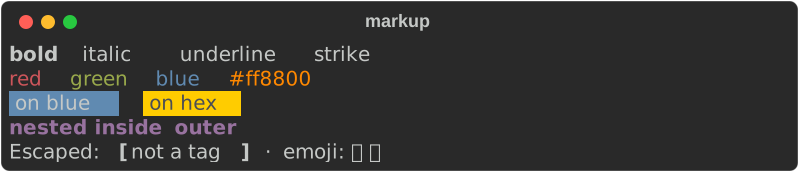
The console adapts to where it is writing
Console::new() inspects the environment once:
| It checks | Because |
|---|---|
| Is stdout a terminal? | If not, styling is dropped — piped output stays clean |
| How wide is it? | Tables and wrapping need a width; defaults to 80 |
| What colour does it support? | Truecolor, 256, or the basic 16 — colours are downgraded to fit |
This is why the following does what you want without any conditionals:
Printing things that are not strings
print_str is for markup. Anything that implements Renderable — a Table, a
Panel, a Markdown document — goes through print:
Escaping
A [ only starts a tag when what follows could be one. To be certain a bracket
is literal, escape it:
There is also rich::markup::escape for text you did not write:
let untrusted = "[bold]from a user[/]";
console.print_str(&rich::markup::escape(untrusted));   // prints the tags literally
Escape anything you did not write
Markup is parsed, so user-supplied text containing [ can change your
formatting — or fail to parse. Escape it.
Next: Markup and style →