3. Tables
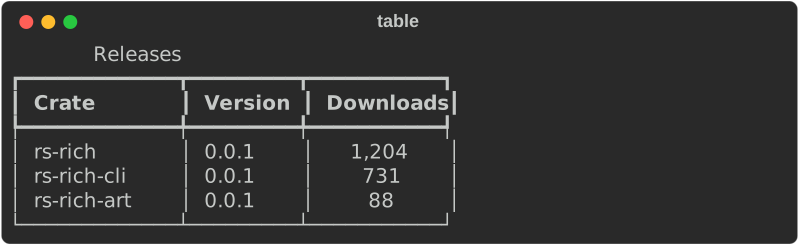
use rich::{Console, Justify, Table};
use rich::r#box::HEAVY_HEAD;

let console = Console::new();

let mut table = Table::new().box_set(HEAVY_HEAD).title("Releases");
table.add_column("Crate");
table.add_column("Version");
table.add_column_justify("Downloads", Justify::Right);

table.add_row(&["rs-rich", "0.0.1", "1,204"]);
table.add_row(&["rs-rich-cli", "0.0.1", "731"]);

console.print(&table);
Sizing
Columns size themselves to their widest cell, then shrink to fit the console if the total is too wide — wrapping cell content rather than truncating it. You can override per column:
table.add_column("Note").column_width(20);     // fixed
table.column_min_width(10);                    // floor
table.column_max_width(40);                    // ceiling; wider content wraps
table.column_no_wrap();                        // never wrap — crop instead
table.column_ratio(2);                         // share of free space when expanded
Styling
use rich::Style;
use rich::r#box::ROUNDED;

let mut table = Table::new()
    .box_set(ROUNDED)
    .border_style(Style::parse("blue").unwrap())
    .title("Test results")
    .caption("10 suites · 0 failures");

table.add_column("Suite");
table.column_style(Style::parse("bold green").unwrap());   // this column's cells
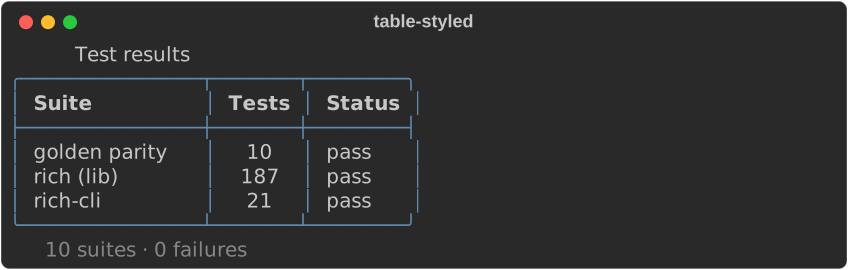
Box styles: ASCII, ASCII2, SQUARE, ROUNDED, HEAVY, HEAVY_HEAD,
DOUBLE, DOUBLE_EDGE, SIMPLE, NONE.
Other knobs
| Method | Effect |
|---|---|
.show_header(false) |
Drop the header row |
.show_lines(true) |
A separator between every row |
.show_edge(false) |
No outer border |
.pad_edge(false) |
Drop the outer padding |
.collapse_padding(true) |
Merge adjacent cell padding |
.expand(true) |
Fill the console width |
Overflow
When content cannot fit, the overflow method decides what happens. It applies to
any Text, not just table cells:
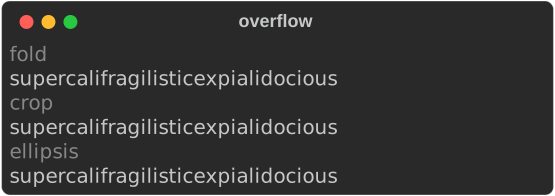
use rich::{Overflow, Text};

Text::new(long).overflow(Overflow::Fold);      // break the word across lines
Text::new(long).overflow(Overflow::Crop);      // cut at the width
Text::new(long).overflow(Overflow::Ellipsis);  // cut, and mark with …
Text::new(long).overflow(Overflow::Ignore);    // do not wrap at all
Fold is the default, matching upstream.
Next: Layout →