2. Markup and style
Tags
A tag names a style. Styles combine, and tags nest:
console.print_str("[bold]bold[/] [italic]italic[/] [underline]underline[/]");
console.print_str("[red]red[/] [white on blue]white on blue[/]");
console.print_str("[bold magenta]outer [italic]and inner[/] again outer[/]");
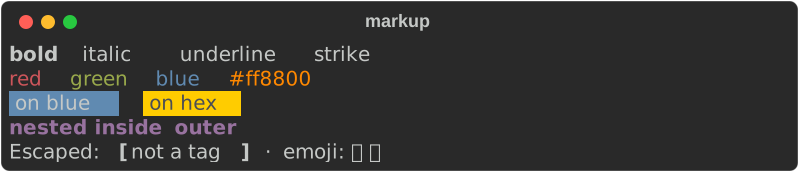
[/] closes the most recent tag; [/bold] closes a named one. Both work, and
abbreviations resolve — [b]…[/bold] matches, because tag names are normalised
before they are compared.
What can go in a tag
| Form | Example |
|---|---|
| Attribute | bold dim italic underline strike reverse |
| Abbreviation | b d i u s r |
| Negation | not bold |
| Named colour | red bright_blue grey37 |
| Hex | #ff8800 |
| RGB | rgb(255,136,0) |
| 8-bit index | color(196) |
| Background | on blue, white on #202020 |
| Hyperlink | link https://example.com |
| Theme name | repr.number, or any name your theme defines |
Combine them freely: [bold not italic #ff8800 on grey15].
Styles as values
Markup is a convenience. The underlying type is Style:
use rich::{Console, Style, Text};

let console = Console::new();
let style = Style::parse("bold underline").unwrap();
console.print(&Text::styled("styled directly", style));
Automatic highlighting
A Console highlights recognisable things without being asked — numbers, paths,
URLs, UUIDs, booleans, None:
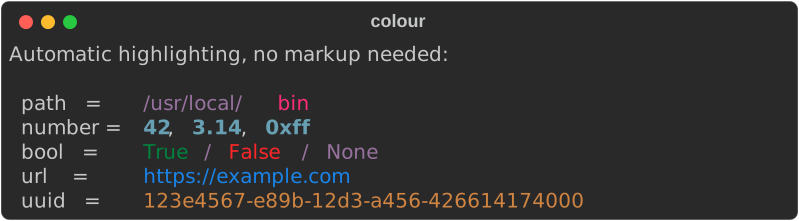
This is on by default, matching upstream. Turn it off when the text is not code-like:
Themes
A theme maps names to styles. Because span styles are resolved when the text is rendered, not when it is created, changing the theme restyles output that was already built:
use rich::{Console, Style, Theme};

let mut theme = Theme::default_theme();
theme.insert("repr.number", Style::parse("bold red").unwrap());

let console = Console::builder().theme(theme).build();
console.print_str("answer = 42");     // 42 is bold red, not the default cyan
The same applies to your own names:
theme.insert("danger", Style::parse("bold white on red").unwrap());
console.print_str("[danger] DANGER [/]");
Unknown tags are not an error
[nope]x[/] renders x with no styling, exactly as upstream does. A
malformed tag — an unmatched [/close] — is still an error.
Next: Tables →