ODS State on Databricks
ods state works with any dbt adapter, because dbt does the building and ODS decides
what needs building. This page shows it on Databricks, using the demo project from
the getting started guide. The screenshots come from the nightly
databricks CI job, which runs these commands against a real Databricks Free Edition
workspace (#294). The workspace hostname is redacted.
Setup
Use your usual profiles.yml with type: databricks. ODS reads nothing from it: it
asks dbt which target it builds in, and keeps state per target
(ADR-0017).
pip install dbt-databricks        # the dbt adapter; ODS itself needs nothing extra
ods state seed                    # load the seeds
ods state build                   # build everything once, and record it
Each run records what it built, from which code and inputs, in .ods/state.db.
A change rebuilds only what it affects
Change one model, customers, and ask what a build would do:
ods state build --dry-run
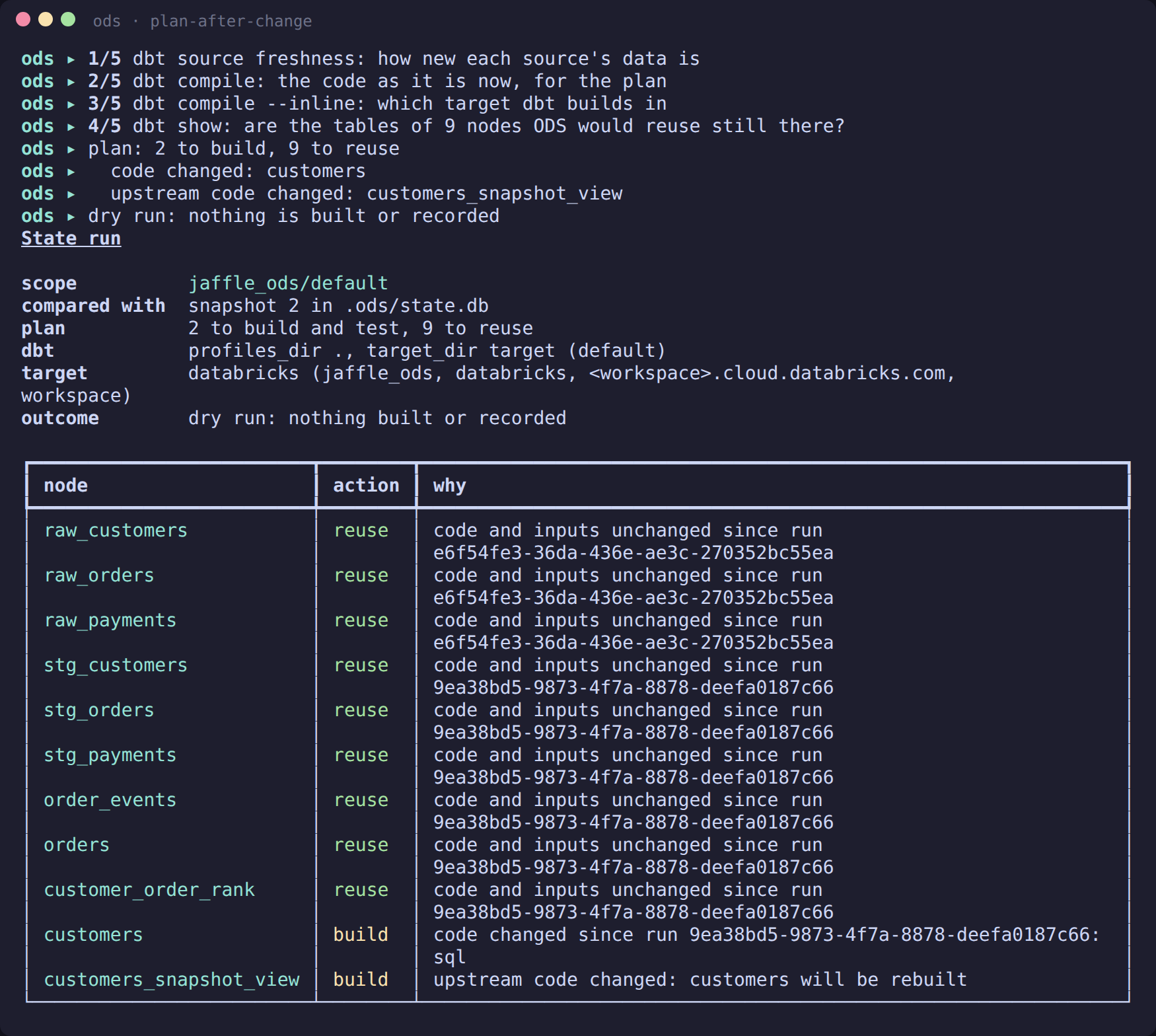
Nine nodes are reused and two are built:
- customers, because its code changed;
- customers_snapshot_view, because it reads customers.
Every decision has a reason. Before reusing anything, ODS checks with dbt show that
the tables it would reuse still exist in the workspace (step 4/5).
Then build:
ods state build
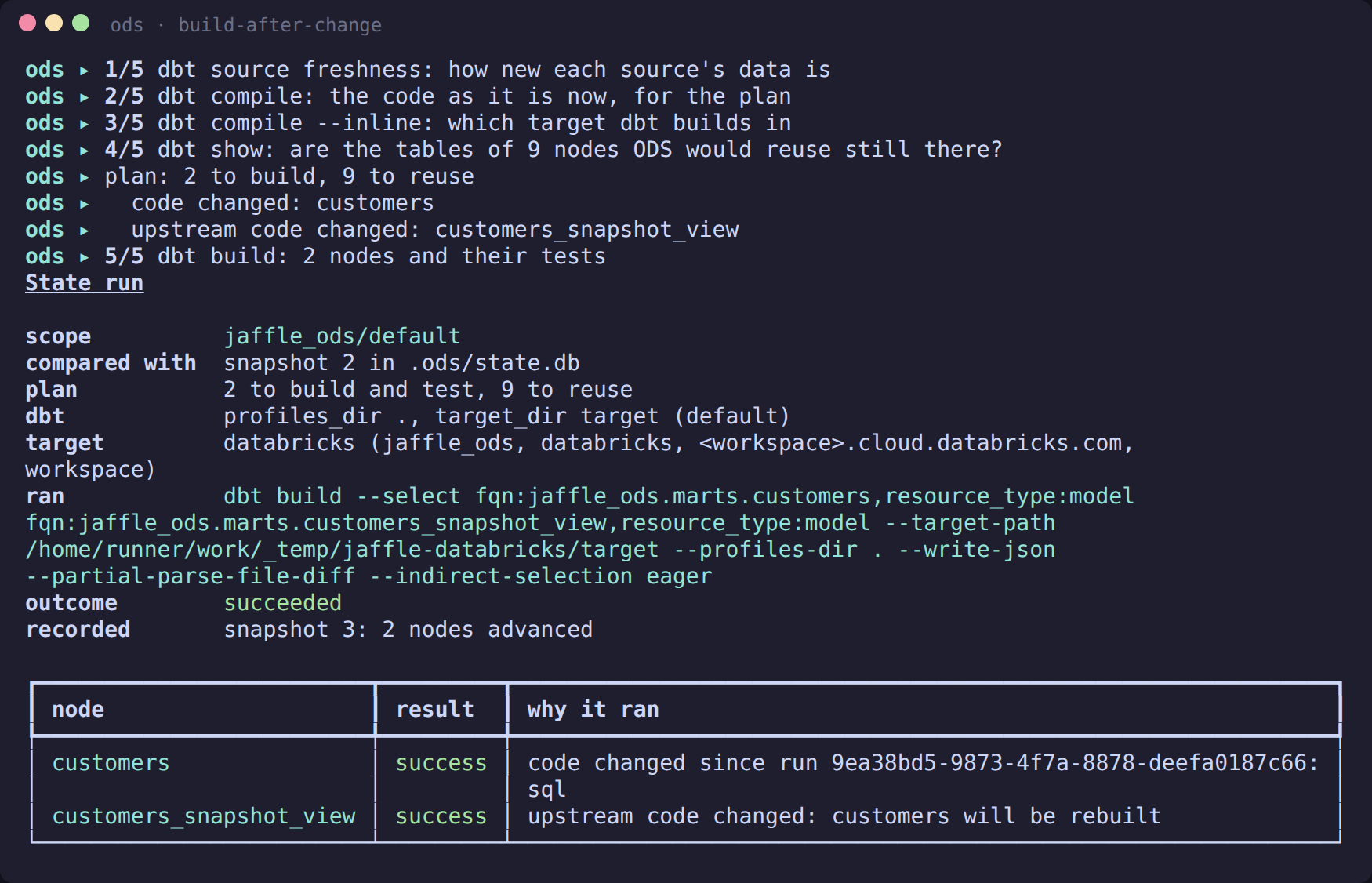
ODS ran dbt build with exactly those two models selected, then recorded the new
state. Nothing else was touched in the warehouse.
History
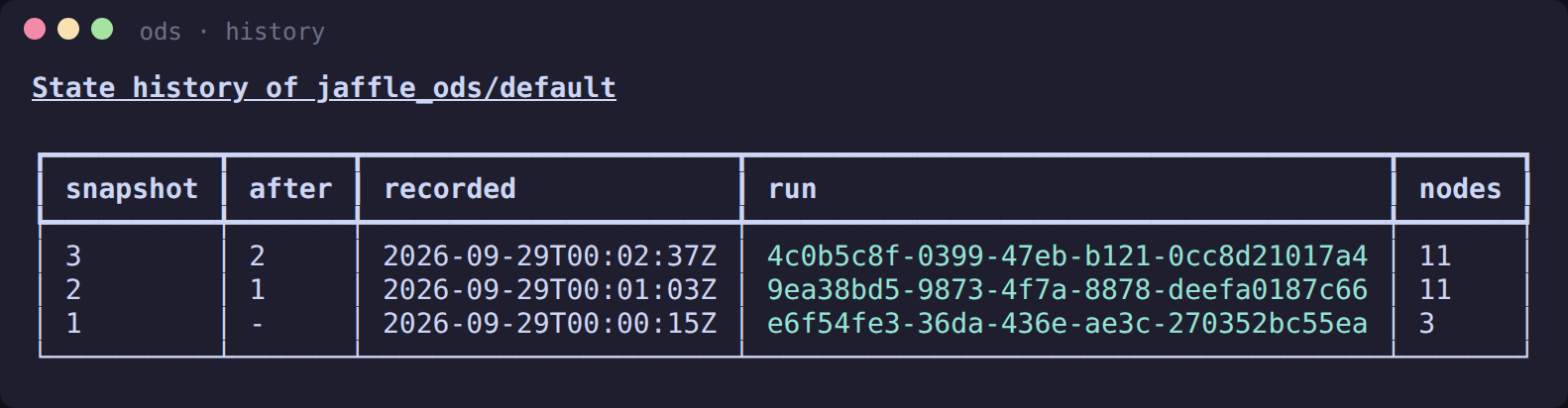
Each run that builds something successfully records a snapshot. A node that fails, or is skipped, keeps its last successful entry. So after a partial run, the nodes that succeeded move on, and the rest stay exactly as they were.
ods state history
Open a model in Catalog Explorer
ods serve's dashboard links each model to its table in Catalog Explorer, the
workspace's UI for Unity Catalog: the model page's header has an Open in Catalog
Explorer ↗ button, and the lineage explorer's side panel and a run's Nodes table have
the same link (#329). ods lineage graph --format json and ods lineage columns --output
json carry it as relation_url.
The link is built from the workspace URL, which ODS reads from ods.toml (or from
DATABRICKS_HOST, which is read first, as in
ADR-0021):
[providers.uc]
kind = "databricks"

[providers.uc.settings]
host = "https://<workspace>.cloud.databricks.com"
A model whose relation is catalog.schema.table links to
https://<workspace>/explore/data/catalog/schema/table?o=<workspace id>, each name
percent-encoded. The host must be https:// (or a bare host name); a trailing / is
dropped, and a path, a query string or a user name is refused.
The workspace id (?o=) picks the workspace when one host serves several. It is the
number after ?o= in your browser's address bar when you are in the workspace. ODS
takes it from workspace_id:
[providers.uc.settings]
host = "https://<workspace>.cloud.databricks.com"
workspace_id = "1234567890123456"
Without workspace_id, it is read from a host that contains it: Azure's
adb-<workspace id>.<n>.azuredatabricks.net and GCP's
<workspace id>.<n>.gcp.databricks.com. AWS hosts (dbc-….cloud.databricks.com)
don't contain it, so their links have no ?o= unless you set workspace_id. ODS
refuses a workspace_id rather than guess, and the page says why, when it:
- isn't a number;
- differs from the id in an Azure or GCP host;
- differs between two Databricks providers that share a host or use DATABRICKS_HOST. Neither setting is a
secret, and no token is ever put in a link. Nothing is fetched to build it.
The link is where the manifest says the table is. It isn't proof that the table
exists: it may not have been built yet, or may have been dropped. When there is no link,
the page says why instead of guessing one: no host configured, a host or
workspace_id that can't be used, a relation named with only two parts (the catalog would be a guess), or a name
that isn't well formed (whitespace inside an unquoted name, text after a closing
backtick, or a name that is . or ..), which is never repaired.
Next steps
ods state explain <node>: why a node was built or reused. See the CLI reference.ods state retry --failed: after a failure, rebuild only what failed.ods state history --run <run_id>: one run's per-node stats (result, time taken, rows, thread, redacted error) from its run journal. The screenshots above predate the per-node stats; the CLI reference shows them.ods state export: a dbt state thatdbt retry --defer-stateand--defer --favor-statecan trust (ADR-0020, more).- Coming next: direct Databricks sign-in for Unity Catalog metadata (ADR-0021).
- Contributors: Testing against Databricks covers how the CI job and these screenshots are made.