Getting started
Experimental
These steps work on the project's demo and on small dbt projects, but ODS is pre-alpha. Expect rough edges, and please open an issue when something breaks.
1. Install
Install next to dbt with pip:
pip install opendatasuite
ods version
Homebrew (brew install buchochelliq-labs/tap/ods), cargo-binstall and direct
downloads with checksums are on the Install page. To build from source instead, use Rust 1.90 or newer
(rustup.rs):
cargo install --locked --git https://github.com/buchochelliq-labs/open-data-suite ods-cli
ods --version
The binary is called ods. CI builds and tests it on Linux, macOS and Windows.
2. Compile your dbt project
ODS reads the artifacts dbt writes. Lineage, ERDs and the MCP server only read them;
the ods state commands of step 6 run dbt for you, and reach the warehouse only
through dbt's own connection.
cd my-dbt-project
dbt compile            # writes target/manifest.json, with compiled SQL
dbt docs generate      # optional: column types, and columns of sources and seeds
ODS reads dbt 1.7 to 1.12 (manifest.json v11 and v12) and dbt v2 (its
manifest.json, or the Parquet "Information Schema").
No dbt project handy?
Clone the repository and use the demo project's artifacts:
--target-dir fixtures/dbt/jaffle-ods/artifacts/dbt-1.10.
3. Explore the lineage
ods lineage view --open                      # an offline HTML explorer
ods lineage columns --model customers        # where each column of a model comes from
4. Check what a change affects
ods lineage impact --column stg_orders.status
ods lineage impact --column orders.amount=removed
ods lineage impact --base ../prod/target     # compare two builds
5. See keys and relationships
ods erd generate                  # Mermaid erDiagram on stdout
ods erd generate --format dot | dot -Tsvg > erd.svg
6. Build only what changed
ods state runs dbt on only the models whose code or upstream data changed since the
last successful run, and keeps that state in .ods/state.db in the project. Check the
setup first, then run it where you'd run dbt build:
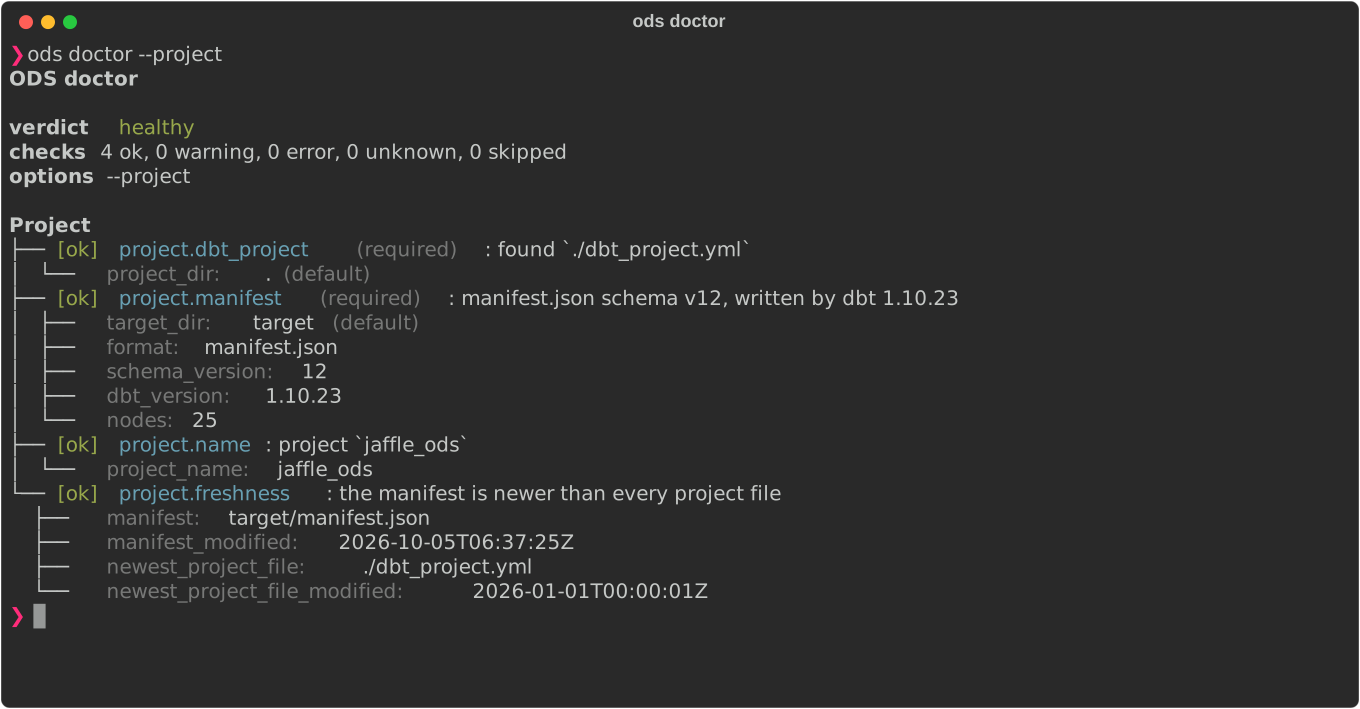
ods doctor                     # configuration, project, dbt, target and state store
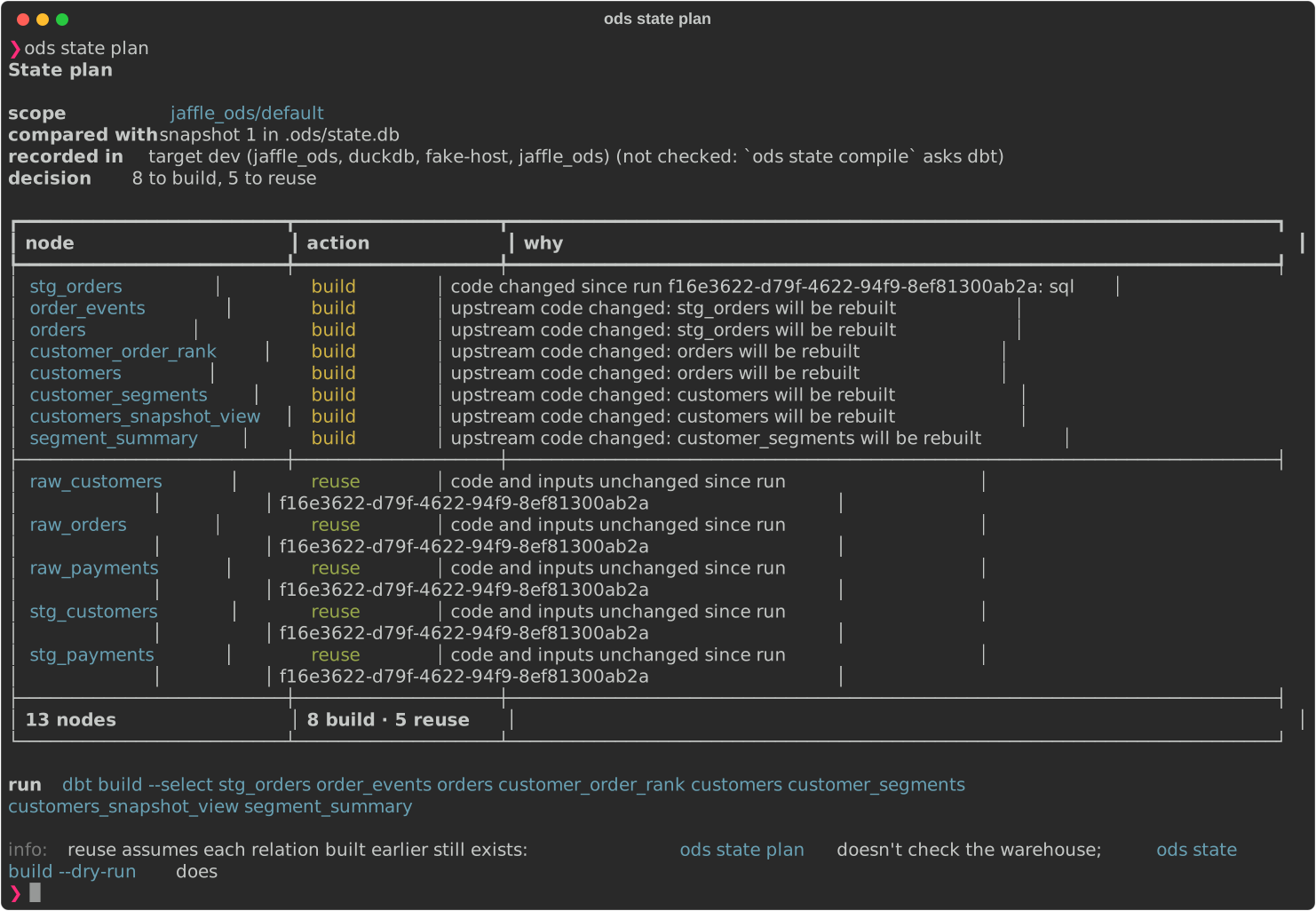
ods state plan                 # what would build, what would be reused, and why
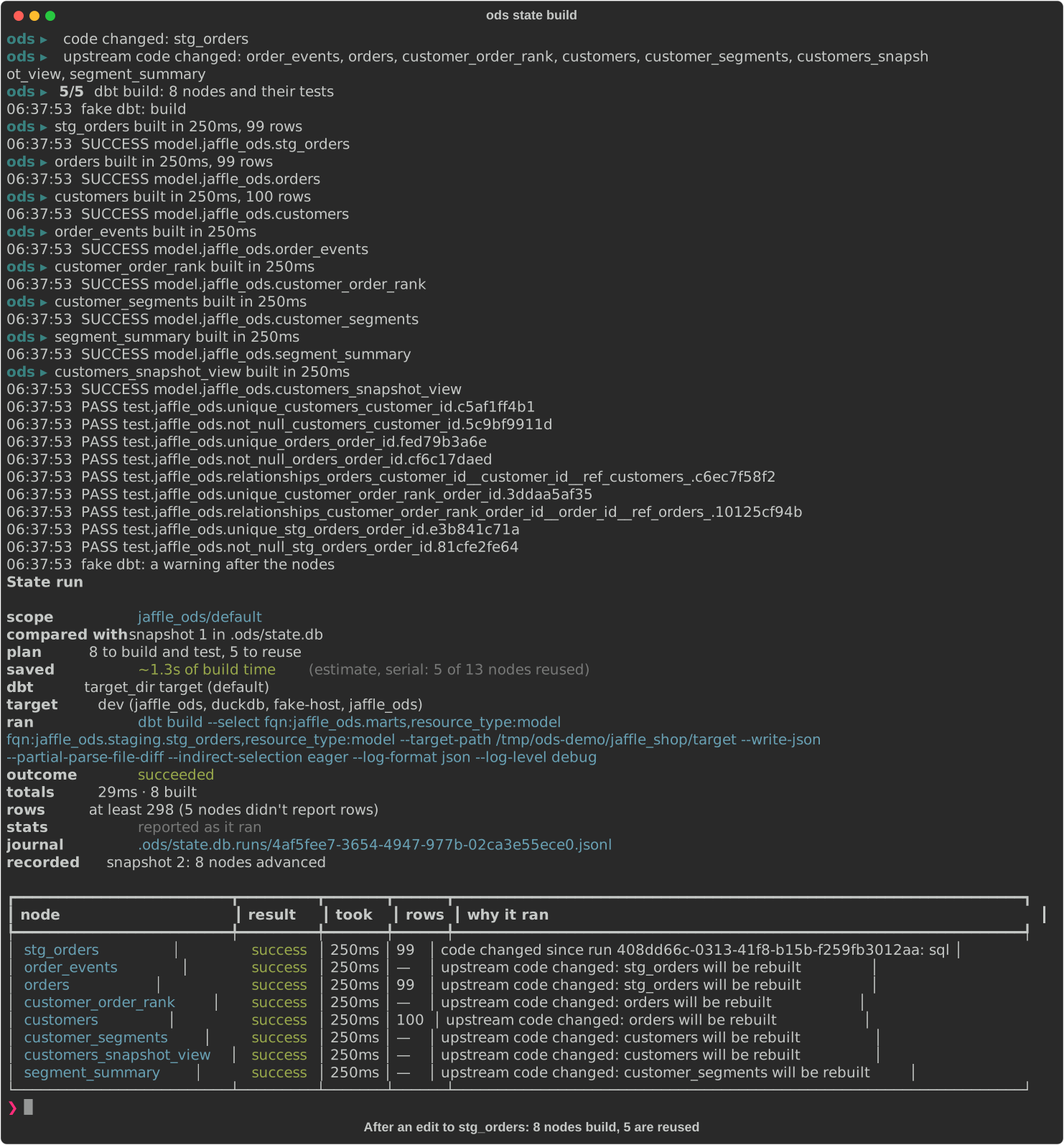
ods state build                # dbt build, on only what needs it; records the run
The first run builds everything. After you edit a model, the plan builds it and what reads it, and reuses the rest:
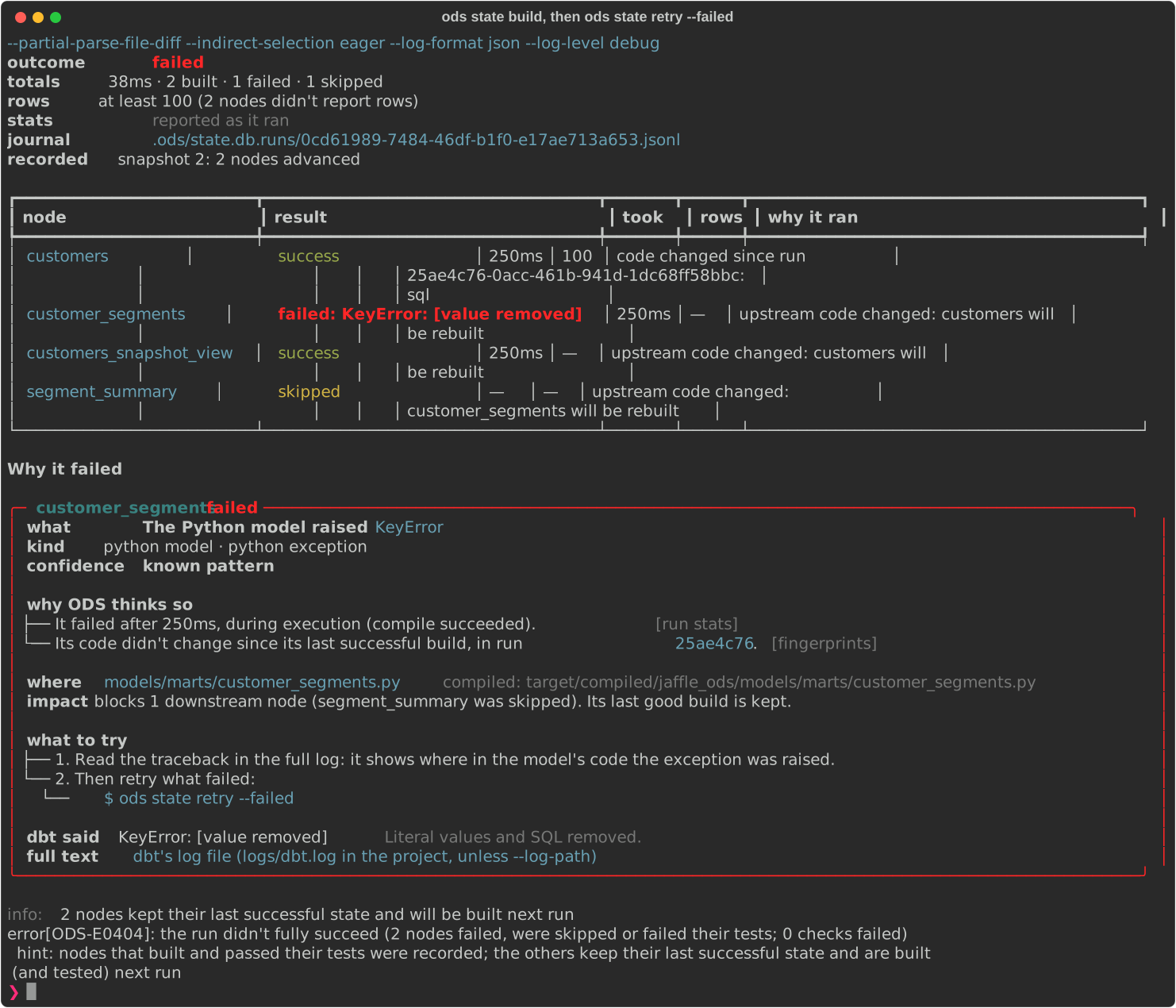
ods state build shows dbt's progress and each node's result as it finishes, then a
report: what it ran, the run's totals (rows read "at least N" when the adapter didn't
report them for every node) and, per node, its result, time taken, rows and why it ran.
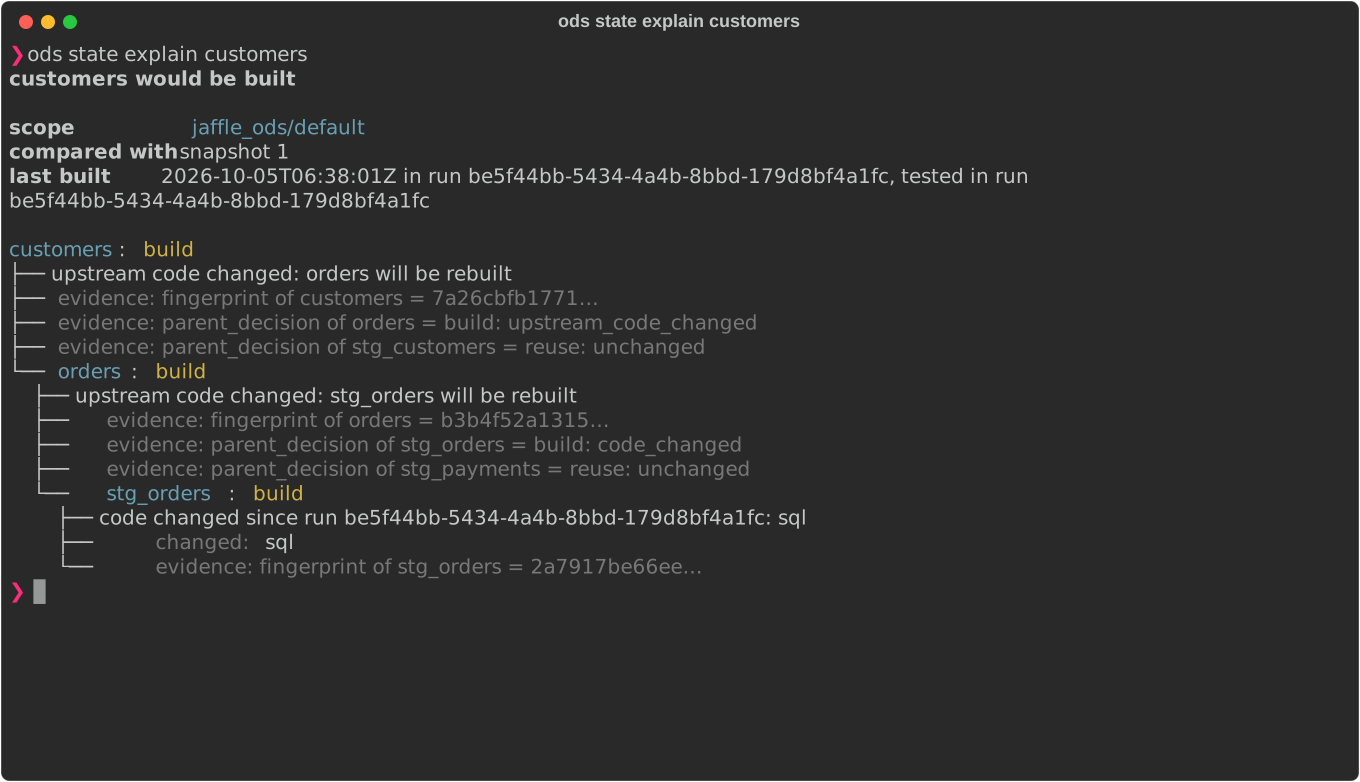
Then ask why, or look back:
ods state explain customers        # why it builds, traced upstream to the root cause
ods state history                  # every recorded run, with its time and rows
ods state history --run <run_id>   # one run's per-node stats, from its journal
ods state retry --failed           # after a failure: build only what failed or was skipped
A failed node keeps its last good build, and its error is shown with quoted values and SQL removed; the nodes that succeeded are recorded:
ods state run, seed, snapshot, test and compile work the same way, each named
after the dbt command it runs. The CLI reference has every option.

7. Open the dashboard
ods serve # http://127.0.0.1:8765/
ods serve is read-only and listens on loopback. It shows Home, the Catalog and model
pages, Lineage with the State overlay, the Plan with its Why panel, and every run with
each node's stats (more).
8. Give an AI agent the same answers
claude mcp add ods -- ods mcp --target-dir target
Any MCP client works. See the MCP server.
Output for scripts
Every command prints readable text by default. Add --json for a stable,
machine-readable envelope, or --output plain for line-oriented output. Exit codes
are documented in the CLI reference.
Next steps
- Column-level lineage, with a live demo.
- State on Databricks, with source table versions.
- CLI reference, which covers every command and flag.
- Roadmap, for what's coming and when.