rs-rich
Python's rich, ported to Rust and
held to it byte for byte: rich text, colour, tables, Markdown and progress
bars in the terminal, with the rich-cli
tool. On top of it: charts and diagrams, pickers and forms, intuiTUIve (a
reactive framework for terminal apps), a terminal recorder, and images in
the terminal.
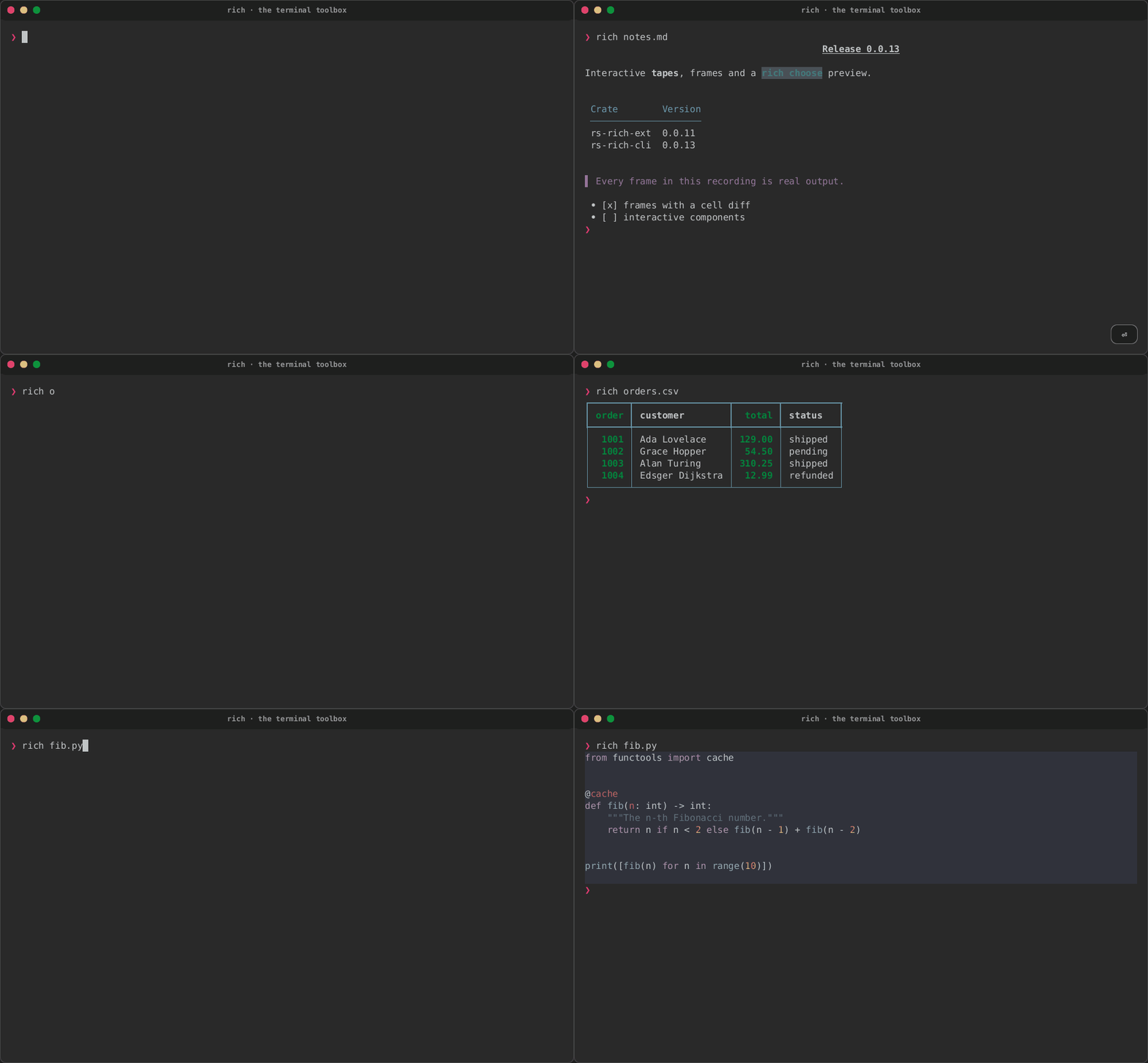
Play the terminal recordings · Browse the gallery · Start with the CLI · Learn the library · Read the full guide
For Rust applications: cargo add rs-rich. Read Getting started
for a complete library example.

intuiTUIve: full terminal apps, built on rs-rich. Describe the screen once as a tree of nodes and keep your state in signals; when a signal changes, only the cells that changed are redrawn. It has a section of its own on this site, with a tutorial, a page per topic and a widget index.
New in 0.0.24
 0.0.24, published on 2026-11-03 (release notes),
brings Cornacai, catches intuiTUIve up with Textual and opens Noctiluca to
scripts and coding agents.
- Cornacai (new): a terminal client for coding agents over the Agent Client Protocol, with edits reviewed hunk by hunk.
- intuiTUIve: a Markdown viewer and a diff view, Textual's themes, user keymaps, palette providers, modes, screenshots and more of Textual's stylesheet language.
- Noctiluca: a control socket for scripts and
agents, the mouse, video to 30 fps, a full-pixel view,
--sshand--transparent. - Also:
inspectfor Rust values, animated banners, AVIF (opt in), edition 2024, a threat model and a security policy, and the docs on Zensical.
Earlier releases are under Releases in the navigation; the roadmap says what comes next.
Which version are these docs for?
The version menu in the header picks the docs of a release. A release is
named by rs-rich-cli's version, and its docs match the crates of that
release: the other crates' versions are in that release's
version table. A release's docs keep the fixes
made to them after it shipped, until main moves on to the next release's
crates. dev (main) documents what
is on main and not released yet. The site's root and /latest/ show the
newest release, and every other version says so in a banner with a link to
it. The site keeps the newest releases that fit GitHub Pages' 1 GB, up to
six; older releases' docs stay in the repository, under docs/ at their
rs-rich-cli-vX.Y.Z tags.
What it does
-
Console markup
[bold red]text[/]— nested tags, themes, emoji shortcodes, and automatic highlighting of numbers, paths, URLs and booleans. -
Layout
Tables, panels, trees, columns, rules, alignment and padding, all of which measure and wrap correctly against terminal cell widths.
-
Documents
Markdown, JSON and syntax-highlighted source, rendered to the terminal.
-
Live output
Progress bars, spinners and status displays that refresh in place.
-
The
richcommandRender files from the shell, plus tools:
inspectstructured data,difftext and patches,view,hex,unicode,env,captureanddoctor;chart,dot,mermaid,depsandschemato draw data and structure;choose,input,pagerandexplorefor scripts. See the CLI guide. -
Charts
Sparklines, bars, histograms, Braille line and scatter charts, gauges, heatmaps, status matrices, KPI cards and timelines, each with an ASCII form and a reading that does not depend on colour. See Charts.
-
Diagrams
Graphs drawn with box-drawing characters through one layered layout, from code, Mermaid flowcharts or DOT (Graphviz) sources; Cargo dependency graphs and JSON Schemas. See Diagrams and Dependency graphs and JSON Schemas.
-
Interactive components
Fuzzy pickers, input, forms, pagers and explorers, composable into your own views. See Interactive.
-
Terminal apps
intuiTUIve: signals, a retained tree, layout, focus, tables, trees, a command line, sprites and pixel buffers, tested headless and served to a browser. See Terminal apps.
-
Terminal recordings
rich recordruns a tape in a real terminal and writes screenshots, a cast, a GIF, an animated PNG and an MP4, images and held keys included. See Terminal recordings. -
Micro assets
Emoji-sized inline images written
:micro:name:, drawn with Kitty, iTerm2 or Sixel graphics, with a text fallback everywhere else. See Micro assets. -
Python
rs_rich, Rich's API over the Rust core, with the port's extensions, charts and diagrams. See the Python documentation. -
Rust ergonomics
Diagnostics and stack traces, checked-markup macros,
claphelp,tracingandloghandlers, and serde-driven structured data, inrs-rich-ext. -
Workflow renderables
Command steps, task trees, transfers, countdowns, badges, size bars and formatters for build and deploy tools. See Workflows.
-
Art
FIGlet banners, images and GIFs as ASCII, Braille, blocks, quadrants or Sixel, with dithering and alpha backgrounds. See Art.
-
Accessibility and capabilities
Detect what the terminal supports, degrade to a fidelity level, render decoration-free text for screen readers and check theme contrast. See Capabilities and Accessibility.
Byte-parity with Python rich
Golden fixtures compare covered output against Python rich 15.0.0 in CI.
Coverage and known differences are documented in Module status
and Divergences; not every implemented feature is byte-identical.
That promise is why the honest bits matter:
Early releases with independent crate versions
The API takes breaking changes regularly, and the port is deliberately
incomplete. What is implemented is parity-tested; what isn't is listed
plainly in Module status, and what deliberately differs is in
Divergences — most notably syntax highlighting, which uses
syntect rather than Pygments and is therefore not byte-identical.
Released crates
Each crate's newest version is on its crates.io page, linked below (the
docs load nothing from other sites, so they show no live badges). The
packages carry an rs- prefix because rich was taken on crates.io; the
library targets keep the short names, so you write use rich::Console.
| crate | newest version | docs | what it is | |
|---|---|---|---|---|
 |
rs-rich |
on crates.io | docs.rs | the library — use rich::… |
 |
rs-rich-cli |
on crates.io | — | the rich command |
 |
rs-rich-ext |
on crates.io | docs.rs | extensions + plugin registry |
 |
rs-rich-macros |
on crates.io | docs.rs | checked markup and derive macros, used through rs-rich-ext |
 |
rs-rich-art |
on crates.io | docs.rs | FIGlet text, image→ASCII, GIFs |
 |
rs-rich-plugin-api |
on crates.io | docs.rs | the plugin contract |
 |
rs-rich-mermaid |
on crates.io | docs.rs | Mermaid flowcharts as text |
 |
rs-rich-lumis |
on crates.io | docs.rs | the lumis (tree-sitter) highlighter |
 |
rs-rich-record |
on crates.io | docs.rs | scripted terminal recordings |
 |
rs-rich-interact |
on crates.io | docs.rs | interactive components |
 |
rs-rich-micro |
on crates.io | docs.rs | micro assets |
 |
rs-rich-diagram |
on crates.io | docs.rs | graph diagrams and DOT (new in 0.0.15; published with the cohort) |
 |
rs-rich-data |
on crates.io | docs.rs | tabular data: row sources, inference and statistics (new in 0.0.16) |
 |
rs-rich-ratatui |
on crates.io | docs.rs | ratatui interop: rich renderables as ratatui widgets (new in 0.0.17) |
 |
rs-rich-intuituive |
on crates.io | docs.rs | intuiTUIve: a reactive, retained TUI framework (new in 0.0.17) |
 |
rs-rich-web |
on crates.io | docs.rs | serving intuiTUIve apps and terminal programs to a browser (new in 0.0.18) |
 |
rs-rich-embed |
on crates.io | docs.rs | a terminal pane and a web view for intuiTUIve apps (new in 0.0.18) |
Versions these docs describe
The crates' versions in the source these docs were built from: a release's
docs list that release's crates, and dev (main)'s the versions on main,
published or not. Each crate versions independently; see
Branching and releases.
| Package | Manifest version |
|---|---|
rs-rich |
0.0.14 |
rs-rich-plugin-api |
0.0.8 |
rs-rich-macros |
0.0.8 |
rs-rich-ext |
0.0.21 |
rs-rich-cli |
0.0.24 |
rs-rich-art |
0.0.17 |
rs-rich-mermaid |
0.0.10 |
rs-rich-lumis |
0.0.8 |
rs-rich-record |
0.0.12 |
rs-rich-interact |
0.0.12 |
rs-rich-micro |
0.0.10 |
rs-rich-diagram |
0.0.7 |
rs-rich-data |
0.0.8 |
rs-rich-ratatui |
0.0.9 |
rs-rich-intuituive |
0.0.9 |
rs-rich-web |
0.0.7 |
rs-rich-embed |
0.0.7 |
rs-rich-marketplace |
0.0.3 |
rs-rich-acp |
0.0.1 |
noctiluca |
0.0.3 |
cornacai |
0.0.1 |
Where next
| Section | What it is |
|---|---|
 Getting started |
Install, check it worked, and a first program |
 Tutorial |
From a line of text to a live progress display |
 Guide |
Every crate, with examples CI compiles |
| intuiTUIve |
The framework for full terminal apps, built on rs-rich |
 Noctiluca |
A web browser for the terminal, built on intuiTUIve |
 Gallery |
What each renderable looks like |
 Terminal recordings |
Tapes of the CLI and the apps, played in the page |
 CLI and art videos |
The CLI and the art crate, on video |
 Using the CLI |
The rich command, task by task |
 CLI reference |
Every command and flag |
 Python |
rs_rich, Rich's API over the Rust core |
 Workflow recipes |
The CLI in scripts and CI |
 Comparing images |
Perceptual image diffs |
 Troubleshooting |
When the output is not what you expected |
 Known issues |
What is known not to work yet |
 Development plans |
What each release sets out to do |
 Releases |
What each release shipped |
 Parity with Python rich |
What matches upstream, and how it is proven |
 Contributing |
Branches, architecture and design notes |