 Tabular data (rs-rich-data)
rs-rich-data (rich_data, new in 0.0.16) turns a file, a stream of records
or a query result into a table without hand-written glue. It is an rs-rich
addition, not a port: Python's rich reads no data files. It builds on
rs-rich-ext's public API and never touches the core.
This page is the map: what each part does, the smallest code for it, and
where the detail lives. The schema views have their own page,
and the developer views page collects merge
conflicts, records, Cargo reports and schema diffs. From Python, the same
API is rs_rich.data.
[dependencies]
rs-rich = "*"
rs-rich-ext = "*"
rs-rich-data = "*"                                     # adapters, inference, stats, profiles
# rs-rich-data = { version = "*", features = ["arrow", "er"] }
| Part | Module | What it gives you |
|---|---|---|
| Row sources | RowSource, Rows, csv, jsonl, serialize, arrow |
Column names, an optional schema and rows of Values, from CSV, TSV, JSON Lines, serde or Arrow |
| Inference | infer |
Each column's type, with the evidence, on request |
| Statistics | stats |
Count, nulls, distinct, min, max, mean, median, quantiles, top values |
| Conditional styles | rich_ext::table::rules |
Style a cell, row or column by value |
| Profiles | profile |
A bounded, sampled profile of every column, with distributions and a missing-value map |
| Quality reports | quality |
Check results (pass, warn, fail, error) drawn as a report |
| Large tables | window, sql |
Virtualised windows over any number of rows, and SQL-shaped result sets |
The crate's README summarises the same, with its features and limits.
The examples on this page come from
guide_tabular.rs,
which reads a small service export (SERVICES) and a month of orders
(ORDERS) as CSV text, and use these imports:
use rich::{Console, Style};
use rich_data::Rows;
use rich_data::csv::CsvReader;
use rich_data::infer::Inferrer;
use rich_data::profile::{Profile, ProfileOptions};
use rich_data::quality::{self, CheckResult, QualityReport, Status};
use rich_data::stats::{Stats, StatsOptions};
use rich_ext::table::{Comparison, StyleRule, StyleRules, Target};
Row sources and adapters
A RowSource yields column names, an optional Schema (rich_ext's
format-neutral model) and rows of
rich_ext::table::Value (Null, Int, Float, Str, Text), one at a
time, so a renderer or a profile can stop early or hold one window of a long
input. collect_rows() reads the rest into Rows, which holds them in
memory and becomes a TableData (to_table_data()) to
sort, group and total.
| Adapter | Reads | Notes |
|---|---|---|
csv::CsvReader |
CSV and TSV | The port of Python's csv sniffer and reader that rich --csv uses: the delimiter and header are sniffed unless set. read(text) reads it whole; source(reader) streams any BufRead. |
jsonl |
JSON Lines | One object per line; columns are the keys in the order first seen (from the first 1,000 records), nested values their JSON text. |
serialize |
any serde::Serialize rows |
Structs and maps become columns. |
arrow (arrow feature) |
Arrow RecordBatches |
Rows, a streaming BatchSource, and Arrow schemas in the model. |
fn read(console: &Console) -> Result {
    let rows = CsvReader::new().read(SERVICES)?;
    assert_eq!(rows.columns()[..3], ["service", "region", "p99"]);
    console.print(&rows.to_table_data());
    Ok(())
}
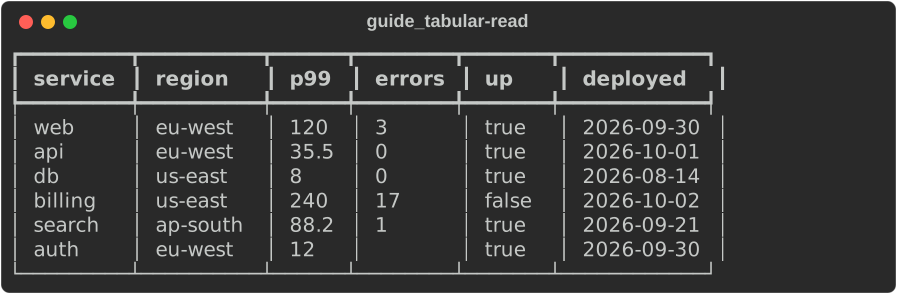
Every cell a CSV adapter reads is text: rich --csv keeps rich-cli 1.8.1's
behaviour, and types come only from inference, when asked.
A streamed record longer than 64 MiB is refused, and every adapter describes
nested values to 32 levels.
Type inference
infer::Inferrer reads every cell of each column and picks integer, float,
boolean, date, timestamp, null or text, keeping the evidence: how many cells
parsed as each type. Null tokens ("", null, NULL, NA, N/A by
default; null_tokens(…) replaces them) count as nulls, and
override_type(column, type) fixes a column's type. The Inference renders
as a table of column, type, parsed values and nulls; apply(&mut rows)
converts integer and float columns and attaches the schema, so tables align
numbers right.
fn infer(console: &Console) -> Result {
    let mut rows = CsvReader::new().read(SERVICES)?;
    let inference = Inferrer::new().infer(&rows);
    assert_eq!(inference.columns()[2].data_type().to_string(), "float");
    assert_eq!(inference.columns()[2].summary(), "float: 6 of 6 values");
    console.print(&inference);
    // Numbers become numbers, so the table aligns them right.
    inference.apply(&mut rows);
    console.print(&rows.to_table_data());
    Ok(())
}
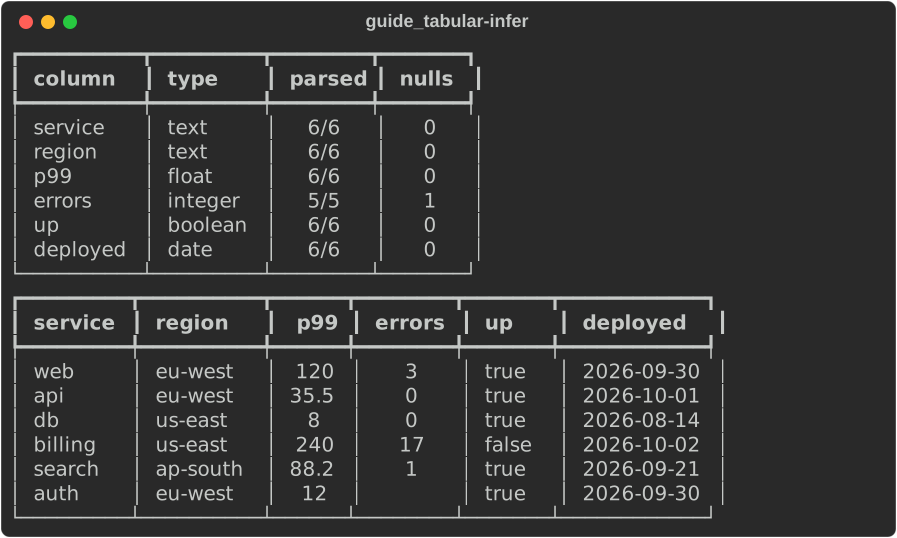
A column where one cell does not parse stays text, and its summary says how
close it came (text: 12 of 13 values parse as float).
Column statistics
stats::Stats::of(&rows) gives each column its count, nulls, distinct
values, min and max, and for numeric columns the mean, median and quantiles
(the quartiles by default), plus the most common values. It renders as a
table; headers() gives one summary line per column for a table heading.
StatsOptions sets the quantiles and how many top values to keep.
fn stats(console: &Console) -> Result {
    let rows = services()?;
    let options = StatsOptions {
        quantiles: vec![0.9],
        top: 1,
    };
    console.print(&Stats::with_options(&rows, &options));
    Ok(())
}
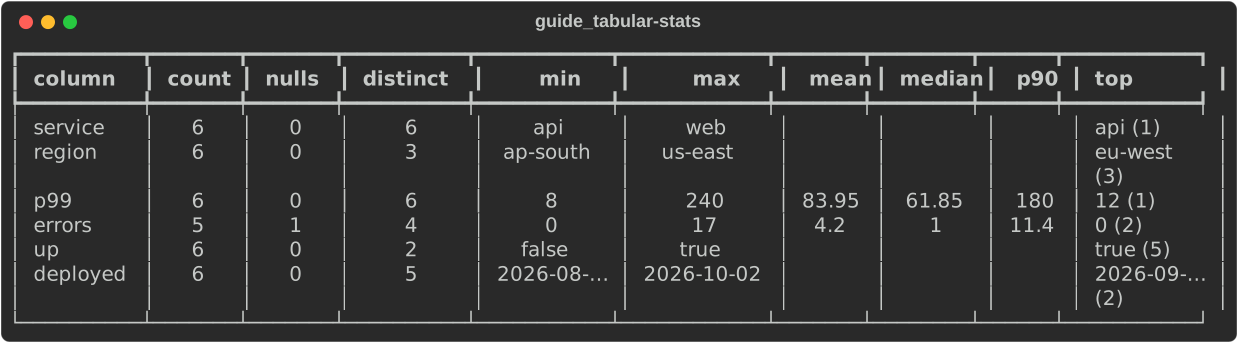
Text columns have a count, distinct values, a min and a max (in text order) and top values; the mean, median and quantiles are left empty.
Conditional styles
rich_ext::table::rules styles a cell, a row or a column by value. A
StyleRule names a column (a header or an index), a condition and a style;
the condition is a Comparison against a value (eq, ne, lt, le,
gt, ge, contains, starts_with, ends_with, empty, not_empty) or
a Rust predicate. There is no expression language. target(Target::Row) or
Target::Column styles the row, or the whole column when any cell matches,
instead of the cell. Where several rules match, their styles combine in
order. Rules restyle; they never change the text.
fn rules(console: &Console) -> Result {
    let rows = services()?;
    let rules = StyleRules::new()
        .rule(StyleRule::new(
            "p99",
            Comparison::Gt,
            100,
            Style::parse("bold red")?,
        ))
        .rule(StyleRule::new(
            "errors",
            Comparison::Eq,
            0,
            Style::parse("green")?,
        ))
        .rule(
            StyleRule::when("up", |v| v.plain() == "false", Style::parse("reverse")?)
                .target(Target::Row),
        );
    console.print(&rows.to_table_data().style_rules(rules));
    Ok(())
}
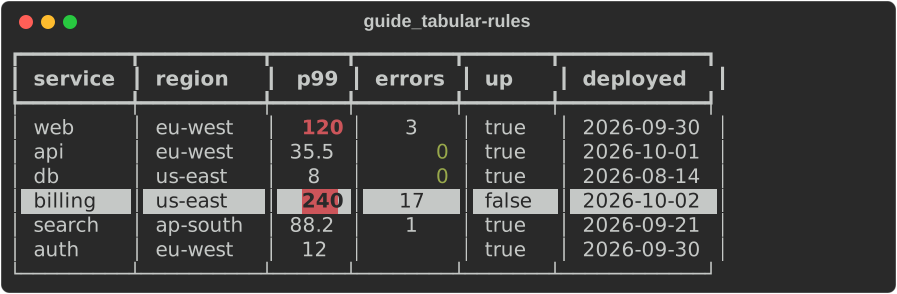
Comparisons with a number compare numerically (a cell that is text parsing as
a number counts), and a cell that is neither never matches an ordering. With
ext's toml feature, StyleRules::from_toml reads the same rules from rule
tables:
[[rules]]
column = "status"     # a header, or a 0-based index
op = "eq"             # or ==, !=, <, <=, >, >=, contains, starts_with, …
value = "failed"
style = "bold red"
target = "row"        # cell (default), row or column
Any other renderer resolves rules once with StyleRules::resolve(headers,
rows) and asks the result for each row's and cell's style.
A rule also reads from one line of text (0.0.19), as rich --style-rule
takes it: StyleRule::parse("latency>500:bold red"), or with a target,
"status=failed:row:on red". The comparison is a symbol (== or =, !=,
<, <=, >, >=, *= contains, ^= starts with, $= ends with) or a
word after a space (note empty); a value in double quotes is always text
and may hold a :, and #2 names a column by index. to_spec() writes a
rule back. The same rules style rich_ext::data::TableView's records
(style_rules), a profile's table of columns (Profile::style_rules, by
its headings), the CLI's --csv, rich profile and rich inspect --table
tables, and, from Python, rs_rich.ext.table.StyleRule and StyleRules.
Profiles
A profile says what each column of any row source holds: its inferred type,
null count and rate, distinct values, min, max, mean, median and quartiles,
and a distribution (a histogram for a numeric column, the most common values
for any other), with a missing-value map of where the nulls are. It renders
as a heading, a table of the columns, each distribution and the map, and
serialises to JSON (to_json()), which is rich profile --report json.
fn profile(console: &Console) -> Result {
    // Any `BufRead` streams: a file through `BufReader`, here a string.
    let source = CsvReader::new().source(ORDERS.as_bytes())?;
    let options = ProfileOptions {
        sample: 10_000,
        top: 3,
        bins: 6,
        columns: Some(vec!["email".into(), "total".into(), "status".into()]),
        ..Default::default()
    };
    let profile = Profile::from_source(source, options)?.with_name("orders.csv");
    console.print(&profile);
    Ok(())
}
For a file, pass std::io::BufReader::new(std::fs::File::open("orders.csv")?)
to source: it is streamed, not read whole.
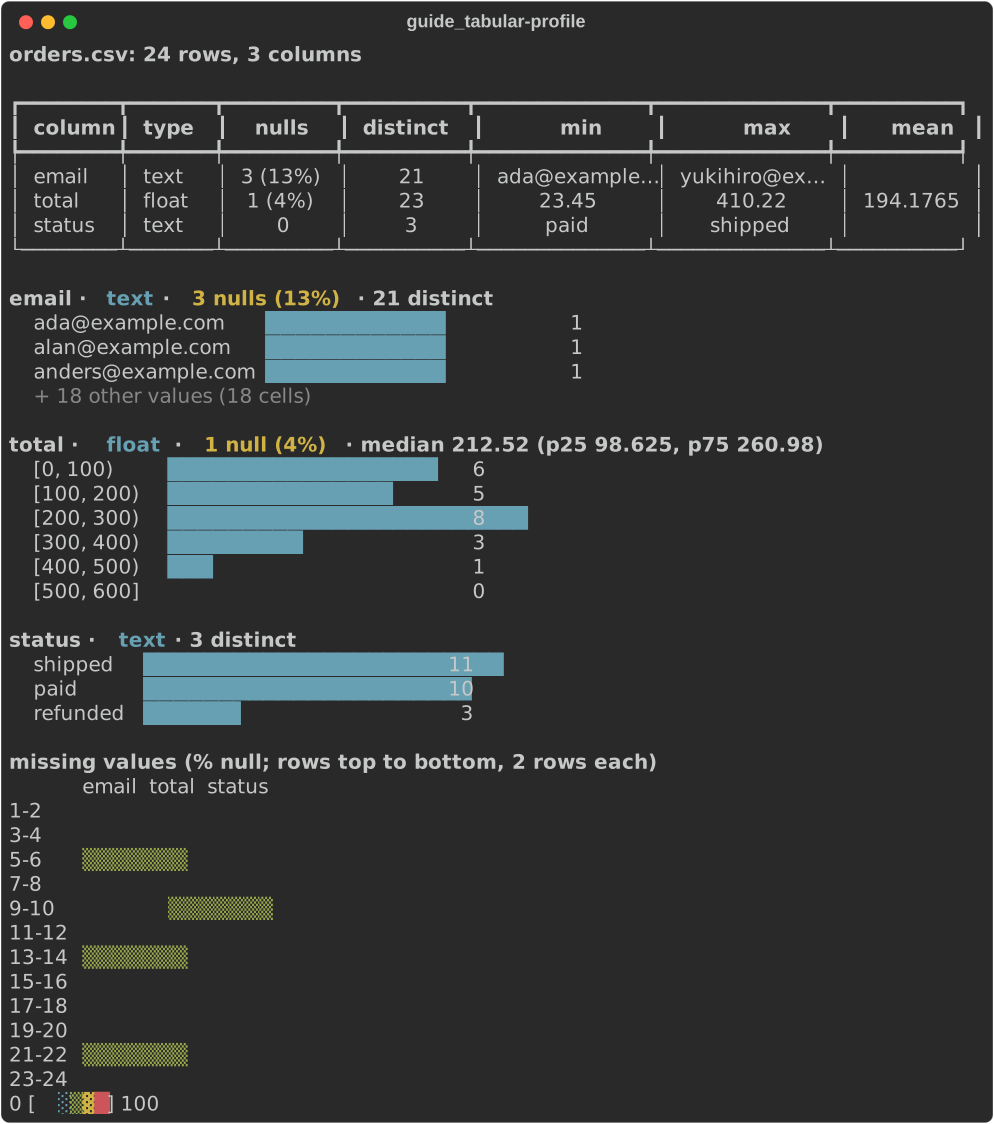
Profiles are bounded: a Profiler keeps a fixed-seed reservoir sample of at
most sample rows (10,000 by default), so the same input always gives the
same profile. Types, statistics and distributions describe the sample; the
row count, null counts and the missing-value map count every row. columns
profiles only the columns named, top and bins size the distributions,
and nulls replaces the null tokens. The
README
has the details, and rich profile
draws one from the command line.
JSON records have more shape than rows, so Profile::from_json_lines(reader,
options) (or a JsonProfiler fed serde_json::Values) profiles them path
by path (0.0.19): user.plan for a key in an object, tags[] for an
array's items, items[].sku for a key of the objects in one, and
["http.status"] for a key that holds a . (profile::path_key writes
one). Each path counts the records that lack it (absent) apart from an
explicit null, and the JSON types its values had (TypeCounts: string,
number, boolean, object, array, null), so a field that is sometimes a number
and sometimes a string is mixed rather than one inferred type. The walk is
bounded by options.depth (4 steps) and options.max_paths (200, the rest
named in a note and Profile::paths()), each path keeps a sample of its
values, and a line that is not JSON is counted (Profile::malformed())
rather than fatal. The model and its JSON gain present, absent, values,
types and mixed per path and paths, malformed and malformed_lines
overall, leaving every key of a flat profile as it was.
use rich_data::profile::{Profile, ProfileOptions};

let text = "{\"id\": 1, \"user\": {\"plan\": \"pro\"}}\n{\"id\": \"2\", \"user\": null}\n";
let profile = Profile::from_json_lines(text.as_bytes(), ProfileOptions::default())?;
let plan = profile.column("user.plan").unwrap();
assert_eq!((plan.present, plan.absent), (Some(1), Some(1)));
assert_eq!(profile.column("id").unwrap().types.unwrap().mix(), "num 50% · str 50%");
Data quality reports
quality is a model, not an engine: a CheckResult holds a check's name,
its column, a status (Pass, Warn, Fail or Error), what it observed
and expected, a message and a sample of the failing rows. Results from any
tool (they are serde types) become a QualityReport, drawn the way
rich_ext's test report draws a test run: failures, errors and warnings
first with their failing rows, then a table of every check and a summary
(3 passed, 1 warned, 2 failed). Status is a word as well as a colour.
quality::not_null and quality::unique are two small checks over Rows.
fn quality(console: &Console) -> Result {
    let rows = CsvReader::new().read(ORDERS)?;
    let report = QualityReport::new([
        quality::not_null(&rows, "email")?,
        quality::unique(&rows, "id")?,
        quality::not_null(&rows, "status")?,
        CheckResult::new("row_count", Status::Warn)
            .observed(rows.len().to_string())
            .expected(">= 100")
            .message("fewer orders than a usual month"),
    ]);
    console.print(&report);
    Ok(())
}
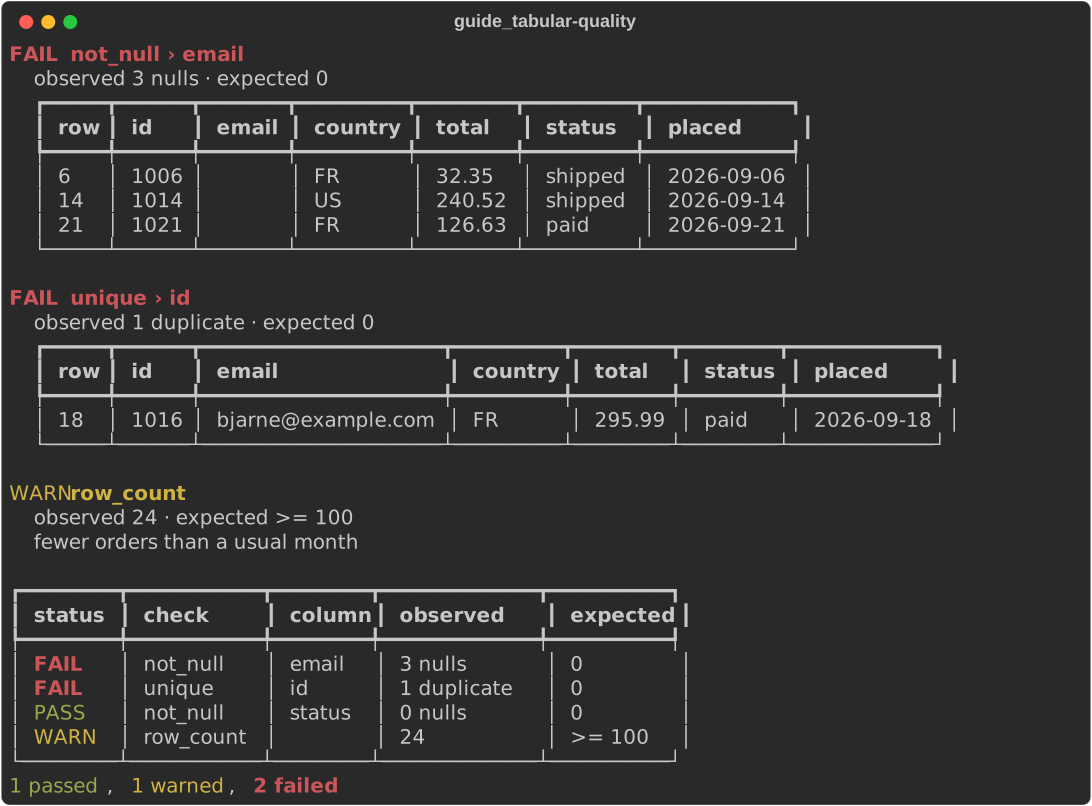
Profiles and reports draw with theme keys: profile::STYLES (profile.title,
profile.column, profile.type, profile.note, profile.null,
profile.mixed) and
quality::STYLES (quality.pass, quality.warn, quality.fail,
quality.error, quality.check, quality.dim).
Large tables and SQL result sets
Both are described in full on the tables page:
- Virtualised tables:
rich_ext'sVirtualTablerenders only the rowsoffset..offset + heightof a source, with column widths from a sample and a position line (rows 1,001–1,040 of 1,000,000).Rowsis a source, andwindow::RowWindowreads one window of any forward-only source (a CSV or JSON Lines reader) in constant memory. - SQL result sets:
sql::ResultSetshows a query result the way a database shell does, with typed alignment from the schema,NULLmarked apart from empty text, and a(3 rows, 12ms)footer. No database connection: rows come from an adapter or from you.
From Python
Everything on this page is in rs_rich.data:
read_csv, read_tsv, read_jsonl, read_file, Rows, infer, Stats,
Profile (from rows, text or a path), CheckResult and QualityReport,
ResultSet and VirtualTable, each printable with Console.print.