Accessibility
How an app reaches assistive technology: the terminal's cursor on the focus, a text mode without boxes or colour, roles, names and states in an accessibility tree, announcements, and a linear mode that writes the app as lines of text. Testing with screen readers says how to check it with Orca, NVDA and VoiceOver.
There are two modes for assistive technology:
App::accessible(true)draws the screen as text, with the cursor on the focus. It is on by default whenINTUITUIVE_ACCESSIBLEis set (to anything but0orlinear), or when rs-rich'sRICH_A11Ynamesscreen-reader.-
App::linear(true)draws no screen: it writes lines of text (see Linear mode). It is on by default whenINTUITUIVE_ACCESSIBLE=linear. -
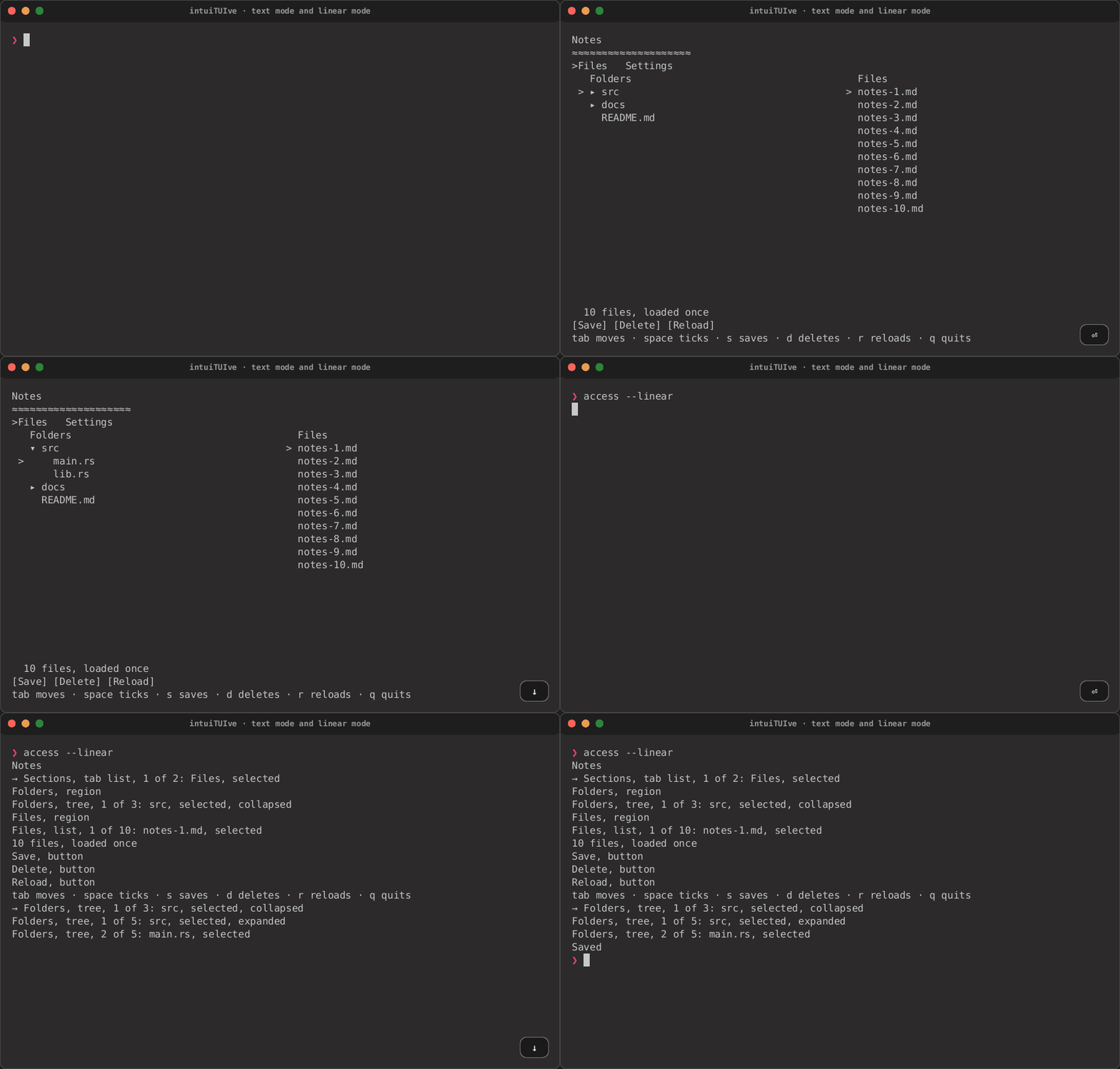
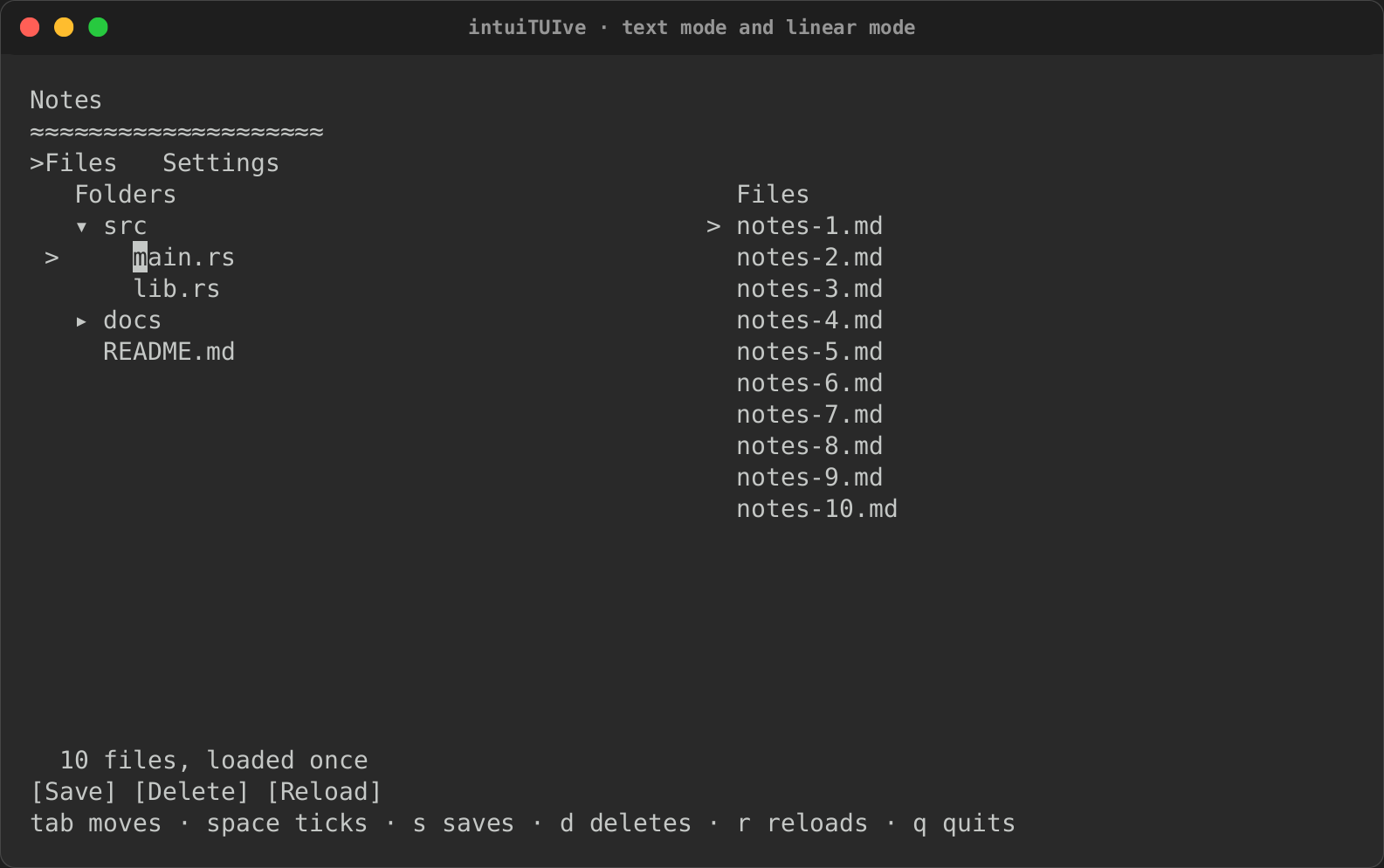
The cursor is on what has the focus. The terminal's real cursor sits on the focused item: an input's caret, a list's or table's selected row, a table's cell, a tree's item, the selected tab, the menu entry, the calendar's day. NVDA, VoiceOver and Orca read the line the cursor is on, so they follow the app with no bridge. The cursor is hidden while a frame is written, so a screen reader does not read the cells it passes. It is shown again once it is back on the focus. A frame that changes nothing on the screen does not move it.
- Text mode:
- Boxes are drawn as blanks (titles stay), so no line characters are read out.
- There is no colour, so no meaning rests on it.
- The selected item in a list, table, tree or tab strip is marked with
>. - Menu separators and a split's divider are blank.
- Animations jump to their end.
- Roles and names. Every node has a role (
Widget::role, set by every built-in:list,table,tree,tablist,menu,regionfor a panel,buttonfor a clickable label or abutton,textboxfor anInputor aTextArea,checkbox,switch,radiogroup,sliderandcomboboxfor the form controls, …) and a name:.label("Save"), else the text it shows, else a panel's title..role(Role::MenuBar)sets a role in code. A node named by the text it shows (a live row, a button) speaks for what is inside it, so its children are not listed again. A chart (or any renderable with rich-ext'sAccessibleText) drawn withdescribed(move || ..)instead ofrenderable(..)is named by what it shows in words (Line chart, 2 series, x from 0 to 23, …; see accessible text), after its.label(..)if it has one.Driver::accessibility()returns the tree: depth, role, name, what is selected in it, focus, states and place. rs-rich-web's DOM renderer carries it to a browser's screen reader; a screen reader bridge could render it too. -
States. Each node in the tree has an
AccessState:expanded,checked,selected,busy, andposition, the selected item's place (3 of 10). In a widget of items, the states are those of its selected item.Widget States it sets list,table,virtual_list,tabs, menus, the menu barselected,positiontree,tree_withthe same, and expandedfor an item with childrentree_lazythe same, and busywhile a level loadscalendarselectedtext_areanone: its value is the caret's line checkbox,switch_togglecheckedradiocheckedandpositionfor the chosen option, its valueselect_fieldexpandedwhile its menu is open,position, its valuecollapsible's headerexpandedslidernone: its value is its number .loading_when(..)busyCode sets them with
.selected_when(…),.expanded_when(…),.checked_when(…)(which makes the rolecheckboxunless one is set; useRole::Switchfor a toggle),.busy_when(…)and.error_when(…)(invalid; see Errors), each taking a condition that may read signals.Widget::access_stateis the hook for a widget of your own.AccessNode::aria_attributes()maps them to ARIA (aria-expanded,aria-checked,aria-selected,aria-busy,aria-disabled,aria-invalid, a slider'saria-valuenow,aria-posinset,aria-setsize) for a browser.Widget::access_valuegives a widget of your own a value its cells do not say. - Hidden from assistive technology..access_hidden(true)(ARIA'saria-hidden) leaves a node, and everything inside it, out of the tree, linear mode's lines, announcements and the names of what holds it, and out of the Tab order and the focus a screen gives when it opens (a click still reaches it). It is still drawn. Use it for decoration: a divider, a spinner's glyph, a logo. - Announcements. Toasts, a screen or dialog opening,.live()nodes whose text changes (a status line), andcx.announce(text, urgent)go to the app'sApp::announcer(…)as they happen, and wait inDriver::take_announcements()for a loop that reads them (the DOM renderer puts them in an ARIA live region).
App::new(|| {
    column([
        text!("{done} of {total} done").live(),
        list(move || tasks.get(), selected).label("Tasks"),
    ])
})
.announcer(|a: &Announcement| eprintln!("say: {}", a.text))
Linear mode
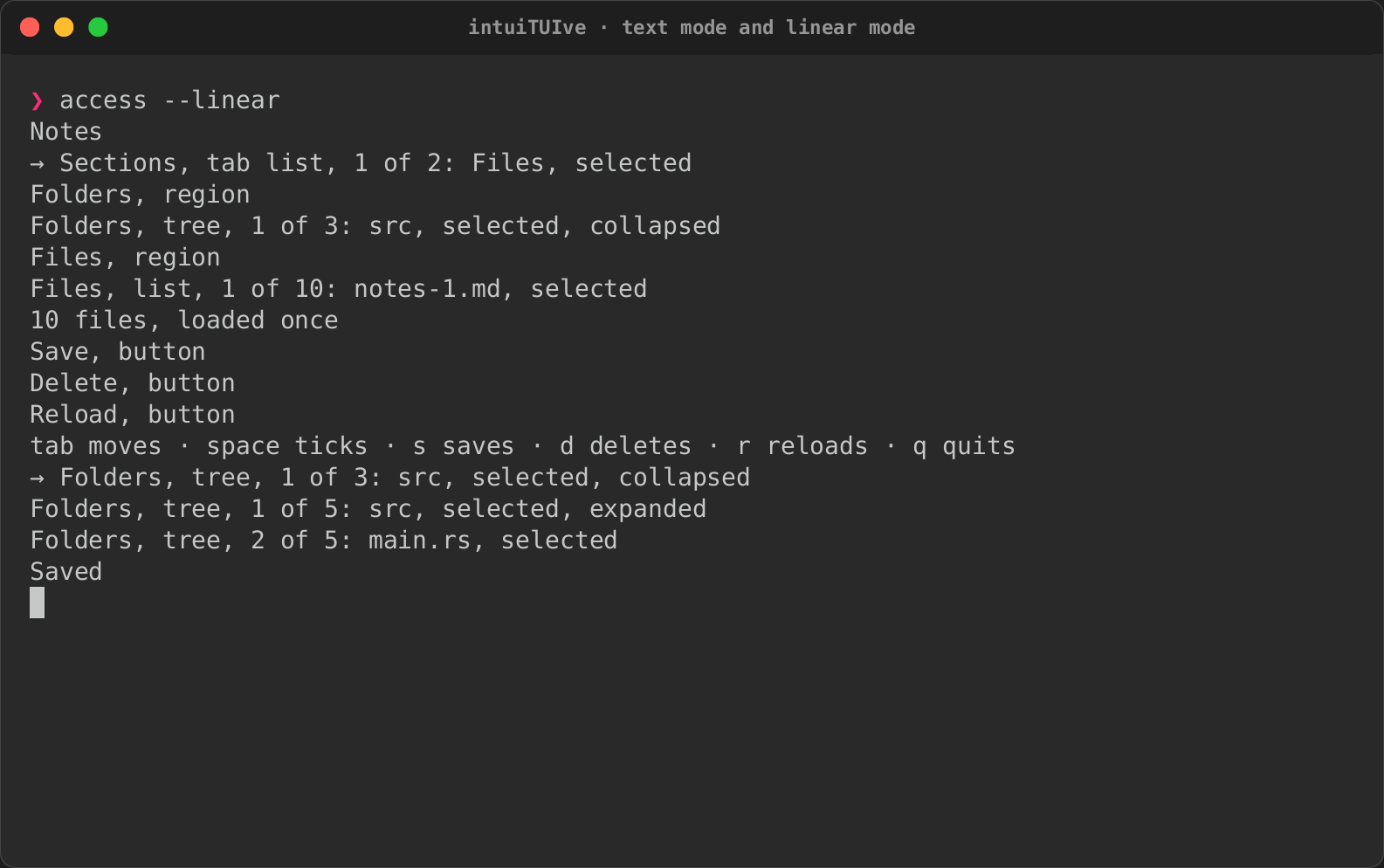
In linear mode the app draws no screen. It writes the accessibility tree as plain lines of text, in reading order: no cursor addressing, no alternate screen, no mouse, no colour and no synchronized output. After each event it writes only the lines of the nodes that changed, like a transcript, and a screen reader reads new output as it arrives. Keys work as usual.
- Each line is
AccessNode::describe(): the name, the role (left out for text and a status), the selected item's place, the value after a colon, then the states. - The focus moving is written as
→and the focused node's line. - Toasts and
cx.announce(…)are written as their text. A live node's change and a dialog opening are written as their lines only. - Closing a dialog writes only what changed on the screen below, and where the focus is.
Here is the access example
(cargo run -p rs-rich-intuituive --example access -- --linear), with the
keys pressed in brackets, shortened (the whole run is pinned by a test in
tests/linear.rs):
[start]
Notes
→ Sections, tab list, 1 of 2: Files, selected
Folders, region
Folders, tree, 1 of 3: src, selected, collapsed
Files, region
Files, list, 1 of 10: notes-1.md, selected
10 files, loaded once
Save, button
Delete, button
Reload, button
tab moves · space ticks · s saves · d deletes · r reloads · q quits
[tab]
→ Folders, tree, 1 of 3: src, selected, collapsed
[right]
Folders, tree, 1 of 5: src, selected, expanded
[down]
Folders, tree, 2 of 5: main.rs, selected
[s]
Saved
[right on the tab strip]
Sections, tab list, 2 of 2: Settings, selected
Settings, region
Wrap lines, check box, checked
Dark theme, switch, not checked
[space on Wrap lines]
Wrap lines, check box, not checked
[d]
Delete, dialog
Delete notes-1.md? y / n
[n]
→ Wrap lines, check box, not checked
Driver::render() returns the lines in linear mode (each ends with
\r\n, as the terminal is in raw mode), so a test or a bridge can read
them.
The same example recorded in text mode (--accessible), then in linear
mode:
| Text mode | Linear mode |
|---|---|
 |
 |
Reduced motion
a11y::motion_allowed() (0.0.24) is whether animations may move:
RICH_ANIMATION when set (0 or 1), else not when RICH_A11Y names
reduced-motion, no-animation or screen-reader, or NO_COLOR is set.
The animated banner honours it and holds
its still frame; a widget of your own can ask it too.
a11y::set_motion(Some(on)) overrides it for the process.