Schemas
Schemas draw, compare and evolve the same way whatever format they come
from. Every schema view in rs-rich reads one format-neutral model,
rich_ext::schema::Schema; readers map JSON Schema, SQL DDL and Arrow into
it, and the views (a tree, a diff, a timeline and an ER diagram) read only
the model. This page is the map; the details, with full outputs, are in the
schema sections of the sources page.
| Want | Use | Detail |
|---|---|---|
| Read a JSON Schema | schema::json::to_model, or SchemaTree::new directly |
JSON Schema |
| Read SQL DDL | schema::sql::parse |
SQL DDL |
| Read an Arrow schema | rich_data::arrow::schema (arrow feature) |
Arrow schemas |
| Draw it as a tree | SchemaTree |
JSON Schema, The schema model |
| See what changed | SchemaDiff::new (JSON Schema), SchemaDiff::models (anything) |
What changed, Comparing any two schemas |
| See how it evolved | SchemaTimeline |
Schema evolution |
| Draw tables and keys | rich_data::er (er feature) |
ER diagrams |
The schema views are in rs-rich-ext behind its data feature; Arrow and
ER diagrams are in rs-rich-data behind its arrow and er features. The
rich schema command draws them from the command line (see the
CLI guide).
The examples on this page come from
guide_schemas.rs
and use these imports:
use rich::Console;
use rich_data::er;
use rich_ext::schema::{
    Constraint, DataType, Field, Schema, SchemaDiff, SchemaTimeline, SchemaTree, sql,
};
The model
A Schema is a list of Fields, optionally named and described, and, for
a SQL file, further named tables, each a Schema of its columns. A Field
has:
- a model type (
DataType):integer,float,decimal(10,2),string,boolean,date,timestamp[UTC],binary,list<…>,struct,map<…, …>,anyorunknown; - the source's own type name as written (
VARCHAR(255),Int32,string | null), which the tree shows and diffs compare; - whether it may be null and whether a value must be present;
- constraints (
Constraint): enum values, bounds, length, pattern, format, a default, primary and unique keys, and aForeignKeytotable.column; - a description and metadata.
A key across several columns is the table's own constraint
(Schema::primary_key, Schema::foreign_keys). rich_data's row sources
carry the same model, and infer::Inference::schema builds one from rows,
so a CSV file's inferred columns draw like any other schema.
fn model(console: &Console) -> Result {
    let users = Schema::new([
        Field::new("id", DataType::Integer).required(true),
        Field::new("email", DataType::String)
            .with_native_type("VARCHAR(320)")
            .with_constraint(Constraint::Format("email".into())),
        Field::new("joined", DataType::Date).with_description("First sign-in."),
    ])
    .named("users");
    console.print(&SchemaTree::from_model(users));
    Ok(())
}

The tree shows the source's type name where there is one (VARCHAR(320))
and the model type otherwise (integer, date).
Readers
- JSON Schema.
schema::json::to_modelkeeps JSON Schema's structure (pattern-named properties, tuple items,oneOfbranches,$refs) with each child'sFieldKind.SchemaTree::newandSchemaDiff::newread a JSON Schema directly, following$refs, and draw byte for byte what they drew before the model existed. - SQL DDL.
schema::sql::parsereads aCREATE TABLEsubset: types,NOT NULL,DEFAULT,PRIMARY KEY,UNIQUE,REFERENCES,CONSTRAINT,ENUMandCOMMENT. What it skips (CHECK, indexes, other statements) comes back as notes with their lines; what it cannot read is an error with its line. Input is bounded (16 MiB, 100,000 statements). - Arrow.
rich_data::arrow::schemamaps nested structs, lists, maps, dictionaries, timestamps with unit and zone, decimals, nullability and metadata.
Views
The views below read two versions of a shop's DDL, V1 and V2:
The DDL
const V1: &str = "
-- The shop, version 1.
CREATE TABLE customers (
    id      BIGINT PRIMARY KEY,
    email   VARCHAR(255) NOT NULL UNIQUE,
    name    TEXT
);

CREATE TABLE orders (
    id          BIGINT PRIMARY KEY,
    customer_id BIGINT NOT NULL REFERENCES customers (id),
    status      VARCHAR(16) DEFAULT 'new',
    total       NUMERIC(10, 2) CHECK (total >= 0)
);
";

const V2: &str = "
CREATE TABLE customers (
    id      BIGINT PRIMARY KEY,
    email   VARCHAR(320) NOT NULL UNIQUE,
    name    TEXT NOT NULL
);

CREATE TABLE orders (
    id          BIGINT PRIMARY KEY,
    customer_id BIGINT NOT NULL REFERENCES customers (id),
    status      VARCHAR(16) DEFAULT 'pending',
    total       NUMERIC(12, 2),
    placed_at   TIMESTAMP WITH TIME ZONE
);

CREATE TABLE order_lines (
    order_id BIGINT REFERENCES orders (id),
    line     INT,
    sku      TEXT NOT NULL,
    PRIMARY KEY (order_id, line)
);
";
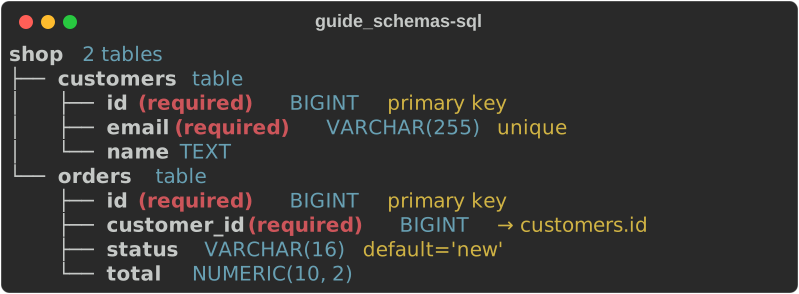
SchemaTree draws each field with its type, (required), its
constraints and the first line of its description; a schema with tables
draws each table under the root. The reader's notes say what it skipped.
fn sql_tree(console: &Console) -> Result {
    let parsed = sql::parse(V1)?;
    for note in &parsed.notes {
        eprintln!("{note}"); // line 13: orders.total: CHECK constraint skipped
    }
    console.print(&SchemaTree::from_model(parsed.schema).title("shop"));
    Ok(())
}
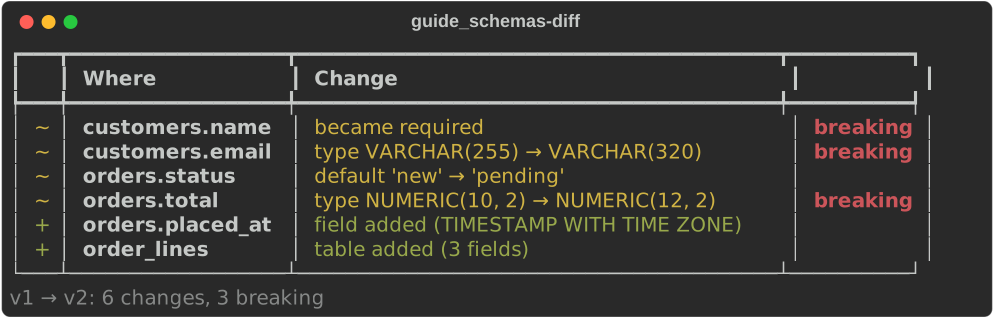
SchemaDiff lists fields added (+), removed (-) and changed
(~): type changes, required, enum values, constraints and keys, marking
breaking where data the old schema accepted may now be refused. The
rule is the same for every format.
fn diff(console: &Console) -> Result {
    let v1 = sql::parse(V1)?.schema;
    let v2 = sql::parse(V2)?.schema;
    console.print(&SchemaDiff::models(&v1, &v2).names("v1", "v2"));
    Ok(())
}
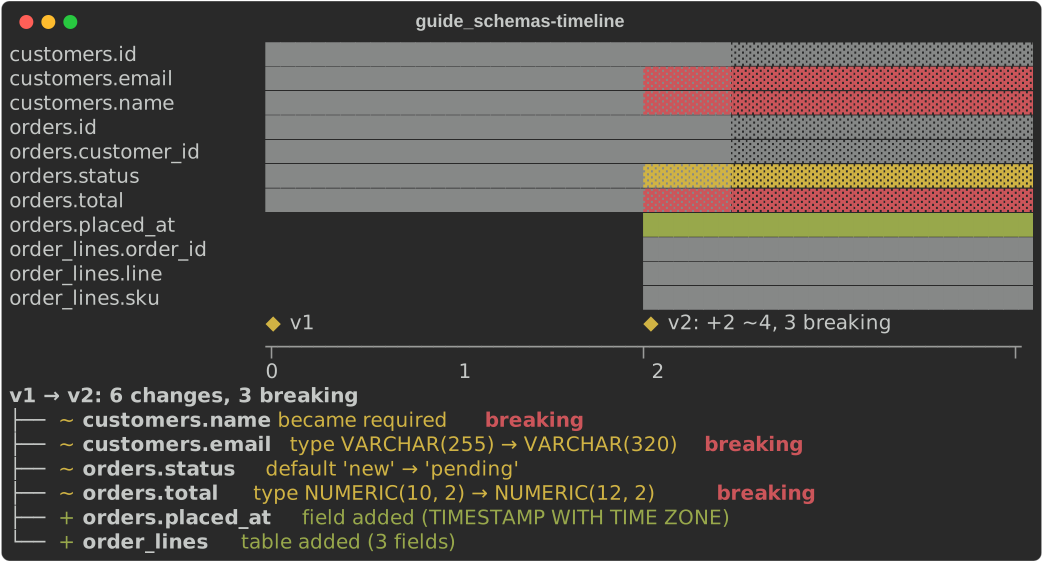
SchemaTimeline lays a series of versions on a chart::Timeline: a
row per field spanning the versions it is in, a milestone per version
with its counts, and the changes listed under it.
fn timeline(console: &Console) -> Result {
    let timeline = SchemaTimeline::new()
        .push("v1", sql::parse(V1)?.schema)
        .push("v2", sql::parse(V2)?.schema);
    console.print(&timeline);
    Ok(())
}
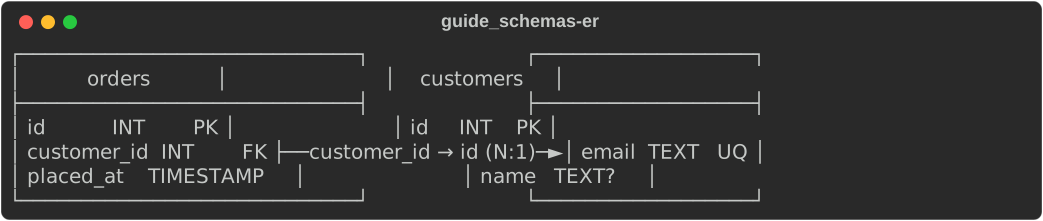
ER diagrams (rich_data::er): a box per table with its columns,
types and keys (PK, FK, UQ, ? for nullable), and an edge per
foreign key with its cardinality, laid out by rs-rich-diagram.
er::model takes any Schema; er::from_sql reads DDL and returns the
diagram with the reader's notes.
const DDL: &str = "
CREATE TABLE customers (id INT PRIMARY KEY, email TEXT NOT NULL UNIQUE, name TEXT);
CREATE TABLE orders (
    id          INT PRIMARY KEY,
    customer_id INT NOT NULL REFERENCES customers (id),
    placed_at   TIMESTAMP NOT NULL
);
";

fn er_diagram(console: &Console) -> Result {
    let (diagram, notes) = er::from_sql(DDL)?;
    assert!(notes.is_empty());
    console.print(&diagram);
    Ok(())
}
None of the views reads colour alone: markers and words carry the meaning,
and the styles come from the schema.* theme keys (schema::STYLES).
From Python
rs_rich.data
has the same views: Schema.from_json_schema, Schema.from_sql,
SchemaTree, SchemaDiff, SchemaTimeline and ErDiagram. Each takes a
Schema, or a JSON Schema as a dict or JSON text.