The rs-rich guide
rs-rich brings Python's rich to Rust:
styled text, tables, trees, progress bars, syntax highlighting, Markdown and more
in the terminal, plus exports to HTML and SVG. On top of that faithful core it
adds Rust-first extensions (diagnostics, structured data, CLI authoring,
diffs, test tooling, capability detection, accessibility, tracing spans,
workflow renderables and charts), graph diagrams, interactive components,
micro assets, image and GIF art, and the rich command-line tool.
This guide walks through all of it. Every code sample on these pages is taken from an example program that CI compiles, and every screenshot is that program's real output, exported to SVG by the library itself.
| Section | Crate | What it covers |
|---|---|---|
 Core |
rs-rich |
The faithful port of rich: console, markup, tables, layout, progress, Markdown, export |
 Extensions |
rs-rich-ext |
Everything added on top: diagnostics, structured data, charts, workflows, QA tooling |
 Art |
rs-rich-art |
Banners, images, GIFs and image diffs |
 Interactive |
rs-rich-interact |
Pickers, inputs, forms, pagers and explorers |
 Using rich with ratatui |
rs-rich-ratatui |
Rich renderables as ratatui widgets, and back |
 Diagrams |
rs-rich-diagram |
Graphs, Mermaid flowcharts and DOT sources |
 Data and schemas |
rs-rich-data |
CSV, JSON Lines and Arrow sources, profiles and schemas |
 Micro assets |
rs-rich-micro |
Emoji-sized inline images |
 The rich CLI |
rs-rich-cli |
The rich command |
 Write a plugin |
rs-rich-plugin-api |
A sandboxed WASM plugin, from the template to the marketplace |

Built on rs-rich: intuiTUIve (rs-rich-intuituive),
the framework for full terminal apps. It has its own section, after this
guide: signals, a retained tree of nodes, widgets, and only the changed
cells redrawn.

Built on intuiTUIve: Noctiluca (noctiluca), a web
browser for the terminal. Chrome runs the page; Noctiluca draws it in
cells, with link hints, keywords and keys of your own for each site.
A Markdown document from the core, a dashboard of rs-rich-ext charts in a
core Layout, and an rs-rich-interact explorer searching a YAML file:
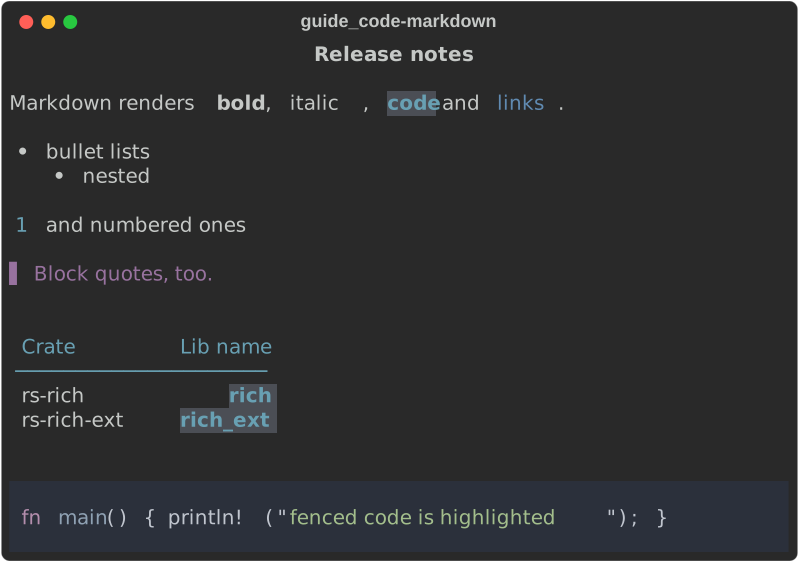
The code: Markdown (core)
fn markdown(console: &Console) {
    let source = r#"# Release notes

Markdown renders **bold**, *italic*, `code` and [links](https://docs.rs/rs-rich).

- bullet lists
  - nested
1. and numbered ones

> Block quotes, too.

| Crate | Lib name |
|-------|---------:|
| rs-rich | `rich` |
| rs-rich-ext | `rich_ext` |

```rust
fn main() { println!("fenced code is highlighted"); }
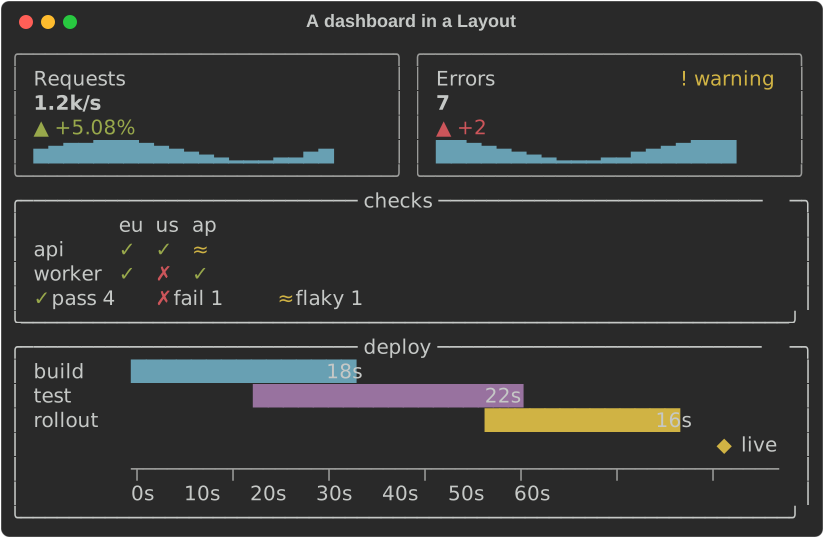
The code: a dashboard of charts (rs-rich-ext)
fn dashboard() -> Layout {
    let card = |c: KpiCard| Layout::with_renderable(Box::new(c.expand(true)));
    let mut cards = Layout::new().size(6);
    cards.split_row(vec![
        card(
            KpiCard::new("Requests", 1240.0)
                .unit("/s")
                .previous(1180.0)
                .trend(trend(0.0)),
        ),
        card(
            KpiCard::new("Errors", 7.0)
                .delta(2.0)
                .higher_is_better(false)
                .trend(trend(5.0))
                .status(Status::Warning),
        ),
    ]);
    let checks = StatusMatrix::new()
        .columns(["eu", "us", "ap"])
        .row("api", ["pass", "pass", "flaky"])
        .row("worker", ["pass", "fail", "pass"]);
    let deploy = Timeline::new()
        .span("build", 0.0, 18.0)
        .span("test", 12.0, 34.0)
        .span("rollout", 36.0, 52.0)
        .milestone("live", 60.0)
        .unit("s");
    let mut root = Layout::new();
    root.split_column(vec![
        cards,
        Layout::with_renderable(Box::new(Panel::new(Box::new(checks)).title("checks"))).size(6),
        Layout::with_renderable(Box::new(Panel::new(Box::new(deploy)).title("deploy"))),
    ]);
    root
}
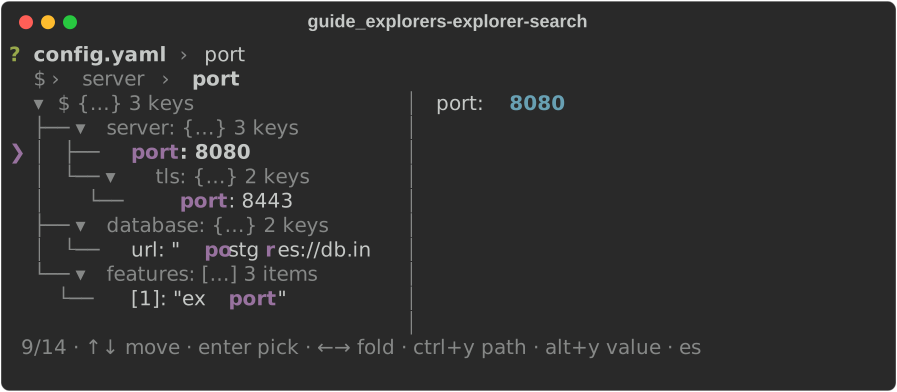
The code: a data explorer (rs-rich-interact)
The pieces
| Crate | Import as | What it gives you | Guide |
|---|---|---|---|
rs-rich |
rich |
The core: Console, markup, Text, Style, tables, panels, trees, columns, layout, progress, live displays, Markdown, syntax, JSON, logging, prompts, export. A line-for-line port of rich 15.0.0, proven byte-for-byte against it. |
Core |
rs-rich-ext |
rich_ext |
Everything that is not in upstream rich: diagnostics, hyperlinks, logging adapters and tracing spans, structured data, CLI authoring, diffs, test and QA tooling, capability detection, accessibility, workflow renderables (commands, task trees, transfers, countdowns, notifications, tables, badges, size bars, formatters, experimental redaction), charts (sparklines, bars, line charts, gauges, heatmaps, status matrices, KPI cards, timelines), and Cargo dependency and JSON Schema trees. Mostly opt-in features. | Extensions, Charts |
rs-rich-plugin-api (new in 0.0.12) |
rich_plugin_api, or rich_ext::plugin |
The plugin contract: implement Plugin to add highlighters, code highlighters, themes, box styles, source and fence renderers, transforms and components. Depends on core only. |
Plugins |
rs-rich-lumis (new in 0.0.12) |
rich_lumis |
The lumis syntax highlighter (tree-sitter, over 100 languages, 250+ Neovim themes, plus ansi_dark/ansi_light), for Syntax, Markdown or the plugin host. |
Plugins |
rs-rich-mermaid (new in 0.0.12) |
rich_mermaid |
Mermaid diagrams: flowcharts and ER diagrams drawn as text in every direction (through rs-rich-diagram's layout), sequence diagrams on lifelines, every diagram type through mmdc (optional), and ```mermaid fences in Markdown. |
Plugins |
rs-rich-diagram (new in 0.0.15) |
rich_diagram |
Graph diagrams: a graph model with a chaining builder, the layered layout Mermaid's flowcharts draw through, and a Diagram renderable in box drawing or ASCII that crops to the width it is given; DOT (Graphviz) sources parsed natively, a dot fence plugin (plugin feature) and Graphviz's own SVG (graphviz feature). |
Diagrams |
rs-rich-data (new in 0.0.16) |
rich_data |
Tabular data: CSV, TSV, JSON Lines, serde and Arrow row sources, type inference, column statistics, bounded profiles, data-quality reports, SQL result sets and windows over long inputs, and ER diagrams of a schema. | Tabular data, Schemas, Developer views |
rs-rich-macros |
through rich_ext |
Compile-time checked markup (richf!), #[derive(Rich)] and print macros. Enabled by ext's macros feature. |
Macros |
rs-rich-art |
rich_art |
FIGlet banners, images as ASCII, Braille, blocks, quadrants, Sixel, Kitty or iTerm2 graphics, animated GIFs, perceptual image diffs. | Art |
rs-rich-interact (new in 0.0.13) |
rich_interact |
Interactive components: fuzzy pickers, input, confirm, forms, pagers, a text area, file, colour, asset and date pickers and data explorers, composable with containers, overlays and a keymap; the terminal session and its keys, natural dates and time zones. | Interactive |
rs-rich-intuituive (new in 0.0.17) |
intuituive |
intuiTUIve, a framework for full-screen terminal apps: signals and memos, a retained tree of nodes (text, rich renderables, rich-interact components, logs), widgets, focus, keys and clicks, sprites and pixel buffers, and only the changed cells sent to the terminal. | intuiTUIve |
rs-rich-web (new in 0.0.18) |
rich_web |
Serving intuiTUIve apps, or any terminal program on a PTY, to a web browser: one per tab over a WebSocket, drawn by a vendored xterm.js page or, for apps, a DOM renderer with ARIA, behind a URL token, an origin check and a session cap. | Serving an app to a browser |
rs-rich-embed (new in 0.0.18) |
rich_embed |
Other programs and web pages inside an intuiTUIve app: a terminal pane that runs any program (a shell, htop, a terminal browser) with scrollback, and a web view with an address bar, each over a swappable backend (PtyHost, WebEngine); a headless Chrome over DevTools and Browsh's HTTP mode behind features. |
Embedding programs and pages |
rs-rich-ratatui (new in 0.0.17) |
rich_ratatui |
ratatui interop: any rich renderable as a ratatui widget, ratatui widgets as rich-interact components (interact feature), and the style, colour, line and buffer-cell conversions underneath. |
Using rich with ratatui |
rs-rich-record (new in 0.0.13) |
rich_record |
Scripted terminal recordings (tapes) in a real PTY, rendered as PNG, SVG, casts, GIF, APNG and MP4, with every frame at a set rate, held keys and the Kitty, Sixel and iTerm2 images a program draws; behind rich record. |
Terminal recordings |
rs-rich-micro (new in 0.0.14) |
rich_micro |
Micro assets: emoji-sized inline images written :micro:name:, .richmicro packages, a layered registry (built-in, user, trusted project, inline), placeholder cells that keep layouts exact, and drawing with Kitty, iTerm2, Sixel or half-blocks, with an emoji or text fallback. |
Micro assets |
rs-rich-cli |
the rich binary |
Upstream rich-cli's commands, plus image, gif, inspect, diff, view, hex, unicode, env, capture, ANSI explain, mermaid, dot, deps, schema, chart, the interactive commands (choose, filter, input, confirm, pager, write, file, color, asset, explore, date), micro, banner, shell, log, profile, approve, jump, record, plugins, bench compare, batch, watch, config, completions, docs and doctor. | CLI |
Each crate versions independently; see the home page for the current numbers.
How it fits together
                        your program                         the `rich` binary
                            │                                      │
            ┌───────────────┼───────────────┐                      │ composes the
            ▼               ▼               ▼                      │ libraries below
       rich_ext  ───────▶  rich  ◀─────── rich_art                  │
   (extensions,        (faithful       (banners, images,     ◀─────┘
    features)           core)           GIFs, image diff)
       │  ▲
       │  └── rich_macros (proc-macros behind ext's `macros` feature)
       ▼
   the extension registry, extended theme and capability data are
   installed onto a core Console; core never depends on ext
The dependency graph only points inwards: rich knows nothing about the other
crates. That is what keeps the core a faithful mirror of upstream rich while
everything new lives in rich-ext (see AGENTS.md).
One render, step by step
Everything you print goes through the same pipeline:
- A renderable. Anything implementing
rich::Renderable:Text, aTable, aPanel, your own type, or a rich-ext view such as a diagnostic. - Measure. The console asks the renderable for its minimum and maximum
width (
Measurement), so containers can lay children out. - Render to segments. Given
ConsoleOptions(width, height, colour system, capabilities), the renderable returnsSegments: runs of text, each with aStyle, plus control codes. - Write or export. The
Consoleturns segments into ANSI for a terminal, or records them for HTML, SVG or plain-text export.
Because steps 2 and 3 only depend on the options you pass in, rendering is deterministic: the same renderable at the same width and capabilities gives the same bytes. The screenshot tests, the golden parity tests and this guide's images all rely on that.
Features at a glance
| Crate | Feature | Turns on |
|---|---|---|
rs-rich |
(default) syntax, markdown |
Syntax with syntect as its highlighter, and Markdown (pulldown-cmark; implies code). With default-features = false everything else in the faithful core remains, without syntect, its bincode 1.x or pulldown-cmark. |
code |
Syntax and the CodeHighlighter plumbing without syntect (syntax implies it). Code highlights through a highlighter you give it or register (such as rich_ext::sql), and is plain otherwise. features = ["code", "markdown"] keeps Syntax and Markdown without syntect. |
|
syntax-cache, json-escape-safe |
Opt-in divergences from upstream, documented in Divergences. | |
onig |
Oniguruma instead of pure-Rust fancy-regex for syntax highlighting: 2–4× faster, same output, needs a C compiler (Divergences #26). |
|
rs-rich-ext |
(default) syntax, markdown |
Core's two features, plus what needs them: rst, cli_doc::markdown_view, the syntect registry entry and testing::conformance. Without syntax, source_view, SourceDiff and PatchView render unhighlighted. |
| (always) | Registry, highlighters, hyperlinks, diagnostics, stack traces, dashboard, live coordinator, RichHandler and SpanView, layouts, targets, capabilities, fidelity, accessibility, ANSI explain, diffs, CLI authoring model, and the workflow modules: workflow, transfer, countdown, notify, cancel, table, badge, size_bar, format, redact, plus the inspector views source_view, hex, unicode_inspect and env_inspect. |
|
macros |
richf!, #[derive(Rich)] and the print macros. |
|
anyhow |
Diagnostic::from_anyhow. |
|
log, tracing |
Logging adapters. | |
data, yaml, toml, xml, jsonpath |
Structured data parsing and views. | |
clap |
Build help, errors and completions from a clap::Command. |
|
testing |
Snapshots, assertion macros and the QA tools. | |
test-report |
JUnit and libtest result reports. | |
serde |
Serialize for capability, accessibility and ANSI reports. |
|
rs-rich-art |
image, gif, sixel |
Image art, GIF playback, Sixel graphics. |
rs-rich-diagram |
plugin, graphviz |
The dot fence and source renderer plugin; Graphviz's own SVG through the dot program. |
rs-rich-cli |
fetch, art, mermaid, record, interact, wasm-plugins (default) |
URLs; images, GIFs, image diffs and micro assets; Mermaid; rich record; the interactive commands; sandboxed WASM plugins. lumis, mmdc and dylib-plugins are opt-in. |
Where to start
- Printing nicer output from a Rust program: read Console and printing, then Text, markup and style and Tables. The shorter tutorial covers the same ground in six steps.
- Reporting errors well: Diagnostics and Logging.
- Showing config files or API responses: Structured data.
- Drawing data or structure: Charts, Diagrams and Dependency graphs and JSON Schemas.
- Tables from data files, profiles and schemas: Tabular data, Schemas and Developer views.
- Writing a CLI: CLI authoring for help, errors, completions and man pages, with or without clap.
- Testing terminal output: Diffs and test reports and QA tooling.
- Adapting to whatever terminal you are on: Capabilities and fidelity and Accessibility.
- Using the
richcommand: the CLI guide, then the walkthrough. The smoke test runs every command end to end.
Running the examples yourself
Every example named on these pages lives in a crate's examples/ folder and
starts with the command that runs it, for instance:
cargo run -p rs-rich --example guide_tables
cargo run -p rs-rich-ext --example guide_data --features data,yaml,toml,xml,jsonpath
Add -- --svg DIR to write the example's screenshots into DIR instead of
printing them. python3 scripts/capture_guide.py regenerates every guide
screenshot this way, and python3 scripts/smoke_cli.py --screenshots
docs/media/guide regenerates the CLI ones.