Files, sound, images and charts
The plugins: off-by-default features for what only one kind of app uses.
Files that change, a sound card and sound files, images (in half blocks
or real pixels), an app's own tracing events, a file manager's
components, and meters, sparklines, spectra and big text. Each is built on generic core pieces from the other
pages.
Files, sound and images
Off-by-default features bring the outside world in, each working on its own thread and delivering on the app's thread, between frames. They are plugins: the core stays generic, and what only one domain uses (files, sound, images) lives behind a feature, built on generic core pieces.
rs-rich-intuituive = { version = "0.0.5", features = ["watch", "audio", "art", "files"] }
# PulseAudio and PipeWire sources, and WAV files:
# features = ["pulse", "wav"]
# Raw PCM only, with no dependency:
# features = ["pcm"]
# Meters, sparklines and spectra as nodes:
# features = ["viz"]
# The app's own tracing events in a Log:
# features = ["tracing"]
Files that change (watch)
watch_path(path, |event, cx| …) wakes the app when a file, or a
directory's entries, change, through notify (inotify, FSEvents,
ReadDirectoryChangesW, kqueue), with no polling. Changes less than 100 ms
apart are one PathEvent: each path once, with what last happened to it
(Created, Modified, Removed, Renamed). watch_path_with(path,
WatchOptions::new().recursive().debounce(d), …) watches a whole tree. The
watcher runs as long as the app, or until its PathWatch is stop()ped.
let entries = signal(list_dir(&dir));
watch_path(&dir, move |_event, _cx| entries.set(list_dir(&dir)))?;
Sound (audio, pulse, pcm, wav)
audio::input(device, rate, channels, buffer) returns a
Signal<Option<Frame>>, the shape of latest's: None until the first
buffer, then the newest Frame, numbered, with samples one row a
channel of buffer samples from -1 to 1 (through cpal: ALSA, CoreAudio,
WASAPI). Watch the number to see every buffer, silence included. The
newest buffer wins: one that arrives while the app is busy replaces the
one still waiting, so a slow frame drops buffers rather than falling
behind. A device with fewer channels than asked for is spread over the
rows. On Linux the feature needs ALSA's headers to build
(libasound2-dev).
audio::open(AudioOptions::new().device(id).rate(r).latency(frames)
  .stall_after(d))
opens one before the app, so a missing device fails before the terminal is taken; inside the app,capture.samples()is the signal andcapture.status()the core'sFeedState(Running,Stalled(since)on the app's clock,Failed(why),Endedoncecapture.stop()ped) to end the app on, scope-tui's--timeout(.stall_after(None): never, as scope-tui'spulsesource);capture.feed()is both as the core'sFeed.audio::devices()lists the inputs asDevice { id, name, default, host }(none, not a panic, on a machine without sound): the id is whatinputtakes (ALSA'snull,pulse,hw:CARD=…), the name what to show.device.configs()lists what each can capture (channels, rates, buffer sizes, sample format), andaudio::picker(| device, cx| …)is a list to choose one in the app.- ALSA's
ALSA lib …complaints are kept off the screen while devices are listed and opened;audio::messages()has them, andcapture.log(log)sends them to aLog. pulse(on top ofaudio) addsHost::Pulse: PulseAudio's and PipeWire's sources, a sink's monitor among them, through cpal's own client (no system library), with.latency(frames)as the server's buffer.- With the light
pcmfeature (no dependency;audioandwavturn it on),audio::pcm(reader, Format::S16Le, channels, buffer)reads raw PCM (parec's,arecord's) as buffers,audio::play(pcm, rate)plays them onto a signal at the sample rate and then silence (latest_iterat a buffer's time apart), andFrame,Matrixanddeinterleaveare there. A read error ends the buffers and stays inpcm.error()(try_next()gives it as aResult).audio::Capture::simulated(frames, period)is a capture with no sound card, its buffers a period apart: a test callsstall()(andresume()) orfail(why)on a clone, and sees the status turnStalledafter.stall_after(d)orFailed, on the app's clock underwait_for_tasks(true). Every source is aCapture, the shape of a sound card's:Capture::generated(frames, period)(a tone, a demo signal:Endedonce the frames run out) andCapture::from_pcm(pcm, rate)(a file or a pipe played at its rate,Endedand then silence, as scope-tui pads a file, orFailedwith the read error, scope-tui's "data source returned null"). Withwav,audio::wav(path, buffer)reads WAV files the same way (seek(to)reads on from a time),audio::wav_writerwrites one, andaudio::record(samples, path, rate, channels)records a frame signal while the app runs (hound). - Playing sound:
audio::output(OutputOptions::new())opens a sound card output (audio;output_devices(host)lists them): anOutputtowriteinterleaved samples orwrite_matrixbuffers to, a quarter second queued ahead, withset_paused,set_volumeandclear(a seek) at once.audio::player(PlayerOptions::new() .output(out))is a music player's model on the core'stransport:queue(tracks),play_track(i),toggle,next,previous(the track's start, or the one before in its first three seconds),seek,seek_by,set_volume,set_speed(the pitch moves with it), with gapless playback by default;player.transport()is the play head for a progress bar,track()the one playing,error()why one was skipped. Tracks areSources (rate,channels,duration,seek,next_buffer):open_source(path)opens WAV withwav,audio::clip(rate, samples)is one in memory, andPlayerOptions::opener(..)takes a decoder of your own. Without an output (a test, a machine with no sound card) the transport runs alone. Other codecs (MP3, FLAC, Ogg) are later work.
use intuituive::audio::{self, player, OutputOptions, PlayerOptions};
use intuituive::widgets::{seg_gauge, status_bar};

App::new(move || {
    let mut options = PlayerOptions::new();
    if let Ok(out) = audio::output(OutputOptions::new()) {
        options = options.output(out);    // none: the play head runs alone
    }
    let music = player(options);
    music.queue(tracks.clone());          // WAV files, with the `wav` feature
    music.play_track(0);
    let head = music.transport();
    column([
        text(move || format!("{:?}  {:.0} s", music.track(), head.position().as_secs_f64())),
        status_bar([seg_gauge(move || head.progress(), String::new).width(40)], []),
    ])
    .on_key("space", move |_| music.toggle())
    .on_key("n", move |_| music.next())
    .on_key("plus", move |_| music.set_volume(music.volume() + 0.1))
})
For a spectrum, rs-rich-ext's rich_ext::dsp has fft (any length),
hann, spectrum(samples, rate) and spectrum_full; bands(spectrum,
n, lo_hz, hi_hz) (log-spaced, cava's) with Falloff::gravity(g) for
bars that fall; peak_hz(spectrum) and nearest_note(hz) (("A", 4,
cents)), and Tuner (tuner.listen(samples, rate) or
update(spectrum): a Reading of the note, octave, cents and Hz,
smoothed within a note, taken at once on a new one, held through a
few quiet spectra) for a tuner; note_hz and NoteTable::ScopeTui (scope-tui's
rounded table, octave 0 by default); and a test signal without a sound
card: tone, partials, noise and mix.
let samples = audio::input(None, 48_000, 2, 1024)?;
renderable(move || samples.with(|f| oscilloscope(f.as_ref())))
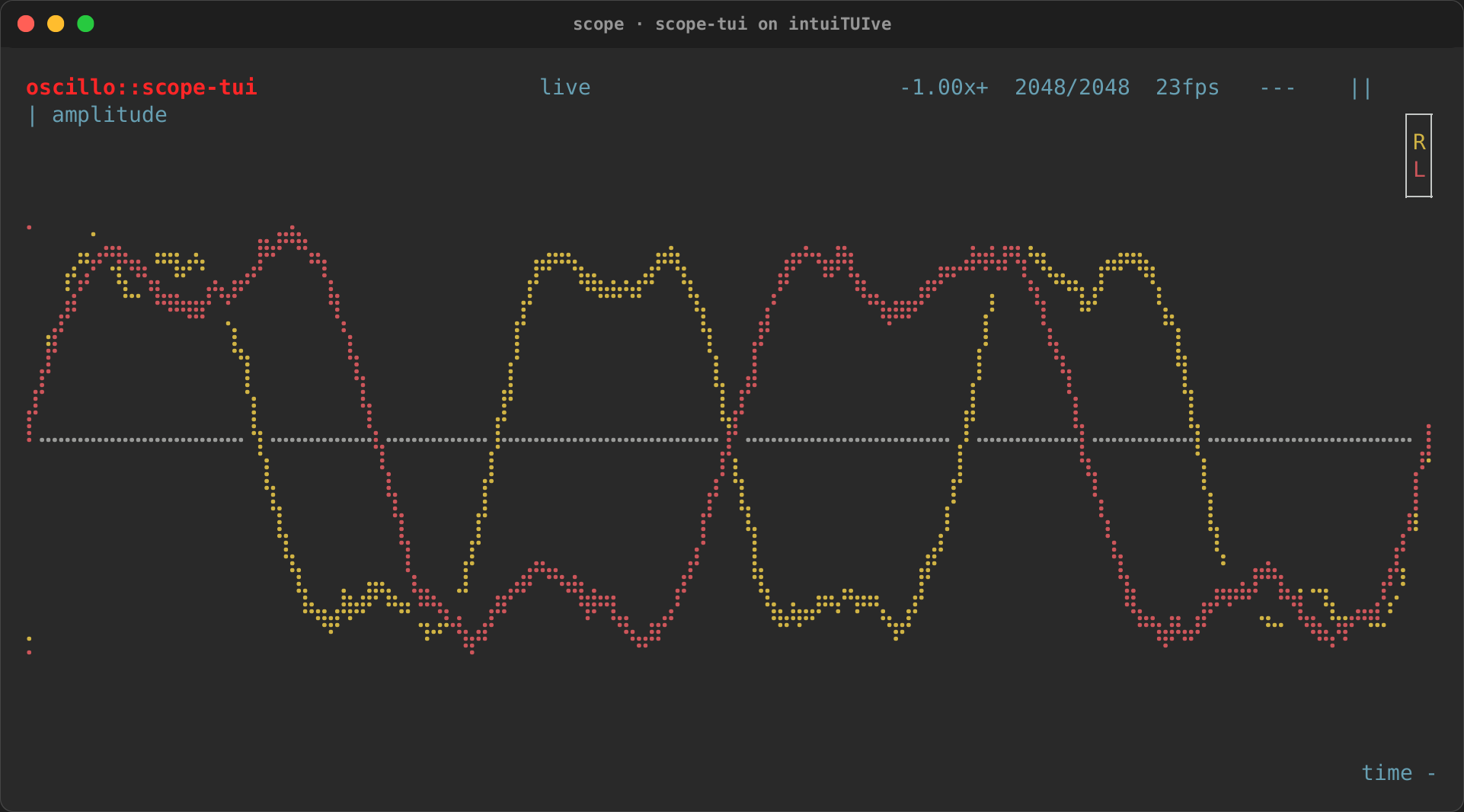
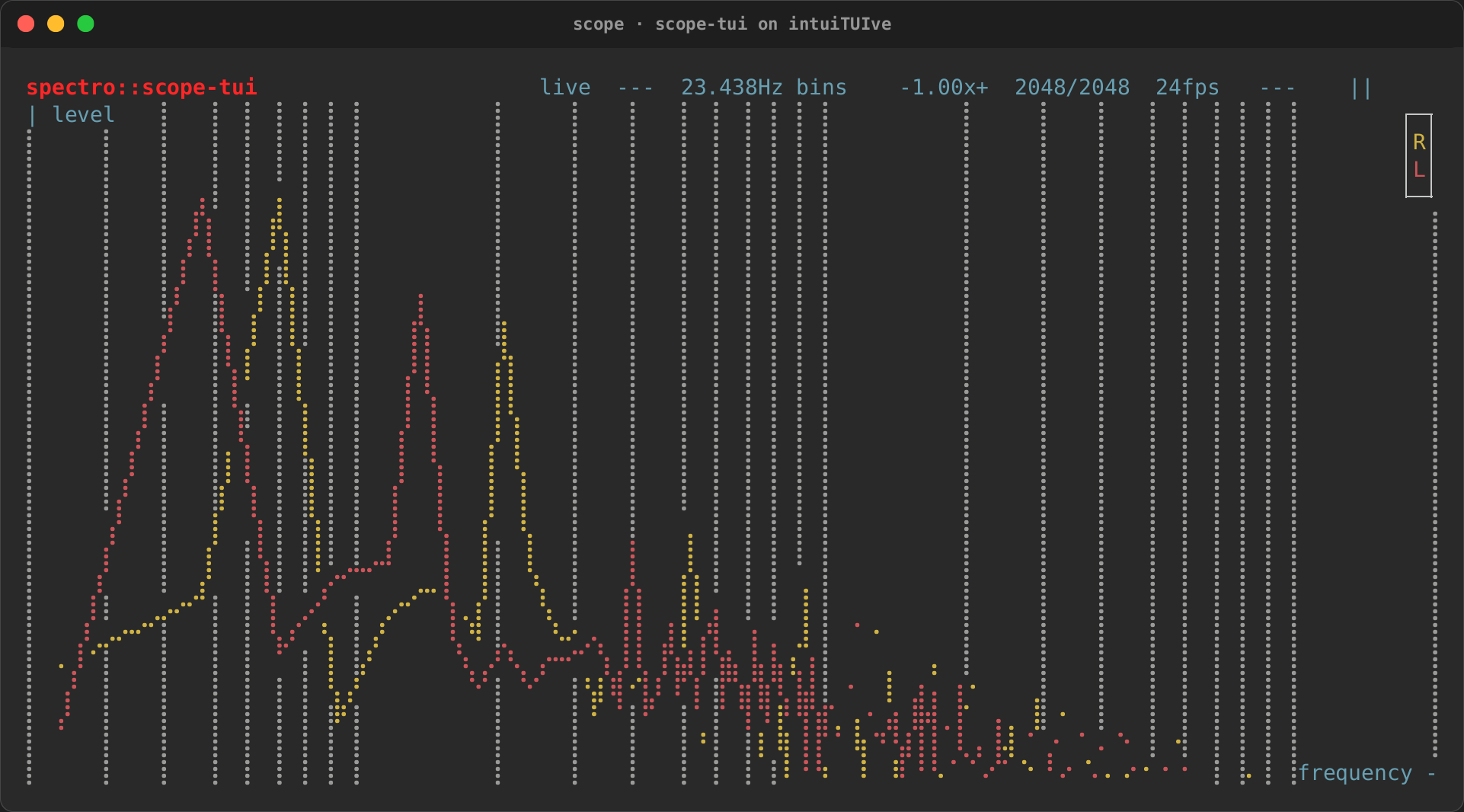
The scope example rebuilds scope-tui on these pieces: raw PCM from a
pipe or a file (pcm), an oscilloscope, a vectorscope and a spectroscope
on rs-rich-ext's charts, and its help in modes (cargo run -p
rs-rich-intuituive --example scope --features pcm):
| Oscilloscope | Spectroscope |
|---|---|
 |
 |
Images (art)
image(path) is a node that draws an image file in half blocks, sized to
its rectangle and kept to its aspect ratio, decoded on a worker thread
(loading… until then). image_with(path,
ImageView::new().fit(ImageFit::Cover)) fills the rectangle instead
(Contain centres, Stretch ignores the aspect), .mode(ImageMode::
Quadrants) (or Braille, Ascii) draws with other cells, and
image_of(move || selected.get(), view) follows a path that changes, as a
preview pane does. image_bytes(bytes, view) and image_bytes_of(||
cover.get(), view) draw an image in memory (a cover embedded in a song).
-
Real pixels:
ImageView::new().pixels(Pixels::detect())(orPixels::Kitty,Sixel,Iterm) withApp::graphics(image_graphics()): the node keeps its half blocks in the cells, tagged, and after each frame the app draws the picture over them (Sixel, iTerm2) only when it is new, moved or written under; for Kitty the cells are its Unicode placeholders and the picture is uploaded once, and freed when the app ends. Without the app's source a Sixel or iTerm2 view is plain half blocks, so the frame stays exact in any terminal. -
A whole frame as tiles:
tiles_of(|| tiles, Pixels::Kitty)draws the tiles of rs-rich-art'stiles::Tiler, which fits each frame (a browser's screencast, an emulator's screen) to its cells and cuts it into tiles of 8 by 4 cells; a tile whose pixels did not change keeps its picture's id and version, so withimage_graphicsonly the tiles that changed go up again. A caret blinking is one tile; a page scrolling changes nearly all of them. Noctiluca's pixel view is built on it.
Any other picture drawn in pixels goes the same way: App::graphics(source)
takes an rs-rich-ext PlacementSource (image_graphics() is the image
nodes') and draws its Kitty, iTerm2 or Sixel images over the cells after
each frame, as rs-rich-ext's Surface does: placements that are new,
moved, on another animation frame or written over are drawn again, and an
overlay that went away has its cells repainted. The cells under a
placement are what a terminal without graphics shows.
A file manager's other parts are in rs-rich-ext: rich_ext::filetype
(Yazi's icons and type colours, MIME types, a Nerd Font check) and
rich_ext::fs (local times, owner and group names); see
Files, spectra and warm-ups. rs-rich-ext's
palette::style_from_color_name("DarkGray") (re-exported by
rs-rich-ratatui) reads a ratatui colour name, as a ported app's options
take them, as a rich style.
Logs from tracing (tracing)
The tracing plugin, off by default, shows an app's own tracing
events in a Log, as they happen, from any thread:
ratatui's tracing example writes them to a file and leaves an in-app
pane to the third-party tui-logger.
use intuituive::log::{tracing_layer, Severity};
use tracing_subscriber::prelude::*;

let mut made = None;
let app = App::new(|| {
    let log = Log::new(5_000);
    log.set_level(Some(Severity::Debug));
    made = Some(log);
    row([
        log.targets_view().panel("Targets").fixed(26),
        log.view().focusable().panel("Log").flex(1),
    ])
});
let subscriber = tracing_subscriber::registry().with(tracing_layer(made.unwrap(), app.proxy()));
tracing::subscriber::set_global_default(subscriber)?;
tracing::info!(port = 8080, "listening");
app.run()
tracing_layer(log, proxy)is atracing_subscriberlayer: add it to your subscriber next to any other (a file, anEnvFilter).install_tracing(log, proxy)makes a subscriber of it alone the global default.TracingFeed::new(log, proxy)sets it up first:.capacity(n)(the events that may wait for the app, 1,024 by default),.fields(false)(leave outkey=valueafter the message) and.spans(false)(leave out theouter:inner:spans before it); then.layer()or.install().- Each event becomes a line with its level and target, so the log's level, target and text filters and its targets panel work on it. The message shows as written: square brackets are not markup.
- It is built on rs-rich-ext's
EventLayerand a boundedChannelSink: the thread that logs never waits for the app. When the app falls behind, what the channel cannot take is dropped and counted, and the log gets one… 12 events droppedline. The app's thread takes what waits a batch at a time, between frames.
The tracing example rebuilds ratatui's: a worker thread logging at
random levels, the log pane with its targets panel, a filter box and a
status line (cargo run -p rs-rich-intuituive --example tracing --features
tracing). Scrolled back, three lines up:
╭─ Targets ──────────────╮╭─ Log ────────────────────────────────────────────╮
│DEBUG tracing_app      1││INFO  worker::net done job=16 ms=77              ││
│DEBUG worker::jobs    10││WARN  worker::db slow, retrying job=17           ││
│DEBUG worker::net      8││INFO  worker::jobs done job=18 ms=802            ││
│DEBUG worker::db      17││WARN  worker::db slow, retrying job=19           ││
│                        ││DEBUG worker::db picked up job=21                ││
│                        ││DEBUG worker::db picked up job=22                ┃│
│                        ││ERROR worker::db failed job=23                   ┃│
│                        ││INFO  worker::db done job=24 ms=502              ┃│
│                        ││DEBUG worker::db picked up job=25                ││
│                        ││WARN  worker::jobs slow, retrying job=26         ││
╰────────────────────────╯╰──────────────────────────────────────────────────╯
Filter words, level:warn, target:worker::db
scrolled back · 7 new · End follows · 31 of 36 lines · level debug+ · q quits,
A file manager's components
The off-by-default files feature (archive adds archive previews and
extraction) has the parts of a file manager such as Yazi as components, in
intuituive::files: the core's generic pieces (see Browsing, jobs,
finding and previewing) with a
file system plugged in, on rs-rich-ext's listing, open, file_ops,
trash and git:
use intuituive::files::{miller, selection, tabs, MillerOptions, Yank};

App::new(|| {
    let columns = miller(start.clone()).icons(true).ratios(1, 4, 3);
    let picked = selection(columns);
    let strip = tabs(columns);
    let yanked = signal(None::<Yank>);
    let view = columns.view_with(
        MillerOptions::new()
            .markers(Yank::markers(yanked))
            .hovered_caps("\u{e0b6}", "\u{e0b4}"),
    );
    columns
        .navigation(column([strip.strip().fit().fixed(1), view.flex(1), status(columns)]))
        .on_key("space", move |_| picked.toggle(columns.hovered_path().unwrap()))
        .on_key("y", move |_| yanked.set(Some(Yank::copy(columns.targets()))))
})
- Miller columns:
miller(start)is the core'smiller_ofover the directory tree: the parent directory, the current one and a preview of the hovered entry, in panes whose rails the mouse drags, as signals (cwd,cursor,hovered,hidden,sort,linemode,find) in aCopystruct. Each directory remembers the entry last hovered in it; a click in the parent column goes there, one in a directory's preview enters it.columns.navigation(node)binds Yazi's movement keys (j/k,h/l,g g/G, Ctrl+D/U,J/Kfor the preview);cd,enter,leave,arrowandrefreshare there for your own. Withwatchboth directories follow the disk. The cursor stays on its entry, by path, through a re-sort, a filter, hidden files shown and a refresh.find_next(previous)is Yazi'snandNover the find query (the core'slist_search), andvisited()the directories shown so far.columns.navigation_with(node, &[(Move::Up, "k up", "Previous file"), ..])andcolumns.go(Move::Top)bind the moves in Yazi's own words (the core's, forwarded;files::Move). - Column options:
view_with(MillerOptions::new() …)takes markers, git signs (.git(status)), the hovered row's rounded ends in its type colour (.hovered_caps(open, close), on the list'shighlight_layer(Under)), a context handler (.on_context(|entry, cx| ..): a right press, the menu key or Shift+F10 on an entry), how a binary file previews (.binary(..)), previewers, and any list option through the core's hooks (.current(|list| list.wheel_step(1)),.parent(..),.preview(..)). - Tabs:
tabs(columns)keeps a directory and a back/forward history per tab (the core'stab_setandhistory):open,close_active,switch,cycle,swap,backandforward(Yazi'sHandL),rename, andstrip(), a tab strip of their titles. Wherever the columns go, the active tab follows. With aselectionover the same columns, each tab has its own selection and visual mode behind the one handle (MultiSelect::scoped):vin one tab leaves the others as they were. - The selection and yanking:
selection(columns)is the core'smulti_selectover the current column by path, marked in the columns, with a visual range that follows the cursor (visual(unset),end_visual);columns.targets()is what an action acts on, the selection or else the hovered file.Yank::copy(paths)andYank::cut(paths)hold whatyandxtook:Yank::markers(signal)marks them,yank.paste(into, Conflict::Rename)is theOpto run, andyank.link(into, kind)the one that links them instead (Yazi's-,LinkKind::Symbolic { relative: false };_, relative; Ctrl+-,LinkKind::Hard), as rs-rich-ext'sOp::Link. The parent column marks the selection too, by path, in the theme'smarker.selected(marks_by). - A directory model:
dir_model(|| Some(dir))holds a directory's entries as memos, sorted (model.sort), hidden files shown or not (model.hidden), filtered (model.filter, smart case), read again onrefresh()..watch()follows the disk (watchfeature);.sniff()types each file by its first bytes on a worker thread, so a PNG named.txtstill gets the image colour.git_status(model)loadsgit statusbeside it. - A file list:
file_list(model, cursor, FileListOptions::new()
  .icons(true).linemode(mode).find(query).git(status).markers(..))
is a lazy list of rows as Yazi draws them: the type's colour across the row (so the hovered bar takes it), a marker column, find matches picked out with the hovered one's place ([2/5]), a git sign and the line mode (Linemode::Size,Permissions,Mtime,Btime,Owner) at the right.entry_markupandlinemode_cellare the pieces on their own. - A preview pane:
preview(move || hovered_path(), PreviewOptions::new())is the core'spreview_ofkeyed by the path: it loads off the app's thread whenever the path or the pane's width changes and picks a renderer by type: a directory's entries, text highlighted, an image (art; described without it), an archive's entries (archive), a hex dump of anything else. A result for a path no longer shown is dropped, and a slow one clears the pane after 150 ms (on the app's clock); the first frame already shows the hovered entry's..previewer(|path, mime, settings| ..)adds your own;.binary(BinaryPreview::FileType)shows a binary file asfile -bLclassifies it (Previewer::file_type(), a MIME description withoutfile) instead of a hex dump.Previewer::command("application/pdf", &["pdftoppm", "-png", "-singlefile", "-f", "1", "-l", "1", "%s"])runs an external previewer, as Yazi'spdftoppmandffmpegthumbnailer(video/*with-o %o): output that is an image is shown as one (withart), anything else as text;%sis the path,%oa file to write to,%wthe pane's width. - Opening:
open_with(cx, &opener, paths, |cx| ..)runs one ofrich_ext::open's openers (opener_rules()is Yazi's defaults): a blocking one (the editor) gets the terminal throughcx.handoff_then, the others run in the background;Launch::Extractextracts beside the archive.open_with_tasks(cx, &opener, paths, jobs, |cx| ..)runs extraction as jobs of a task list instead. - Background jobs:
tasks()is the core'sjobswith file operations as the work: it runs copies, moves, deletes, trashing (jobs.run(Op::Copy { .. }, |report, cx| ..)) and extraction (jobs.extract(..)) each on a thread, with progress a few times a second and a cancel token;tasks_panel(jobs)lists them with progress bars (xcancels, Yazi'sw). A job with errors stays listed.tasks().on_fail(|job, cx| ..)hears every failure in one place, andtasks_panel_with(jobs, JobsPanelOptions::new().failed_title(false))then leaves the title out of a failed row, so nothing is told twice;jobs.summary()is(share done, running, failed)for aseg_gaugein the status line. - A streaming finder:
finder(walk(root), |path, cx| ..)is the core'sfuzzy_listover a directory walk that runs on its own thread: results show while it goes on (12/3400 (loading…)), and the walk stops when the finder's screen closes.finder_with(.., FuzzyOptions ::new().title("Find").border(Border::Rounded))looks as any fuzzy list does; Esc closes its modal (or runs.on_cancel(..)). - Frecency:
frecency().follow(columns)counts a visit to each directory shown and ranks them as zoxide does (ranked(), best first), in a small file in the user's state directory (state_dir(), the core'sstate_dir("intuituive");frecency_at(file)names one): the core'sFrecencyStorekeyed by paths, so two windows' visits add up. Yazi'sZacross sessions. - Searching:
search(root, query, SearchKind::Name | Grep)runsfdorrg(else a walk of its own), its results streaming in;columns.show_search(found)lists them as a level of their own at the root (the core'soverlay, Yazi'ssearch://folder), each named by its path from the root and previewed as any entry:lon a directory found goes there,hgoes back to the directory searched, on the entry hovered before, andend_search()does too (Yazi'ssandS). - A file picker:
pick_file(cx, start, |path| filter, |path, cx|
  ..)
asks for a file in a modal of Miller's columns: Enter enters a directory or picks a file the filter takes (one it refuses stays, with a warning), Esc cancels. Bubbles'filepicker, Textual'sDirectoryTreein a dialog. - The spotter, bulk rename, a shell:
spot(path)is the core'sfactswith a file's name, path, MIME type, size, mode, owner, times and link target.bulk_rename(cx, paths, |renamed, cx| ..)edits the names in$EDITOR(the core'scx.edit_text) and renames what changed when it ends (files may swap names; a name in use is reported).shell(cx, paths, ShellOptions::new())prompts for a command and runs it on them as Yazi's;(in the background, or as a job with.tasks(jobs)) or:(.block(true): the terminal handed over),"$@"the paths and$0the hovered file (.hovered(..)). - A path header:
path_crumb(|| cwd)is the core'sbreadcrumbover a path's parts (path_parts),/between them and the home directory as~(path_crumb_at(.., Some(home))names it). - A hex view:
hex_viewis the core's (widgets::hex_view), re-exported. - The trash everywhere:
Op::Trashuses rs-rich-ext'strash::send: the FreeDesktop trash on Linux and the BSDs, the Finder's on macOS, the Recycle Bin on Windows.
Image previews draw in pixels with the art feature's Pixels and
image_graphics (see Images).
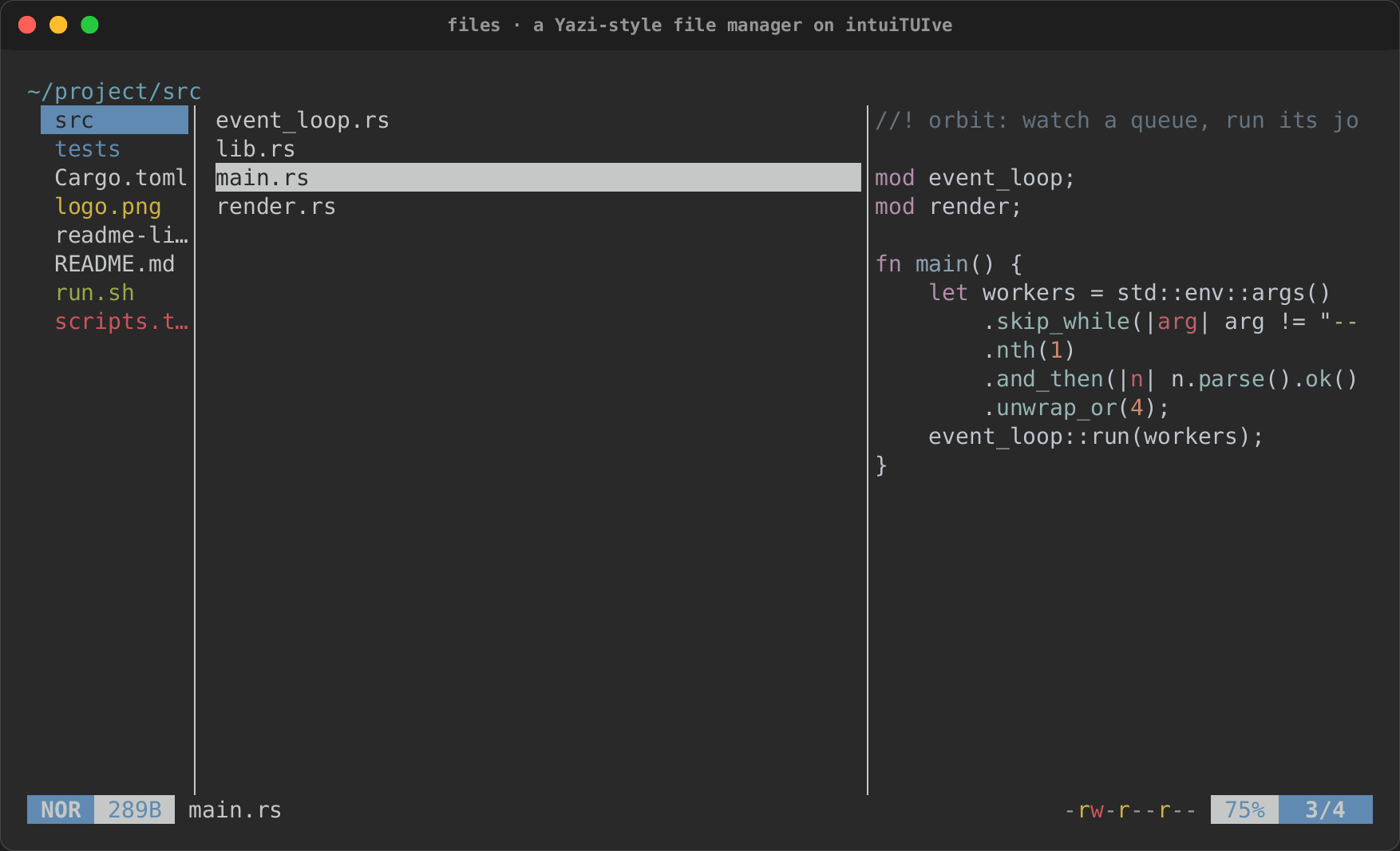
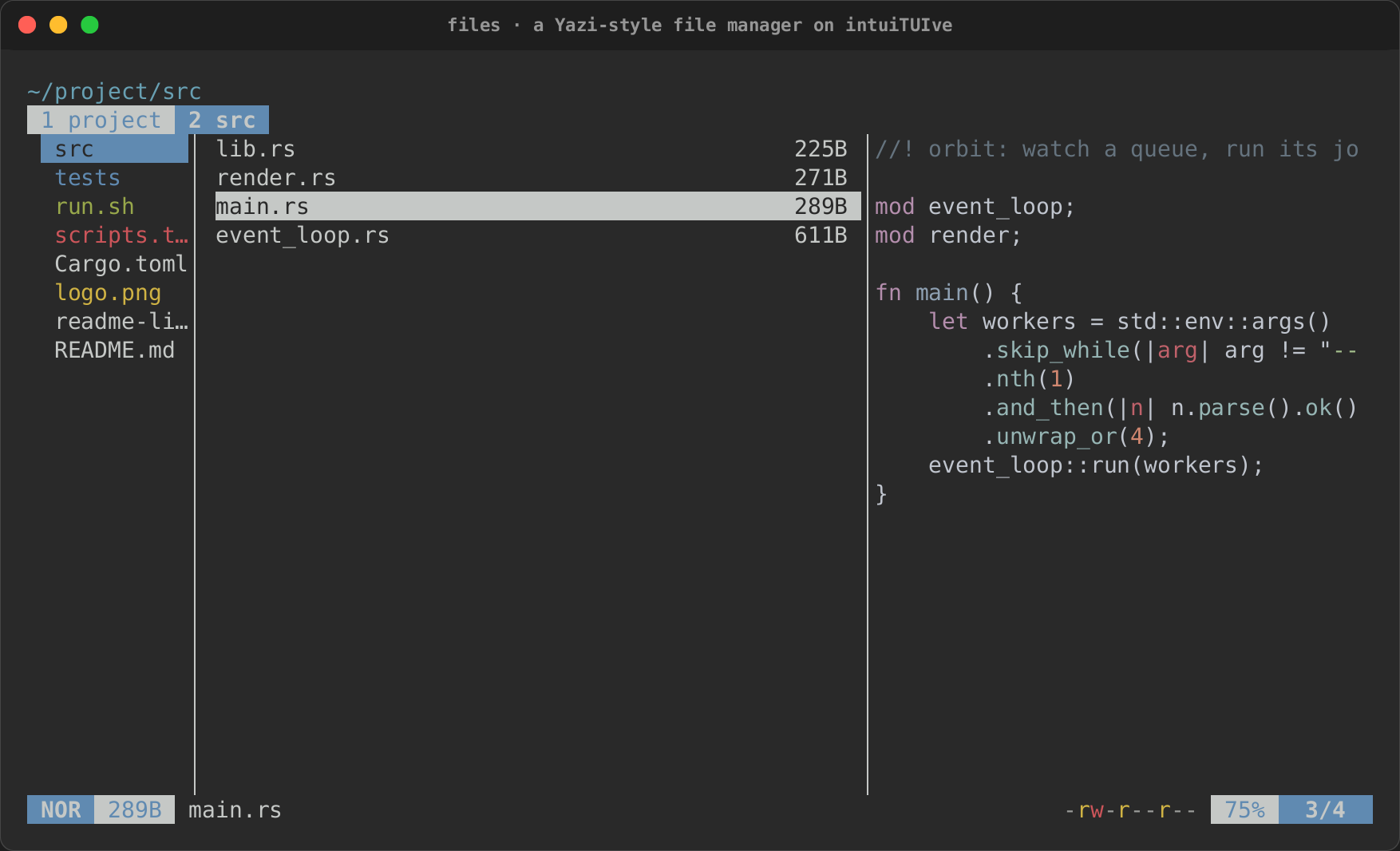
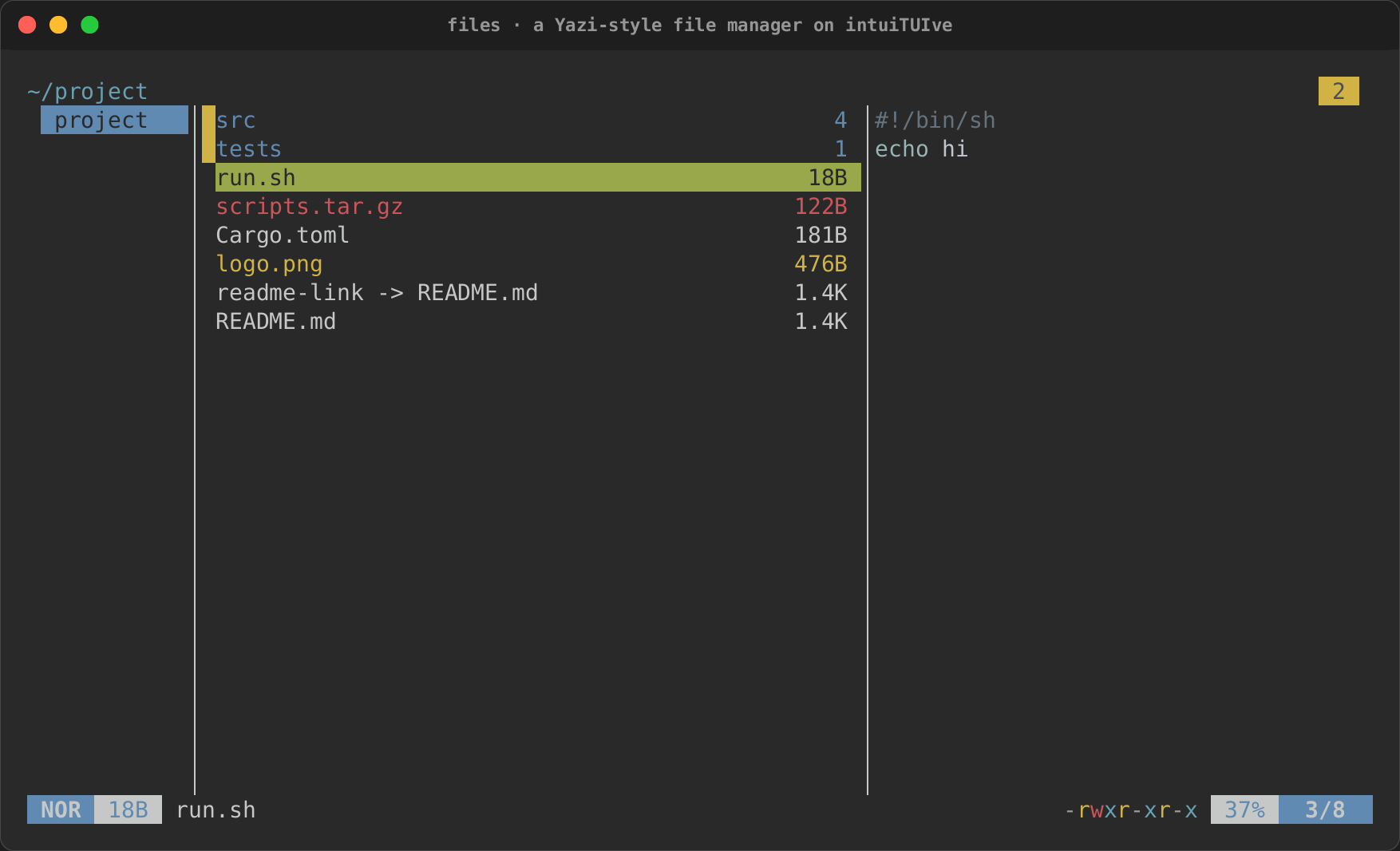
The files example is a Yazi clone on these components (cargo run -p
rs-rich-intuituive --example files --features files,watch,art):
| Tabs | A selection |
|---|---|
 |
 |
Levels, sparklines and big text
Nodes for a dashboard or an audio app, drawn by rs-rich-ext's charts
from closures that read signals. The meters, sparklines and spectra are
the viz plugin, off by default (they show one domain's data, levels
and spectra, so they are not in the core); big_text is art's, and
digits is in every build:
use intuituive::{big_text, meter_with, sparkline};
use rich_ext::chart::MeterScale;

row([
    meter_with(move || rms.get(), move || peak.get(), |m| {
        m.label("L").readout(true).scale(MeterScale::Decibels { floor: -60.0 })
    })
    .hold(Duration::from_secs(1))
    .flex(1),
    sparkline(move || history.get()).fixed(20),
])
big_text(move || format!("[accent]{:02}[/]:{:02}", minutes.get(), seconds.get()))
meter(level, peak)is aLevelMeter: a bar green to red with a mark at the peak;.hold(duration)adds a mark that keeps the highest peak for that long, as a DAW's meter does.meter_with(level, peak, configure)sets up its label, readout, decibel scale or orientation.sparkline(values)is aSparklineof what the closure returns, one cell a value (resampled when there are more): keep a history the node's width long.sparkline_withconfigures it.spectrogram(spectra)is aSpectrogram, a waterfall: the closure returns the spectra to show, oldest first (the core'srecent(spectrum, rows)keeps them), the newest drawn at the top.spectrogram_withsets its resolution, log scale, bounds and range.bar_spectrum(bands)is aBarSpectrum, cava's bars: a column per band from the bottom, in eighths of a cell. Feed itdsp::bandsof a spectrum through adsp::Falloff(orsmoothedper band);bar_spectrum_with(bands, |b| b.mirror(true).range(1.0))mirrors it, the low bands in the middle, anddescribed(|| BarSpectrum::stereo(l, r))shows two channels.big_text(markup)(theartfeature) draws markup in FIGlet letters with rs-rich-art's bundled font, each run in its style: a clock, a readout, a title.digits(markup)draws markup three rows tall in box-drawing glyphs, as Textual'sDigits, in every build (no font):0-9,A-G,+ - = / % ( ) : . , #and the space, any other character as it is. A clock, a counter or a note name where theartfeature is off.tuner(|| reading)(viz) is a tuner's readout of an rs-rich-extdsp::Tunerreading: the note indigits, a needle from flat to sharp with the note in the middle, and the frequency and cents, green within 5 cents, yellow within 15, red beyond;no signalwithout one.
Each says what it shows to a screen reader: the meter its level, peaks and band, the sparkline its range and trend, the spectrogram its range and where the newest spectrum peaks, the bar spectrum its loudest band, big text and digits their text.
For a scope's persistence (older traces fading, as a phosphor's), the
viz plugin's persistence(|| frames) draws rs-rich-ext's
chart::Persistence of the last frames (recent(trace, 8)) on a
Chart, each older one fainter, the newest on top, the axes spanning the
points; persistence_with(frames, |p| p.style("#33ff66").fade(0.2),
|chart| chart.x_axis(..)) sets up the trace and the chart.