Live logs and adaptations
Live logs
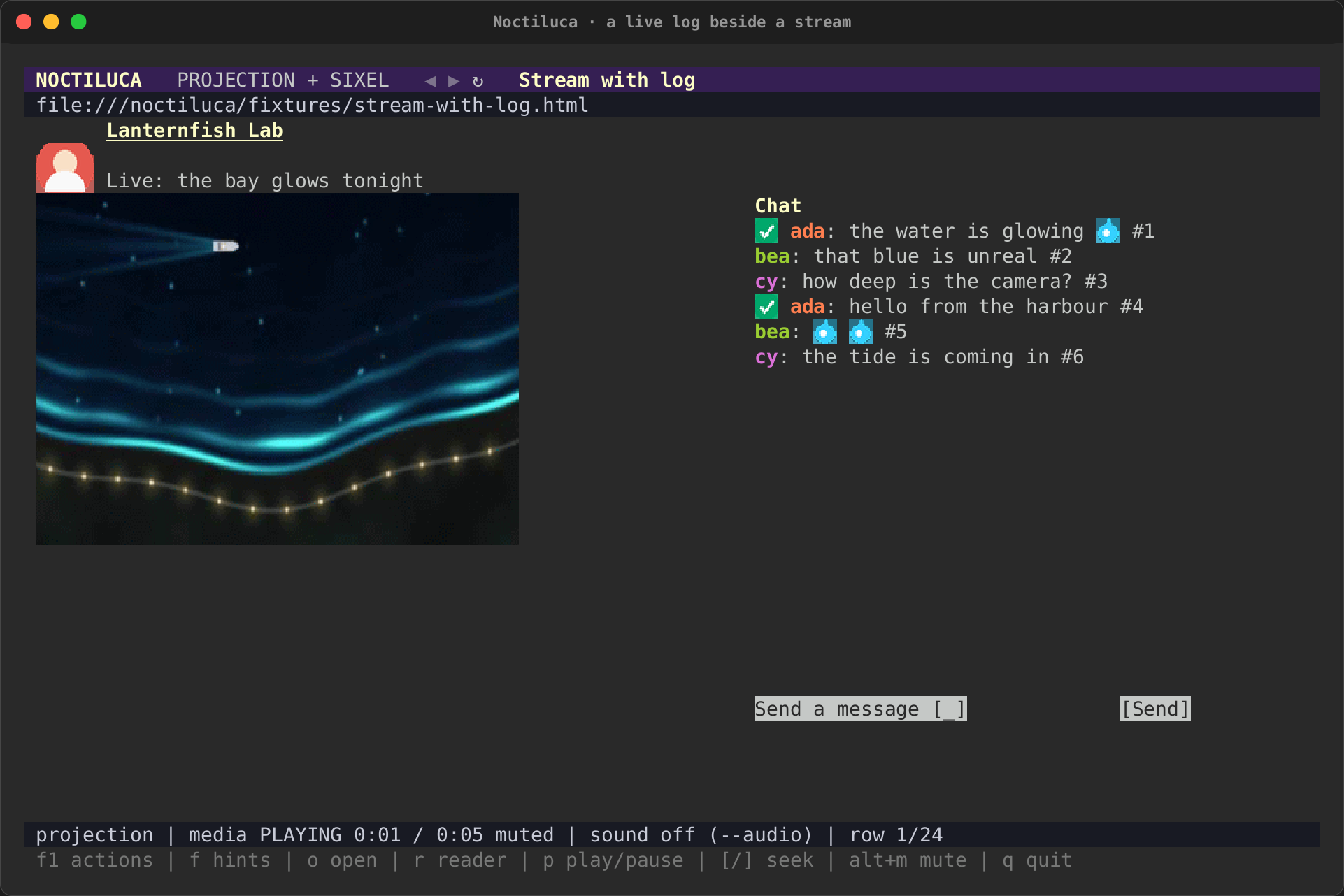
A chat beside a stream, a build log, a feed of events: any box the page
marks role=log or aria-live, or any scroll box the page keeps
appending rows to, is a live log. Noctiluca knows it from those
constructs alone, never from the site. New rows arrive within a fraction
of a second, and only they are read: the rest of the page is not read
again.
- The log shows its newest entries, in its own box, and follows them.
{scrolls it up. It then holds still while new entries come.}scrolls it down, and at its end it follows again.- Each entry keeps its colours (an author's name) and its small pictures (badges, emotes).
- A chat's input is an ordinary field:
fand its hint, type, Enter, then its Send button.
Terminal adaptations
A page is drawn as Chrome lays it out, with a few named rules that make it read better in cells. Each rule is about constructs, never about a site, and each can be switched off.
| Rule | What it does | Default |
|---|---|---|
decorative-images |
Drops spacers, tracking pixels, and icon-sized pictures marked decorative (alt="", aria-hidden) |
on |
inline-pictures |
Keeps small pictures (emotes, badges) in their line | on |
cap-pictures |
Caps a picture's height; what is under it moves up | on |
captions |
An Image: … line under a picture with alt text and no caption |
on |
icon-buttons |
Shows every button, icon-only ones too, as [ label ] from its name |
on |
snap-grids |
Snaps a grid's columns to the cells, with fewer columns when they would be too narrow | on |
collapse-nav |
On a narrow terminal (under 100 columns), a navigation or sidebar becomes one row of its links | on |
collapse-gaps |
Rows blank across the whole page (an empty ad slot, a hidden menu, a spacer) collapse to one blank row | on |
text-over-pictures |
Draws a picture of text (a heading or button image, a banner) as its text | off: it changes meaning |
live-tail |
A live log shows its newest entries unless you scrolled it up | on |
page-colors |
Keeps the page's saturated text colours (a red label, a chat name), readable on your terminal; greys follow your terminal's own colour. Off, the page's own colours: on a light terminal as the page wrote them, on white; on a dark one with their lightness turned over (dark text reads light, a red stays red), on black | on |
bandwidth |
Lowers a video's frame rate and picture tier when the terminal is short of bandwidth | on |
a(Alt+Ain the plain keys) toggles between the adapted and the faithful projection, with no rule at all.?(Alt+I), or going toabout:noctiluca, opens the about page: the version, the browser, the rules and which are on, and the codecs the browser says it plays.--adapt=-decorative-images,-collapse-navswitches rules off for one run, and--adapt=+text-over-picturesswitches one on.--no-adaptswitches every rule off.- In the config,
[adapt]sets each rule by its name: