Transforms
A transform rewrites what is about to be rendered: it drops lines, narrows a
data tree, masks secrets, or sorts rows. A Pipeline runs named transforms in
order, each stage getting the one before's output, and names the stage that
failed. The CLI's --redact, --select, --filter and --highlight are
built this way (see Filter and highlight
for the order they run in).
The examples come from
guide_transforms.rs:
It also has the test that checks the pipelines produce what the pictures
show (cargo test -p rs-rich-ext --example guide_transforms --features
jsonpath).
| Module | Works on | Transforms |
|---|---|---|
rich_ext::transform |
rich::Text |
KeepLines, HighlightMatches, any plugin TextTransform |
rich_ext::data::transform (jsonpath feature) |
a data Document |
Redact, Select, Filter, Highlight |
rich_ext::table::transform |
TableData |
Sort, Group |
rich_ext::diff::transform |
a parsed git Patch |
KeepFiles |
Anything that implements Transform<T> can be a stage, and
transform::from_fn turns a closure into one. A pipeline is itself a
Transform, so pipelines nest.
Text
KeepLines keeps the lines a regular expression matches (or, inverted, those
it does not), with their styles. HighlightMatches styles every match.
Pattern is the same regular expression compiled once and run on a plain
&str (Pattern::new(re)?.is_match(cell)): a filter over many rows or
cells, where building a Text for each would cost more than the match.
fn text(console: &Console) {
    let pipeline = Pipeline::new()
        .then("filter", KeepLines::new("WARN|ERROR").unwrap())
        .then(
            "highlight",
            HighlightMatches::new("ERROR", Style::parse("bold red").unwrap()).unwrap(),
        );
    let log = Text::new("INFO start\nWARN slow disk\nERROR failed\nINFO done");
    console.print(&pipeline.apply(log).unwrap());
}

Data
A Document is a parsed data tree plus what the transforms decided about
showing it: its label and the paths to highlight. document.explorer() draws
it.
fn data(console: &Console) {
    let node = parse(
        Format::Json,
        r#"{"servers": [{"host": "a", "port": 1, "token": "t1"},
                        {"host": "b", "port": 2, "token": "t2"}]}"#,
    )
    .unwrap();
    let pipeline = Pipeline::new()
        .then("redact", Redact(Redaction::secrets()))
        .then("select", Select::new("$.servers").unwrap())
        .then("filter", Filter::new("$[*]['host', 'token']").unwrap())
        .then(
            "highlight",
            Highlight::new("$[1]", Style::parse("reverse").unwrap()).unwrap(),
        );
    let document = pipeline
        .apply(Document::new(node).label("hosts.json"))
        .unwrap();
    console.print(&document.explorer());
}
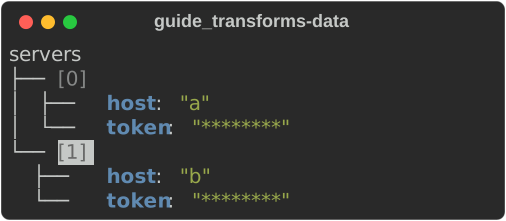
Selectnarrows to what a JSONPath selects. One hit becomes the root and labels it with its path; several become a map keyed by path.Filterkeeps what a JSONPath selects and the containers above it, so the tree keeps its shape. Sequences are renumbered.Highlightstyles the tree lines of what it selects (reverse video above).Redactmasks values with anyRedactor, such asRedaction::secrets().
Order matters. Here Redact runs first, so later stages never see a secret,
and Filter's path is relative to what Select chose.
Tables and patches
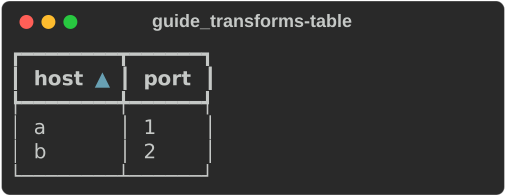
Sort and Group set a TableData's sort keys and grouping.
KeepFiles keeps the files of a patch whose path matches a pattern.
fn table(console: &Console) {
    let mut data = TableData::new([Column::new("host"), Column::new("port")]);
    data.extend([
        [Value::from("b"), Value::from(2)],
        [Value::from("a"), Value::from(1)],
    ]);
    let sorted = Pipeline::new()
        .then("sort", Sort(vec![SortKey::asc(0)]))
        .apply(data)
        .unwrap();
    console.print(&sorted.to_table(console));
}
Contribute a transform from a plugin
Text transforms are part of the plugin contract. A plugin implements
TextTransform (from rich_plugin_api, or rich_ext::plugin) and registers it
by name:
/// Masks every digit.
struct MaskDigits;

impl TextTransform for MaskDigits {
    fn transform(&self, text: Text) -> Result<Text, PluginError> {
        let masked: String = text
            .plain()
            .chars()
            .map(|c| if c.is_ascii_digit() { '#' } else { c })
            .collect();
        // Same byte length, so the styles still line up.
        let mut out = Text::new(masked);
        for span in text.spans() {
            out.stylize(span.style.clone(), span.start, span.end);
        }
        Ok(out)
    }
}

struct Masking;

impl Plugin for Masking {
    fn metadata(&self) -> PluginMetadata {
        PluginMetadata::new("masking", "Masking transforms", "1.0.0")
    }
    fn register(&self, registrar: &mut dyn PluginRegistrar) -> Result<(), PluginError> {
        registrar.transform("mask-digits", Arc::new(MaskDigits));
        Ok(())
    }
}
A host builds a pipeline of registered transforms by name:
fn registry(console: &Console) {
    let mut registry = ExtensionRegistry::new();
    registry.add_plugin(&Masking).unwrap();
    let pipeline = registry.text_pipeline(["mask-digits"]).unwrap();
    console.print(&pipeline.apply(Text::new("card 4242 4242")).unwrap());
}

ExtensionRegistry::register_transform adds one without a plugin, and
transform_names() lists them. rich doctor lists each plugin's transforms
with its other capabilities.
The text comes from the input, so treat it as untrusted: a transform may change styles freely, but text it adds must not carry terminal control sequences.