Progress and live displays¶
These types show work in progress, redrawing in place instead of scrolling:
| Type | Use it for |
|---|---|
track |
a progress bar over an iterator, in one line |
Progress |
several tasks with bars, percentages, speeds and times |
Live |
redrawing any renderable in place |
Status and Spinner |
"working on it" with an animation |
ProgressBar |
a bare bar to embed in your own layout |
The screenshots on this page are single frames rendered with a fixed clock; the code runs the real animation in a terminal.
The examples use these imports:
use rich::progress::TaskUpdate;
use rich::{
    BarColumn, ColumnOptions, Console, Justify, Live, Progress, ProgressBar, ProgressColumn,
    Spinner, SpinnerColumn, Status, Text, TextColumn, TimeRemainingColumn,
};
The one-liner: track¶
rich::track wraps an iterator and draws a live bar on stdout while you
consume it. The total comes from the iterator's exact size, if it has one.
fn track_iterator() {
    // The one-liner: a live bar on stdout for any iterator.
    let mut total = 0;
    for n in rich::track(0..40, "Summing") {
        std::thread::sleep(Duration::from_millis(10));
        total += n;
    }
    assert_eq!(total, 780);

    // The same through a running Progress, sharing its display with other tasks.
    let live = Progress::new().start(Console::new(), std::io::stdout(), 10.0);
    for _item in live.track(vec!["a", "b", "c"], None, "Items") {
        std::thread::sleep(Duration::from_millis(50));
    }
    live.stop();
}
The display stops when the iterator is exhausted or dropped. The second half
shows LiveProgress::track, which adds a task to a display you already have
running.
Progress¶
A Progress
holds a list of tasks and a list of columns. It is a renderable: printing it
draws one frame. To animate it, start it as a live display.
Running it live¶
fn live_progress() {
    let progress = Progress::new().transient(false).expand(false);
    // `start` moves the progress onto a refresh thread: 10 redraws a second.
    let live = progress.start(Console::new(), std::io::stdout(), 10.0);

    let task = live.add_task("Working", 50.0, 0.0);
    for _ in 0..50 {
        std::thread::sleep(Duration::from_millis(20));
        live.advance(task, 1.0);
    }
    // Draw the final frame, join the thread, get the Progress back.
    let (progress, _stdout) = live.stop();
    assert!(progress.finished());
}
start(console, writer, refresh_per_second)moves the progress to a background thread that redraws it on a timer, and returns aLiveProgresshandle.writeris usuallystd::io::stdout(); anyWrite + Sendworks.- Through the handle:
add_task,advance,update,reset,refresh,track,wrap_read(count bytes as they are read),open(a file, sized from its metadata) andwith(|progress| …)for anything else. stop()draws the final frame, joins the thread and gives back theProgressand the writer. Dropping the handle stops it too..transient(true)erases the display when it stops;.disable(true)shows nothing while tasks still update.
Tasks¶
fn default_columns(console: &Console) {
    let (now, clock) = fixed_clock();
    // Description, bar, percentage and time remaining — upstream's defaults.
    let mut progress = Progress::new().clock(clock);

    let download = progress.add_task("Downloading", 100.0, 0.0);
    let extract = progress.add_task("Extracting", 100.0, 0.0);
    let verify = progress.add_task("Verifying", None, 0.0); // indeterminate

    *now.lock().unwrap() = 5.0;
    progress.advance(download, 30.0);
    *now.lock().unwrap() = 10.0;
    progress.advance(download, 34.0);
    progress.update(extract, TaskUpdate::default().completed(100.0));
    progress.advance(verify, 1.0);

    console.print(&progress);
}

| Method | Does |
|---|---|
add_task(description, total, completed) |
a started task; returns its TaskId. total is f64 or None (indeterminate: the bar pulses) |
add_unstarted_task(…) |
a task whose clock has not started (start_task starts it) |
add_task_with(…, start, fields) |
with custom fields for format strings |
advance(id, amount) |
add to completed and record a speed sample |
update(id, TaskUpdate) |
change total, completed, advance, description, visible, fields |
reset(id, start, total, completed) |
start over |
start_task, stop_task, remove_task |
lifecycle |
task(id), tasks(), finished() |
read back: each Task has percentage(), speed(), elapsed(), time_remaining()… |
TaskUpdate::default().completed(100.0).description("done") builds an
update; .refresh(true) makes a running display redraw immediately.
Columns¶
Progress::new() uses upstream's default columns. Replace them with
.columns(vec![…]):
fn all_columns(console: &Console) {
    let (now, clock) = fixed_clock();
    let mut progress = Progress::new().clock(clock).columns(vec![
        ProgressColumn::spinner(),
        ProgressColumn::Description,
        ProgressColumn::Bar,
        ProgressColumn::Download,
        ProgressColumn::TransferSpeed,
        ProgressColumn::TimeElapsed,
        ProgressColumn::time_remaining(),
    ]);
    let iso = progress.add_task("ubuntu.iso", 4_700_000_000.0, 0.0);
    let deb = progress.add_task("rich.deb", 18_000_000.0, 0.0);

    *now.lock().unwrap() = 4.0;
    progress.advance(iso, 400_000_000.0);
    progress.advance(deb, 18_000_000.0);
    *now.lock().unwrap() = 8.0;
    progress.advance(iso, 500_000_000.0);

    console.print(&progress);
}

ProgressColumn |
Shows |
|---|---|
Description |
the task description (markup) |
Bar, BarWith(BarColumn) |
the bar; BarColumn sets width and styles |
Percentage |
64% |
MofN |
9/40 |
TaskProgress { show_speed } |
percentage, or speed for indeterminate tasks |
Download, BinaryDownload |
0.9/4.7 GB (decimal or binary units) |
TransferSpeed |
125.0 MB/s |
FileSize, TotalFileSize |
completed or total as a size |
TimeElapsed |
0:00:08 |
TimeRemaining(..), time_remaining() |
estimated time left; TimeRemainingColumn::new(compact, elapsed_when_finished) |
Spinner(..), spinner() |
a spinner, replaced by finished_text when the task completes |
Text(String, Style) |
fixed text |
TextFormat(TextColumn) |
a format string over the task |
Renderable(Arc<…>) |
any renderable, the same on every row |
WithTableColumn(..) / .with_table_column(ColumnOptions) |
set the grid column's width, ratio or justify |
Format strings and custom fields¶
TextColumn expands a Python-style format string against the task, as
upstream does: {task.description}, {task.completed},
{task.percentage:>3.0f}, {task.fields[name]}. The result is markup unless
you call .markup(false).
fn custom_columns(console: &Console) {
    let (now, clock) = fixed_clock();
    let mut progress = Progress::new().clock(clock).columns(vec![
        // Format strings see the task, like upstream's "{task.description}".
        ProgressColumn::TextFormat(TextColumn::new("[bold blue]{task.fields[stage]}")),
        ProgressColumn::Description,
        ProgressColumn::BarWith(
            BarColumn::new()
                .bar_width(Some(20))
                .complete_style("magenta")
                .finished_style("bold green"),
        ),
        ProgressColumn::MofN,
        ProgressColumn::TextFormat(
            TextColumn::new("{task.percentage:>3.0f}%").justify(Justify::Right),
        ),
        ProgressColumn::TimeRemaining(TimeRemainingColumn::new(true, true)),
        ProgressColumn::Spinner(SpinnerColumn::new("line", "✓")).with_table_column(ColumnOptions {
            width: Some(2),
            ..ColumnOptions::default()
        }),
    ]);

    let fields = |stage: &str| [("stage", stage.to_string())];
    let build = progress.add_task_with("compile", 120.0, 0.0, true, fields("1/2"));
    let test = progress.add_task_with("test", 40.0, 0.0, true, fields("2/2"));

    *now.lock().unwrap() = 30.0;
    progress.advance(build, 120.0);
    progress.update(test, TaskUpdate::default().advance(9.0));

    console.print(&progress);
}

Deterministic time¶
Time-based columns (speed, elapsed, remaining, spinners) read the progress
clock. Replace it with .clock(f) — a function returning seconds — to get the
same frame every run, which is how the screenshots here are made and how you
should test progress output:
/// A clock you control. Time-based columns read it, so frames are reproducible.
fn fixed_clock() -> (Arc<Mutex<f64>>, impl Fn() -> f64 + Send + Sync + 'static) {
    let now = Arc::new(Mutex::new(0.0_f64));
    let reader = now.clone();
    (now, move || *reader.lock().unwrap())
}
Live¶
Live redraws a
renderable in place: each update moves the cursor back over the previous frame
and draws the new one. It has two modes.
Manual: you call update (or refresh) and each call redraws.
fn live_display() {
    // Live redraws a renderable in place. Manual mode: you call update/refresh.
    let spinner = Spinner::new("dots").text("counting…");
    let mut live = Live::new(Box::new(Text::new("")), Console::new(), std::io::stdout());
    live.start();
    let started = Instant::now();
    for n in 0..20 {
        let frame = spinner.render(started.elapsed().as_secs_f64());
        live.update(Box::new(frame.append_text(&Text::new(format!(" {n}")))));
        std::thread::sleep(Duration::from_millis(50));
    }
    live.stop(); // leaves the last frame on screen
}
Auto-refresh: Live::spawn runs the display on a background thread that
redraws on a timer; update sends it a new renderable. The renderable, the
console and the writer move to the thread, so they must be Send.
fn auto_live() {
    // Auto-refresh mode: a background thread redraws; you send new renderables.
    let live = Live::spawn(
        Box::new(Text::new("starting")),
        Console::new(),
        std::io::stdout(),
        20.0,
    );
    let status = Status::new("Downloading…");
    let started = Instant::now();
    while started.elapsed() < Duration::from_millis(800) {
        // Spinners animate by rendering at the current time.
        let frame = status.renderable().render(started.elapsed().as_secs_f64());
        live.update(Box::new(frame));
        std::thread::sleep(Duration::from_millis(50));
    }
    live.update(Box::new(Text::styled("✓ downloaded", "green")));
    let _stdout = live.stop();
}
Live::new(renderable, console, writer);.transient(true)erases the display onstop.start()hides the cursor and draws the first frame;stop()draws the last frame and restores the cursor.- For an auto-refreshing display,
Live::spawn_with(…, transient)andAutoLive'supdate,refresh,refresh_waitandstop.
One live display at a time
A live display owns the cursor. Anything else printed to the same terminal while it runs — including from another thread — lands in the middle of its redraws.
Nested displays
Displays given clones of one console share its live stack, as upstream's
displays on one console do. A display started while another runs is
nested: the first display draws it below its own renderable, a refresh of
the nested display redraws the first, and when the nested display stops
it prints its renderable above the first, unless it is transient. This
works for Live, AutoLive, LiveProgress and LiveStatus, from any
thread. Give nested displays writers to the same terminal.
When stdout is not a terminal
Live draws nothing while running, and stop writes the final frame once,
without a trailing newline (upstream's behaviour for files). Print a
newline after stop if more output follows. LiveProgress::stop does this
for you.
Status and spinners¶
A Spinner
is an animation of frames; render(seconds) returns the frame for that
moment as a Text. The first call fixes the start of the animation, so keep
one spinner for the whole animation.
fn spinners(console: &Console) {
    for name in [
        "dots",
        "line",
        "arc",
        "bouncingBar",
        "moon",
        "earth",
        "clock",
    ] {
        let spinner = Spinner::new(name).style("green");
        spinner.render(0.0); // the first render starts the animation clock
        // Six frames, 0.1 s apart, then the name.
        let mut row = Text::new("");
        for step in 0..6 {
            row = row.append_text(&spinner.render(step as f64 * 0.1));
            row.append("  ", None);
        }
        row.append(name, Some("dim".into()));
        console.print(&row);
    }
}
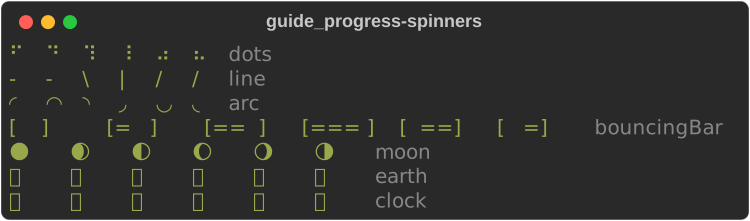
Spinner::new(name) accepts every upstream spinner name (dots, dots2 …
dots12, line, arc, bouncingBar, bouncingBall, moon, earth,
clock, material, aesthetic and more); an unknown name falls back to
dots. .text(markup) adds text after the frame, .style(s) styles the
frame, .speed(x) scales the rate.
A Status is
a spinner plus a message, styled status.spinner:
fn status(console: &Console) {
    let mut status = Status::new("Fetching [bold]index[/]…").spinner("dots");
    console.print(&status.renderable().render(0.0));

    // Change the message, the spinner, its style or speed.
    status.update(
        Some("Unpacking…"),
        Some("line"),
        Some("yellow".into()),
        None,
    );
    console.print(&status.renderable().render(0.0));
}

A status in a Live animates on its own. The auto-refresh example above
renders status.renderable().render(elapsed) instead, to choose each frame.
Spinners read the console clock
As upstream's does, a Spinner or Status renders the frame for
console.get_time(), so one placed directly in a Live animates on
every refresh. For reproducible output, such as tests or screenshots, pin
the clock with ConsoleBuilder::get_time, or render a given moment with
render(elapsed_seconds) as the examples on this page do.
ProgressBar¶
ProgressBar
is the bar on its own — for a table cell, a panel, or your own renderable.
fn bars(console: &Console) {
    // The bar on its own, as a renderable.
    console.print(&ProgressBar::new(100.0, 25.0).width(40));
    console.print(
        &ProgressBar::new(100.0, 70.0)
            .width(40)
            .complete_style("yellow"),
    );
    console.print(&ProgressBar::new(100.0, 100.0).width(40));
    // No total: a pulsing bar. `animation_time` picks the frame.
    console.print(&ProgressBar::indeterminate().width(40).animation_time(0.4));
}

ProgressBar::new(total, completed), .width(n) (default: the full width),
.style, .complete_style, .finished_style, .pulse_style, .pulse(true)
and ProgressBar::indeterminate(); .animation_time(t) picks the pulse frame.
Differences from upstream¶
Console::status(status)iswith console.status(...): the display starts at once, on a copy of the console, andLiveStatus::stopends it.- A
Liveowns its console, so what upstream prints through the console while a display runs goes through the display here:Live::printforconsole.print,Live::logforconsole.log, and on a running progressLiveProgress::printandLiveProgress::logforprogress.printandprogress.log. A log names the code that called it, with its time. - The stdout and stderr redirect is a writer (
Live::stdout,LiveProgress::stdout), not the process's own stdout. See DIVERGENCES §17.
See also¶
- Layout — build a dashboard to redraw with
Live - Tutorial: progress and live output
- API:
progress·track·Live·Status·Spinner·ProgressBar