 Interactive components (rs-rich-interact)
rs-rich-interact (rich_interact) is the layer between printing and a full
TUI framework: small interactive components that take the terminal, get an
answer, and give the terminal back. rich has no interactive components, so
this crate is an rs-rich addition, not a port.
Components
A component is a state machine. It handles one Event (a key, the mouse, a
resize, a paste, a tick) and returns a Flow:
Continue;Done(value);Cancel;Handoff(command), to lend the terminal to another program.
It renders its state as a View: lines of segments, plus where the caret
goes.
use rich_interact::{Component, Context, Event, Flow, KeyCode, View};

/// Counts Up presses; Enter returns the count, Escape cancels.
struct Counter(u32);

impl Component for Counter {
    type Output = u32;

    fn handle(&mut self, event: &Event, _: &Context<'_>) -> Flow<u32> {
        match event.key().map(|key| key.code) {
            Some(KeyCode::Up) => self.0 += 1,
            Some(KeyCode::Enter) => return Flow::Done(self.0),
            Some(KeyCode::Escape) => return Flow::Cancel,
            _ => {}
        }
        Flow::Continue
    }

    fn render(&self, context: &Context<'_>) -> View {
        View::new(context.markup(&format!("count: [bold]{}[/]", self.0)))
    }
}
Context carries the console to render with and the space available.
context.lines(&renderable) renders any rich renderable (a Table, a
Panel, Markdown) into lines.
A component can also implement start, which runs once before its first
paint and gets the same Context. Use it for work that needs the terminal's
size, such as rendering content at the width. It can also finish the
component straight away, without waiting for a key. The Pager renders its
content there, and a Form with no fields returns from it.
Composing components
Containers are components too: Column, Row and Stack lay children
out, Split puts two side by side with a draggable border, Tabs keeps
each tab's state, and Layers opens modal and popover layers over a base.
Keys go to the focused child and bubble up when it does not use them; Tab
moves focus. The pieces the built-ins are made of are public in kit, and
every key is declared in a rebindable keymap. See
Building your own components.
Ready-made components
Each of these is a Component, so it runs under run, in an event loop and
headless. Each also has a line-based form for when there is no terminal. All
are styled by one Theme. When finished, each collapses to a one-line answer
(? Open › src/main.rs), so a sequence of prompts reads like a transcript.
The screenshots come from the
components tape, which runs
--example components.
Select and MultiSelect
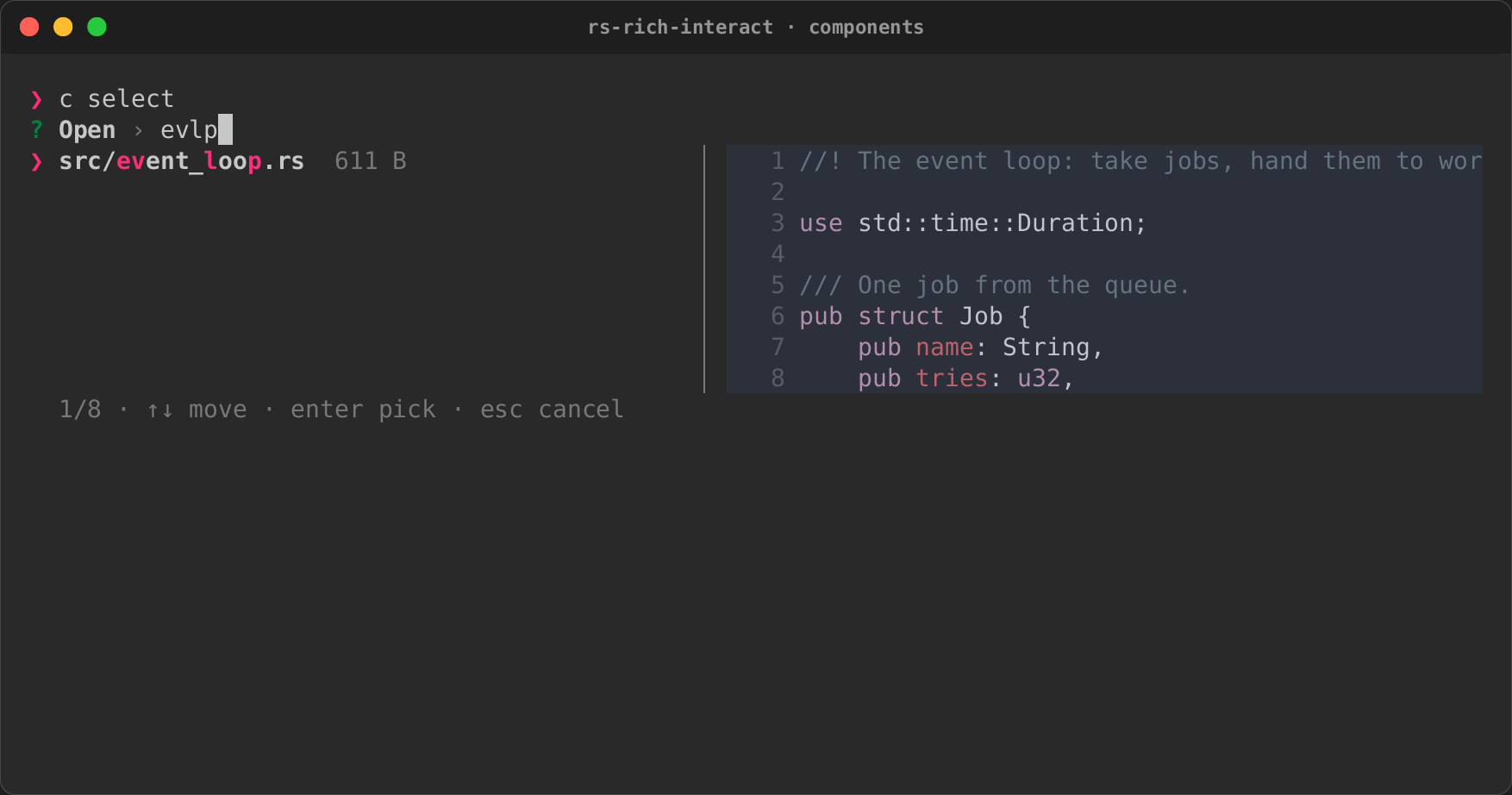
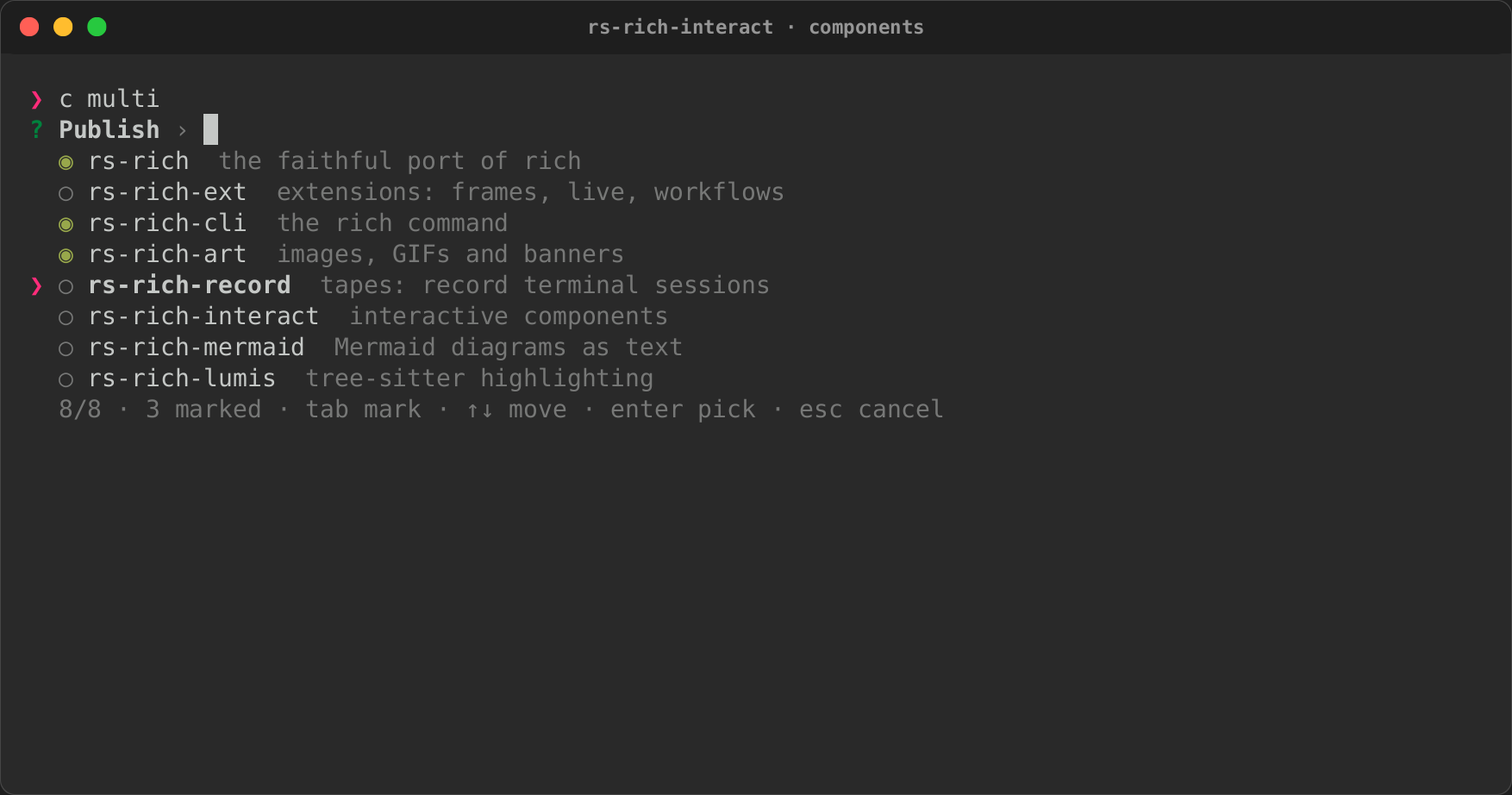
A fuzzy picker over items:
- typing filters, with smart case, and highlights what matched;
- the arrows, PageUp and PageDown move, and Enter picks;
MultiSelectmarks with Tab (Ctrl+A marks every match) and returns what was marked;- an item's actions pick it by their key, and
select.action()says which one was used.
When the focused item has a preview, a pane shows it: beside the list from 72
columns, below it on a narrower terminal. The preview can be text, markup, or
any renderable, such as a Syntax.
use rich_interact::{run, Item, Preview, RunOptions, Select};

let items = paths.into_iter().map(|path| {
    let preview = Preview::Renderable(Arc::new(Syntax::new(read(&path), "rust")));
    Item::new(path.clone(), path.display().to_string()).preview(preview)
});
let picked = run(Select::new("Open", items), &RunOptions::default())?;
Input
One line, which edits like a shell's: the arrows, Home and End, Ctrl+A, Ctrl+E, Ctrl+U and Ctrl+W.
- Placeholder, default and masking. A placeholder shows while the line is
empty;
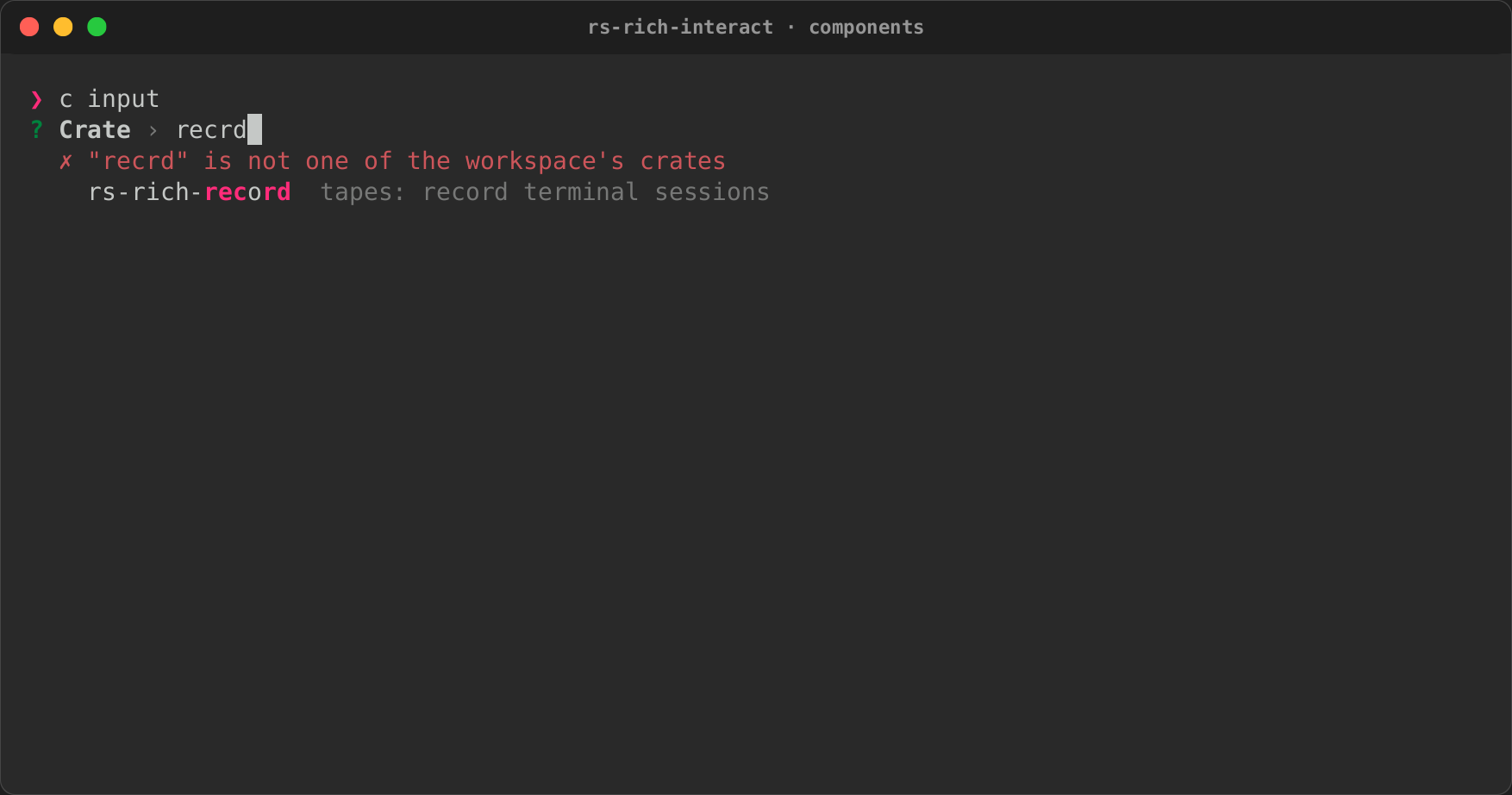
defaultanswers an empty line;Input::maskedhides what is typed, for passwords and tokens, and shows a default only as(default set). Without a terminal session but with stdin a terminal (token=$(app)), it reads its line with echo off, as Python'sgetpassdoes. - Validation. A validator's message shows under the line, and Enter waits until it passes.
- History. Up and Down walk earlier answers.
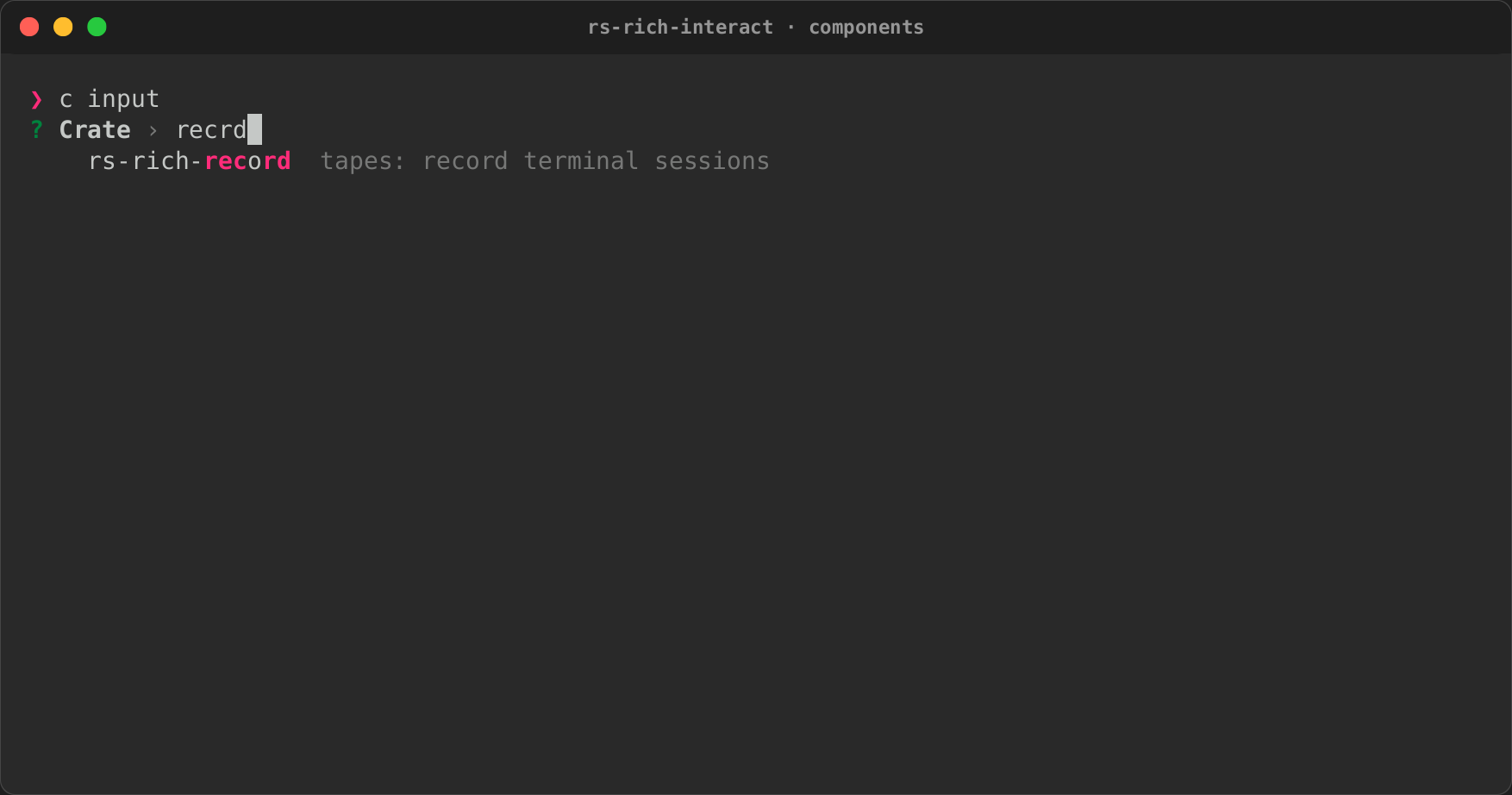
- Suggestions. They come from a fixed list, filtered as you type, or from a
providerthat runs on a background thread, so a slow lookup (a registry, a file system) never stalls typing. The input keeps one such thread. It runs one lookup at a time and, when free, takes only the latest text, so fast typing never piles up lookups. Tab accepts one. Suggestions work the same inside aFormfield.
let input = Input::new("Crate")
    .suggestions(["serde", "serde_json", "tokio"])
    .validate(|text| if text.is_empty() { Err("required".into()) } else { Ok(()) });
Confirm
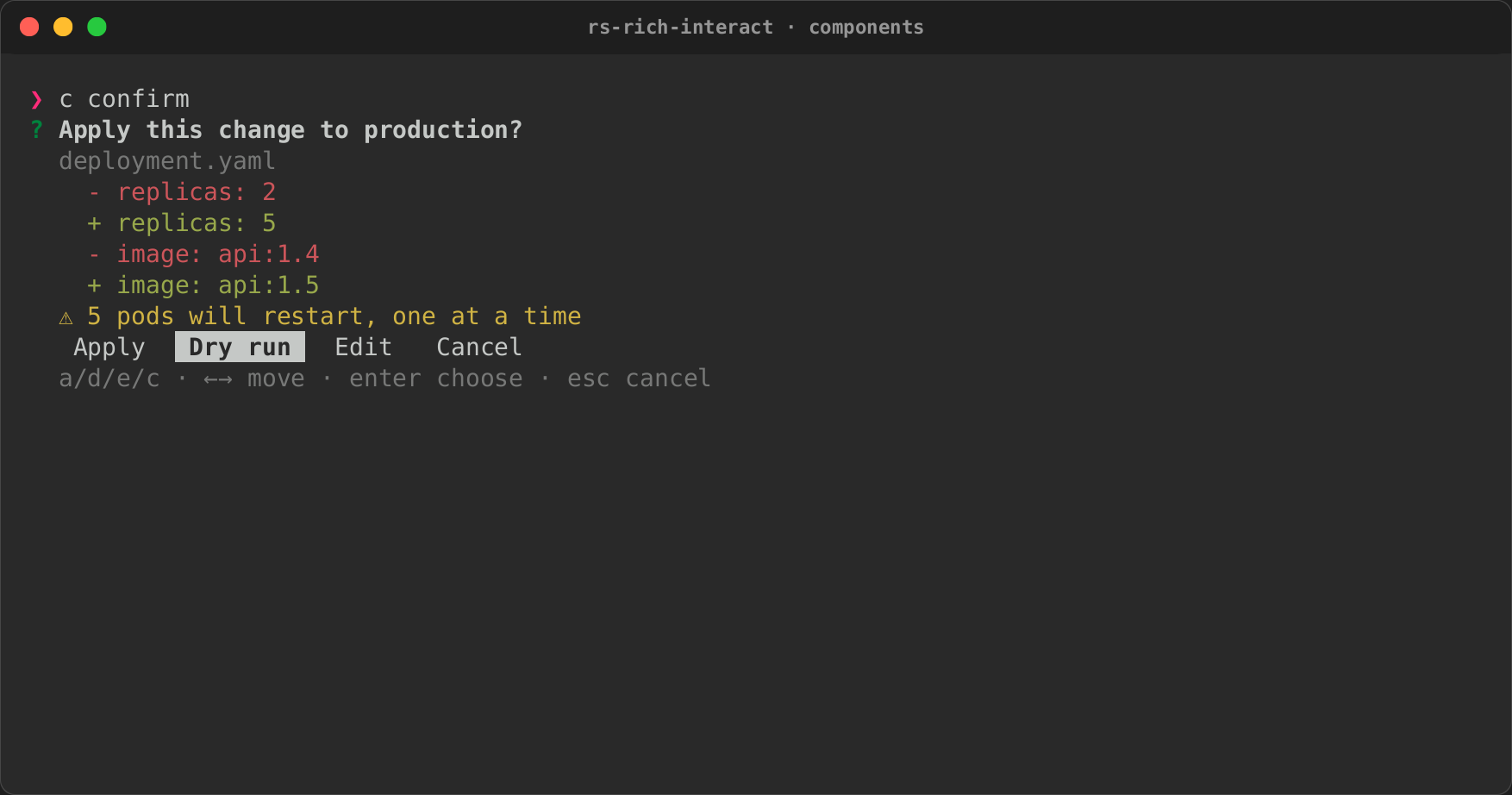
A confirmation sheet: what will happen, then a choice.
- Body: any renderables (a diff, a table of affected files), in a scrollable viewport.
- Warnings: listed under the body.
- Choices: as many as needed, each with a key:
Apply,Dry run,Edit,Cancel.Confirm::newalone is yes or no.
let sheet = Confirm::new("Apply this change to production?")
    .body(diff)
    .warning("5 pods will restart, one at a time")
    .choices([
        Choice::new("apply", "Apply", 'a'),
        Choice::new("dry-run", "Dry run", 'd'),
    ])
    .default("dry-run");
Form
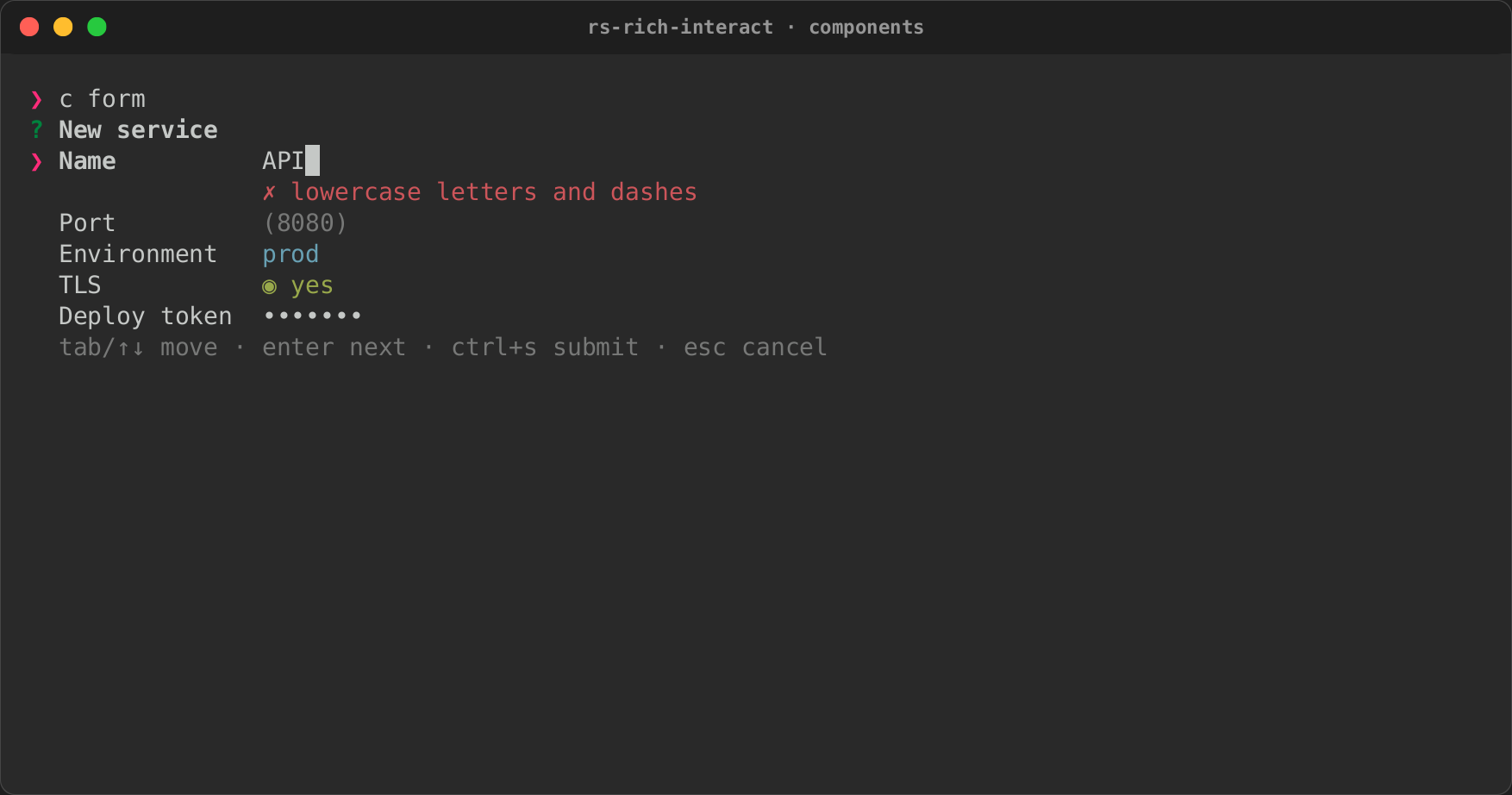
Several fields answered together, in the manner of Charm's Huh.
- Field kinds: text (any configured
Input), masked text for passwords (Form::masked), a choice among options (choice), several options at once (multi), a file or directory picked with aFilePicker(file), yes/no toggles (toggle), and notes (note). A note is read-only text: focus passes over it and it has no answer. - Descriptions:
describe(text)puts a dim line of help under the field just added. - Multi-select: Left and Right move between the options and Space (or
x) chooses one.chosen([..])chooses some to begin with, andlimit(n)stops atn. The answer is aValue::List, in the options' order. - A file field: Space (or a click) opens the picker under the field,
with its root, mode, extensions and jail. Picking closes it, and Escape
closes it with no change. With nothing picked, the picker's
defaultanswers; without one, the field fails with "nothing picked yet". - A dynamic choice:
dynamic_choice(name, label, options)takes a function from the answers above the field to its options. It runs again after every key, so the options follow the earlier answers. The option chosen stays chosen while it is still offered. - Moving: Tab and the arrows move between fields; Enter moves on and, on the last field, submits.
- Errors: submitting checks every field, puts each failure's message under its field, and focuses the first one.
The result, Answers, gives each value by field name: text, flag,
list and path.
let form = Form::new("New service")
    .input("name", Input::new("Name").validate(lowercase))
    .input("port", Input::new("Port").default("8080"))
    .choice("env", "Environment", ["dev", "staging", "prod"])
    .toggle("tls", "TLS", true);
let answers = run(form, &options)?.value();
Pages
group(title) starts a new page. The fields added after it are shown
together, and the pages one at a time, with a Paginator under them. Before
any field, group titles the first page.
- Moving between pages: Enter on a page's last field, or Page Down, checks that page's fields. The next page shows only when they all pass; otherwise each error is under its field. Page Up goes back without a check. With the mouse on, a click on a page's dot goes there, through the same checks.
- Submitting: Ctrl+S checks every page. When a field fails on another page, that page shows with the field focused.
- The indicator: dots by default;
page_style(PaginatorStyle::Fraction)shows1/2instead.
let form = Form::new("Deploy a service")
    .group("The service")
    .note("Two pages", "Enter on a page's last field checks the page and moves on.")
    .input("name", Input::new("Name"))
    .describe("lower case, like api")
    .multi("features", "Features", ["tls", "metrics", "logs"])
    .chosen(["tls"])
    .group("Where it runs")
    .choice("cloud", "Cloud", ["aws", "gcp"])
    .dynamic_choice("region", "Region", |answers| match answers.text("cloud") {
        Some("gcp") => vec!["us-central1".into(), "europe-west1".into()],
        _ => vec!["us-east-1".into(), "eu-west-1".into()],
    });
The first page, after typing a name and choosing a second feature, and the second page once GCP is chosen (from the headless renderer):
? Deploy a service
  The service
  Two pages
    Enter on a page's last field checks the page and moves on.
  Name      api
            lower case, like api
❯ Features  ◉ tls  ◉ metrics  ○ logs
  ● ○
  tab/↑↓ move · enter next page · pgup/pgdn page · ctrl+s submit · esc cancel

? Deploy a service
  Where it runs
  Cloud     gcp
❯ Region    ◂ us-central1 ▸
  ○ ●
  tab/↑↓ move · enter submit · pgup/pgdn page · ctrl+s submit · esc cancel
Without a terminal, a form asks a line a field. Each page's title comes
before its fields, and a note's text where it is. A multi-select takes its
options comma-separated, and a file field a path (empty for the picker's
default). The huh_form example (cargo run -p rs-rich-interact --example
huh_form) runs the form above with a file field.
Pager
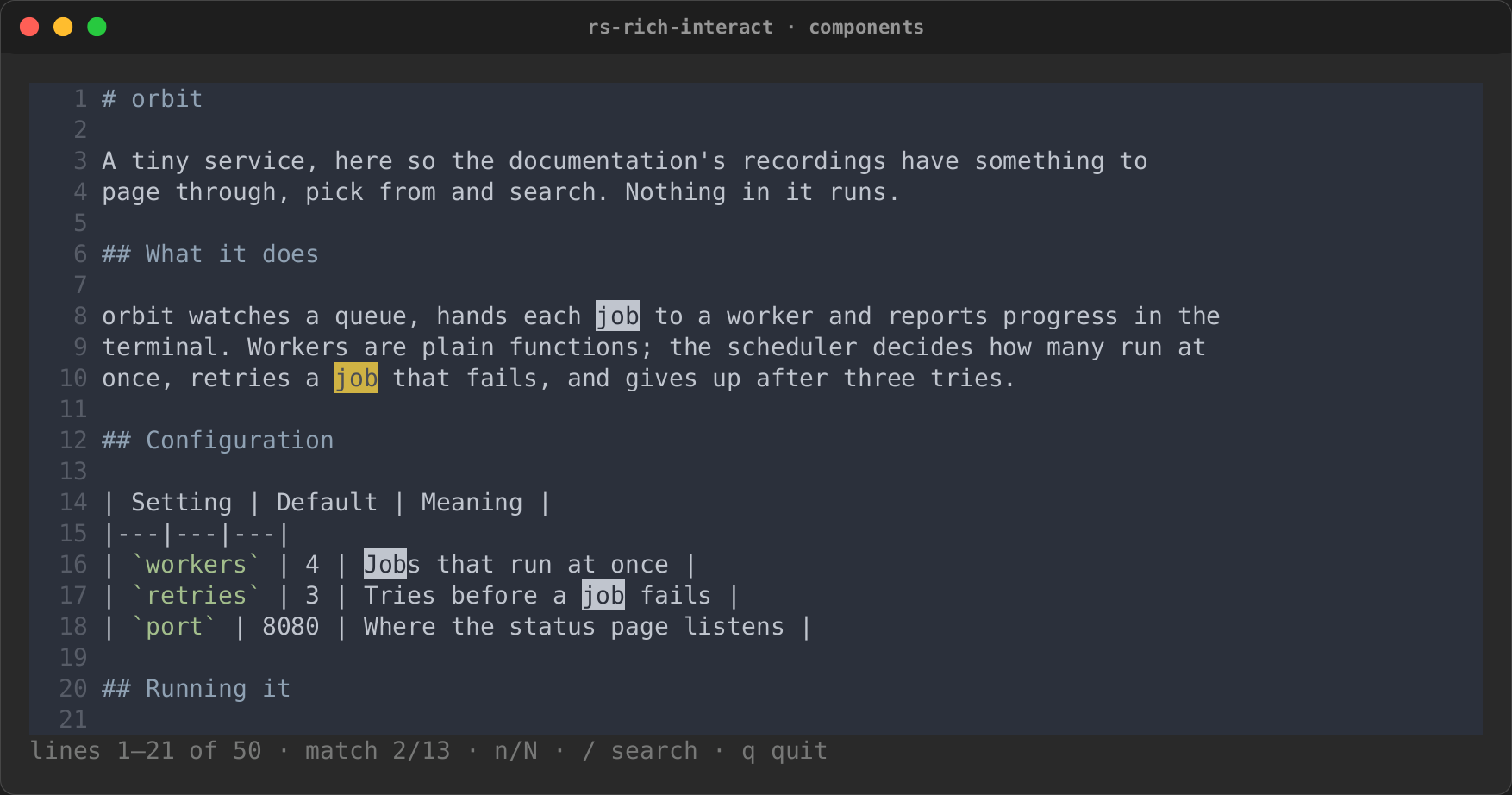
Pages any renderable at the terminal's width, and renders it again after a resize.
- Moving: it scrolls like the viewport;
qor Escape closes it. - Searching:
/starts a search. Matches are marked in place, the current one in yellow, andnandNjump between them. - A sticky header:
sticky_table_header(true)keeps a table's header on top while its rows scroll, when the content starts with a table: its title, top edge and header rows, down to the line under them, found again at each width (table_header_rows).sticky_header(n)keeps the firstnlines instead.rich pagerdoes the first by default. On a page too short for them all, the last that fit stay (a table's column names) and the ones before scroll away first. A table whose rows are divided by lines drawn like the one under a header (show_linesinSQUARE, or a table without a header) has no header found: pinning a row would be worse than pinning nothing. - Without a terminal: it writes the content out in full.
Paginator
Which page of several is showing, as dots (● ○ ○) or a fraction (1/3),
like Bubbles' paginator. It is state with a one-line indicator, to embed
wherever a list or a form needs pages (a Form's groups use it), and a
component of its own.
- On its own:
Paginator::over(title, items, per_page)shows a page of items above the indicator; Enter returns the page shown (from 0), and Escape orqcancels. - Keys: Left and Right (and
h,l, Page Up, Page Down) move a page; Home and End go to the ends. Each is rebindable (paginator_keymap). - The mouse: with
with_mouse(true), a click on a dot goes to its page and the wheel moves a page. - Looks:
style(PaginatorStyle::Fraction)showsn/m;dots(active, inactive)changes the dots. Dots that do not fit the width show as a fraction. The current dot is in the theme'schecked_style, and the others inhint. - Embedded:
next_page,previous_page,set_page,set_pages,bounds(len, per_page)(the slice of a list on the current page),handle_key(key)for a container's keys, andindicator(width)andpage_at(width, column)to draw it and to place a click. - Without a terminal: it lists every item and asks for a page number.
TextArea
Several lines of text, for rich write.
- Editing: Enter starts a line; the arrows, Home/End, Ctrl+A/E, Ctrl+U/K/W, Backspace and Delete edit, the caret moving by grapheme cluster. Long lines wrap one cell short of the edge, and the text scrolls to keep the caret in view.
- Finishing: Ctrl+D submits (
submit_keychooses another key); Escape cancels. - Limits:
char_limitcounts line breaks too, and cuts pasted text. A paste keeps its line breaks; other terminal controls are dropped. - Without a terminal: every line of input up to its end is the text.
FilePicker
Browses from a root, for rich file. The listing is a Select, so typing
filters it, and the focused entry is previewed beside it: a text file's
first 200 lines, highlighted by extension; a directory's entries; or why
there is nothing to show (a binary file, a FIFO, which is never opened).
- Moving: Enter opens a directory or picks a file, Right opens, Left
and Backspace (with nothing typed) go up to
.., Ctrl+T shows hidden files. A directory opens with its first entry focused. - What may be picked:
FileMode::File(the default),Directory(files are not listed) orBoth;extensionskeeps only some files. - A root jail: with
jail(true), nothing outside the root is listed, opened or read:..stops at the root and a symbolic link out of it is left out. - Names that are not UTF-8 show with each such byte as
\xNN, as therichcommand spells such paths; the path returned is the real one. - Without a terminal: the
defaultpath, or no answer.
ColorPicker
A colour, for rich color: rich's named colours, filtered as you type; a
colour typed as #rrggbb, rgb(r,g,b) or color(N), offered first; or
the 256-colour palette, a 16 by 16 grid on Tab. A swatch shows the focused
colour with its hex, RGB and names. The answer is a colour string rich
parses, as ColorFormat::Hex, Name or Rgb says.
AssetPicker
An emoji, a box style or a spinner, for rich asset, with a preview (the
emoji, a small table drawn in the style, the spinner's frames). The lists
come from core's public API: the emoji names are those of core's table,
each resolved through rich::emoji::replace. With the micro feature,
AssetKind::Micro (or AssetPicker::micro(prompt, ®istry)) lists micro
assets, each drawn in its row and magnified in the preview, and answers
with the asset's name. Run it with
run_with_graphics(picker, &options, graphics.source()) (a
rich_micro::MicroGraphics) to draw the rows' assets as images where the
terminal can; run shows their emoji.
TableSelect and TreeSelect
Pick a table's row (columns aligned under their headings, filtered by any
cell) or a tree's node (guides drawn, Left and Right fold and unfold,
searching finds nodes inside folded ones). Both are a Select underneath.
A table copies its row or a cell as text, CSV or JSON, and scrolls across
when it is wider than the list (scroll_x, freeze_columns). A tree keeps
each match's ancestors, shows breadcrumbs and copies a node's path: see
Explorers, copying and live lists.
DataExplorer and ThemePicker
DataExplorer (the data feature) explores a JSON, YAML, TOML, XML, INI
or dotenv document as a tree, with breadcrumbs, search and copy, and is what
rich explore runs. ThemePicker previews a sample in each theme as you
move. Both are in Explorers, copying and live lists.
Reorder
Put a list in order (#720). Enter returns the items' values in their new
order; reorder.order() has it as the items' first indices.
| Keys | What they do |
|---|---|
↑ ↓ (or k j), PgUp PgDn, Home End |
Move the focus |
Alt+↑ ↓ or Ctrl+↑ ↓, and K J |
Move the focused item one place |
| Alt+Home End or Ctrl+Home End | Move it to the top or the bottom |
| Space | Grab it: the arrows, PgUp PgDn and Home End then carry it; Space drops it, Esc puts it back |
| Ctrl+R | Restore the first order |
| Enter, Esc | Done; cancel |
Alt and Ctrl with an arrow need a terminal that reports modifiers on the
arrows. Most do, in xterm's encoding, and every terminal with the kitty
keyboard protocol does; macOS Terminal takes Ctrl+arrows for Mission
Control by default. K and J and grabbing with Space work in any terminal.
The carried item is marked ↕ as well as reversed, so it shows without
colour. With the mouse on, a press focuses a row and a drag carries it,
scrolling past the top or the bottom row; the wheel is ↑ and ↓, so it
carries a grabbed item too. The keys are in context reorder and can be
rebound.
use rich_interact::{run, Reorder, RunOptions};

let order = run(Reorder::new("Priority", ["deploy", "test", "build"]), &RunOptions::default())?;
Without a terminal it lists the items numbered and reads the new order as
numbers, 3 1 2 or 3, 1: those come first, and the rest keep their order.
An empty line, or the end of input, keeps the order.
DatePicker, TimePicker and DateTimePicker
A day, a time of day, or both (#719), as the rich_interact::datetime
types: Date, Time and DateTime. They are hand-rolled (the proleptic
Gregorian calendar, with no time zone and no dependency), parse and print
ISO 8601 (2026-10-17, 14:30, 2026-10-17 14:30), and are what
intuiTUIve's calendar uses. The pickers start from today in UTC: pass the
local day (Date::today_local(), see Time zones) with
.value(...) and .today(...) when the difference matters.
- The date is picked on a month grid: ←/→ a day, ↑/↓ a week, PgUp/PgDn
(or
[]) a month, Shift+PgUp/PgDn (or{}) a year, Home/End the month's first and last day,ttoday. - The time is picked field by field: ←/→ move between the hour, the
minute, the seconds (
.seconds(true)) and AM/PM (.twelve_hour(true);aandpset it), ↑/↓ change the field, wrapping round, and digits type it, two to a field. - Both: Tab moves between the grid and the time. Tab and Shift+Tab are
the containers'
focus-nextandfocus-previous: in aColumnor any other container, Tab after the last part moves on to the next field, and Shift+Tab into a picker lands on its last part. On its own, a picker goes round. - A start and a default:
.value(..)is where the picker starts;.default(..)is the answer without a terminal and the start too, unless.value(..)is given, in either order. - A range:
.min(..)and.max(..). Days outside it are dimmed and the grid does not go to them; a time outside it is refused on Enter, with a message that names the limit.DateTimePicker::minis a moment: on its day an earlier time is refused, and later days take any time. A range whose earliest is after its latest refuses every answer, saying "the range is empty". Days go from the year 1 to 9999, the yearsYYYYwrites. - To the minute: without
.seconds(true)a picker works to the minute, whatever order the builders come in: the start, the default and a typed answer drop their seconds, and a limit is the minute that can be picked (min09:00:30 is 09:01,max14:30:45 is 14:30), so a message never names a limit the picker refuses. - A validator:
.validate(|date| ...)refuses with its own message (no weekends, no holidays). - Without colour: the value so far is on the question line, the selected
day is in brackets as well as reversed (
16[17]18), and the focused time field too ([14]:30). - Without a terminal: a line, parsed and checked against the range and
the validator:
2026-10-17,14:30or2:30 pm,2026-10-17 14:30(or with aT:2026-10-17T2:30 pm). The year is four digits. An empty line answers.default(..), checked as a typed answer is: one outside the range or refused by the validator is an error, and asked for defaults there is none.
use rich_interact::datetime::{Date, DateTime, Time};
use rich_interact::{run, DateTimePicker, RunOptions};

let opens = DateTime::new(Date::new(2026, 10, 17), Time::new(9, 0, 0));
let picker = DateTimePicker::new("Meeting").value(opens).min(opens);
let at = run(picker, &RunOptions::default())?;
rich date runs these from the shell: see
Ask in a script.
Natural dates
dates::parse(text, now) reads a date as people type it, relative to
now: tomorrow, friday, eom, 3d, 2026-11-01 14:30. It is
generic, for a to-do list's due dates, a log viewer's since or a
calendar's jump, and its words are Taskwarrior's, which most such tools
share. intuiTUIve re-exports the module as intuituive::dates.
use rich_interact::dates::{self, DateOptions};
use rich_interact::datetime::{Date, DateTime, Time};

// Monday 19 October 2026, noon.
let now = DateTime::new(Date::new(2026, 10, 19), Time::new(12, 0, 0));
assert_eq!(dates::parse("tomorrow", now)?, Date::new(2026, 10, 20).into());
assert_eq!(dates::parse("eom", now)?, Date::new(2026, 10, 31).at(Time::LAST));
assert_eq!(dates::parse("3d", now)?.date, Date::new(2026, 10, 22));

// Weeks that start on Sunday (0 is Monday, 6 Sunday).
let sunday = DateOptions::new().week_start(6);
assert_eq!(dates::parse_with("eow", now, sunday)?.date, Date::new(2026, 10, 24));
# Ok::<(), dates::DateError>(())
| Word | Is |
|---|---|
now |
now |
today, sod, yesterday, tomorrow |
that day at 00:00 |
eod |
today at 23:59:59 |
monday … sunday, mon … sun |
the next such day (never today) |
january … december, jan … dec |
the 1st of the next such month (never this one) |
sow, som, soq, soy |
the start of the next week, month, quarter or year |
socw, socm, socq, socy |
the start of the current one |
eow, eom, eoq, eoy (and eocw …) |
the end of the current one, at 23:59:59 |
later, someday |
9999-12-30 |
2026-11-01, 2026-11-01 14:30, 2026-11-01T14:30 |
that day, and time |
14:30, 2pm |
today at that time |
3d, 2w, 1mo, 1y, 4h, 30min, 10s, -2d, +1w |
now plus or minus that long |
Case does not matter. dates::parse_date(text, today) gives the day
alone, a DateError says which text was not a date, and dates::NAMES
lists every word by name, for completion.
Time zones
datetime::Zone says how far a zone's clocks are from UTC at a moment,
summer time included, with no dependency:
| Zone | Is |
|---|---|
Zone::Utc |
UTC |
Zone::Local |
the platform's local zone, as it is configured now: localtime_r on Unix (which reads TZ and the zoneinfo database); SystemTimeToTzSpecificLocalTime on Windows, unless TZ is set |
Zone::Fixed(seconds) |
always that far ahead of UTC (behind if negative) |
Zone::posix(rule) |
a POSIX TZ rule: "CET-1CEST,M3.5.0,M10.5.0/3", "EST5EDT,M3.2.0,M11.1.0", "UTC0" |
Zone::tzif(bytes) |
the rules in a TZif file, the zoneinfo database's format |
Zone::named(name) |
"Europe/London", read from $TZDIR or /usr/share/zoneinfo; an error where there is no such file, as on Windows |
use rich_interact::datetime::{Date, DateTime, Time, Zone};

// Central Europe: an hour ahead of UTC in winter, two in summer.
let cet = Zone::posix("CET-1CEST,M3.5.0,M10.5.0/3")?;
let summer = DateTime::new(Date::new(2026, 7, 15), Time::new(12, 0, 0));
let unix = summer.to_unix(&cet);
assert_eq!(DateTime::from_unix(unix, &Zone::Utc).time, Time::new(10, 0, 0));

// Now on the local clocks: what `dates::parse` wants as `now`.
let now = DateTime::now_local();
assert!(now.is_valid());
# Ok::<(), String>(())
DateTime::from_unix(unix, &zone) and to_unix(&zone) convert between
seconds since 1970 UTC and a zone's clocks; a time the clocks pass twice
when summer time ends is the first of the two, and one they skip when it
starts is read on the clock of before the change (02:30 in a gap from
02:00 to 03:00 is 03:30). DateTime::now_in(&zone), Date::today_in and
Time::now_local read the clock; add_seconds adds on a clock that does
not change.
On Windows a TZ that is set wins over the system's zone, as it does for
the C runtime's localtime. Without a zoneinfo database there, TZ must be
a POSIX rule (TZ=CET-1CEST,M3.5.0,M10.5.0/3), or TZDIR must name a
zoneinfo directory for a name such as Europe/Berlin; a TZ that is
neither is read as UTC. See Troubleshooting.
ApprovalQueue and Jump
ApprovalQueue (#471) reviews pending items one by one or in bulk:
approve, reject or skip each, with a reason when one is wanted, then submit
an ApprovalReport. Jump (#484) is one fuzzy box over several sources
(files, headings, symbols, commands, recent places), its results grouped by
source, over a JumpIndex that searches without the component too. Both
are in Approval queues and jumping to anything, and
rich approve and rich jump run them from the shell.
Mouse
Mouse reporting is off unless a component asks for it
(Component::mouse, set by each component's with_mouse(true)), since it
takes text selection away from the terminal. run then turns it on for the
session; a component painting inline on standard error is moved to the
alternate screen, where clicks can be placed.
- Coordinates: the event loop gives each component mouse events in its own view's rows and columns, wherever the view is on screen; a press outside the view is not delivered.
- Links: a left click on a hyperlink (an OSC 8 region: a style with a
link) arrives as
Event::Link(url). Opening it is the caller's choice: the pager records it (Pager::links) and shows it in its status line. - Rows and buttons: in
Selecta click focuses a row and a second click picks it;Confirm's choices are buttons, andFormshows Submit and Cancel buttons and focuses (or flips) the field clicked. - Pane resizing: the border between a list and the preview beside it drags, each pane keeping at least 12 columns.
- Tests:
Script::click,drag,scrollandmousescript it.
Actions
An Action has an id, a label and an optional key. An item's own actions,
and the view's Actions (offered on every target, or on those a filter
accepts), apply to list items, table rows, tree nodes and file entries
alike: the filter sees an ActionTarget with its TargetKind (item,
row, node or file), label and value. An action's key picks the item
directly; Ctrl+K opens a modal menu of every action for the focused item.
The component finishes with the item, and action() says which action.
Actions can also target a whole region (TargetKind::Region), through
Overlays: see Overlays and chrome.
use rich_interact::{Action, Actions, FilePicker, Key, TargetKind};

let actions = Actions::new()
    .action_for(TargetKind::File, Action::new("edit", "Open in $EDITOR", Key::ctrl('e')))
    .action_if(Action::menu("run", "Run it"), |target| target.value.ends_with(".sh"));
let picker = FilePicker::new("File", ".").actions(actions);
Plugins add actions through rs-rich-plugin-api: a CustomAction (a
label, an optional key name, the targets it applies to, and an optional
run) registered with PluginRegistrar::action.
Actions::from_registry(®istry) offers what the plugins of an
ExtensionRegistry registered; rich file offers them, and prints what a
plugin's run returns.
Running one
run is the blocking driver:
- It starts a terminal session.
- It drives the component to an
Outcome:Done(value),Cancelled, orInterruptedon Ctrl+C. - It restores the terminal.
use rich_interact::{run, Outcome, RunOptions};

match run(Counter(0), &RunOptions::default())? {
    Outcome::Done(count) => println!("counted {count}"),
    Outcome::Cancelled | Outcome::Interrupted => {}
}
By default the component paints inline, below the cursor, and its last view stays on screen. The options can change that:
SessionOptions { alternate_screen: true, .. }takes over the whole screen and restores it afterwards;output: Output::Stderrpaints on standard error, which leaves standard output to the answer a script captures (choice=$(app));mouse: truereports clicks and the wheel;bracketed_paste: truedelivers a paste as one event;legacy_keys: truekeeps the kitty keyboard protocol off (see Keys);synchronized_output: Some(true)(orSome(false)) forces synchronized output on (or off) rather than asking the terminal (see Synchronized output);backend: BackendKind::Termion(orTermwiz) drives the terminal with another library (see Backends);LoopOptions { transient: true, .. }clears the region at the end;heightlimits how many rows the inline region may take.
Keys
A key name is what Key::parse, keymap::keys and a configuration file
read: q, ctrl+s, shift+tab, pagedown, f1 to f24, space. Shift
with a letter is the capital letter (shift+a is A, ctrl+shift+a is
Ctrl and A); Shift with anything else (shift+1) depends on the
keyboard layout and is not a name.
A name means the key: ctrl+i is Ctrl+I, not Tab. A terminal without the
kitty keyboard protocol cannot tell some keys apart, because it sends one
byte for both: Tab and Ctrl+I, Enter and Ctrl+M, Esc and Ctrl+[, Ctrl+4
to 7 and Ctrl+\ ] ^ _, Ctrl+Space and Ctrl+@, Ctrl+A and Ctrl+Shift+A;
some send Ctrl+H for Backspace. Bindings are matched with Key::matches,
which reads a key from such a terminal as any key it could be: its Tab
fires a tab or a ctrl+i binding, and a binding that names the key
exactly wins over one it could be.
A session asks the terminal whether it has the kitty protocol, and turns
it on when it does (kitty, ghostty, foot and Alacritty among others).
Every key is then exact (Key::is_exact): Tab fires only tab, Ctrl+I
only ctrl+i. Keys held down repeat as presses, and keys let go arrive as
Event::KeyUp, which no binding fires; a component that wants releases
matches them itself. The session asks for releases without asking for
every key as an escape code (kitty's flag 8), so that typed text keeps
its shifted and layout forms: a terminal reports the release of Escape,
arrows, function keys and keys with Ctrl or Alt, and not of a plain
letter, digit, Enter, Tab or Backspace. SessionOptions { legacy_keys: true, .. } keeps the
protocol off. A loop of your own that reads crossterm uses
event::from_crossterm, or event::from_crossterm_kitty after pushing
the protocol's flags.
The question is asked once per process, and the session waits for the answer. Real terminals answer at once; a terminal emulator that answers neither the protocol's query nor the device attributes query sent after it keeps the session waiting a second at most before it goes on without the protocol, and a quarter of a second once keys come instead of an answer. On Unix the keys typed meanwhile are kept and delivered, not lost.
Releases, and every key
Which releases arrive depends on the terminal and the backend, and
Session::releases_reported() says which, as a Releases:
Releases |
When | Reported |
|---|---|---|
None |
no kitty protocol, the termion or termwiz backend | no releases |
ExceptText |
crossterm with the kitty protocol, as a session pushes it by default | every key's but text keys': characters typed without Ctrl or Alt (Space too), Enter, Tab and Backspace |
All |
crossterm with the kitty protocol and all_keys; the Windows console |
every key's |
Releases::reported(&key) asks it of one key. A game that moves while a
key is held wants every release: SessionOptions { all_keys: true, .. }
asks the terminal to report every key as an escape code (kitty's flags 1,
2, 4 and 8), so letters report their releases too, and a modifier pressed
on its own arrives as KeyCode::Modifier(ModifierKey::Shift) (Ctrl,
Alt, Super; named shift, ctrl, alt and super). It is off by
default because typed text then arrives as a base key and modifiers,
which loses what an input method composes.
use rich_interact::{Key, Releases};

let up = Key::parse("up").unwrap();
let w = Key::parse("w").unwrap();
assert!(Releases::ExceptText.reported(&up));
assert!(!Releases::ExceptText.reported(&w));
assert!(Releases::All.reported(&w));
intuiTUIve builds held keys, release bindings and key repeat on these: see Terminal apps.
Synchronized output
A terminal with synchronized output (DEC private mode 2026: kitty,
WezTerm, iTerm2, foot, Alacritty, Ghostty, Windows Terminal, Contour,
recent VTE and xterm.js, among others) holds the screen while an update is
written between CSI ? 2026 h and CSI ? 2026 l, and shows it in one go.
Where the terminal has it, the session writes every frame that way: the
changed cells, then the cursor placed and shown or hidden, all inside one
update and one write. Nothing tears, and a screen reader that follows the
cursor sees it land once, on the focus, rather than jump across every
changed region. A frame with nothing to paint writes nothing, not an empty
update.
The session asks the terminal in the same round trip as the kitty keyboard
query: CSI ? 2026 $ p (DECRQM), the kitty query, then the device
attributes query, which every terminal answers last, so detecting it adds
no wait. A report of the mode as set or reset means the terminal has it;
not recognised, permanently reset, or no report means it does not. The
answers are read by the session before any key is, and never reach a
component.
There is nothing to ask with when there is no kitty query: with
legacy_keys: true, with the termion backend (which does not read the
kitty protocol), or when standard output is not the terminal, the session
sends no query at all, and synchronized output stays off unless it is
forced. Forcing it:
RICH_SYNC_OUTPUT=1turns it on, for a terminal that has it but does not answer DECRQM (crossterm on Windows reads no answers, so Windows Terminal needs this too);RICH_SYNC_OUTPUT=0turns it off;SessionOptions::synchronized_output(Some(true)orSome(false)) does the same from code, and wins over the environment.
Session::synchronized_output says whether it is on. A Backend writes
painted frames through Backend::write_frame, which wraps them when
Backend::synchronized_output is on; Headless::synchronized_output
turns it on in the headless driver, so tests see the exact bytes, and
synchronized_update wraps a frame for a loop of your own. On every way
out (see below) the session ends any update left open before it restores
the other modes.
Pixel-precise mouse reports
The start-up query also asks whether the terminal knows SGR-Pixels mouse
reports (mode 1016, DECRQM). When it does, and the window size gives the
cells' size in pixels, a session with the mouse on turns 1016 on after
1006 and reads each report back into cells: Mouse::column and
Mouse::row are the cell as ever, and Mouse::pixel is where in the cell
the pointer was (Subcell). Mouse::precise gives fractional cells, the
cell's centre without pixels. RICH_PIXEL_MOUSE=0 turns it off, and the
restore turns 1016 off before the other mouse modes. Mouse::from_pixels
builds one from a pixel position, for a backend or a test of your own.
The terminal host: splits, panes and focus
Behind the host feature, rich_interact::host asks the terminal itself
(or the multiplexer it runs in) to open a split beside the program, type
into another pane, or move the focus: an app can open itself beside a
coding agent, or hand it some text.
use rich_interact::host::{detect, Direction, Split};

if let Some(host) = detect() {
    let pane = host.split(&Split::new(Direction::Right, vec!["htop".into()]))?;
    println!("opened {} in {}", pane.id, host.name());
}
detect reads the environment, innermost first:
| Host | Found by | What it can do |
|---|---|---|
a terminal with terminal-browser's socket protocol (SocketHost) |
TERMINAL_BROWSER_TERMINAL_SOCKET |
what its hello lists |
tmux (Tmux) |
TMUX, TMUX_PANE |
splits, panes, neighbours, text, focus |
zellij (Zellij) |
ZELLIJ |
splits right and down |
WezTerm (WezTerm) |
WEZTERM_PANE |
splits, panes, text, focus |
kitty (Kitty) |
KITTY_WINDOW_ID, with allow_remote_control on |
splits right and down, text, focus |
- The socket protocol is one JSON request a connection, ending in a
newline, and one JSON reply;
hellofirst, which lists the terminal's methods (getCurrentPane,listPanes,neighbor,split,sendText,pasteKey,focusPane). A method it does not list is never sent: the call fails withHostError::Unsupported, as it does for what an adapter cannot do. An error reply isHostError::Refusedwith its reason. - Commands are words, not shell lines. A split's command is a list;
each adapter passes it as arguments, and tmux, which runs a pane's
command through a shell, gets each word quoted (
host::shell_quote). - Only this user's socket:
SocketHost::connectrefuses a path that is not a socket or is another user's. - What it can do is real: a split runs a command and
send_texttypes into a pane that may be a shell. Call them for what the user asked, never for what a page, a file or a model's output says.
Not verified here: the socket protocol's exact message shapes against
terminal-browser's own implementation (the client reads result or the
reply itself, and an error as a string or an object with a message),
and the kitty, WezTerm and zellij adapters against those terminals (their
arguments are unit tested; tmux is tested against a real server).
A control socket: driven by scripts and agents
Behind the control feature (Unix only for now), rich_interact::control
lets a running program answer requests from scripts and agents of the same
user: one JSON line in, {"verb": "open", "args": {…}}, and one JSON line
out, {"ok": true, "result": …} or {"ok": false, "error": "…"}. The
program names its verbs and says which change anything; Noctiluca's
noctiluca action is built on it.
use rich_interact::control::{self, ControlServer, Request, Verb};
use serde_json::json;

const VERBS: &[Verb] = &[Verb::read("info", "who is here"), Verb::write("open", "open it")];
let dir = control::runtime_dir("my-app")?; // $XDG_RUNTIME_DIR/my-app, mode 700
let server = ControlServer::bind(dir.join("my-app-1.sock"), VERBS)?.read_only(true);
std::thread::spawn(move || server.serve(|request: &Request| match request.verb.as_str() {
    "info" => Ok(json!({"name": "my-app"})),
    _ => Err("not here".into()),
}));
let reply = control::call(&dir.join("my-app-1.sock"), &Request::new("info", json!({})), control::IO_TIMEOUT)?;
What it protects:
- This user only. The socket's directory is made the user's own with
mode 700 before the socket is bound (
private_dir); one that is another user's, open to others, or a symbolic link is refused. Where the platform tells (Linux, macOS, the BSDs), each peer's user is checked (peer_uid,peer_allowed), andcallchecks the server's. - No links followed: the server and
callrefuse a symbolic link at the socket's path or its directory, andbindreplaces only a socket of the user's that no one answers. - Read-only sessions (
ControlServer::read_only) refuse every verb that mutates before the handler runs; a verb the program did not name is refused too. - Bounded: requests up to
MAX_REQUEST(64 kB), replies up toMAX_REPLY(16 MB), reads and writes timing out (IO_TIMEOUT, 5 s, orControlServer::timeout), at mostMAX_CONNECTIONSanswered at once. - No network listener.
sessions(dir, prefix) lists the sockets of a program's running sessions;
Closer::close stops serve from another thread and removes the socket.
Several at once: the event loop
EventLoop runs several mounted components together:
- it stacks their views;
- it sends keys to the first one still running;
- it delivers each component's ticks (
Component::tick) and the loop's timers (EventLoop::every).
It repaints only what changed. The painter writes the cells that
Frame::diff reports, so an idle loop writes nothing at all. run is this
loop with one component.
The loop is deliberately small (events, timers, repaint on change), so that the intuiTUIve track can build its component tree, reactive state and focus routing on top of it.
The terminal is always given back
A session turns on raw mode and, optionally, the alternate screen, mouse reporting, bracketed paste and the kitty keyboard protocol. It undoes all of them on every way out, ending any synchronized update first:
- when the component finishes;
- on an early return or
?, when the session is dropped; - on Ctrl+C, which ends the loop as
Interrupted; - on a panic, through a hook that restores the terminal before the panic message prints;
- on Unix, on SIGTERM, SIGHUP and SIGQUIT, through a thread that restores the terminal and then takes the signal's default action, so the process still ends as the signal asks. The handlers are installed with the first session and stay, because removing them would leave the signals ignored;
- on Unix, for a suspend: Ctrl+Z (a key in raw mode) or a SIGTSTP from
outside gives the terminal back, stops the process as the shell expects,
and on
fgturns the modes back on and repaints the whole view. An inline region starts again below the shell's "Stopped" line.SIGSTOPcannot be caught, so it stops with the modes still on. ABackendthat cannot suspend (the headless driver, by default) passes Ctrl+Z to the component as a key.
Whatever a view holds, terminal controls in its text (an escape from a
file, a pasted ESC c, an 8-bit CSI) are painted as visible characters
(␛c, �), one for one; styles reach the terminal only as styles. Pasted
text loses its controls before it reaches an Input or a picker's query.
A component can lend the terminal to another program by returning
Flow::Handoff(command). The session is left, the command runs with the
terminal as it was, and the session comes back. The component then receives
Event::Returned(exit_code). That is how "open in $EDITOR" works.
Only one session runs at a time, because the terminal's modes belong to the
whole process. A component that calls run from inside another gets an
io::ErrorKind::ResourceBusy error, and the outer session carries on
unchanged. Mount both components on one EventLoop instead.
PTY tests check each of these by running stty -a in the same terminal
afterwards.
Backends: crossterm, termion, termwiz
A session drives the terminal with one library: crossterm by default, or
termion or termwiz, each behind an off-by-default feature of the same name.
SessionOptions::backend picks it, and BackendKind::ALL lists the ones
the build has:
use rich_interact::{run, BackendKind, RunOptions, SessionOptions};

let options = RunOptions {
    session: SessionOptions {
        backend: BackendKind::Termwiz,
        ..SessionOptions::default()
    },
    ..RunOptions::default()
};
run(Counter(0), &options)?;
The library reads keys, the mouse, pastes and resizes, measures the
terminal, and turns raw mode and the alternate screen on and off. The
rest is the same whichever it is: the modes a session turns on, and their
return on every way out above (finishing, Ctrl+C, a panic, the signals, a
hand-off, Ctrl+Z and fg).
| crossterm | termion | termwiz | |
|---|---|---|---|
| Platforms | Unix, Windows | Unix | Unix, Windows |
| Kitty keyboard protocol | exact keys and releases | no: keys as a legacy terminal sends them | exact keys, no releases |
| Mouse | buttons, drags, moves, modifiers | buttons, drags; no modifiers, no moves without a button | buttons, drags, moves, modifiers |
| Bracketed paste | yes | yes | yes, unless its probe says no |
Colours for run |
rich's detection | rich's detection | termwiz's probe (terminfo, COLORTERM, NO_COLOR) |
| Synchronized output | asked (Unix) | only when forced | asked (Unix) |
termion has no reader with a timeout, so its session waits on the terminal itself and hands termion's parser one event's bytes at a time; a sequence termion does not know is dropped, and pastes are cut out before it. On Unix the session reads the terminal for termwiz too, and hands what it read to termwiz's parser. With both, a sequence that one read cuts short (a slow link, a report written in two pieces) waits up to 500 ms for its rest rather than being read as typed characters; an ESC alone waits 100 ms before it is the Esc key. termwiz reads keys with the kitty protocol's first flag only, since it does not read the release reports of the second.
A loop of your own reading one of these libraries translates its events
with event::from_termion and event::from_termwiz (or
from_termwiz_kitty). Neither termion nor termwiz says which button a
release is of, so both take a HeldButton that remembers it between
events.
The same PTY suite runs against every backend the build has: the bytes a terminal sends are checked to arrive as the same events (where the library reads them at all), and the terminal to be given back after each way out.
No terminal, no blocking
A component needs a terminal on both ends. run degrades instead of starting
a session when any of these holds:
- stdin or stdout is redirected;
CIis set;TERM=dumb;- the caller turned interactive mode off.
What happens then is the Policy fallback:
| Fallback | Then |
|---|---|
Prompt (default) |
Component::prompt asks line by line: prompts on stderr, answers from stdin. A component without a line form returns its default |
Default |
Component::default_value |
Error |
Error::NotInteractive with the reason |
Nothing emits control sequences or waits on a pipe.
When input ends before an answer, the built-in components answer with their
default (an Input or Confirm default, a Select default, the marked
items of a MultiSelect), as they do for an empty line. Without one, run
fails with NotInteractive::NoDefault: end of input is no answer, not a
cancel. Component::prompt returns Ok(None) only when the user backed out,
Err(NotInteractive::Ended) when input ran out, and a masked line read with
echo off returns Err(NotInteractive::Interrupted) on Ctrl+C, which run
reports as Outcome::Interrupted.
A picker that reads its list from a pipe (ls | app) can still take keys
from the keyboard: Policy { tty_keys: true, .. } reads them from the
controlling terminal when standard input is not one. rich choose,
rich filter, rich input, rich confirm, rich pager, rich write,
rich file, rich color and rich asset run this way,
painting on standard error (the CLI guide).
Viewport
Viewport is a scrollable window over rendered lines. It moves with:
- the arrow keys and
j/k, by a line; - PageUp/PageDown and Space, by a page;
- Home/End and
g/G, to the ends; - the mouse wheel.
A component keeps one and renders its visible lines. Because repaints are cell diffs, scrolling rewrites only what moved.
sticky(n) keeps the first n lines on every page, above the lines that
scroll: a table's header. rows(page) gives the lines shown with their
indices, sticky ones first. The scroll position (offset, scroll_to)
then counts the lines under them, and show(line) takes a line's index in
the whole content. A page keeps one row to scroll: on one too short for
every sticky line, the last that fit stay, and the ones before scroll away
first, so every line is shown; top(page) is the first line under those
that stay, and status, show and the pager's search count the same way.
On its own it is a minimal pager:
Items
Item<T> is the one model behind every picker: file pickers, command
palettes and history search alike. It holds:
- a value;
- a label;
- a description;
key: valuemetadata;- a preview (text, markup or any renderable);
- actions bound to keys;
- extra search keywords.
Item::search_text() is what a filter matches against.
use rich_interact::{Action, Item, Key, Preview};

let item = Item::new(path, "main.rs")
    .description("the entry point")
    .meta("size", "2 KB")
    .preview(Preview::Text(source))
    .action(Action::new("edit", "Open in $EDITOR", Key::ctrl('e')));
Testing components
The headless driver runs the same event loop with:
- scripted events;
- a virtual clock, so a
waitmakes ticks and timers fire without sleeping; - a recorder that keeps every paint, both as the exact bytes and as plain text.
use rich_interact::headless::{self, Script};

let script = Script::new().keys("up up enter");
let (outcome, record) = headless::run(Counter(0), script, 40, 5);
assert_eq!(outcome.unwrap(), Outcome::Done(2));
assert_eq!(record.frames, ["count: 0", "count: 1", "count: 2"]);
Scripted keys arrive as a terminal without the kitty protocol sends them:
ctrl+i arrives as a Tab, which fires a tab or a ctrl+i binding. Set
Headless::exact_keys to stand for a terminal with the protocol, where
every key is only itself; Script::key_up lets a key go.