Inline apps, backends and your own loop
Where and how an app runs: in a few rows under the prompt rather than the whole screen, on termion or termwiz rather than crossterm, with synchronized output, or inside a loop of your own (an existing event loop, a game loop, a ratatui app).
Inline apps
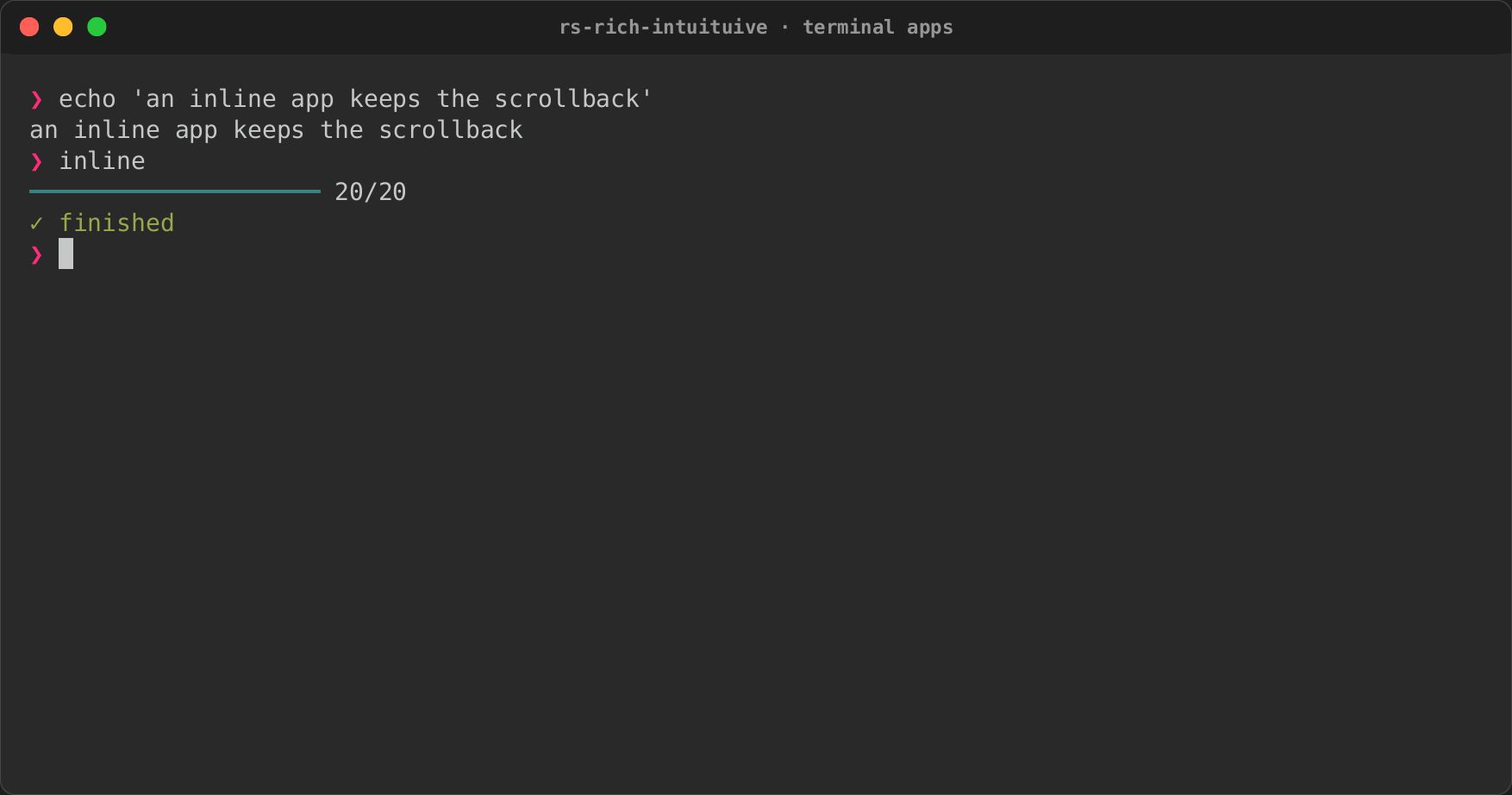
App::inline(rows) runs in a few rows under the prompt instead of the
alternate screen, like a command's progress output. Only those rows are
drawn, with cursor moves relative to them, so the scrollback above is left
alone. When the app ends, its last frame stays, and the prompt continues
below it. The mouse is left to the terminal.
every(Duration::from_millis(200), move |cx| {
    if let Some(name) = finished.take() {
        cx.print_above(format!("[green]✓[/] downloaded {name}"));
    }
});
cx.print_above(markup)prints lines into the scrollback above the region, which moves down under them, as ratatui'sinsert_beforedoes: a download's done line over its progress bars.Proxy::print_abovedoes it from another thread.- Full-screen, the lines print once the app ends and the terminal is
back. A loop of your own takes them with
Driver::take_printed(), to print when it gives the terminal back. App::mouse(Some(true))captures the mouse inline too (clicks, the wheel and hover reach the app);App::mouse(Some(false))leaves it to the terminal full-screen.None, the default, is the rule above.App::session_options(backend)shows whatrunasks the terminal for.
Backends
App::run drives the terminal with crossterm. App::run_with picks the
library instead: termion (Unix) or termwiz, each behind this crate's
feature of the same name, off by default.
The app behaves the same on each: the alternate screen or the inline
region, the mouse, pastes, Ctrl+Z, and the terminal given back on every way
out. What differs is what the library reads: termion reads keys as a
legacy terminal sends them, even in a terminal with the kitty keyboard
protocol (so "tab" and "ctrl+i" both fire for Tab), and reports no
modifiers with the mouse and no movement without a button, so hover does
not show; termwiz reads the kitty protocol's keys but not their releases,
so widgets get no WidgetEvent::KeyUp. The interact
guide compares
them.
BackendKind::from_name("termwiz") finds a backend by its name (in any
case), for a flag or a setting, and BackendKind::ALL lists the ones the
build has. The files and scope examples take --backend NAME, or
INTUITUIVE_BACKEND=NAME (only these examples read it), and say which
backends the build has when the name is not one of them:
cargo run -p rs-rich-intuituive --example files --features files,termwiz -- --backend termwiz
INTUITUIVE_BACKEND=termion cargo run -p rs-rich-intuituive --example scope --features termion,pcm
termwiz runs on Windows too. CI builds both crates, and every target, with it on Linux, macOS and Windows; it runs the PTY conformance suites on Linux and macOS, and the headless suites on Windows, where the PTY suites do not run. A pass in real terminals of the mouse, resizes and Ctrl+Z on the termion and termwiz backends, and on termwiz in Windows Terminal, has not been made yet (see the release notes).
Synchronized output
Where the terminal has synchronized output (DEC private mode 2026: kitty,
WezTerm, iTerm2, foot, Alacritty, Ghostty, Windows Terminal and others),
App::run sends each frame as one synchronized update: the terminal holds
the screen until the whole frame, cursor and all, has arrived, then shows
it at once. Nothing tears, and a screen reader following the cursor sees
it move once, to the focus, instead of across every cell that changed. A
frame that changes nothing sends nothing.
The terminal is asked at start-up, in the same round trip as the kitty
keyboard query, so detecting it costs no wait. With
legacy_keys(true) there is no such query, and none is
sent: synchronized output stays off unless forced. RICH_SYNC_OUTPUT=1
forces it on (for a terminal that has it but does not answer the
question), RICH_SYNC_OUTPUT=0 off, and App::synchronized_output(Some(true))
or Some(false) does the same from code, over the environment. With the
termion backend, which asks nothing, it is on only when forced. The
terminal is never left inside an update: quitting, a panic, Ctrl+Z and a
signal all end it. Headless, Headless::synchronized_output wraps the
recorded writes, so a test can assert them. The interact
guide has the details.
Paint strategies
Each frame, the painter turns the cells that changed into bytes. How it
does that is App::paint_strategy (or the RICH_PAINT_STRATEGY
environment variable, when the app does not choose):
| Strategy | What it sends |
|---|---|
best (the default) |
Per frame: scroll when rows moved, else cells |
cells |
The cells that changed, with the shortest cursor moves, colour changes sent as changes, and runs of blanks erased |
rows |
Each changed row, from its first change to its last |
full |
Everything, every frame |
scroll |
Rows that moved together (a log's new line, a list scrolled) moved with the terminal's own scrolling, then the cells that still differ |
use intuituive::prelude::*;
use intuituive::PaintStrategy;

let app = App::new(|| label("hello")).paint_strategy(PaintStrategy::Cells);
Every strategy shows the same screen; the benchmark replays each one's
bytes through a terminal emulator to check it. best is the default
since 0.0.23: on every scene of the benchmark it is within 5% of the best
fixed strategy, in bytes and in time. cells is what 0.0.22 sent. A log
or a list scrolled one row sends about one row's bytes under scroll and
best instead of the whole pane. Scrolling is off on Windows, under tmux
(which redraws a scroll region itself), in an inline app, and over a
picture; there best paints cells. App::terminal_scroll(true) or
(false) overrides that wherever the app runs.
Frame stats and the timedemo
Driver::stats() (or App::stats_handle() for an app that runs its own
loop) has each frame's numbers: the time the widgets took to draw
(draw), the painter to encode (paint) and the terminal to take the
bytes (write), running totals of each, and the painter's counts
(painted): cells compared, written and elided, and bytes of moves,
styles and text, as notcurses counts a render, with the strategy used.
App::timedemo replays input against an app as fast as it can draw, as
Doom's -timedemo does: a Script of keys and waits runs on the
driver's virtual clock, so a minute of timers takes no minute, and each
frame's times, bytes and counts come back. timedemo::script_from_tape
reads the keys, typing, sleeps and resizes of a rich-record tape.
use intuituive::interact::headless::Script;
use intuituive::prelude::*;

let app = App::new(|| {
    let n = signal(0);
    text!("count {n}").on_key("+", move |_| n.update(|n| *n += 1))
});
let demo = app.timedemo(Script::new().keys("+ + +"), 20, 1);
println!("{demo}"); // 4 frames in … ms (… fps); mean … µs, …
cargo run --release -p rs-rich-intuituive --example timedemo [tape]
runs it on the dashboard example.
Owning the loop
App::run owns the loop: it reads the terminal, runs timers and draws.
To keep a loop of your own (an existing crossterm or termion loop, a game
loop, a socket, another framework), use App::driver. Each turn:
use std::time::Instant;
use intuituive::interact::event::from_crossterm;

let mut driver = app.driver(width, height);
let start = Instant::now();
loop {
    driver.update(start.elapsed()); // timers, animations, task results
    if driver.is_done() {
        break;
    }
    if let Some(bytes) = driver.render() {
        out.write_all(bytes.as_bytes())?; // only what changed
    }
    if crossterm::event::poll(driver.timeout(start.elapsed()))? {
        if let Some(event) = from_crossterm(crossterm::event::read()?) {
            driver.event(event);
        }
    }
    for text in driver.take_copies() {
        // put text selected with the mouse on the clipboard; when that
        // worked, `driver.copied(&text)` shows a toast saying so
    }
}
out.write_all(driver.finish().as_bytes())?;
update(now)brings the app up tonow: the timers that are due, animations, results from other threads, the watches they set off, and toasts that are over. Time is yours, so a test or a replay can run it faster than the clock.render()draws what changed and returns the escape sequences that show it, orNonewhen nothing did.timeout(now)is how long you may wait for an event: until the next timer orafter, a frame while something animates, at most 50 ms.set_waker(|| …)is called from any thread that sends the app a value (alatestvalue, a task's result, aProxy), so a loop that waits on something can stop waiting at once:runandrun_onuse the backend'sWaker, which a read on the terminal waits on beside it.render()also runs the watches its layout set off (one that reads aRectHandle: a pane that loads once it has a width) and, in an app that waits for its tasks, their tasks, so the next event finds what they load.event(e)takes a key, mouse event, paste or resize;resize(w, h)sets the size directly.screen()is the frame as cells, andscreen().lines()as styled rich segments, to draw it somewhere else.suspend()returns the bytes to write before you give the terminal away for a while (Ctrl+Z, a command run in it); once it is back, callresize(w, h)and the nextrenderdraws everything again.stats()is the last frame's numbers: the nodes that drew, the bytes, andframes, how many frames have been drawn (ratatui'sFrame::count).take_exit::<T>(),take_error()andtake_printed()give you what the app ended with, and the lines it printed above itself.
Reading termion or termwiz instead of crossterm, translate with
event::from_termion or event::from_termwiz, which take a HeldButton
to remember the mouse button between events.
run and run_on are this loop, written for you, so an app behaves the
same either way.
Inside a ratatui app
A ratatui program can host an intuiTUIve app in part of its frame. Give
the app the pane's size, call render for its frame, and copy its lines
into the ratatui buffer with rs-rich-ratatui's lines_to_buffer.
examples/in_ratatui.rs does this, with ratatui drawing the left half and
owning the loop:
terminal.draw(|frame| {
    let [left, right] = Layout::horizontal([Constraint::Fill(1), Constraint::Percentage(50)])
        .areas(frame.area());
    frame.render_widget(Paragraph::new("ratatui").block(Block::bordered()), left);
    rich_ratatui::lines_to_buffer(&driver.screen().lines(), right, frame.buffer_mut());
})?;