 Using rich with ratatui
rs-rich-ratatui (rich_ratatui) connects rs-rich and
ratatui, both ways. A ratatui app can draw rich
renderables (tables, panels, Markdown, syntax, trees, markup) as ordinary
ratatui widgets today, without changing anything else about the app. And an
existing ratatui widget can run inside an rs-rich-interact
event loop, so moving the other way does not mean rewriting widgets that
already work.
The crate is an rs-rich addition, not a port: Python rich has no ratatui.
It is built on core rs-rich and on
ratatui-core, the crate ratatui's
own Buffer, Rect, Style and Widget live in. ratatui 0.30 re-exports
those types, so the buffer a ratatui app draws into is the one this crate
takes, and no other rs-rich crate depends on ratatui.
This crate is the interop layer. For writing a new full-screen app, rs-rich has its own framework, intuiTUIve: a retained tree with signals, where only what changed is redrawn and sent. The design note records why both exist, the benchmarks against ratatui, and the decisions behind this crate. To move an app across, see Porting a ratatui app.
[dependencies]
rs-rich = "0.0.10"
rs-rich-ratatui = "0.0.5"
# For RatatuiComponent, ratatui widgets inside rich-interact:
# rs-rich-ratatui = { version = "0.0.5", features = ["interact"] }
Draw rich renderables in a ratatui app
RichWidget is a ratatui Widget. Hand it any rich Renderable, by
reference (RichWidget::new(&table)) or by value (RichWidget::owned(…),
RichWidget::markup("[b]q[/] quit")), and render it like any other widget:
fn widget() -> Buffer {
    let mut table = Table::new();
    table.add_column("service");
    table.add_column("status");
    table.add_row(&["api", "[green]ok[/]"]);
    table.add_row(&["worker", "[bold red]failed[/]"]);

    let mut terminal = Terminal::new(TestBackend::new(40, 8)).unwrap();
    terminal
        .draw(|frame| {
            // A borrowed renderable: the table outlives the frame.
            frame.render_widget(RichWidget::new(&table), Rect::new(0, 0, 40, 6));
            // An owned one: markup, drawn in the last row.
            frame.render_widget(RichWidget::markup("[b]q[/] quit"), Rect::new(0, 7, 40, 1));
        })
        .unwrap();
    terminal.backend().buffer().clone()
}
(The same code is RichWidget's doc test; in an app the terminal has a
crossterm backend instead of TestBackend.) The pictures on this page are
the backend's buffer, read back with buffer_to_lines and exported through
a rich console (the example's Lines is a renderable of rich lines), so
each is the ratatui frame cell for cell:
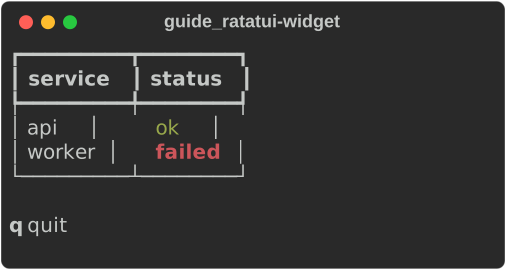
The examples come from
guide_ratatui.rs:
The renderable is rendered at the area's width, and its first
area.height lines are drawn; the rest are cut off, as ratatui's
Paragraph cuts off text. A few options:
.console(&console)renders with your ownConsole: its theme, emoji, highlighting and box settings. Without one, a per-thread default console is used, built without reading the environment, soNO_COLORand terminal detection never reach into the app: colour is the backend's business..fill_height(true)also passes the area's height, for renderables that use it (aLayout, aPanelwith a height) instead of taking their natural height..lines(area)returns the rich lines without drawing them.
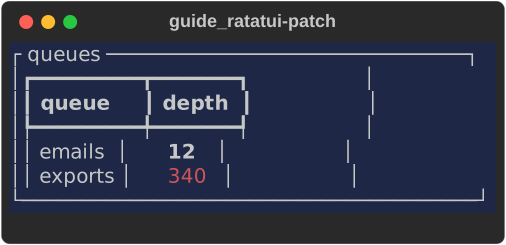
Styles patch the cells beneath, as ratatui's own widgets do: an unstyled
part of a table keeps the background a Block painted under it.
fn patch() -> Buffer {
    let mut table = Table::new();
    table.add_column("queue");
    table.add_column("depth");
    table.add_row(&["emails", "[bold]12[/]"]);
    table.add_row(&["exports", "[red]340[/]"]);

    let area = Rect::new(0, 0, 40, 7);
    let mut buffer = Buffer::empty(area);
    // A ratatui block paints a background first...
    let block = Block::bordered()
        .title(" queues ")
        .style(Style::default().bg(Color::Rgb(30, 40, 70)));
    let inner = block.inner(area);
    block.render(area, &mut buffer);
    // ...and the table's unstyled cells keep it.
    RichWidget::new(&table).render(inner, &mut buffer);
    buffer
}
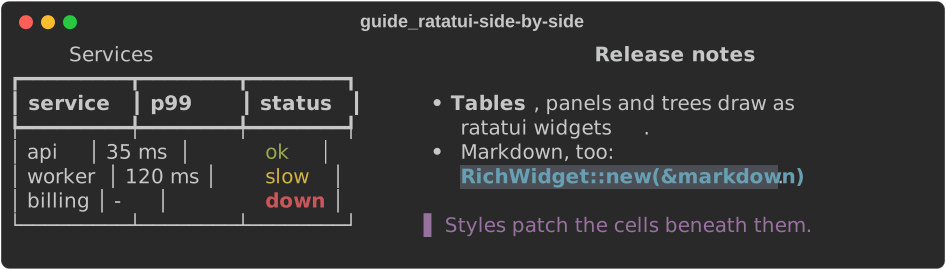
The crate's example draws a rich table and rich Markdown side by side in one ratatui frame and prints the frame, with no terminal needed:
The same frame, drawn by the guide's example:
const NOTES: &str = "\
# Release notes

- **Tables**, panels and trees draw as *ratatui widgets*.
- Markdown, too: `RichWidget::new(&markdown)`.

> Styles patch the cells beneath them.
";

fn side_by_side() -> Buffer {
    let mut table = Table::new().title("Services");
    table.add_column("service");
    table.add_column("p99");
    table.add_column("status");
    table.add_row(&["api", "35 ms", "[green]ok[/]"]);
    table.add_row(&["worker", "120 ms", "[yellow]slow[/]"]);
    table.add_row(&["billing", "-", "[bold red]down[/]"]);
    let markdown = Markdown::new(NOTES);

    let mut terminal = Terminal::new(TestBackend::new(76, 8)).unwrap();
    terminal
        .draw(|frame| {
            let [left, right] = Layout::horizontal([Constraint::Length(34), Constraint::Fill(1)])
                .areas(frame.area());
            frame.render_widget(RichWidget::new(&table), left);
            frame.render_widget(RichWidget::new(&markdown), right);
        })
        .unwrap();
    terminal.backend().buffer().clone()
}
Run ratatui widgets in rich-interact
With the interact feature, RatatuiComponent is a
rich_interact::Component whose view a ratatui drawing closure draws. It
owns its state and an optional event handler, so the state lives in the
component rather than behind an Rc<RefCell>, and it runs under every
rich-interact driver, the headless one included:
fn counter() -> RatatuiComponent<u32, u32> {
    RatatuiComponent::with_state(0u32, |n, area, buf| {
        Paragraph::new(format!("pressed {n}"))
            .block(Block::bordered().title("counter"))
            .render(area, buf);
    })
    .on_event(|n, event| match event {
        Event::Key(key) if key.code == KeyCode::Enter => Flow::Done(*n),
        Event::Key(_) => {
            *n += 1;
            Flow::Continue
        }
        _ => Flow::Ignored,
    })
    .height(3)
}

fn component(console: &Console) {
    // Under the headless driver; `rich_interact::run` drives a terminal.
    let (outcome, record) = headless::run(counter(), Script::new().keys("a b enter"), 30, 10);
    assert!(matches!(outcome.unwrap(), Outcome::Done(2)));
    assert!(record.last_frame().contains("pressed 2"));

    // The same keys by hand, then the component's view, as the loop paints it.
    let context = Context {
        console,
        width: 30,
        height: 10,
    };
    let mut counter = counter();
    for step in Script::new().keys("a b").0 {
        if let Step::Event(event) = step {
            counter.handle(&event, &context);
        }
    }
    console.print(&Lines(counter.render(&context).lines));
}
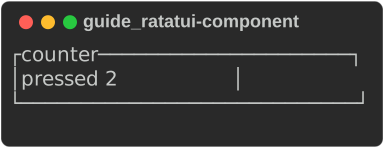
Each render draws into a fresh ratatui Buffer the size of the context (or
.height(rows) rows) and converts it into the component's view. Without a
handler, every event is ignored, so a container can route it elsewhere.
The conversions underneath
Both directions are built on public functions you can use directly:
| Function | Converts |
|---|---|
to_ratatui_style, to_rich_style |
a rich Style ⇄ a ratatui Style |
to_ratatui_color, to_rich_color |
a rich Color ⇄ a ratatui Color |
style_from_color_name |
a colour name as ratatui reads one (DarkGray, light red, #ff8800, 208) into a rich style (bright_black, bright_red, #ff8800, color(208)) |
lines_to_buffer |
rich lines (Console::render_lines) into a rectangle of a buffer |
buffer_to_lines, buffer_area_to_lines |
a buffer, or a rectangle of one, into rich lines |
buffer::cells |
a rectangle of a buffer, cell by cell, without allocating |
cells is for a consumer with its own cell screen. It yields each leading
cell of a rectangle with its column, row, symbol, width and a small Copy
style key, skipping wide characters' trailing cells, and a StyleCache
turns each distinct key into a rich Style once:
use ratatui_core::buffer::Buffer;
use ratatui_core::layout::Rect;
use ratatui_core::style::{Color, Style};
use rich_ratatui::buffer::{cells, StyleCache};

let mut buffer = Buffer::empty(Rect::new(0, 0, 10, 2));
buffer.set_string(0, 0, "日本 ok", Style::default().fg(Color::Red));

let mut styles = StyleCache::new();
let mut row = String::new();
for cell in cells(&buffer, Rect::new(0, 0, 6, 1)) {
    // Hand cell.x, cell.y, cell.symbol, cell.width and the style to
    // your own screen; here, just collect the text.
    let _style: Option<&rich::Style> = styles.get(cell.style);
    row.push_str(cell.symbol);
}
assert_eq!(row, "日本 o");
A ported app whose options take ratatui's colour names (--axis-color
DarkGray) reads them with style_from_color_name, which accepts what
ratatui's Color::from_str does (the 16 names in any case and spacing,
grey and silver, reset, #rrggbb and an index) and answers rich's
name for the same terminal colour, or None:
use rich_ratatui::style_from_color_name;

assert_eq!(style_from_color_name("DarkGray").as_deref(), Some("bright_black"));
assert_eq!(style_from_color_name("Gray").as_deref(), Some("white"));
assert_eq!(style_from_color_name("nope"), None);
What converts losslessly, and what is lost
Lossless: no colour; the terminal default (rich's default ⇄ ratatui's
Reset); the 16 named colours; the 256-colour palette; 24-bit RGB; and nine
attributes (bold, dim, italic, underline, blink, blink2 as rapid blink,
reverse, conceal as hidden, strike), each on, explicitly off (not bold)
or unset. A rich Panel drawn into a buffer and read back has the same text
and the same SGR codes as rich's own rendering; the crate's tests check it.
Lost or changed:
| What | Direction | What happens |
|---|---|---|
| Colour names | ratatui → rich | the colour is kept, the name is rich's canonical one: grey0 comes back as color(16), #FF0000 as #ff0000 |
| Legacy Windows colours | rich → ratatui | become the standard colour with the same number |
underline2, frame, encircle, overline |
rich → ratatui | dropped: ratatui has no modifier for them |
| Hyperlinks and meta | rich → ratatui | dropped, the text kept: a ratatui cell holds a symbol and a style |
| Underline colour | ratatui → rich | dropped: rich has no underline colour |
An explicit default colour |
through a buffer | read back as unset, since every fresh cell is Reset |
Forced-width cells (CellDiffOption::ForcedWidth) |
buffer → rich lines | become spaces of their width: the symbol may hold escape sequences rich cannot measure (cells reports them as they are) |
Widths. rich and ratatui measure some characters (some emoji) differently. When drawing, each segment is placed at the column rich measured for it, so a disagreement cannot shift the rest of the line; a wide character that would straddle the right edge becomes a space, as rich's own cropping does. When reading a buffer, a wide character's trailing cells are found by its width, as ratatui's own diff finds them.