 The core library
rs-rich (imported as rich) is the core of the project: a module-for-module
port of Python rich. Everything that
draws in the terminal — styled text, tables, panels, trees, progress bars,
Markdown, syntax highlighting — lives here. The other crates build on it.
This section of the guide covers the core crate only. Extensions (the plugin
registry, extra highlighters, log handlers) are in
rs-rich-ext; image rendering
is in rs-rich-art.
What is in the crate
| Area | Types | Page |
|---|---|---|
| Output | Console, ConsoleOptions, Segment, Measurement, the Renderable trait |
Console and printing |
| Text | Text, Style, Color, markup, emoji, highlighters, Theme |
Text and style |
| Tables | Table, ColumnOptions, Cell, box styles |
Tables |
| Layout | Panel, Padding, Align, Columns, Rule, Layout, Constrain, Styled |
Layout |
| Hierarchies | Tree |
Tree |
| Running work | Progress, track, Live, Status, Spinner, ProgressBar |
Progress and live displays |
| Documents | Syntax, Markdown, Json, Pretty |
Code and data |
| Diagnostics | LogRecord, LogRender, Traceback |
Logging and errors |
| Input | Prompt, Confirm, IntPrompt, FloatPrompt |
Prompts |
| Output files | HTML, SVG and text export, TerminalTheme |
Exporting |
The most-used names are re-exported at the crate root (rich::Table,
rich::Panel, …). Less common ones stay in their module: rich::markdown::Markdown,
rich::prompt::Prompt, rich::r#box::ROUNDED (box is a Rust keyword, hence
the r#).
How rendering works
Every visible thing goes through the same four steps. Knowing them explains most of the API.
 your value ──► Renderable ──► measure ──► render ──► Vec<Segment> ──► Console
 (Table, Text,   (a trait)     (min/max    (fit into   (text + style    writes ANSI,
  Panel, …)                     width)      options)    pieces)         or exports
                                                                        HTML/SVG/text
Renderable. Anything printable implementsRenderable. It is the Rust form of upstream's__rich_console__protocol, and you can implement it for your own types (example).- Measure. Containers ask their children how wide they want to be — a
Measurementwith a minimum and maximum cell width. This is how a table sizes its columns and howAlign::centerknows what to centre. - Render. The renderable receives
ConsoleOptions(the width it must fit, an optional height, justify/overflow overrides) and returns a flat list ofSegments: a string plus an optionalStyle. Newlines are segments too. - Output. The
Consoleturns segments into bytes for the terminal (downgrading colours to what the terminal supports), or records them so they can be exported as HTML, SVG or plain text.
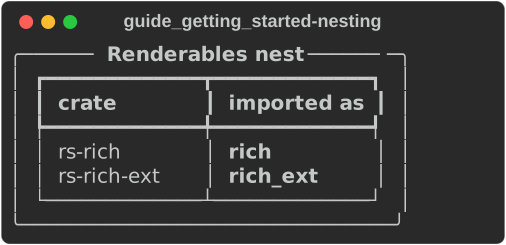
Containers such as Panel and Table render their children through the same
protocol, so everything nests: a table in a panel in a layout.
fn nesting(console: &Console) {
    let mut table = Table::new();
    table.add_column("crate");
    table.add_column("imported as");
    table.add_row(&["rs-rich", "[bold]rich[/]"]);
    table.add_row(&["rs-rich-ext", "[bold]rich_ext[/]"]);

    // A table in a panel: the panel measures the table, then renders it
    // inside its border, through the same Renderable protocol.
    console.print(&Panel::fit(Box::new(table)).title("[b]Renderables nest[/]"));
}
How it mirrors upstream
- Same modules, same names.
rich/table.pyiscrates/rich/src/table.rs;Table.add_columnisTable::add_column. Where Python uses keyword arguments, Rust uses builder methods (Panel::new(x).title("t")) or an options struct (ColumnOptions). - Same output. Golden tests compare the bytes this crate writes against real Python rich output for the pinned upstream version (see Parity). The screenshots in this guide are real output, exported by the guide's example programs.
- Documented differences. Where Rust cannot follow Python — there is no
repr()to pretty-print, no Python traceback, no Pygments — the port says so in Divergences. Some upstream options are not ported yet; a page with any missing lists them under "Not yet ported", and Module status has every module. - No extras in the core. Features that upstream does not have belong in
rs-rich-ext, so the core stays a faithful mirror.
Running the examples
Every snippet in this guide is cut from an example program in
crates/rich/examples/,
so it compiles and runs:
cargo run -p rs-rich --example guide_tables              # print to your terminal
cargo run -p rs-rich --example guide_tables -- --svg out # write the screenshots
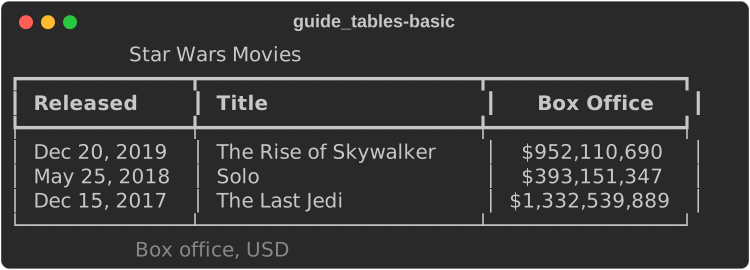
Each screenshot sits under the snippet that drew it. The first table on the Tables page, for instance:
fn basic(console: &Console) {
    let mut table = Table::new()
        .title("Star Wars Movies")
        .caption("Box office, USD");

    table.add_column("Released");
    table.add_column("Title");
    table.add_column_justify("Box Office", Justify::Right);

    table.add_row(&["Dec 20, 2019", "The Rise of Skywalker", "$952,110,690"]);
    table.add_row(&["May 25, 2018", "Solo", "$393,151,347"]);
    table.add_row(&["Dec 15, 2017", "The Last Jedi", "$1,332,539,889"]);

    console.print(&table);
}
Every example renders its screenshots on a pinned console, so the same code gives the same bytes on every machine:
/// A console that renders the same bytes on every machine.
fn pinned_builder(width: usize) -> ConsoleBuilder {
    Console::builder()
        .width(width)
        .force_terminal(true)
        .color_system(Some(ColorSystem::Truecolor))
        .no_color(false) // ignore NO_COLOR in the environment
}
python3 scripts/capture_guide.py regenerates every screenshot, and
--check fails when one no longer matches its example.
Pages
- Console and printing
- Text and style
- Tables
- Layout
- Tree
- Progress and live displays
- Code and data
- Logging and errors
- Prompts
- Exporting
API reference: docs.rs/rs-rich.