Embedding programs and pages
rs-rich-embed (rich_embed, new in 0.0.18) puts other programs and web
pages inside an intuiTUIve app:
terminal(cmd)runs any program in a pane: a shell,htop, an editor, a terminal browser;web_view(url)shows a web page in a pane, with an address bar.
Each sits on a trait, the way intuiTUIve's terminals sit on Backend:
PtyHost behind the pane, WebEngine behind the web view. What runs
behind them can be swapped, including for one your app writes itself.
[dependencies]
rs-rich-intuituive = "0.0.5"
rs-rich-embed = "0.0.1"
# The Chrome and Browsh engines are off by default:
# rs-rich-embed = { version = "0.0.1", features = ["chrome", "browsh"] }
The crate is separate from the framework so that an app without these panes gains no PTY, no VT emulator and no browser protocol.
A shell beside a page
use intuituive::prelude::*;
use rich_embed::{terminal, web_view_with, ProgramEngine};

fn main() -> std::io::Result<()> {
    App::new(|| {
        let page = web_view_with(ProgramEngine::new("w3m"), "https://example.com")
            .release_keys("f6 f10");
        let shell = terminal("bash")
            .release_keys("f6 f10")
            .on_exit(|status, cx| cx.toast(format!("the shell {status}")));
        row([shell.node().panel("shell"), page.node().panel("web")])
            .on_key("f6", |cx| cx.focus_next())
            .on_key("f10", |cx| cx.quit())
    })
    .run()
}
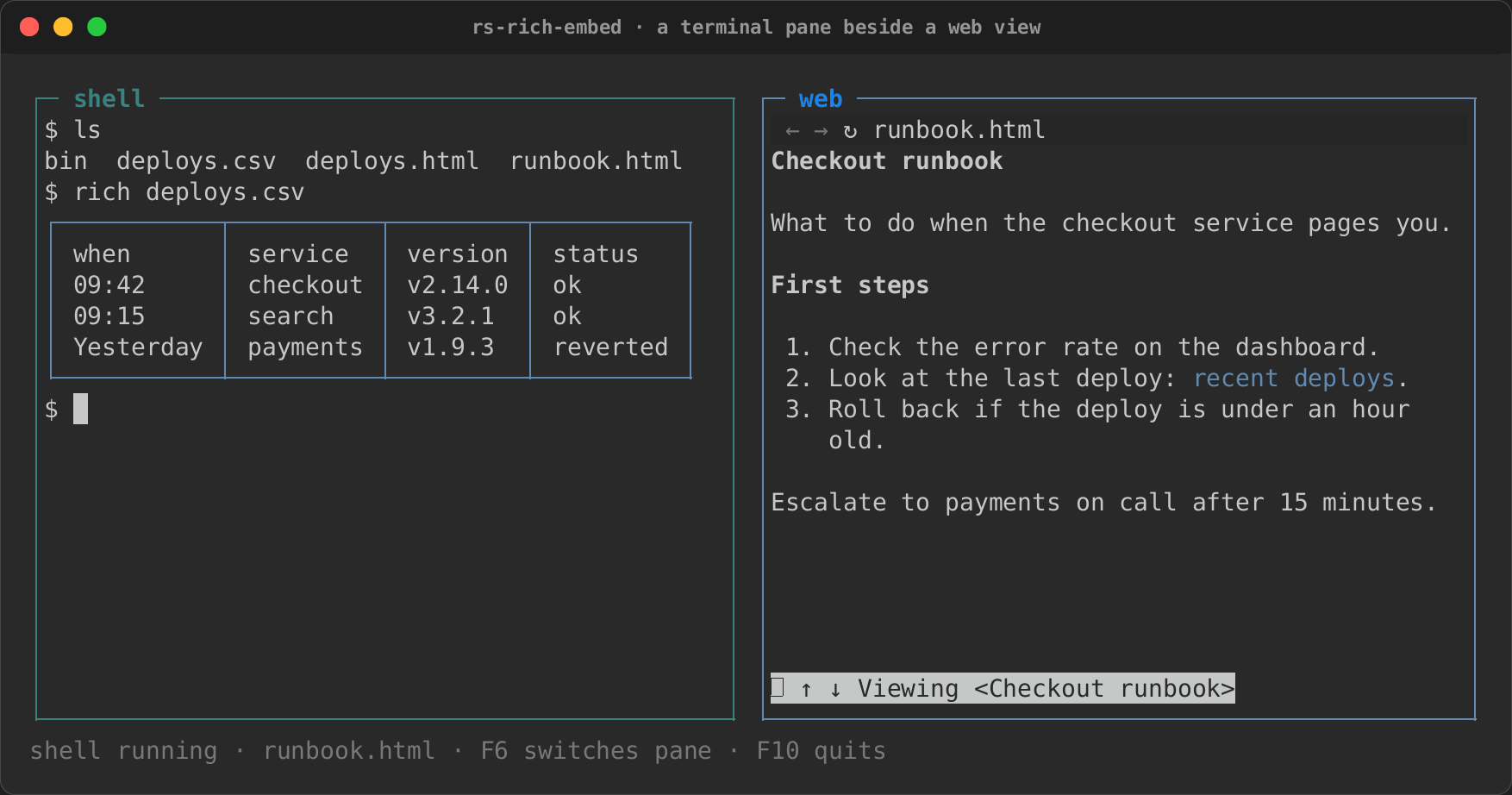
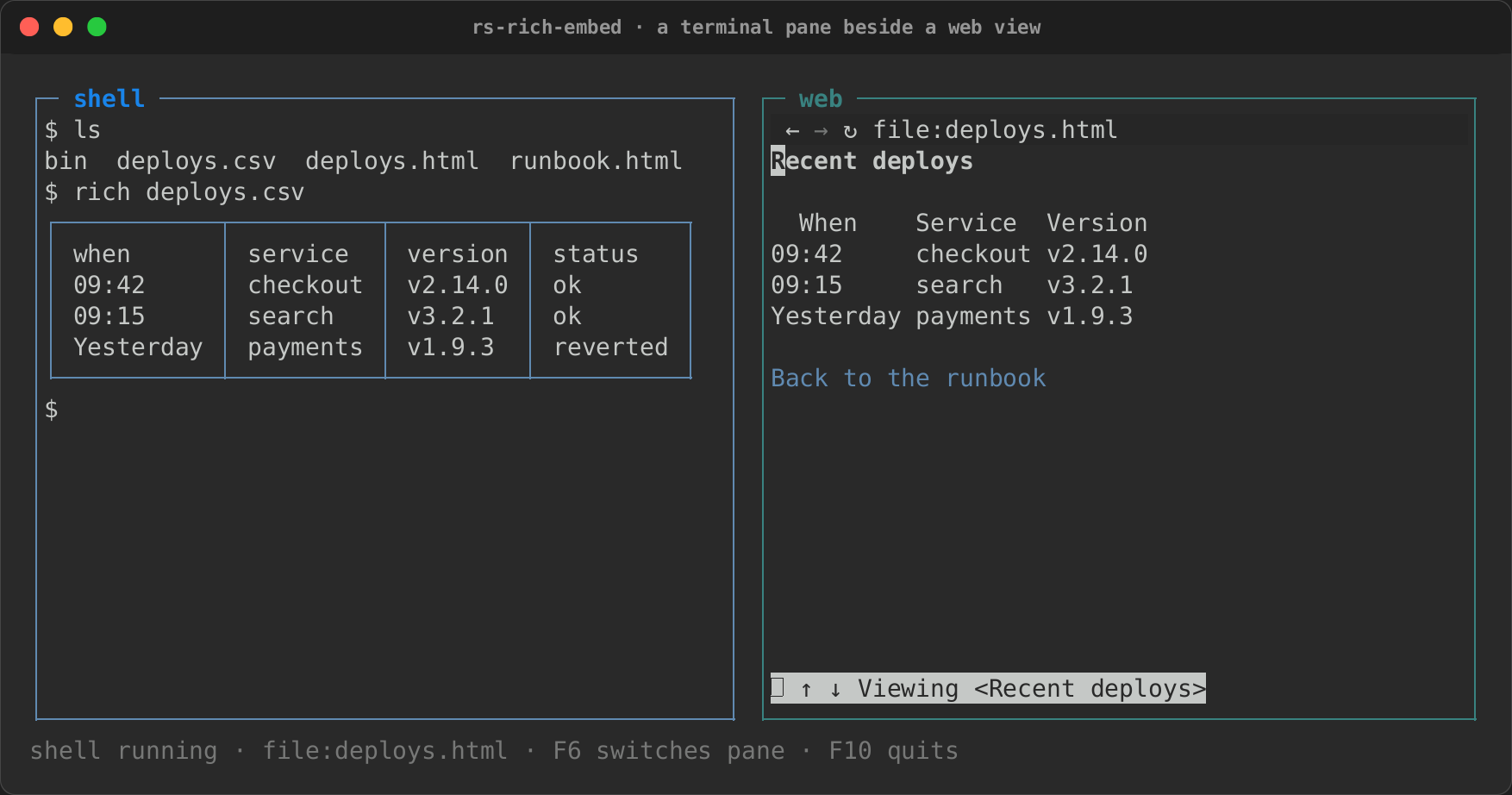
The example in the repository adds a status line built from both panes' signals:
Here it runs bash in the shell pane and w3m on a local page in the web
view; Ctrl+L opens another address:
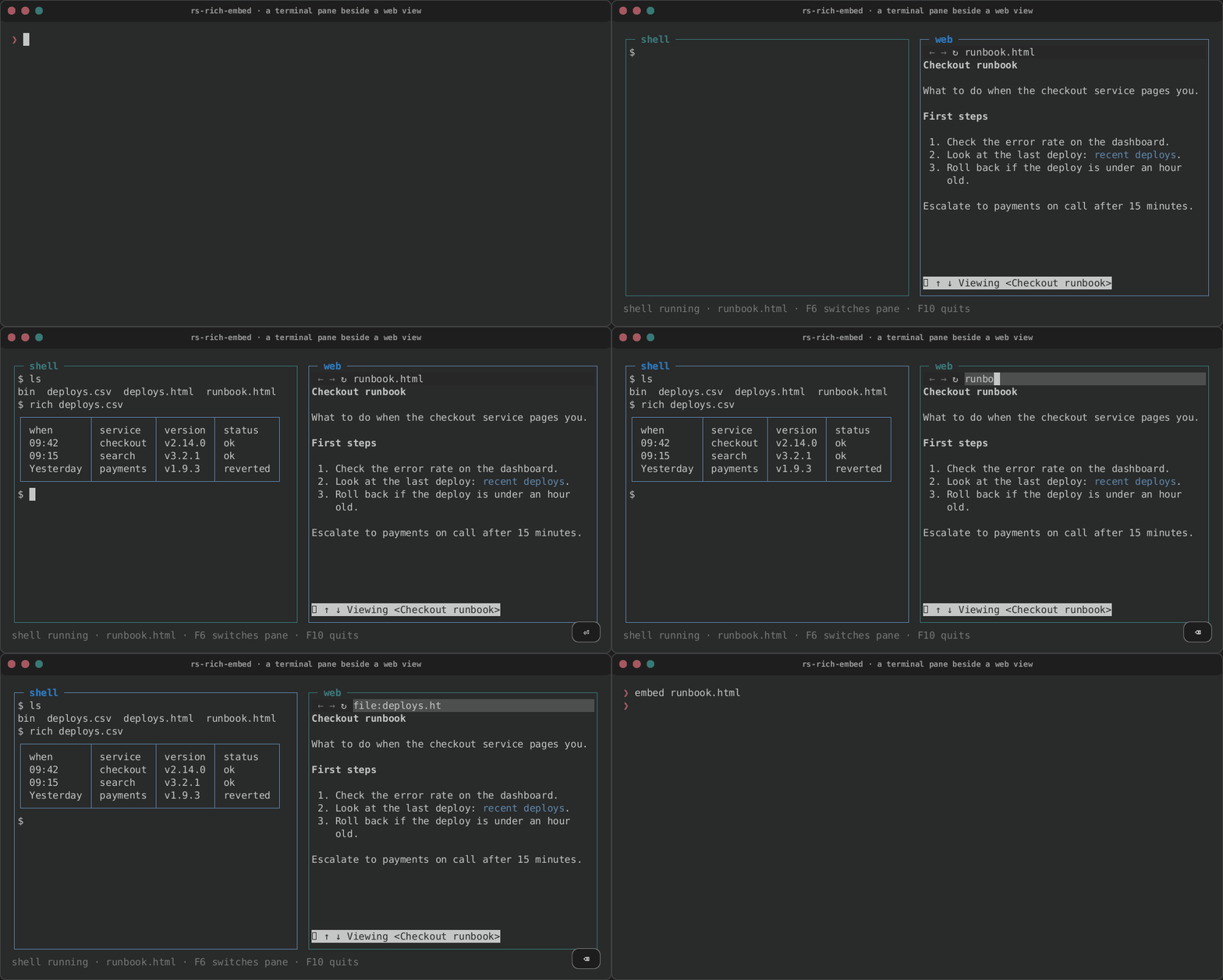
| The shell | Another address |
|---|---|
 |
 |
terminal and web_view return builders; .node() (or .into()) makes
the node, which takes every builder a node has (.panel, .flex,
.on_key). Like signal, they are called inside App::new's closure or a
node's.
The terminal pane
The program starts when the pane is first laid out, at the pane's size, and is told every new size after. Its screen is followed by rs-rich-record's VT emulator (vt100, with rich's character widths, so emoji sequences and flags line up with the rest of the app) and drawn in the pane, colours and all.
While the pane has the focus:
- every key goes to the program as an xterm sends it, Tab and Ctrl+C
included (the app still quits on Ctrl+C once the program has exited).
release_keys("ctrl+q f10")names keys the program never sees: they go on to the app's bindings, a way out of the pane; - pastes go to the program, bracketed when it asked for that;
- the mouse goes to the program when it asked for it (X10, UTF-8 or SGR reports, as it chose). Otherwise presses are left to the app, so the app's text selection works over the pane;
- Shift+PgUp and Shift+PgDn, and the wheel when the program does not
want the mouse, scroll back through what scrolled off the top (1000
rows;
.scrollback(rows)for more). Any other key returns to the live screen. On the alternate screen (a pager, an editor) the wheel sends the arrow keys instead, as terminals do.
When the program exits, its last screen stays, keys go to the app again, and the exit is reported both ways:
let pane = terminal(["make", "test"]).on_exit(|status, cx| {
    if !status.success() {
        cx.toast(format!("[red]tests failed: {status}"));
    }
});
let status = pane.status(); // Signal<Option<ExitStatus>>
column([
    pane.node(),
    text(move || match status.get() {
        Some(status) => format!("{status}"),
        None => "running…".into(),
    })
    .fixed(1),
])
The program is ended when its pane leaves the tree: it is hung up on
(SIGHUP, as when a terminal closes), and one still running a second
later is killed with SIGKILL, with everything in its process group.
Behind the pane: PtyHost
pub trait PtyHost {
    fn start(&mut self, columns: u16, rows: u16) -> io::Result<()>;
    fn write(&mut self, bytes: &[u8]) -> io::Result<()>;
    fn resize(&mut self, columns: u16, rows: u16) -> io::Result<()>;
    fn read(&mut self) -> Vec<u8>;              // what arrived; never blocks
    fn set_notify(&mut self, notify: Notify);   // call it when output arrives
    fn exit_status(&mut self) -> Option<ExitStatus>;
    fn kill(&mut self) -> io::Result<()>;
}
A host reads its program's output on a thread of its own and calls the
Notify it was given. The pane then reads the host on the app's thread,
between frames, through the app's Proxy: output wakes the app, and no
state is touched from another thread.
LocalPtyruns a program on this machine: a PTY on Unix, ConPTY on Windows, through portable-pty, as rs-rich-record's tapes do.terminalisterminal_with(LocalPty::new(command)). ACommandtakes arguments, environment and a working directory (default: the app's). It holds at most 1 MiB of input its program has not read: past that,writeis refused withWouldBlockuntil the program reads some (a pane drops those keys).ReplayHostplays bytes back instead of running anything. ItsReplayHandlefeeds more output or an exit from any thread and reads back what the pane sent: the keys' bytes, the sizes. It is how the crate's own tests check a pane without a program.- Your own: an SSH channel, a container's exec stream, a remote shell.
Implement the trait and pass it to
terminal_with.
use rich_embed::{terminal_with, ExitStatus, ReplayHost};

let host = ReplayHost::new()
    .output("\x1b[1;32mbuild ok\x1b[0m\r\n")
    .exit(ExitStatus::with_code(0));
let handle = host.handle(); // .feed(..), .exit(..), .written(), .sizes()
let node = terminal_with(host).node();
The web view
let page = web_view_with(ProgramEngine::new("w3m"), "https://example.com");
let web = page.handle();
// web.address(), web.title(), web.loading(), web.can_go_back(),
// web.can_go_forward(), web.error(): signals.
// web.open(url), web.back(), web.forward(), web.reload(): from handlers.
The top row is an address bar: ← back, → forward, ↻ reload, the
address, and … while the page loads. Click the address or press Ctrl+L
to type one (Enter opens it, Esc gives up); Alt+Left, Alt+Right and F5 go
back, forward and reload. .address_bar(false) leaves it out, for an app
that draws its own from the handle's signals. Setting the address signal
opens that address. Every other key, the mouse and pastes go to the page
while the view has the focus, except the keys release_keys names; the
page's size is given to the engine whenever it changes.
web_view(url) without an engine uses ProgramEngine::detect(): the
browser named in the RICH_EMBED_BROWSER environment variable (a program
and its arguments), else the first of carbonyl, cha (Chawan), browsh,
w3m and lynx found on PATH. With none, the view says so. The address
is the browser's last argument (Carbonyl gets -- before it), so an
address that starts with -, or has a control character in it, is
refused: a link an app did not write cannot become one of the browser's
options.
Behind the view: WebEngine
pub trait WebEngine {
    fn open(&mut self, url: &str) -> io::Result<()>;
    fn resize(&mut self, columns: u16, rows: u16) -> io::Result<()>;
    fn input(&mut self, input: WebInput) -> io::Result<()>;   // keys, mouse, paste
    fn back(&mut self) -> io::Result<()>;
    fn forward(&mut self) -> io::Result<()>;
    fn reload(&mut self) -> io::Result<()>;
    fn poll(&mut self) -> Option<WebFrame>;   // the newest frame
    fn state(&self) -> PageState;             // url, title, loading, history
    fn set_notify(&mut self, notify: Notify);
}
A frame is either cells (rich segments, a line per row, and a cursor),
drawn as they are, or pixels (RGB), drawn as coloured half blocks: each
cell is a ▀ whose foreground is the upper pixel and whose background the
lower one, averaged down from the frame. Drawing pixel frames through the
kitty, sixel or iTerm2 graphics protocols is not done yet: intuiTUIve
diffs a grid of cells, and those protocols draw outside it.
| Engine | Feature | What it is |
|---|---|---|
ProgramEngine |
default | A terminal browser in a terminal pane: Carbonyl, Browsh, Chawan, w3m, lynx, or any program you name. Its own keys work as in a terminal. Back, forward and reload restart it at an address from the engine's own history of what was opened. |
ChromeEngine |
chrome |
Headless Chrome or Chromium, which you install, driven over the DevTools protocol. Pixel frames. |
BrowshEngine |
browsh |
Browsh's HTTP server mode: a page as text, read-only, scrolled with the arrows, PgUp/PgDn, Space, g/G and the wheel. |
No browser ships with this crate, and none is downloaded. Carbonyl (no release since February 2023, so its Chromium has had no security updates since) and Browsh (no release since January 2024) are programs you choose and install, never dependencies.
Chrome
use rich_embed::{web_view_with, ChromeEngine};

let page = web_view_with(ChromeEngine::new(), "https://example.com");
// ChromeEngine::new().binary("/opt/chromium/chrome").cell_pixels(10, 20)
The engine finds the browser at the path you give, else under its usual
names on PATH (google-chrome, chromium, chromium-browser, …) or its
usual install location. It speaks the protocol directly, on a thread of
its own, so no async runtime comes with it.
- The sandbox stays on.
--no-sandboxis never passed, and it is dropped if you pass it in.args, as is every other switch that turns part of the sandbox off (--disable-setuid-sandbox,--disable-seccomp-filter-sandbox,--single-process, …), however it is spelled (-no-sandbox,--No-Sandbox,/no-sandboxon Windows). Chrome refuses to run as root with its sandbox on: run the app as an ordinary user. - The profile is a temporary directory that only this user can read (mode 0700 on Unix), removed when the engine goes.
- On Linux and macOS, DevTools runs over a pipe, and no port is
opened. Chrome starts with
--remote-debugging-pipeand reads the protocol from its file descriptor 3 and writes it to descriptor 4, as JSON messages each ended by a NUL byte. Only the engine and the browser hold the pipe, so no other program or user on the machine can reach DevTools. The descriptors are passed with thecommand-fdscrate, so rs-rich-embed itself keeps nounsafecode. (Since 0.0.21.) - On Windows, DevTools listens on a random port of
127.0.0.1while the view is open, as it did everywhere before 0.0.21. Other programs and other users on this machine can reach that port, and DevTools has no authentication of its own: whoever finds it can drive the browser as you (open local files, run script in pages). On Windows, use the Chrome engine on a machine you do not share. This is a known limit: Chrome takes the pipe there only as two inheritable handles named in one switch, and no maintained crate can pass them yet. - Where DevTools goes is the engine's choice. A
--remote-debugging-…switch you pass in.args(--remote-debugging-port=9222,--remote-debugging-address=…) is dropped, however it is spelled. - Downloads are denied (
Browser.setDownloadBehavior). - Frames are
Page.startScreencastJPEGs, with the page laid out at the pane's size timescell_pixels(10 x 20 CSS pixels a cell by default). Keys, the mouse and pastes go in asInput.dispatchKeyEvent,Input.dispatchMouseEvent(at the middle of the cell) andInput.insertText; the address, loading state and history come from the page's events andPage.getNavigationHistory.
Browsh
BrowshEngine::new() starts browsh --http-server-mode and asks it for
each page as plain text (X-Browsh-Raw-Mode: PLAIN) on
127.0.0.1:4333; BrowshEngine::connect("host:port") uses a server you
started. Links and forms are not followed: for those, run Browsh in a
terminal pane with ProgramEngine::new("browsh").
Browsh's own default is to listen on every interface, which would let
anyone who can reach the machine have it fetch pages from there. The
engine therefore starts it with a configuration of its own, in a temporary
directory removed when the engine goes, that binds it to 127.0.0.1; your
own Browsh configuration is not read (start Browsh yourself and connect
to use it). When the engine goes, Browsh is killed with its process
group, the headless Firefox it started included (Unix).
Testing
Both panes run under intuiTUIve's headless driver like any node.
ReplayHost stands in for a program, and a WebEngine of your own (a
dozen lines that record calls and hand back frames) stands in for a
browser:
use std::time::Duration;
use intuituive::interact::{Event, Key};

let host = ReplayHost::new().output("hello");
let handle = host.handle();
let mut driver = App::new(move || terminal_with(host).node()).driver(20, 4);
for _ in 0..2 {
    driver.update(Duration::ZERO); // delivers the host's output
    driver.render();
}
assert_eq!(driver.screen().plain()[0].trim_end(), "hello");
driver.event(Event::Key(Key::parse("up").unwrap()));
assert_eq!(handle.written(), b"\x1b[A");
The tests against a real Chrome (crates/rich-embed/tests/chrome.rs, and
the engine's own tests) run only when RICH_EMBED_CHROME names a Chrome or
Chromium binary, so CI needs none. With one, on Linux, they also check that
neither the browser nor any process it started listens on a TCP socket
while a view is open, and that a page's frames arrive over both the pipe
and the port Windows uses. Chrome will not start its sandbox as root, so
run them as an ordinary user.