Tables and scrolling
Tables of rows and columns, from a closure or from a source too large to hold, and the viewports and scrollbars that scroll any node. A table's options can follow state: columns that change, hide and reorder, a cell cursor that comes and goes, widths a key can change. Lists and trees are on Lists, trees and tabs.
Tables, tabs and scrolling
use intuituive::widgets::{table, tabs, Column};

let selected = signal(0usize);
let tab = signal(0usize);
column([
    tabs(|| vec!["Files".into(), "Log".into()], tab).fixed(1),
    switch(move || tab.get(), move |tab| match tab {
        0 => table(
            vec![Column::new("Name", Size::Flex(1)), Column::new("Size", Size::Auto)],
            move || files.with(|f| f.iter().map(|f| vec![f.name.clone(), f.size()]).collect()),
            selected,
        ),
        _ => scroll(text(move || log.get())),
    }),
])
table(columns, rows, selected):- The header row stays in view, and each column is sized like a child
in a row (cells, a percentage, a share, or
Size::Autoto fit what is in view). - One row is selected. ↑/↓ (or k/j), PgUp/PgDn and Home/End move it, a click selects a row, and the wheel moves it.
virtual_table(columns, len, row, selected)asks only for the rows in view, so a million rows cost a screenful.tabs(titles, selected)is a strip of titles. ←/→ and 1–9 move the selection, and so does a click. Pair it withswitchon the same signal for the content. Lists, trees and tabs has its options, and a model of a tab set.scroll(child)is a viewport onto a child laid out at its full height (up to 4000 rows). It is for content of a modest size: rows past the 4000th are cut off, and a debug build says so once on stderr. For long or endless content, usescroll_virtualbelow.- The arrow keys, PgUp/PgDn, Home/End and the wheel scroll it, and a scrollbar appears when the child does not fit.
- The focus moving to a node inside scrolls that node into view.
- The child draws into an offscreen screen with its own damage, so only what changed inside draws, and the rows in view are copied out.
scroll_with(child, offset)puts the first row in view in a signal you can read and set..follow_end()(new in 0.0.24), onscrollorscroll_virtual, keeps the view on the end while content arrives, the last item growing included (an answer streaming in): a chat, a transcript, a log. A scroll up (a key, the wheel, the bar, or an offset set from code) stops it following, and the view stays where the reader left it. End, or a scroll that reaches the end, follows again..follow_end_with(follow)puts whether it follows in aSignal<bool>: read it to show that new content waits below, or set it totrueto jump back. Textual'sanchor().scroll_x(child)scrolls across instead, for content wider than the view (up to 2000 columns), andscroll_both(child)both ways, with a bar along the bottom too. ←/→, Shift+wheel and Shift+PgUp/PgDn move across.scroll_both_with(child, x, y, across, down)puts both offsets in signals.
Long and endless content: scroll_virtual
scroll_virtual(len, height_of, row) is a scroll view over len()
items that builds only those near the view: a feed, a chat, a log, search
results, a file of a million lines.
use intuituive::prelude::*;

let app = App::new(|| {
    let posts = signal(50usize);
    scroll_virtual(move || posts.get(), |_| 1, |i| label(format!("post {i}")))
        // Within ten rows of the end: fetch the next page.
        .on_near_end(10, move |_| posts.update(|n| *n += 50))
});
- Only what is near the view is built. Item
iisrow(i). The items in view and one screen either side are built, kept by key while they stay near, and dropped when they leave. A million items cost a screenful. - Heights are estimated, then measured.
height_of(i)is a guess (at least one row). Once an item is drawn, its real height (its fixed size, else its content's) replaces the guess. - No row cap. The offset is a
u64of rows. The scrollbar is computed from the heights. ↑/↓, PgUp/PgDn, Home/End, the wheel and the bar scroll it.scroll_virtual_with(len, height_of, row, offset)puts the first row in view in aSignal<u64>; set it tou64::MAXfor the end. .item_key(|i| key)gives items stable keys. An item then keeps its node and its measured height when items are inserted or removed around it, and the top item in view keeps its row: content arriving above does not push the reader down. A kept node can sit at another index than the one it was built for, so what it draws should follow its key..on_near_end(threshold, load)callsloadonce the view comes withinthresholdrows of the end, and not again untillengrows. One load is in flight at a time..stand_in(|i| node)(new in 0.0.23, opt-in) draws a cheap stand-in for items not built yet while the view scrolls fast (two screens or more before it rests for 100 ms); full items replace them at rest. Measured on a held PageDown over cards (a panel of styled text), it cut frame time about five times (debug build: 25 ms to 5 ms a frame). Over one-line labels it gains nothing, so use it only for items that are costly to build..scrollbar(Scrollbar)sets the bar's look, as on the other views.
Sorting, resizing and a cell cursor
table_with(columns, rows, selected, options) takes the rest as
TableOptions:
use intuituive::widgets::{table_with, Order, TableOptions};

let sort = signal(Some((1, Order::Descending)));
let cell = signal(0usize);
table_with(
    columns,
    move || files.get(),
    selected,
    TableOptions::default().sort_rows(sort).cells(cell).resizable(),
)
.sort(signal)puts the sort column and order in a signal. A click on a header sorts by it, a second click reverses the order, andssorts by the cell cursor's column. The header shows ▲ or ▼. Your rows closure reads the signal and sorts, soselectedstays an index into your own rows..sort_rows(signal)sorts plain string rows for you instead. Numbers compare as numbers; everything else compares as lowercase text..cells(signal)adds a cell cursor. ←/→ move it, a click puts it on the cell, and the theme'sselected.cellstyle draws it..resizable()lets the columns be resized by dragging the gap after a header..scroll_x()keeps the columns at their natural widths when they do not fit, and scrolls the table across, a column at a time:- A
Size::Fixedcolumn keeps its cells; the others fit their title and the cells in view. A table that fits shares the width as before. - ←/→ (or h/l) scroll it, or Shift+←/→ with a cell cursor, since ←/→ move the cursor. Shift+Home and Shift+End go to the ends, and Shift with the wheel scrolls too.
- The header is cut where the rows are, so it stays over its columns.
‹and›in it say that columns are out of view on that side. - The view follows the cell cursor.
.freeze_columns(n)keeps the firstncolumns in place while the rest scroll, and turns.scroll_x()on.
virtual_table_with(columns, len, row, selected, options) takes the same
options, but sorts nothing itself: its rows are never all in hand.
How a table looks
use intuituive::widgets::{table_with, Column, HighlightSpacing, TableOptions};

let columns = vec![
    Column::new("Food", Size::Auto),
    Column::new("Qty", Size::Fixed(5)).align(Align::End),
    Column::new("Energy", Size::Auto).align(Align::End).min(8),
];
table_with(
    columns,
    move || meals.get(),
    selected,
    TableOptions::default()
        .footer(move || vec!["Total".into(), "".into(), total.get()])
        .header_gap(1)
        .column_spacing(2)
        .symbol("» ")
        .highlight_spacing(HighlightSpacing::Always)
        .row_style(|i| (i % 2 == 1).then(|| "on grey11".into()))
        .multiline()
        .scroll_padding(1),
)
Column::align(Align::End)puts a column's cells and title at the end (numbers on the right), orAlign::Center;.min(n)and.max(n)bound its width..footer(cells)is a row under the rows that stays in view, in the theme'stable.footerstyle;cellsmay read signals..header_gap(n)leaves blank lines under the header and.row_gap(n)after each row (ratatui'sbottom_margin);.column_spacing(n)putsncells between columns (one by default)..symbol("» ")draws markup before the selected row, and the other rows (the header and footer too) get blank cells in its column..highlight_spacing(..)says when the column is kept:WhenSelected(the default),AlwaysorNever..row_style(|i| …)styles rowiwhole, gaps included, under its cells' own markup and the selection: zebra stripes, a row's colour..multiline()makes each row as tall as its tallest cell, the cells wrapping to their columns; ↓ still moves a row, and PgDn a screenful of rows..row_height(n)makes every rownlines tall instead, which is what avirtual_tabletakes, as its rows are never all in hand..column_highlight(), with a cell cursor, draws the cursor's column down the rows in the theme'sselected.columnstyle..scroll_padding(n)keepsnrows in view either side of the selection, where they fit..header(false)leaves the header out: the rows start at the top. Names with their sizes beside them are one table this way..offset(signal)puts the first row in view in a signal you can read, or set to scroll, as a list's does.Column::overflow(Overflow::Crop)cuts the column's cells at its edge, as ratatui's table does, rather than with….table_optional(columns, rows, selected, options)takes aSignal<Option<usize>>:Noneselects nothing and shows no highlight, and ↓ selects the first row.
Tables that follow state
use intuituive::widgets::{table_with, Column, HighlightLayer, TableLayout, TableOptions};

let layout = TableLayout::new();
let options = TableOptions::default()
    .columns_with(move || report.with(|r| r.columns()))    // titles and sets that change
    .columns_shown(move || shown.get())                     // a column filter, by index
    .freeze_columns_with(move || frozen.get())              // csvlens's `f<n>`
    .cells_when(move || mode.get() == Mode::Cell, column)   // Tab between row and cell modes
    .multiline_when(move || wrap.get())                     // `-S`
    .widths(widths)                                         // `<`/`>`, shared with drags
    .sort(sort)
    .sort_indicator(|title, order| format!("{title} [{}]", if order == Order::Ascending { "▴" } else { "▾" }))
    .offset_x(first_column)                                 // `Col n`, Ctrl+←/→
    .highlight_layer(HighlightLayer::Under)                 // matches keep their colours
    .marker(move |i| marked(i).then(|| "on yellow".into()))
    .symbol_for(2, move |i, _| (i == playing.get()).then(|| "► ".into()))
    .layout(&layout);
table_with(vec![], rows, cursor, options)
    .selection_markers(picked, move |i| key_of(i))
    .cursor_by(move |i| key_of(i))
A table's options can follow state, so a change of layout needs no new table (and keeps the scroll across, the cursor and the widths):
.columns_with(|| columns)gives the columns from a closure that may read signals, in place of the ones the table was made with:PIDbecomingCount, another report's set..columns_shown(|| indices)shows only some of them, in the order given. A column's cursor, sort and width stay its own (by its index among all the columns)..freeze_columns_with(|| n),.multiline_when(|| on),.cells_when(|| on, column)(the cell cursor on or off; off, ←/→ go to the ancestors or scroll across) and.sort_indicator(|title, order| ..)are the frozen count, wrapping, the selection mode and the sorted title, read at each draw..widths(signal)holds each column's width (Nonekeeps itsSize); the mouse's drags write it too, so a key can resize.Column::min_percent(p)andmax_percent(p)clamp a column to a share of the table (csvlens's 30% cap), scrolled across too.Column::priority(n)drops a column whole, lowest first, when the columns do not fit, so a flexible column keeps itsmin(or title) instead of shrinking to nothing; a column with no priority is never dropped..offset_x(signal)is the first scrolled column in view (its place among the columns shown), to read or set;.layout(&TableLayout)records what each draw laid out:width_of(column),columns_in_view(),first_row()androws_in_view()..marker(|i| style)is a one-cell marker column outside the highlight, as a list's, and.selection_markers(..)and.marks_by(..)draw amulti_select's marks in it..cursor_by(|i| key)keeps the cursor on its row when the rows are sorted or filtered again..symbol_for(width, |i, selected| markup)gives each row a symbol in a columnwidthwide (None: the plain.symbolon the selected row)..highlight_layer(HighlightLayer::Under)puts the selection's highlight under the cells' own styles..row_height_for(|i| lines)gives each row its height; avirtual_tableasks only for the rows near the view, with.multiline()too.
Rows that nest
A process tree with its columns, projects with their counts, folders with
their sizes: tree_table(columns, rows, selected, collapsed, options) is a
table whose rows nest.
use intuituive::widgets::{tree_table, Column, TreeRow, TreeTableOptions};

let rows = move || {
    vec![TreeRow::new(1, ["1", "init"]).children([
        TreeRow::new(2, ["2", "sshd"]).children([TreeRow::new(4, ["4", "bash"])]),
        TreeRow::new(3, ["3", "cron"]),
    ])]
};
let columns = vec![Column::new("PID", Size::Fixed(4)), Column::new("Name", Size::Auto)];
tree_table(columns, rows, selected, collapsed, TreeTableOptions::new().tree_column(1))
A TreeRow<K> has a key, its cells and its children; rows may read
signals. The selection and the closed rows are kept by key: selected is
a Signal<Option<K>> and collapsed a Signal<HashSet<K>> of the rows
whose children are hidden. Every row with children is open until it is
closed, as in a process tree. When the rows change (a re-sort, a process
that exits) the selection stays on its row; a row that is gone leaves the
cursor at its place, on the row now there.
The table's keys move the selection. Space opens or closes the selected
row, + opens it and - closes it, ← closes an open row or goes to its
parent, and → opens a closed row or goes to its first child.
TreeTableOptions says which column carries the tree (.tree_column(n),
the first by default), its guides (.guides(middle, last, down, blank),
├─, └─, │ and blanks by default), its markers
(.markers(open, closed): none and + by default, bottom's look) and
the table's own options (.table(TableOptions)). The rows closure sorts
each level itself: the table's sort_rows would mix the levels up, but
.sort(..) shows the sort in the header as for any table.
For a table of your own (an index-based selection, rows that carry more
than their cells), tree_table_rows(&rows, |key| closed, &options) gives
the rows as a tree table shows them, with their guides, depth and parent.
The top clone's process tree is built so.
Rows from a source
use intuituive::widgets::{source_table, view_of, Order, RowCount, TableSource, ViewQuery};

struct Indexed { /* an index of record offsets, built on a task */ }
impl TableSource for Indexed {
    fn len(&self) -> RowCount { /* RowCount::AtLeast(n) until the index is done */ }
    fn row(&self, i: usize) -> Vec<String> { /* seek and parse record i */ }
    fn rows(&self, range: Range<usize>, each: &mut dyn FnMut(usize, Vec<String>) -> bool) {
        /* one read of the records' bytes, each parsed in turn */
    }
}

let view = view_of(Indexed::open(path), move || {
    let (pattern, sort) = (filter.get(), sort.get());
    let mut query = ViewQuery::default().keep(move |cells| matches(&pattern, cells));
    if let Some((column, order)) = sort {
        query = query.sort(column, order);
    }
    query
});
source_table(view, columns, cursor, options).cursor_by(move |i| view.source_row(i))
TableSourceis rows by index:len()(aRowCount,Exact(n)orAtLeast(n)while not all are found; it printsn+) androw(i);rows(range, each)hands a run of rows over in order (by default aroweach), for a source that reads faster in bulk.source_table(source, columns, selected, options)is avirtual_table_withover one; alenthat reads a signal draws the table again as the source grows.view_of(source, || query)filters (keep), sorts (sort, with an optionalcompare) and finds (find) over aSend + Syncsource on a worker thread, reading each row once a pass throughrows, a thousand at a time; a regex test is cheapest as rs-rich-ext'stransform::Patternrun on each cell (pattern.is_match(cell)), noTextbuilt. A new query, or the count becoming final, starts a new pass and drops the old. TheViewisCopyand aTableSourceitself:len(),source_row(at),found(),next_found(at)andprevious_found(at)(round the ends),place(at)for[Find: 2/4],is_busy(). Nothing in it knows a file format: the source does.
Scrollbars
use intuituive::widgets::{scrollbar, Scrollbar, ScrollbarSymbols, Show, Side};

scroll(child).scrollbar(Scrollbar::new().thumb("▐"));
list(items, selected).scrollbar(
    Scrollbar::new()
        .side(Side::Left)
        .symbols(ScrollbarSymbols::VERTICAL)
        .track(None)
        .ends(Some("↑"), Some("↓"))
        .show(Show::Always),
);
// A bar of its own, for a view of your own.
row([my_view, scrollbar(top, move || lines.get().len(), || 0, Scrollbar::new())]);
.scrollbar(bar)gives ascroll, alist, a table orvirtual_list, atree, atext_areaor a log's view a bar. It keeps a column of the widget while it shows: by default (Show::Auto) only while the content does not fit;Show::Alwayskeeps it with a full thumb, andShow::Neverkeeps no column. Ascrollgiven no bar still shows a thin one while its child does not fit..side(..)puts it on the right (the default) or the left; on ascroll_xorscroll_both, a bar on the top or the bottom is the one across..symbols(..)draws it in a set:ScrollbarSymbols::THIN(the default,┃on│, andTHIN_HORIZONTALacross),VERTICAL,DOUBLE_VERTICAL,HORIZONTALorDOUBLE_HORIZONTAL(ratatui's)..thumb(..),.track(..)(Nonefor a blank track) and.ends(begin, end)change single symbols.- The theme's
scrollbar,scrollbar.thumbandscrollbar.arrowstyles draw it. - With the mouse, a press on the track pages, a press on an arrow steps, and dragging the thumb scrolls. On a list, a table or a tree the selection comes along into the view.
scrollbar(position, len, view, bar)is a bar on its own: it showsviewoflenfrom thepositionsignal (aviewof 0 is the bar's length), and the mouse and the wheel setposition.- In text mode a bar keeps its column, blank: it is nothing for a screen reader to read.
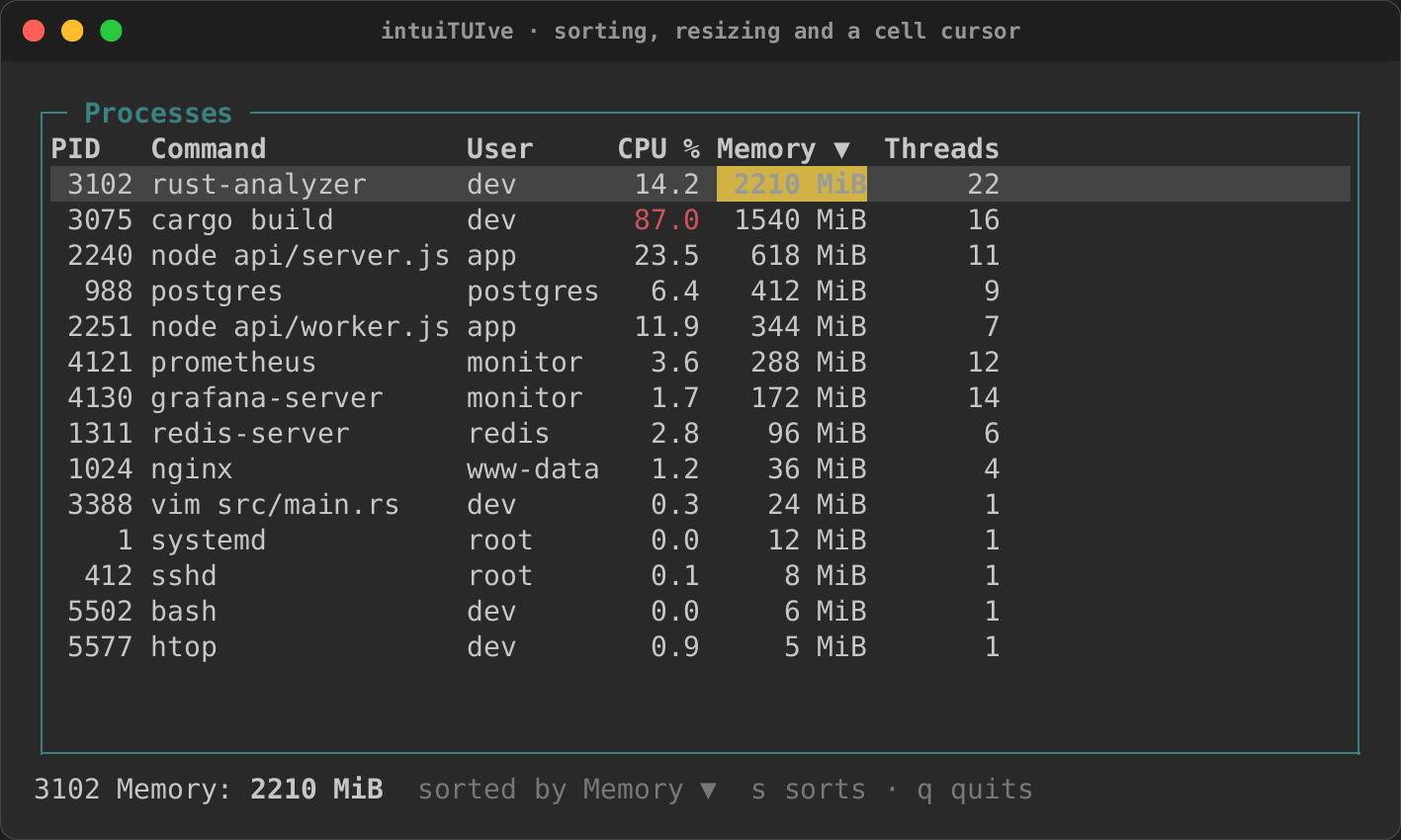
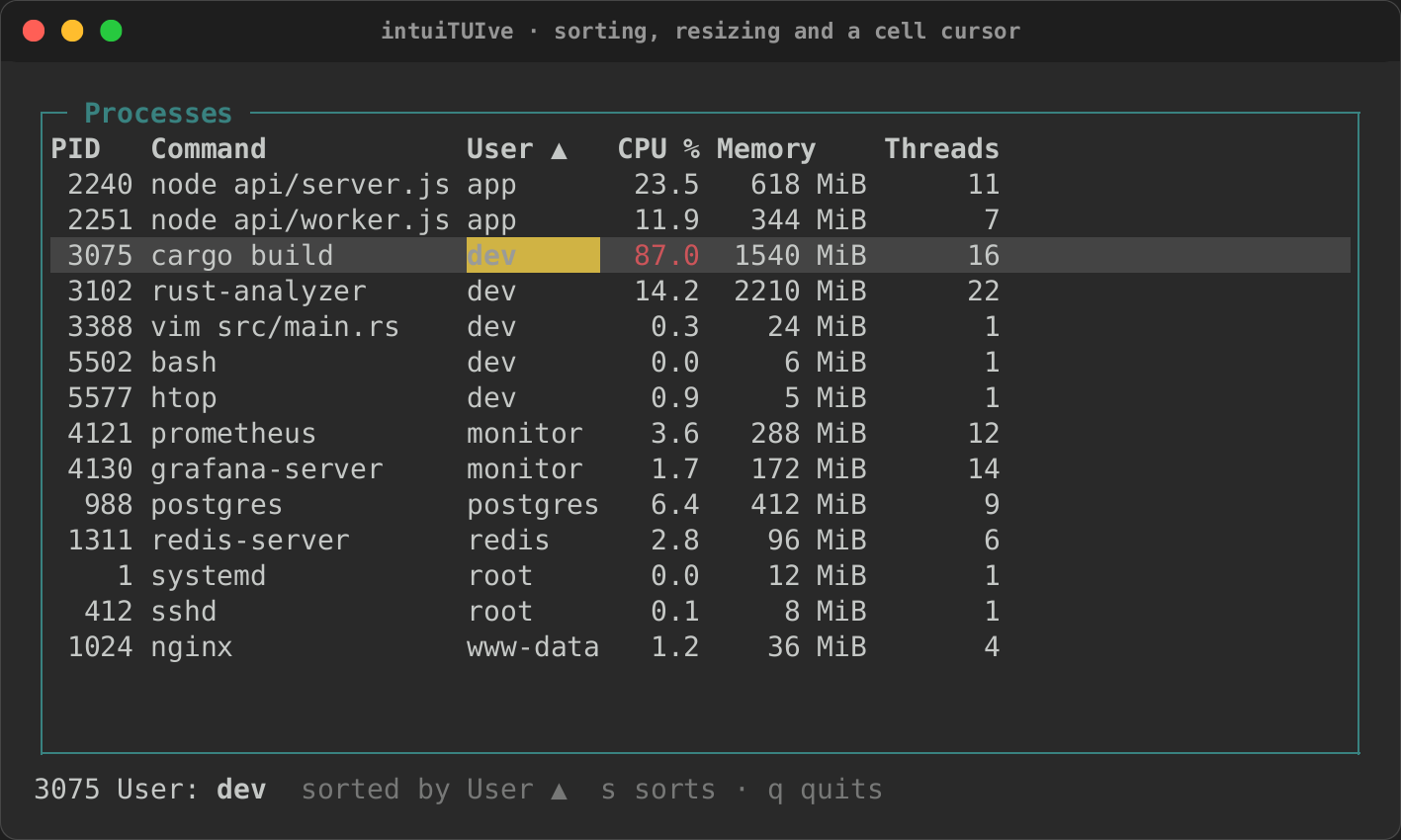
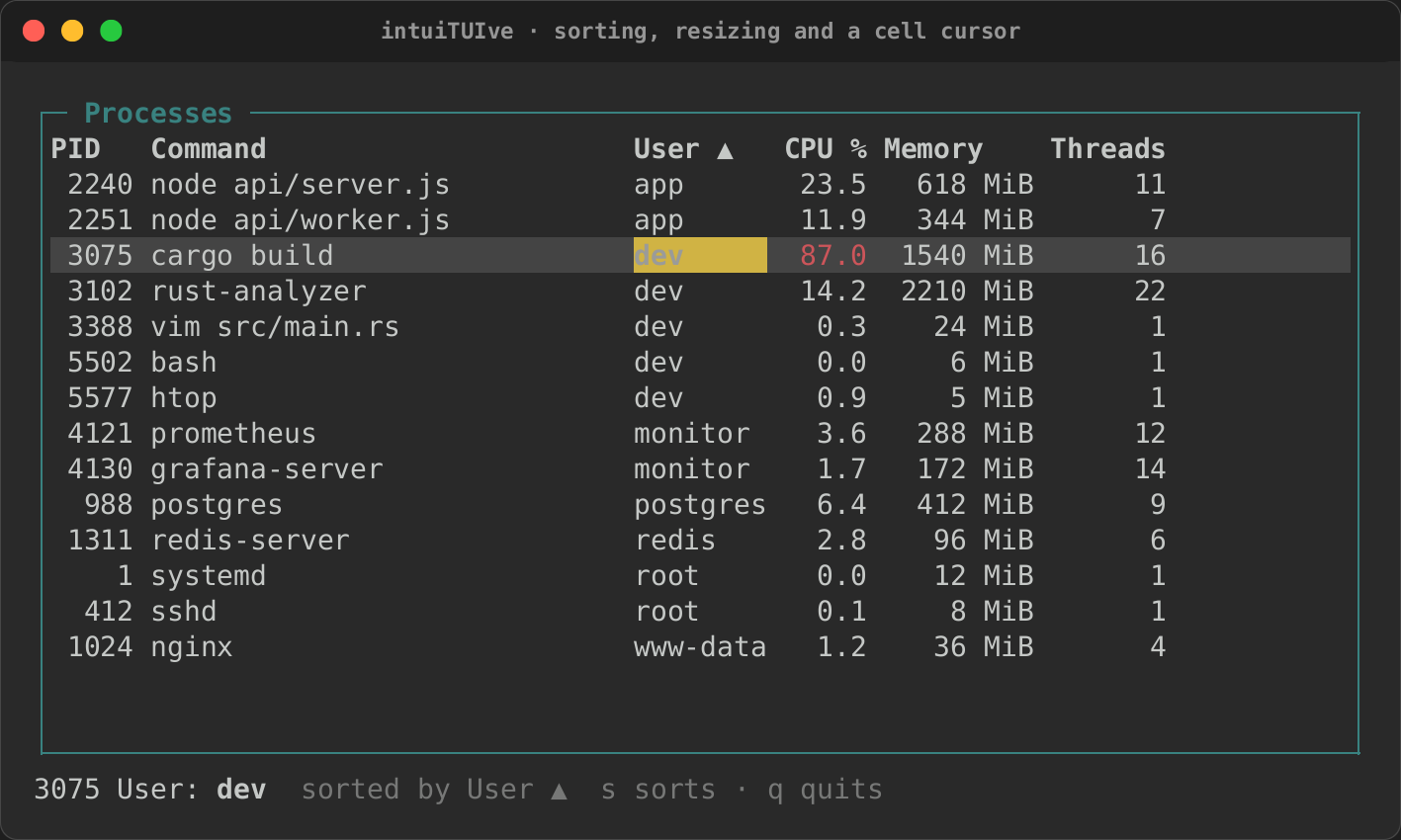
The tables example sorts a process table in its rows closure, so its
status line can name the selected process and the cell under the cursor
(cargo run -p rs-rich-intuituive --example tables):
let sort = signal(Some((3, Order::Descending)));
let selected = signal(0usize);
let cell = signal(1usize);

let columns = COLUMNS.map(|title| Column::new(title, Size::Auto)).to_vec();
let processes = table_with(
    columns,
    move || sorted(sort.get()).iter().map(cells).collect(),
    selected,
    TableOptions::default().sort(sort).cells(cell).resizable(),
)
.panel("Processes");
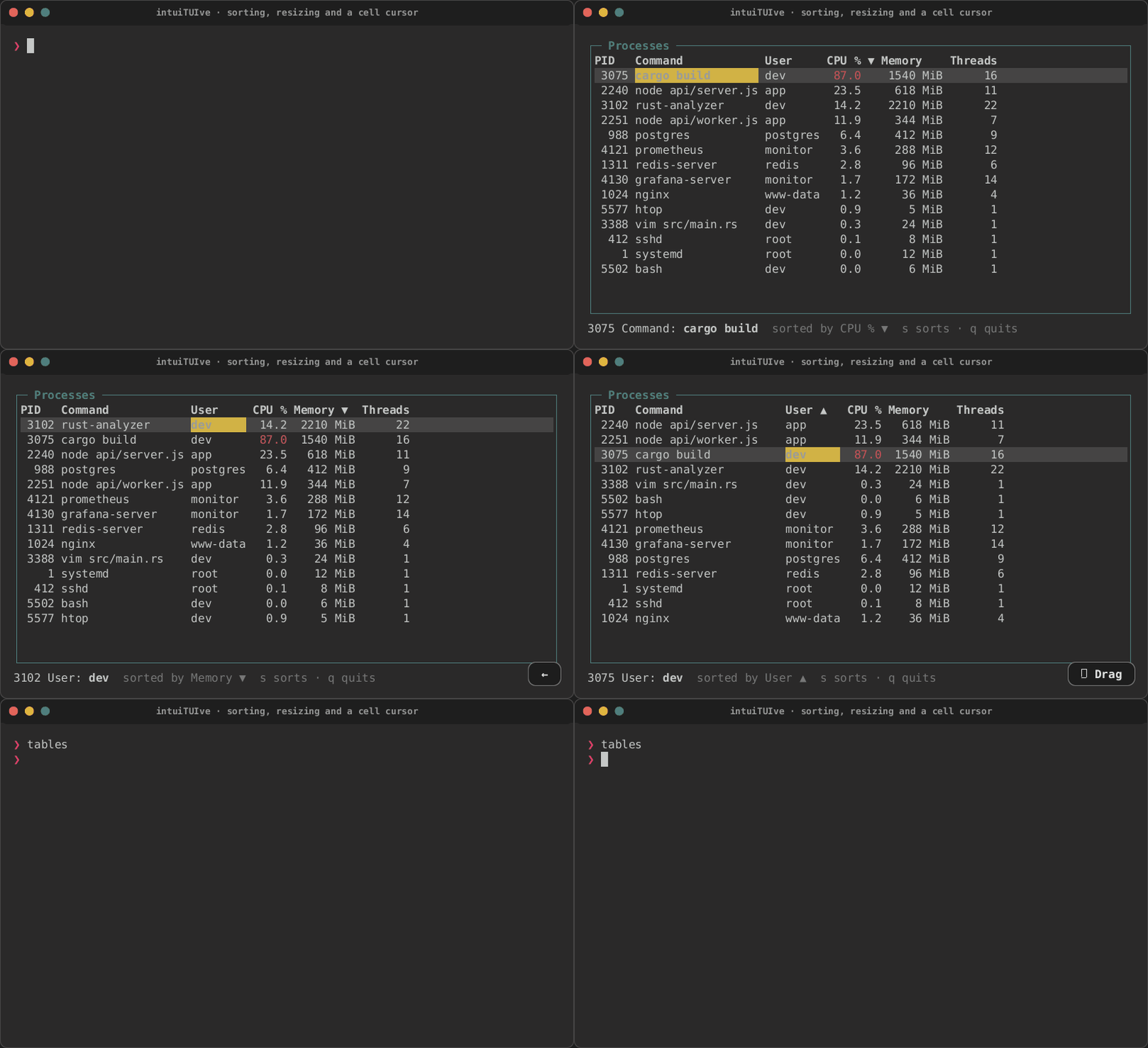
| Sorted by a click | The cell cursor, sorted with s |
Resized |
|---|---|---|
 |
 |
 |