Inputs, text and dates
The nodes that take what a user types: rs-rich-interact's components hosted in an app, inputs bound to signals (with completion and a history), a command line, text areas, calendars and date and time pickers, and a query language for filtering records by what was typed. Buttons, check boxes, radio groups, sliders and select fields are on Buttons and form controls.
Components
use rich_interact::Input;

let name = signal(String::new());
column([
    component(Input::new("Name"), move |value, _| name.set(value)).fixed(1),
    text!("Hello, {name}"),
])
- A focused component takes keys first. Keys it does not use bubble on, and the terminal caret follows its cursor.
- Its answer (Enter in an
Input, a pick in aSelect) goes to the closure. .on_cancel(|cx| …)handles Esc. Without it, Esc bubbles to your own bindings.- A component answers once and then shows its answer. For an entry box
that takes one entry after another, use
repeating(make, on_done): it builds a fresh component after each answer.
Inputs bound to signals
let first = signal(String::new());
let password = signal(String::new());
let age = signal(30i64);
column([
    input(first).placeholder("First name").fixed(1),
    input(password).mask('•').max_length(40).fixed(1),
    number_input(age, 0..=150).step(1).fixed(1),
])
.on_key("enter", move |cx| save(first.get(), age.get()))
input(text)is a one-line text box on aSignal<String>, both ways: typing sets the signal, and setting the signal replaces the text. It is atext_areain a single-line mode, with the same editing keys, undo and mouse. Enter goes to.on_submit(|value, cx| …), which uses it, or with none bubbles to your bindings (a form's own Enter). Tab moves the focus on, pasted line breaks become spaces, and a long line scrolls sideways to the caret..placeholder("…")shows dimmed text while it is empty,.mask('•')shows each character as•while the signal holds the text (nothing is copied out of it), and.max_length(n)stops typing and pasting atncharacters.number_input(value, range)is a whole number on aSignal<i64>, kept inrange. ↑/↓ step it by.step(n), PgUp/PgDn by ten steps, Home/End go to the ends, and the wheel steps it. Digits type a new number (a-first for a negative one), which is set on the signal at once, clamped, and shown as typed until Enter or the focus leaves.- The caret goes to the end of an input's text when it is made and
whenever the signal is set from elsewhere (a text area's goes to the
start).
.caret(Caret::Start | Caret::End | Caret::At(n))puts it elsewhere, and.select(range)selects characters (grapheme clusters, a line break counting one) with the caret at the end, so typing replaces them: a rename that selects the name before its extension isinput(name).select(0..stem). - Both are text boxes for assistive technology, with their text as the
value. Validate them with
.error_when(..), as any node, or with.validate(|text| Option<String>), which shows the message too and gives it to assistive technology (Editing text).
Completion, history and a command line
use intuituive::command_line::{command_line_with, CommandLine, CommandLineOptions, Mode};
use intuituive::{complete_words, history_in, Completion};

// An input that completes and remembers.
input(query)
    .complete(complete_words(["project:", "status:", "priority:"]))
    .history(history_in("tasks", "filter-history"));

// A command bar: modes, a title, an inline confirm, errors in red.
let cmd = CommandLine::new();
column([report, command_line_with(cmd, CommandLineOptions::new().two_rows())])
    .on_key("/", move |cx| {
        cmd.open(cx, Mode::new("").title("Filter Tasks")
            .on_change(move |text, _| filter.set(text.to_string())))
    })
    .on_key("x", move |cx| cmd.confirm_keys(cx, "Delete Task 1? (x)", "x", delete));
input(..).complete(|text, caret| Vec<Completion>)gives an input candidates for its text and the caret's byte; eachCompletion::new(range, text)replaces a byte range (usually the word before the caret,word_before(text, caret)), with an optional.detail(..)shown dimmed beside it. Tab opens a pop-up of them under the input (above it where there is no room), drawn over its neighbours without taking the keys; one candidate is taken at once. Tab and ↓ or Shift+Tab and ↑ move through it, Enter takes one, Esc closes it, and typing narrows it. The top candidate's rest shows after the caret, dimmed (input.ghost), and → or End at the end takes it.complete_with(f, CompleteOptions::new().auto().ghost(false).rows(5))opens it as you type, drops the ghost, shows five rows.complete_words(list)completes the word before the caret from a list. The pop-up's styles arecompletion,completion.selectedandcompletion.detail.input(..).history(h): ↑ and ↓ go through the entries that start with what was typed before the first ↑ (newest first; ↓ past the newest puts the typing back), and Enter adds the text as the newest entry.his anInputHistory: a name ("find", the session's, shared by name),history_session(),history_in(app, name)in the app's state directory, orhistory_file(path), written on each entry under a lock and merged with what another session wrote.h.status()isSome((3, 7))while an input browses it, for a[3 / 7]in a title.cx.prompt_with(.., PromptOptions::new().complete(f).history(h), ..)does the same in a prompt.command_line(state)is a bar of one row (or two:command_line_with(state, CommandLineOptions::new().two_rows()), the title above the line) driven by aCommandLine, which isCopy.state.open(cx, Mode::new(":"))opens it with that prefix and takes the focus; the mode sets.title(markup),.initial(text),.complete(f),.history(h),.on_submit(|text, cx| Ok(()))(anErr(message)keeps it open with the message in red),.on_change(..)(a filter as you type) and.on_cancel(..)(Esc).state.confirm(cx, question, on_yes)asks in place (y;confirm_keystakes other keys, andn,qand Esc say no),state.error(text)shows an error in red,state.message(markup)a message, andstate.close(cx)closes it. On closing, the focus goes back where it was. Its styles arecommand.title(reversed) andcommand.question(bold).
Text areas
text_area(text) edits the String in a signal: what is typed is set on
the signal, and a string set on it from elsewhere replaces what the area
holds. Its options are builders on the node, called before .panel(..)
and the like wrap it:
let source = signal(SOURCE.to_string());
let notes = signal(String::new());
let code = text_area(source)
    .language("rust")
    .line_numbers()
    .soft_wrap(false)
    .autofocus()
    .panel("count.rs");
let jotted = text_area(notes)
    .placeholder("Notes: what to change, what to test…")
    .panel("notes")
    .fixed(6);
.language("rust")highlights it through the console's code highlighter: syntect by default, lumis when it is registered. Every row is filled with the theme's background..line_numbers()numbers the lines in a gutter..soft_wrap(false)scrolls long lines sideways to the caret instead of wrapping them (wrapping is the default)..read_only()keeps the caret, selection and copying, and refuses edits..placeholder("…")shows dimmed text while it is empty.
The editing is rich_interact::edit::Buffer, which the interact crate's
own TextArea uses too: the caret moves by grapheme cluster, so an emoji
or an accented letter is one step. The keys:
| Keys | What they do |
|---|---|
| arrows, Home/End, PageUp/PageDown | move; Ctrl+←/→ by word, Ctrl+Home/End to the start and end |
| Shift with any of them | select |
| Ctrl+A | select everything |
| Ctrl+C, Ctrl+X | copy and cut the selection (OSC 52); with nothing selected, Ctrl+C quits as anywhere |
| pasting | the terminal's bracketed paste, cleaned of control characters, as one undo step |
| Tab, Shift+Tab | indent and outdent the selected lines |
| Escape, then Tab | move the focus on (read-only, Tab always does) |
| Ctrl+Z, Ctrl+Y or Ctrl+Shift+Z | undo and redo; a typed run is one step. Ctrl+Z here never suspends the app |
| Ctrl+W, Ctrl+U, Ctrl+K | delete a word, to the line's start, to its end |
The mouse places the caret, drags a selection, and a double or triple click selects a word or a line; the wheel scrolls.
The keys are a keymap of named actions: rebind them, take the Emacs or Vim preset, search with a find bar, wrap at words, and more, in Editing text.
Only the lines in view are wrapped, highlighted and drawn, so a file of a hundred thousand lines pages as fast as a short one. Highlighting starts at the first line in view: a construct that opened above it (a long comment, a multi-line string) is not known to the lines it covers.
For assistive technology it is a text box whose value is the caret's line, so linear mode reads the line the caret moves to.
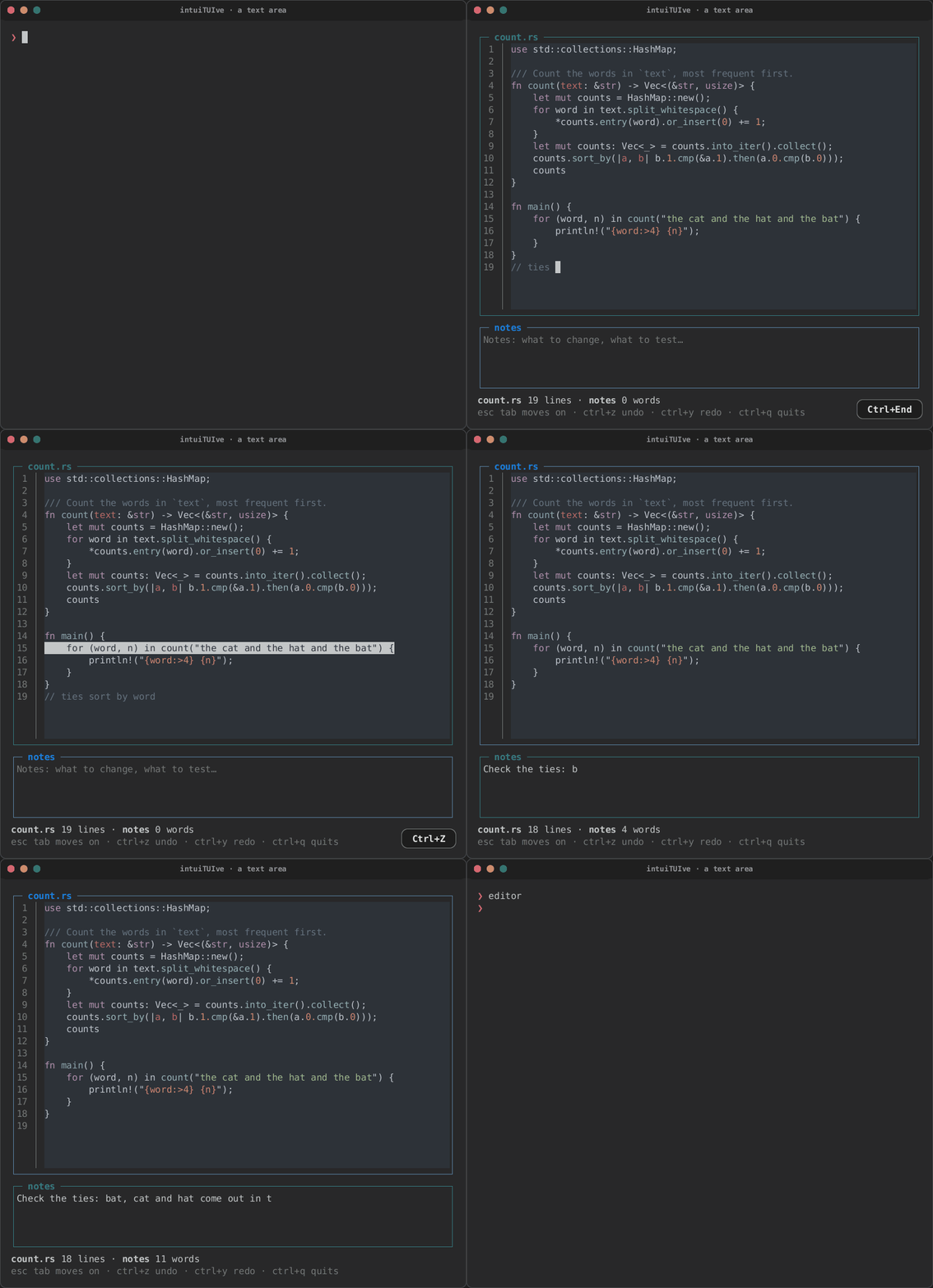
| Highlighted, with line numbers | A line selected | Notes, after Escape and Tab |
|---|---|---|
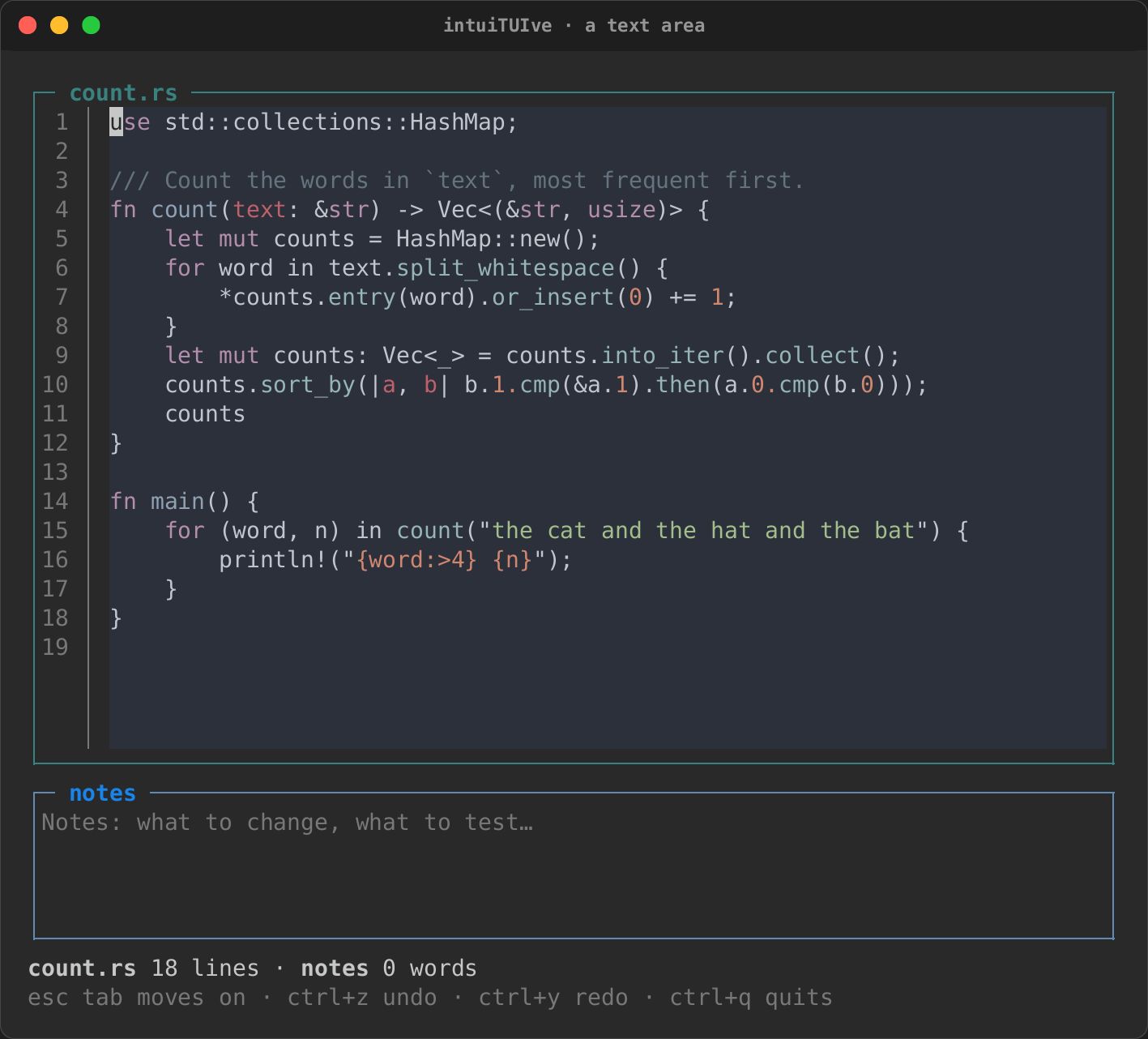 |
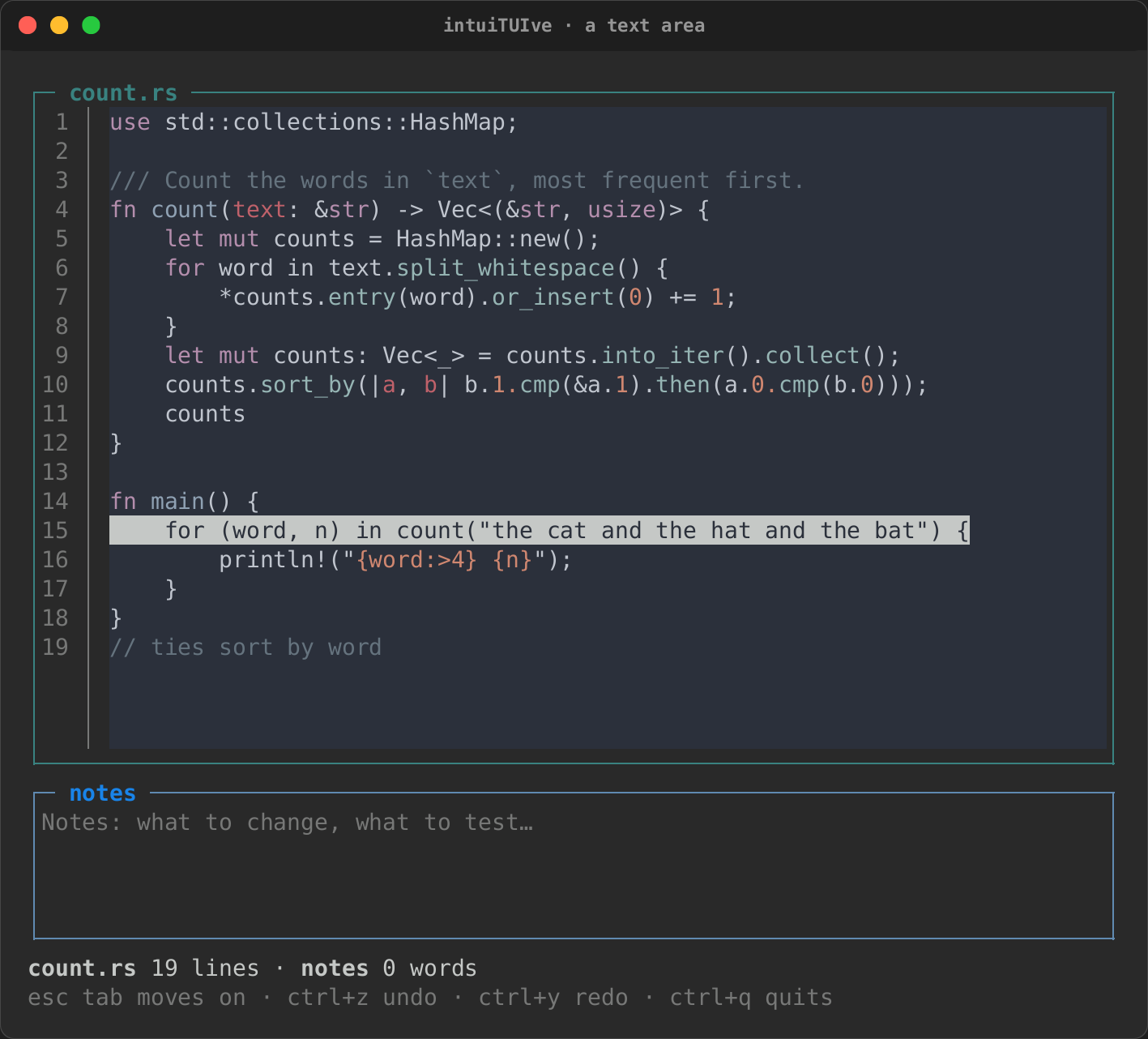 |
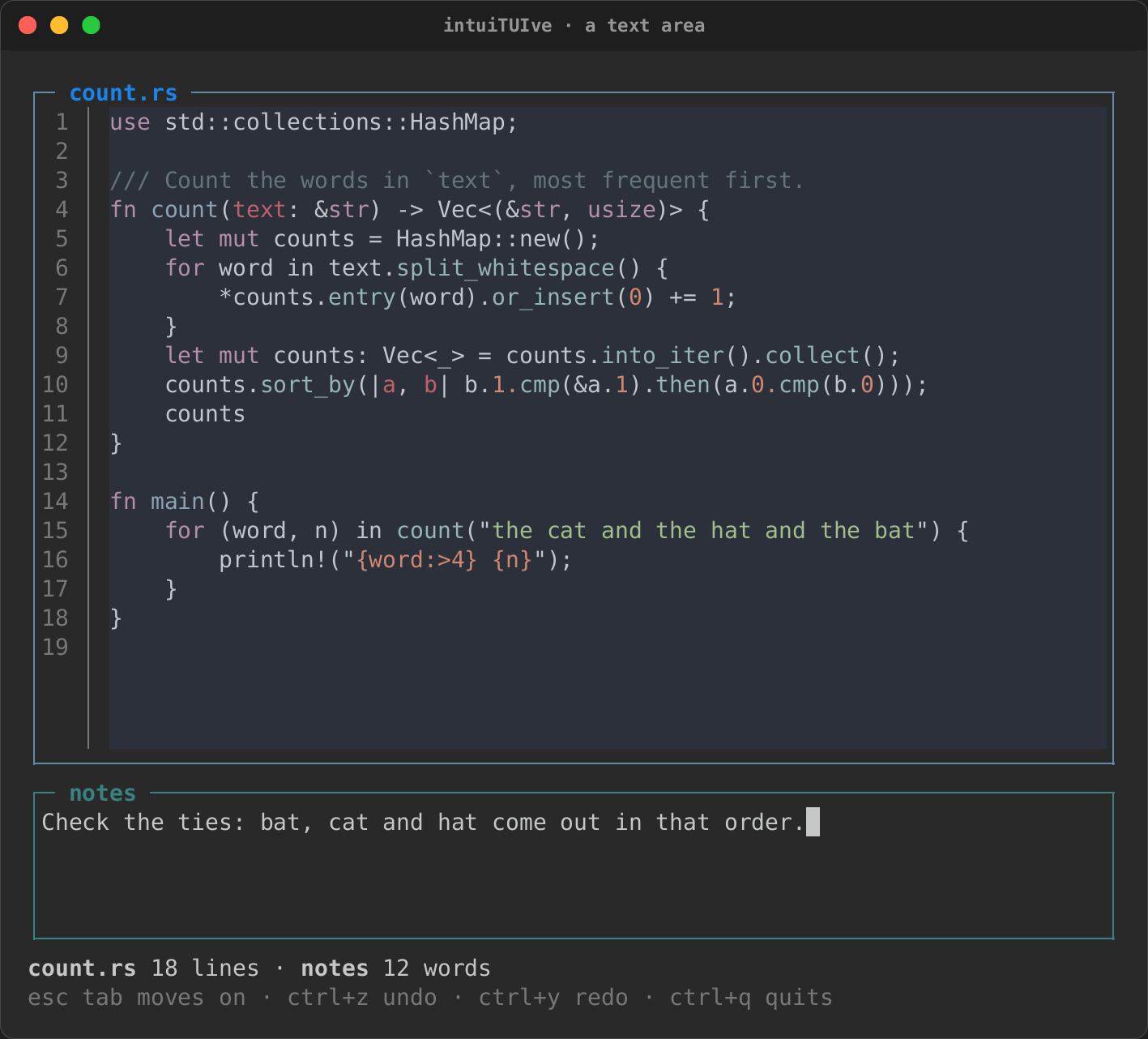 |
cargo run -p rs-rich-intuituive --example editor runs it. In Python,
text_area(text, language="rust", line_numbers=True) takes the options as
keywords.
A prompt editor
New in 0.0.24: the parts of a chat's prompt, on text_area.
use intuituive::complete::{Completion, history_session};
use intuituive::files::path_completer; // the `files` feature
use rich_ext::listing::walk;

text_area(prompt)
    .grow(1, 10)                                   // rows: at least 1, at most 10, then it scrolls
    .submit_on("enter")                            // Shift+Enter and Alt+Enter add a line
    .placeholder("Ask anything")
    .history("prompt")                             // ↑ on the first line, ↓ back to the draft
    .complete_at('@', path_completer(walk(&root).skip_dir("target")))
    .complete_at('/', |query| commands(query))     // a Vec<Completion>
    .on_submit(move |text, cx| send(text, cx))
.grow(min, max)makes it as tall as its rows (wrapped lines counted), frommintomax, then it scrolls to the caret. The rows around it lay out again as it grows and shrinks, and when the app clears it..submit_on(keys)names the keys (ason_keytakes them) that callon_submitwith the text, after adding it to the history. Shift+Enter and Alt+Enter then add a line; a terminal that cannot tell Shift+Enter from Enter still sends Alt+Enter..newline_on(keys)names other keys for that..history(h), as on an input: ↑ on the first line recalls the newest entry, ↑ again goes back, and ↓ forward to the draft. A text area goes through every entry (an input, through those that start with what was typed). A history for the session keeps entries of more than one line; one kept in a file (one entry a line) leaves them out..complete_at(trigger, source)opens the completion pop-up once a word starts withtrigger:source(query)gives the candidates for what is typed from the trigger to the caret, eachCompletion's range counted in the query's bytes (0..query.len()for all of it). Typing narrows it, ↑/↓ and Tab move, Enter takes the candidate and a space after it, and Esc closes it until the next trigger. It works on an input too, and beside.complete(..).files::path_completer(walk)(thefilesfeature) is such a source over the paths a walk finds, relative to its root, fuzzy-matched as the finder matches them:@src/maofferssrc/main.rs.
Markdown that streams
New in 0.0.24: markdown(doc) draws the Markdown a Signal<String>
holds, and keeps up as it grows: an agent's answer arriving.
use intuituive::{markdown, MarkdownStream};

let doc = signal(String::new());
let stream = MarkdownStream::new(doc);   // Clone + Send
std::thread::spawn(move || {
    for fragment in reply() {
        stream.append(&fragment);       // joined, delivered once a turn
    }
    stream.finish();
});
scroll(
    markdown(doc)
        .on_link(|url, cx| cx.copy(url.to_string()))
        .code_theme("ansi_dark"),
)
.follow_end()
- Blocks. The document is kept as blocks, each a node: the runs of lines between blank lines, outside fenced code. Each is rs-rich's Markdown port (headings, lists, quotes, tables, highlighted code), rendered at the node's width and kept until its source or the width changes.
- Streaming. When the document grows, it is split again only from its last block. The blocks above neither render nor draw again: an append damages only the last block's rows. A fence still open draws as code, as CommonMark reads it, so nothing jumps when it closes. Streamed in one-byte fragments, an answer ends exactly as it does set at once.
MarkdownStream::new(doc), made on the app's thread, is aClone + Sendhandle:append(fragment)from any thread, fragments arriving faster than the app's loop turns joined into one update.- Links. A block with links takes the focus. Tab and Shift+Tab go
through its links, then on, the focused one drawn in
markdown.link.focus(elsereverse); Enter or a click calls.on_link(|url, cx| ..). - Limits. A reference-style link whose definition sits in another block is not resolved, and list items separated by blank lines draw as lists of one item each (a line indented under an item stays with it). A table draws as a table once its delimiter row arrives.
A Markdown viewer
New in 0.0.24: markdown_viewer(load) reads documents with a table of
contents and a history, as Textual's MarkdownViewer does. How a
document is loaded is the app's: load takes a location (guide/a.md)
and gives its text or an error, and runs off the app's thread. The
files plugin's files::markdown_loader(root) reads files under root.
use intuituive::markdown_viewer;

let viewer = markdown_viewer(intuituive::files::markdown_loader("docs"))
    .on_link(|url, cx| cx.copy(url.to_string()))   // `https:` and the like
    .open("guide/index.md");
viewer.view().on_key("ctrl+h", move |_| viewer.go("index.md#install"))
- Contents. A list of the headings, docked left, marks the one in
view with
▸; Enter scrolls the one selected to the top.tshows or hides it (.toc(false)starts it hidden). - Links. A link with no scheme is followed:
other.md,../b.md#usage(relative to the document shown) or#install(an anchor of this one, GitHub's: lower case, spaces as-). Any other goes to.on_link. - History.
viewer.go(target),back()andforward()(Backspace or Alt+←, Alt+→), each place coming back at its scroll offset.location(),headings()andoffset()read where it is. - Errors. A loader that fails shows its error in place of the document; the app goes on, and Back returns.
Diffs to review
New in 0.0.24: diff_view(old, new) is an interactive diff of two
Signal<String>s, diffed again when either changes: an agent's edit to
accept or reject hunk by hunk.
use intuituive::widgets::{accepted_text, diff_view_with, Decision, DiffOptions};

let (old, new) = (signal(before), signal(after));
let decisions = signal(Vec::<Decision>::new());   // one per hunk
diff_view_with(
    old,
    new,
    DiffOptions::new()
        .side_by_side_at(100)      // unified below 100 columns
        .language("rust")          // highlight both sides
        .context(3)                // unchanged lines around each hunk
        .decide(decisions)
        .on_done(move |decisions, cx| {
            write_back(accepted_text(&old.get(), &new.get(), decisions));
            cx.pop();
        }),
)
- The diff is rs-rich-ext's line diff (
rich_ext::diff): its engine, its word diff for the emphasis inside a changed line, its@@headers and its theme styles (diff.added,diff.removed,diff.hunk,diff.line_number, …)..layout(Layout::SideBySide)sets the layout, and.side_by_side_at(columns)switches by width. - A hunk is one run of changed lines. Unchanged lines show
contextlines around each hunk, and the rest of a run folds into one⋯ 12 unchanged linesrow. - Keys (listed in the help, under
diff):]ornand[orpmove the hunk cursor, which starts before the first hunk and marks the rows of its hunk with▌(diff.cursor). Enter opens the folds around the cursor's hunk, or folds them again. Up, Down,j,k, PageUp, PageDown, Home, End and the wheel scroll. A click puts the cursor on a hunk or opens a fold. - Decisions. With
.decide(signal),aandraccept or reject the cursor's hunk, andAandRdecide every hunk. Headers say✓ acceptedor✗ rejected, and a status row counts the decided hunks..on_done(..)runs when the last pending hunk is decided.accepted_text(old, new, decisions)builds the result: the accepted hunks' new lines and the old lines everywhere else, the start and end of the file included (a missing final newline is a change too). - Long diffs. Only the rows in view are rendered and highlighted, so
a 10,000-line diff scrolls as fast as a short one.
.cursor(signal)keeps the hunk cursor where the app can read or set it.
Calendars and dates
use intuituive::widgets::{calendar_options, CalendarOptions, Date, Weekday};

let day = signal(Date::new(2026, 10, 7));
calendar_options(
    day,
    CalendarOptions::new()
        .today(Date::new(2026, 10, 7))
        .event(Date::new(2026, 10, 31), "red underline")
        .first_weekday(Weekday::Sunday),
)
.fixed(8)
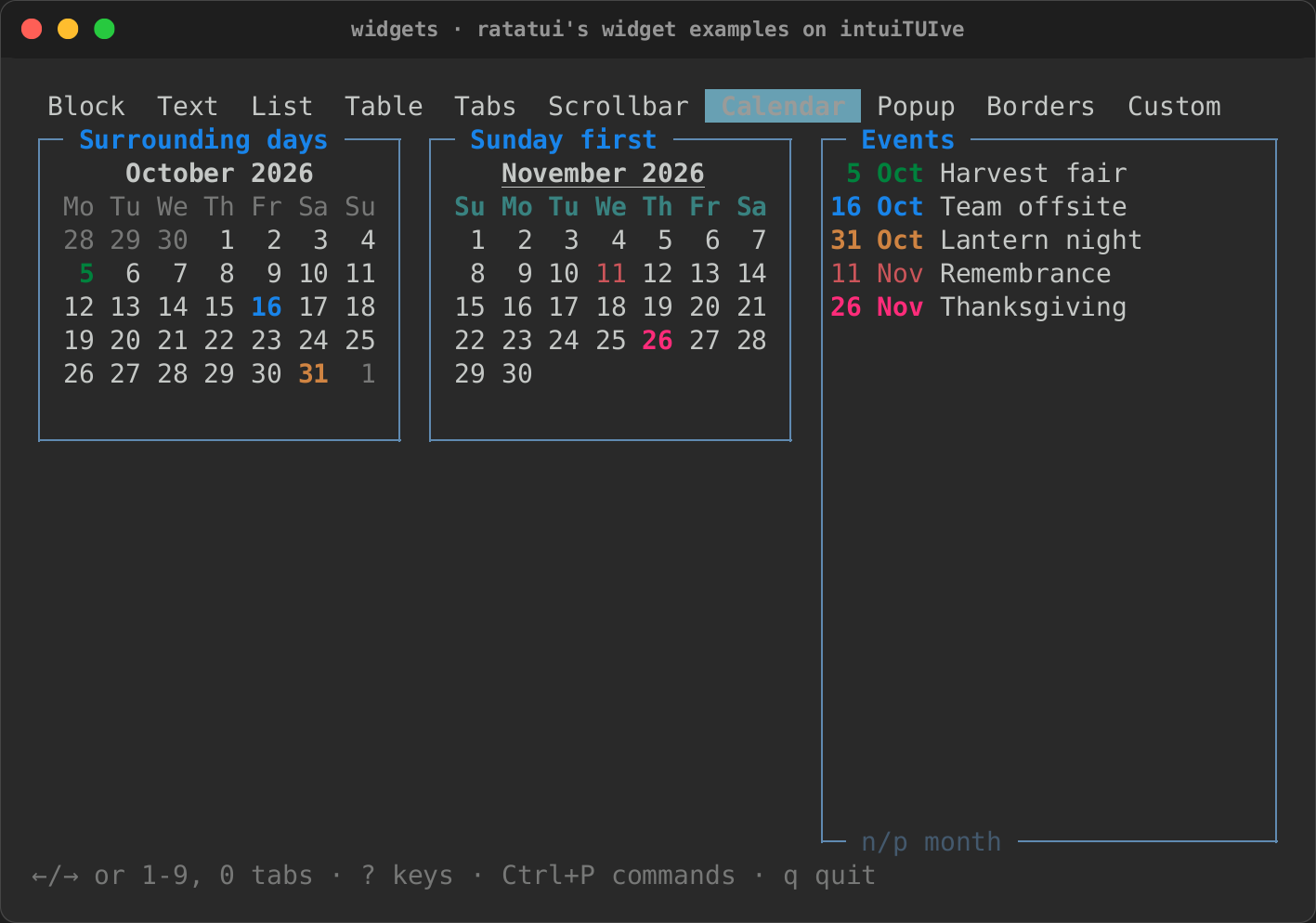
calendar(selected)is a month grid of aDatesignal: the arrows move by day and week, PgUp/PgDn by month, a click picks a day and the wheel changes month.Date(rs-rich-interact's, shared with its date pickers) has the date arithmetic it needs (weekday, adding days and months, month lengths) and parses and prints2026-10-07.calendar_options(selected, CalendarOptions::new().min(..).max(..))keeps the selection in a range: days outside it are dimmed (the theme'scalendar.disabledstyle), and the keys, the wheel and clicks stop at its ends. A range whose min is after its max is empty: the calendar says so where the weeks go ("the range is empty: min is after max", as rs-rich-interact's pickers say it), and nothing changes the day. The same options do what ratatui'scalendar::Monthlydoes:.event(date, "red underline")styles a date, and.events(|date| ..)styles them by a function;.surrounding("dim")shows the days of the months either side, which a click selects;.first_weekday(Weekday::Sunday)starts the weeks on another day; and.weekday_style(..),.month_style(..)and.day_style(..)style this calendar's headers and days.CalendarOptionsisClone.month(shown, options)is a month that only shows: no focus, no keys, no selection, and the month of the dateshownreturns, which may read a signal. Twelve in agridmake a year:
use intuituive::widgets::{month, CalendarOptions, Date};

let year = signal(2026);
let months = (1..=12).map(move |m| {
    let options = CalendarOptions::new().event(Date::new(2026, 12, 25), "red");
    month(move || Date::new(year.get(), m, 1), options).padding(0, 1)
});
grid([Size::Fixed(22); 3], months)
CalendarOptions::title(
  MonthTitle::Name)
titles a month October (NameYear, the default,
October 2026; None, no title), and .month_style_with(|first| ..)
styles each month's title by the month (bold only for this one).
month_with(shown, || options) and calendar_options_with(selected, ||
options) read their options again whenever a signal those read
changes.
- year_view(year, YearOptions::new()) is the year as taskwarrior-tui
draws it: as many months across as fit (.across(n) for a set number),
centred, under the year, each titled by its name, with
.marks(|date| Some("red")) styling dates, .today(date),
.first_weekday(..), .gap(columns, rows) and .calendar(options)
for each month's options. year_view_with(year, || options) reads its
options from signals.
- agenda(from, days, |date| items) lists the days from from that
have items, each under a bold heading (Monday 19 October 2026), and
says "Nothing scheduled" when none has.
A year and an agenda beside it, as taskwarrior-tui and calcurse draw them:
use intuituive::widgets::{agenda, year_view, Date, YearOptions};

let today = Date::new(2026, 10, 19);
row([
    year_view(move || today.year, YearOptions::new().today(today).marks(move |date: Date| {
        due.with(|due| due.contains(&date)).then_some("red")
    })),
    agenda(move || today, 7, move |day: Date| tasks_due(day)).fixed(32),
])
Weekday::name() ("Monday") and short_name() ("Mo") name a day,
and Weekday::of(date) finds one.
Times, and a date with a time
use intuituive::widgets::{datetime_picker, time_picker, DateTime, DateTimeOptions, Time};

let start = signal(Time::new(9, 0, 0));
let meeting = signal(DateTime::new(Date::new(2026, 10, 17), Time::new(9, 0, 0)));
let opens = DateTime::new(Date::new(2026, 10, 17), Time::new(9, 0, 0));
column([
    time_picker(start).fixed(1),
    datetime_picker(meeting, DateTimeOptions::new().min(opens)).fixed(11),
])
time_picker(selected)picks theTimein a signal field by field: ←/→ move between the hour and the minute, ↑/↓ change the focused one, wrapping round, and digits type it, two to a field.time_picker_withtakesTimeOptions:.seconds(),.twelve_hour()(AM and PM;aandpset them), and.min(..)/.max(..), where a step stops. A field typed past them stops at the range's end for that field and keeps the others where it can: with 09:30 the earliest,08typed into 12:45 makes 09:45. A first digit that would leave the range is not written until the field is complete or left. With its min after its max, the picker says the range is empty after its fields, and nothing changes the time.datetime_picker(selected, options)is a calendar over a time picker on oneDateTimesignal, Tab moving between them, and two rows under them for the range.DateTimeOptions::minis a moment: days before its day cannot be selected, and on its day an earlier time moves up to it, with a line saying why (✗ the earliest is 2026-10-17 09:00) until the next change that needs none. A field typed past the range moves alone, as in a time picker, and the line says why. An empty range (its min after its max) is said there too, and nothing changes the moment. Eleven rows, twenty cells wide.- The focused day and field are reversed, which reads without colour.
Queries over records
use intuituive::query::{self, Grammar, Kind, Record, TextMatch, Value};

let grammar = Grammar::new()
    .field("project", Kind::Text).matching(TextMatch::Prefix).alias("proj", "project")
    .field("due", Kind::Date)
    .field("urgency", Kind::Number)
    .dates(move |word| intuituive::dates::parse(word, now).ok());
let query = query::parse("proj:home +next (due.before:eow or urgency > 5)", &grammar)?;
let shown: Vec<&Task> = tasks.iter().filter(|t| query.matches(*t)).collect();
query::parse(text, &grammar)reads a filter into aQuery, andquery.matches(&record)tests anything that implementsRecord:field(name) -> Option<Value>,text()for bare words, andtags()(orhas_tag, for virtual tags). Bare and"quoted words"look in the text;field:valuecompares by the field'sKind(text by itsTextMatch, numbers equal, dates on the same day),field:matches a record without it; modifiersfield.before:/.after:/.above:/.below:,.is:/.not:,.has:/.hasnt:,.startswith:/.endswith:,.none:/.any:; comparisonsfield > 5,<=,!=;+tag/-tag;and,or(looser),notor!, and parentheses. Errors areQueryError { message, at },atthe byte range.- The grammar names the fields, their aliases and kinds, reads
values (
.read(|text| ..)for one field's sizes or levels,.dates(..)for dates), gives some bare words a test of their own (.words(..), Taskwarrior's ids), and says whether case counts, whether an unknownname:valueis a word (.lenient()), and whether+wordis a tag. A Taskwarrior or a process list's syntax is a grammar, not core code. - Dates as typed:
intuituive::dates(rs-rich-interact's) readsnow,today,tomorrow,eod,monday,eow,som,eoy,2026-11-01,14:30,3d,2wand the rest relative to a given now (dates::parse(word, now),parse_with(.., DateOptions::new() .week_start(6))for weeks from Sunday);dates::NAMESlists the words for completion.DateTime::now_local()andDate::today_local()read the clock in the local zone, which follows summer time (Zone::Local;Zone::posix(rule),Zone::named("Europe/London")andZone::tzifread others;DateTime::now_in(&zone)andDate::today_in(&zone)read the clock there),DateTime::from_unix(secs, &zone)/to_unix(&zone)convert, andadd_seconds(n)moves a moment on.