State, keys and the mouse
Signals hold an app's state, and keys and the mouse change it. This page covers signals, memos and watches; how keys reach nodes and where the focus goes (scopes, directions, held keys and releases); the mouse (clicks, hover, tooltips, drag-and-drop, copying text); and bindings with descriptions, which the help, the command palette and key hints list.
State
get()reads a value, andset(v)orupdate(|v| …)writes it. A node that reads a signal while drawing subscribes to it, and a write redraws exactly those nodes.setwith an equal value does nothing.setneedsPartialEq;replace(v)does not (it returns the old value, and every reader updates), for a value that cannot be compared: a closure, a handle.RectHandleandPathWatchcompare as handles: equal when they are the same one.watch(move || source, move |value, cx| …)runs a callback when a value changes (and once at the start), between frames, with aCtx: load a preview when the selection moves, save when a document changes. A watch made while a screen is built stops when the screen closes.on_write(signal, move |value, cx| …)runs a callback after every write to a signal, in turn, an equal value too: a watch sees two equal buffers as one, this sees two frames. Not called at the start.rate(signal)is aSignal<u32>of how many times a second it was written, counted over each second of the app's clock: a frame-rate meter. Callratewhere you callevery.- A
memoderives a value and notifies its readers only when the result changes. In a list where each row readsmemo(move || selected.get() == i), a move redraws two rows, not all of them. - Signals are
Copy: move them into as many closures as you need. Two apps in one program (two panes of a ratatui app, say) can share one: a write redraws the readers in both.
Writing signals, and the cycles the runtime stops:
- Inside
update, the closure may read and write other signals. Readers see every change once the outermost update is done. Reading the signal being updated panics: use the value the closure is given. - A memo only computes. Writing a signal while a memo (or a watch's source) computes panics with a message that says so: write in a handler, a watch's callback or a task.
- A node that writes a signal it reads while it draws draws again, once (a scroll moving to keep the focus in view does this). One that does it frame after frame would draw forever: after a few frames its own writes stop drawing it again, and a toast names it.
- A watch whose callback changes its own source runs at most 100 rounds in a row; then what is left is dropped and a toast says so.
Input and focus
column([
    label("one").focusable().on_key("x", |_| { /* … */ }).panel("One"),
    label("two").focusable().panel("Two"),
])
.on_key("q", |cx| cx.quit())
- Keys go to the focused node first, then bubble up through its ancestors until a binding uses them.
- Tab and Shift+Tab move the focus through focusable nodes. A
handler can move it too, with
cx.focus_next()orcx.focus(id). - Which node has the focus first: the first focusable one, unless a
node asks with
.autofocus()(a search box, the list a screen is about). On a wrapper that is not focusable of its own (aswitch, a panel or padding round a list) the focus passes to the first focusable node inside it, now or once it is built: a list in aswitchgets its own keys, and the menu key reaches itson_context. - Clicks:
.on_click(|cx| …)gets the clicks inside the node and focuses it. The app remembers where each node was drawn, so you never store rectangles yourself. - Key names are the ones
rs-rich-interactuses:"q","ctrl+s","up k"(either key). Spaces separate names, so the space key is"space", and the comma"comma"("ctrl+comma"); a binding with no keys, or a name that is not a key ("f99","ctrl-s"), panics when the binding is made. A name means the key:"shift+a"is"A", and"ctrl+i"is Ctrl+I, not Tab. A terminal without the kitty keyboard protocol sends some keys alike (Tab and Ctrl+I, Enter and Ctrl+M, Esc and Ctrl+[), so its Tab fires a"tab"or a"ctrl+i"binding (on one node,"tab"wins). With the protocol, which the app turns on when the terminal has it (.legacy_keys(true)keeps it off), Tab fires only"tab"and Ctrl+I only"ctrl+i". - Key releases come from a terminal with the kitty protocol. They
reach widgets as
WidgetEvent::KeyUp, and release bindings (.on_key_up,.bind_release);.on_keyand.bindfire on presses and repeats. Typed text stays text, so a plain letter or digit (or Enter, Tab and Backspace) has no release unless the app asks for every key withApp::all_keys(true). See Held keys, releases and key repeat. - Ctrl+C quits, unless a node on the focused path binds it: then the binding runs, and quitting is up to you.
- Ctrl+Z suspends the app on Unix, as the shell expects, and
fgdraws it again (inline, in a new region below the shell's lines), unless a node on the focused path binds it: then the binding runs. - When the focused node goes (a row deleted from an
each), the focus moves to the next one in the Tab order, or the one before it if it was last. - Out of the Tab order:
.no_focus()keeps a list or component you only show from taking the focus. - Showing the focus: panels highlight their border while the focus is
inside them. Any node can show it too:
.focus_style("reverse")(any style or theme name) restyles it, filled to its full width and over its children, while it has the focus, which is how a list shows its selected row.
Focus within, scopes, by direction, and as state
cx.focus_within(id)focuses the first focusable node inside a container, once it is laid out: aswitch's page shown from the next frame, akeyedchild about to be rebuilt, a search box shown by a signal. Nocx.after(Duration::ZERO, ..), no id kept from a builder. Moving the focus again before then drops the wait..focus_scope()marks a pane that remembers the node inside it that had the focus last; focusing the pane as a whole gives it back.cx.focus_next_scope()andcx.focus_previous_scope()move between panes (Slumber's and lazygit's Tab), Tab still moving between nodes. They pass a hidden pane by, unless it was made with.focus_scope_reveal(|| can, |cx| show): then, whilecan()holds, reaching it callsshow(which sets what itsshown_whenreads), and the focus goes inside once it is laid out. A pane shown alone, in fullscreen, so moves on to the next pane, shown in its place.cx.focus_direction(Direction::Left)moves to the neighbour on a side by where things were drawn (between scopes when the focus is in one), and.bind_directional_focus("ctrl+left H", "ctrl+right L", "ctrl+up K", "ctrl+down J")binds the four;focus::neighbour(rects, from, direction)is the geometry, for a widget placing parts of its own.- Where the focus is:
focus::focused()(the focused node) andfocus::has_focus(id)(on it or inside it) read it so a text, a memo, a watch or a size follows it. .on_focus(|cx| ..)and.on_blur(|cx| ..)run when the focus comes into a node (or a node inside it) from outside, and when it leaves; a modal opening over it is leaving.
Key sequences, any key, and keys a container sees first
column([list(files, selected), status])
    .previews_keys()
    .bind_sequence("g g", "Go to the top", move |_| selected.set(0))
    .bind_sequence("g h", "Go home", go_home)
    .on_any_key(|cx, key| { log(key); false })
.bind_sequence("g g", description, handler)(.on_sequencewithout a description) runs once the keys are pressed one after another. The first key starts the sequence where a binding of it would run (a deeper node's binding of the key wins, as for any key; on one node, a binding of the first key wins over the sequence). Esc cancels a sequence under way; any other key that goes on with none of the node's sequences cancels it and is then handled as usual, sogthenjstill moves down. The comma key iscomma, as in any binding:"comma s"(or quoted,"\",\" s"). Spaces mean "then" here and "or" inbind("k up", ..); a sequence is two keys or more, and one of one key panics: bind it withbind.App::which_key(true)shows what can follow while a sequence waits, Yazi's way: in up to three columns, in a box at the bottom of the screen, the keys left in the theme'swhich_key.keystyle (elseaccent), the two cells after them inwhich_key.sep, the descriptions inwhich_key.desc. A description too long for its column ends in…, two cells short of the next column's keys.App::which_key_delay(d)waitsdfirst, so a sequence typed quickly shows nothing. The help and the command palette list sequences asg g..on_any_key(|cx, key| -> bool)gets every key that reaches the node and none of its bindings or sequences took; it returns whether it used it, and one it did not use goes on to the ancestors..previews_keys()lets a container's own bindings, sequences andon_any_keysee keys before the focused node inside it does, outermost container first: an app-wide keymap that wins over a focused list'sj,kandg, without making the container focusable. A focused text box inside (an input, a text area, an opencommand_line) keeps the keys typed into it that have no Ctrl or Alt (letters, Enter, the arrows): the container sees one of those only when the box does not use it, so a command line can sit inside the app's keymap.- With nothing focused (a pop-up of plain text), keys go to the root
and down through every node that holds a single child, so a binding on
the content inside a pop-up's
.panel()works.
Held keys, releases and key repeat
App::new(|| {
    let game = signal(Game::new());
    let held = held_keys();
    column([view(game, held)])
        .bind("left a", "Move left", move |cx| game.update(|g| g.left(cx.key())))
        .repeat(Duration::from_millis(167), Duration::from_millis(33))
        .bind("down", "Soft drop", move |_| game.update(|g| g.soft(true)))
        .bind_release("down", "Stop the soft drop", move |_| game.update(|g| g.soft(false)))
})
.all_keys(true)
.synthesize_releases(Some(Duration::from_millis(600)))
held_keys()is a memo of the keys held down, as plain keys (plain_key: no modifiers, a letter in lower case, sowis held with or without Shift), in the order they went down.cx.is_held("w up")asks of one,cx.held_keys()reads them once. A key is held from its press to its release; one whose release will not come is never held.- Releases reach
.on_key_up(keys, ..)and.bind_release(keys, description, ..)(listed in the help as "(on release)") on the focused path, after the widgets there (which getWidgetEvent::KeyUp). A binding without modifiers takes its key's release with any modifiers held by then. - Which releases come:
cx.releases_reported()says, as aReleases:None(a legacy terminal),ExceptText(the kitty keyboard protocol: no release for text keys, Enter, Tab and Backspace) orAll.App::all_keys(true)asks a kitty terminal to report every key (flag 8, with alternate keys so Shift+1 is still!): text keys then report releases, and a modifier on its own is a key ("shift","ctrl","alt","super":KeyCode::Modifier(ModifierKey::Shift)and the rest), as a game wants it.App::synthesize_releases(Some(hold))makes up the releases that do not come,holdafter a key's last press or repeat: pick it longer than the terminal's repeat delay.App::synthesize_releases_with(Holds::new(first, repeat))holds a keyfirstafter its press andrepeatafter each repeat: a game passes 400 ms and 120 ms, so a held key outlasts the repeat delay and a let-go key stops soon after its last repeat. A test sets what its terminal reports withdriver.set_releases(..)and sends releases withdriver.send(Event::KeyUp(..)). - Repeat under the app's control:
.repeat(delay, rate)after a binding fires it at once, afterdelay, then everyratewhile the key is held, passing the terminal's own repeats over (a game's DAS and ARR). Without a release to stop it, the binding fires on the terminal's repeats instead. - Which key fired:
cx.key()in a binding (pressed, repeating or let go) is the key that fired it, so.bind("w up", ..)tellswfrom ↑. - Input waiting is taken together: the loop handles every event
already waiting (64 at most) before it draws, so keys typed while a
frame was slow are not spread over the frames after. Keys typed while
the terminal is asked about itself at the start are kept: the session
waits a second at most for the answer, a quarter of one once keys come.
A test scripts keys that arrive together with the
Headlessbackend'squeuedfield set (headless.queued = true).
The mouse
Every mouse event (press, release, drag, movement, the wheel) goes to the deepest node under the pointer, in that node's own coordinates, and bubbles up through its ancestors until one uses it.
- A press first focuses the deepest focusable node under the pointer.
.on_click(handler)handles a left click..on_mouse(|cx, mouse| …)handles every mouse event. It returns whether it used the event. On a table, list, tree or calendar, a right click selects what is under it and then reaches this handler, so acontext_menuit opens is about the row it selected.- A drag can be kept by the widget it started in, even when the
pointer leaves it: call
capture_mouse()from its handler. - Hover is state. A widget that asks whether it is hovered draws again when the pointer enters or leaves it. The terminal's movement reports are turned on only once something asks.
.hover_style(style)lays a style over a node while the pointer is over it, the way.focus_style(style)does for the focus. It works on containers too.
To the pixel
A terminal that reports the mouse in pixels (SGR-Pixels, mode 1016) lets a node tell where in a cell it was clicked: a picture, a canvas or a map can then act on the exact pixel. Nothing needs turning on.
- The session asks at the start (DECRQM, in the same query as the
kitty keyboard protocol's) and turns 1016 on, after 1006, when the
terminal knows it and gives its cells' size in pixels (
TIOCGWINSZ's pixel fields). The size is measured again on a resize. - Events stay in cells.
mouse.columnandmouse.roware the cell, as ever, andmouse.pixelsays where in that cell the pointer was (aSubcell: the offset from the cell's top left and the cell's size). It is relative to the cell, so it is still right in a node's own coordinates. mouse.precise()gives the position in fractional cells: to the pixel where the terminal reports pixels, the cell's centre elsewhere. A node that uses it works the same in both.RICH_PIXEL_MOUSE=0keeps the mouse in cells whatever the terminal answers.- Tests click a pixel with
Driver::click_pixel(x, y, (width, height)).
Terminals known to report pixels (none verified on this project's build machine, which has no graphical terminal): kitty, WezTerm, foot, Ghostty and xterm. Terminals that do not answer the question (and multiplexers that answer it themselves, tmux among them) keep reporting cells, and every click behaves as before. termion's backend asks nothing, so it stays in cells.
Tooltips
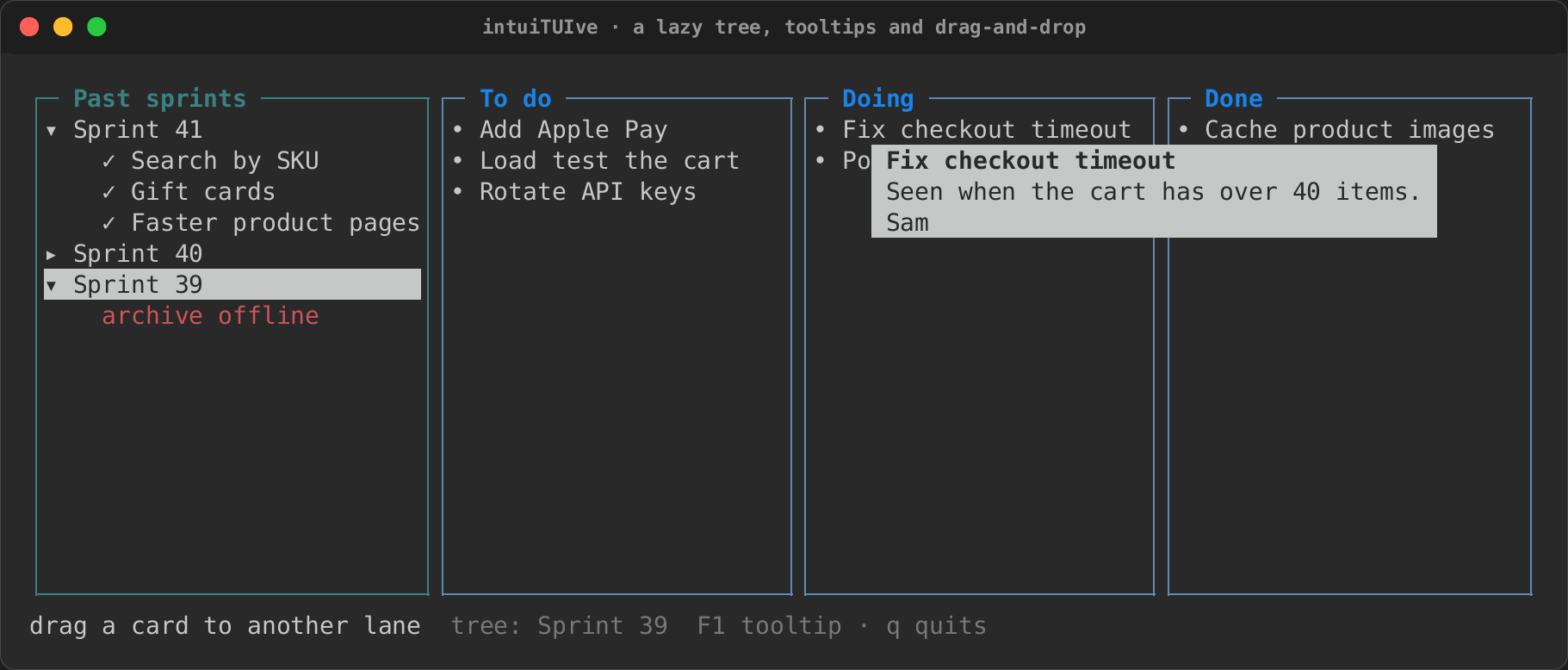
.tooltip(markup) shows a small box by the pointer once the pointer has
rested on the node for 600 ms. F1 shows the focused node's tooltip below
the node at once, unless a binding takes F1. A key, a click or moving to
another node hides it.
The box draws over everything, in the theme's tooltip style (reverse
unless the theme sets it). It wraps to fit the screen and goes above the
pointer when there is no room below.
Drag-and-drop
let done = signal(Vec::<Task>::new());
column([
    each(move || todo.get(), |task| label(task.title.clone()).draggable(task)),
    text(move || format!("{} done", done.with(Vec::len)))
        .on_drop(move |task: &Task, _| done.update(|d| d.push(task.clone()))),
])
.draggable(value)lets a node be dragged with the left button, carryingvalue. A press still focuses and clicks as before; the drag starts once the pointer moves a cell..on_drop(|value: &T, cx| …)takes values of typeT. A drag carrying another type passes the node by: it is not highlighted, and nothing drops.- While a drag lasts, its source is dimmed and the target under the
pointer is lit in the theme's
drop.targetstyle (reverse unless set). - Letting go over a target drops the value there; anywhere else, nothing happens. Esc cancels.
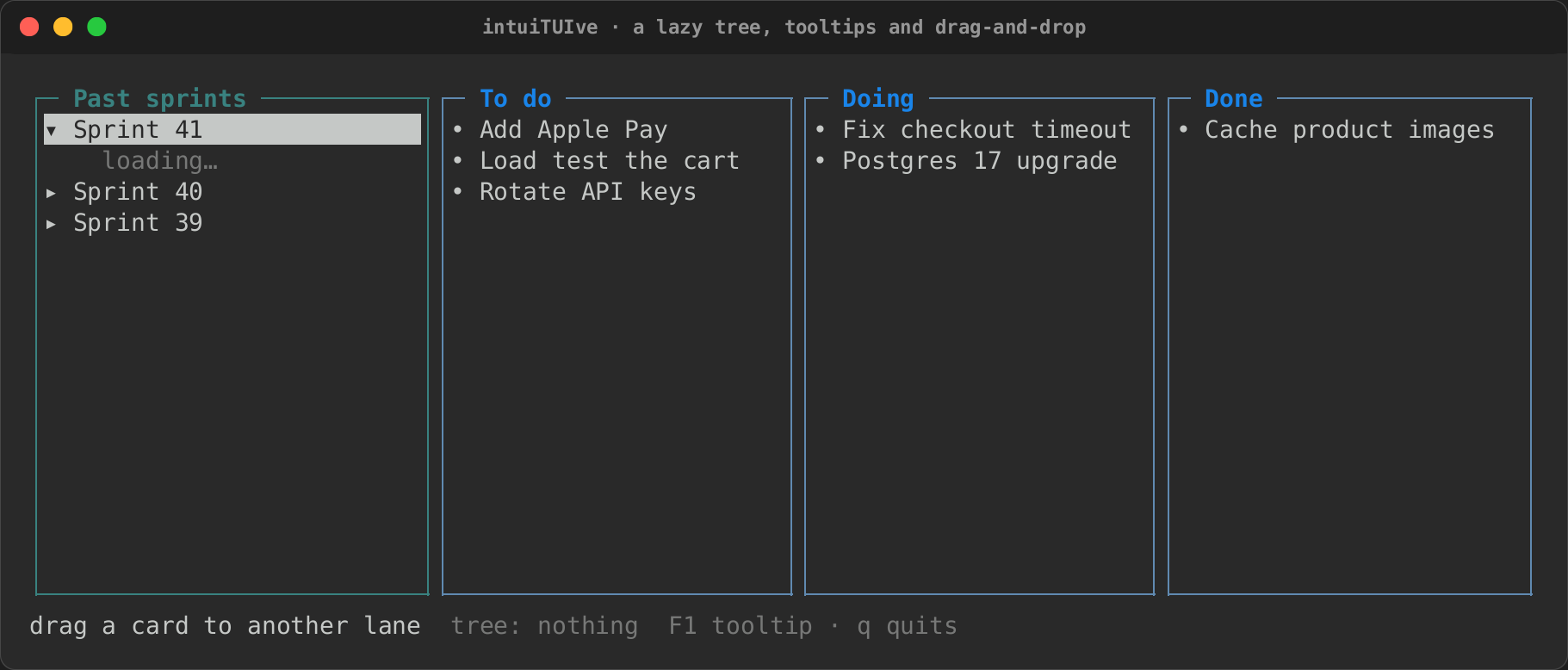
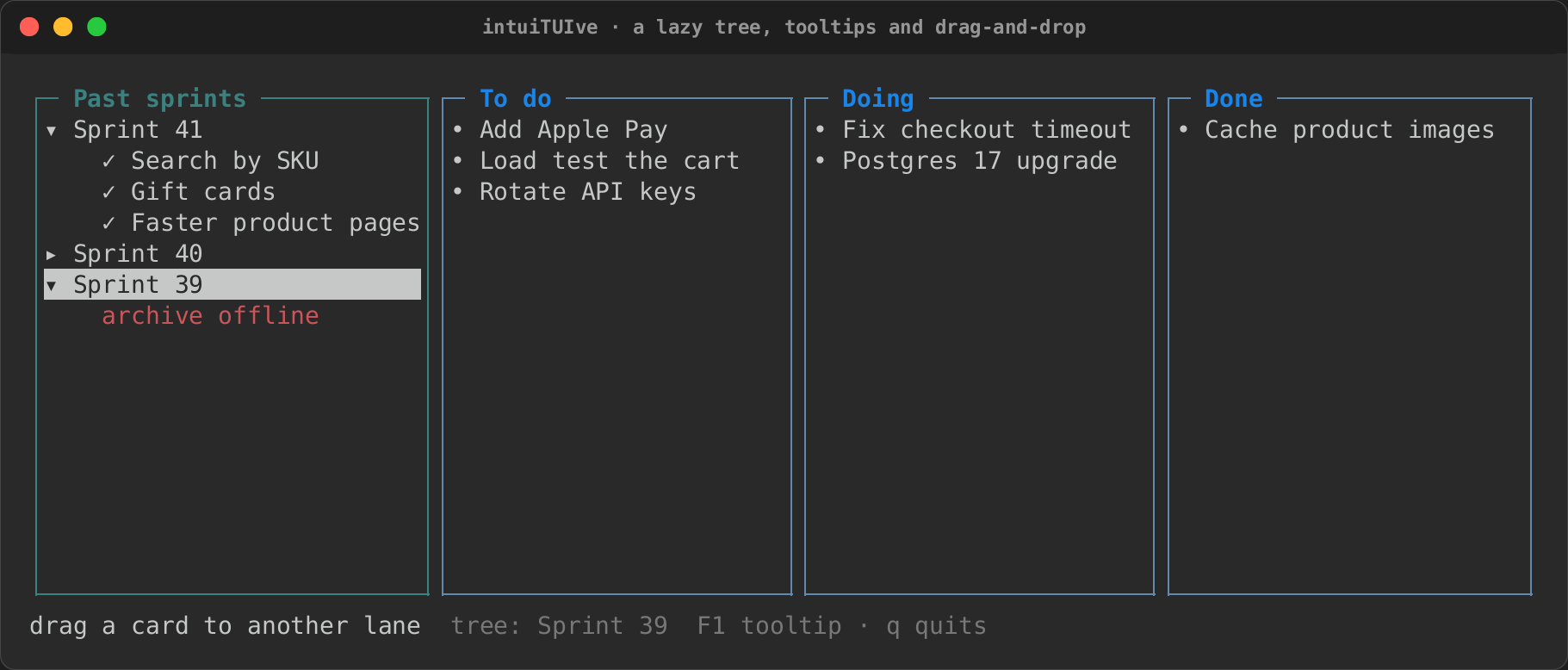
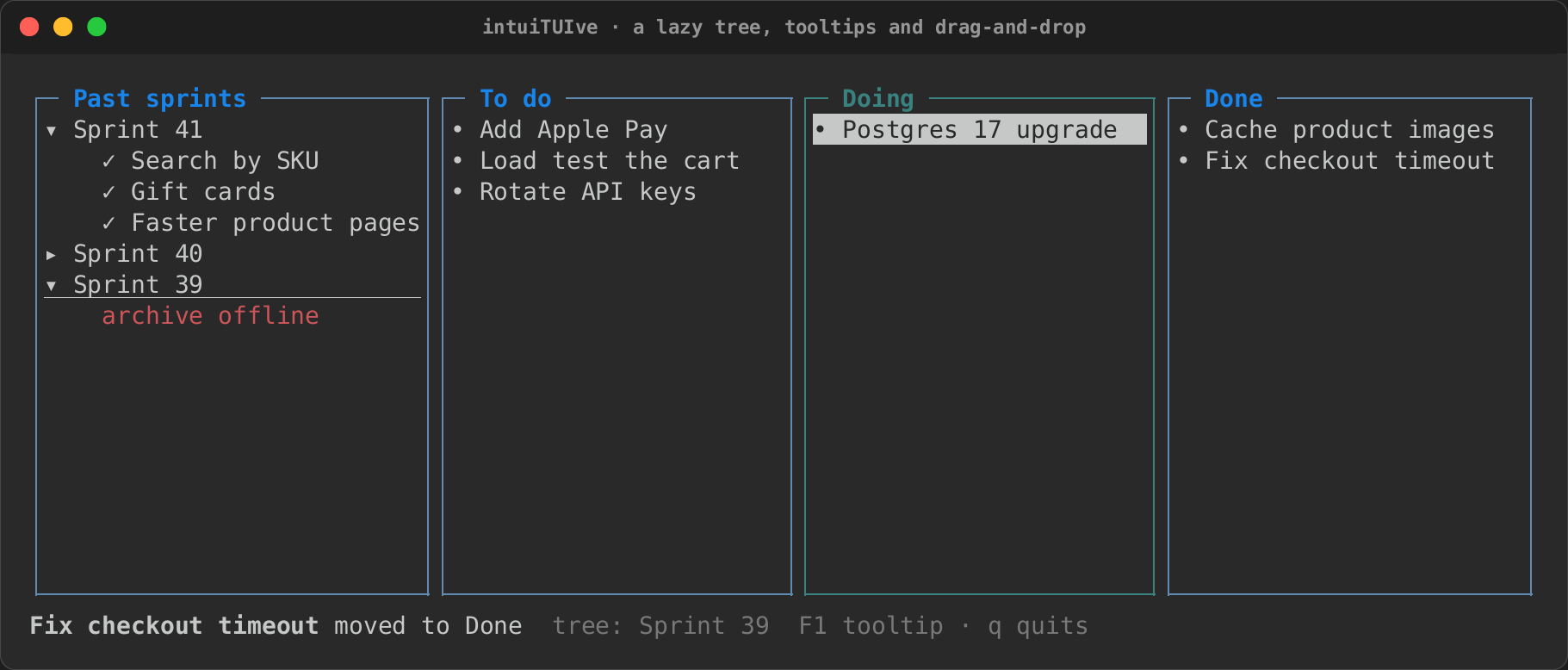
The board example puts a lazy tree, tooltips and drag-and-drop together
(cargo run -p rs-rich-intuituive --example board). Past sprints load
when they are opened, each after a pause, as from a tracker over the
network:
let history = tree_lazy(
    roots,
    move |key: String| {
        std::thread::sleep(delay);
        tickets(&key)
    },
    selected,
)
.autofocus()
.panel("Past sprints");
Each card carries its id and has its note as a tooltip, and each lane takes the ids dropped on it:
/// One card: dragged by the mouse, with its note as a tooltip.
fn card_node(lanes: Signal<Vec<Vec<Card>>>, id: u32) -> Node {
    let card = lanes.with_untracked(|l| {
        let (lane, at) = find(l, id).expect("a card on the board");
        l[lane][at].clone()
    });
    label(format!("• {}", escape(card.title)))
        .draggable(CardId(id))
        .tooltip(format!(
            "[b]{}[/]\n{}\n[i]{}[/]",
            escape(card.title),
            escape(card.note),
            card.owner
        ))
        .focusable()
        .focus_style("reverse")
        .fixed(1)
}
let lane = move |i: usize| {
    each(
        move || lanes.with(|l| l[i].iter().map(|c| c.id).collect()),
        move |id| card_node(lanes, id),
    )
    .panel(LANES[i])
    .flex(1)
    .on_drop(move |&CardId(id): &CardId, _| {
        let Some((from, at)) = find(&lanes.get_untracked(), id) else {
            return;
        };
        if from == i {
            return;
        }
        let title = lanes.with_untracked(|l| l[from][at].title);
        lanes.update(|l| {
            let card = l[from].remove(at);
            l[i].push(card);
        });
        last.set(format!("[b]{}[/] moved to {}", escape(title), LANES[i]));
    })
};
| Loading | Loaded, and a failure |
|---|---|
 |
 |
| A tooltip | Dropped |
 |
 |
Selecting and copying text
Turning on the mouse usually costs the terminal's own text selection. In
an intuiTUIve app, a drag that starts where nothing uses the press selects
the text under it, shown reversed, and copies it when the button is let
go, with OSC 52, so it works over SSH too, in terminals that allow it. A
toast says how much was copied. App::selectable(false) turns this off.
A handler puts text of its own on the clipboard with cx.copy(text) (the
files example copies a path with c c, as Yazi does), with the same toast.
The command palette and help
Every binding made with .bind(keys, description, handler) is a command.
cx.palette() lists the ones on the focused node and its
ancestors, searched as you type, and runs the one picked as its key would.
cx.help() lists the same bindings with their keys. Keys open either:
Bindings made with .on_key have no description and stay out of both.
Name a node (.name("Editor")) to group its commands under that name, or
put one binding in a section of its own with .bind_in(section, keys,
description, handler): an app with modes lists each mode's keys under the
mode, as scope-tui's help does.
label("scope")
    .bind_in("oscilloscope", "t", "Toggle the trigger", toggle_trigger)
    .bind_in("spectroscope", "l", "Logarithmic scale", toggle_log)
    .bind_scaled("up", &[("", 1.0), ("shift", 10.0), ("ctrl", 5.0)], "Scale up",
        move |_, by| scale.update(|s| *s *= 1.0 + 0.01 * by))
    .bind_cycle("tab", "Next mode", mode, &[Mode::Scope, Mode::Vector, Mode::Spectrum])
.bind_scaled(keys, variants, description, |cx, value| …) binds the keys
and the same keys with modifiers, each variant with its value (Shift ten
times, Ctrl five, Alt a fifth), and the help shows them as one row: the
plain keys, and Scale up (shift ×10, ctrl ×5). .bind_cycle(keys,
description, signal, &modes) moves a signal on to the next of its modes,
round to the first after the last; .bind_cycle_back(keys, ..) moves it
back, round to the last (Shift+Tab to Tab's cycle).
Sequence bindings are listed too, with their keys as g g; a long
description is cut so its keys still show. .bind_sequence_in(section,
keys, description, handler) lists one under a section of its own, as
bind_in does a binding. The same descriptions make a footer of the keys
that work now: key_hints().
HelpOptions::new().all_panes(true) lists every node's bindings on the
screen, wherever the focus is, a section per pane and the focused path's
first: one help for the whole app, as termusic's and bottom's are.
A variant of bind_scaled may say itself its own way: with a label as a
third item, ("alt", 0.2, "⅕") is listed alt ⅕ rather than alt ×0.2.
A help row too long for the help wraps under its description.
A live list
The help and the palette are live: while either is open, it reads the bindings again each time something they depend on changes. A binding whose condition starts to hold comes into the list, one whose condition stops leaves it, and one that becomes unavailable is greyed. The palette keeps the focus on the same command, by its id, as the list changes or is filtered, and checks a command again as it runs it: one that stopped applying after it was listed does not run.
A binding that cannot run now can still be listed, with why:
label("editor").bind_unless(
    move || (!dirty.get()).then(|| "nothing to save".to_string()),
    "ctrl+s",
    "Save",
    save,
)
.bind_unless(|| reason, keys, description, handler) is listed in the
help and the palette as Save (nothing to save), greyed, while the
closure gives a reason, and in a key_hints() footer greyed. Meanwhile
its keys pass it by, as a bind_when binding's do, and Enter on it in the
palette does nothing. .unless(|| reason, |node| …) does the same for
every binding the closure adds.
Actions that are not key bindings (a page's commands, a document's
outline) get the same palette from action_overlay(actions, run):
actions is a closure that returns Actions (an id, a label, shortcut
keys and an unavailable reason) and may read signals, and run gets
the id of the one chosen. cx.action_palette(actions, run) opens it as a
modal titled Actions, so the focus comes back where it was when it closes,
and no key reaches the screen beneath while it is open.
.on_key("ctrl+k", move |cx| {
    cx.action_palette(
        move || {
            vec![
                Action::new("toggle", if playing.get() { "Pause" } else { "Play" }).keys("space"),
                match queued.get() {
                    true => Action::new("next", "Next track"),
                    false => Action::new("next", "Next track").unavailable("queue is empty"),
                },
            ]
        },
        move |id, cx| run_action(id, cx),
    )
})
Providers and system commands
The palette also lists the app's system commands, after Textual's:
Theme (a picker of the built-in themes), Keys (shows or hides the
key_panel(), or opens the help when there is none), Maximize or
Minimize (the focused pane), Screenshot and Quit.
App::system_commands(SystemCommands::default().without("quit")) turns
one off, and SystemCommands::none() all of them.
A Provider adds hits of its own (files, symbols, sessions): its
discover() gives the hits shown before anything is typed, and its
search(query, sink) sends a Hit for each match to the sink. A hit has
an id, a label, a help line, a shortcut, a score and the characters to
highlight, and a closure that runs once the palette closes;
Hit::matching(query) scores and highlights it with the palette's fuzzy
match. The palette merges every hit by score as it arrives. A slow search
moves to a thread of its own with sink.background(|sink| …); typing again
cancels it (sink.cancelled() turns true, and what it sends after is
dropped), and an app that waits for its tasks waits for it.
struct Colours;
impl Provider for Colours {
    fn name(&self) -> &str { "colour" }
    fn search(&self, query: &str, sink: &HitSink) {
        for name in ["red", "green", "blue"] {
            let hit = Hit::new(name, name, move |cx| cx.toast(name));
            if let Some(hit) = hit.matching(query) {
                sink.send(hit);
            }
        }
    }
}

App::new(build).provider(Colours).palette_key("ctrl+p")
cx.palette_of(provider) opens a palette of one provider alone, as
Theme opens one of Themes.
Bindings in a state, sections and help options
#[derive(Clone, Copy, PartialEq)]
enum Mode { Osc, Spec }

label("scope")
    .in_mode(mode, Mode::Osc, "oscilloscope", |node| {
        node.bind_toggle("t", "Toggle the trigger", cfg, |c| &mut c.triggering)
            .bind("p", "Peaks", show_peaks)
    })
    .in_mode(mode, Mode::Spec, "spectroscope", |node| {
        node.bind_toggle("l", "Logarithmic scale", cfg, |c| &mut c.log)
            .bind("p", "Phase", show_phase)
    })
    .section("view", |node| {
        node.bind_scaled("pageup", &[("", 1.0, "1"), ("alt", 0.2, "⅕")], "Up", nudge)
            .bind_step("equals", "More samples", cfg, |c| &mut c.samples, 256.0, 256..=8192)
            .bind_step("minus", "Fewer samples", cfg, |c| &mut c.samples, -256.0, 256..=8192)
            .bind_cycle("tab", "Next mode", mode, &[Mode::Osc, Mode::Spec])
    })
.bind_when(|| cond, keys, description, handler)binds a key that applies only whilecond()is true: a key passes a binding that does not apply by (to another of the key, on the node or above), and the help, the palette, the which-key pop-up andkey_hints()leave it out (.bind_unlesslists it greyed instead; see a live list). Two bindings may so share a key under different conditions:pfor peaks in one mode and phase in another..when(|| cond, |node| …)does the same for every binding the closure adds, of any kind (sequences too); scopes nest..in_mode(mode, value, "section", |node| …)is the bindings of one mode: they apply, and are listed under the section, only whilemodeholdsvalue..modes(mode, &[(value, "section", &|node: Node| …), …])does several at once. The mode's view is aswitchon the same signal..section("name", |node| …)lists every binding the closure adds under a help section:bind_scaled,bind_cycle,bind_toggleandbind_steptake no section of their own. A binding given its own (bind_in) keeps it..bind_toggle(keys, description, signal, |s| &mut s.flag)flips aboolfield of a signal's value;.bind_step(keys, description, signal, |s| &mut s.n, step, range)moves a number field (any integer or float type) bystep, negative to go down, kept withinrange.- Punctuation keys by name, wherever keys are parsed (bindings,
Driver::press, scripts, keymap files):equals,minus,plus,underscore,slash,backslash,periodordot,comma,semicolon,colon,quote,doublequote,backtick,tilde,bracketleft,bracketright,braceleft,braceright,lt,gt,question,exclam,at,hash,dollar,percent,caret,ampersand,asterisk,pipe:ctrl+minus,"equals plus". The help shows the character.
cx.help_with(options) shows the help another way:
cx.help_with(
    HelpOptions::new()
        .title("mgr.help")
        .key_format(KeyFormat::Vim) // <C-u>, <S-Tab>, gg
        .filter_first(true),        // Yazi's: search, a rule, one list
)
KeyFormat::Vim says keys in vim's notation (<C-u>, <A-x>,
<PageUp>, a sequence as gg), and the search finds them as said;
filter_first(true) lists every binding in one list under the search
line and a rule, with no section headings. KeyFormat::keys(&keys,
sequence) says keys the same way anywhere else. .filter_key("/") makes
it Yazi's: j and k move a row and g/G go to the ends until /
starts the search, which Esc ends (clearing it) before Esc closes the
help. A row too long for the help wraps, its keys as well as its
description: a binding of several keys lists them over several lines,
broken between keys, the key column taking at most half the width.
Scaled steps, any modifiers, falling through, unlisted bindings
const MAGNITUDES: [(&str, f64, &str); 4] =
    [("", 1.0, "×1"), ("shift", 10.0, "×10"), ("ctrl", 5.0, "×5"), ("alt", 0.2, "⅕")];

fn samples(s: &mut Scope) -> &mut u32 { &mut s.samples }

label("scope")
    .bind_step_scaled("right", &MAGNITUDES, "More samples", cfg, samples, 16.0, 16..=8192)
    .bind_step("pageup", "Average more", cfg, |s| &mut s.average, 1.0, 1..=64)
    .any_modifiers()
    .bind("esc", "Reset the view", reset)
    .fall_through()
    .bind_hidden("ctrl+l", "Clear the trace", move |_| trace.set(Vec::new()))
.bind_step_scaled(keys, variants, description, signal, field, step, range)isbind_stepwith the step scaled by the modifiers held, asbind_scaledscales a value: one row in the help (More samples (shift ×10, ctrl ×5, alt ⅕)), the field still kept withinrange. An integer moves by the scaled step rounded. A field picker kept in a variable does not compile as a closure (its return does not take its argument's lifetime): write it as afn, assamplesabove..any_modifiers()lets the binding added last fire with any modifiers held:pageup, Shift+PgUp, Ctrl+PgUp. A binding that names the key with its modifiers, on the node or deeper, still wins..fall_through()lets the key go on after the binding added last runs: to the next binding of the key on the node, then up to the nodes above, as Bubble Tea passes a message on. A handler decides as it runs withcx.pass_key()..unlisted()keeps the binding added last out of the help, the which-key pop-up andkey_hints; it still works, and its description is its name: the palette lists it, anddriver.run_named(name)runs it in a test.bind_hidden(keys, name, handler)is both at once (Textual'sshow=False). An empty description still hides a binding with no name.
User keymaps
New in 0.0.24: a binding with an id can be remapped by its users, from a
keys file or from code, without the app being rebuilt (Textual's
Binding(id=…) and App.set_keymap).
label("editor")
    .bind_id("editor.save", "ctrl+s", "Save", save)      // or .bind(..).binding_id(..)
    .bind_sequence("g g", "Top", top)
    .sequence_id("nav.top");
App::new(build)
    .keymap([("editor.save", "ctrl+s f2"), ("app.quit", "ctrl+q")])
    .keymap_file(state_dir("myapp")?.join("keys.toml"));  // read again on change
cx.set_keymap([("editor.save", "f2")])?;                 // at run time
cx.reload_keymap();                                      // read the file now
- Ids go on a binding (
bind_id, or.binding_id(id)afterbind,bind_in,bind_scaled,bind_when, …) or on a sequence (.sequence_id(id), whose keys in the map are the new sequence:"space t"). An editor's actions are in the same map astext_area.<action>(text_area.undo,text_area.word-left), for every text area and input. The diff view's keys arediff.next,diff.previous,diff.fold,diff.accept,diff.reject,diff.accept_allanddiff.reject_all. - The map gives each id its keys, as
on_keynames them, separated by spaces or commas, ornoneto unbind. The keys file holds oneid = keysa line, with#comments;[section]lines are skipped and a quoted list is read inside its quotes, so a TOML file of strings works (editor.save = "ctrl+s f2"). The file's entries go over the ones in code. A file that does not parse is reported in a toast and the last good map stays; the file is checked for changes as the app runs, as a theme file is. - Everywhere: the help, the command palette, a
key_hintsfooter and the which-key pop-up show the keys the map gives. - Reports. After each change of map, one warning toast lists the ids no
binding has (on the screens open then) and the keys two ids now share on
one path of the tree: the deeper node's binding takes the key, as it
does without a map, and on one node the first.
driver.keymap_report()returns the same lines in a test.