Testing and the inspector
 Apps run headless in tests: keys by name, a clock you move, snapshots of
the screen, and the inspector, which shows an app's tree, its timings and
what happened, live or from a test.
Testing
render_with runs an app headless, pressing keys, and returns the last
screen. The app need not quit: once the keys are pressed it settles
(watches the first frames set off run, so what loads from a
rect_handle's width is there) and the screen is read. An error the app
failed with comes back as the Err.
App::driver(width, height) steps an app one event at a time, with no
terminal and no clock of its own. For a test it has:
press("tab tab enter"): keys by name, each followed bysettle(), which draws until nothing is left to draw;type_text("Ada"): a key a character, as a person types;resize(columns, rows),event(…)for the mouse and pastes, andupdate(now)to move the clock;advance(d)moves it on byda step at a time, to each timer,after, animation, toast orlatestthread asleep on the app's clock due (50 ms at most), drawing after each, so what is timed runs at its own time, and a feed's every value is seen;assert_focused("save"): the focus is on the node with that.name("…"), or that accessible name (its.label("…"), the text it shows, a panel's title). When it is not, the message says where the focus is.focused()andfocused_name()return it;screen()(the cells),accessibility()andtake_announcements().
By name, as Textual's Pilot does. A click at a cell breaks whenever
the layout moves; these find the node first, by its .name("…"), else by
its accessible name, as assert_focused does:
driver.click_on("save");                 // the centre of the node named "save"
driver.click_on_at("list", (2, 3));      // an offset inside it
driver.double_click_on("row-4");
driver.hover_on("help");                 // its tooltip shows after advance(..)
driver.scroll_on("log", -3);             // the wheel, up when negative
driver.drag_on("divider", (10, 0));      // press, move a cell at a time, release
driver.wait_for_animations();            // until no animation or effect runs
driver.rect_of("save")                   // Option<Rect>
A name that matches nothing, or several shown nodes, panics with a message
listing the named nodes. click(column, row), wheel(..) and
click_text(..) still take a place on the screen.
Snapshots. assert_screen!(driver, "name") compares the screen with
tests/snapshots/name.txt: plain text, one line a row, trailing spaces
trimmed, so a review reads it as the screen. A file saved with Windows
line endings, trimmed lines or a byte-order mark still matches. When the
screen differs, the test fails with a unified diff:
snapshot tests/snapshots/counter_two.txt differs; run with UPDATE_SNAPSHOTS=1 to accept the change
--- expected
+++ actual
@@ -1 +1 @@
-Count: 2
+Count: 3
Run the tests with UPDATE_SNAPSHOTS=1 to write the files instead (a new
snapshot is written the same way), then review them with git diff.
assert_screen_styled!(driver, "name") also keeps name.styled.txt, each
row as console markup ([bold red]Age: forty[/]), for a test about
colours. Both take a Driver, a Screen, or the rows render_with
returns; intuituive::testing::assert_snapshot(path, text) compares any
text with any file.
SVG snapshots and screenshots. assert_screen_svg!(driver, "name")
checks the styled rows against tests/snapshots/name.styled.txt, as
assert_screen_styled! does, and keeps the screen's picture as
name.svg beside it for review. Pass or fail comes from the styled text,
since an SVG's bytes change with fonts and versions. When it differs, the
message names target/intuituive-snapshots/report.html (under
$CARGO_TARGET_DIR when it is set), which shows the kept picture and the
new one side by side with the diff, as pytest-textual-snapshot's report
does. UPDATE_SNAPSHOTS=1 writes both files.
screen.to_svg(&SvgOptions::default().title("demo")) turns any screen
into that picture (SvgOptions is rs-rich-ext's frame::SvgOptions, with
builders for its title, theme, window, cursor and caption). An app takes
one of itself with cx.screenshot(path), written once the next frame is
drawn, and the command palette's Screenshot writes screenshot-1.svg
(then the next free number) into App::screenshot_dir(..), the current
directory unless set, with a toast naming the file. App::title(..) is
the picture's window title.
A component test builds the component in an app of its own:
/// A component: a node and the state behind it, built by a function.
fn counter() -> Node {
    let count = signal(0);
    text!("[b]Count:[/] {count}")
        .name("counter")
        .focusable()
        .on_key("+", move |_| count.update(|c| *c += 1))
        .on_key("-", move |_| count.update(|c| *c -= 1))
}

#[test]
fn the_counter_counts() {
    let mut driver = App::new(counter).driver(20, 1);
    driver.press("+ + + -");
    driver.assert_focused("counter");
    assert_screen!(driver, "counter_two");
}
An end-to-end test drives the whole app, here the tutorial's to-do list:
#[test]
fn a_new_todo_goes_to_the_end_of_the_list() {
    let mut driver = todo_app(vec![Todo::new(1, "milk")]).driver(40, 9);
    driver.type_text("eggs");
    driver.press("enter");
    assert_screen!(driver, "todo_added");
    // Tab leaves the entry for the list; space ticks the row off.
    driver.press("tab");
    driver.assert_focused("• milk");
    driver.press("space");
    assert_screen_styled!(driver, "todo_ticked");
    driver.press("ctrl+q");
    assert!(driver.is_done());
}
╭─ New ────────────────────────────────╮
│? Add ›                               │
╰──────────────────────────────────────╯
╭─ To do ──────────────────────────────╮
│• milk                                │
│• eggs                                │
╰──────────────────────────────────────╯
2 left · space ticks · d deletes ·
ctrl+q quits
For the exact bytes sent, or a script of clicks and waits, use
App::run_on with rs-rich-interact's Headless backend; its Record
keeps the programs handed the terminal (handoffs) and each with its
arguments (handoff_commands), so a test sees that $EDITOR got the
right file. App::wait_for_tasks(true) waits for background tasks before
each step, so a test sees a task's result however fast the machine is.
It also puts latest threads that keep a beat (tx.sleep(period),
latest_every) on the app's clock: each step lets the threads that are
due run until they sleep again, so a thread-fed app shows the same thing
frame by frame on every run, and a script's wait(..) moves the threads
on as far as the app. (A latest thread that waits on something else, a
pipe, holds each step up to 5 seconds.)
A log console in another terminal
A full-screen app has no room for its own log. With the tracing feature,
it can send its tracing events to rich console in a second terminal, as
Textual's textual console does:
intuituive::log::install_console().ok();   // connects if INTUITUIVE_CONSOLE is set
// in a handler:
cx.log(format!("loaded {n} rows"));       // a tracing event at DEBUG, target "app"
rich console                              # terminal 1: listens and prints
INTUITUIVE_CONSOLE=1 cargo run --example demo   # terminal 2
INTUITUIVE_CONSOLE=1uses the default socket,console/console.sockin intuiTUIve's state directory; any other value is the socket's path, andrich console --socket PATHlistens there. Unset (or0), nothing is opened.log::console_layer(path)adds the console to a subscriber of your own.- The socket is a Unix domain socket, never a TCP port, and only yours:
rich consolecreates it 0600, in a directory only you can use (made 0700 when missing; a--socketin a directory others can enter or write is refused, as is a symbolic link), and drops another user's connection; the app connects only to a socket, and a listener, of its own user. Events go through a bounded queue on a thread of their own, so a slow console drops events rather than slowing the app. - The inspector's trace (keys, focus, screens, signal writes) goes too,
while no inspector shows it:
rich console --traceprints it.-x TARGETleaves a target out,-vputs each event's fields on lines of their own. - Unix only for now: on Windows,
install_consoledoes nothing (std has no local socket there; a named pipe is a follow-up), andrich consolesays so.
Inspector
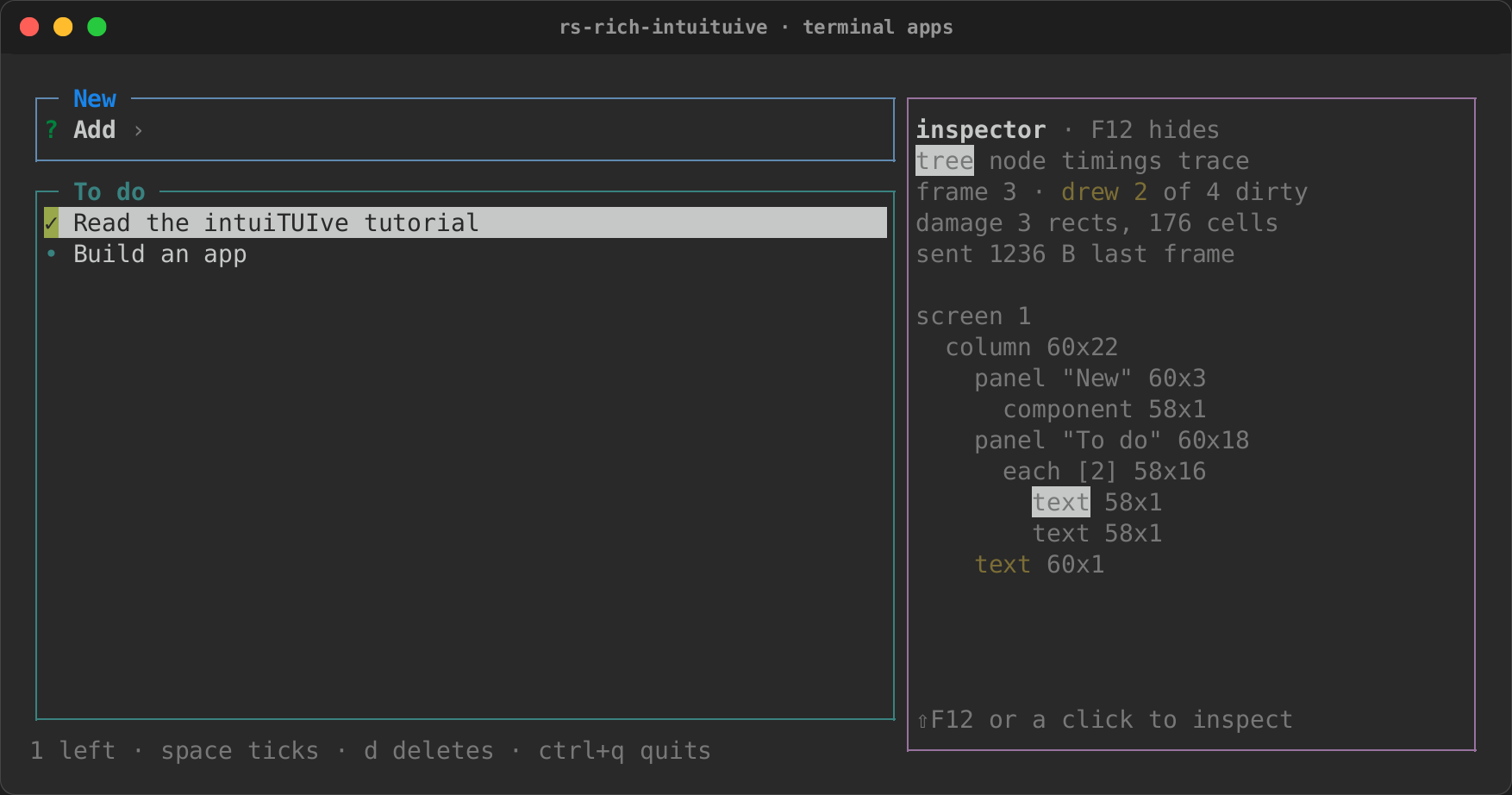
or App::inspector(true) in code. The inspector docks on the right, and
the app is laid out in the space to its left. F12 shows and hides it.
While it is shown the app keeps the keys, so you use the app and watch the
inspector. Shift+F12, or a click on the panel, gives the inspector the
keys; Esc, Shift+F12 again or a click on the app gives them back. Ctrl+C
still quits.
The top of the panel is always the last frame the app drew: its number, the nodes that drew of those made dirty, the damaged rectangles and cells, the bytes sent, and the theme file's state (and its error, if the last edit did not parse). A frame the inspector draws for itself, its selection moving, leaves it as it was. Below it is one of four panes, named on the line under the title:
- tree: the node tree as it is, each node's builder (or its
.name("…")), what it holds (a panel's title, a list's length, a grid's shape) and its size, orhidden. In yellow, the nodes that drew in the last frame; reversed, the focused node; marked›, the selected one. - node: the selected node. Where it is on the screen (
at 0,2 ·
  60x17
), and where its widget draws inside a stylesheet's border and padding; its size and who set it (code, the stylesheet or the default), its minimum and maximum; a column's or row's gap, alignment, justification and wrapping where they differ from the defaults; a grid's tracks, or a grid child's cell and span;align-selfanddock; its padding and border; whether it takes the focus and has it; whether it is shown, or the rule that hides it (hidden by hide_below 70 (app 60x20), or a stylesheet'sdisplay: none); its classes, the conditional ones that hold now and those that do not, and its states (:focus,:hover,:disabled,:error,:selected); whether it was dirty and drew in the last frame; its draws and times; its role, key bindings and handlers. - timings: the last frame's time and how many nodes drew, the average and slowest of the last 120 frames, and each node's draws, its time in all and the last time it drew, slowest first. A node's time is its own layout and drawing: its children's are theirs.
- trace: what happened, newest last, each line after the number of the
frame that drew next. Keys with their modifiers and what took them
(
key ctrl+s → editor on_key, or(unused)); presses, releases, drags and the wheel, with the node under the pointer and what took them (press left 12,3 on save → save on_click); resizes and pastes; the focus moving; screens, modals and pop-ups opening and closing; signal writes, named by where the signal was made and where it was written, with the nodes they made dirty (signal main.rs:8 → count (i32, by main.rs:14)); timers, watches, tasks done and jobs from other threads, each by where it was made. It keeps the last 1,000 events.
While the inspector has the keys, its keys are these, and none reaches the app (the two help lines at the bottom of the panel list them):
| Key | What it does |
|---|---|
| F12 | Show or hide the inspector (hidden, it gives the keys back) |
| Shift+F12, Esc | Give the keys back (Esc while picking puts the selection back) |
Tab, Shift+Tab, 1 to 4 |
The next pane, the one before, or that pane (a click on its name too) |
↑ ↓, k j, PgUp PgDn, Home End, g G |
Tree and node panes: select a node (a click on its line too); timings and trace: scroll |
← →, h l |
Select the node's parent, or its first child |
| Enter | The node pane for the selected node, or back to the tree |
p |
Pick: the pointer, or a cursor the arrows move (with Shift, five cells), selects the node under it; a click or Enter keeps it |
f |
The redraw flash, on or off |
s |
Timings: sort by time in all, the last time, or draws |
c |
Timings: start again; trace: clear it |
| Space | Trace: pause it, or take events in again |
While the inspector has the keys, the selected node is outlined on the
app: the cells of its edges are restyled in the theme's inspector.selected
style (reverse magenta unless the theme names it), so nothing moves. The
picking cursor is inspector.cursor (reverse yellow). The redraw flash
marks what each frame drew, in inspector.flash (on dark green), for
300 ms, so redraws show as they happen, keys given back or not; the flash
is sent to the terminal like anything else, so the bytes count it. Each
comes off at the next frame, and the app's cells are as they were.
Nothing is measured or traced while the inspector is closed: each place that would note something checks a flag first, and the app sends the same bytes, frame for frame, as one without an inspector. A terminal narrower than 40 columns has no room for the panel: the app keeps the whole width and the keys, the trace goes on, and the panel is back when there is room. In linear mode, which draws nothing, the inspector is off: it takes no columns, and F12 is the app's.
A test or a loop of your own reads the same with Driver::inspector_trace()
(each entry's frame, time, kind and text), inspector_timings() and
inspector_selected():
#[test]
fn a_test_reads_what_the_inspector_saw() {
    let app = App::new(|| {
        let count = signal(0);
        text!("count {count}")
            .name("count")
            .on_key("+", move |_| count.update(|n| *n += 1))
    })
    .inspector(true);
    let mut driver = app.driver(80, 10);
    driver.press("+");
    let trace = driver.inspector_trace();
    assert_eq!(trace[0].text, "key + → count on_key");
    assert!(trace[1].text.contains("→ count"), "the write made it dirty");
    let timing = &driver.inspector_timings()[0];
    // The first frame, and the one after `+`.
    assert_eq!((timing.name.as_str(), timing.draws), ("count", 2));
}
It is the quickest way to see that a change redraws what it should and nothing more, and why.