Serving an app to a browser
rs-rich-web (rich_web, new in 0.0.18) serves an intuiTUIve app to a web
browser. Each browser tab that opens it gets its own copy of the app, in a
process of its own (since 0.0.19; on a thread
if you ask). The page draws the terminal with xterm.js.
The app's frames reach it over a WebSocket, and its keys, mouse and resizes
come back as the same events a terminal gives. The app does not change: the
function that builds it for App::run builds it for the browser too.
It serves any terminal program the same way, one
pseudo-terminal per tab (rich serve -- htop from the command line), and
can draw an app with its own DOM instead of xterm.js,
carrying the app's accessibility tree to the browser's screen reader.
The framework is re-exported as rich_web::intuituive, so this one
dependency is enough.
use rich_web::intuituive::prelude::*;

fn counter() -> App {
    App::new(|| {
        let count = signal(0);
        column([
            text!("[b]Count:[/] {count}").panel("Counter"),
            label("[dim]+ adds one"),
        ])
        .on_key("+", move |_| count.update(|c| *c += 1))
    })
}

fn main() -> std::io::Result<()> {
    rich_web::serve("127.0.0.1:8080", counter)
}
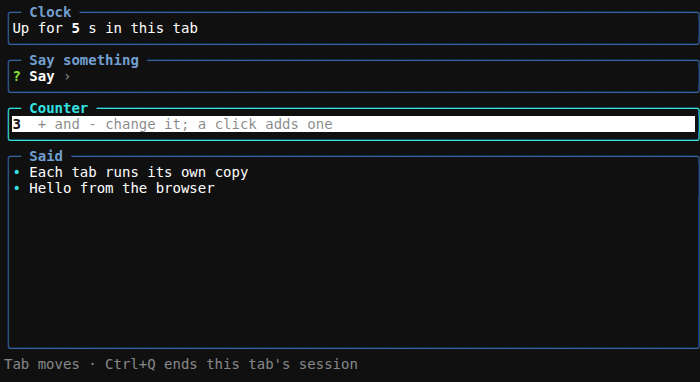
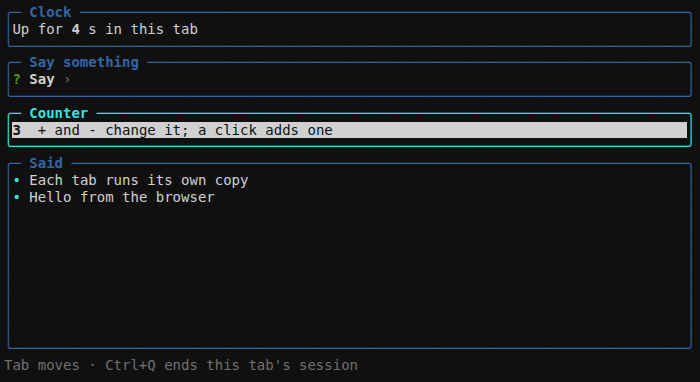
Open the printed address. It carries the token the server checks, so open it exactly as printed. The crate's example serves a clock, a text box, a counter and a list:
Here it is in Chromium, after typing two lines and pressing + three
times on the counter (scripts/capture_web.mjs takes this page's
pictures):
Options
serve is Server::bind and Server::run with the defaults. Server
takes options first:
use rich_web::Server;

Server::bind("127.0.0.1:0", counter)? // port 0: any free port
    .title("Counter")                 // the page's title
    .max_sessions(4)                  // tabs at once (8 by default)
    .run()?;                          // prints the address, serves until the process ends
spawn()serves on a background thread and returns aHandle(url(),local_addr(),sessions(),stop()). Stopping it, or dropping it, ends every session, and returns once every program a session ran has ended. Tests use it to serve on127.0.0.1:0.run_until(f)isrunthat serves untilfreturns (a wait for a signal, say), then stops asstop()does.token(t)fixes the token instead of drawing a random one, for an address that stays the same between runs. Keep it as long and as secret.allow_origin(o)accepts the page from another origin. That origin is where a reverse proxy serves it (see below).renderer(Renderer::Dom)draws the app with the DOM renderer instead of xterm.js.max_buffered(bytes)bounds the output a program's session holds for a slow page.compress(Some(1024))deflates frames of 1,024 bytes or more, for a page over a slow link. The page asks for it only where the browser hasDecompressionStream, and inflates the frames itself. Frames shrink to 5 to 30% of their size for 15 to 60 µs of work each. Off by default: on one machine it only adds work.isolation(Isolation::Threads),session_command(program, args),session_memory(bytes)andsession_cpu(time)decide where each session runs (see below).
How a session runs
The server runs one intuiTUIve Driver per
connection. Each turn of the loop updates the app, sends what changed, and
then waits for the page's next message, but no longer than the app can
wait: until its next timer, animation frame or toast. Timers and background
tasks keep drawing while nobody types.
- The page is served by the crate:
index.html, a smallapp.js, and xterm.js 6.0.0 with its fit add-on. They are vendored in the crate, pinned by hash and embedded in the binary, so nothing is fetched from a CDN. The page fills the window and follows its size. - Keys, the mouse and pastes arrive as the bytes an xterm sends:
control characters,
ESC [sequences, SGR mouse reports and bracketed pastes.rich_web::input::decodeturns them into rs-rich-interact events, the same ones crossterm gives for those bytes. Ctrl+I is Tab, an upper-case letter has no Shift, and so on, so key bindings work the same in a terminal and in a browser. - Copying: text the app copies (a mouse selection,
Ctx::copy) goes to the page as OSC 52, and the page puts it on the browser's clipboard. The page answers each copy, and the "Copied" toast shows only when the browser took it: a browser that refuses (no permission, or a plain-HTTP page served to another machine, which has no clipboard API) shows none. - Quitting: when the app quits (a handler calls
cx.quit(), or Ctrl+C reaches it unbound), the session ends and the page says so. Reloading starts a new session.
One process per session
Each session runs in a process of its own (Isolation::Processes, the
default since 0.0.19), as textual-serve isolates them. For a new tab the
server starts its own program again, with the same arguments and the
RS_RICH_WEB_SESSION variable set. That process runs main as before
until it reaches the same serve (or Server::bind) call, and there,
instead of listening, it connects back to the server over a loopback
socket, proves with a secret from the variable that it is the process the
server started (and the server answers with another, so a process whose
server has died talks to nobody who took over its port), runs the tab's
app, and exits. The server keeps the
browser's connection and relays its WebSocket to the process, so the app
and the page see nothing different. The app needs no change.
So a crash, a hang or a runaway allocation ends one tab, not the server:
- A crash (a panic, an abort) ends the process; the server tells the page "The session's process ended unexpectedly", and the other tabs carry on.
- A hang holds up its own tab only. When the tab closes, or the server
stops, the process is killed with what it started. On Unix that is its
process group. Should the server itself be killed, each session's
process sees it go and ends its group the same way. A process that left
the group (
setsid, a daemon) is not reached. - On Windows the server puts each session's process in a job object as
soon as it starts, and holds the job's only handle. The job kills every
process in it when that handle closes: when the session ends, and when
the server dies, however it dies. What the process starts is in the job
too, and cannot leave it. Only what a program starts in the moment before
the server assigns it escapes: the app runs after that, so only code
mainruns beforeservecan, or asession_commandthat starts the program as a child instead of being it. A server that runs inside a job of its own (a CI runner, say) nests each session's job in it; if that job forbids nesting, sessions cannot start, and the page says why. - Limits (Unix):
session_memory(bytes)caps each process's address space, so an allocation past it fails and that process ends;session_cpu(time)kills one that has used that much CPU. On Linux the server sets them as the process starts, and refuses one that took more memory before they were set, so they cover the codemainruns beforeservetoo; on other Unix systems they take effect when the process reachesserve. macOS has no memory limit to set, so there only the CPU limit applies. On Windows neither is applied.
The isolated example shows it: each tab prints its process id, and c
panics, h loops forever and m allocates until the memory limit stops
it, while the other tabs keep answering
(cargo run -p rs-rich-web --example isolated).
What has to hold for a program to run its sessions this way:
- It reaches the same call when started again.
mainruns again in each session's process, up toserve, so it must not depend on something that has changed (a file it deletes, a port it binds before serving). With several servers in one program, each session's process runs the one its server is: the binds are counted, in the order the program makes them. - It can be started again.
std::env::current_exe()with the same arguments, unlesssession_command(program, args)names another way: an interpreter running the same script, say. Python'srs_rich.tui.Serverpassessys.executableand the script's arguments itself, and falls back to threads in a REPL. The command must be the program, orexecit: a session is the process the server started, and a program that process runs (which inherits the variable) serves as it would anywhere.
isolation(Isolation::Threads) keeps 0.0.18's behaviour, every session on
a thread of the server's process: for tests (a test binary started again
would run its tests again) and for an app built inside a program that
cannot start itself again. A program's sessions
are processes already, and isolation does not change them.
Any terminal program
serve_command runs a program instead of an app: one copy per tab, each on
a pseudo-terminal of its own (a PTY on Unix, ConPTY on Windows), through
rs-rich-embed's LocalPty, and streams it to the same
xterm.js page.
fn main() -> std::io::Result<()> {
    rich_web::serve_command("127.0.0.1:8080", ["htop", "-d", "10"])
}
A string is a program name, an array or a vector is the program and its
arguments, and a rich_web::Command also sets the environment and the
working directory. The program sees TERM=xterm-256color.
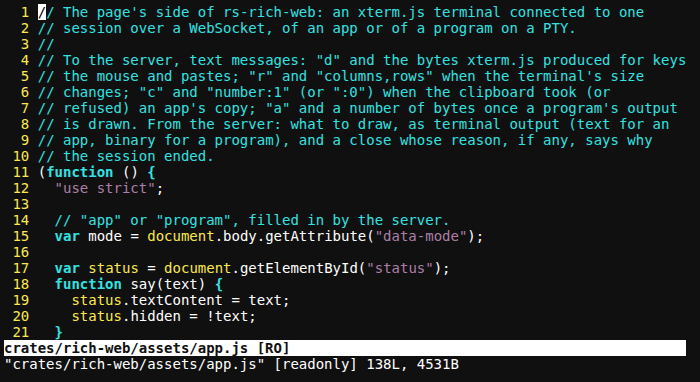
Here rich serve runs vim, showing the xterm.js page's own script:
- Input goes to the program as the page sent it: keys, pastes (bracketed
when the program asked for that) and mouse reports when it turned the
mouse on. Resizing the window resizes the pseudo-terminal, so the program
gets
SIGWINCHand redraws. Input the program has not read is held up to 1 MiB; past that the server stops reading the page until the program reads some, so a flood of pastes waits in the network, not in the server's memory. - Output goes to the page as binary messages, and the page keeps a scrollback of 5,000 lines, as a terminal does. An OSC 52 clipboard write in it is ignored: whatever a program prints (a file it shows, a page it fetched) cannot replace what is on the browser's clipboard.
- The exit ends the session: the page shows how the program ended
("The program exited with code 0." or "ended by signal …"), and a
program that cannot start says why. Closing the tab, or stopping the
server, ends the program: it is hung up on (
SIGHUP, as when a terminal closes), and one still running a second later (it ignoresSIGHUP) is killed withSIGKILL, with everything in its process group. - A slow page holds the program back. The page says when it has drawn
each message. With half of
max_buffered(1 MiB by default) sent and not yet drawn, the server stops reading the program's output, and with the other half waiting unread, the program's writes wait, as they do on a slow terminal.yesorcatof a large file in a tab therefore costs a bounded amount of memory, and nothing is dropped.
Server::bind_command(addr, command) takes the same options as an app's
server (title is the program's name by default). Server::bind_host(addr,
|| Box::new(host)) runs a program on any other PtyHost: an SSH session,
a container's exec stream, or rs-rich-embed's ReplayHost in a test.
From the command line: rich serve
The rich command has it behind its serve feature, which is off by
default (a default build has no network server):
| Option | Default | |
|---|---|---|
--bind ADDR |
127.0.0.1 |
The address to listen on. Anything else lets other machines reach it, and prints a warning. |
--port N |
8080 |
The port; 0 picks a free one. |
--max-sessions N |
8 |
Programs (tabs) at once; one more is refused until one ends. |
--allow-origin ORIGIN |
Also accept the page from ORIGIN, where a reverse proxy serves it. Repeatable. | |
--allow-host HOST |
Also answer to HOST (box.lan, box.lan:9000; the port is added unless given): a name this computer is reached by that it does not know as its own. Repeatable. |
|
--compress |
off | Compress frames of 1 KiB or more with deflate, for pages that can undo it. Worth it over a slow link (frames shrink to 5 to 30% of their size); on this computer it only adds work. |
Everything after -- (or after the first word that is not an option) is
the program and its arguments. Ctrl+C stops the server and every program
it started (on Unix, so do SIGTERM and SIGHUP): rich exits once each
program has ended, so none outlives it.
Serving a shell gives a shell to anyone who has the address with its
token. Keep it on 127.0.0.1 unless a proxy with authentication is in
front (see Security).
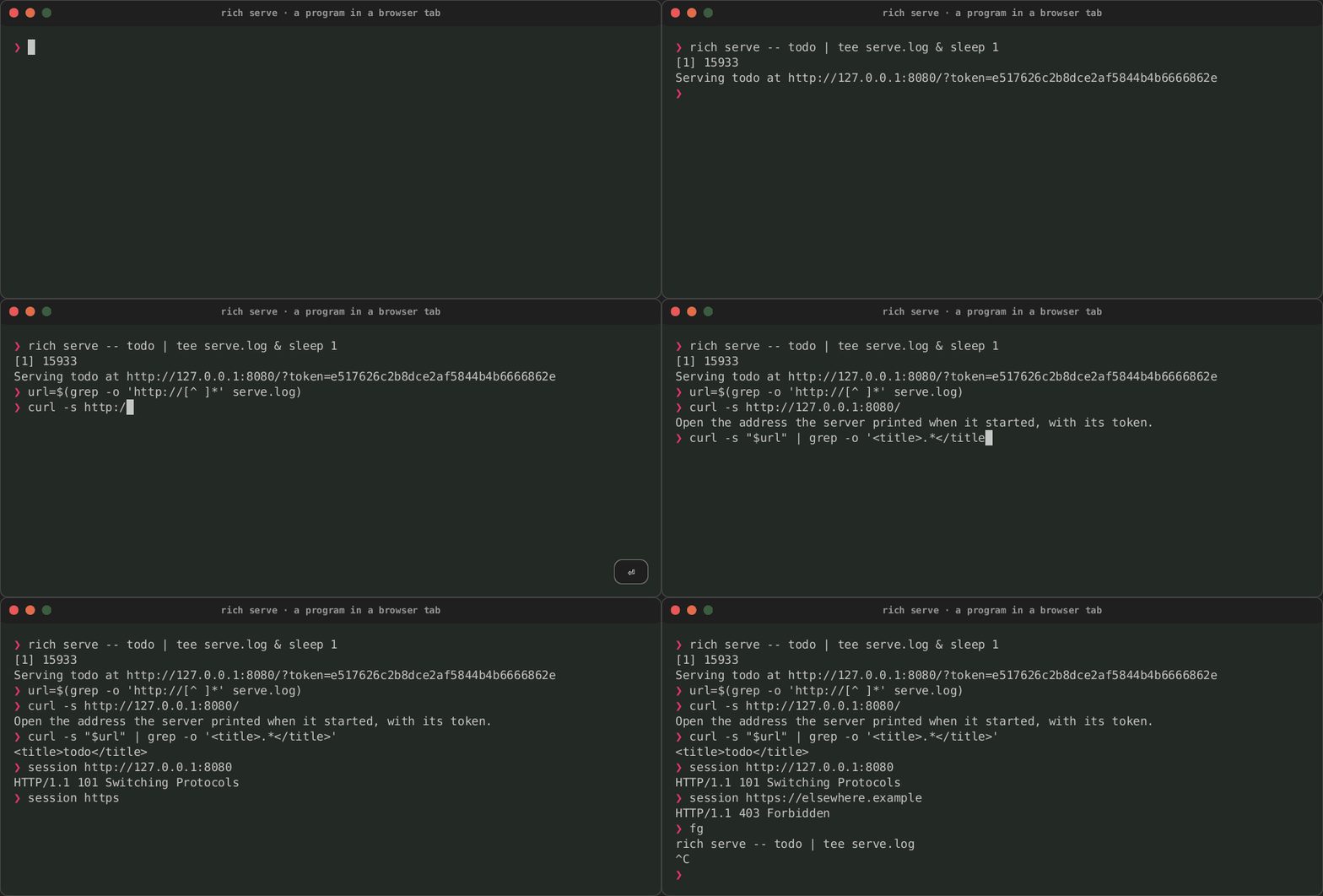
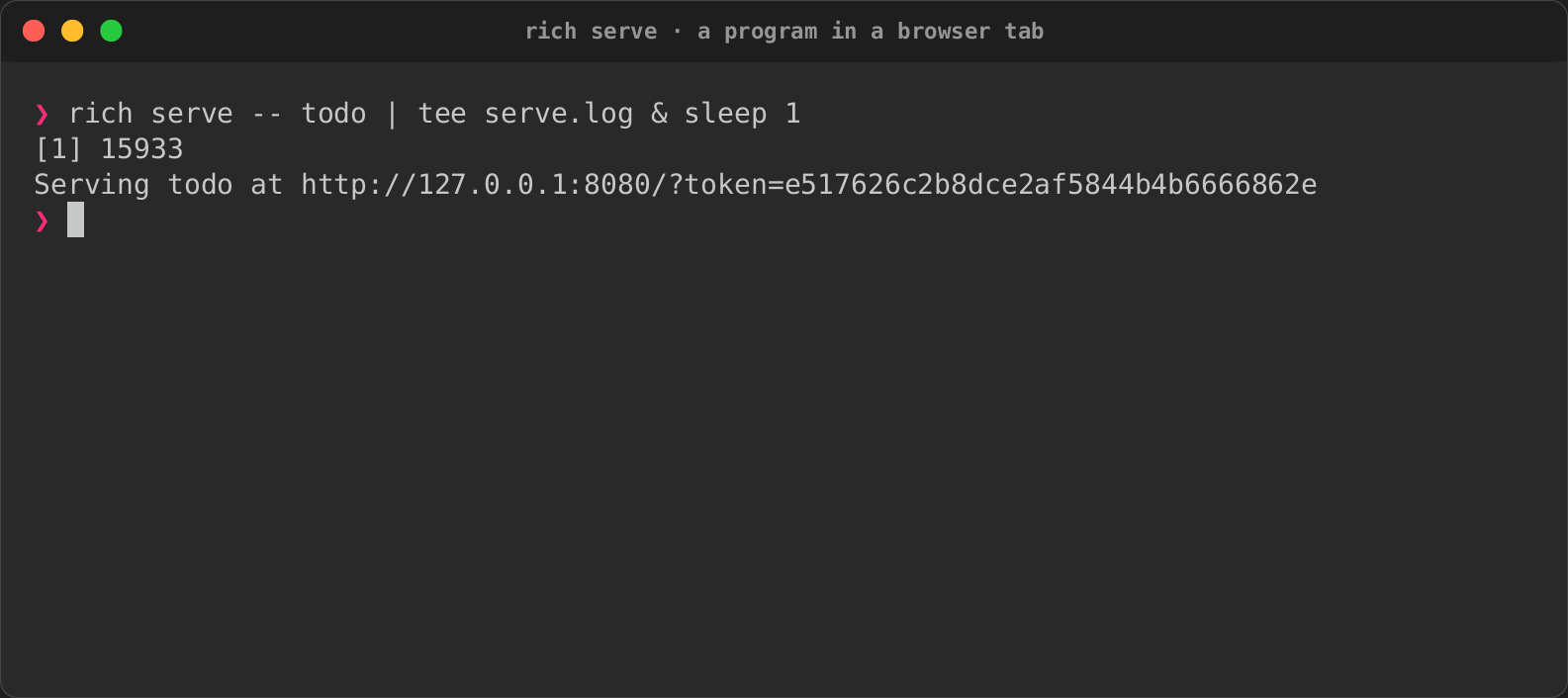
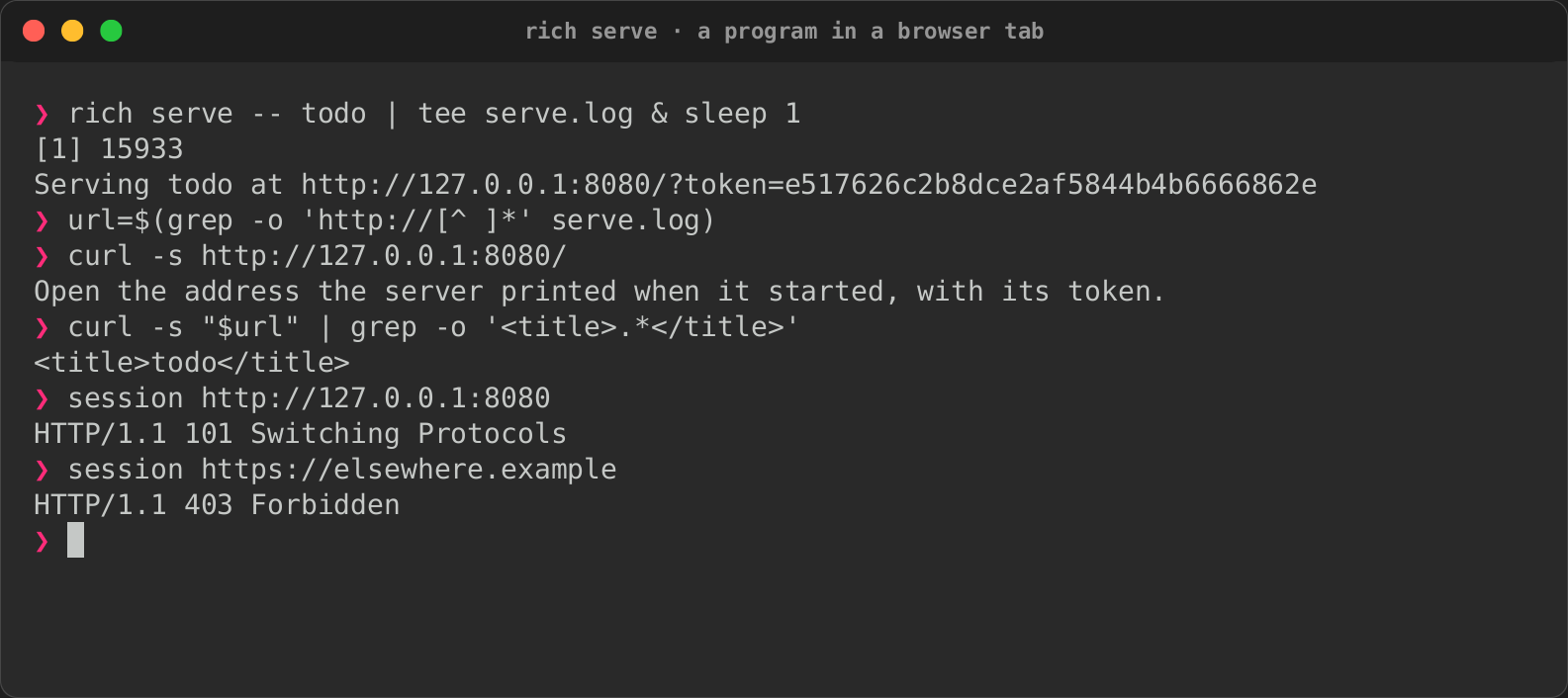
The recording serves the todo example. A tape cannot drive a browser, so
curl asks what one would: the page without the token is refused and with
it is served; a WebSocket upgrade from the server's own page starts a
session, and one from another site is refused. Ctrl+C then stops it. The
tape is docs/tapes/serve.tape.
| Started | The token and the origin checked |
|---|---|
 |
 |
The DOM renderer
Renderer::Dom draws an app with the page's own DOM instead of xterm.js:
the screen as a grid of styled spans, and over it the app's
accessibility tree as elements carrying ARIA roles,
names and states, so a browser's screen reader reads the app as it reads a
web page.
use rich_web::{Renderer, Server};

Server::bind("127.0.0.1:8080", counter)?
    .renderer(Renderer::Dom)
    .run()?;
xterm.js stays the default. A page's address can choose either way:
&renderer=dom after the token asks for the DOM renderer from a server
whose default is xterm.js, and &renderer=xterm the other way. A program
has no tree, so a program's page is always xterm.js.
The example from above, with &renderer=dom, after the same keys:
What the page carries:
- The grid: each line as runs of text in one style; styles become CSS
(in xterm.js's default palette, so an app looks the same drawn either
way), wide characters take two cells, and the focused text box's caret is
drawn where the app put the cursor. The grid is hidden from assistive
technology (
aria-hidden): the tree describes it. - The tree: each node of
Driver::accessibility()as an element withAccessNode::aria_attributes(): its role, its name asaria-label, and its states (aria-expanded,aria-checked,aria-selected,aria-busy,aria-disabled,aria-posinset,aria-setsize). A widget of items (a list, a table, a tree, tabs, a menu) gets a child element for its selected item (alistitem,row,treeitem,tab,menuitemorgridcell), which holds the item's states and text. Text and a status read asAccessNode::describe()writes them, a text box reads its value. Elements are nested as the tree nests, and laid over the cells they describe, so a screen reader's highlight is where the node is drawn. The whole tree is onerole="application"region named by the page's title, so the screen reader passes keys through to the app. - The focus: the focused node's element (its selected item, for a widget of items) has the browser's focus, so a screen reader says what has it as it moves.
- Announcements (toasts, a dialog opening, live nodes changing,
Ctx::announce) go to anaria-liveregion: assertive when urgent, polite otherwise. Status and log elements are kept quiet themselves, so nothing is said twice. - Input is the xterm.js page's: keys are turned into the bytes an xterm sends for them (Ctrl+Shift+C and Ctrl+Shift+V stay the browser's copy and paste), clicks, drags, the wheel and pointer movement into SGR mouse reports on the cell under the pointer, and pastes into bracketed pastes. Copies go to the clipboard as with xterm.js.
The page's script, dom.js, is the crate's own (no third-party code), a
few hundred lines, and runs under the same content security policy.
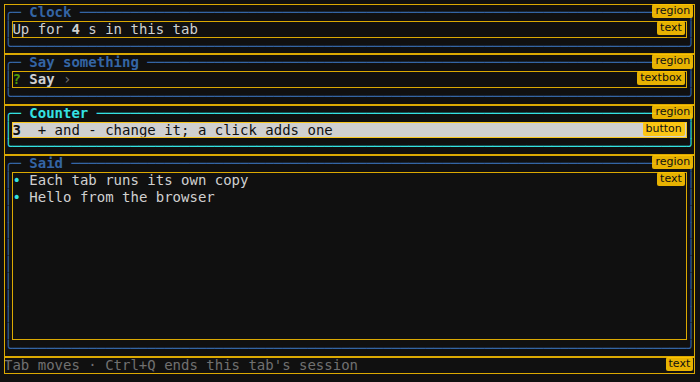
The tree's elements are invisible on the page. Outlined, and labelled with
their roles, they lie over the panels they describe: a region for each
panel, a textbox for the text box and a button for the counter, which
has the focus:
The protocol
Version 1, described in full in the rich_web::dom module. The page sends
what the xterm.js page sends (d and input bytes, r and
columns,rows, c and a copy's answer). The server sends JSON objects,
each named by t:
| Message | When | Carries |
|---|---|---|
hello |
first | protocol: 1. A page that speaks another version stops. |
frame |
after a frame that changed something | cols, rows, new styles as [number, css], the changed lines as [y, runs] (each run [text, style], or [text, style, 2] for a wide character), cursor |
tree |
when the accessibility tree changed | focus and nodes: id, depth, rect, attrs, text, and item for a widget of items |
say |
an announcement | text, urgent |
copy |
the app copied text | n, text; the page answers c |
rich_web::dom::Dom builds these from a Driver, so they can be checked
without a browser, as the crate's tests do.
Security
Anyone who opens a session can do whatever the app (or the program) lets them do. The server is therefore closed by default:
- It listens where you tell it. Use a loopback address (
127.0.0.1,[::1],localhost) to keep it on this computer. Any other address prints a warning at start. - A random token (128 bits from the operating system's random source) is part of the printed address. The page and the WebSocket both refuse a request without it.
- The
Originheader is checked. Browsers let any web page open a WebSocket to a localhost port, so the upgrade must come from this server's own page. That meanshttp://plus the address the server is bound to (orlocalhostand its port), which must also be theHostthe request was sent to. This guards against DNS rebinding. Bound to every interface (0.0.0.0,::), theHostmust still be one the server answers to: the loopback addresses,localhost, this computer's name (andNAME.local), the address the connection arrived on, or a name allowed withallow_host(rich serve --allow-host). It can also come from an origin allowed withallow_origin. A request with no origin is refused. - Sessions are capped. One more than
max_sessionsis refused with503until a session ends. - Requests are timed. A connection has 10 seconds to send its whole
request, however slowly it trickles in. With 64 connections still
sending theirs, one more is answered
503rather than closed unanswered. - A program's output is bounded by
max_buffered: a page that stops reading holds the program back rather than growing the server's memory. Its input is bounded too (1 MiB held that it has not read). - The page is locked down: a content security policy allows only its own scripts and styles and a WebSocket to the server, and other sites cannot frame it.
The same checks apply to apps, programs and both renderers, and the tests cover each of them.
Beyond this computer
There is no other authentication and no TLS. To reach an app from another machine, keep the server on a loopback address and put a reverse proxy in front of it. The proxy must provide both TLS and authentication (nginx, Caddy or Traefik with basic auth or single sign-on, for example). Then allow the address the proxy serves it at:
The proxy must pass WebSocket upgrades through to /ws. The token is
still required.
Status
All three phases of serving to a browser (0.0.18 plan, workstream 7) are here: intuiTUIve apps, any terminal program, and the DOM renderer. Since 0.0.19 every app session runs in a process of its own.