 Micro assets (rs-rich-micro)
rs-rich-micro (rich_micro, new in 0.0.14) holds micro assets:
emoji-sized inline images and animations, written Deploying :micro:rocket:.
rich has no micro assets, so this crate is an rs-rich addition, not a
port, and core is unchanged: :micro:name: is not an emoji code, so it
passes through core as plain text.
Version 0.0.1 holds the model, the .richmicro package format, the layered
registry, the markup, the drawing (Kitty, iTerm2 or Sixel images where the
terminal supports them, half-block cells or the emoji or text fallback
everywhere else, with animation), the image pipeline that makes packages,
and a built-in library (status/, dev/ and fun/ sets).
- The built-in library: every built-in asset, magnified, with its animation and fallbacks, and the drawing modes side by side.
- Authoring micro assets: the pipeline,
rich micro
  create
, the manifest, packs and the built-in library. - Micro assets in the
richCLI:rich micro,:micro:in--print --emoji, titles, captions and Markdown,rich asset --kind micro,rich explore --icons. - Terminal compatibility: what each terminal draws.
- From Python:
rs_rich.micro.
The asset and markup samples below are the crate's doc tests, which CI runs.
An asset
A MicroAsset has:
- a name:
[a-z0-9_-]segments joined by/namespaces, such asstatus/success; - a kind: static or animated;
- a size in cells: 2×1 by default (an emoji's footprint, since a cell is about twice as tall as it is wide), and anything up to 4×2: 1 to 4 columns, 1 or 2 rows, such as a 2×2 icon or a 3×2 animation (new in rs-rich-micro 0.0.5; see Two rows). A larger size is refused with an error that names the limit;
- alt text, which is mandatory: screen readers, logs and plain exports show it where nothing else fits;
- a fallback: an emoji, a short text, or both, each fitting the asset's columns with no whitespace;
- images (a static image, an animation, or a frame sequence), aliases, and its origin, version, licence and author.
use rich_micro::{CellSize, MicroAsset};

let asset = MicroAsset::new("status/ok", "green check mark")?
    .with_emoji("✅")?
    .with_text("OK")?;
assert_eq!(asset.size(), CellSize::default()); // 2x1
Markup
:micro:name: is the one syntax ([micro=…] would collide with core's
markup tags). \:micro: escapes it. A name no layer has stays as written and
comes back as a diagnostic.
use rich::Console;
use rich_micro::{render_markup, FallbackPreference, Layer, MicroAsset, MicroRegistry};
let mut registry = MicroRegistry::new();
registry.add(Layer::Inline, MicroAsset::new("ship", "rocket")?.with_emoji("🚀")?)?;
let console = Console::builder().width(40).build();
let (text, diagnostics) =
render_markup(&console, "Deploying :micro:ship: :fire:", ®istry, FallbackPreference::Emoji);
assert_eq!(text.plain(), "Deploying 🚀 🔥");
assert!(diagnostics.is_empty());
render_markup, markup_text and PreparedMarkup swap tokens out before
core parses the markup, so a token directly followed by an emoji code
(:micro:ship::fire:) gets both. To expand tokens in a Text you already
have, use expand, MicroExt::expand_micro, or MicroTransform in a
transform pipeline (MicroPlugin registers it as micro). In code,
text.append_micro(®istry, "ship") appends one, and MicroAssetRef is a
renderable of its own.
Markdown has no markup to tag, so PreparedMarkdown swaps each token
outside code (blocks and inline spans, as pulldown-cmark parses them with
core's options) and URLs (link and image destinations, autolinks, reference
definitions; link text expands) for stand-in cells of the
asset's width before core's Markdown renders it, and its view turns
them back into tagged placeholders afterwards:
use rich::markdown::Markdown;
use rich_micro::{FallbackPreference, Layer, MicroAsset, MicroRegistry, PreparedMarkdown};
let mut registry = MicroRegistry::new();
registry.add(Layer::Inline, MicroAsset::new("ship", "rocket")?.with_emoji("🚀")?)?;
let prepared = PreparedMarkdown::new(
"Go :micro:ship: `:micro:ship:`",
®istry,
FallbackPreference::Emoji,
);
let console = rich::Console::builder().width(40).build();
let shown = console.render_export(&prepared.view(Markdown::new(prepared.source())));
assert!(shown.starts_with("Go 🚀 "), "{shown:?}");
assert!(shown.contains(":micro:ship:"), "{shown:?}");
graphics.view(…) around the view draws the images, as below.
Width and layout
An asset in a Text is exactly its columns of ordinary text: its fallback,
padded with U+2800 (a blank that is not whitespace, so wrapping never splits
an asset), under a style whose metadata holds
rich.micro = [name, cols, rows, id]. It measures, wraps, crops, and sits in
tables and panels at exactly its width, and prints as plain fallback in
pipes, logs and exports. That is its first row; a two-row asset's second row
is reserved after layout (below).
Here the built-in library's assets sit in a table's cells, each two columns wide, printed with their emoji fallback:
/// A deploy's steps, each with a built-in asset before it.
fn steps(console: &Console, registry: &MicroRegistry) -> Table {
let mut table = Table::new().title("Deploy v1.4.0");
table.add_column("step");
table.add_column("status");
let rows = [
("Run the tests", ":micro:status/success: passed"),
("Lint", ":micro:status/warning: 2 warnings"),
("Fix the flaky one", ":micro:dev/bug: retried twice"),
("Build the package", ":micro:dev/package: 4.2 MB"),
("Sign the release", ":micro:status/error: key expired"),
];
for (step, status) in rows {
let (text, diagnostics) =
render_markup(console, status, registry, FallbackPreference::Emoji);
assert!(diagnostics.is_empty());
table.add_row_text(vec![rich::Text::new(step), text]);
}
table
}
fn fallback(console: &Console) {
let registry = MicroRegistry::builtin();
// Printed as it is, each asset is its fallback, at exactly its width.
console.print(&steps(console, ®istry));
}
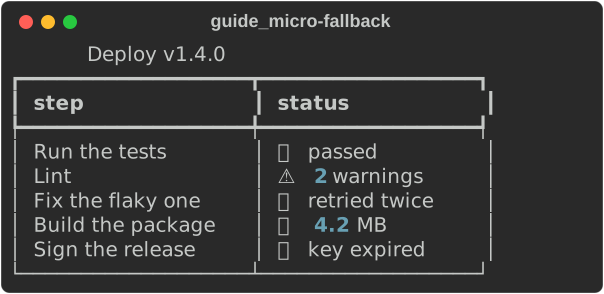
The pictures on this page come from
guide_micro.rs:
MicroView wraps any renderable and offers each complete placement in its
output to MicroRenderers, which may swap it for other cells of the same
width. A placement that was cropped or split is never offered.
FallbackRenderer redraws the emoji, text or alt text; the terminal graphics
renderers below plug in at the same seam.
Two rows
A 2×2 or 3×2 asset (any size with two rows) is still one word of its
columns in the line it sits on, so wrapping, measuring and cropping treat it
as they treat a one-row asset. MicroRows gives it the row below: it
renders what it wraps, and after each line holding a two-row asset it
inserts a reserved row. The rules:
- The reserved row holds the asset's second row at the same columns (U+2800
blanks tagged
[name, cols, rows, id, 1]), and nothing else: the text beside the asset stays on the first row, and the reserved row is blank under it (spaces that keep only the background colour above, with no trailing blanks). The next line of text moves down one row; nothing is ever drawn over it. - Two assets on one line share one reserved row.
- The rule is the same at every width, and the output depends only on the input, so the same text renders the same way every time.
- Wrap the
Text, not the table or panel around it: a table cell or a panel sees the extra row in the lines it renders, so the row or the panel grows to hold it.MicroAssetRefreserves its own rows. Reserving twice changes nothing. - Where nothing reserves the row (a bare
Text, Markdown, a panel or table title), a two-row asset shows its first row only, as its fallback: no mode draws an image unless both rows are there, the second right below the first.
use rich::{Console, Text};
use rich_micro::{CellSize, MicroAsset, MicroExt, MicroRows};

let icon = MicroAsset::new("team/icon", "blue square")?
    .with_size(CellSize::new(2, 2)?)?
    .with_text("[]")?;
let mut text = Text::new("Deploying ");
text.append_micro_asset(&icon).append(" done", None);
let console = Console::builder().width(40).build();
let shown = console.render_export(&MicroRows::new(text));
assert_eq!(shown, "Deploying [] done\n          \u{2800}\u{2800}\n");
The built-in fun/trophy (2×2) and fun/campfire (3×2, animated), as the
fallback and drawn in half-blocks, in text and in a table:
fn rows(console: &Console) {
let registry = Arc::new(MicroRegistry::builtin());
// fun/trophy is 2x2 and fun/campfire 3x2: `MicroRows` reserves the row
// below the line each one sits on.
let (text, _) = render_markup(
console,
"Release :micro:fun/trophy: shipped, then the team at the :micro:fun/campfire:",
®istry,
FallbackPreference::Emoji,
);
// `MicroAssetRef` reserves its own rows: a table row grows to hold them.
let mut table = Table::new();
table.add_column("asset");
table.add_column("size");
for name in ["fun/trophy", "fun/campfire"] {
let asset = MicroAssetRef::from_registry(®istry, name).expect("built in");
let size = asset.asset().size().to_string();
table.add_row_cells(vec![
Cell::Renderable(Arc::new(asset)),
Cell::Text(rich::Text::new(size)),
]);
}
// The fallback first, then half-blocks over both rows.
console.print(&MicroRows::new(text.clone()));
let selection = Selection::forced(MicroMode::Blocks, CellPixels::DEFAULT);
let graphics = MicroGraphics::new(Arc::clone(®istry), selection);
console.print(&graphics.view(MicroRows::new(text)));
console.print(&graphics.view(table));
}
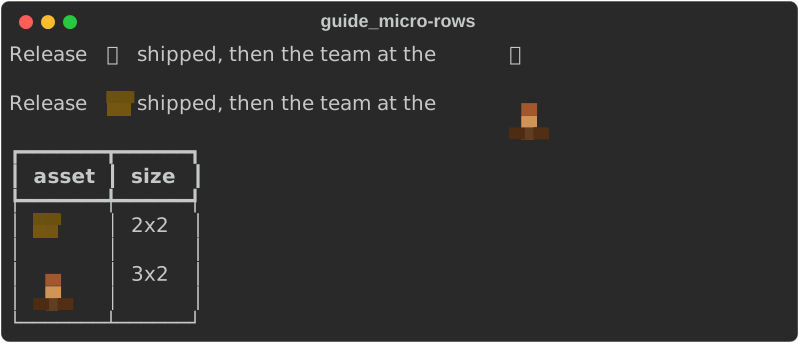
Drawing on a terminal
MicroGraphics holds one terminal's drawing state. MicroGraphics::detect
reads the terminal (through rich_ext::graphics::GraphicsEnvironment) and
selects one way to draw; graphics.view(renderable) draws every micro asset
in a renderable with it:
use std::sync::Arc;
use rich::Console;
use rich_micro::{render_markup, FallbackPreference, Layer, MicroAsset, MicroGraphics, MicroRegistry};
let mut registry = MicroRegistry::new();
registry.add(Layer::Inline, MicroAsset::new("ship", "rocket")?.with_emoji("🚀")?)?;
let registry = Arc::new(registry);
// Detects the terminal once: Kitty, iTerm2, Sixel, blocks or text.
let graphics = MicroGraphics::detect(Arc::clone(®istry));
let console = Console::new();
let (text, _) = render_markup(&console, "Deploying :micro:ship:", ®istry, FallbackPreference::Emoji);
console.print(&graphics.view(text));
The same table drawn in half-blocks, the mode a colour terminal without an image protocol gets. Each asset's image is fitted to its two cells, so the table keeps its layout exactly:
fn blocks(console: &Console) {
let registry = Arc::new(MicroRegistry::builtin());
// `MicroGraphics::detect` chooses for the terminal; a fixed mode here,
// so the picture is the same on every machine.
let selection = Selection::forced(MicroMode::Blocks, CellPixels::DEFAULT);
let graphics = MicroGraphics::new(Arc::clone(®istry), selection);
console.print(&graphics.view(steps(console, ®istry)));
}
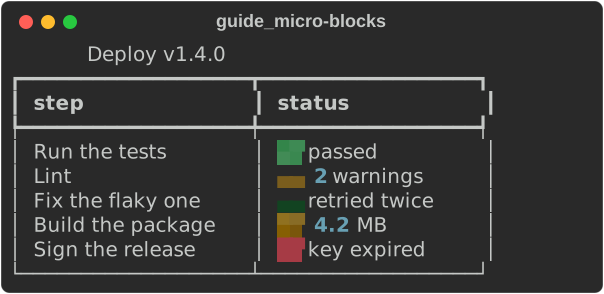
The built-in library page shows each asset magnified, and the drawing modes side by side.
The selection goes, in order:
- Kitty (
TERM=xterm-kittyorKITTY_WINDOW_ID): each image is transmitted once per session under an id, with a virtual placement, and the asset's cells are Unicode placeholders (U+10EEEE with a row and a column diacritic, coloured with the id). The image lives in the cell grid: it scrolls with the text, survives redraws, and costs nothing to show again. - iTerm2 (
TERM_PROGRAMiTerm.app or WezTerm): an inline image of exactly the asset's cells, drawn over blank cells with the cursor saved before them and restored after, then moved past them. - Sixel (the same heuristic as
rich --image), when the cell size in pixels is known: the image fitted to exactly its cells, with no line break, drawn the same way as iTerm2's. - Half-blocks, on a colour terminal: the asset's emoji or text if it has one, else its image as block cells at exactly its size, else its alt text.
- Text: the emoji or text fallback, else the alt text.
A two-row asset is drawn over both its rows, or not at all: Kitty prints row 0 of its placeholders on the first row and row 1 on the reserved row, for one image placed over the whole box; iTerm2 and Sixel draw one image of the box (Sixel at twice the cell height in pixels) once both rows' blank cells are printed, from the second row with the cursor moved up to the first and back; half-blocks draw two pixel rows a cell row; and the text fallback is the emoji or text on the first row with blanks below.
RICH_MICRO=kitty|iterm|sixel|blocks|text overrides the choice on a
terminal (blocks puts the image before the emoji). Output that is not a
terminal, a pipe, a log file, or a console exporting text, HTML or SVG,
always gets the text fallback, byte for byte what it would be without
MicroGraphics, whatever the override says. Each renderer checks the
console it renders for, so an export from a console that is not a terminal
never holds an escape. rich doctor reports the choice and the reason.
Images are fitted to the cell size in pixels, from RICH_CELL_PIXELS=WxH,
the terminal's window size in pixels, or (for MicroGraphics::detect on an
interactive terminal that has a graphics protocol) a CSI 16 t query; 8×16
is assumed otherwise. The query is asked only by a foreground process and
only when no input is waiting, so it never stops a background job or eats
typeahead; set RICH_CELL_PIXELS to skip it altogether.
Animation
Animated assets (GIF or APNG) are decoded under the package limits, fitted
to their cells, deduplicated (repeated frames merge) and rate-limited
(frames under 40 ms merge into the next). Kitty plays them with its own
frame protocol and iTerm2 as an animated GIF. Elsewhere, like a spinner, the
frame follows the clock: each redraw inside a live region or the interactive
event loop shows the frame that is due, and the graphics source tells the
event loop when the next one is. RICH_A11Y=reduced-motion and
RICH_ANIMATION=0 show the still image, as does any output that is not
interactive.
Live regions and interactive views
Frames, LiveCoordinator and the interactive painter carry images beside
their cells, as a list of placements: live.with_graphics(graphics.source()),
event_loop.graphics(graphics.source()), and for one component
rich_interact::run_with_graphics(component, &options, graphics.source()).
Before a frame is built the
source swaps the fallback cells for the mode's cells (Kitty placeholders, or
blanks under an image); after the cell diff is written, images are drawn
where they are new, moved, on another frame, or where the cells under them
were repainted. Diffs stay exact because the cells hold the layout. When a
view closes, the Kitty images it no longer shows are deleted by id
(graphics.close() deletes every one for a program that is done).
The cache
Decoded images are cached in memory, keyed by a hash of the source, the size
in cells and the cell size, within 32 MiB by default. MicroGraphics::detect
also keeps the fitted still images under the user cache directory
(RICH_CACHE_DIR/micro, else $XDG_CACHE_HOME/rich/micro,
~/Library/Caches/rich/micro or %LOCALAPPDATA%\rich\cache\micro), so a
later run reads a tiny PNG instead of decoding the source. Each file is
named by a SHA-256 of the source bytes, the size in cells, the cell size and
whether it is animated, so no package can name another asset's file.
Terminal compatibility
What each terminal draws, the overrides, and how to check yours are on their own page.
Packages
A .richmicro package is a zip archive or a directory holding
manifest.json and its images:
{
  "schema_version": 1,
  "name": "status/success",
  "alt": "green check mark",
  "size": "2x1",
  "fallback": { "emoji": "✅", "text": "OK" },
  "static": "static.png",
  "animation": "animation.gif",
  "aliases": ["success"],
  "version": "1.0.0",
  "license": "CC0-1.0",
  "author": "you"
}
"size" is "COLSxROWS" (or {"cols": 3, "rows": 2}): 1 to 4 columns and
1 or 2 rows. A manifest without one is 2×1, whatever its images' shape: a
size is never guessed, and a placeholder tagged with a size its asset does
not declare (one made with another registry) is never drawn. Packages
written before two-row sizes load as they always did; an older reader
refuses a two-row package with an error naming its size.
The animation may be a GIF, APNG or WebP, or a "frames" list of still
images. A pack is a directory or zip archive with a pack.json
(schema_version, name, version and a packages list).
Packages are untrusted input. Limits bound the archive size, each file,
the manifest, the number of entries, the bytes read from one archive, pixel
dimensions, frame counts and the bytes an asset takes decoded. Images are
checked by their headers without being decoded, so a decompression bomb is
refused by its header. Paths that are absolute, use .., hold backslashes,
or are symbolic links (in an archive, any; in a directory, any that leads
out of it) are refused. Unknown manifest fields and any schema_version but
1 are errors.
The registry
Layers resolve in this order, a later one winning:
- built-in: the library's own set, compiled in (
MicroRegistry::builtin(), orMicroRoots::from_env, which turns it on); - the user's,
~/.config/rich/micro/; - a trusted project's,
.rich/micro/; - inline, added in code.
A project's assets load only when the caller says the project is trusted,
under the same rule as project config, so a cloned repository cannot restyle
success or put images in your terminal. Aliases resolve within their own
layer. When two packages in one layer claim a name, the first in file-name
order keeps it and the other is reported as a collision; a package that
fails to load is reported and the rest still load.
use rich_micro::{Layer, Limits, MicroRegistry, MicroRoots};

let roots = MicroRoots::from_env(Some(std::path::Path::new("."))).trust_project(false);
let (registry, report) = MicroRegistry::load(&roots, &Limits::default());
for rejected in &report.rejected {
    eprintln!("{}: {}", rejected.path.display(), rejected.error);
}
if let Some(explanation) = registry.explain("status/success") {
    rich::Console::new().print(&explanation);
}
explain shows which layer won and what it overrides, through the
precedence view in rich_ext::cli_doc.