Code highlighters
Syntax, Markdown code blocks, source_view and the diff views all highlight
code through one extension point, core's CodeHighlighter. Two adapters ship
with the port, and you can write your own in about 40 lines.
The examples come from
guide_highlighters.rs:
Choose one
| syntect (default) | lumis (rs-rich-lumis) |
|
|---|---|---|
| Parsing | TextMate grammars, regex-based | tree-sitter grammars |
| Code | Pure Rust by default; the onig feature swaps in the Oniguruma C library |
C (tree-sitter's runtime and grammars) |
| Languages | syntect's default set | 116 with default features; bundles select fewer |
| Themes | 7 syntect themes, plus ansi_dark and ansi_light |
256 Neovim themes (default monokai), plus ansi_dark and ansi_light |
| Speed | 2–4× faster with onig |
a fixed cost per language, then the fastest on long files (benchmarks) |
| Binary | about 15.7 MB for the CLI | about 169 MB for the CLI with every language; a bundle is far smaller |
| Minimum Rust | the workspace's (1.90) | 1.91 |
syntect is the default everywhere and is what upstream parity is measured with. Choose lumis for tree-sitter's more precise parsing, its languages or its themes, and accept the larger build.
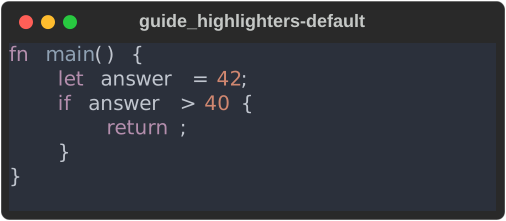
A Syntax with no highlighter of its own uses syntect (core's default
syntax feature), with its default theme, base16-ocean.dark:
const CODE: &str =
    "fn main() {\n    let answer = 42;\n    if answer > 40 {\n        return;\n    }\n}\n";

// No highlighter given: syntect, with its default theme.
fn default_engine(console: &Console) {
    console.print(&Syntax::new(CODE, "rust"));
}
One tree-sitter per binary
lumis links tree-sitter's C runtime. Another crate that links a different version of that runtime (another tree-sitter highlighter, for example) cannot go into the same binary. That is why lumis lives in its own crate and is behind an off-by-default feature in the CLI.
In the CLI, choose with --highlighter NAME and --code-theme NAME, or the
highlighter and code_theme keys in rich.toml. rich doctor lists the
highlighters compiled in, their themes, and the one in use.
Use one
Give a highlighter to one Syntax, or make it the default for every block a
console renders: register it, choose it by name and install the registry.
// One block of code, with an engine and one of its themes.
fn one_block(console: &Console) {
    console.print(
        &Syntax::new(CODE, "rust")
            .highlighter(Arc::new(Keywords))
            .theme("blue"),
    );
}

// Or every block a console renders: register it, choose it by name and
// install the registry on the console.
fn install_keywords(console: &mut Console) {
    let mut registry = ExtensionRegistry::with_defaults();
    registry
        .register_code_highlighter("keywords", Arc::new(Keywords))
        .unwrap();
    registry
        .set_default_code_highlighter("keywords", None)
        .unwrap();
    registry.install(console);
}

fn every_block(console: &Console) {
    console.print(&Syntax::new(CODE, "rust"));
}
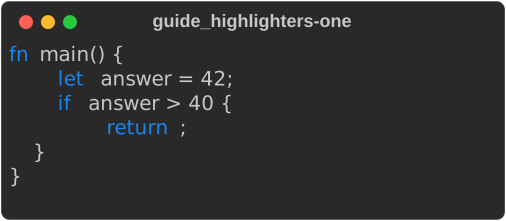
Keywords is the adapter written below. Given to one
Syntax with its blue theme, it colours the keywords and nothing else:
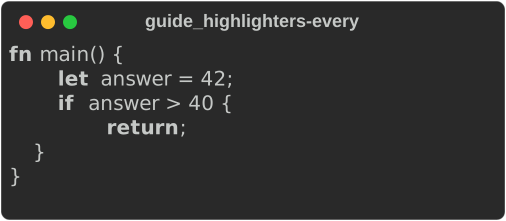
Installed as the console's default, it highlights a plain
Syntax::new(CODE, "rust") with its default theme, bold:
A Syntax with a highlighter of its own always uses it; the console's default
covers everything else, including Markdown code blocks. Theme names are each
highlighter's own.
The first highlight loads syntect's grammars and themes, which takes seconds
in a debug build. An interactive app can do that on a worker thread at
start-up with rich_ext::syntax::preload(&["rust", "markdown"]) (see
Warming up syntax highlighting).
SQL without syntect
The sql feature of rs-rich-ext adds sql::SqlHighlighter, a
CodeHighlighter built on a hand-written SQL lexer: pure Rust, no
dependencies, no grammar files. It answers to sql and to postgresql,
postgres, mysql, mariadb, sqlite, bigquery, snowflake, duckdb,
tsql and plsql, and knows their common words (QUALIFY, PRAGMA,
ILIKE, INT64, VARIANT, …).
use rich::protocol::{CodeHighlighting, ConsoleCodeHighlighting};
use rich::Console;
use rich_ext::sql::SqlHighlighter;

let mut console = Console::new();
console.set_code_highlighting(Some(CodeHighlighting {
    highlighter: SqlHighlighter::shared(),
    theme: Some("ansi_dark".into()),
}));
// Every `Syntax` and Markdown ```sql fence this console renders.
What it tells apart:
| class | examples |
|---|---|
| keywords, types, constants | SELECT, VARCHAR, NULL |
| functions | a name before (: count(, coalesce( |
| names and quoted names | orders, "Order Id", `col`, [dbo].[t] |
| strings | 'it''s', E'\n', $$ … $$, $fn$ … $fn$, '''raw''', X'FF' |
| numbers | 42, .5, 1.5e-3, 0xFF |
| comments | -- …, /* … */ (nested) |
| parameters | :name, @name, @@var, $1, ? |
| operators, punctuation | <>, \|\|, ::, ->>; ( ) , ; |
| Jinja blocks | {{ ref('orders') }}, {% if … %}, {# … #}, as dbt models use them |
A name after a . is a name even when it is a keyword (t.date), and [
after a name or ARRAY is a subscript, not a quoted name. An unterminated
string, comment or block runs to the end of the input; the lexer never
fails. # is an operator (PostgreSQL), not a MySQL comment.
Its themes are monokai (the default), ansi_dark and ansi_light; a theme
it does not know colours SQL with monokai, so a console set up with
another engine's theme still colours SQL. Other languages are plain text,
or go to another highlighter with SqlHighlighter::with_fallback(…).
sql::SqlPlugin registers it as the highlighter "sql".
Dropping syntect
The syntax feature brings syntect; the code feature has Syntax
without it, and markdown needs only code. rs-rich-ext forwards all
three, and sql turns on code, so one dependency is enough:
rs-rich-ext with default-features = false, features = ["sql",
"markdown"] (leave out markdown if you need no Markdown). Then install SqlPlugin as the default code highlighter (or set it on
the console as above): every Syntax and ```sql fence is
highlighted by this lexer, and cargo tree shows no syntect or bincode.
Code in other languages is plain in such a build, unless another
highlighter is registered or given as the fallback. Without Syntax at
all, rich_ext::sql::highlight(code, theme) returns the highlighted SQL
as a Text; sql::tokenize gives the tokens.
Write your own
An adapter implements four methods. highlight returns one line per element
of code.split('\n'), each with styled byte ranges: sorted, not overlapping,
inside the line and on character boundaries. An unknown language is plain
text, and an unknown theme is an error. This one only bolds (or colours) a few
Rust keywords:
/// Highlights a handful of Rust keywords, and nothing else.
struct Keywords;

const KEYWORDS: &[&str] = &["fn", "let", "mut", "if", "else", "return", "struct"];

impl CodeHighlighter for Keywords {
    fn highlight(
        &self,
        code: &str,
        language: Option<&str>,
        theme: &str,
    ) -> Result<HighlightedCode, HighlightError> {
        let style = match theme {
            "bold" => Style::parse("bold").unwrap(),
            "blue" => Style::parse("bright_blue").unwrap(),
            other => return Err(HighlightError::UnknownTheme(other.to_string())),
        };
        let rust = matches!(language, Some("rust" | "rs"));
        // One line per `split('\n')` element; spans are byte ranges in the line.
        let lines = code
            .split('\n')
            .map(|line| {
                let mut spans = Vec::new();
                let mut start = 0;
                for word in line.split(|c: char| !c.is_alphanumeric() && c != '_') {
                    if rust && KEYWORDS.contains(&word) {
                        spans.push(HighlightSpan {
                            range: start..start + word.len(),
                            style: style.clone(),
                        });
                    }
                    start += word.len()
                        + line[start + word.len()..]
                            .chars()
                            .next()
                            .map_or(0, char::len_utf8);
                }
                HighlightedLine {
                    spans,
                    newline_style: None,
                }
            })
            .collect();
        Ok(HighlightedCode {
            lines,
            ..Default::default()
        })
    }
    fn default_theme(&self) -> &str {
        "bold"
    }
    fn themes(&self) -> Vec<String> {
        vec!["bold".into(), "blue".into()]
    }
    fn languages(&self) -> Vec<String> {
        vec!["rust".into()]
    }
}
Core checks what an adapter returns against the source. It drops bad spans, renders missing lines unstyled, strips hyperlinks from styles and takes the text from the source, so an adapter can change colours but never the text. That is a safety net, not a licence: the conformance kit holds adapters to the contract.
Check it with the conformance kit
rich_ext::testing::conformance (the testing feature) runs the checks both
shipped adapters pass in CI:
- the default theme is listed and highlights (with
ansi_dark, if listed), and an unknown theme isUnknownTheme; - line counts match
split('\n')for empty input, a missing final newline, CRLF, tabs and multi-byte text; - spans are sorted, disjoint, in range and on character boundaries;
- an unknown language renders exactly as no language;
- rendered output carries no control characters beyond styling;
- 10,000 lines cost at most 40× what 1,000 lines do, a relative budget rather than a wall-clock one.
// The same kit the shipped adapters run in CI.
conformance::check(Arc::new(Keywords)).expect("Keywords conforms");
As a test:
#[test]
fn keywords_conforms() {
    conformance::check(Arc::new(Keywords)).unwrap_or_else(|error| panic!("{error}"));
}
check_with(…, Options { all_themes: true, .. }) also runs every theme the
adapter lists. A failure lists every problem with the input that caused it.
The ANSI themes
ansi_dark and ansi_light are upstream rich's ANSI_DARK and ANSI_LIGHT:
the terminal's own 16 colours, with no background, so highlighted code follows
the user's terminal palette. Both shipped adapters map their token names onto
upstream's Pygments token types (see
Divergences #18).
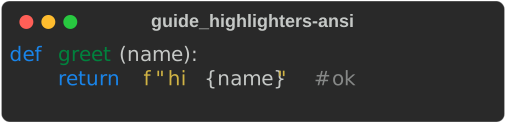
// The ANSI themes use the terminal's own 16 colours, so code follows the
// user's terminal palette. Both shipped adapters have them.
fn ansi(console: &Console) {
    console.print(
        &Syntax::new(
            "def greet(name):\n    return f\"hi {name}\"  # ok\n",
            "python",
        )
        .highlighter(SyntectHighlighter::shared())
        .theme("ansi_dark"),
    );
}