rich-art
rs-rich-art (imported as rich_art) puts pictures in the terminal: FIGlet
text banners, still images drawn with characters or real pixels, animated
GIFs, and a perceptual image diff. Everything it draws is an ordinary rich
renderable, so it can sit in a Panel or a Table, take a style, and be
exported to HTML or SVG like any other output.
Use it when you want:
- a big text banner at the top of a tool's output;
- a thumbnail or preview of an image without leaving the terminal;
- a short animation, such as a spinner-like GIF or a loading screen;
- to tell whether two screenshots differ to a person, and where.
It is our own crate, not a port: Python rich has no image support. The rich
command-line tool uses it for rich image, rich gif and rich diff on
images; see Comparing images and the
CLI walkthrough.
Install
cargo add rs-rich                        # imported as `rich`
cargo add rs-rich-art --features image   # imported as `rich_art`
The crate is split by Cargo feature so a banner-only user pulls in no image decoders:
| Feature | Default | Adds | Pulls in |
|---|---|---|---|
| (none) | ✅ | Figlet banners |
only rs-rich |
image |
off | ImageArt, the ASCII/Braille/block/quadrant backends, imagediff |
the image crate (PNG and JPEG decoders) |
gif |
off | AnimatedArt, Stage |
image plus its GIF decoder |
sixel |
off | SixelArt, Sixel through ImageArt |
image plus icy_sixel |
gif and sixel each switch on image. The image crate is re-exported as
rich_art::image, so you can build or decode pictures without adding your own
dependency on it (and without a version mismatch).
The backends
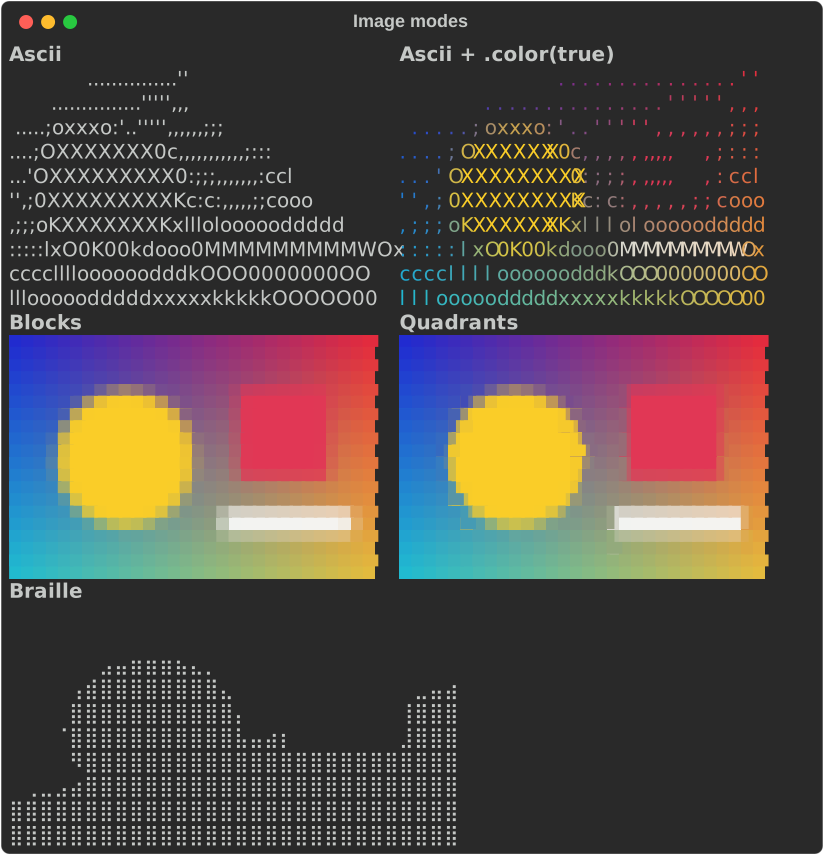
Every still image goes through one of these. ImageArt picks between them for
you, or you pin one with ImageMode.
| Backend | ImageMode |
Cell holds | Colour | Best for |
|---|---|---|---|---|
| ASCII | Ascii |
1 pixel, as a character from a density ramp | optional | no-colour terminals, logs, line art |
| Braille | Braille |
2×4 pixels, on or off | none | sharp monochrome detail |
| Half blocks | Blocks |
2 pixels stacked (▀, foreground over background) |
required | photos and gradients on any colour terminal |
| Quadrants | Quadrants |
2×2 pixels in two colours (▘ ▚ ▙ █ …) |
required | edges and diagonals |
| Sixel | Sixel |
real pixels, drawn by the terminal | full | terminals that support Sixel |
ImageMode::Auto (the default) chooses ASCII without colour, Sixel where it is
compiled in and looks supported, and half blocks otherwise.
Pages in this section
- Text banners —
Figlet: fonts, styles, justification. - Images —
ImageArt: every mode, fitting and cropping, transparency, colour depth and dithering, tone adjustments, rotation and flips, and strict rendering. - Animated GIFs —
AnimatedArt,RepeatandStage. - Image diff — the
imagediffAPI behindrich diff.
Running the examples
Every snippet in these pages is compiled from an example in
crates/rich-art/examples/, and every screenshot is that example's own SVG
export:
cargo run -p rs-rich-art --example guide_banners
cargo run -p rs-rich-art --features image --example guide_images
cargo run -p rs-rich-art --features gif --example guide_gifs -- --play
cargo run -p rs-rich-art --features image --example guide_image_diff

# Regenerate the screenshots in docs/media/guide/
cargo run -p rs-rich-art --features image --example guide_images -- --svg docs/media/guide
The examples draw their own test pictures in code, so they need no image files.
See also
crates/rich-art/README.md— the crate overview on crates.io- CLI and art videos — recordings of the CLI tour and the renderers in a real terminal
- Using the CLI — the same features from the command line