Explorers, copying and live lists
rs-rich-interact 0.0.2 adds components and utilities built on the
kit:
- a data explorer for JSON, YAML, TOML, XML, INI and
dotenv documents, which is what
rich exploreruns; - tree filtering that keeps each match's ancestors, breadcrumbs and a path copy;
- copying to the terminal's clipboard with OSC 52, and a table that copies a row or a cell as text, CSV or JSON;
- reloading a list's items while keeping the query, the focus and the marks;
- a theme picker that previews each theme live.
The data explorer
DataExplorer needs the data feature. It takes a rich_ext::data::Node,
so any format rich_ext::data parses works. Enable the formats you need on
rs-rich-ext (yaml, toml, xml):
[dependencies]
rs-rich-interact = { version = "0.0.2", features = ["data"] }
rs-rich-ext = { version = "0.0.12", features = ["yaml"] }
use rich_ext::data::{parse, Format};
use rich_interact::components::json_path;
use rich_interact::{run, DataExplorer, Outcome, RunOptions};

let text = std::fs::read_to_string("config.yaml")?;
let document = parse(Format::Yaml, &text)?;
let explorer = DataExplorer::new("config.yaml", document);
if let Outcome::Done(path) = run(explorer, &RunOptions::default())? {
    println!("{}", json_path(&path)); // $.server.port
}
Every node is a row: key: value for a scalar, key: {…} 3 keys for a
container. Only the root's children show at first (fold_below changes
that). Right opens a container and Left folds it, or goes to the parent.
Typing searches keys and values, folded or not. The line under the question
shows the path to the focused node ($ › server › port), and a preview
draws its subtree with rich_ext::data::Explorer.
| Key | Action | Does |
|---|---|---|
| Ctrl+Y | tree.copy-path |
Copy the node's path as JSONPath |
| Alt+Y | explore.copy-value |
Copy its value: a string as it is, a container as indented JSON (rich_ext::data::copy_text) |
| Enter | select.pick |
Finish with the node's rich_ext::data::Path |
To open a branch from code, before or between runs, use
rich_ext::data::OpenBranch: explorer.open_branch(&path) opens the
container at path and every one above it, as Right would, and
close_branch folds it. Both return false when path is not a non-empty
container. rich_ext::data::RecordView implements the same trait, so one
"open this branch" action drives both the record inspector and the explorer.
json_path writes a Path as --select reads it: $, $.servers[0].name,
$["odd key"]. The runnable example is
crates/rich-interact/examples/explore.rs:
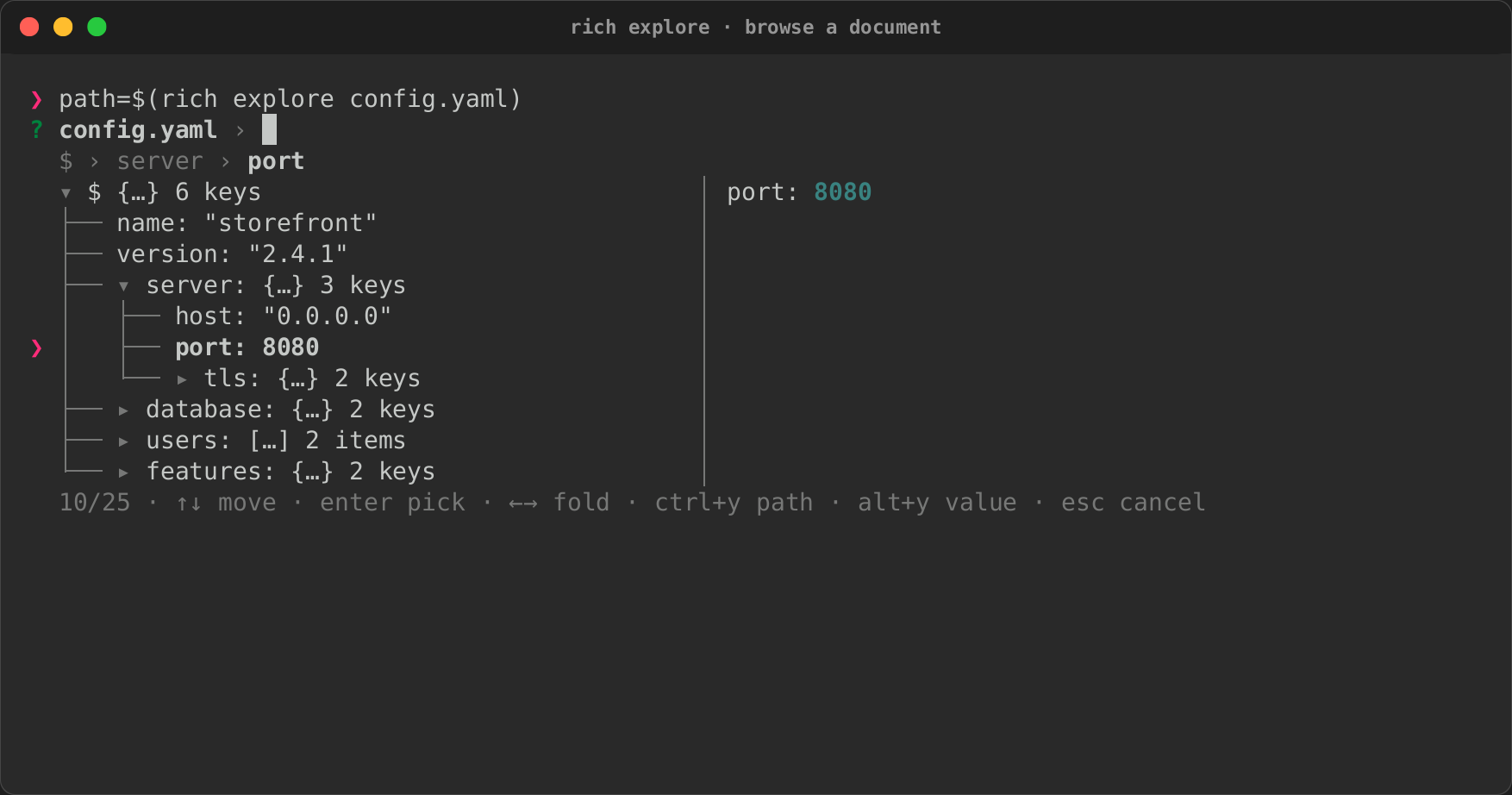
Trees: filtering and breadcrumbs
TreeSelect filters as a tree. A query keeps what matches and every
ancestor of it, in tree order. The ancestors are dimmed, the guides join what
is listed, and the cursor goes to the best match rather than to the first
ancestor. The same rule is public for your own components:
use rich_interact::kit::{keep_ancestors, FilterState};

//  0 config
//  1 ├── server
//  2 │   └── port
//  3 └── debug
let parents = vec![None, Some(0), Some(1), Some(0)];
let (list, context) = keep_ancestors(vec![(2, vec![0, 1])], &parents);
assert_eq!(list.iter().map(|(i, _)| *i).collect::<Vec<_>>(), [0, 1, 2]);
assert_eq!(context, [true, true, false]);

// Or let a FilterState do it on every query.
let mut filter = FilterState::new(["config", "server", "port", "debug"]);
filter.set_tree(Some(parents));
filter.set_query("port");
assert_eq!(filter.len(), 3);
assert!(filter.is_context(0) && !filter.is_context(2));
assert_eq!(filter.best(), Some(2));
kit::ancestors(parents, index) walks up from a node. Select::set_tree
turns tree filtering on for a list you build yourself.
TreeSelect::breadcrumbs(true) adds the path line under the question, cut
from the left (… › bin › main.rs) when it is too wide. crumbs names each
node in it (a key instead of key: value), and paths sets what Ctrl+Y
copies and what actions see as each node's value. By default that is the
labels joined by /. paths_with(|index| …) works each one out when it
is asked for instead, so a large tree keeps no string per node.
fold_below(depth) folds everything from a depth down.
set_collapsed(index, bool) folds or opens one node.
Building a tree is linear in its nodes, and so is what it keeps: the
paths and the guides (│ ├──) are worked out for the focused node and
the rows on screen. DataExplorer keeps each node's place in the document,
not its path, and its preview draws at most a screenful of each
container's children.
The breadcrumbs line is drawn by a small private helper for now. It will move to the shared breadcrumbs component of the status bar work (#482).
Copying to the clipboard
A component cannot write to the terminal, so it calls
rich_interact::clipboard::copy(text) while it handles an event. The event
loop sends the text once the handler returns. The call says at once whether
the copy will go anywhere, so the component can report it:
use rich_interact::clipboard;

let result = clipboard::copy("$.server.port");
let line = clipboard::report("path", &result); // "copied path", or why not
A real session writes an OSC 52 sequence, and only when
rich_ext::clipboard::detect says the terminal takes one:
- never when the output is not a terminal, whatever else is true;
RICH_CLIPBOARD=1or0decides on a terminal;- otherwise, never on
TERM=dumbor inside tmux or screen, which pass OSC 52 on only when configured to; - yes for kitty, iTerm2, WezTerm, Windows Terminal, ghostty, Alacritty, foot, contour, rio and VS Code's terminal;
- no for anything else.
A copy over 74,994 bytes (100,000 in base64, the smallest limit a terminal
sets) is refused rather than cut. The headless driver records copies in
Record::copies. Set Headless::clipboard to false to test a terminal
without one.
Outside interactive components, rich_ext::clipboard::Clipboard writes the
sequence to any Write:
use rich_ext::clipboard::Clipboard;

let clipboard = Clipboard::system();
if clipboard.enabled() {
    clipboard.copy(&mut std::io::stdout(), "copied from rs-rich")?;
}
Copying from a table
TableSelect copies the focused row with Ctrl+Y and its focused cell with
Alt+Y. Ctrl+Right and Ctrl+Left move the focused column, which the headings
underline. Alt+F cycles the format, and copy_format sets the first one:
| Format | A row | A cell |
|---|---|---|
CopyFormat::Text |
cells separated by tabs (pastes into a spreadsheet) | as it is |
CopyFormat::Csv |
one RFC 4180 record | one quoted field |
CopyFormat::Json |
an object keyed by the headings | a JSON string |
CopyFormat::row and CopyFormat::cell are in rich_ext::clipboard, for
copying from anything else. The keys are in context table (table_keymap)
and can be rebound like the others.
Reloading a list
A list can be refilled without losing the user's place (#485), as fzf
--bind 'ctrl-r:reload(...)' does. Select::reload(items) replaces the
items, matches the query against the new ones, keeps the focused item
focused (matched by label) and keeps the marks. Two builders call it for
you:
use std::sync::mpsc;
use rich_interact::{Item, Key, Select};

// On a key: the `select.reload` action, bound here to Ctrl+R.
let branches = Select::new("Branch", ["main".to_string()]).reload_on(Key::ctrl('r'), || {
    vec![Item::from("main".to_string()), Item::from("next".to_string())]
});

// From another thread: send the whole list again whenever it changes.
let (sender, receiver) = mpsc::channel::<Vec<Item<String>>>();
let files = Select::new("File", Vec::<String>::new()).reload_from(receiver);
std::thread::spawn(move || {
    let _ = sender.send(vec![Item::from("a.rs".to_string())]);
});
A select fed from a channel ticks every 100 ms to look for new items.
MultiSelect has the same three methods.
The theme picker
ThemePicker lists themes by name, and its preview renders a sample in the
focused theme, so moving through the list shows the difference as you go.
Each theme is layered over rich_ext::theme::extended_theme(), so a theme
that sets a few names previews with the rest at their defaults. The answer
is the theme's name.
use rich::{Style, Theme};
use rich_interact::{run, RunOptions, ThemePicker};

let mut night = Theme::new();
night.insert("info", Style::parse("bold blue")?);
let picker = ThemePicker::new("Theme", [("default", Theme::new()), ("night", night)]);
let name = run(picker, &RunOptions::default())?;
ThemePicker::from_registry offers the themes plugins registered (theme
packs; ExtensionRegistry::theme_names lists them) after default, and
with_sample previews your own renderable instead of THEME_SAMPLE.