Text and style
Styled output is built from three pieces:
- a
Style— colours plus attributes such as bold or underline; - a
Text— a plain string with styles applied to ranges of it (spans); - console markup — the
[bold red]…[/]syntax, a compact way to write aText.
Use markup for strings you write in code, Text when you build output
programmatically, and Style when you need a style as a value.
Markup
console.print_str parses markup. So do panel and table titles, rule titles,
spinner and status text, and prompt questions.
fn markup(console: &Console) {
    console.print_str("[bold]bold[/] [italic]italic[/] [underline]underline[/] [strike]strike[/]");
    console.print_str("[bold red]nested [italic]and inner[/italic] outer[/bold red] plain");
    console.print_str("[b]short[/b] [i]forms[/] [reverse] reverse [/] [dim]dim[/]");
    console.print_str("[link=https://github.com/Textualize/rich]a hyperlink[/link]");
    console.print_str("A literal \\[bold] tag, and :rocket: :sparkles: emoji");

    // Text you did not write: escape it first.
    let user_input = "[red]not markup[/red]";
    console.print_str(&format!("user said: {}", escape(user_input)));
}
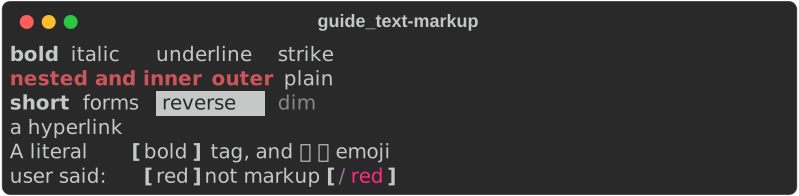
The rules:
| Write | Meaning |
|---|---|
[bold red]…[/] |
open a style; [/] closes the most recent tag |
[bold]…[/bold] |
close a tag by name; tags nest, and names are normalised so [b]…[/bold] matches |
[link=https://…]…[/link] |
an OSC 8 hyperlink (clickable in terminals that support it) |
\[ |
a literal [ |
:rocket: |
an emoji shortcode (turn off with Console::builder().emoji(false)) |
[danger]…[/] |
a style name, looked up in the console's theme |
A [ that could not start a tag ([1, 2]) is left alone. An unknown style
name renders unstyled, as upstream does; a closing tag with nothing to close is
an error.
Escape text you did not write
rich::markup::escape(s) backslash-escapes anything in s that would parse
as a tag. Use it for file names, user input, error messages — anything that
might contain [.
Text::from_markup(&str) parses markup into a Text without a console, and
returns a Result — use it when a markup mistake should be an error.
console.print_str is lenient instead: malformed markup is printed as-is
(try_print_str reports it).
Styles and colours
A style definition is a space-separated list of words — the same grammar
inside a markup tag and in Style::parse.
fn colors(console: &Console) {
    console.print_str("[red]red[/] [bright_green]bright_green[/] [grey62]grey62[/]");
    console.print_str(
        "[#ff8800]#ff8800[/] [rgb(90,160,255)]rgb(90,160,255)[/] [color(201)]color(201)[/]",
    );
    console.print_str("[white on dark_blue] white on dark_blue [/] [black on #ffcc00] on hex [/]");
    console.print_str("[bold not italic]bold not italic[/] [i]italic [not i]not[/] again[/]");
}

| Part | Examples |
|---|---|
| Attributes | bold dim italic underline blink blink2 reverse conceal strike underline2 frame encircle overline |
| Short forms | b d i u r c s uu o |
| Negation | not bold, not i — explicitly off, which beats an inherited bold |
| Named colour | red, bright_green, grey62, dark_blue — the 256 standard names |
| Hex | #ff8800 |
| RGB | rgb(255,136,0) |
| 256-palette | color(208) |
| Background | on blue, white on #202020 |
| Link | link https://example.com |
| Nothing | none |
Style values
fn style_values() {
    // Parse a definition — the same grammar as a markup tag.
    let warning = Style::parse("bold yellow on #202020").unwrap();

    // Or build from colours.
    let accent = Style::from_color(Some(Color::from_rgb(255, 136, 0)), None);
    let link = Style::new().with_link("https://docs.rs/rs-rich");

    // Combine: the right-hand style wins where both set something.
    let both = warning.combine(&accent);
    assert_eq!(both.definition(), "bold #ff8800 on #202020");
    assert_eq!(link.link(), Some("https://docs.rs/rs-rich"));

    // Colours downgrade to what the terminal supports.
    let orange = Color::parse("#ff8800").unwrap();
    let ansi256 = orange.downgrade(ColorSystem::EightBit);
    assert_eq!(ansi256.ansi_codes(true), vec!["38", "5", "208"]);

    // Bad definitions are errors, not silent no-ops.
    assert!(Style::parse("bold chartreuse-ish").is_err());
}
Style::parsereturnsErrfor a definition it does not understand.a.combine(&b)layersbovera;definition()turns a style back into its text form.Colorhasparse,from_rgb,from_ansi,get_truecoloranddowngrade. You rarely downgrade by hand: the console converts every colour to the terminal'sColorSystem(16, 256 or truecolor) as it writes.
Text
A Text is a string plus spans. Build it up, style ranges, then print it — or
pass it to anything that takes a renderable.
fn text_api(console: &Console) {
    // Build up a Text piece by piece.
    let mut text = Text::new("Status: ");
    text.append("ok", Some(Style::parse("bold green").unwrap().into()));
    text.append(" (3 warnings)", Some("yellow".into())); // a style name
    console.print(&text);

    // Style a byte range after the fact.
    let mut text = Text::new("Hello, World!");
    text.stylize("bold magenta", 0, 5);
    console.print(&text);

    // Style every match.
    let mut text = Text::new("error: disk full; error: retry failed");
    text.highlight_words(&["error"], "bold red", true).unwrap();
    text.highlight_regex(r"\b\w+ \w+$", Some("underline".into()), "")
        .unwrap();
    console.print(&text);

    // From markup, then keep editing.
    let text = Text::from_markup("[b]parsed[/b] markup")
        .unwrap()
        .append_text(&Text::styled(" + appended", "italic cyan"));
    console.print(&text);
}

| Method | Does |
|---|---|
Text::new(s) |
plain text; never parses markup |
Text::styled(s, style) |
text with a base style (a Style or a style name) |
Text::from_markup(s) |
parse markup |
append(s, Some(style)) |
add a run, optionally styled |
append_text(&other) |
add another Text, keeping its styles (consumes and returns self) |
stylize(style, start, end) |
style a byte range |
highlight_words(&[..], style, case_sensitive) |
style every occurrence of some words |
highlight_regex(pattern, style, prefix) |
style every match; named groups get the style prefix + name |
justify(..), overflow(..), no_wrap(..) |
layout, see below |
plain(), spans(), cell_len() |
inspect |
Anywhere a style is accepted you can pass a Style or a &str. A string is a
style name (or definition) resolved when the text is rendered, against the
theme of the console doing the rendering.
Offsets are bytes
stylize and Span use byte offsets into plain(), not character
indices. For ASCII they are the same; for other text, compute offsets with
str::find or char_indices (divergence #3).
Justify, overflow and wrapping
Justify decides where spare cells go on each line: Left, Center,
Right or Full (stretch the gaps; the last line stays left).
fn justify(console: &Console) {
    let words = "Justification decides where the spare cells on each line go.";
    for justify in [
        Justify::Left,
        Justify::Center,
        Justify::Right,
        Justify::Full,
    ] {
        // A Text's own justify applies when it is inside another renderable.
        let text = Text::new(words).justify(justify);
        console.print(&Panel::new(Box::new(text)).title(format!("{justify:?}")));
    }
}
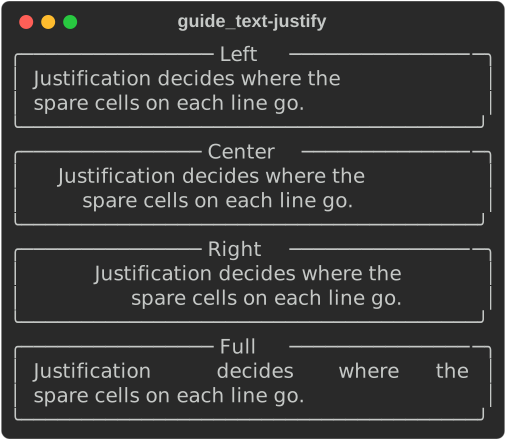
Overflow decides what happens to a word that is wider than the line:
Fold (the default) breaks it, Crop cuts it, Ellipsis cuts it and adds
…, Ignore leaves it alone. no_wrap(true) keeps each line on one line, so
the overflow method applies to the whole line.
fn overflow(console: &Console) {
    let word = "supercalifragilisticexpialidocious-and-then-some";
    for overflow in [Overflow::Fold, Overflow::Crop, Overflow::Ellipsis] {
        let text = Text::new(word)
            .overflow(overflow)
            .no_wrap(overflow != Overflow::Fold);
        console.print(&Panel::new(Box::new(text)).title(format!("{overflow:?}")));
    }
}
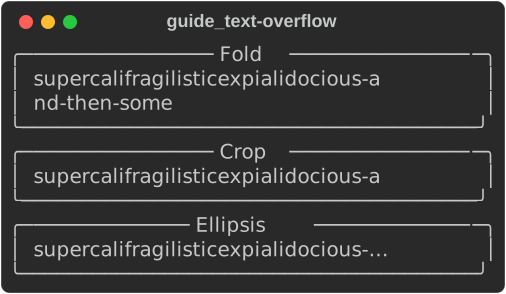
A Text's own justify and overflow apply inside containers (panels, table
cells). A Text printed directly uses the print's options instead — see
per-print options.
Emoji
Markup expands :name: shortcodes — :rocket: 🚀, :sparkles: ✨,
:package: 📦 — before parsing tags. rich::emoji::replace(s) does the same
for any string. Disable it per console with .emoji(false).
Highlighting
A console runs a highlighter over every string printed with print_str.
The built-in
ReprHighlighter
colours what looks like code: numbers, strings, booleans, None, paths, URLs,
UUIDs, IP addresses, call syntax.
fn highlight(console: &Console) {
    // No markup: the ReprHighlighter finds these on its own.
    console.print_str("int 42, float 3.14, hex 0xff, str 'quoted', bool True / None");
    console.print_str("path /usr/local/bin/rich, url https://example.com/a?b=1");
    console.print_str("uuid 123e4567-e89b-12d3-a456-426614174000, ip 192.168.0.1");
    console.print_str("call Point(x=1, y=2) → {'k': [1, 2]}");
}

It is on by default, as upstream. Console::builder().highlight(false) turns
it off. Explicit markup always wins over the highlighter: [green]42[/] is
green.
Your own highlighter
RegexHighlighter::new(prefix, patterns)
styles each named group of each pattern with the style name
prefix + group. Register it on the console, and give the name a style in the
theme:
/// Colour ticket ids like `ENG-1234` wherever they appear.
fn install_tickets(console: &mut Console) {
    // Each named group becomes a span styled `ticket.<group>`…
    let tickets = RegexHighlighter::new("ticket.", &[r"\b(?P<id>[A-Z]{2,5}-\d+)\b"]);
    console.add_highlighter(Box::new(tickets));

    // …which a theme maps to a real style.
    let theme = Theme::from_styles([("ticket.id", "bold black on bright_yellow")], true).unwrap();
    console.push_theme(theme, true);
}

fn tickets(console: &Console) {
    console.print_str("Fixed in ENG-1234; see also OPS-77 and 1234.");
}

- Patterns use
fancy-regexsyntax, so lookaround works. - For anything a regex cannot express, implement the
Highlightertrait: one method,highlight(&self, text: &mut Text), that adds spans. - Registered highlighters run before the built-in
ReprHighlighter, and later spans win where they overlap, so repr styles (numbers, for one) paint over yours. The screenshot above was taken on a console built with.highlight(false)for that reason. Adding highlighters is this port's plugin seam; upstream takes a singlehighlighter=instead (see Extending). ISO8601Highlighter(dates and times) ships too.
Themes
A Theme maps
style names to styles. Every built-in renderable styles itself through names —
repr.number, rule.line, table.header, bar.complete,
logging.level.error, prompt.choices and about 150 more — so a theme
restyles all of them at once, and adds names for your own markup.
fn my_theme() -> Theme {
    let mut theme = Theme::default_theme();
    // Override a built-in name…
    theme.insert("repr.number", Style::parse("bold magenta").unwrap());
    // …and add your own.
    theme.insert("danger", Style::parse("bold white on red").unwrap());
    theme.insert("muted", Style::parse("dim italic").unwrap());
    theme
}

fn themed_console() -> Console {
    Console::builder().theme(my_theme()).build()
}

fn use_theme_names(console: &Console) {
    console.print_str("[danger] DANGER [/] [muted]quietly noted[/] answer = 42");
    // Style names work anywhere a style is accepted.
    console.print(&Text::styled("a muted Text", "muted"));
}

Theme::default_theme()is upstream's default set;Theme::new()is empty.Theme::from_styles([(name, definition), …], inherit)builds one from pairs, like upstream'sTheme({...});inherit = truestarts from the defaults.theme.names()lists every name;theme.get(name)looks one up.
The theme stack
A console keeps a stack of themes, as upstream does. use_theme pushes one
until the returned guard is dropped; print through the guard while it lives.
fn theme_stack(console: &mut Console) {
    let alert = Theme::from_styles([("danger", "bold yellow on red")], false).unwrap();
    {
        // Pushed until the guard drops; it inherits the current styles.
        let themed = console.use_theme(alert);
        themed.print_str("[danger] ALERT [/] answer = 42");
    }
    // Back to the previous theme, where `danger` is not defined.
    console.print_str("[danger]no longer styled[/]");

    // The manual form.
    console.push_theme(Theme::from_styles([("x", "red")], true).unwrap(), true);
    console.pop_theme().unwrap();
    assert!(console.pop_theme().is_err()); // the base theme cannot be popped
}
Theme files
Upstream's theme file format (an INI [styles] section) loads unchanged, so a
theme shared with Python rich users works here too:
fn theme_files() {
    // Python rich's theme file format ([styles] section, one name per line).
    let ini = "[styles]\nwarning = bold yellow\nrepr.number = cyan\n";
    let theme = Theme::from_file(ini, true).unwrap(); // true: keep the defaults
    assert!(theme.get("warning").is_some());
    assert!(theme.get("rule.line").is_some()); // inherited

    // Theme::read(path, inherit) loads the same format from disk, and
    // theme.config() writes one back out.
    let round_trip = Theme::from_file(&theme.config(), false).unwrap();
    assert_eq!(round_trip.get("warning"), theme.get("warning"));
}
Not yet ported
Textmethods for which Rust has other idioms (Text.assemble,Text.from_ansi) — useappend/append_text, andAnsiDecoderto turn ANSI output back intoText.- Upstream's
Style(bold=True, color="red")keyword constructor: useStyle::parse("bold red")orStyle::from_color.
See also
- Console and printing — where markup gets printed
- Tutorial: markup and style
- Extending — highlighters as plugins
- API:
Text·Style·Color·markup·Theme·highlighter