CLI authoring
rich_ext::cli_doc describes a command line once and produces everything a
user reads about it:
- help, rendered through rich and wrapped to the terminal;
- usage errors with "a similar argument exists" suggestions;
- completion scripts for Bash, Zsh, Fish and PowerShell;
- Markdown and man pages;
- a configuration reference, and an explanation of which layer set each value.
The description is plain data (CommandSpec, ArgSpec) with no parser
behind it, so any argument parser can use it. With the clap feature,
CommandSpec::from_clap builds the description from a clap::Command.
The rich binary uses this module itself. rich --help, rich completions,
rich docs markdown|man|config, rich config reference and
rich config explain all come from one CommandSpec of the whole CLI. Drift
tests keep that spec and the real parser in step.
The examples come from
guide_cli.rs
(no features needed) and
guide_clap.rs
(--features clap).
Describe the command
CommandSpec is the command and ArgSpec is one argument. There are three
ways to create an argument:
ArgSpec::flag("dry-run"): a switch that takes no value;ArgSpec::option("region"):--region <REGION>;ArgSpec::positional("artifact"):<ARTIFACT>.
fn deploy_spec() -> CommandSpec {
    CommandSpec::new("deploy")
        .version("2.1.0")
        .about("Ship a build to one or more regions")
        .arg(
            ArgSpec::positional("artifact")
                .value(ValueHint::File)
                .required(true)
                .help("The build archive to upload"),
        )
        .arg(
            ArgSpec::option("region")
                .short('r')
                .value_name("NAME")
                .choice("eu-west-1", "Ireland")
                .choice("us-east-2", "Ohio")
                .multiple(true)
                .env("DEPLOY_REGION")
                .config_key("deploy.region")
                .help("Region to deploy to; repeat for several")
                .heading("Targets"),
        )
        .arg(
            ArgSpec::option("parallel")
                .short('j')
                .value_name("N")
                .default_value("4")
                .config_key("deploy.parallel")
                .help("Upload this many files at once")
                .heading("Targets"),
        )
        .arg(
            ArgSpec::flag("dry-run")
                .short('n')
                .help("Show the plan without uploading"),
        )
        .arg(
            ArgSpec::flag("verbose")
                .short('v')
                .help("Log every request"),
        )
        .subcommand(CommandSpec::new("rollback").about("Restore the previous release"))
        .subcommand(CommandSpec::new("status").about("Show what is running where"))
        .example("deploy build.tar -r eu-west-1", "Deploy to one region")
        .example(
            "deploy build.tar -n -r eu-west-1 -r us-east-2",
            "Preview a two-region deploy",
        )
        .section(
            "Exit status",
            "0 on success, 1 when an upload fails, 2 on a usage error.",
        )
}
ArgSpec builders:
| Method | Effect |
|---|---|
short('r'), long("…"), alias("…") |
Switch names |
value_name("NAME") |
The metavar (default: the id in capitals) |
value(ValueHint::File) |
What the value is, for help and completion: Any, File, Dir, Path, Command, Url |
choices([...]), choice(value, help) |
Allowed values, with optional help each |
default_value("4") |
Shown as [default: 4] |
env("DEPLOY_REGION") |
Shown as [env: DEPLOY_REGION] |
config_key("deploy.region") |
Shown as [config: …], and listed by ConfigReference |
required(true), multiple(true), hidden(true) |
Usage, ... suffix, left out of help |
heading("Targets") |
Group the argument under its own heading |
global(true) |
Completions offer the option in every subcommand below, too (clap's Arg::global maps to it) |
help(…), long_help(…) |
Short help, and the longer form for --help |
CommandSpec builders: version, about, long_about, alias, usage
(to replace the generated usage line), arg/args, subcommand,
example(command, description), section(title, body),
heading_note(heading, text), subcommand_heading, subcommand_required and
hidden.
Help
HelpView renders the usage line, the about text, each heading's arguments
with their hints, the subcommands, the examples and the extra sections:
fn show_help(console: &Console, spec: &CommandSpec) {
    // Two columns from STACK_BELOW (60) cells up; stacked below that.
    console.print(&HelpView::new(spec));
}
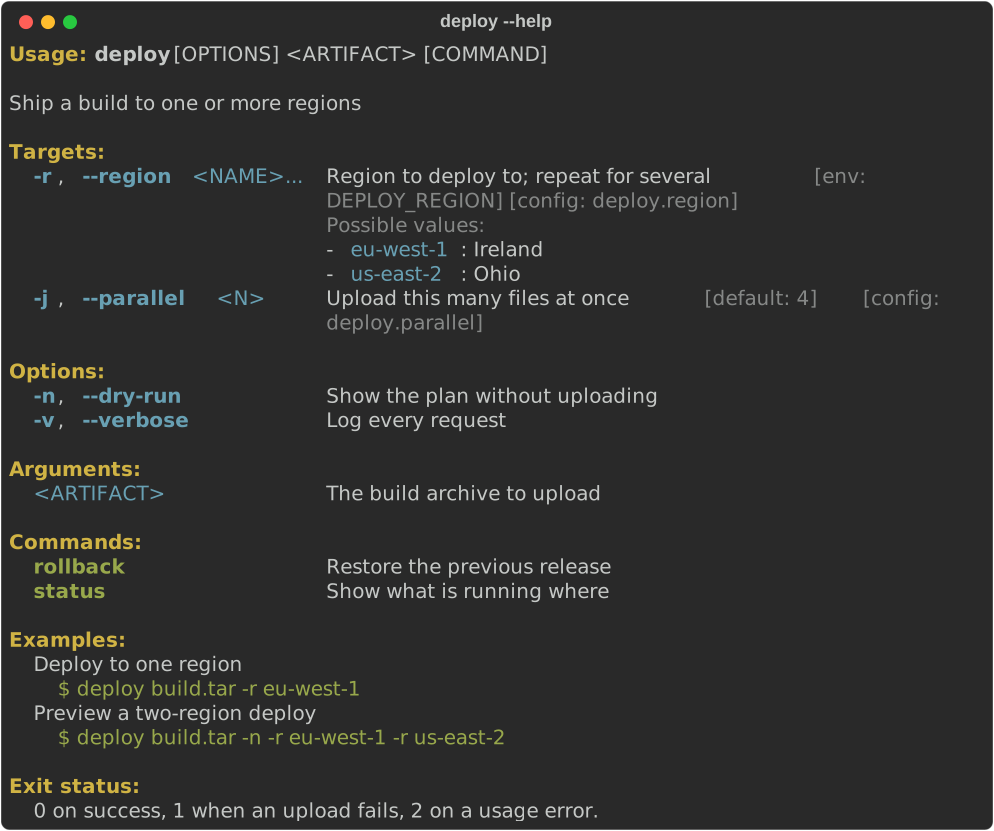
From STACK_BELOW (60) columns up, arguments sit in two columns:
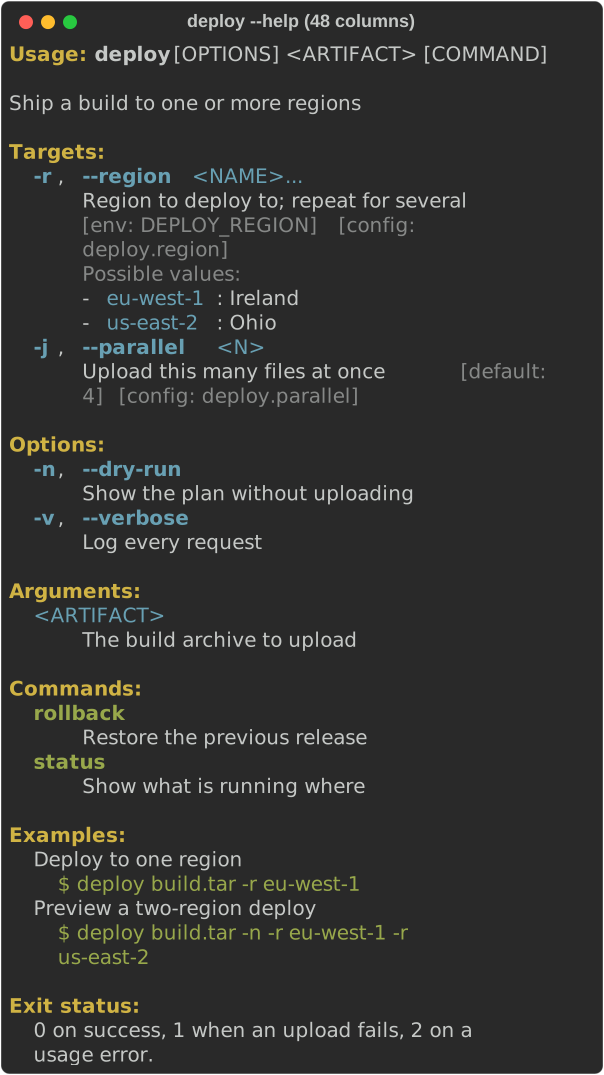
Below 60 columns, each description is stacked under its switches:
HelpView::for_path(&root, &["rollback"]) shows a subcommand's help, with the
full command path in its usage. long(true) is the --help form: it uses
long_about and long_help where they are set, and puts a blank line between
entries.
fn show_subcommand_help(console: &Console, spec: &CommandSpec) {
    let view = HelpView::for_path(spec, &["rollback"]).expect("known subcommand");
    console.print(&view.long(true));
}

Styles come from the console theme and fall back to cli_doc::STYLES
(help.usage, help.heading, help.option, help.metavar, …). Help is
plain text on a console without colour.
Errors
CliError describes a usage error and renders it as a
diagnostic, with control characters from the command line
escaped (\u{1b}). Constructors fill in suggestions for you:
CliError::unknown_in(&spec, "--paralel")checks switches (for-…) or subcommand names and takes the usage line from the spec;unknown_argument,unknown_subcommandandinvalid_valuetake explicit candidates;missing_valueandmissing_requiredreport missing input;CliError::new(kind, message)covers anything else.
fn show_errors(console: &Console, spec: &CommandSpec) {
    // An unknown flag: suggestions come from every switch the spec knows,
    // and the usage line from the spec.
    let error = CliError::unknown_in(spec, "--paralel").help_flag("--help");
    console.print(&error.to_diagnostic());
    assert_eq!(error.exit_code(), 2); // the usage-error status clap uses too

    // A bad value, with the allowed ones listed and the closest suggested.
    let regions = ["eu-west-1", "us-east-2"];
    let error = CliError::invalid_value("--region <NAME>", "eu-west", regions);
    assert_eq!(error.suggestions, suggest("eu-west", regions));
    console.print(&error.to_diagnostic());
}
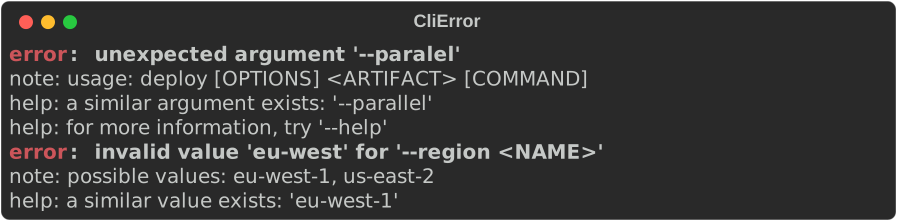
suggest(input, candidates) is the matcher on its own. It uses Jaro-Winkler
similarity above 0.7 with leading dashes ignored, as clap does, and returns at
most three candidates, best first. exit_code() is 2, the usage-error
status clap uses.
Shell completions
generate(&spec, shell) returns a completion script for Shell::Bash,
Zsh, Fish or PowerShell. Scripts complete subcommands, switches,
choices (with their help as descriptions) and file or directory values. A
subcommand completes its own options plus the global options of the
commands above it. "pwsh".parse::<Shell>() also works.
Names and values are quoted for each shell. The command name loses any
whitespace and control characters where a script names it (a newline in
#compdef would start a shell command), zsh action values escape shell
metacharacters, and fish receives subcommand words and choices only as
printf output, which it does not expand again.
fn write_completions(spec: &CommandSpec) {
    for shell in Shell::ALL {
        let script = generate(spec, shell);
        // Typically: `deploy completions bash > /etc/bash_completion.d/deploy`.
        println!("{shell}: {} lines", script.lines().count());
    }
    let fish: Shell = "fish".parse().expect("known shell");
    print!("{}", generate(spec, fish));
}
A program usually prints the script from a completions <shell>
subcommand, as rich completions bash does. Install locations:
| Shell | Where the script goes |
|---|---|
| Bash | ~/.local/share/bash-completion/completions/<name> |
| Zsh | a directory on $fpath, as _<name> |
| Fish | ~/.config/fish/completions/<name>.fish |
| PowerShell | dot-source it from $PROFILE |
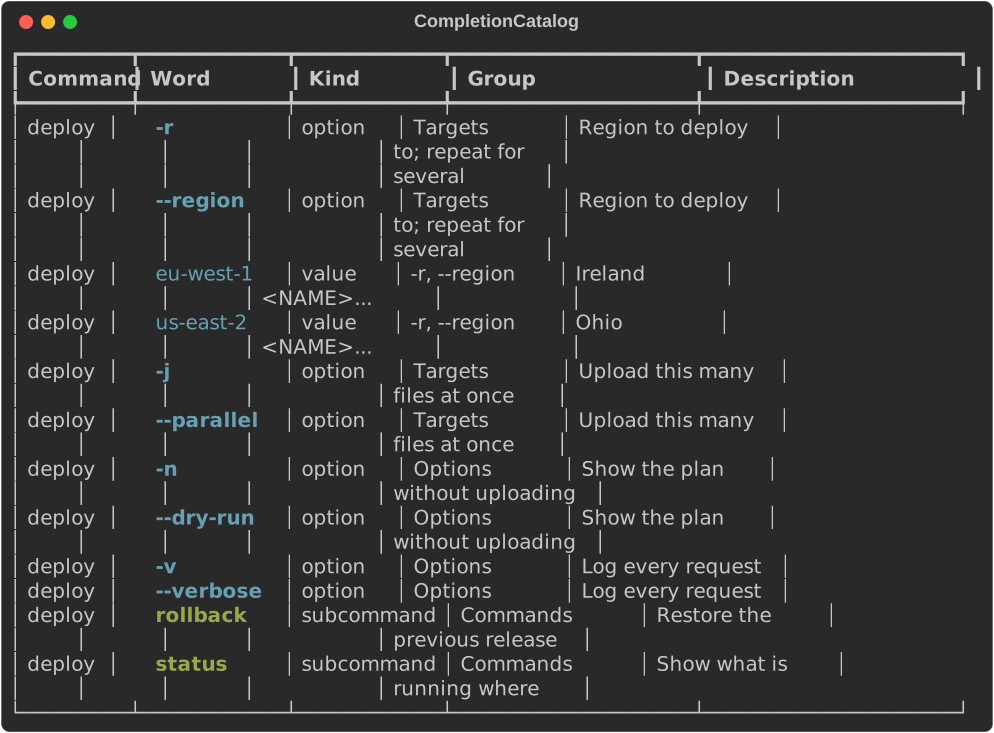
CompletionCatalog::from_spec exposes the same words as data (path, word,
description, group and kind) for other completion systems, and renders as a
table:
fn show_catalog(console: &Console, spec: &CommandSpec) {
    let catalog = CompletionCatalog::from_spec(spec);
    // Plain data for other completion systems...
    assert!(catalog.items.iter().any(|item| item.word == "--dry-run"));
    // ...and a renderable table.
    console.print(&catalog);
}
Markdown and man pages
to_markdown(&spec) writes a reference page, with a table per heading and a
section per subcommand. markdown_view returns it as core's Markdown
renderable. to_man(&spec, section, date) writes one roff page, and
to_man_pages writes one page per subcommand (deploy.1,
deploy-rollback.1, …). The man pages pass mandoc -T lint and
groff -ww: line breaks inside a value (a default, an example command) become
spaces so they cannot start a roff request, and non-ASCII text is written as
roff escapes (\(em, \[u2026]). Pass a date for reproducible output; with
None the page takes its date from SOURCE_DATE_EPOCH when that is set, and
is undated otherwise (mandoc then warns about the missing date).
fn write_docs(console: &Console, spec: &CommandSpec) {
    // Markdown for a docs site, or rendered in the terminal.
    let markdown: String = to_markdown(spec);
    assert!(markdown.starts_with("# deploy"));
    console.print(&markdown_view(spec));

    // Man pages: one page, or one per subcommand. Pass a date for
    // reproducible output; `None` leaves it out.
    let page = to_man(spec, "1", Some("2026-09-23"));
    assert!(page.starts_with(".TH \"DEPLOY\" \"1\" \"2026-09-23\""));
    for (file_name, _page) in to_man_pages(spec, "1", Some("2026-09-23")) {
        println!("would write {file_name}"); // deploy.1, deploy-rollback.1, …
    }
}
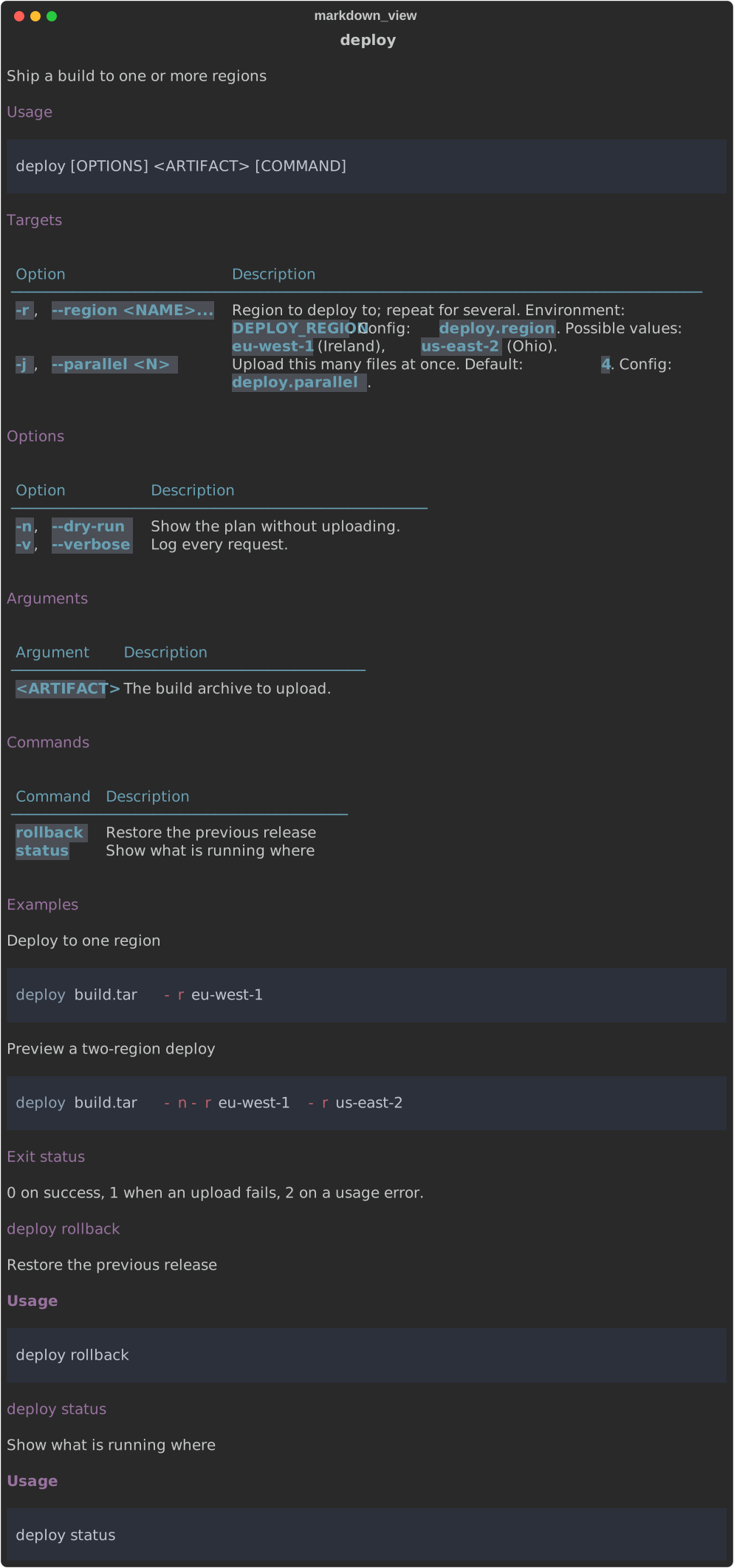
This site's CLI reference is generated this way from
the rich binary's spec.
Configuration reference
ConfigReference lists the settings a program reads: key, type, default,
environment variable, flag and description, with the sources in precedence
order. ConfigReference::from_spec collects every argument that has a
config_key. Add ConfigEntrys for settings that have no flag. Render it,
or call to_markdown().
fn show_config_reference(console: &Console, spec: &CommandSpec) {
    // Every argument with a `config_key` becomes an entry...
    let reference = ConfigReference::from_spec(spec)
        .description("Settings can live in a file, the environment or on the command line.")
        // ...listed with its sources, lowest precedence first.
        .source("defaults", "", "Built in")
        .source("user", "~/.config/deploy.toml", "Your settings")
        .source("environment", "DEPLOY_*", "")
        .source("command line", "", "")
        .entry(
            ConfigEntry::new("deploy.timeout", "duration")
                .default_value("30s")
                .description("Give up on an upload after this long"),
        );
    console.print(&reference);
    let _markdown = reference.to_markdown();
}
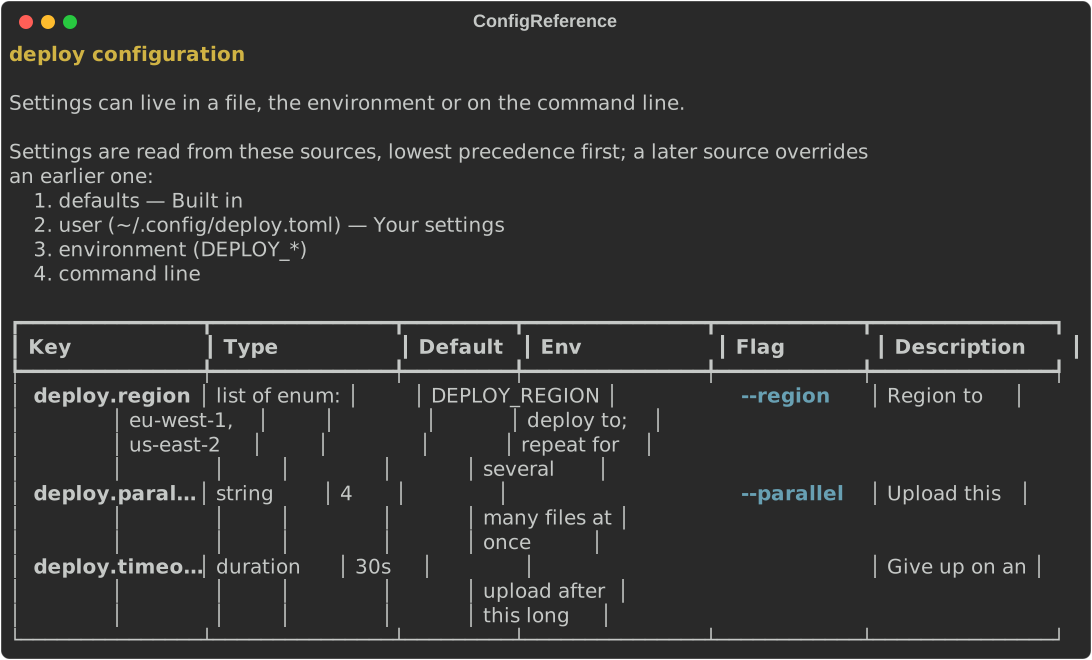
from_spec guesses each key's type from the argument: bool for flags,
enum for choices, path, url or command from the value hint, otherwise
string, and list of … for repeatable arguments. Use ConfigEntry::new
when you want a precise type such as integer.
Precedence
Precedence answers "why is this setting what it is?". Add a Layer for
each source, lowest priority first. A later layer wins. view() shows every
key across the layers, with ✔ on the winner and ✗ on overridden values
(* and x on ASCII consoles), so the table still reads correctly without
colour. explain(key) shows one key's chain, highest priority first.
fn show_precedence(console: &Console) {
    let precedence = Precedence::new()
        .layer(
            Layer::new("defaults")
                .value("deploy.parallel", "4")
                .value("deploy.timeout", "30s"),
        )
        .layer(
            Layer::new("user")
                .origin("~/.config/deploy.toml")
                .value("deploy.parallel", "8")
                .value("deploy.region", "eu-west-1"),
        )
        .layer(
            Layer::new("env")
                .origin("DEPLOY_REGION")
                .value("deploy.region", "us-east-2"),
        )
        .layer(Layer::new("flags").value("deploy.parallel", "2"));
    console.print(&precedence.view());
    console.print(
        &precedence
            .explain("deploy.parallel")
            .expect("some layer sets it"),
    );
}
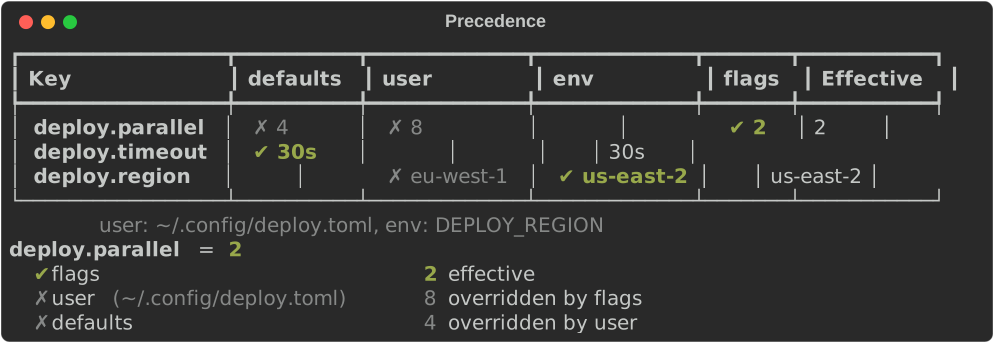
resolve() returns the same information as data: each key's value, the
winning layer's index and the values it overrode. rich config explain [KEY]
is this view over the binary's defaults, NO_COLOR, config file, profile and
command line.
With clap
Enable the clap feature. rs-rich-ext depends on clap 4.5 with
default-features = false, so rich renders help and colour rather than
clap's own formatter. The adapter:
CommandSpec::from_clap(&cmd)maps names, aliases, value names, possible values (with help), value hints, defaults, environment variables, headings, and hidden, required and positional arguments, plusabout,long_about,versionandafter_help.CountandAppendactions make an argumentmultiple;CliError::from_clap(&err, Some(&cmd))maps aclap::Error, including clap's own suggestions;parse_or_exit(cmd)andparse_or_exit_with_spec(cmd, &spec)parsestd::env::args_os(). On--help,--versionor an error, they print through rich and exit with 0 or 2, as clap does;try_parse_from(cmd, args),try_parse_with(&console, cmd, args)andtry_parse_with_spec(…)return aParseExit(the clap error, the rendered output, which stream it belongs on and the exit code) instead of printing.
A small program:
use clap::{value_parser, Arg, ArgAction, Command};

fn command() -> Command {
    Command::new("deploy")
        .version("2.1.0")
        .about("Ship a build to one or more regions")
        .arg(
            Arg::new("artifact")
                .required(true)
                .help("The build archive to upload"),
        )
        .arg(
            Arg::new("region")
                .short('r')
                .long("region")
                .value_name("NAME")
                .value_parser(["eu-west-1", "us-east-2"])
                .action(ArgAction::Append)
                .env("DEPLOY_REGION")
                .help("Region to deploy to; repeat for several")
                .help_heading("Targets"),
        )
        .arg(
            Arg::new("parallel")
                .short('j')
                .long("parallel")
                .value_name("N")
                .value_parser(value_parser!(u8))
                .default_value("4")
                .help("Upload this many files at once")
                .help_heading("Targets"),
        )
        .arg(
            Arg::new("dry-run")
                .short('n')
                .long("dry-run")
                .action(ArgAction::SetTrue)
                .help("Show the plan without uploading"),
        )
}
clap has no notion of examples or config keys, so add them to the derived spec:
fn spec() -> CommandSpec {
    // clap has no notion of examples or config keys: add them to the spec
    // derived from the command.
    CommandSpec::from_clap(&command())
        .example("deploy build.tar -r eu-west-1", "Deploy to one region")
        .example(
            "deploy build.tar -n -r eu-west-1 -r us-east-2",
            "Preview a two-region deploy",
        )
}
fn run() {
    use rich_ext::cli_doc::clap::parse_or_exit_with_spec;

    // Help, --version and errors render through rich, and the process exits
    // with 0 (help, version) or 2 (errors), as clap's own `get_matches` does.
    let matches = parse_or_exit_with_spec(command(), &spec());
    let regions: Vec<&String> = matches.get_many("region").into_iter().flatten().collect();
    let parallel: u8 = *matches.get_one("parallel").expect("has a default");
    let dry_run = matches.get_flag("dry-run");
    println!("deploying to {regions:?}, {parallel} at a time (dry run: {dry_run})");
}
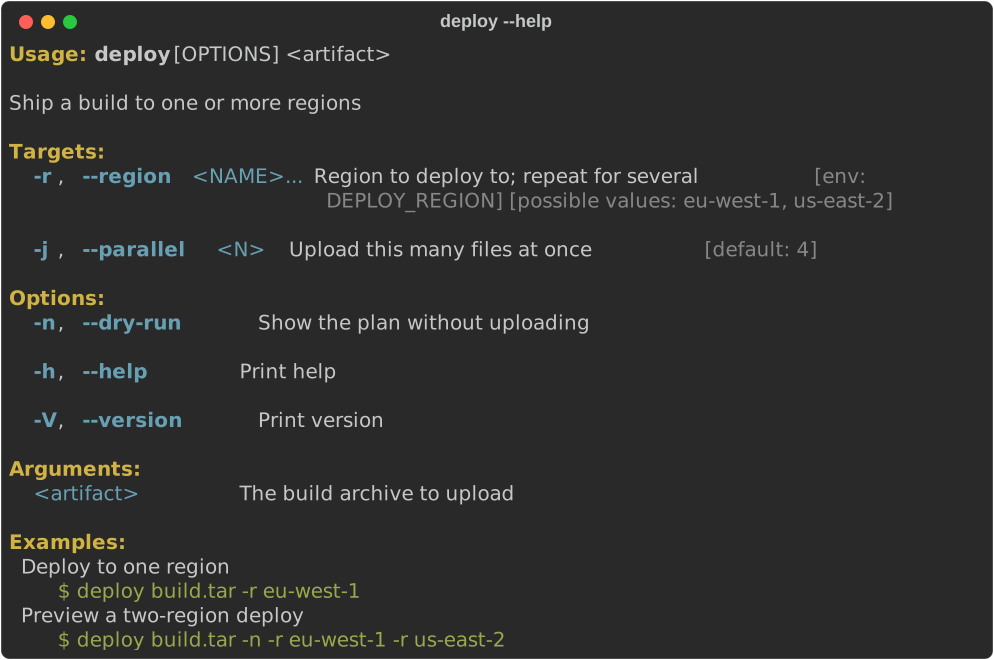
In tests, use try_parse_with with a console you control:
fn render_error(console: &Console) {
    use rich_ext::cli_doc::clap::try_parse_with;

    // Nothing is printed and nothing exits, so this works in a test.
    let args = ["deploy", "build.tar", "--parralel", "2"];
    let exit = try_parse_with(console, command(), args).unwrap_err();
    assert_eq!(exit.code, 2);
    assert!(exit.use_stderr);
    assert!(exit
        .output
        .contains("a similar argument exists: '--parallel'"));
    // `exit.output` is the rendered text; replay it on this console.
    for line in AnsiDecoder::new().decode(&exit.output) {
        console.print(&line);
    }
}

Gotchas
- Keep the spec and the parser in step. A hand-written spec can drift
from the parser it describes.
from_clapavoids that; otherwise write a test that checks each parser flag appears inspec.switch_names(), and the other way round, as therichbinary's drift tests do. from_clapincludes clap's generated-h/--helpand-V/--version, as the clap help screenshot shows.- Suggestions include short switches. An unknown argument is compared
with
-ras well as--region. A typo whose first letter matches a single-letter short flag can therefore suggest that flag too, for example--paralelsuggests both--paralleland-r.
See also
rich_ext::cli_docon docs.rsCommandSpec,HelpView,CliError,cli_doc::clap- Diagnostics: the renderable behind
CliError - Using the CLI and the
CLI reference: the output of this module for
rich