Transfers, retries and notifications
Three ext modules cover the status output of a command-line app that moves data over a network, without a full-screen UI:
transfer:TransferandTransfersshow downloads and uploads with a smoothed rate, an ETA, retries and cancellation.TransferReaderandTransferWritercount bytes as they pass;transfer_columns()sets up the coreProgressfor transfers instead.countdown:Backoffcomputes retry delays;RetryStatus,RateLimitandCountdownBarshow them;CountdownWaitwaits while showing the time left and stops when aCancelTokenis cancelled.notify:NotificationandNotificationsshow short toasts under live output that disappear when they expire.
None needs a feature flag. The styles are in extended_theme() under
transfer.*, countdown.* and notify.*; without them each renderer falls
back to built-in defaults.
Two rules hold for all three:
- Nothing reads the clock for you. Every update takes
now, aDurationsince a start time you choose (usuallystart.elapsed()of oneInstant). Tests pass fixed times and get exact output. - Colour is never the only signal. Every state is shown as a word or a
symbol (from the accessibility
SymbolSet). Without colour, bars are drawn in brackets. When motion is off, a status is printed once instead of redrawn.
Transfers
A Transfer holds a name, a Direction (Download or Upload), an
optional total, the bytes done so far, the attempt number and a
TransferState: Active, Paused, Retrying, Done, Failed or
Cancelled. Transfers renders several with aligned columns and an
optional totals line:
fn session() -> Transfers {
    let mut group = Transfers::new().summary(true);
    let iso = group.push(Transfer::download("debian-13.iso").total(650_000_000));
    let pkg = group.push(
        Transfer::download("packages.tar.zst")
            .total(48_000_000)
            .max_attempts(3),
    );
    let log = group.push(Transfer::upload("session.log")); // size unknown
    let docs = group.push(Transfer::download("docs.zip").total(2_400_000));

    // Every update takes the time: here, seconds since the session started.
    for s in 0..=10 {
        group[iso].set_completed(s * 21_000_000, secs(s));
        group[log].set_completed(s * 40_000, secs(s));
    }
    group[pkg].advance(19_500_000, secs(6));
    group[pkg].retry("connection reset by peer"); // attempt 2 of 3 next
    group[docs].finish(secs(4));
    group
}

Each line is direction name bar done/total rate ETA-or-state:
| Part | Detail |
|---|---|
| bar | The core ProgressBar (bar.* styles). It is up to bar_width cells (default 24), shrinks to fit the width and is dropped when fewer than 8 cells are left. An unknown total pulses. |
| sizes | 12.3/45.6 MB in the total's unit, like the core DownloadColumn; just 12.3 MB when the total is unknown |
| rate | format::rate of the smoothed rate, - before there are two samples or while not active |
| ETA | ETA 0:00:14, or -:--:-- when the rate or total is unknown; (attempt 2/3) is added after a retry |
| state | ↻ retrying 2/3, ‖ paused, ✔ done, ✖ failed: reason, ↷ cancelled |
The rate is averaged over a moving window (rate_window, default 5 s):
the bytes gained since the oldest sample in the window, divided by the time
since then. A burst or a stall stops counting once it leaves the window.
RateMeter is public if you need the same average elsewhere.
State changes:
| Call | Effect |
|---|---|
advance(bytes, now), set_completed(bytes, now) |
Count progress. A paused or retrying transfer becomes active again. Going backwards (restarting from zero) resets the rate. |
pause(now) |
Paused; the rate resets so resuming starts clean. |
retry(reason) |
Moves to the next attempt and returns true, or fails and returns false if max_attempts is used up. Keeps the bytes done (a resume); call set_completed(0, now) to restart. |
finish(now), fail(reason), cancel() |
End states. Later calls are ignored. |
Without colour
// No colour: the bar is drawn in brackets and every state is a word.
let plain = Console::builder().width(90).no_color(true).build();
let words = session().symbols(SymbolSet::Words);
let out = plain.render_to_string(&words);

On an ASCII-only console the Unicode symbols switch to their ASCII forms by
themselves: v/^ for the direction and [DONE], [RETRY] and so on for
the state.
With the core Progress
If you already use rich::Progress, keep it. transfer_columns() sets
the columns to description, a 30-cell bar, DownloadColumn,
TransferSpeedColumn and time remaining. Transfer::task_update() copies a
transfer's total, bytes done and state into a task (the description gets
(retry 2/3) and similar, with markup escaped):
// A deterministic clock for the core Progress (seconds as f64 bits).
let clock = Arc::new(AtomicU64::new(0f64.to_bits()));
let reader = clock.clone();
let mut progress = Progress::new()
    .columns(transfer_columns())
    .clock(move || f64::from_bits(reader.load(Ordering::SeqCst)));

let mut transfer = Transfer::download("model.safetensors").total(4_000_000_000);
let task = progress.add_task("model.safetensors", 0.0, 0.0);
for s in 1..=5 {
    clock.store((s as f64).to_bits(), Ordering::SeqCst);
    transfer.advance(120_000_000, secs(s));
    progress.update(task, transfer.task_update());
}
console.print(&progress);

Counting bytes and cancelling
TransferReader and TransferWriter wrap any Read or Write and count
into a SharedTransfer (an Arc<Mutex<Transfer>>), so another thread can
draw it:
use std::sync::{Arc, Mutex};
use rich_ext::cancel::CancelToken;
use rich_ext::transfer::{is_cancelled, Transfer, TransferReader};

let shared = Arc::new(Mutex::new(Transfer::download("blob").total(len)));
let token = CancelToken::new();
let mut reader = TransferReader::new(response, shared.clone()).cancel(token.clone());
match std::io::copy(&mut reader, &mut file) {
    Err(e) if is_cancelled(&e) => { /* the transfer shows ↷ cancelled */ }
    Err(e) => { /* the transfer shows ✖ failed: <e> */ }
    Ok(_) => { /* the reader hit EOF: ✔ done */ }
}
- A read of 0 bytes (end of file) marks the transfer done, and an I/O error
marks it failed. For a writer, call
finishyourself. - The wrappers read a real clock by default. Pass
.clock(Arc::new(|| ...))to supply your own times in tests. - The cancellation error has kind
ErrorKind::Other, notInterrupted.io::copyandread_to_endretryInterruptederrors forever, so that kind would never stop them. Useis_cancelled(&error)to recognise it.
Retries and rate limits
Backoff is plain arithmetic. The delay after failed attempt n is
initial × factorⁿ⁻¹, capped at max. attempts(n) sets the limit, and
delay(n) returns None after the last attempt. jitter(fraction, seed)
shortens each delay by a pseudo-random part of up to fraction. The same
seed always gives the same delays, so tests stay exact. In production, seed
from something that varies between clients (the clock or the process id) so
they don't all retry at once.
let backoff = Backoff::new(secs(1))
    .factor(2.0)
    .max(secs(30))
    .attempts(5)
    .jitter(0.25, 7); // same seed, same delays: tests stay exact
for attempt in 1..=5 {
    let status = backoff
        .status(attempt, "503 Service Unavailable")
        .expect("attempts count from 1");
    console.print(&status);
}

backoff.status(attempt, reason) builds the RetryStatus line: a warning
with retrying in 4s while attempts remain, or an error with giving up
after the last one. The time left is shown in whole seconds, rounded up, and
switches to 1m 05s from one minute. RateLimit shows a limit that resets
at a known time, with an optional scope and quota. Both can draw a
CountdownBar that shrinks as time runs out (.bar(total)). The bar gets
the space left on the line and is dropped when there is not enough.
let delay = secs(8);
let status = Backoff::new(delay)
    .attempts(3)
    .status(1, "connection refused")
    .expect("attempt 1")
    .bar(delay);
// The frames an animated wait draws, one per second.
for left in [8, 5, 2] {
    console.print(&status.at(secs(left)));
}
let limit = RateLimit::new(secs(42))
    .scope("search API")
    .limit(30)
    .remaining(0)
    .bar(secs(60));
console.print(&limit);

The renderables are snapshots: status.at(left) is the same status with
left remaining, which is how you build each frame of an animation.
Waiting with a countdown
CountdownWait blocks for a duration. On every tick (250 ms by default) it
reports the time left and checks its CancelToken. It measures time by
adding up its own sleeps. The default sleeper is std::thread::sleep, and
.sleeper(|d| ...) replaces it, so a test runs instantly.
run(on_tick)calls you with the time left and returnsWaitOutcome::ElapsedorWaitOutcome::Cancelled.run_live(&mut live, &target, motion, |left| frame)shows the frame through aLiveCoordinator:- With
Motion::Animatedthe frame goes in a new region, is redrawn each tick and is removed at the end. - With
Motion::Staticthe first frame is printed once as an ordinary line.
Motion::for_target(&target, &policy) picks Static for a
non-interactive target, or when the AccessibilityPolicy asks for reduced
motion or no animation (RICH_A11Y=reduced-motion). A log then gets
exactly one line per attempt:
let stream = RenderTarget::new(
    TargetKind::PlainStream, // a pipe: not interactive, no colour
    TargetCapabilities {
        width: 80,
        height: 24,
        color_system: None,
        interactive: false,
        unicode: true,
        hyperlinks: false,
        sixel: Support::Unsupported,
    },
    Theme::default_theme(),
);
let motion = Motion::for_target(&stream, &AccessibilityPolicy::default());
assert_eq!(motion, Motion::Static); // print once, never redraw

let mut out = Vec::new();
{
    let mut live = LiveCoordinator::new(&mut out, stream.clone());
    let mut toasts = Notifications::for_target(&stream); // prints each once
    let mut region = None;
    let backoff = Backoff::new(secs(2)).attempts(3);
    let cancel = CancelToken::new();

    for attempt in 1..=3 {
        let status = backoff
            .status(attempt, "connection refused")
            .expect("from 1");
        let Some(delay) = backoff.delay(attempt) else {
            live.print(&stream.segments(&status)).expect("print");
            break;
        };
        let outcome = CountdownWait::new(delay)
            .cancel(cancel.clone())
            .sleeper(|_| {}) // a real program leaves the default sleeper
            .run_live(&mut live, &stream, motion, |left| status.at(left))
            .expect("live output");
        assert_eq!(outcome, WaitOutcome::Elapsed);
    }
    toasts.push(
        Notification::error("giving up on mirror 1").title("Net"),
        secs(9),
    );
    toasts
        .present(&mut live, &stream, &mut region, secs(9))
        .expect("live output");
    live.finish().expect("live output");
}

Notifications
A Notification has a level (an accessibility Status: Ok, Info,
Warning, Error, Pending, Skipped), an optional title, a message and
an optional time to live. Each line starts with the status symbol, so the
level can be read without colour: ✔ ok, [WARN], or error: with
SymbolSet::Words.
Notifications is the stack:
| Method | Effect |
|---|---|
push(n, now) |
Post a notification; returns a NotificationId |
expire(now) |
Drop every notification whose TTL is up (the default TTL is 5 s; default_ttl(None) keeps them until dismissed) |
dismiss(id) |
Remove one now |
next_expiry() |
When to redraw next |
max_visible(n) |
Show the newest n (default 3) and a +N more line |
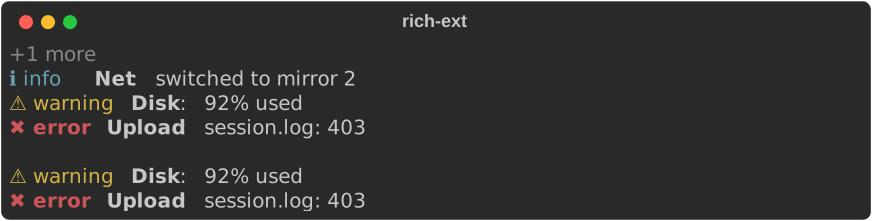
let mut toasts = Notifications::new()
    .default_ttl(Some(secs(4)))
    .max_visible(3);
toasts.push(
    Notification::ok("debian-13.iso verified").title("Checksum"),
    secs(0),
);
toasts.push(
    Notification::info("switched to mirror 2").title("Net"),
    secs(1),
);
toasts.push(
    Notification::warning("92% used")
        .title("Disk")
        .ttl(secs(30)),
    secs(2),
);
toasts.push(
    Notification::error("session.log: 403").title("Upload"),
    secs(3),
);
console.print(&toasts); // the newest three, and "+1 more"

toasts.expire(secs(5)); // the first two have had their 4 seconds
console.print(&Text::new(""));
console.print(&toasts);
ToastStyle::Panel draws a small panel with a border in the level's colour
in place of the single line:
let toast = Notification::error("upload rejected: 403 Forbidden")
    .title("session.log")
    .toast_style(ToastStyle::Panel);
console.print(&toast);

Under live output
present(&mut live, &target, &mut region, now) does one tick: it prints any
queued lines, expires old toasts and redraws the rest. region starts as
None. While there are toasts to show, a region is added after the
coordinator's other regions, so toasts appear below the live content. When
the last toast expires the region is removed, because LiveCoordinator
would draw an empty region as a blank row. To put toasts above other
content, render the stack into your own first region with
target.segments(&stack) and keep that region even when it is empty.
Notifications::for_target(&target) stacks toasts only on an interactive
target. On a pipe or a log file, each notification is instead printed once
as a normal line the next time present runs, so nothing is lost. The last
line of the log example above shows this.
Try it
cargo run -p rs-rich-ext --example transfers            # animated in a terminal
cargo run -p rs-rich-ext --example transfers | cat      # the log fallback
RICH_A11Y=reduced-motion cargo run -p rs-rich-ext --example transfers
The example runs three simulated transfers. One drops its connection halfway, waits out a retry countdown and resumes, and toasts appear as each transfer completes.