Workflows: commands, task trees and summaries
rich_ext::workflow covers what build, deploy and install tools show while
they work:
- Commands: what ran, what it printed, how it ended, and a diagnostic when it failed.
- Task trees: nested tasks with live status, progress, durations and cancellation.
- Completion summaries: one closing block with the overall result, counts, the items that need attention and the next steps.
No feature flag is needed. Each part keeps its data model separate from its
view. A CommandRecord, TaskTree or CompletionSummary is plain data that
you can build by hand, test, or keep for later. Rendering it is a separate
step.
Status never depends on colour
Every marker is a symbol and a word (✔ ok, ✖ error), a bracketed tag
([OK], [ERROR]) or a word (ok:, error:), chosen with
.symbols(SymbolSet::…) or .policy(&AccessibilityPolicy). With the
ASCII and word sets, guides, bullets, ellipses and µs switch to ASCII
as well. Under reduced motion, no animation or a screen reader, the
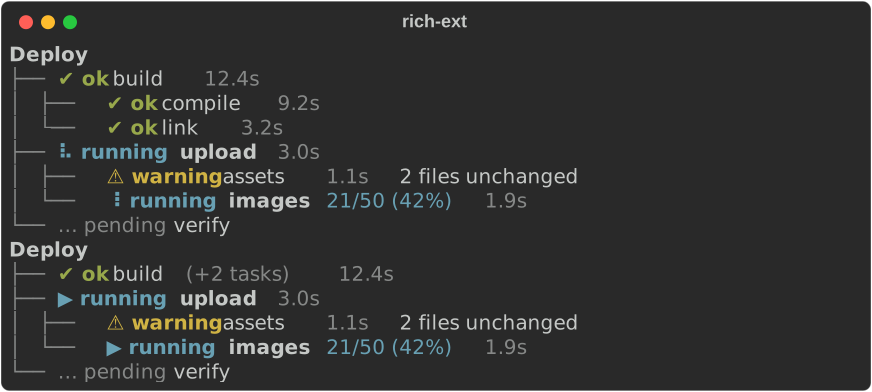
running spinner becomes a static ▶ running marker.
Commands
A CommandRecord holds the program and arguments, the working directory,
stdout and stderr lines in the order they arrived, the exit status and the
duration. Its view prints a header (status, $ command, exit detail,
duration), then the output folded to its last lines:
let record = CommandRecord::new("cargo", ["build", "--release"])
    .stdout("   Compiling rs-rich v0.0.11\n   Compiling rs-rich-ext v0.0.10")
    .stderr("warning: unused variable: `width`")
    .stdout("    Finished `release` profile [optimized] target(s)")
    .status(CommandStatus::Exited(0))
    .duration(ms(41_300));
console.print(&record.view().tail(3));

- A
!gutter marks stderr lines and a│gutter marks stdout lines, so you can tell the streams apart without colour. Stderr lines also get theworkflow.stderrstyle. - ANSI styling in the output is decoded into styles. Cursor movement and other control sequences are dropped, and a carriage return keeps only the text after it, as a terminal would show it.
.tail(n)sets how many lines stay visible (10 by default)..show_all()shows every line.
Failures
By default a failed run (a non-zero exit, a signal, or a program that could not start) shows all of its output and ends with a diagnostic. The diagnostic names the command and how it ended, and uses the last stderr line as its cause:
let record = CommandRecord::new("cargo", ["test", "-p", "demo"])
    .cwd("crates/demo")
    .stdout("running 3 tests\ntest parse::empty ... ok\ntest parse::quoted ... FAILED")
    .stderr("error: test failed, to rerun pass `--lib`")
    .status(CommandStatus::Exited(101))
    .duration(ms(4_250));
console.print(
    &record
        .view()
        .help("rerun one test with `cargo test parse::quoted`"),
);
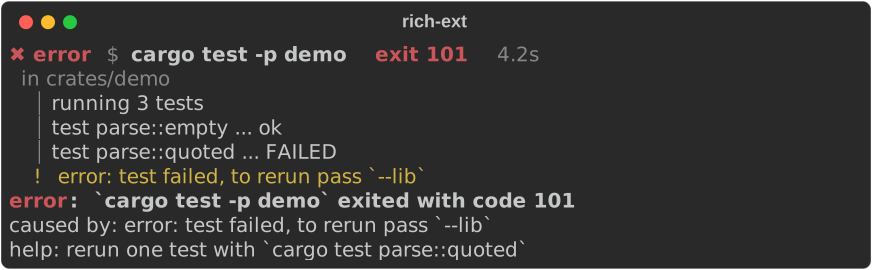
.full_on_failure(false)keeps the tail limit on failures too..show_diagnostic(false)leaves out the diagnostic..help(..)addshelp:lines to the diagnostic..show_cwd(false)hides thein <dir>line.record.diagnostic()returns theDiagnosticso you can print or collect it yourself.
While it runs
A record whose status is CommandStatus::Running renders a spinner and the
time elapsed so far. The spinner frame comes from the record's duration, not
from a clock, so a redraw moves it and a test can pin it:
use rich_ext::a11y::AccessibilityPolicy;

let record = CommandRecord::new("npm", ["install"])
    .stdout("added 212 packages")
    .duration(ms(3_400)); // still running: the status defaults to Running
console.print(&record); // a spinner frame chosen by the elapsed time
console.print(&record.view().policy(&AccessibilityPolicy::reduced_motion()));

Running a real process
CommandRunner fills a record from a std::process::Command:
fn run_for_real(console: &Console) {
    use rich_ext::cancel::CancelToken;
    use rich_ext::workflow::CommandRunner;
    use std::process::Command;

    let cancel = CancelToken::new(); // cancel() it from anywhere to kill the child
    let record = CommandRunner::new()
        .cancel(cancel.clone())
        .on_update(|so_far| {
            // Redraw a live region here: so_far.view() shows a spinner.
            let _ = so_far.lines.len();
        })
        .run(Command::new("rustc").arg("--version"));
    console.print(&record);
}
- Stdout and stderr are read on two threads and merged in the order lines arrive. The pipes do not guarantee exact ordering between the two streams.
- Stdin is closed.
on_updatereceives the record after every line and everytick(100 ms by default). Renderrecord.view()into aLiveCoordinatorregion there.- When the
CancelTokenis cancelled, the runner kills the child, and the record ends asCommandStatus::Cancelled. Ticks and cancellation keep working if the child closes its output and keeps running. - After the child exits, the runner reads output for about one more second.
A background process that inherited the pipes cannot keep
runwaiting, and cancelling in that second does not change the recorded exit status. - A program that cannot start gives a record with
CommandStatus::FailedToStart(reason). The runner does not panic or return an error.
Task trees
A TaskTree holds tasks under optional parents. Leaves move from pending to
running and then to succeeded, warning, failed, skipped or cancelled. A
parent's state comes from its children, so only leaves need transitions:
let clock = ManualClock::new(); // TaskTree::new() uses the wall clock
let mut tree = TaskTree::with_clock(clock.clone()).title("Deploy");
let build = tree.add(None, "build");
let compile = tree.add(Some(build), "compile");
let link = tree.add(Some(build), "link");
let upload = tree.add(None, "upload");
let assets = tree.add(Some(upload), "assets");
let images = tree.add(Some(upload), "images");
tree.add(None, "verify");

tree.start(compile);
clock.advance(ms(9_200));
tree.succeed(compile).start(link);
clock.advance(ms(3_200));
tree.succeed(link).start(assets);
clock.advance(ms(1_100));
tree.warn(assets, "2 files unchanged").start(images);
tree.progress(images, 21, Some(50));
clock.advance(ms(1_900));
How a parent's state is aggregated from its children:
| Children | Parent |
|---|---|
| any running, or some finished and some pending | running |
| all pending | pending (running if the parent was started) |
| all finished | the worst: failed, cancelled, warning, succeeded |
| all skipped | skipped |
An explicit fail or cancel on the parent itself always wins.
Times come from a Clock. TaskTree::new() uses the wall clock. A
ManualClock moves only when you advance it, which gives exact durations in
tests and screenshots. A parent's duration runs from its first child's start
to its last child's finish.
.collapse_finished(true) shrinks each finished subtree that has no failure,
warning or cancellation to one line. (+2 tasks) shows how many tasks are
hidden. Long lines end in an ellipsis instead of wrapping, so the guides stay
aligned.
Cancellation
Every task has a CancelToken (from rich_ext::cancel) that
is a child of its parent's token. Give tree.token(id) to the code doing
the task:
let upload = tree.roots()[1];
let images = tree.children(upload)[1];
let worker = tree.token(images); // hand this to the upload thread
tree.cancel(upload);
assert!(worker.is_cancelled());
console.print(&tree.view().collapse_finished(true));
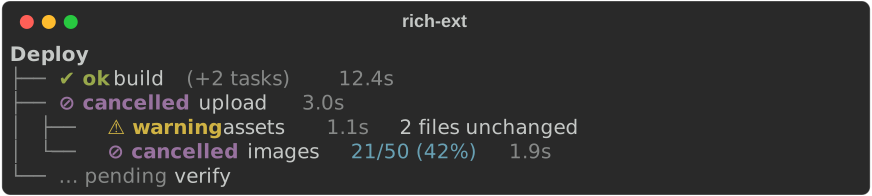
tree.cancel(id)cancels that task's subtree and marks each unfinished task in it as cancelled. The rest of the tree carries on.tree.cancel_all()cancels every task.- If the cancellation comes from elsewhere, for example from a Ctrl-C handler
that holds
tree.root_token(), calltree.sync_cancelled()to update the tree's states.
Live display
A tree view is an ordinary renderable. Give it a LiveCoordinator region and
update the region on every change and on a timer, so the spinners move.
cargo run -p rs-rich-ext --example workflow shows a full live run: a tree,
a real command and a summary. Set RICH_A11Y=reduced-motion or
RICH_A11Y=screen-reader to see the fallbacks.
Completion summaries
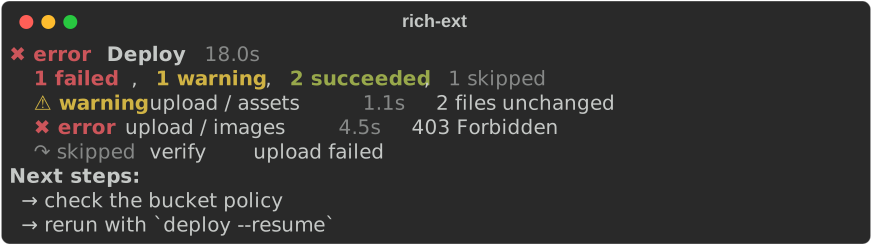
CompletionSummary::from(&tree) summarises a finished tree:
- The title is the tree's title.
- The overall status and duration come from the tree.
- Each leaf becomes an item, labelled with its path.
By default, only the items that need attention are listed. The counts cover the rest.
clock.advance(ms(2_600));
tree.fail(images, "403 Forbidden")
    .skip(verify, Some("upload failed"));

let summary = CompletionSummary::from(&tree)
    .next_step("check the bucket policy")
    .next_step("rerun with `deploy --resume`");
console.print(&summary);
You can also build a summary by hand:
.item(state, label)or.push(SummaryItem)adds items..count(state, n)sets counts when there are too many items to list..status(state)overrides the derived overall state..show_all_items(true)lists successes too.SummaryItem::from(&CommandRecord)turns a command run into an item.
With the ASCII set, the summary carries its meaning in a log file:
use rich_ext::a11y::SymbolSet;
use rich_ext::workflow::State;

let summary = CompletionSummary::new("Lint")
    .count(State::Succeeded, 118)
    .count(State::Warning, 2)
    .duration(ms(6_800))
    .next_step("run `lint --fix`")
    .symbols(SymbolSet::Ascii);
console.print(&summary);

Theme keys
The views use these keys, listed in workflow::STYLES and included in
extended_theme(). If a console's theme lacks a key, the view falls back to
the key's default style.
| Key | Default | Used for |
|---|---|---|
workflow.status.ok / .warning / .error |
bold green / bold yellow / bold red | markers |
workflow.status.running / .cancelled |
bold cyan / bold magenta | markers |
workflow.status.pending / .skipped |
dim | markers |
workflow.prompt, workflow.command |
dim, bold | $ command |
workflow.cwd, workflow.duration, workflow.hidden |
dim | details |
workflow.stderr, workflow.stdout, workflow.gutter |
yellow, none, dim | output lines |
workflow.guide |
dim | tree guides |
workflow.task.label, workflow.task.running |
none, bold | task labels |
workflow.task.progress, workflow.task.note |
cyan, italic | progress, notes |
workflow.summary.title, workflow.summary.next, workflow.summary.counts |
bold, bold, none | summaries |