Badges, size bars, formatters and redaction
Four small tools for status lines, reports and logs:
- Badges (
rich_ext::badge): compact chips for statuses, labels, links and metadata. They still make sense without colour. - Size bars (
rich_ext::size_bar): a size against a total or a limit. - Formatters (
rich_ext::format): sizes, rates, durations, times, percentages and counts written the way people read them. - Redaction (
rich_ext::redact): masks secrets in strings, terminal output, rendered segments and exports.
The examples come from
guide_badges.rs.
None of these modules needs a feature:
The styles are theme keys (badge.*, size_bar.*). Pass
rich_ext::extended_theme() to the console builder to get them, or define
them in your own theme. Without them the same defaults are used.
Badges
A Badge is one of four kinds:
| Constructor | Colour | Plain |
|---|---|---|
Badge::status(Status::Ok, "build") |
✔ build on badge.ok |
[OK build] |
Badge::status(Status::Error, "") |
✖ error on badge.error |
[ERROR] |
Badge::label("beta") |
beta on badge.label |
[beta] |
Badge::link("docs", url) |
docs, an OSC 8 link |
[docs <url>] |
Badge::meta("version", "1.2.0") |
version 1.2.0 on badge.key and badge.value |
[version: 1.2.0] |
Badges puts several in a row. When the row is too long it wraps between
badges, never inside one:
fn release_badges() -> Badges {
    Badges::new([
        Badge::status(Status::Ok, "build"),
        Badge::status(Status::Error, "tests"),
        Badge::status(Status::Warning, "lint"),
        Badge::status(Status::Pending, "deploy"),
        Badge::label("beta"),
        Badge::meta("version", "0.0.11"),
        Badge::link("docs", "https://example.com/docs"),
    ])
}

fn show_badges(console: &Console) {
    console.print(&release_badges());
}

Without colour
Colour is never the only signal. When the console has no colour system, or
colour is turned off (NO_COLOR, no_color(true)), each badge gets its
plain form. The text then carries the meaning:
fn show_plain(console: &Console) {
    // No colour system, NO_COLOR or no_color(true): brackets and tags
    // carry the meaning, and a link spells out its URL.
    let plain = Console::builder().width(60).color_system(None).build();
    console.print(&Text::new(plain.render_to_string(&release_badges())));
    // The same text for screen readers and logs.
    assert!(release_badges()
        .plain()
        .starts_with("[OK build] [ERROR tests]"));
}

- Status chips use the markers of
a11y::Status: a glyph with colour, an ASCII tag (OK,WARN,ERROR) without it or on an ASCII-only console..symbols(SymbolSet::Words)gives[ok: build]. - A link is an OSC 8 hyperlink wherever the console renders styles. This
includes
NO_COLOR, which removes only the colours. Where there are no styles at all, the URL is written after the text..show_url(true)or.show_url(false)overrides this. .style(..)replaces a badge's theme key with another key ("badge.warning") or with a style definition ("black on magenta").badge.plain()andAccessibleTextreturn the plain form, for logs and screen readers.
A Badge or Badges measures to its width, so it can go in a table cell
(Cell::Renderable). See the table below.
Size bars
SizeBar::new(used, total) shows a part of a total, such as a file in a
bundle. SizeBar::limit(used, limit) shows a size that should stay under a
limit, such as a package against a registry's cap. It switches to the
size_bar.high style from 90% (.warn_at(ratio) changes that).
fn show_sizes(console: &Console) {
    let limit = 10_000_000;
    for (name, size) in [
        ("rs-rich", 2_400_000),
        ("rs-rich-ext", 9_300_000),
        ("rs-rich-art", 12_600_000),
    ] {
        console.print(&SizeBar::limit(size, limit).label(format!("{name:<12}")));
    }
    console.print(
        &SizeBar::new(3 << 30, 8 << 30)
            .label("disk        ")
            .units(Units::Binary),
    );
}

Going over a limit is never shown by colour alone:
- the part of the bar past the limit uses its own glyph,
▓; - the percentage is over 100%;
- the line ends with
over by ….
On an ASCII-only console the bar is drawn with # (used), . (free) and
! (over). Sizes use format::bytes, or format::bytes_binary with
.units(Units::Binary). The bar is 20 cells wide by default
(.bar_width(n)). It shrinks to 4 cells when the line does not fit. If even
that is too wide, the line is cut with an ellipsis rather than wrapped.
.show_sizes(false) and .show_percent(false) leave those parts out.
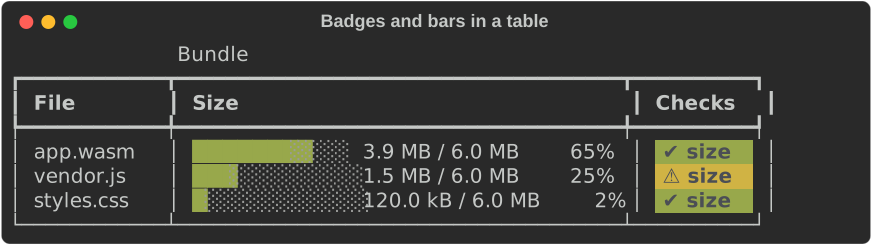
Bars and badges both work in table cells:
fn show_table(console: &Console) {
    let total = 6_000_000;
    let mut table = Table::new().title("Bundle");
    table.add_column("File");
    table.add_column("Size");
    table.add_column("Checks");
    for (file, size, ok) in [
        ("app.wasm", 3_900_000, true),
        ("vendor.js", 1_500_000, false),
        ("styles.css", 120_000, true),
    ] {
        let status = if ok { Status::Ok } else { Status::Warning };
        table.add_row_cells(vec![
            Cell::Markup(file.into()),
            Cell::Renderable(Arc::new(SizeBar::new(size, total).bar_width(12))),
            Cell::Renderable(Arc::new(Badge::status(status, "size"))),
        ]);
    }
    console.print(&table);
}
Formatters
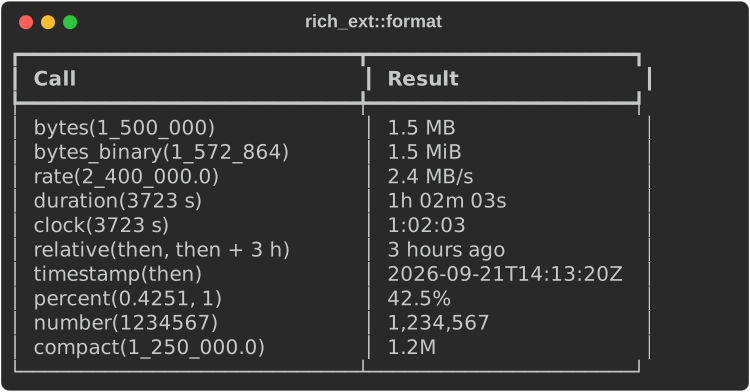
rich_ext::format holds pure functions that return strings, so the results
work in any cell, label or log line. They use . as the decimal point, ,
between thousands, English words and UTC.
fn show_format(console: &Console) {
    let then = UNIX_EPOCH + Duration::from_secs(1_790_000_000);
    let rows = [
        ("bytes(1_500_000)", format::bytes(1_500_000)),
        ("bytes_binary(1_572_864)", format::bytes_binary(1_572_864)),
        ("rate(2_400_000.0)", format::rate(2_400_000.0)),
        (
            "duration(3723 s)",
            format::duration(Duration::from_secs(3723)),
        ),
        ("clock(3723 s)", format::clock(Duration::from_secs(3723))),
        (
            "relative(then, then + 3 h)",
            format::relative(then, then + Duration::from_secs(3 * 3600)),
        ),
        ("timestamp(then)", format::timestamp(then)),
        ("percent(0.4251, 1)", format::percent(0.4251, 1)),
        ("number(1234567)", format::number(1_234_567)),
        ("compact(1_250_000.0)", format::compact(1_250_000.0)),
    ];
    let mut table = Table::new();
    table.add_column("Call");
    table.add_column("Result");
    for (call, result) in rows {
        table.add_row(&[call, &result]);
    }
    console.print(&table);
}
| Function | Gives |
|---|---|
bytes(n) |
Decimal units, as upstream's filesize.decimal: 1.5 MB |
bytes_binary(n) |
Binary units: 1.5 MiB |
rate(bytes_per_second) |
2.4 MB/s; negative or non-finite rates read 0 bytes/s |
duration(d) / duration_with(d, ascii) |
Two largest units: 850µs, 4.2s, 3m 07s, 2d 04h (us when ASCII) |
clock(d) |
H:MM:SS, as progress columns show it |
relative(then, now) |
just now, 3 hours ago, in 2 days |
timestamp(t) |
ISO 8601 UTC to the second |
percent(ratio, decimals) |
42.5%; non-finite reads - |
number(n) |
1,234,567 |
compact(n) |
1.2k, 3.4M, truncated so 1999 is never 2.0k |
Redaction
Experimental: check the output yourself
rich_ext::redact and rich capture --redact are experimental. The
detectors, masks and API may change in any release.
Redaction is best effort, not a guarantee. It only knows the secret shapes listed below, matches within one line, and cannot tell a secret from ordinary text when it looks like ordinary text. Always read redacted output before you share, publish or store it.
If a secret gets through, or anything else does not work as expected, please report a bug with an example (with the real secret replaced).
A Redactor masks secrets before they reach the terminal, a log, an export
or a recording. Redactor::secrets() turns on the built-in detectors:
| Detector | Masks |
|---|---|
KeyValue |
The value in key=value, key: value, "key": "value" or --key=value when the key looks secret. A quoted value is masked up to its closing quote, spaces and commas included |
Bearer |
The token after Bearer (12+ characters with a digit) |
TokenPrefix |
GitHub (ghp_, gho_, ghu_, ghs_, ghr_, github_pat_), GitLab (glpat-), Slack (xox?-), Stripe secret keys (sk_live_, rk_test_, …), npm (npm_) and sk- API keys |
AwsAccessKey |
AKIA… / ASIA… access key ids |
Jwt |
eyJ….eyJ….… JSON Web Tokens |
UrlCredentials |
The password in scheme://user:password@host, up to the last @ before the host. A bare user:password@host without a scheme is not matched |
A key looks secret when redact::is_secret_key matches it against
redact::SECRET_KEYS: password, secret, token, api_key,
private_key, credential and the like anywhere in the key, case-insensitive,
with - and _ interchangeable (so api-key and API-KEY match), plus the
whole-key globs *auth, auth_* and authorization. This is the same list
that data::Redaction::secrets() uses for structured documents (where
everything under a secret key, including XML element text, is masked; see
Structured data), so author
is never masked. The set is kept small to avoid false
positives. It is pattern matching, so it can miss a secret that looks like
an ordinary word.
Add your own rules with .pattern(regex) or .named_pattern(name, regex).
If the pattern has a group named secret, only that group is masked. The
mask is ******** by default. .mask("[{kind}]") writes the rule's name
instead, for example [jwt]. Matching fails closed: if a pattern gives up
at run time (too much backtracking), the rest of that line is masked.
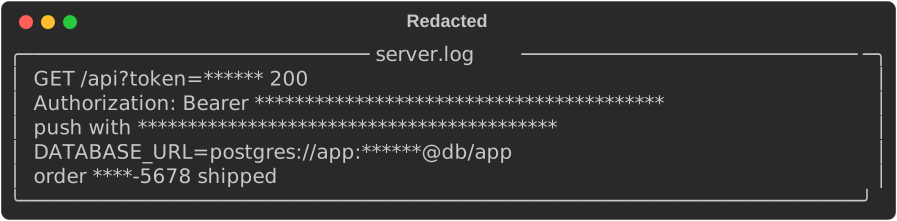
fn show_redact(console: &Console) {
    let log = Text::new(
        "GET /api?token=abc123 200\n\
         Authorization: Bearer eyJhbGciOiJIUzI1NiJ9.eyJzdWIiOiIxIn0.c2ln\n\
         push with ghp_0123456789abcdefghijklmnopqrstuvwxyzAB\n\
         DATABASE_URL=postgres://app:s3cret@db/app\n\
         order 1234-5678 shipped",
    );
    let redactor = Redactor::secrets()
        .named_pattern("order", r"order (?P<secret>\d{4})")
        .expect("valid pattern");
    // Masks keep the cells they replace, so the border stays put.
    console.print(&Redacted::new(
        Panel::new(Box::new(log)).title("server.log"),
        redactor,
    ));
}
Where it applies
| Input | Method |
|---|---|
| A string or log line | redact_str |
| Text with ANSI escapes | redact_ansi: rules see the visible text, the escapes stay |
| A stream of chunks (a recording) | redact_chunks: a secret split across chunks is still found |
| Raw bytes from a pipe | redact_byte_chunks: a character split between reads stays whole, invalid bytes are kept |
| A command line | redact_args: also masks the value of a secret-named flag (--token X) |
| Rendered segments | redact_segments, or wrap a renderable in Redacted |
| A recording to export | capture, export_text, export_html, export_html_classes, export_svg |
In segments, a secret can span several segments with different styles.
Rules match on each line's text. Each part of the mask keeps the style of
the cells it covers, and the line keeps its width, so borders and columns
stay aligned. To get the same in strings, use .preserve_width(true).
Hidden text is searched too. With ANSI text, that is the body of each
escape string: an OSC 8 hyperlink's URL, a window title, DCS and APC
payloads. With segments, it is each style's link target. There the plain
mask is used, with any control characters in it turned into *, so the
escape stays well formed.
The export helpers record what the closure prints, redact it, and export it. The secret never reaches the file:
fn redacted_exports(console: &Console) -> (String, String) {
    let redactor = Redactor::secrets();
    let print = |c: &Console| c.print(&Text::new("password=hunter2"));
    // Record, redact, export: the secret never reaches the file.
    let svg = redactor.export_svg(console, "Redacted", "redacted", print);
    let html = redactor.export_html(console, print);
    // Or plain strings, such as log lines.
    assert_eq!(redactor.redact_str("api_key: abc"), "api_key: ********");
    (svg, html)
}
For another terminal theme, call console.record_output(f), then
redactor.redact_segments(..), then the core rich::export or rich::svg
function.
What redaction cannot see
Rules match within one line. If a renderable wraps a long secret onto
two lines, neither half matches. When that can happen, redact the input
with redact_str before you render it. Masks that keep their width also
reveal the secret's length. A mask inside a binary escape payload, such
as an inline image, can spoil the image. Eight-bit C1 controls are read
as text, not as escapes.
From the command line
rich capture takes the same detectors. Masking happens before the output
is shown, exported or recorded:
rich capture --redact --export-svg run.svg --cast run.cast -- ./deploy.sh
rich capture --redact-pattern 'order (?P<secret>\d{4})' -- ./report.sh
See Using the CLI.