Walkthrough
A hands-on tour of every rich command. Each step gives the exact command, a
screenshot of what it printed, and what to notice. Work through it top to
bottom in about twenty minutes, or jump to a section from the
command table.
This page is the tutorial path. For every option of every command, see Using the CLI and the CLI reference.
The screenshots are real
Each image is the binary's own --export-svg output for the command shown,
run against the sample files below at a fixed width. They are regenerated by
python3 scripts/smoke_cli.py --screenshots docs/media/guide (see
Smoke test). Your terminal's colours and font will differ.
Set up
You need the rich binary (cargo install rs-rich-cli, or
cargo build -p rs-rich-cli in a checkout, which puts it in target/debug/)
and a scratch directory.
The quickest way to get every sample file, including the images, is the smoke tool from a checkout of the repository:
Without a checkout, paste this block. It creates the same text files; the image sections further down need the smoke tool (or your own PNG files).
mkdir -p rich-tour/docs rich-tour/site && cd rich-tour

cat > notes.md <<'EOF'
# Release notes

Version **1.2** makes the tool *faster* and adds `--csv`.

## Added

- Tables from CSV files
- A [changelog](https://example.com/changelog)

> Upgrading needs no configuration changes.

```python
print("hello")
```
EOF

cat > greet.py <<'EOF'
def greet(name: str) -> str:
    """Return a friendly greeting."""
    return f"Hello, {name}!"


for person in ["Ada", "Grace"]:
    print(greet(person))
EOF

cat > greet_v2.py <<'EOF'
def greet(name: str, excited: bool = False) -> str:
    """Return a friendly greeting."""
    mark = "!" if excited else "."
    return f"Hello, {name}{mark}"


for person in ["Ada", "Grace"]:
    print(greet(person))
EOF

cat > data.json <<'EOF'
{"name": "rs-rich", "version": "0.0.11", "tags": ["cli", "terminal"],
 "stable": false, "license": null, "downloads": {"week": 1204, "total": 88410}}
EOF

printf '{"name": "rs-rich",\n' > broken.json

cat > team.csv <<'EOF'
name,role,commits,joined
Ada,author,120,2021-03-01
Grace,reviewer,98,2022-07-15
Linus,maintainer,311,2019-11-30
EOF

cat > events.jsonl <<'EOF'
{"timestamp": "2026-09-23T10:00:00Z", "level": "info", "message": "server started", "port": 8080}
{"timestamp": "2026-09-23T10:00:02Z", "level": "warning", "message": "slow request", "path": "/api", "ms": 870}
{"timestamp": "2026-09-23T10:00:05Z", "level": "error", "message": "database unreachable", "retry": true}
EOF

cat > deploy.yaml <<'EOF'
name: web
replicas: 3
database:
  host: db.internal
  password: hunter2
servers:
  - name: alpha
    port: 8080
  - name: beta
    port: 8081
EOF

cat > deploy-prod.yaml <<'EOF'
name: web
replicas: 5
database:
  host: db.prod.internal
  password: hunter2
servers:
  - name: alpha
    port: 8080
EOF

cat > analysis.ipynb <<'EOF'
{"cells": [
  {"cell_type": "markdown", "metadata": {},
   "source": ["# Analysis\n", "Adding up the *commits* column."]},
  {"cell_type": "code", "execution_count": 1, "metadata": {},
   "outputs": [{"name": "stdout", "output_type": "stream", "text": ["529\n"]}],
   "source": ["commits = [120, 98, 311]\n", "print(sum(commits))"]}],
 "metadata": {"kernelspec": {"display_name": "Python 3", "language": "python", "name": "python3"},
              "language_info": {"name": "python"}},
 "nbformat": 4, "nbformat_minor": 5}
EOF

printf '\033[1;31mERROR\033[0m disk full\n\033[32mok\033[0m \033]8;;https://example.com\033\\docs\033]8;;\033\\\n' > capture.ans

cat > rich.toml <<'EOF'
version = 1

[defaults]
theme = "night"

[profiles.ci]
no_color = true
width = 60
panel = "rounded"

[themes.night]
notice = "bold cyan"
warning = "bold yellow"
EOF

printf '# Intro\n\nWelcome.\n' > docs/intro.md
printf '# Usage\n\nRun `rich FILE`.\n' > docs/usage.md
The tour directory has a rich.toml
rich reads ./rich.toml automatically, so every command in this
directory uses its [defaults] (only a theme, which changes nothing
unless you use its style names). Pass --no-config to ignore it.
Rendering files
With no mode, rich picks a renderer from the file extension.
Markdown
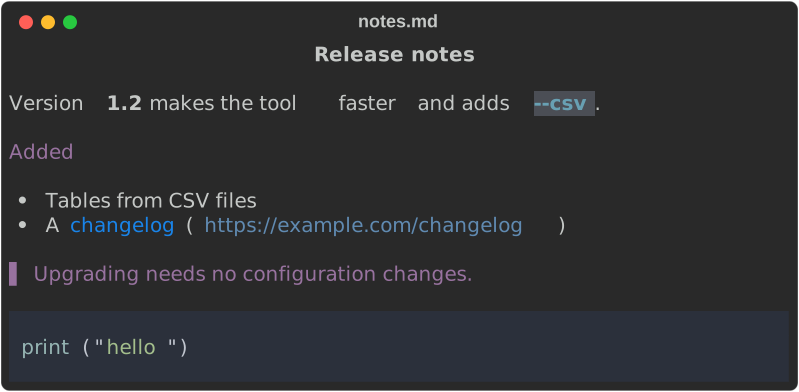
- Headings, emphasis, lists, block quotes and fenced code are all rendered.
- The link keeps its URL in brackets, so it survives a pipe. Add
--hyperlinks(-y) to emit a clickable OSC 8 link instead. rich markdown FILE(ormd, or-m) forces Markdown for any extension.
Source code
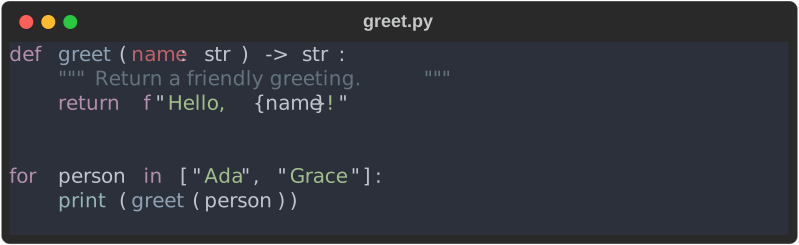
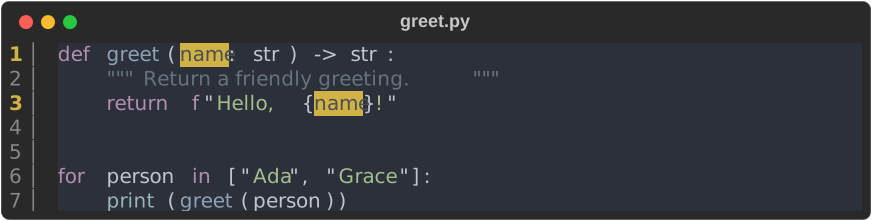
Any extension without a dedicated renderer is syntax-highlighted, with the
language taken from the extension. rich syntax FILE (code, -x) forces it.
JSON
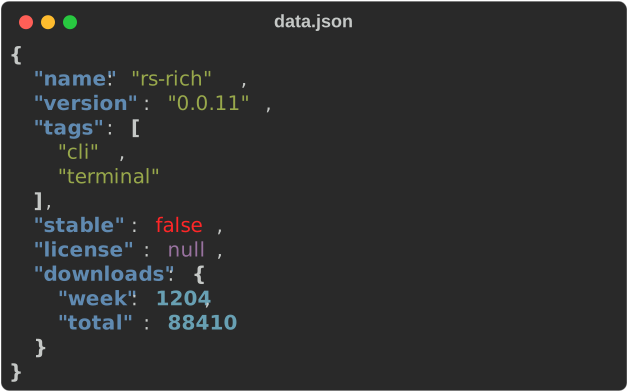
The one-line-ish input comes out indented, with strings, numbers, booleans and
null each in their own colour. Invalid JSON is an error (exit code 4), not a
best-effort print.
CSV and TSV
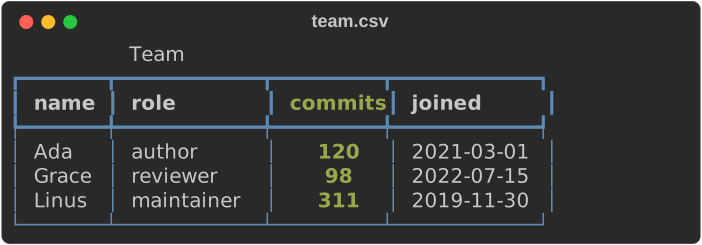
- The delimiter and the header row are detected, not assumed, so semicolon- and tab-separated files work too.
- Numeric columns are right-aligned.
--titleand--captionbecome the table's title and caption.
From standard input, name the mode: cat team.csv | rich csv -.
Notebooks
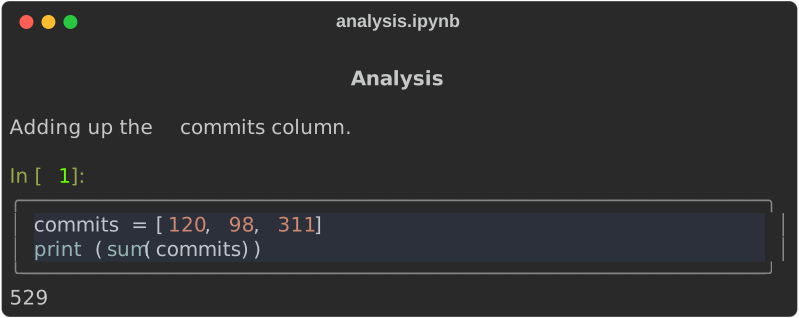
Markdown cells are rendered, code cells are highlighted in a box with their
In [n] label, and stream outputs follow.
Markup and rules
print treats its RESOURCE as console markup
rather than a file name:

- reads the markup from standard input: echo '[b]hi' | rich print -. Bad
markup, such as an unmatched [/tag], is an error with exit code 4.
About the screenshot titles
An exported SVG is titled after its RESOURCE when that is a file path or
URL. Literal text, from print or rule, and stdin give the title rich.
rule draws a horizontal rule with the RESOURCE as its title:

JSON Lines and logs
jsonl renders newline-delimited JSON one record at a time, so it can follow
a stream that never ends (tail -f app.jsonl | rich jsonl -):
{
  "timestamp": "2026-09-23T10:00:00Z",
  "level": "info",
  "message": "server started",
  "port": 8080
}
{
  "timestamp": "2026-09-23T10:00:02Z",
  …
log recognises common structured-log fields (timestamp/time,
level/severity, message/msg) and prints one line per record, with the
remaining fields at the end:
2026-09-23T10:00:00Z INFO server started {"port":8080}
2026-09-23T10:00:02Z WARNING slow request {"path":"/api","ms":870}
2026-09-23T10:00:05Z ERROR database unreachable {"retry":true}

2026-09-23T10:00:00Z info server started port=8080
2026-09-23T10:00:02Z warn slow request path=/api ms=870
2026-09-23T10:00:05Z error database unreachable retry=true
--log-presentation rich types the fields and colours the level labels. A
malformed line stops the stream with its line number and exit code 4.
Streams are rendered as they arrive, so jsonl and log cannot be exported to
HTML or SVG (that is why this section shows text).
Structured data
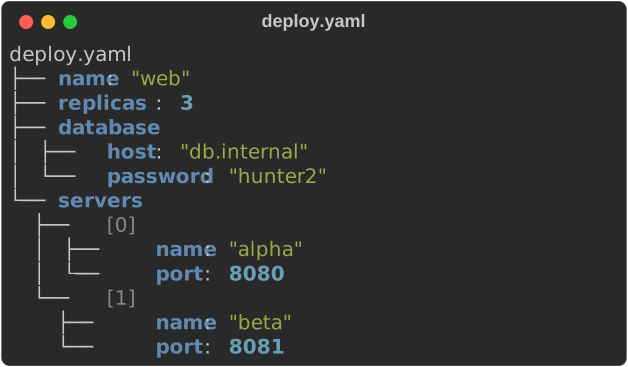
inspect reads JSON, YAML, TOML, XML, INI or dotenv and draws it as a tree:
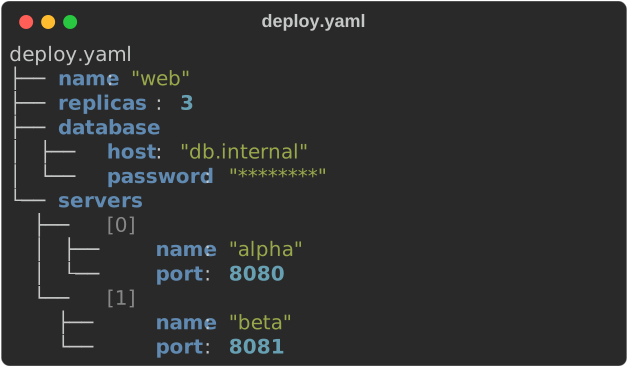
The options change the view:


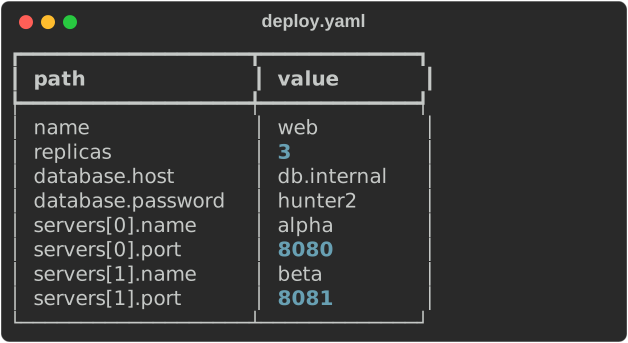

--compare lists what changed (~), was added (+) or removed (-) in the
second document. Other options: --table, --max-depth N, --max-length N
and --show-paths. A document that does not parse is reported as
file:line:column with exit code 4.
Detecting piped input
Piped text prints as plain text, as upstream does. --format auto detects what
it is instead:
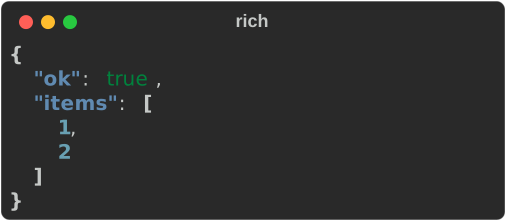
JSON goes to the JSON renderer; YAML, TOML, XML, INI and dotenv are
highlighted; anything else stays plain text. --format yaml (or json, toml
…) names the format outright, overriding a file's extension too. To make
detection the default, put format = "auto" in your config.
Comparing text and patches
Two text files give a line diff, syntax-highlighted by file name, with the changed words emphasised:
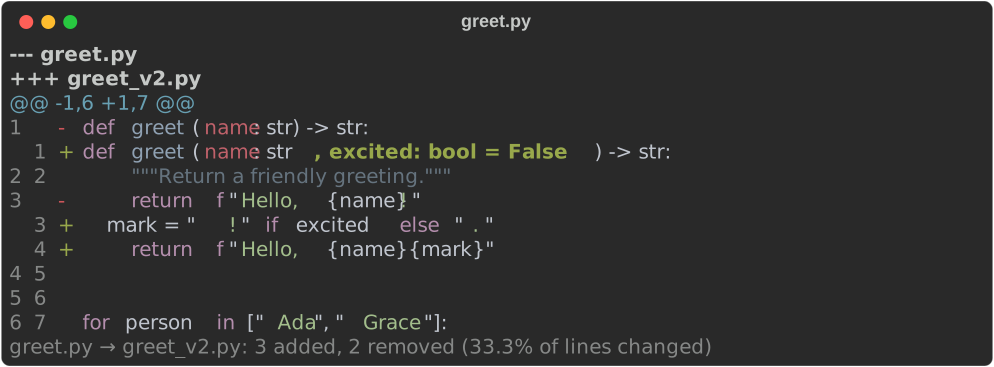
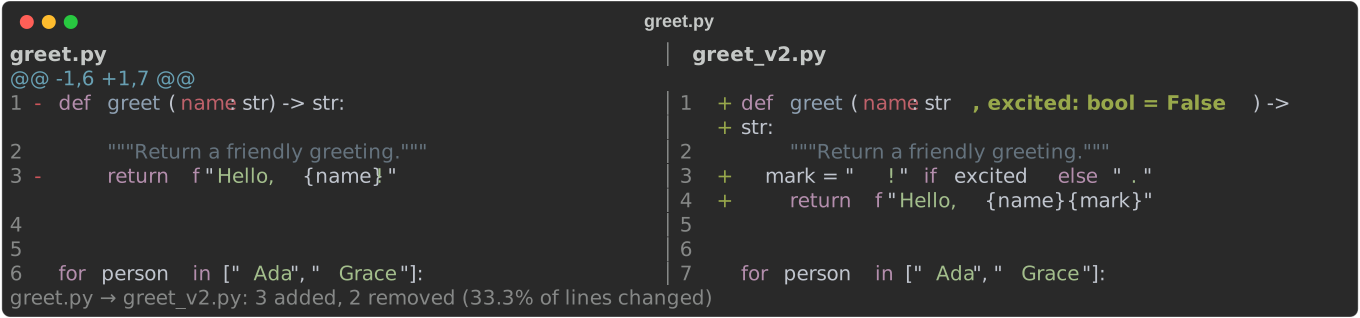
A single input is read as a patch, such as git diff output. It renders a tree
of the changed files, then each file's hunks:
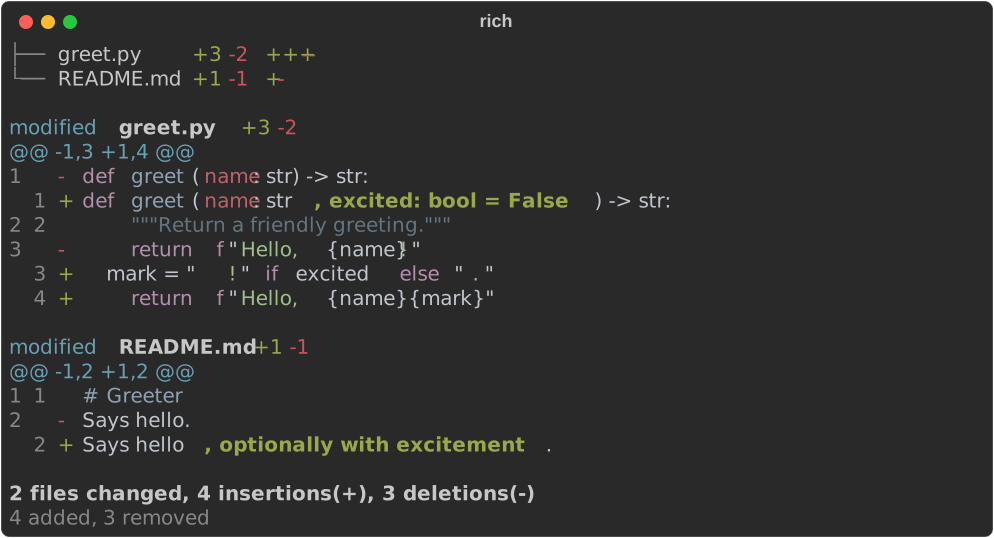
--threshold PCT turns a diff into a gate. Above the threshold it prints
FAIL and exits 5:
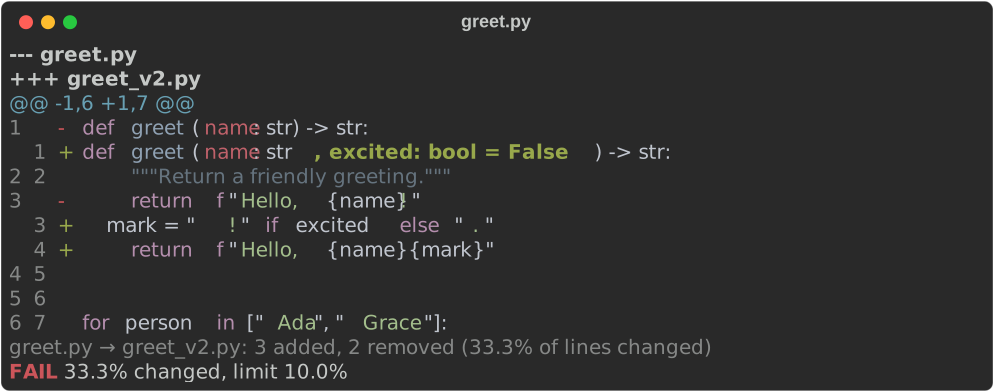
--context N sets the unchanged lines around each change (default 3) and
--language NAME overrides the highlighting language.
Text diffs show terminal controls in the files as inert symbols (␛[2J), so
diffing a hostile file cannot clear the screen or retitle the window; two ANSI
captures are still compared by their colours. --no-sanitize lets the escapes
through. Image diffs are unaffected.
Images, GIFs and image diffs
These need a binary with the art feature (the default) and the sample images
from python3 scripts/smoke_cli.py --fixtures DIR: before.png and
after.png (a gradient with a disc; after.png adds a white badge),
logo.png (a disc on a transparent background) and ball.gif.
Still images
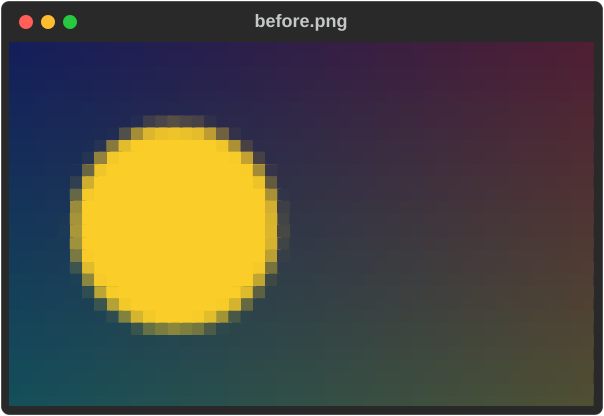
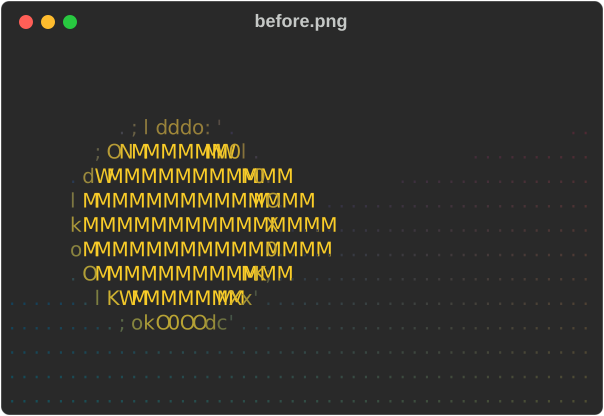
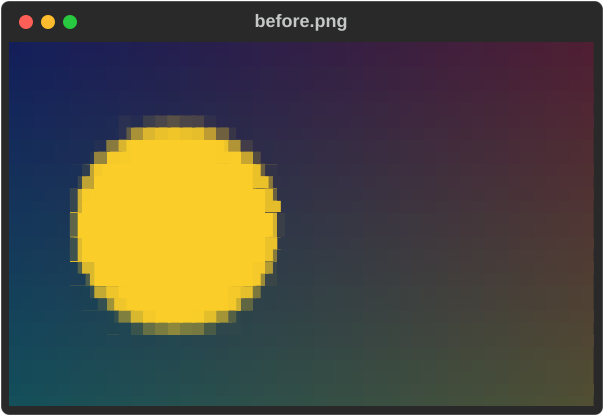
--image-mode picks how the picture is drawn:
| Mode | Draws with |
|---|---|
auto |
Sixel where it looks supported, else half blocks, else ASCII (default) |
blocks |
▀ half blocks: two pixels per cell, needs colour |
quadrants |
2×2 pixels per cell in two colours |
braille |
2×4 dots per cell, monochrome |
ascii |
a character ramp; works without colour |
sixel |
real pixels, in terminals that support Sixel |
rich image before.png --image-mode ascii --width 48
rich image before.png --image-mode quadrants --width 48
Fit it into an exact box, cropping around an anchor:
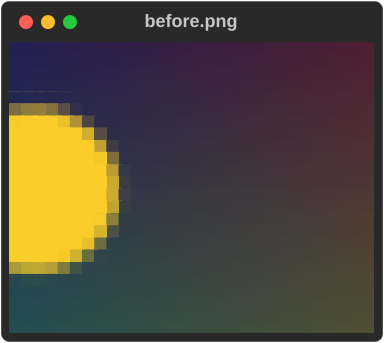
rich image before.png --image-mode blocks --width 30 --height 12 \
  --image-fit cover --image-anchor right
Flatten transparency onto a colour:
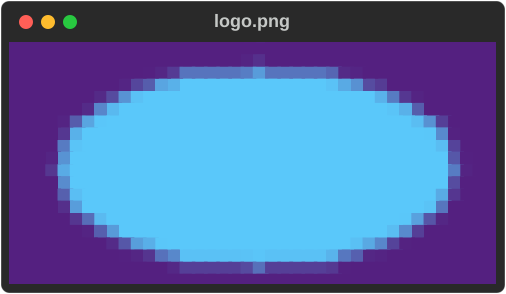
Without --image-background, transparent pixels are left to the terminal's own
background (--image-background default); --image-background checkerboard
shows them on a gray checkerboard instead.
Reduce the colours, with dithering:
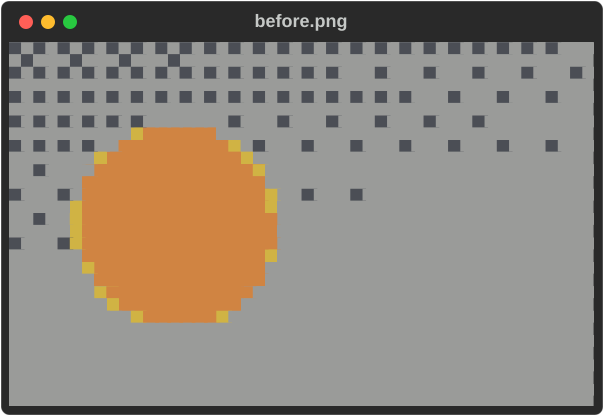
The colour modes are truecolor (the default), ansi256, ansi16 and
grayscale, for ASCII, half-block, quadrant and Sixel images and for GIF
frames. The dithers are floyd-steinberg, bayer4x4 and atkinson, and
--image-color-distance oklab picks the nearest palette colour perceptually,
which keeps hues truer in the small ANSI16 palette:
rich image before.png --image-mode quadrants --width 48 \
  --image-color ansi16 --image-dither atkinson --image-color-distance oklab
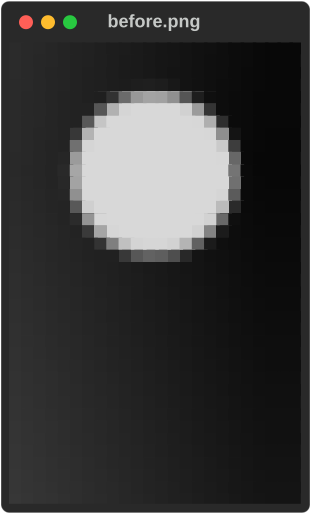
Rotate, convert to grayscale and adjust the tone:
rich image before.png --image-mode blocks --width 24 \
  --image-rotate 90 --image-grayscale --image-contrast 1.4
What to notice:
- Explicit
blocksandquadrantsneed colour. When stdout is redirected they still print their characters without colour, so pickasciiorbraillefor plain-text output.--export-html/--export-svgrender in colour even then (unless you pass--no-color). --image-fitneeds--height;--image-anchorneeds--image-fit cover.- Images explains every option, and Using the CLI lists the exact rules.
GIFs
In a terminal this plays the animation in place, twice; --loop 0 repeats
until Ctrl+C. Piped or redirected, it prints the first frame once and says so on
stderr:
Several GIFs play side by side, each at its own speed:
rich gif a.gif b.gif. GIFs cannot be exported to HTML or SVG. If Ctrl+C
leaves the cursor hidden, printf '\033[?25h' brings it back.
Image diffs
When both inputs are images, diff compares them perceptually: would a person
notice the change, and where?
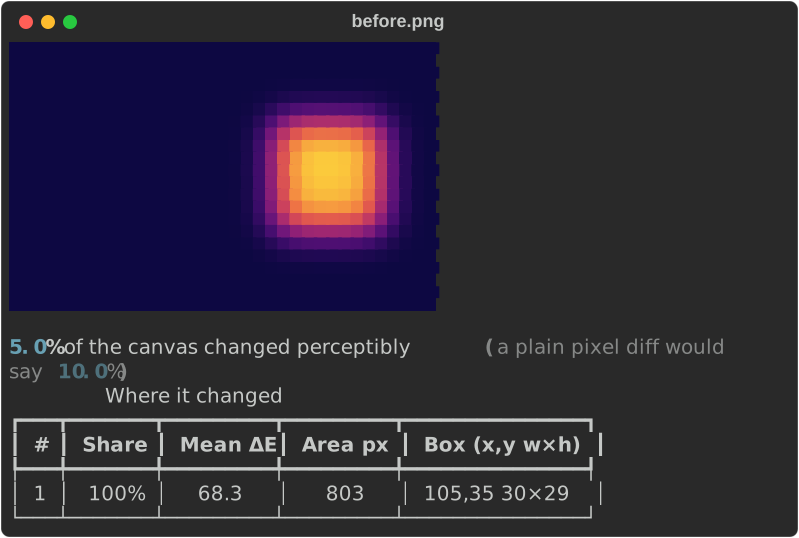
- The headline compares the perceptual figure (5.0%) with what a plain pixel comparison would say (10.0%).
- The table ranks the regions that changed, with their share of the change, strength (mean ΔE), area and bounding box.
--threshold 2makes it a CI gate:FAIL, exit5.--image-mode noneprints the numbers only.
Comparing images covers the method and the gate in depth; Image diff covers the library.
Decoding escape sequences
ansi explain lists every escape sequence in a capture of terminal output and
what it does, then the text a terminal would show:
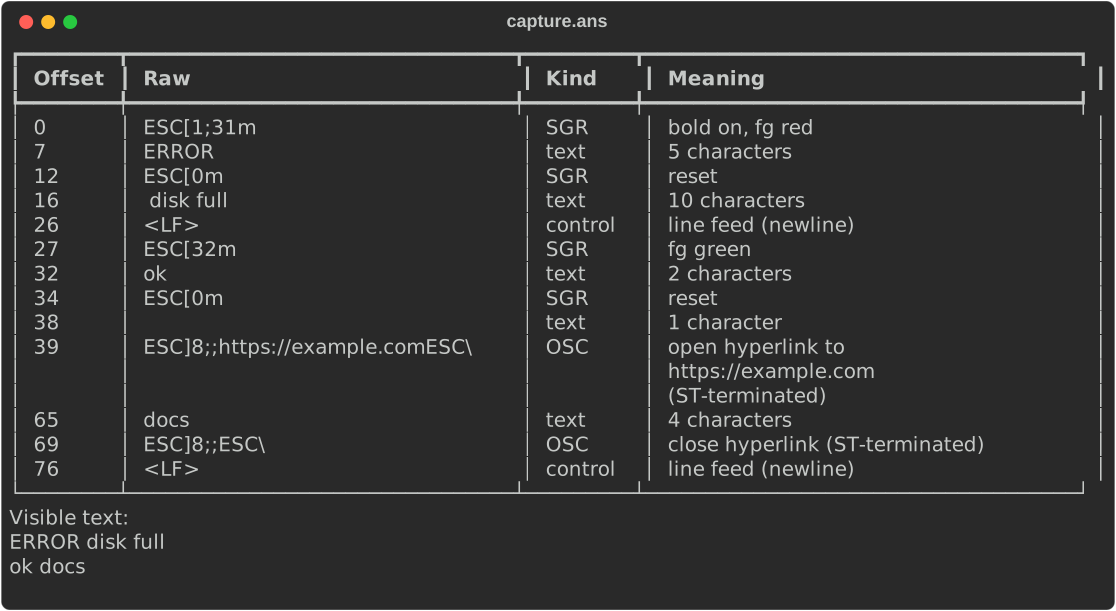
--ansi-inline marks the escapes inside the text instead
(⟨bold on, fg red⟩ERROR⟨reset⟩ disk full), and --escapes-only drops the
text rows from the table.
Related: --sanitize replaces control characters in any input with visible,
inert symbols (ESC[2J becomes ␛[2J). Use it for files you do not trust.
rich view and the text rich diff do this by default; --no-sanitize turns
it off there.
Charts and diagrams
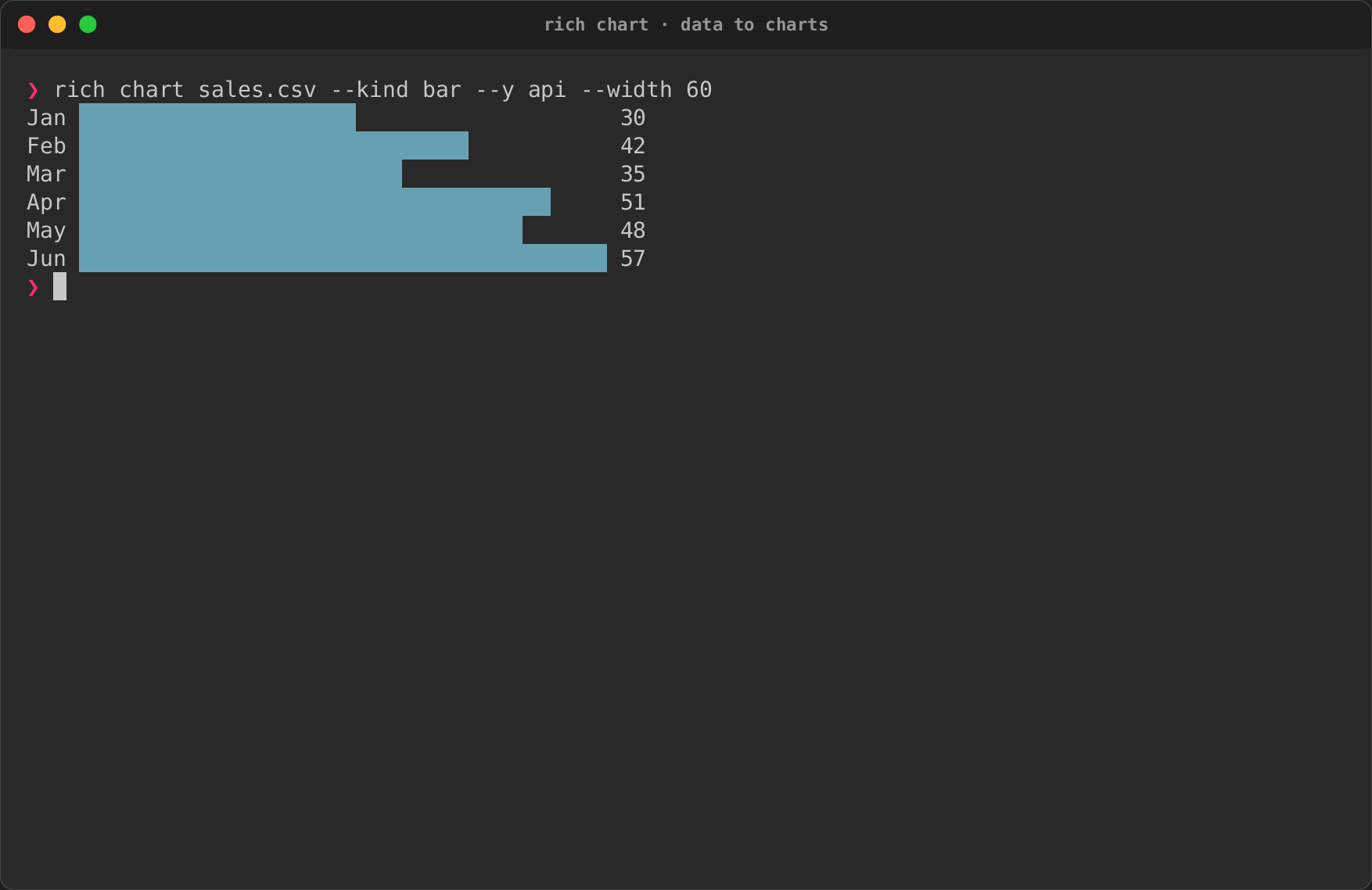
rich chart draws numbers from CSV, JSON or stdin (0.0.15). Columns go by
header or by 1-based number:
rich chart sales.csv --kind bar --x month --y api
rich chart sales.csv                       # every numeric column as a line
seq 1 20 | rich chart --kind spark
Graphs are drawn as text through one layout, whatever their source:
rich mermaid flow.mmd                      # a Mermaid flowchart
rich dot services.dot                      # a DOT (Graphviz) graph
rich deps --why syn                        # what pulls a crate into this workspace
rich deps --graph --depth 1                # the same dependencies as a diagram
rich schema order-v1.json order-v2.json    # a JSON Schema, or what changed
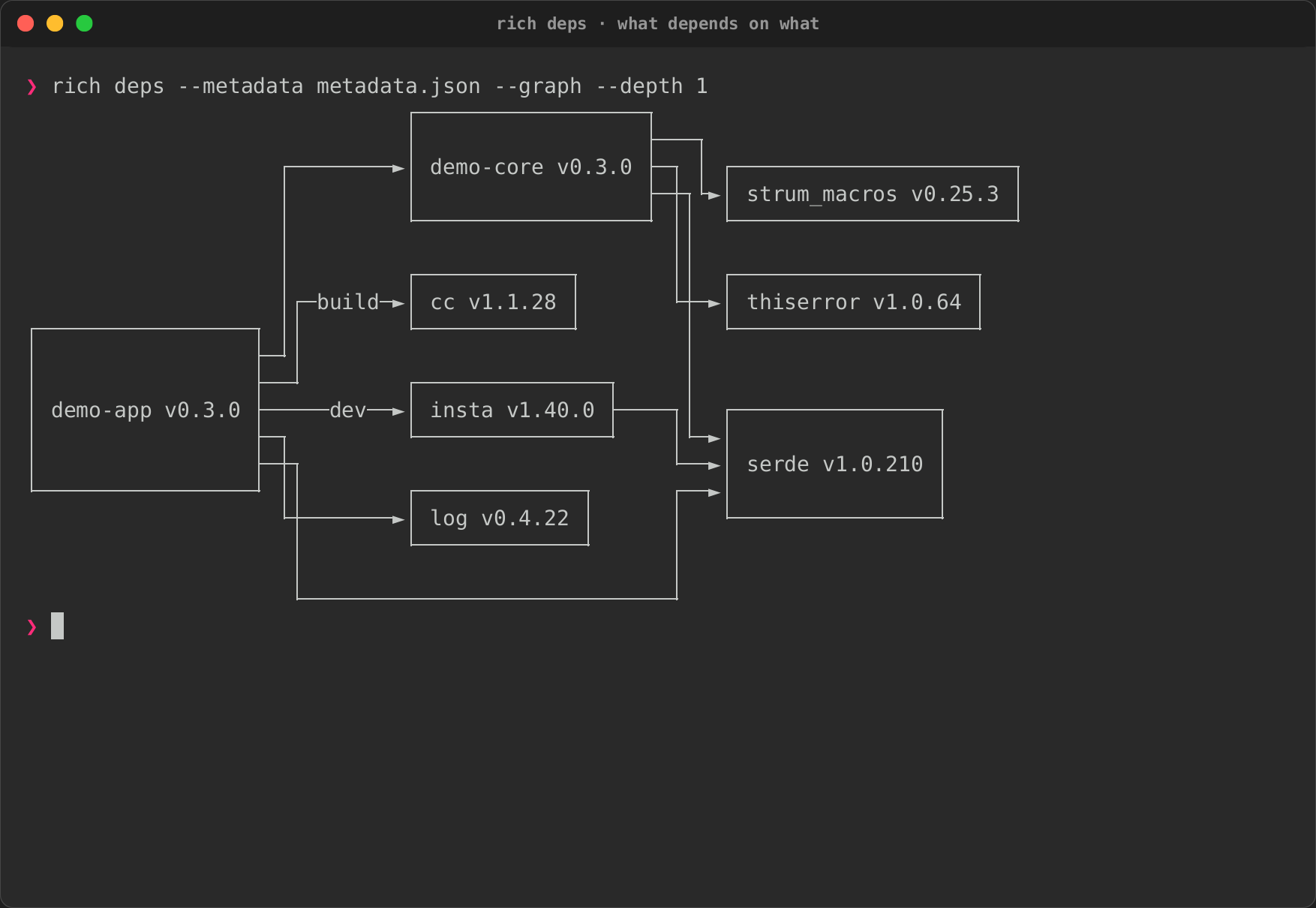
These screenshots come from the terminal recordings, not the smoke tool. What to notice: the bars, lines and boxes read without colour, and a missing column or an unsupported DOT construct is refused with exit code 4 and a message naming it. See Charts, Diagrams and Dependency graphs and JSON Schemas.
Viewing and inspecting anything
view shows a file the way it should be read, and pages it when it is taller
than the terminal:
rich view src/main.rs
rich view src/main.rs --search todo     # highlight matches; a summary goes to stderr
cat config.yaml | rich view -           # the format is detected from the content
| The file is | view shows it as |
|---|---|
| Markdown, CSV/TSV, a notebook, JSON Lines | the matching renderer, as rich FILE does |
| an image or GIF | the image or animation |
a .diff / .patch, or text starting with diff --git |
a rendered patch |
| source code, JSON, YAML, TOML, XML, INI or plain text | highlighted, with line numbers (--no-line-numbers leaves them out) |
| binary (a NUL byte, or not UTF-8) | a hex dump |
Paging is on by default; any paging flag, on the command line or in the
config, overrides it. Folding and interactive search are left to your pager.
Like less, view shows escape sequences in the file as inert text (␛]0;…)
instead of letting them retitle the window or write the clipboard; pass
--no-sanitize to let them through. It shows at most 8 MiB and 20,000 lines of
source or text (64 KiB of binary), and says so on stderr when it stops early.
hex (alias hexdump) is a hex dump in the style of hexdump -C: offsets, bytes in groups,
an ASCII panel, and * for runs of repeated lines. --offset and --length
slice the input, reading only that window, --bytes-per-line (1–4096) and
--group shape it, and --search highlights a byte string. Without
--length it shows at most 64 KiB:
rich hex logo.png --length 48 --search "49 48 44 52"
rich hex firmware.bin --offset 0x200 --search '"MAGIC"'

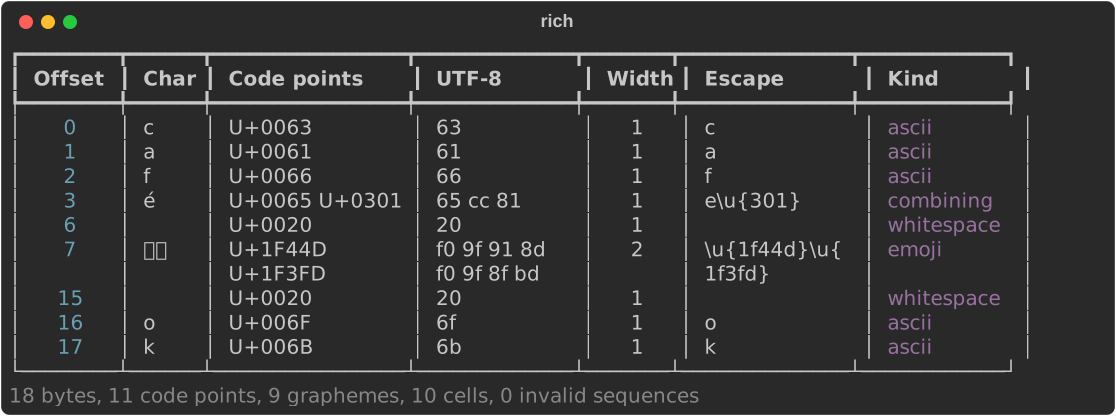
unicode splits text into graphemes and shows each one's code points, UTF-8
bytes, width in cells, an escape you can paste into Rust, and a kind
(combining, emoji, zero-width, control…). Invalid UTF-8 gets a row of its own:
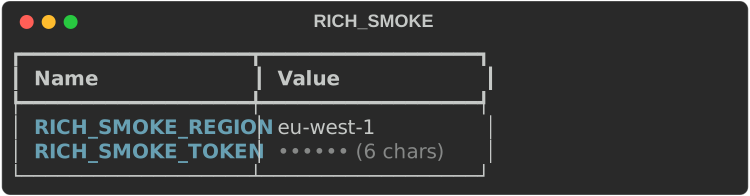
env lists environment variables. Values whose names look secret (TOKEN,
PASSWORD, API_KEY, or AUTH, KEY, PASS, PWD, DSN, COOKIE, JWT
as a whole word…) are masked, and so is the secret part of any value that looks
like a credential (the password in postgres://user:pw@host, ghp_… and
sk_live_… tokens, JWTs), unless you pass --show-secrets. Masking is best
effort: it can miss a secret, so check the output before you share it.
Arguments filter the names, as substrings or * globs, and a
single PATH-like variable is checked entry by entry, flagging missing,
duplicate and empty ones:
capture runs a command as a colour terminal would (FORCE_COLOR,
CLICOLOR_FORCE and COLUMNS set), then shows its output in a panel titled with
the command, with its exit status and duration below. stdout and stderr share
one pipe, so they interleave in the order they were written. Every export
works, and --cast FILE also writes an asciicast v2 recording:
rich capture -- cargo test
rich capture --export-svg test-run.svg --cast test-run.cast -- cargo test
asciinema play test-run.cast
capture exits with the command's own status (128 + the signal number if a
signal killed it) after drawing the panel and writing any exports, so
rich capture -- cargo test fails a CI step when the tests fail. Append
|| true to ignore it. With --report json a failed command's envelope has
"code": "command" and its status. There is no PNG export.
The command sees COLUMNS as the panel's inner width. capture keeps at most
1 MiB or 20,000 lines of output, stopping the command beyond that, and stops
reading one second after the command exits, even if something it started in
the background still holds the output open; either leaves a notice on stderr.
--sanitize makes controls in the output inert, keeping its colours.
Experimental: check the output yourself
--redact and --redact-pattern are experimental and best effort. Read
the capture, and any file it writes, before sharing it.
--redact masks secrets before anything is shown, exported or recorded:
values of secret-named keys (password=…, --token=…), bearer tokens, common
token prefixes, AWS key ids, JWTs and URL passwords, in the output and in the
command line in the title. --redact-pattern REGEX adds your own pattern (only
its secret group is masked when it has one) and can be repeated:
rich capture --redact --export-svg deploy.svg -- ./deploy.sh
rich capture --redact-pattern 'order (?P<secret>\d{4})' -- ./report.sh
Using the CLI lists exactly what is masked.
Panels, padding, alignment and style
These options decorate the output of any mode:
printf '[b]Build passed[/]\n3 targets, 0 warnings\n' |
  rich print - --panel rounded --title CI --caption main \
    --padding 1,2 --panel-style green
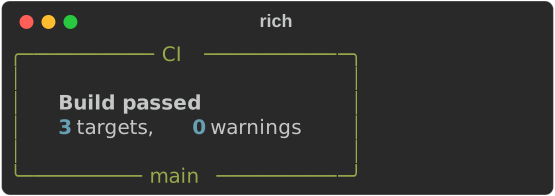
--panel BOXwraps the output (rounded,square,heavy,double,ascii,ascii2). A panel shrinks to fit its content;-e/--expandfills the width instead.--paddingtakes 1, 2 or 4 comma-separated numbers, like CSS.--stylestyles the content;-S/--panel-stylestyles the border.

--width N sizes the rendered block, not the terminal, so --center (or
--left, --right) still positions it within the full terminal width.
Exporting HTML and SVG
Any rendering can also be written to a file, while still printing to stdout:
- The HTML is self-contained. The SVG loads its font from a CDN.
- Exports keep colour even when stdout is redirected;
--no-colorturns it off. Image exports draw with coloured blocks unless you chooseascii. - The SVG width follows the terminal width; set
COLUMNS=64for a fixed size. Every screenshot on this page is such an export. jsonl,log,gif,doctor,configandbenchoutput cannot be exported.
Paging
rich notes.md --pager          # always page
rich notes.md --auto-pager     # page only if taller than the terminal
The pager is MANPAGER, then PAGER, then less (more.com on Windows).
Redirected output is never paged, so rich --pager notes.md > out.txt just
writes the file. --no-pager cancels paging set in a config file.
Watching files
In a terminal, --watch re-renders a file every time it is saved, until
Ctrl+C. It uses operating-system file events, catches editors that save by
rename, and only re-renders when the content really changed. Several files each
get their own region with the file name as a header, and only the changed one
is redrawn. A file that fails to parse shows its error in its region and
recovers on the next good save.
Useful options: --watch-debounce SEC (default 0.1), --watch-poll for
network filesystems, --watch-interval SEC and --watch-exit-on-error. URLs
can be watched too, with --watch-cache to skip unchanged responses.
When stdout is not a terminal, --watch renders once and exits. No screenshot
here: it is an interactive mode. See the
watch recipe.
Converting many files
--batch takes files, directories and globs, and runs each one through the
same renderer. Plan first with --dry-run, which writes nothing:
docs/intro.md
  HTML: site/intro.html
docs/usage.md
  HTML: site/usage.html
Dry run: 2 file(s), 0 error(s); no files written.
Each output is named after its input, in the directory of the export path you gave. Then run it, here with two parallel workers and a JSON report:
{"ok":true,"code":"success","exit_code":0,"result":{"planned":2,"attempted":2,"completed":2,"failed":0,"skipped":0,"failures":[]}}
- Existing outputs stop the run (exit
3) unless you pass--overwriteor--collision suffix. - The run stops at the first failure unless you pass
--continue-on-error. --batch-preserve-dirs,--batch-input-rootand--batch-name-templatemirror a directory tree. See Using the CLI.
Configuration, profiles and themes
The sample rich.toml has a [defaults] table, a ci profile and a night
theme. Check that it is valid and see what a profile resolves to:
rich config validate --config rich.toml --profile ci
rich config show --config rich.toml --profile ci
{
  "valid": true,
  "source": "/…/rich-tour/rich.toml",
  "profile": "ci",
  "disabled": false,
  "theme": "night",
  "theme_styles": {
    "notice": "bold cyan",
    "warning": "bold yellow"
  },
  "settings": {
    "no_color": true,
    "panel": "rounded",
    "theme": "night",
    "width": 60
  }
}
Explain where one value comes from, and what it overrides:
Without a key, config explain tables every key across the layers — built-in
defaults, NO_COLOR, the config file, the profile and the command line — and
config reference lists every key with its type, default and flag.
no_color = false in your own config (~/.config/rich/config.toml, or a file
named with --config) overrides NO_COLOR. A rich.toml found in the working
directory belongs to the project, so it can turn colour off but not back on
while NO_COLOR is set; pass --color to override it for one run.
Themes give names to styles. The night theme defines notice and warning:

--theme NAME picks another theme and --theme-style 'notice=bold green'
overrides one style for a single run. --theme-file PATH (or theme_file in
your own config) loads the [styles] section of an upstream rich theme file;
--theme and --theme-style override it. A working-directory rich.toml
cannot set theme_file. Unknown keys, bad values and missing
profiles are errors (exit 2), even in profiles you did not select.
Completions and generated docs
rich completions bash > ~/.local/share/bash-completion/completions/rich
rich completions zsh  > "${fpath[1]}/_rich"
rich completions fish > ~/.config/fish/completions/rich.fish
rich completions powershell >> $PROFILE
The same description of the command line generates --help, the completion
scripts, and reference documentation:
rich docs markdown > rich.md       # the CLI reference as Markdown
rich docs config                   # the configuration reference as Markdown
rich docs man --output man/        # rich.1 plus one page per subcommand
man ./man/rich.1
rich COMMAND --help shows one command, for example rich config explain --help.
Diagnosing your terminal
Rich doctor — rs-rich-cli 0.0.11
Build features: {"art":true,"fetch":true,"syntax-cache":false,"onig":false,"json-escape-safe":false}
Terminal: stdout TTY=false, 80×25 cells, colour=none (detected); NO_COLOR=false
Image backend: ascii; Sixel support=false (inferred, no probe)
Configuration: source="/…/rich-tour/rich.toml", profile="default", disabled=false
Pager: less from platform default; availability not checked; never launched

┏━━━━━━━━━━━━━┳━━━━━━━┳━━━━━━━━━━━━━━━━━━━━━━━━━━━━━━━━━━━━━━━━━━┓
┃ Capability  ┃ Value ┃ Source                                   ┃
┡━━━━━━━━━━━━━╇━━━━━━━╇━━━━━━━━━━━━━━━━━━━━━━━━━━━━━━━━━━━━━━━━━━┩
│ color       │ none  │ inferred: stdout is not a terminal       │
│ unicode     │ yes   │ environment (LC_CTYPE): LC_CTYPE=C.UTF-8 │
│ hyperlinks  │ no    │ inferred: stdout is not a terminal       │
│ graphics    │ none  │ inferred: stdout is not a terminal       │
│ sixel       │ no    │ inferred: stdout is not a terminal       │
│ width       │ 80    │ environment (COLUMNS): COLUMNS=80        │
│ height      │ 25    │ default: default 25                      │
│ interactive │ no    │ inferred: stdout is not a terminal       │
│ animation   │ no    │ inferred: not interactive                │
└─────────────┴───────┴──────────────────────────────────────────┘
This was run with stdout redirected, so colour and interactivity are off; in a
terminal you will see what your terminal supports. Every value names its
source. doctor never probes the terminal, fetches a URL or starts the pager.
rich doctor --report json prints the same as JSON on stdout. Environment
variables such as RICH_COLOR, RICH_SIXEL or RICH_WIDTH override a
detected value.
Comparing benchmark runs
bench compare compares two benchmark runs saved by rich_ext::qa::bench (or
two criterion output directories). The smoke tool writes a sample pair:
┏━━━━━━━━━━━━━┳━━━━━━━━━━┳━━━━━━━━━━━┳━━━━━━━━┳━━━━━━━━━━━┳━━━━━━━━━━━━━┓
┃ Benchmark   ┃ Baseline ┃ Candidate ┃ Change ┃ Spread    ┃ Verdict     ┃
┡━━━━━━━━━━━━━╇━━━━━━━━━━╇━━━━━━━━━━━╇━━━━━━━━╇━━━━━━━━━━━╇━━━━━━━━━━━━━┩
│ table/80    │ 1.00 µs  │ 1.30 µs   │ +30.0% │ ▆▆▆▆ ████ │ regression  │
│ markdown/80 │ 2.00 µs  │ 1.50 µs   │ -25.0% │ ████ ▆▆▆▆ │ improvement │
└─────────────┴──────────┴───────────┴────────┴───────────┴─────────────┘
2 benchmarks: 1 regression, 1 improvement, 0 unchanged, 0 new, 0 removed
A change inside --threshold percent (default 5), or inside the noise, counts
as unchanged. Any regression exits 5, so it can gate CI.
Scripts, CI and exit codes
rich exits with a code for each class of failure:
| Code | Meaning | Try it |
|---|---|---|
0 |
Success | rich data.json |
2 |
Usage or configuration error | rich --no-such-flag |
3 |
Input, read or write error | rich missing.md |
4 |
Parse or render error in the data | rich json broken.json |
5 |
A threshold or gate failed | rich diff greet.py greet_v2.py --threshold 10 |
130 |
A batch was interrupted with Ctrl+C |
--report json adds a one-line result envelope on stderr, leaving stdout
for the rendered output:
{"ok":true,"code":"success","exit_code":0,"result":{}}
{"ok":false,"code":"data","exit_code":4,"message":"invalid JSON: json parse error: key must be a string at line 1 column 20","error":{"message":"invalid JSON: json parse error: key must be a string at line 1 column 20"}}
In a shell script:
if rich --csv "$f" > /dev/null 2>&1; then
  echo "readable"
else
  echo "could not render $f (exit $?)" >&2
fi
The guided demo
core       Core renderables and extensions
workflows  Configuration, batch, exports, watch, inspectors and capture
art        Banners, images, image diff and GIF
rich --demo                            # the whole tour, 3 s between sections
rich --demo --demo-section art         # one section
rich --demo --demo-delay 0             # no pauses
rich --demo --no-color > tour.txt      # a plain transcript
The demo is offline, ignores your config, writes only to a temporary directory
and stops cleanly on Ctrl+C. With no RESOURCE and no mode, rich alone shows a
short capability demo instead.
Where to go next
- Smoke test — run every command above against a build, in one go.
- Using the CLI — every option, organised by task.
- Workflow recipes — watch, batch, profiles and CI setups.
- Troubleshooting — error messages and fixes.