Tree
Tree draws a
hierarchy with guide lines — a directory listing, a dependency graph, a
nested configuration. Each node has a label and any number of children.
Building a tree
Tree::new(label) makes the root. add(label) appends a child and returns
&mut Tree for it, so you descend by binding the result:
fn basic(console: &Console) {
    let mut tree = Tree::new("rs-rich-cli");

    // `add` returns the new child, so bind it to keep descending.
    let crates = tree.add("crates");
    crates.add("rich");
    let ext = crates.add("rich-ext");
    ext.add("src");
    ext.add("examples");
    crates.add("rich-cli");

    tree.add("docs").add("guide").add("core");
    tree.add("Cargo.toml");

    console.print(&tree);
}
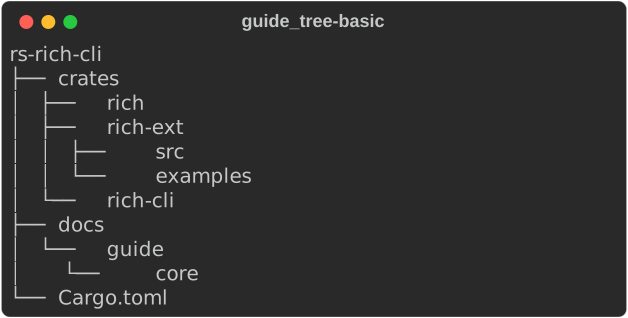
- Chaining
addgoes one level deeper each time:tree.add("docs").add("guide").add("core"). - To add siblings, keep the parent's
&mut Treein a variable and calladdon it repeatedly. Each child borrows the parent mutably, so finish with one branch before starting the next — or build recursively, as below.
Building from data
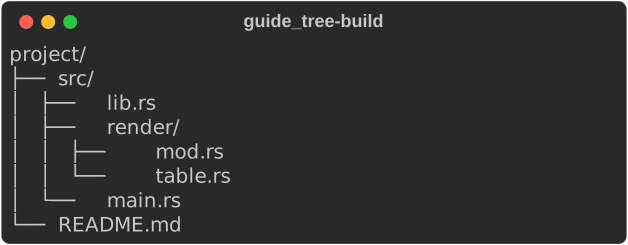
A recursive function that takes &mut Tree maps any nested structure onto a
tree:
/// Anything hierarchical maps onto `add` with a little recursion.
enum Node {
    Dir(&'static str, Vec<Node>),
    File(&'static str),
}

fn attach(parent: &mut Tree, node: &Node) {
    match node {
        Node::File(name) => {
            parent.add(*name);
        }
        Node::Dir(name, children) => {
            let branch = parent.add(format!("{name}/"));
            for child in children {
                attach(branch, child);
            }
        }
    }
}

fn build_from_data(console: &Console) {
    let src = Node::Dir(
        "src",
        vec![
            Node::File("lib.rs"),
            Node::Dir("render", vec![Node::File("mod.rs"), Node::File("table.rs")]),
            Node::File("main.rs"),
        ],
    );
    let mut tree = Tree::new("project/");
    attach(&mut tree, &src);
    attach(&mut tree, &Node::File("README.md"));
    console.print(&tree);
}
Long labels
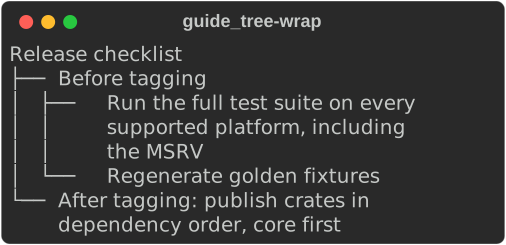
Labels wrap to the available width, and continuation lines keep the guides of their branch:
fn wrapping(console: &Console) {
    let mut tree = Tree::new("Release checklist");
    let checks = tree.add("Before tagging");
    checks.add("Run the full test suite on every supported platform, including the MSRV");
    checks.add("Regenerate golden fixtures");
    tree.add("After tagging: publish crates in dependency order, core first");
    console.print(&tree);
}
Trees inside other renderables
A Tree is a renderable like any other: put it in a panel, a table cell or a
layout region.
fn in_a_panel(console: &Console) {
    let mut tree = Tree::new("services");
    let api = tree.add("api");
    api.add("v1");
    api.add("v2");
    tree.add("worker");

    let panel = Panel::new(Box::new(tree)).title("Deployment");
    console.print(&Constrain::new(Box::new(panel), Some(30)));
}
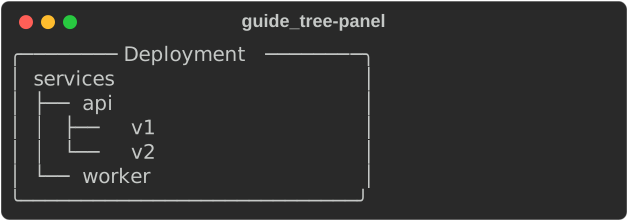
A tree measures its widest label plus its guides (see
measuring), so in a table cell or under
Align::center it takes only the room it needs.
Not yet ported
This port covers upstream's default tree: thin guides, with labels given as
markup strings, Text or renderables. Not yet available:
guide_styleand the bold, double and ASCII guide sets.style,hide_rootandexpanded=False.
See also
- Layout — panels and constraints around a tree
- Tutorial: layout
- API:
Tree