Code and data
Four renderables turn source text and values into readable terminal output:
| Type | Renders | Upstream |
|---|---|---|
Syntax |
source code, highlighted | rich.syntax.Syntax |
Markdown |
a CommonMark document | rich.markdown.Markdown |
Json |
a JSON document, indented and coloured | rich.json.JSON |
Pretty |
any Debug value, highlighted |
rich.pretty.Pretty |
The examples use these imports:
Syntax
fn syntax(console: &Console) {
    // Language by name or file extension: "rust", "rs", "py", "toml", …
    console.print(&Syntax::new(CODE, "rust"));
}
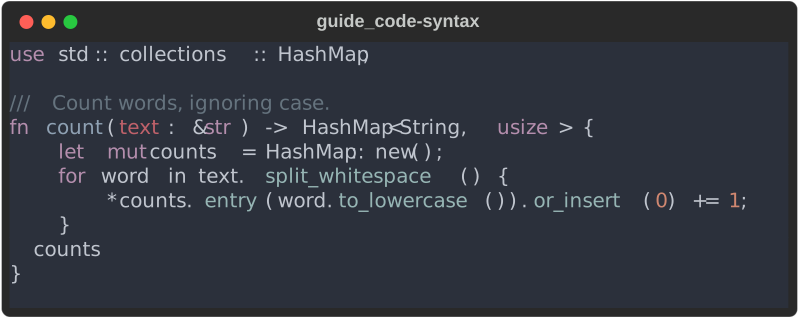
Syntax::new(code, language) takes a language name or file extension
("rust", "rs", "py", "json", "toml", "sh" …). An empty or unknown
language renders the code as plain text on the theme background.
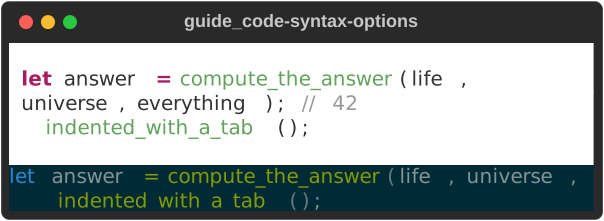
fn syntax_options(console: &Console) {
    let line = "let answer = compute_the_answer(life, universe, everything); // 42";
    let snippet = format!("{line}\n\tindented_with_a_tab();");

    let syntax = Syntax::new(snippet.clone(), "rs")
        .theme("InspiredGitHub") // any syntect theme name
        .padding(1) // background margin on every side
        .tab_size(2) // tabs expand to spaces (default 4)
        .word_wrap(true); // wrap long lines instead of cropping
    console.print(&syntax);

    // The default crops long lines at the width.
    console.print(&Syntax::new(snippet, "rs").theme("Solarized (dark)"));
}
| Method | Default | Effect |
|---|---|---|
theme(name) |
"base16-ocean.dark" |
a syntect theme: base16-ocean.dark, base16-eighties.dark, base16-mocha.dark, base16-ocean.light, InspiredGitHub, Solarized (dark), Solarized (light); unknown names fall back to the default |
word_wrap(bool) |
false |
wrap long lines; off, they are cropped at the width |
padding(n) |
0 |
n cells of background on every side |
tab_size(n) |
4 |
tabs are expanded to spaces before highlighting |
highlight() returns the highlighted code as a Text instead of a padded
block — for embedding in your own layout:
fn highlight_to_text() {
    // Highlight into a Text (no padding or background block), to embed or edit.
    let text = Syntax::new("x = 1", "py").highlight();
    assert_eq!(text.plain(), "x = 1");
    assert!(!text.spans().is_empty());
}
Colours differ from Python rich
Upstream highlights with Pygments; this port uses
syntect, which ships different grammars and
themes. The layout matches; the colours do not
(divergence #18). Pygments style names such as
monokai are not recognised.
Not yet ported
line_numbers, line_range, highlight_lines, start_line,
indent_guides, code_width, background_color, dedent and
Syntax.from_path. To show part of a file, slice the lines before passing
them in; to number lines, a two-column Table::grid() of line numbers and
highlight() output works.
Markdown
fn markdown(console: &Console) {
    let source = r#"# Release notes

Markdown renders **bold**, *italic*, `code` and [links](https://docs.rs/rs-rich).

- bullet lists
  - nested
1. and numbered ones

> Block quotes, too.

| Crate | Lib name |
|-------|---------:|
| rs-rich | `rich` |
| rs-rich-ext | `rich_ext` |

```rust
fn main() { println!("fenced code is highlighted"); }

Headings, paragraphs, emphasis, inline code, links, bullet and numbered lists
(nested), block quotes, horizontal rules, tables with column alignment, and
fenced code blocks (highlighted by `Syntax`) are all rendered, as upstream
does.
```rust
fn markdown_options() -> Markdown {
use rich::{Justify, Style};
Markdown::new("Some *text* with a [link](https://example.com).")
// false: write "text (url)" instead of an OSC 8 hyperlink.
.hyperlinks(false)
.justify(Justify::Full)
.style(Style::parse("grey85").unwrap())
.code_theme("base16-ocean.dark")
// Highlight `inline code` as Rust.
.inline_code_lexer("rust")
}
| Method | Default | Effect |
|---|---|---|
hyperlinks(bool) |
true |
true: link text becomes an OSC 8 hyperlink. false: written as text (url) |
justify(Justify) |
Left |
paragraph justification (headings keep their own) |
style(Style) |
none | base style for all text |
code_theme(name) |
the Syntax default |
theme for fenced code blocks |
inline_code_lexer(lang) |
none | highlight inline code as this language |
inline_code_theme(name) |
the code theme | theme for highlighted inline code |
Hyperlinks off for piped output
An OSC 8 link is only written when the console has colour. With hyperlinks
on, output redirected to a file keeps the link text and loses the URL.
That is why upstream's rich CLI turns them off by default; do the same
when your output may be piped.
Markdown styles come from the theme: markdown.h1, markdown.code,
markdown.link, markdown.block_quote and so on. See
divergence #9 for the few elements that differ.
JSON
fn json(console: &Console) {
    let raw = r#"{"name": "rs-rich", "version": "0.0.7", "tags": ["terminal", "ansi"],
                  "stable": false, "downloads": 1204, "license": null}"#;
    match Json::new(raw) {
        Ok(json) => console.print(&json),
        Err(error) => console.print_str(&format!("[red]invalid JSON:[/] {error}")),
    }
}
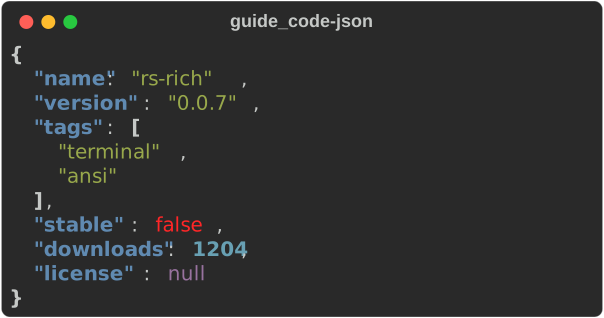
Json::new(text)parses and returnsErrfor invalid JSON. The output is re-indented (two spaces) with keys, strings, numbers, booleans andnullstyled through the theme (json.key,json.str, …)..no_wrap(true)crops long lines instead of wrapping them — what upstream does for aJSONnested inside another renderable. The default wraps, which matches a top-level print.- The
json-escape-safefeature adds.escape_safe(true), which never splits an escape sequence at a line break (divergence #22).
Upstream's indent, sort_keys and ensure_ascii options are not ported;
format with serde_json first if you need them.
Pretty
Python rich pretty-prints any object via its repr. Rust has no runtime
reflection, so Pretty
uses the value's Debug implementation and runs the repr highlighter over it.
#[derive(Debug)]
#[allow(dead_code)]
struct Config {
    name: &'static str,
    width: Option<usize>,
    ratio: f64,
    tags: Vec<&'static str>,
    limits: BTreeMap<&'static str, u32>,
}

fn pretty(console: &Console) {
    let config = Config {
        name: "demo",
        width: Some(80),
        ratio: 0.5,
        tags: vec!["a", "b"],
        limits: BTreeMap::from([("cpu", 4), ("mem", 8)]),
    };
    // {:#?} output, highlighted.
    console.print(&Pretty::new(&config));
    // {:?} on one line.
    console.print(&Pretty::compact(&config.tags));
}
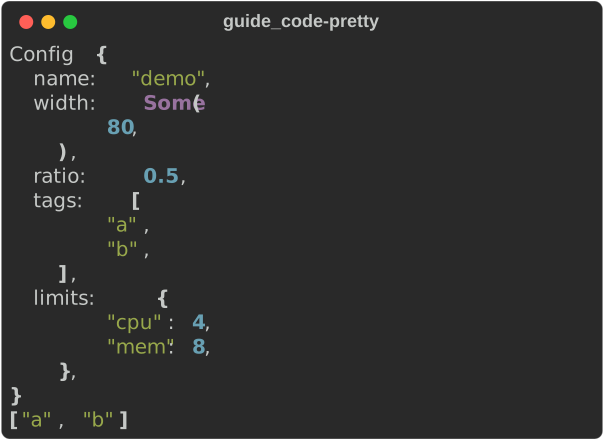
Pretty::new(&value)formats with{:#?}(multi-line);Pretty::compactwith{:?}.- Numbers, strings,
None, paths and URLs are coloured. Rust's lowercasetrue/falseare left plain, since the highlighter targets Python's spelling (divergence #19). - Line breaking is
Debug's, not upstream's width-aware layout:max_length,max_string,max_depthandindent_guidesare not available.
See also
- Text and style — themes that restyle these renderables
- Tables —
Syntax,Markdown,JsonandPrettycan sit in cells - The CLI renders files with these types: Using the CLI
- API:
Syntax·Markdown·Json·Pretty