Explaining ANSI output
Captured terminal output is hard to read: \x1b[1;38;5;208m means nothing at
a glance, and a stray escape can break a log or a test snapshot.
rich_ext::ansi_explain splits text into tokens, describes every escape
sequence in words, and gives the text a terminal would show.
Use it to debug output that looks wrong, to check what a program writes to
a pipe, or to show a readable failure when a snapshot contains escapes.
rich ansi explain is the same thing on the command line.
The examples come from
guide_ansi.rs
(no features needed):
Explain a capture
explain(&str) returns an Explanation: the tokens, each with its byte
offset and len, and the visible_text. ExplanationView renders it as a
table of offset, raw input, kind and meaning, followed by the visible text:
fn show_table(console: &Console) {
    let explanation = explain(CAPTURE);
    // What a terminal would show, with every escape removed.
    assert_eq!(explanation.visible_text, "✔ compiled 3 crates\nlog ");
    // One token per escape, text run or control, with its byte offset.
    for spanned in explanation.escapes() {
        let meaning = spanned.token.meaning();
        eprintln!(
            "{:>3} {:<8} {meaning}",
            spanned.offset,
            spanned.token.kind()
        );
    }
    assert_eq!(explanation.invalid().count(), 1); // the trailing `ESC[`
    console.print(&ExplanationView::new(&explanation));
}
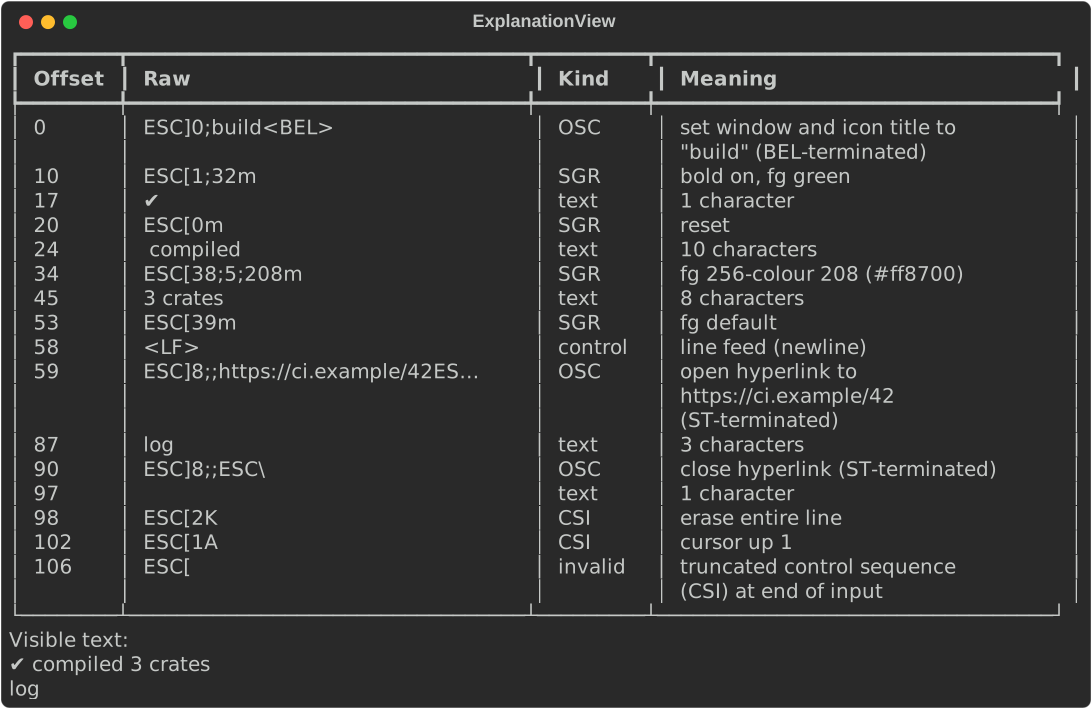
The capture above sets a window title, colours text, opens and closes an OSC
8 hyperlink, erases a line, moves the cursor, and ends with a truncated
escape. The last one is reported as invalid rather than dropped.
What it recognises
| Kind | Examples | Meaning given |
|---|---|---|
SGR |
ESC[1;31m, ESC[38;5;208m, ESC[4:3m |
Each effect: bold, colours (16, 256 with its hex value, and RGB), underline styles and colour, resets |
CSI |
ESC[2K, ESC[1A, ESC[?25l |
Cursor movement, erasing, scrolling, private modes |
OSC |
ESC]0;title BEL, ESC]8;;url ESC\ |
Window titles, hyperlinks, colours and other commands, and whether BEL or ST ended them |
ESC |
ESC 7, ESC ( B |
Plain escape sequences |
DCS, APC, PM, SOS |
Sixel images | Summarised by length; the payload is never dumped |
control |
\n, \t, \r, BEL |
The control's name |
invalid |
A truncated or interrupted sequence | Why it is invalid |
text |
Anything else | Its length in characters |
Both 7-bit (ESC [) and 8-bit C1 introducers (U+009B CSI, U+009D OSC, …)
are recognised. explain_bytes(&[u8]) reads raw bytes: valid UTF-8 is
decoded, lone bytes 0x80–0x9F become the C1 controls they are in 8-bit mode,
and other invalid bytes become U+FFFD. Offsets then refer to the decoded
string.
View options
| Method | Effect |
|---|---|
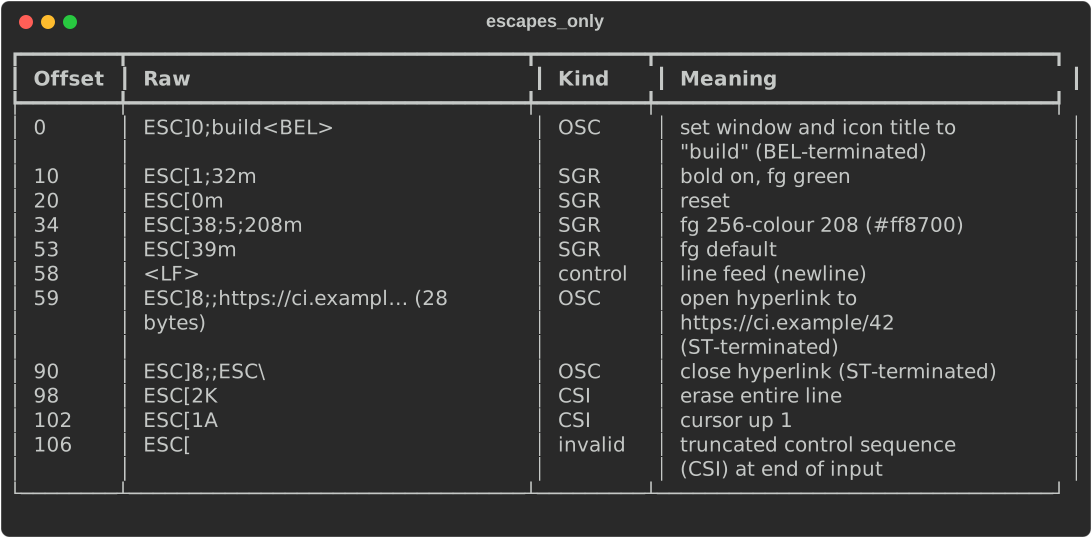
escapes_only(true) |
Leave text runs out of the table |
show_visible(false) |
Leave out the visible text after the table |
raw_width(n) |
Characters of raw input shown per row before eliding (default 40, minimum 8) |
mode(ViewMode::Inline) |
Show the text with ⟨…⟩ markers where the escapes were |
fn show_options(console: &Console) {
    let explanation = explain(CAPTURE);
    // Only escapes, no text rows, no visible text, raw input cut at 24 chars.
    let view = ExplanationView::new(&explanation)
        .escapes_only(true)
        .show_visible(false)
        .raw_width(24);
    console.print(&view);
}
fn show_inline(console: &Console) {
    let explanation = explain(CAPTURE);
    console.print(&ExplanationView::new(&explanation).mode(ViewMode::Inline));
}

inline_text(ascii) returns the inline form as a String. With
ascii = true it uses <…> markers. The view needs no colour to carry its
meaning.
Work with tokens
Token is an enum (Text, Sgr, Csi, Osc, Esc, Dcs, Control,
Invalid) with the parsed parts of each sequence. kind(), raw() and
meaning() work on any token. Explanation::escapes() iterates over
everything except text, and invalid() over the invalid tokens only, which
makes a quick test that output is clean.
fn inspect_tokens() {
    let explanation = explain("\x1b[4:3;58;2;255;0;0mwavy\x1b[0m");
    for spanned in &explanation.tokens {
        if let Token::Sgr {
            params, effects, ..
        } = &spanned.token
        {
            let described: Vec<String> = effects.iter().map(ToString::to_string).collect();
            println!("{params}: {}", described.join(", "));
        }
    }
    // The building blocks are public too.
    let effects = sgr_effects("1;38;5;208");
    assert_eq!(effects[1].code, "38;5;208");
    assert_eq!(escape_visible("\x1b[0m\x07"), "ESC[0m<BEL>");
    // Raw bytes: C1 controls (0x9B is CSI) in non-UTF-8 input are decoded.
    let from_bytes = explain_bytes(b"\x9b31mred\x9b0m");
    assert_eq!(from_bytes.visible_text, "red");
}
The building blocks are public: sgr_effects(params), csi_meaning(params,
intermediates, final), osc_meaning(body), control_name(byte),
escape_visible(raw) and decode_bytes(bytes). With the serde feature an
Explanation serializes, tokens tagged by type.
On the command line
ls --color=always | rich ansi explain
rich ansi explain capture.txt --escapes-only
rich ansi explain capture.txt --ansi-inline
rich ansi explain [FILE|-] (or rich --ansi-explain FILE) prints the
table and the visible text. --escapes-only and --ansi-inline match the
view options above. The escapes are only ever printed as visible text, so
explaining a capture cannot change your terminal's state. See
Using the CLI.
Gotchas
- No cursor emulation.
visible_textis the text runs plus tabs and newlines. A carriage return, backspace or cursor movement does not overwrite anything, so progress-bar captures show every frame. - Offsets are bytes into the input (or into the decoded string for
explain_bytes), not characters or cells.
See also
rich_ext::ansi_explainon docs.rs- Diffs and test reports: compare two ANSI captures, including style-only changes
- Quality assurance: explain why a render lost colour or fell back to ASCII