Live regions and bounded layout
Three ext modules give you strict control over where output goes and how much room it gets:
target:RenderTargetdescribes a destination (a terminal, a plain stream, a capture, HTML, SVG) completely, so rendering never depends on what the process happens to be attached to.layout:LayoutNodesplits a region into rows and columns with min/max/preferred/flex constraints and an explicit overflow policy per cell.Overflowinggives any renderable that overflow policy.live:LiveCoordinatorowns one writer and keeps several updating regions at the bottom of the terminal while ordinary lines print above them.
None needs a feature flag. They sit beside the core's Layout and Live,
which keep upstream's behaviour; reach for these when you need hard bounds or
several live regions.
Why rendering here is deterministic
A plain Console::new() looks at the process: is stdout a terminal, how wide
is it, what colours does it support. That is right for a quick script, and it
is what upstream does. It is wrong for tests, for rendering the same thing to
two places, and for any renderable nested inside another: a nested renderable
cannot know where its output will end up.
So the ext crate separates observing from rendering:
- Observe once, at the edge of your program (
is_terminal(), the terminal size, your--colorflag, orCapabilitiesdetection). - Describe the destination in a
RenderTarget. - Render against the target. Nothing below this point probes the environment, so the same target and input always give the same bytes.
Render targets
/// A destination described in full by the caller: nothing is detected.
fn target(kind: TargetKind, width: usize, height: usize) -> RenderTarget {
    let capabilities = TargetCapabilities {
        width,
        height,
        color_system: Some(ColorSystem::Standard),
        interactive: true,
        unicode: true,
        hyperlinks: true,
        sixel: Support::Unsupported,
    };
    // Policy is applied here: a PlainStream drops colour and links, anything
    // but a Terminal or Custom target is non-interactive.
    RenderTarget::new(kind, capabilities, Theme::default_theme())
}
TargetCapabilities is plain data from the core's protocol module: width,
height, color_system, interactive, unicode, hyperlinks and sixel.
TargetKind then applies a policy on top:
| Kind | Policy |
|---|---|
Terminal |
as described |
Custom |
as described; your writer declares its own capabilities |
PlainStream |
no colour, no links, not interactive |
Capture, Html, Svg |
not interactive (no cursor control, no sixel) |
let mut text = Text::styled("docs", "bold red");
text.stylize(
    rich::Style::new().with_link("https://acme.dev".to_string()),
    0,
    4,
);

for kind in [
    TargetKind::Terminal,
    TargetKind::PlainStream,
    TargetKind::Capture,
] {
    let target = target(kind, 20, 1);
    let interactive = target.capabilities().interactive;
    let out = target.text(&text);
    console.print(&Text::new(format!(
        "{kind:?} (interactive: {interactive}): {out:?}"
    )));
}
// A zero-sized destination renders nothing at all.
assert!(target(TargetKind::Terminal, 0, 1).text(&text).is_empty());

What a target gives you:
target.console(): aConsoleconfigured from the capabilities (width, height, colour,ascii_onlywhen not Unicode, no emoji without Unicode, automatic highlighting off). It carries the target as itsRenderEnvironment, so nested renderables can ask for the capabilities.target.segments(&renderable): rendered segments with the policy applied: control segments dropped when not interactive, links stripped when hyperlinks are off.target.text(&renderable): those segments as a string.target.frame(&renderable): those segments as aFrame, without control segments.- A zero width or height renders nothing, without calling the renderable.
target::resolve_capabilities(observations, overrides) merges what you
observed with explicit overrides and records where each value came from
(Configured, Detected, Inferred, Default), still without reading the
environment itself.
Frames
rich_ext::frame::Frame holds a render as rows of styled runs over one text
buffer, with each style stored once in a StyleTable. It is built from the
segments any renderable already returns (Frame::from_segments, or
target.frame), so no renderable changes.
frame.to_ansi(&console)writes exactly whatconsole.segments_to_stringwrites for the same segments, less control segments: the same bytes upstream writes.frame.to_ansi_merged(&console)joins neighbouring runs of one style first. It writes fewer bytes, but not upstream's, so use it only where byte parity does not matter.frame.plain(),frame.height(),frame.row(i),frame.row_width(i)andframe.width()read the layout without re-splitting text.frame.cells(i)gives one cell per grapheme of rowi, with core's widths; a wide grapheme is followed by a continuation cell.frame.diff(&previous)lists the cells that changed, as column ranges per row, andframe.encode_span(row, columns, …)encodes one such range. Styles compare by value, so the two frames need not share a style table.
Semantic regions
A frame can say what its cells are: which ones a panel, a table, a table
cell, a rule, a Markdown heading or a code block drew. Render with
frame::render_frame(&console, &options, &renderable), or
target.frame_with_regions(&renderable), and read frame.regions():
use rich_ext::frame::{render_frame, role_name};
let frame = render_frame(&console, &console.options(), &panel);
for region in frame.regions() {
let bounds = region.bounds().unwrap();
println!("{}{} at row {}, column {}", " ".repeat(region.depth),
role_name(®ion.role), bounds.row, bounds.column);
}
Each Region has a role (RegionRole::Panel, Table, TableHeader,
TableCell { row, column }, TableFooter, Rule, Heading { level },
Code or Link), an optional label (a panel's or table's title, a
heading's text, a code block's language) and link, its parent and
depth, and spans: the cells it covers, one column range per row. A
region covers its children's cells too, and bounds() is the smallest
rectangle around them. Links need nothing reported: every stretch of text
with an OSC 8 link becomes a Link region.
The regions come from core's renderables, through an opt-in seam
(rich::protocol::RegionSink, recorded here by RegionRecorder). Without a
recorder, which is the default, nothing is reported and output is exactly as
before; with one, the terminal bytes are still the same.
RenderSnapshot::capture_regions stores the regions in a snapshot (schema 3);
schema 1 and 2 snapshots still load and compare.
HTML and SVG from a frame
frame.to_html(&HtmlOptions::default()) and
frame.to_svg(&SvgOptions::default()) export a frame with core's templates
and themes, so a frame without regions exports as Console::export_html and
export_svg do. On top of that:
- links survive:
<a href>in HTML, and an<a>around the text in SVG. Their targets are kept as they are,javascript:included, as upstream'sexport_htmlkeeps them, so drop the links of untrusted text before exporting it (Style::clear_meta_and_linkson each span); - in HTML, each region's cells are wrapped in a
<span class="rich-region rich-ROLE">, nested as the regions are and closed at the end of every row, so the grid is not disturbed. The first wrapper of a region carries its ARIA role (headingwitharia-level,separator,code, orgroupwitharia-roledescriptionfor panels, tables and cells) and its label.HtmlOptions { regions: false, .. }leaves them out; to_html_with(&options, "{code}")returns only the markup, to embed in a page of your own;- in SVG,
SvgOptionscan leave out the window (window: false), draw a cursor and add a caption under the terminal.
rich record draws its SVG screenshots and its HTML page this way. The
differences from core's exporters are listed in
Divergences.
Bounded layouts
A LayoutNode is either a leaf holding a renderable or a split of child nodes
along an Axis. Every node has a width and a height Constraint.
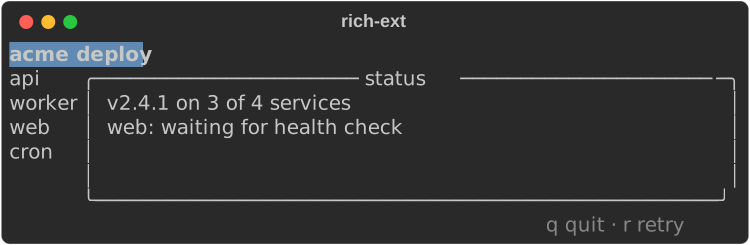
fn dashboard() -> LayoutNode {
    let header = LayoutNode::leaf(Box::new(Text::styled("acme deploy", "bold white on blue")))
        .height(Constraint::fixed(1));
    let sidebar = LayoutNode::leaf(Box::new(Text::new("api\nworker\nweb\ncron")))
        .width(Constraint {
            min: 6,
            max: Some(12),
            ..Constraint::default()
        })
        .content_width(); // as wide as its longest line, within min..=max
    let body = LayoutNode::leaf(Box::new(
        Panel::new(Box::new(Text::new(
            "v2.4.1 on 3 of 4 services\nweb: waiting for health check",
        )))
        .title("status"),
    ));
    let footer = LayoutNode::leaf(Box::new(Text::styled("q quit · r retry", "dim")))
        .height(Constraint::fixed(1))
        .align(Alignment::End, Alignment::Start); // right-aligned

    LayoutNode::split(
        Axis::Vertical,
        vec![
            header,
            LayoutNode::split(Axis::Horizontal, vec![sidebar, body]),
            footer,
        ],
    )
}
let layout = dashboard();
layout.validate().expect("constraints are consistent");
// A layout fills the height it is given: pass one explicitly.
console.print_with(&layout, &console.options().update_dimensions(60, 8));
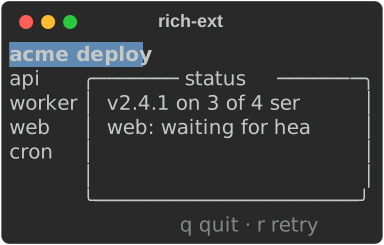
The same layout at 30 columns: the header and footer keep one row, the sidebar keeps its content width, and the panel takes what is left, clipped at its boundary:
Node builders:
| Builder | Effect |
|---|---|
LayoutNode::leaf(Box<dyn Renderable>) |
A cell holding a renderable |
LayoutNode::split(axis, children) |
Columns (Axis::Horizontal) or rows (Axis::Vertical) |
.width(c), .height(c) |
The node's constraint on that axis |
.content_width(), .content_height() |
Prefer the content's natural size (still within min/max) |
.align(horizontal, vertical) |
Alignment::Start, Center or End inside the allocated cell |
.overflow(OverflowPolicy::…) |
How a leaf's lines fit its width (default Fold) |
.validate() |
Check every constraint in the tree |
Gotchas:
- A layout fills the height it is given. Printed plainly it takes the
console's height (the whole terminal); pass a height with
print_with(&layout, &console.options().update_dimensions(w, h)). - Invalid constraints render nothing. Rendering validates the tree and
returns no output on failure; call
validate()yourself to get theConstraintError. - A leaf is rendered with no-wrap and then fitted with the node's overflow
policy. A
Textleaf wraps or folds; aPanelleaf draws its border at the cell size and crops content that is too wide for it. - Every container clips at its boundary, even with
OverflowPolicy::Visible. A cell that gets zero columns or rows skips its children. - Leaves receive their region's height, as in upstream
Layout, so aPanelfills its cell. Use.content_height()for natural height.
Constraints and allocation
A Constraint has four fields:
| Field | Meaning |
|---|---|
min |
Never below this, unless the total is smaller than all minimums |
max |
Never above this (None: unbounded) |
preferred |
A fixed size request (Constraint::fixed(n)); needs flex: 0 |
flex |
Share of leftover space (default 1); needs preferred: None |
layout::allocate(total, &constraints) is the allocator on its own. It
returns an Allocation with the sizes, the padding left over (when
maxima cap growth) and which indexes were relaxed below their request:
let constraints = [
    Constraint::fixed(20), // wants exactly 20
    Constraint {
        min: 10,
        max: Some(30),
        ..Constraint::default()
    }, // flex 1, 10..=30
    Constraint {
        min: 5,
        flex: 2,
        ..Constraint::default()
    }, // flex 2, at least 5
];
let mut table = Table::new();
for heading in ["total", "sizes", "padding", "relaxed"] {
    table.add_column(heading);
}
for total in [100, 60, 30, 12] {
    let a = allocate(total, &constraints).expect("valid constraints");
    table.add_row(&[
        &total.to_string(),
        &format!("{:?}", a.sizes),
        &a.padding.to_string(),
        &format!("{:?}", a.relaxed),
    ]);
}
console.print(&table);
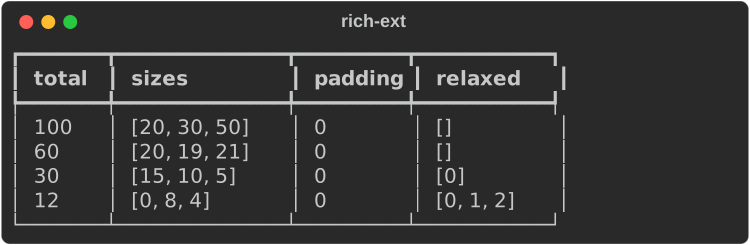
- With room to spare, requests are met and flexible items share the rest by
weight, up to their
max. - Under pressure, requests shrink toward their
min, in proportion to how far above the minimum they were (the30row). - When even the minimums do not fit, sizes are proportional to the minimums
(the
12row). allocatereturnsConstraintError::InvalidBounds,InvalidPreference,InvalidWeightorArithmeticOverflowrather than guessing.
Overflow policies
OverflowPolicy is shared by layouts, events, diagnostics and
Overflowing:
| Policy | Long lines |
|---|---|
Wrap |
wrap at spaces; a word longer than the width is cropped |
Fold |
wrap at spaces; a word longer than the width continues on the next line |
Crop |
cut at the width |
Ellipsis |
cut and end with … |
Visible |
not cut by the node (the container still clips) |
Wide characters are never split. Overflowing::new(renderable, policy)
applies a policy to any renderable. The core's Syntax never wraps its lines
and Json wraps like text; wrapped in Overflowing, both follow the policy
you choose:
let code = "let answer = compute_the_answer(universe, everything, 42);";
for policy in [
    OverflowPolicy::Fold,
    OverflowPolicy::Crop,
    OverflowPolicy::Ellipsis,
] {
    console.print_str(&format!("[dim]{policy:?}[/]"));
    let syntax: Box<dyn Renderable> = Box::new(Syntax::new(code, "rust"));
    console.print(&Overflowing::new(syntax, policy));
}
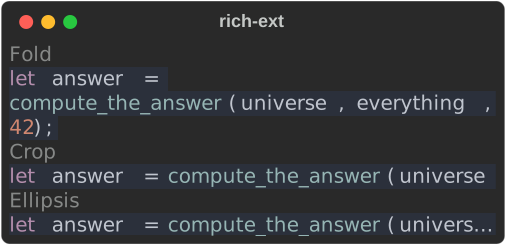
Output that already fits is returned byte for byte as the core renders it.
layout::fit_segments(segments, width, policy) is the same fitting for
segments you produced yourself.
Coordinated live regions
LiveCoordinator keeps a stack of regions at the bottom of an inline
display. You add, update and remove regions, print ordinary lines through the
coordinator, and call refresh when you want the screen redrawn:
fn run_live(target: RenderTarget) -> Result<(), LiveError> {
    let mut live = LiveCoordinator::new(std::io::stdout(), target.clone());

    // Regions are drawn top to bottom, in the order they were added.
    let build = live.add(target.segments(&status("build", "running", "yellow")))?;
    let tests = live.add(target.segments(&status("tests", "queued", "dim")))?;
    live.refresh()?;

    // Ordinary output goes through the coordinator, above the regions.
    live.print(&target.segments(&Text::new("compiled 12 crates")))?;
    live.update(build, target.segments(&status("build", "done", "green")))?; // takes the id by value
    live.update(
        tests.clone(),
        target.segments(&status("tests", "running", "yellow")),
    )?;
    live.refresh()?;

    live.print(&target.segments(&Text::new("148 tests passed")))?;
    live.update(tests, target.segments(&status("tests", "done", "green")))?;
    live.refresh()?;

    // Restores the cursor; on a non-interactive target, writes the final state.
    live.finish()
}
use std::io::IsTerminal;

// Observe the process once, at the edge; everything below is explicit.
let interactive = std::io::stdout().is_terminal();
let kind = if interactive {
    TargetKind::Terminal
} else {
    TargetKind::PlainStream
};
run_live(target(kind, 60, 10)).expect("live output");
A frame from the middle of that run: the printed line has scrolled up and both regions sit below it.

How it behaves:
- One writer. The coordinator owns the writer. Print through
live.print(…)(orlive.handle().print(…)), never withConsole::printor anotherLiveon the same stream, or the display tears. - Explicit refresh.
addandupdateonly record content;refreshredraws only what changed: within a row whose length in rows is unchanged, it moves to each changed run of cells and rewrites just those, falling back to rewriting the whole row when that is shorter. A one-digit countdown tick writes the digit, not the line.printclears the regions, writes the lines, and repaints. - Opaque ids.
addreturns aRegionId.updateandremovetake it by value, so clone it to use it again. An id from another coordinator is rejected withLiveError::InvalidRegion. - Safe viewport. Regions get
width - 1columns andheight - 1rows: one guard column avoids terminal auto-wrap and one row is left for insertion. Region rows are cropped, printed lines are folded. - Plain content only. Content with control segments, control characters
(other than newline and tab) in its text, or any control character in a
style's link is rejected with
LiveError::UnsupportedControl. - Non-interactive targets. With
interactive: false(aPlainStream, say) nothing is repainted: printed lines are written as they come andfinishwrites the regions' final state once, every row of it whatever the target's height, so logs stay readable. - Resize.
resize(width, height)updates the viewport and repaints; rerender your region content for the new width yourself. Interactivity and the writer are fixed for the coordinator's lifetime: finish it and create a new one to switch. - Cleanup.
finishclears the regions, shows the cursor again and reports I/O errors.Dropdoes the same on a best-effort basis, including during unwinding, but nothing can run afterSIGKILLor an abort.
Run the example
The layout and live_regions examples in crates/rich-ext/examples are
smaller versions; live_regions -- --script drives a coordinator from stdin.
See also
- Progress and live output and
Layout in the tutorial: the core
Live,ProgressandLayout. - Capabilities: detect what a terminal supports, with provenance, before building a target.
- QA: screenshots, stress tests and fuzzing, all rendered through explicit targets.
- Logging and Diagnostics: the other users of
OverflowPolicy. - API:
target,layout,live,TargetCapabilities.