Tables
Table lays
out rows and columns inside a box. Columns size themselves to their content,
wrap when the terminal is too narrow, and can be justified, styled, fixed or
flexed. Use a table for anything with rows — and, with Table::grid(), for
aligning things side by side without borders.
The examples use these imports:
use rich::r#box::{DOUBLE_EDGE, ROUNDED, SIMPLE_HEAD, SQUARE};
use rich::{Cell, ColumnOptions, Console, Justify, Overflow, ProgressBar, Style, Table, Text};
A first table
Add columns, then rows. A row is a slice of strings, one per column.
fn basic(console: &Console) {
    let mut table = Table::new()
        .title("Star Wars Movies")
        .caption("Box office, USD");

    table.add_column("Released");
    table.add_column("Title");
    table.add_column_justify("Box Office", Justify::Right);

    table.add_row(&["Dec 20, 2019", "The Rise of Skywalker", "$952,110,690"]);
    table.add_row(&["May 25, 2018", "Solo", "$393,151,347"]);
    table.add_row(&["Dec 15, 2017", "The Last Jedi", "$1,332,539,889"]);

    console.print(&table);
}
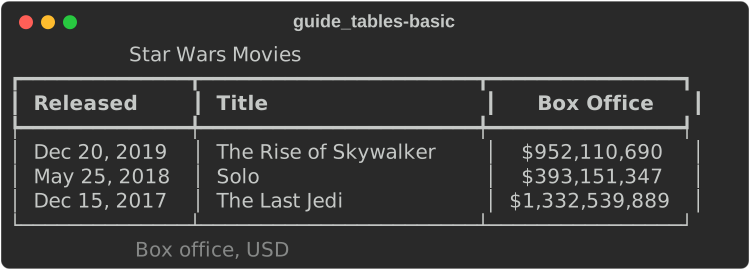
titlesits above the table andcaptionbelow, both centred. Both are console markup.- Missing cells render empty; extra cells are ignored.
- The default box is
HEAVY_HEAD, the header is bold, and cells have one space of padding left and right — upstream's defaults.
Strings are markup: use Text cells for data
As upstream does, add_row(&["[b]x[/b]"]) renders x in bold, and so do
headers passed to add_column and any Cell::from("…") (or .into())
from a &str or String. Cells are parsed when the table renders, with
emoji codes and highlighting where the table or column enables it. The
compiler cannot tell data from markup, so a model name, a column name, a
file name or user input that contains [ can restyle, hide or link the
rest of the cell, or fail to render.
For data you do not control, pass a Text, as upstream's
add_row(Text(name)) does. A Text is never parsed:
add_row_text(vec![Text::new(name), Text::new(value)]): a row shown exactly as given;Cell::from(Text::new(name)): one literal cell, foradd_row_cellsandadd_row_with;add_column_textfor a literal header.
rich::markup::escape also works, but it is easy to forget on one of
many cells.
Columns
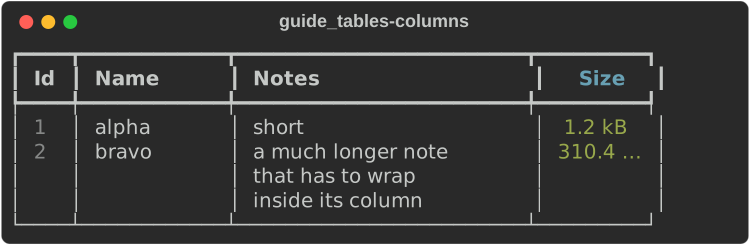
Every add_column* call returns &mut Table, and the column_* setters
change the most recently added column, so you configure a column by
chaining onto the call that created it. add_column_with takes everything at
once in a
ColumnOptions,
the equivalent of upstream's add_column(header, **kwargs).
fn column_options(console: &Console) {
    let mut table = Table::new();

    // Chain column_* setters after add_column; they modify the last column.
    table
        .add_column("Id")
        .column_style(Style::parse("dim").unwrap());
    table.add_column("Name").column_min_width(10);
    table
        .add_column("Notes")
        .column_max_width(22)
        .column_overflow(Overflow::Fold);

    // Or set everything at once, as upstream's add_column(**kwargs).
    table.add_column_with(
        Text::styled("Size", "bold cyan"),
        ColumnOptions {
            justify: Justify::Right,
            width: Some(7),
            no_wrap: true,
            style: Style::parse("green").unwrap(),
            ..ColumnOptions::default()
        },
    );

    table.add_row(&["1", "alpha", "short", "1.2 kB"]);
    table.add_row(&[
        "2",
        "bravo",
        "a much longer note that has to wrap inside its column",
        "310.4 MB",
    ]);
    console.print(&table);
}
| Setter | ColumnOptions field |
Effect |
|---|---|---|
add_column_justify(h, j) |
justify |
Left (default), Center, Right, Full |
column_width(n) |
width |
a fixed content width |
column_min_width(n) |
min_width |
never narrower than n |
column_max_width(n) |
max_width |
never wider than n; longer content wraps |
column_ratio(n) |
ratio |
share of the spare width when the table expands |
column_no_wrap() |
no_wrap |
one line per cell; over-long text is cut |
column_overflow(o) |
overflow |
Ellipsis (default for cells), Fold, Crop |
column_style(s) |
style |
style of the body cells |
column_header_style(s) |
— | style of the header text |
column_header_fill(s) |
— | style of the whole header cell, padding included |
add_column_text(Text, Justify) takes a styled header.
Sizing and expand
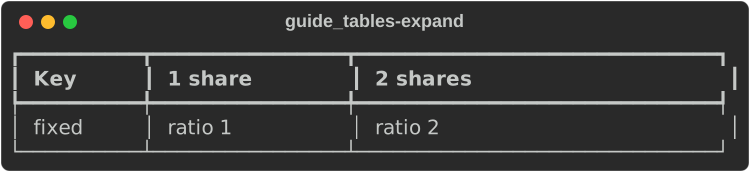
Without expand, a table is as wide as its content needs, up to the console
width; past that, columns shrink and their cells wrap. With .expand(true) it
fills the width, and the spare space goes to the columns with a ratio, in
proportion:
fn expand(console: &Console) {
    // expand(true) fills the width; ratio columns share the spare space.
    let mut table = Table::new().expand(true);
    table.add_column("Key").column_width(8);
    table.add_column("1 share").column_ratio(1);
    table.add_column("2 shares").column_ratio(2);
    table.add_row(&["fixed", "ratio 1", "ratio 2"]);
    console.print(&table);
}
Styling
fn styling(console: &Console) {
    let mut table = Table::new()
        .box_set(ROUNDED)
        .border_style(Style::parse("bright_blue").unwrap())
        .show_lines(true) // a rule between every row
        .title("[b]Deploys[/b] :rocket:"); // titles are markup

    table.add_column("Service");
    table
        .add_column("State")
        .column_header_style(Style::parse("magenta").unwrap());
    table
        .add_column_justify("Latency", Justify::Right)
        .column_header_fill(Style::parse("on grey23").unwrap());

    // Styled cells: build a Text (markup, or spans) per cell.
    let cell = |markup: &str| Text::from_markup(markup).unwrap();
    table.add_row_text(vec![cell("api"), cell("[green]up[/]"), cell("12 ms")]);
    table.add_row_text(vec![
        cell("worker"),
        cell("[yellow]degraded[/]"),
        cell("840 ms"),
    ]);
    table.add_row_text(vec![cell("billing"), cell("[bold red]down[/]"), cell("—")]);
    console.print(&table);
}
| Table method | Effect |
|---|---|
box_set(BOX) |
the border characters — see the box gallery |
border_style(s) |
style of the border and dividers |
style(s) |
base style of the whole table (the border sits on top of it) |
show_lines(true) |
a separator between every row |
show_header(false) |
no header row |
show_edge(false) |
no outer border |
pad_edge(false) |
no padding on the outer sides of the first and last column |
padding(top, right, bottom, left) |
cell padding (default 0, 1, 0, 1) |
collapse_padding(true) |
adjacent cells share their padding |
expand(true) |
fill the width |
title(markup), caption(markup) |
text above and below |
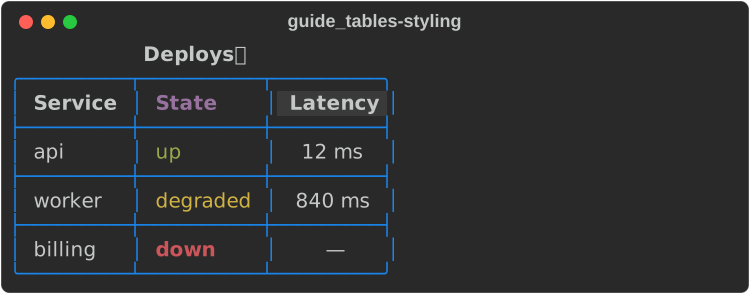
add_row_text(Vec<Text>) takes one styled Text per cell. A cell's own
justify, overflow and no_wrap override the column's.
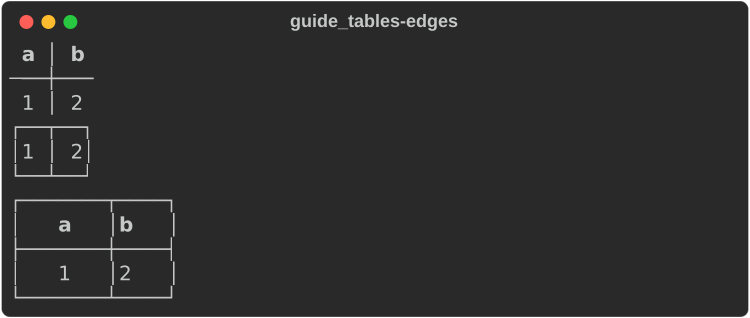
The edge and padding options side by side:
fn edges(console: &Console) {
    let build = || {
        let mut t = Table::new().box_set(SQUARE);
        t.add_column("a");
        t.add_column("b");
        t.add_row(&["1", "2"]);
        t
    };
    console.print(&build().show_edge(false));
    console.print(&build().show_header(false).pad_edge(false));
    console.print(&build().padding(0, 3, 0, 3).collapse_padding(true));
}
Renderables in cells
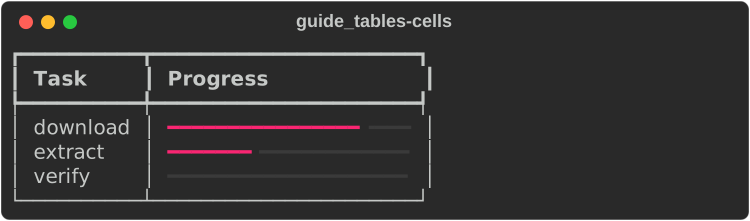
A cell can hold any renderable that is Send + Sync: another table, a
ProgressBar, a Syntax block, your own type. Wrap it in
Cell::Renderable(Arc::new(…)) and add the row with add_row_cells;
Cell::from("text") and Cell::from(text) make ordinary cells.
fn rich_cells(console: &Console) {
    let mut table = Table::new();
    table.add_column("Task");
    table.add_column("Progress").column_width(20);

    for (name, done) in [("download", 80.0), ("extract", 35.0), ("verify", 0.0)] {
        table.add_row_cells(vec![
            Cell::from(name),
            // Any Send + Sync renderable can be a cell.
            Cell::Renderable(Arc::new(ProgressBar::new(100.0, done))),
        ]);
    }
    console.print(&table);
}
Nested tables
fn nested(console: &Console) {
    let mut inner = Table::new().box_set(SIMPLE_HEAD);
    inner.add_column("k");
    inner.add_column("v");
    inner.add_row(&["cpu", "4"]);
    inner.add_row(&["mem", "8 GB"]);

    let mut outer = Table::new().box_set(DOUBLE_EDGE);
    outer.add_column("Host");
    // A nested table asks for the full width, so pin the column.
    outer.add_column("Resources").column_width(16);
    outer.add_row_cells(vec![Cell::from("web-1"), Cell::Renderable(Arc::new(inner))]);
    console.print(&outer);
}
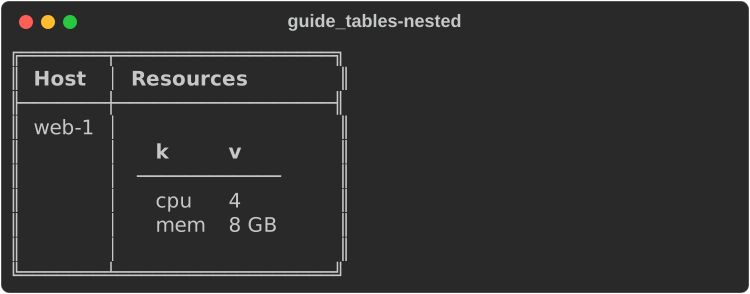
A cell's width comes from measuring its content, and a nested Table,
Tree or Padding measures by its own content, as upstream's do. A Panel
fills the width it is given unless it is built with Panel::fit.
Not every renderable can be a cell
Cell::Renderable needs Send + Sync. Panel, Padding, Align,
Constrain, Styled and Layout hold a plain Box<dyn Renderable> and
are neither, so they cannot go in a cell. Table, Text, Tree,
Columns, Rule, ProgressBar, Syntax, Markdown, Json and Pretty
can.
Grids
Table::grid() is a table with no box, no header, no edge and no padding —
a tool for aligning things in columns:
fn grid(console: &Console) {
    // No borders, no header, no padding: a layout tool.
    let mut grid = Table::grid().expand(true);
    grid.add_column("");
    grid.add_column_justify("", Justify::Right);
    grid.add_row_text(vec![
        Text::styled("rs-rich", "bold"),
        Text::styled("v0.0.7", "dim"),
    ]);
    grid.add_row(&["left-aligned", "right-aligned"]);
    console.print(&grid);
}

Add .padding(0, 1, 0, 0) for a gap between columns. Grids are how the
progress display and log records are laid out internally.
Box styles
Pass any constant from
rich::r#box to
box_set. HEAVY_HEAD is the default; ROUNDED and SIMPLE_HEAD are common
choices; MARKDOWN produces a Markdown table.
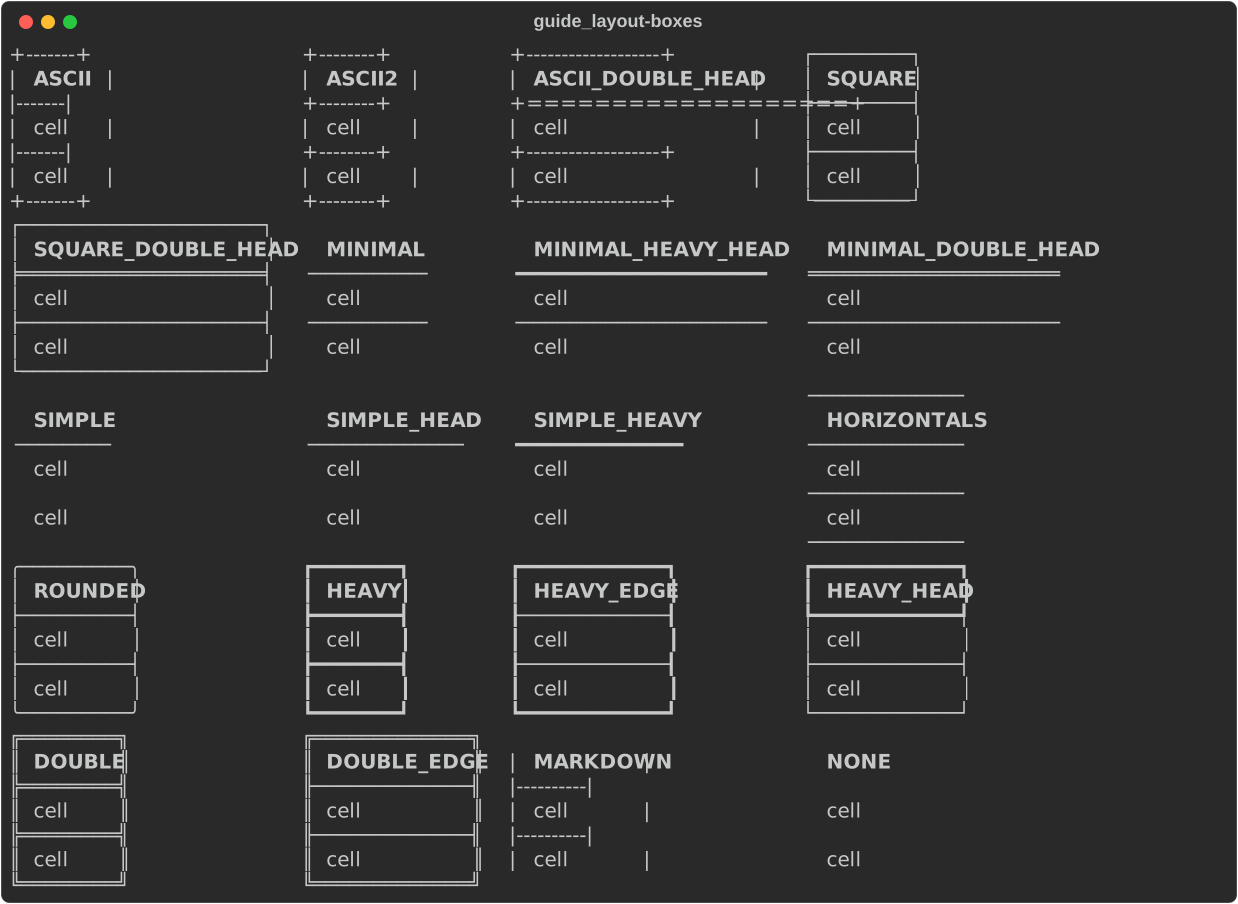
On a legacy Windows console the fancy boxes fall back to SQUARE, and with
Console::builder().ascii_only(true) every box is drawn in ASCII.
Not yet ported
- Footers (
show_footer,Column.footer). - Alternating row styles (
row_styles), per-rowstyle/end_section, andadd_section. title_style,caption_style,title_justify,caption_justify,header_styleon the table,min_width/widthon the table.
See also
- Layout — panels, columns and alignment around tables
- Tutorial: tables
- API:
Table·ColumnOptions·Cell·box