The rich command
rich renders files that are hard to read raw — Markdown, JSON, CSV, source
code, Jupyter notebooks, logs, YAML — as formatted, coloured terminal output.
It can also compare files and images, decode escape sequences, convert whole
folders to HTML or SVG, and gate a CI job on a threshold.
It is a Rust port of Python's rich-cli
built on this repository's port of rich. It starts in a few milliseconds and
has no Python dependency.
Install
The package is rs-rich-cli; the binary is rich. Five default Cargo
features can be turned off for a smaller, network-free binary:
| Feature | Adds |
|---|---|
fetch |
http(s):// URLs as input |
art |
images, GIFs and image diffs (rich image, rich gif, rich diff a.png b.png), and micro assets (rich micro) |
mermaid |
rich mermaid and ```mermaid fences, drawn as text |
record |
rich record: scripted terminal recordings |
interact |
the interactive commands (rich choose, filter, input, confirm, pager, write, file, color, asset, explore) |
rich chart, rich dot, rich deps and rich schema are in every build.
lumis, mmdc, dylib-plugins and wasm-plugins are off by default; the
crate README
lists what each adds.
cargo install rs-rich-cli --no-default-features   # text only, no network
rich doctor                                       # shows which features a binary has
The mental model
Every rendering command has the same four parts:
- RESOURCE — what to render: a file path, an
http(s)URL, or-for standard input. Withprintandruleit is the text itself. - Render mode — how to read it. Without one,
richpicks from the file extension:.md,.json,.csv/.tsvand.ipynbget their own renderer (.mmd/.mermaidand.dot/.gvare drawn as diagrams), and any other extension is syntax-highlighted. Choose one with a subcommand (rich json data.txt) or the equivalent flag (rich --json data.txt). - Decoration and export — options that work on any mode's output:
--width,--left/--center/--right,--panel,--padding,--title,--caption,--style, and--export-html/--export-svgto also write the output to a file. - Configuration — defaults from a
rich.tomlin the current directory or~/.config/rich/config.toml, a named--profile, and named--themes. Explicit flags always win.
Rendered output goes to stdout and diagnostics to stderr, so pipes and
redirects stay clean. Colour turns off automatically when stdout is not a
terminal, and with NO_COLOR or --no-color.
Upstream and additions
The port tracks upstream rich-cli 1.8.1 for the features it mirrors: the
flat mode flags (-p, -m, --rst, -j, -x, --csv, --ipynb, --rule), width
and justification, panels and padding, stdin, URL fetching, HTML/SVG export
and --pager.
On top of that it adds, without changing the mirrored behaviour:
- subcommands (
rich markdown FILE) alongside the flags; - new modes: JSON Lines and logs,
inspectfor structured data, text and patch diffs, perceptual image diffs, still images and GIFs,ansi explain, and the viewersview,hex,unicode,envandcapture; - charts and diagrams:
chart,mermaid,dot,depsandschema; - interactive commands for scripts (
choose,filter,input,confirm,pager,write,file,color,asset) andexplore; - micro assets (
micro), terminal recordings (record) andplugins; - workflow features:
--watch,--batch, config profiles and themes,--report json, stable exit codes,doctor,bench compare, generated completions and man pages, and a guided--demo.
The module status page records exactly which parts are upstream and which are additions.
Every command and mode
| Command | Flag | Purpose | Tour |
|---|---|---|---|
rich FILE |
— | Auto-detect the mode from the extension | Rendering files |
print |
-p, --print |
Render the RESOURCE as console markup text | Markup |
markdown, md |
-m, --markdown |
Render Markdown | Rendering files |
rst |
--rst |
Render reStructuredText | Command-line guide |
syntax, code |
-x, --syntax |
Syntax-highlight source code | Rendering files |
json |
-j, --json |
Pretty-print JSON | Rendering files |
csv, tsv |
--csv |
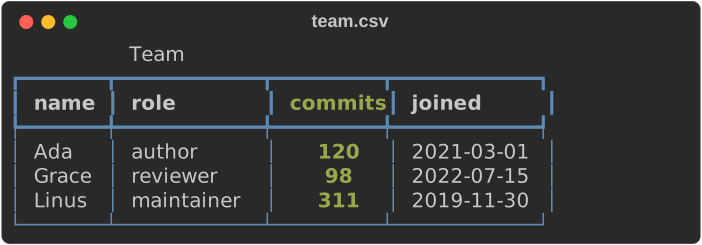
Render CSV/TSV as a table | Rendering files |
ipynb, notebook |
--ipynb |
Render a Jupyter notebook | Rendering files |
jsonl, ndjson |
--jsonl |
Stream JSON Lines records | Streams |
log, logs |
--log |
Stream structured-log records as log lines | Streams |
rule |
--rule |
Draw a horizontal rule with a title | Markup |
inspect |
--inspect |
Explore JSON, YAML, TOML, XML, INI or dotenv as a tree | Structured data |
| — | --format auto |
Detect the format of piped or extensionless input | Piped input |
diff |
--diff |
Compare two text files, render a patch, or compare two images | Diffs |
image |
--image |
Draw a still image | Images |
gif |
--gif |
Play animated GIFs | Images |
ansi explain |
--ansi-explain |
List and decode escape sequences in a capture | Escape sequences |
view |
— | Show any file: rendered, numbered and highlighted, or as hex; paged and searchable | Viewers |
hex, hexdump |
— | Hex dump with offsets, byte groups and an ASCII panel | Viewers |
unicode |
— | Graphemes, code points, UTF-8 bytes, widths and invalid sequences | Viewers |
env |
— | Environment variables, with secret-named values and credentials inside values masked (best effort); PATH entries checked | Viewers |
capture |
— | Run a command and show, export or record its output | Viewers |
chart |
— | Draw CSV, JSON or stdin as a sparkline, bars, lines, points or a heatmap | Charts |
mermaid, mmd |
— | Draw a Mermaid flowchart as text | From Mermaid |
dot, graphviz |
— | Draw a DOT (Graphviz) graph as text | Diagrams |
deps |
— | A Cargo dependency tree or graph; --why CRATE; feature, build-time, advisory and licence reports |
Dependency graphs, supply-chain reports |
schema |
— | A JSON Schema as a tree, or what changed between two | JSON Schemas |
choose, filter, input, confirm, pager |
— | Ask in a script: answer on stdout, exit 1 when cancelled | Ask in a script |
write, file, color, asset |
— | A text area, a file, colour or asset picker | Ask in a script |
explore |
— | Explore JSON, YAML, TOML, XML, INI or .env interactively |
Explore it interactively |
micro |
— | List, preview, add and create micro assets | Micro assets in the CLI |
record |
— | Run a tape and write screenshots, a cast, a GIF or an MP4 | Terminal recordings |
plugins |
— | List the built-in, linked and loaded plugins | Plugins |
| — | --watch |
Re-render files as they change | Watch |
| — | --batch |
Convert many files to HTML/SVG | Batch |
| — | --pager, --auto-pager |
Page long output | Paging |
config show, validate, explain, reference |
— | Inspect and validate configuration | Configuration |
completions |
— | Print a bash, zsh, fish or PowerShell completion script | Completions |
docs markdown, man, config |
— | Generate reference docs and man pages | Completions |
doctor |
— | Show build features, terminal capabilities, config and pager | Doctor |
bench compare |
— | Compare two benchmark runs; exit 5 on regression | Benchmarks |
| — | --report json |
Machine-readable result on stderr | Scripts and CI |
| — | --demo |
A guided tour of everything | Demo |
Exit codes
| Code | Meaning |
|---|---|
0 |
Success |
1 |
An interactive command was cancelled, or rich confirm was answered no |
2 |
Usage or configuration error |
3 |
Input, read or write error |
4 |
Parse or render error in the data |
5 |
A threshold or gate failed (diff --threshold, bench compare, a vulnerability in deps --audit) |
130 |
A batch, or an interactive command, was interrupted with Ctrl+C |
rich capture is the exception: it exits with the captured command's own
status, or 128 plus the signal number when a signal ended it.
Where to go next
- Walkthrough — a hands-on tour of every command with real output.
- Smoke test — check a build of the binary end to end.
- Using the CLI — task-oriented reference with every detail.
- CLI reference — every option, generated from
--help. - Workflow recipes and Troubleshooting.