Exporting
Anything you can print you can also save: as plain text, as an HTML page, or as an SVG picture of a terminal window. Exports are self-contained — no external CSS, fonts or images — and deterministic, so they diff cleanly and work as test fixtures.
The examples use these imports and this small report:
use rich::r#box::ROUNDED;
use rich::{
    export, svg, ColorSystem, Console, Justify, Table, DEFAULT_TERMINAL_THEME, MONOKAI,
    NIGHT_OWLISH, SVG_EXPORT_THEME,
};
fn report(console: &Console) {
    console.print_str("[bold]Build report[/] :package:");
    let mut table = Table::new().box_set(ROUNDED);
    table.add_column("Crate");
    table.add_column_justify("Tests", Justify::Right);
    table.add_column("Result");
    table.add_row(&["rs-rich", "312", "pass"]);
    table.add_row(&["rs-rich-ext", "187", "pass"]);
    console.print(&table);
    console.print_str("[green]✓[/] all green in [bold]41[/] s");
}
Exporting a render
Each export method takes a closure, runs it with output recorded instead of written, and returns the document:
fn exports(out: &Path) -> std::io::Result<()> {
    // Pin the console so the export does not depend on the terminal.
    let console = Console::builder()
        .width(60)
        .force_terminal(true)
        .color_system(Some(ColorSystem::Truecolor))
        .build();

    // Each export renders the closure, records it, and returns a document.
    // Nothing is written to the terminal.
    let text = console.export_text(report); // plain text
    let html = console.export_html(report); // inline style="…" spans
    let html_classes = console.export_html_classes(report); // <style> + classes
    let svg = console.export_svg("Build report", "build-report", report);

    std::fs::write(out.join("report.txt"), &text)?;
    std::fs::write(out.join("report.html"), &html)?;
    std::fs::write(out.join("report-classes.html"), &html_classes)?;
    std::fs::write(out.join("report.svg"), &svg)?;

    assert!(text.starts_with("Build report"));
    assert!(html.contains("<pre"));
    assert!(svg.starts_with("<svg"));
    Ok(())
}
| Method | Produces | Upstream |
|---|---|---|
export_text(f) |
plain text, styles stripped | export_text() |
capture(f) |
the ANSI text a terminal would receive | capture() |
export_html(f) |
HTML with inline style="…" on each span |
export_html(inline_styles=True) |
export_html_classes(f) |
HTML with a <style> block and .r1, .r2 … classes |
export_html() |
export_svg(title, unique_id, f) |
an SVG of a terminal window with title in its title bar |
export_svg(title=…, unique_id=…) |
Pin the console first
An export captures whatever the console renders at the console's width
and with its theme. Styles are kept even when stdout is piped (HTML and
SVG do not depend on the colour system), but the width does depend on the
terminal. Build the console with an explicit width — plus
force_terminal(true) and a colour system if you also compare capture
output — so the file is the same wherever the program runs.
unique_id is required
SVG class names and ids are prefixed with unique_id, so several SVGs can
share one HTML page. Upstream derives a default by hashing Python repr()
output, which Rust cannot reproduce, so here you pass it. Given the same id
and the same render, the bytes are identical to upstream's
(divergence #15).
Terminal themes
Styles name abstract colours ("red", "the default foreground"). A
TerminalTheme
decides what RGB those become in the exported file. Every export has a
_themed variant:
fn themed(out: &Path) -> std::io::Result<()> {
    let console = Console::builder().width(60).build();

    // Choose the palette the abstract colours map to.
    let dark_html = console.export_html_themed(&MONOKAI, report);
    let light_svg = console.export_svg_themed(&DEFAULT_TERMINAL_THEME, "Report", "light", report);

    std::fs::write(out.join("report-monokai.html"), dark_html)?;
    std::fs::write(out.join("report-light.svg"), light_svg)?;
    Ok(())
}
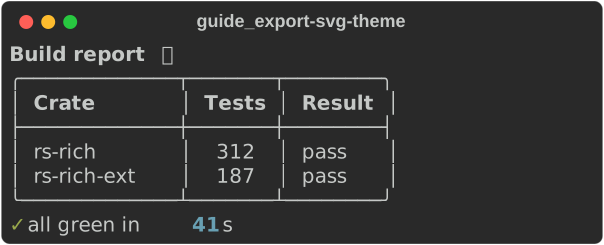
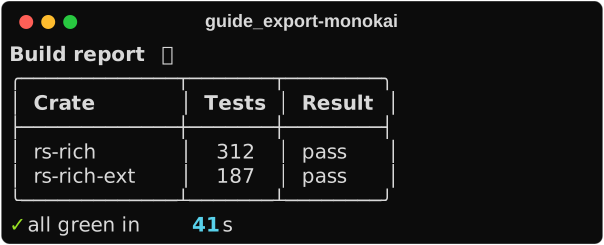
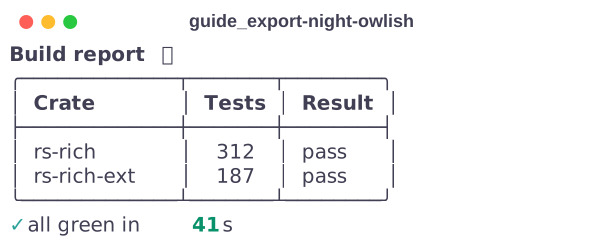
The same report under three of the bundled palettes:
| Theme | Default for |
|---|---|
SVG_EXPORT_THEME |
export_svg |
DEFAULT_TERMINAL_THEME |
export_html (black on white) |
MONOKAI, DIMMED_MONOKAI, NIGHT_OWLISH |
— |
A TerminalTheme is a plain struct (background, foreground, and the 16
ansi colours as ColorTriplets), so you can define your own. Truecolor and
256-colour styles are exported as-is; only the 16 standard colours and the
defaults go through the theme.
Render once, export many
The closure-based methods render once per call. To produce the terminal output and several files from a single render — which matters when the render consumes something, like standard input — record the segments and export them yourself:
fn record_once(out: &Path) -> std::io::Result<()> {
    let console = Console::builder()
        .width(60)
        .force_terminal(true)
        .color_system(Some(ColorSystem::Truecolor))
        .build();

    // Render once, keep the segments, produce every format from them.
    let segments = console.record_output(report);

    let ansi = console.segments_to_string(&segments); // what the terminal gets
    let html = export::export_html_classes(&segments, &DEFAULT_TERMINAL_THEME);
    let image = svg::export_svg(
        &segments,
        &SVG_EXPORT_THEME,
        "Report",
        "rpt",
        console.width(),
    );

    print!("{ansi}"); // show it, too
    std::fs::write(out.join("once.html"), html)?;
    std::fs::write(out.join("once.svg"), image)?;
    Ok(())
}
export::export_html_inline,
export::export_html_classes
and svg::export_svg
take the segments directly. This is upstream's Console(record=True) plus
save_html(clear=False), with the buffer handed to you instead of kept on the
console. It is also how rich --export-html … --export-svg … works in the
CLI.
How the guide's screenshots are made
Every picture in this guide is an export_svg of the example program that
contains the snippet next to it. Each program takes an optional
--svg DIR; with it, each "shot" is rendered on a pinned console:
/// A console that renders the same bytes on every machine.
fn pinned_builder(width: usize) -> ConsoleBuilder {
    Console::builder()
        .width(width)
        .force_terminal(true)
        .color_system(Some(ColorSystem::Truecolor))
        .no_color(false) // ignore NO_COLOR in the environment
}
and written to DIR/guide_<topic>-<shot>.svg, with the file name as the
unique id so a regenerated image only changes when the rendering does:
/// Render `f` on `console` and write it to `dir/<stem>.svg`.
fn export_shot(dir: &Path, stem: &str, console: &Console, f: impl FnOnce(&Console)) {
    // The stem doubles as the SVG's unique id: same input, same bytes.
    let svg = console.export_svg(stem, stem, f);
    let path = dir.join(format!("{stem}.svg"));
    std::fs::write(&path, svg).expect("write the screenshot");
    eprintln!("wrote {}", path.display());
}
Regenerate them all with:
for ex in console text tables layout tree progress code logging prompts export; do
    cargo run -p rs-rich --example guide_$ex -- --svg docs/media/guide
done
Not yet ported
save_text,save_html,save_svg— write the returned string withstd::fs::write.export_html(code_format=…)andexport_svg(code_format=…)custom templates, and the SVGfont_aspect_ratiooption.
See also
- Console and printing — capture and record
- Tutorial: the CLI's exports
- API:
Console::export_svg·export·svg·terminal_theme