Extensions
rs-rich-ext is where everything that is not in Python rich lives:
semantic styles, extra highlighters, hyperlinks, diagnostics, logging, macros
and more. This page covers the pieces every other ext feature builds on: the
extension registry, the extended theme, highlighters, hyperlinks and the
input-safety helpers.
The packages are rs-rich and rs-rich-ext; the use lines are rich and
rich_ext.
Why a separate crate
rs-rich (the core) is a faithful mirror of upstream rich: its default
behaviour matches the Python library, and golden tests check covered output
byte for byte. That is what lets the port absorb a new upstream release as a
diff instead of a merge.
So the rule is: the core never learns about our features. Our additions
live in rs-rich-ext and reach the core only through its public API and a few
extension-point traits (Renderable, Highlighter, RenderEnvironment).
The dependency only goes one way:
In practice this means:
- A plain
rich::Consolebehaves like Pythonrich. Nothing in this crate changes it until you opt in. - Opting in is explicit: install extensions onto a console, pass a theme, wrap a renderable. There is no global state and no auto-discovery.
- Anything here renders through ordinary core types, so it mixes freely with
Table,Panel,Textand the rest.
See Extending for the design and the roadmap to a public plugin API.
Installing the default extensions
ConsoleExt::install_extensions registers this crate's default extensions on a
console. Today that is NumberHighlighter, which styles every run of ASCII
digits, including ones inside words that core's ReprHighlighter leaves
alone:
let line = "build42 finished: 3 crates, x86_64, 12 warnings";

let core = Console::new();
let mut with_ext = Console::new();
with_ext.install_extensions(); // registers NumberHighlighter

// `build_text` applies a console's markup and highlighters.
console.print(&core.build_text(line));
console.print(&with_ext.build_text(line));

The first line is the core alone: 3 and 12 are numbers to
ReprHighlighter, but build42 and x86_64 are not. The second line adds the
ext highlighter.
In an application you would normally write:
use rich::Console;
use rich_ext::ConsoleExt;

let mut console = Console::new();
console.install_extensions();
console.print_str("build42 finished");
Highlighters only run on markup strings
Registered highlighters run in print_str, render_str_to_string and
build_text: the paths that parse console markup. Printing a Text,
Table or other renderable with print does not re-highlight it.
The extension registry
ExtensionRegistry holds factories, not instances. install calls each
factory and adds the result to a console, so one registry can set up any
number of consoles, in a fixed order.
use rich_ext::{ExtensionRegistry, NumberHighlighter};

/// Our extensions, as a registry that can be installed on any console.
fn my_extensions() -> ExtensionRegistry {
    let mut registry = ExtensionRegistry::new();
    registry
        .register_highlighter(|| Box::new(NumberHighlighter::new()))
        .register_highlighter(|| Box::new(TodoHighlighter));
    registry
}

fn my_console(builder: ConsoleBuilder) -> Console {
    let mut console = builder.build();
    // `install` calls every factory, so one registry serves many consoles.
    my_extensions().install(&mut console);
    console
}
Install it and print as usual:

ExtensionRegistry::new()is empty;ExtensionRegistry::with_defaults()holds whatinstall_extensionsinstalls.register_highlighterreturns&mut Self, so calls chain.- Highlighters must be
Send, so the console staysSend(aLivedisplay may move it to a refresh thread). - The registry only knows highlighters today. The registry API is usable but not yet a stability promise; see Extending.
Writing a highlighter
A highlighter is any type implementing the core Highlighter trait: it gets
the plain text of a Text and adds style spans to it.
/// Highlights `TODO` and `FIXME` markers, wherever they appear.
struct TodoHighlighter;

impl Highlighter for TodoHighlighter {
    fn highlight(&self, text: &mut Text) {
        // `highlight_words` styles every occurrence; the count is not needed.
        let _ = text.highlight_words(&["TODO", "FIXME"], "bold black on yellow", true);
    }
}
Useful Text methods for highlighters:
| Method | What it does |
|---|---|
highlight_words(&words, style, case_sensitive) |
Style every occurrence of any word |
highlight_regex(pattern, Some(style), prefix) |
Style regex matches; named groups get prefix + group name as a theme key |
stylize(style, start, end) |
Style a byte range of plain() |
Gotchas:
- Spans are byte offsets into
text.plain(), not character or cell indexes. - Registered highlighters run before the built-in
ReprHighlighter, and explicit markup is applied last, so[green]42[/]stays green. - Styles can be theme names (
"repr.number"): they are resolved when the text is rendered, against the console's theme.
The extended theme
Core's default theme is upstream's list of styles and nothing more. Upstream
has no [error] or [warning] style, so neither does the core.
rich_ext::theme::extended_theme() returns upstream's theme plus our names:
use rich_ext::theme::extended_theme;

fn themed_console(builder: ConsoleBuilder) -> Console {
    builder.theme(extended_theme()).build()
}
console.print_str("[error]error[/]  [warning]warning[/]  [info]info[/]  [success]ok[/]");
console.print_str("[help.option]--width[/] [help.metavar]<SIZE>[/]  [diff.added]+ added[/]  [diff.removed]- removed[/]");

What it adds:
| Names | Styles | Used by |
|---|---|---|
error, warning, info, success |
bold red, yellow, cyan, bold green |
your markup (EXTRA_STYLES) |
help.*, config.* |
usage, headings, options, metavars, config winners | CLI authoring (cli_doc::STYLES) |
diff.*, test.* |
added/removed lines, hunks, test states | Diffs and test reports (diff::STYLES) |
Other ext renderables look up their own keys and fall back to a built-in style when the theme does not define them, so they work with any theme. To restyle them, insert the key into your theme:
| Prefix | Keys | Renderable |
|---|---|---|
diagnostic. |
error, warning, info, note, help, message, headline, gutter, secondary, suggestion |
Diagnostic |
stacktrace. |
error, function, location, library, bridge |
StackTrace |
event. |
message, field, value, severity.<level> |
StructuredEvent |
let mut theme = rich_ext::theme::extended_theme();
theme.insert("diagnostic.error", rich::Style::parse("bold magenta").unwrap());
Hyperlinks
hyperlink::Hyperlinker finds linkable things in text and turns them into
OSC 8
terminal hyperlinks:
http://andhttps://URLs (trailing punctuation is left out);- file paths: absolute,
./,../,~/,dir/file.ext, and a barefile.extwhen a line follows; path:lineandpath:line:columnlocations;#123andowner/repo#123references, once you set a repository.
use rich_ext::hyperlink::Hyperlinker;

let linker = Hyperlinker::new()
    .base_dir("/work/app")
    .repository("https://github.com/acme/app");
let message = "see src/main.rs:12:5, fixed in #42 and acme/lib#7 (https://acme.dev/faq)";

// Add OSC 8 link spans to a Text in place...
let mut text = Text::new(message);
linker.link(&mut text);
console.print(&text);

// ...or just ask what would be linked.
let mut table = Table::new();
table.add_column("Span");
table.add_column("URL");
for link in linker.find(message) {
    table.add_row(&[&message[link.start..link.end], &link.url]);
}
console.print(&table);
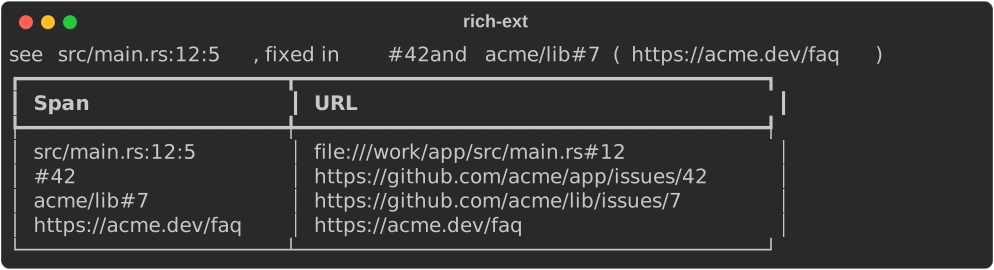
Links are style attributes, so they cost nothing where they cannot be shown: a console that is not a terminal prints the same text with no escape codes. (The screenshot cannot show links; in a terminal that supports OSC 8, the spans are clickable.)
Options
| Builder | Default | Effect |
|---|---|---|
urls(bool) |
on | Link http(s):// URLs |
paths(bool) |
on | Link paths and path:line:col |
base_dir(dir) |
none | Resolve relative paths against dir |
repository(url) |
none | Enable #123 references, linked to url/issues/123 |
editor(template) |
none | Link files through an editor URL instead of file:// |
enabled(bool), disabled() |
enabled | The plain fallback, chosen explicitly |
find(text) returns the Links (byte start, end and url) without
touching anything; link(&mut text) adds the link spans; file_url and
reference_url build single URLs.
Paths are percent-encoded in file:// URLs and in an editor template's
{path}: every byte outside RFC 3986's path characters becomes %XX, which
covers control characters, space, ", %, #, ?, <, >, ^, the
backtick, braces, |, brackets and non-ASCII (as its UTF-8 bytes). Backslashes
become / first. So /tmp/café report.rs
links to file:///tmp/caf%C3%A9%20report.rs, and a crafted file name cannot
break out of the OSC 8 escape.
Editor links
With an editor template, file links open in your editor at the right place.
{path}, {line} and {column} are replaced; a missing line or column
becomes 1.
use rich_ext::hyperlink::Hyperlinker;

let vscode = Hyperlinker::new().editor("vscode://file{path}:{line}:{column}");
let url = vscode.file_url("/work/app/src/main.rs", Some(12), Some(5));
console.print(&Text::new(format!("{url:?}")));

// A ready-made, linked `path:line:col` label in a style of your choice.
console.print(&vscode.location("src/lib.rs", Some(3), None, "magenta"));

// `disabled()` is the explicit plain fallback: same text, no links.
let mut text = Text::new("src/lib.rs:3");
Hyperlinker::disabled().link(&mut text);
assert!(text.spans().is_empty());

No slash after file
{path} is an absolute path that already starts with / (Windows paths
become /C:/…), so write vscode://file{path}:{line}:{column}.
vscode://file/{path}… produces a double slash.
location(path, line, column, style) builds a path:line:col label that is
already linked; diagnostics, the diagnostics dashboard and stack traces use it
for their locations.
Anywhere a highlighter is accepted
Hyperlinker implements Highlighter, so it can be registered on a console
or handed to the log handler:
use rich_ext::{hyperlink::Hyperlinker, RichHandler};

let handler = RichHandler::new(rich::Console::new())
    .highlighter(Some(Box::new(Hyperlinker::new())));
Sanitizing untrusted text
Core rich keeps the ESC character, as upstream does, so text that contains
escape sequences can move the cursor or clear the screen when printed. When you
display file names, log lines or other text you did not write, pass it through
sanitize_terminal_controls first:
use rich_ext::sanitize_terminal_controls;

// A file name from an untrusted source that tries to clear the screen.
let untrusted = "report\x1b[2J\x1b[H.txt\tsize\u{7}";
let safe = sanitize_terminal_controls(untrusted);
console.print(&Text::new(safe));

- ESC becomes
␛, other C0 controls become their Unicode control pictures (␇,␍), DEL becomes␡, and C1 controls become\u{009B}-style text. - Newlines and tabs are kept: they are layout, not attacks.
- It does not touch markup. For untrusted text passed to
print_str, also escape it withrich::markup::escape(see Markup and style).
Decoding input explicitly
encoding::Encoding decodes bytes strictly, in an encoding you choose. It
never guesses:
use rich_ext::encoding::{has_utf16_bom, Encoding};

let bytes = [0xff, 0xfe, b'h', 0, b'i', 0]; // UTF-16LE with a BOM
assert!(has_utf16_bom(&bytes));
let text = Encoding::Utf16.decode(&bytes).expect("valid UTF-16");
console.print(&Text::new(format!("decoded: {text:?}")));

// Nothing is guessed: headerless UTF-16 needs an explicit byte order.
let err = Encoding::Utf16.decode(b"h\0i\0").unwrap_err();
console.print(&Text::new(format!("error:   {err}")));
let le: Encoding = "utf-16le".parse().expect("a known name");
console.print(&Text::new(format!(
    "utf-16le: {:?}",
    le.decode(b"h\0i\0").unwrap()
)));

| Variant | Accepts |
|---|---|
Utf8 |
UTF-8, with or without a BOM |
Utf16 |
UTF-16 with a BOM (the BOM picks the byte order) |
Utf16Le, Utf16Be |
That byte order, with or without a matching BOM |
Malformed input, an odd byte count, an unpaired surrogate, a BOM that
contradicts the chosen byte order and UTF-32 signatures are all errors
(io::ErrorKind::InvalidData). Encoding parses from utf-8, utf-16,
utf-16le and utf-16be, which is how the rich CLI's --encoding option
uses it.
Run the example
See also
- The ext crate at a glance: every module and its feature flag.
- Diagnostics and Logging, which link their
locations with
Hyperlinker. - Markup and style for themes and highlighting in the core.
- Extending: the extension points and plugin roadmap.
- API:
ConsoleExt,ExtensionRegistry,theme,Hyperlinker,sanitize_terminal_controls,Encoding,Highlighter.