Structured data
rich_ext::data reads JSON, YAML, TOML, XML, INI and dotenv into one document
tree, then shows it as a tree, a table, a flat path = value list, search
results or a diff. It also prints any serde::Serialize value as a table or
tree with no setup.
Use it when a program has to show configuration, API responses or records to
a person: a --show-config flag, a debug dump, a report. The rich inspect
command is built on it.
Enable it
| Feature | Adds |
|---|---|
data |
The document model, every view, the serde helpers, and the JSON, INI and dotenv parsers |
yaml |
YAML parsing (anchors, aliases and positions are kept) |
toml |
TOML parsing (dates keep their text) |
xml |
XML parsing (attributes become @name keys) |
jsonpath |
The built-in JSONPath backend for selection |
yaml, toml, xml and jsonpath each turn on data. The examples on
this page come from
guide_data.rs:
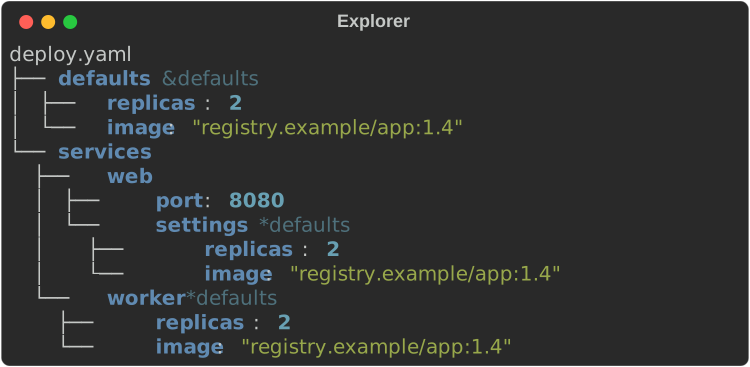
The smallest example
Parse a document and print it as a tree:
const DEPLOY_YAML: &str = "\
defaults: &defaults
  replicas: 2
  image: registry.example/app:1.4
services:
  web:
    port: 8080
    settings: *defaults
  worker: *defaults
";

fn show_explorer(console: &Console) {
    let doc = parse(Format::Yaml, DEPLOY_YAML).expect("valid YAML");
    console.print(&Explorer::new(&doc).root_label("deploy.yaml"));
}
The document model
Every parser produces the same types:
Node: aValueplusMeta.Value:Null,Bool,Int,UInt(abovei64::MAX),Float,String,DateTime(TOML dates as written),Seq(Vec<Node>)andMap(Vec<(String, Node)>). Maps keep document order.Meta: the sourcePosition(line and column), a YAMLanchororalias, an INI/dotenvcomment, and for XML what the node was (XmlKind::Element,AttributeorText).Path: a route from the root. It displays asservers[0].name(keys that are not identifiers are quoted:a["weird key"]) and parses back from the same syntax withstr::parse.Format:Json,Yaml,Toml,Xml,IniandDotenv.
Look nodes up with get(key), index(i) or at(&path); walk every node
with walk; convert with to_json().
fn parse_documents() -> Result<(Node, Node), DataError> {
    // Name the format explicitly...
    let deploy = parse(Format::Yaml, DEPLOY_YAML)?;
    // ...or let `Format::detect` guess it (a file name hint wins outright).
    let text = r#"{"name": "api", "ports": [80, 443], "tls": true}"#;
    let format = Format::detect(text, None).expect("recognisable");
    assert_eq!(format, Format::Json);
    let api = parse(format, text)?;

    // Every format produces the same `Node` tree.
    let port = api.at(&"ports[1]".parse::<Path>().unwrap()).unwrap();
    assert_eq!(port.value, Value::Int(443));
    assert_eq!(
        deploy.get("defaults").unwrap().meta.anchor.as_deref(),
        Some("defaults")
    );
    Ok((deploy, api))
}
parse(format, text) dispatches on the format. Each format also has its own
function: parse_json, parse_yaml, parse_toml, parse_xml, parse_ini
and parse_dotenv. A format whose feature is off returns an error that names
the feature; Format::is_enabled checks first.
What each format keeps
| Format | Notes |
|---|---|
| JSON | Numbers become Int, UInt or Float; -0 is the integer 0, as in Python. |
| YAML | YAML 1.2 core schema. Anchors (&name) and aliases (*name) are recorded in Meta; an alias holds a copy of its anchor's value. Merge keys (<<) stay ordinary keys and are not merged. A repeated key in one mapping is an error. Several documents parse to a sequence. Comments are dropped. |
| TOML | Tables keep document order. Dates and times stay as written (Value::DateTime). |
| XML | The document becomes {root: …}. Attributes are @name keys, repeated child elements become sequences, and mixed text goes under #text. Comments and processing instructions are dropped. Text, CDATA or a reference outside the root element is an error. |
| INI | Sections become maps. Values are always strings, and inline comments are not stripped. A comment line directly above an entry becomes its Meta::comment. A section named like a key before the first section is an error, since both would share the root map. |
| dotenv | KEY=VALUE and export KEY=VALUE. Values are strings with no variable expansion ($HOME stays $HOME). |
Deep nesting (over 512 levels in YAML or XML) is an error, and YAML alias expansion stops after one million copied nodes or 64 MiB of copied strings, so hostile input cannot exhaust memory. Only anchors that some alias uses are copied, and those copies count against the same budget.
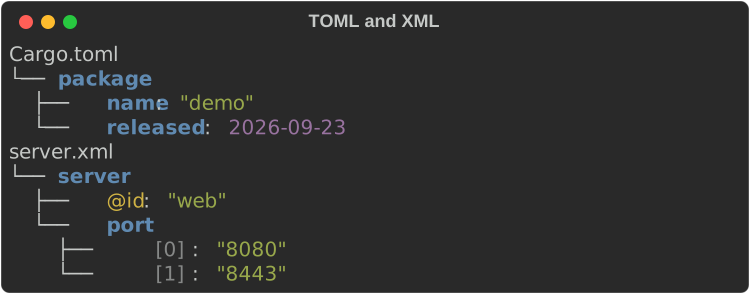
fn show_formats(console: &Console) {
    let toml = parse(
        Format::Toml,
        "[package]\nname = \"demo\"\nreleased = 2026-09-23\n",
    )
    .unwrap();
    let xml = parse(
        Format::Xml,
        r#"<server id="web"><port>8080</port><port>8443</port></server>"#,
    )
    .unwrap();
    console.print(&Explorer::new(&toml).root_label("Cargo.toml"));
    console.print(&Explorer::new(&xml).root_label("server.xml"));
}
Detecting the format
Format::detect(text, name_hint) guesses cautiously. When the file name hint
maps to an enabled format, that format wins. Otherwise the text is tried as
JSON, XML, TOML, dotenv, INI, then YAML. The more distinctive formats go first
because YAML accepts almost anything. Prose, Markdown, CSV and single lines
return None rather than a wrong guess.
Format::from_name, from_extension and from_file_name map names such as
yml, .cfg or .env.local to a format.
Parse errors
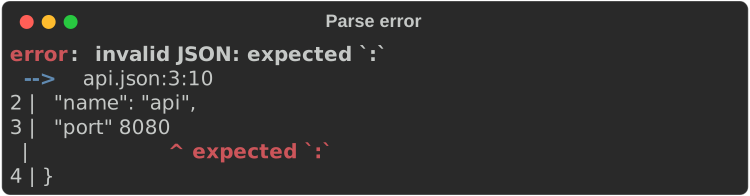
A DataError carries the format, a message and, when known, a Position.
Display gives one line; to_diagnostic(source, name) gives a
diagnostic with the offending character underlined.
Parsers often repeat the offending input, so control characters in messages
are escaped (\u001b), and in the snippet they show as one-column pictures
(␛), keeping the underline aligned:
fn show_error(console: &Console) {
    let source = "{\n  \"name\": \"api\",\n  \"port\" 8080\n}\n";
    let error = parse(Format::Json, source).unwrap_err();
    // `Display` gives one line: invalid JSON at line 3, column 10: …
    eprintln!("{error}");
    // `to_diagnostic` points at the offending character.
    console.print(&error.to_diagnostic(source, "api.json"));
}
The explorer
Explorer draws a tree with the same guides as core's Tree. Scalars use
core's JSON styles (json.key, json.str, json.number, …), so a JSON theme
applies here too. Every line is cut to the width: long strings shrink first
(keeping their quotes), then the line ends in …. Nothing wraps.
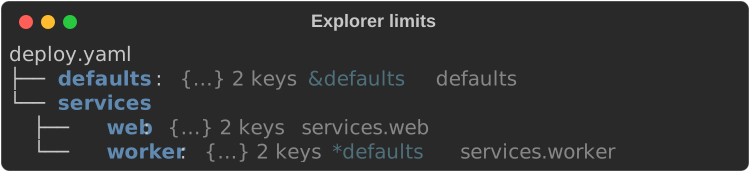
| Method | Effect |
|---|---|
max_depth(n) |
Fold containers n levels down to a summary such as {…} 3 keys |
max_length(n) |
Show at most n children per container, then … N more |
max_string(n) |
Cut strings to n characters |
fold(path) |
Fold one container |
show_paths(true) |
Append each leaf's path, dim |
show_types(true) |
Append each node's type (str, int, map, …) |
root_label(s) |
Replace the root line |
view(View::Table) |
Lay the document out as a table instead |
fn show_limits(console: &Console, deploy: &Node) {
    let explorer = Explorer::new(deploy)
        .root_label("deploy.yaml")
        .fold("defaults".parse().unwrap()) // fold one container by path
        .max_depth(2) // fold everything two levels down
        .show_paths(true);
    console.print(&explorer);
}
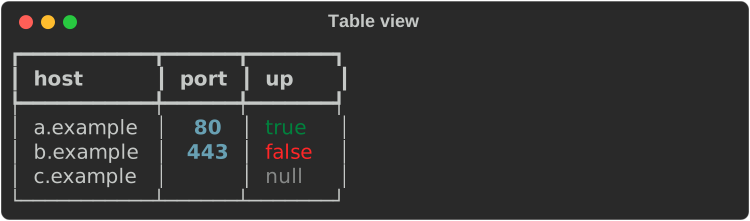
View::Table shows a sequence of maps as rows, and anything else as
path | value rows:
fn show_table_view(console: &Console) {
    let hosts = parse(
        Format::Json,
        r#"[{"host": "a.example", "port": 80, "up": true},
            {"host": "b.example", "port": 443, "up": false},
            {"host": "c.example", "up": null}]"#,
    )
    .unwrap();
    console.print(&Explorer::new(&hosts).view(View::Table));
}
Explorer::new takes either &Node or an owned Node, so a view can own a
freshly built document.
The record inspector
RecordView shows one record as a field | type | value table. Scalars
show as they are (strings unquoted, cut to max_string(n) characters, 200 by
default, with the full length beside them). A nested map or sequence shows as
an Explorer tree opened depth(n) levels (default 1; 0 folds every nested
value to its summary), with deeper containers folded and long ones cut to
max_items(n) children (default 20) and … N more.
fn show_record(console: &Console) {
    let record = parse(
        Format::Json,
        r#"{"id": 7, "name": "web", "password": "hunter2",
            "ports": [80, 443, 8080, 8443],
            "owner": {"team": "infra", "oncall": {"primary": "ana", "backup": "bo"}}}"#,
    )
    .unwrap();
    let view = RecordView::new(&record)
        .depth(1) // a nested value's own children show (the default)
        .expand("owner.oncall".parse().unwrap()) // and this branch, however deep
        .max_items(3) // then `… N more`
        .redact(&Redaction::secrets());
    console.print(&view);
}
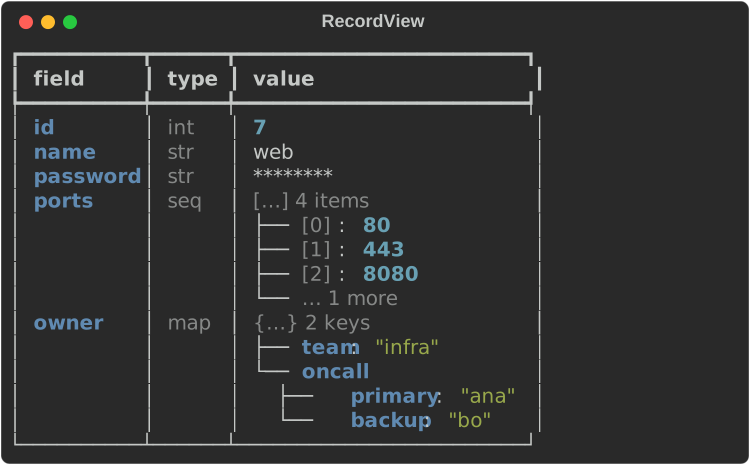
expand(path) opens one branch, and every container above it, however deep
it is; collapse(path) folds one within the depth. branch(path) returns
the tree of any branch on its own, folded the same way, for a pane that
drills in, and branches() lists the fields there are to open.
redact(&Redaction::secrets()) masks the record before anything is drawn. A
sequence's items are its fields (cut to max_items), and a scalar is a
one-row table.
Opening and folding by path is the OpenBranch trait: RecordView
implements it, and so does rich_interact's DataExplorer, so code that
tracks the branch a user opened can apply it to either.
Serde values
print_json, print_table and print_tree print any Serialize value to
standard output. print_json_to, print_table_to and print_tree_to print
to a given console. json, table and tree return the renderable instead,
and from_serialize returns the Node.
#[derive(serde::Serialize)]
struct Release {
    name: &'static str,
    version: &'static str,
    downloads: u64,
    yanked: bool,
}

fn show_serde(console: &Console) -> Result<(), DataError> {
    let releases = [
        Release {
            name: "rs-rich",
            version: "0.0.7",
            downloads: 1200,
            yanked: false,
        },
        Release {
            name: "rs-rich-ext",
            version: "0.0.9",
            downloads: 310,
            yanked: false,
        },
        Release {
            name: "rs-rich-cli",
            version: "0.0.10",
            downloads: 5400,
            yanked: true,
        },
    ];
    // `print_table(&releases)` prints to stdout; the `_to` forms take a console.
    print_table_to(console, &releases)?;
    print_tree_to(console, &releases[0])?;
    Ok(())
}
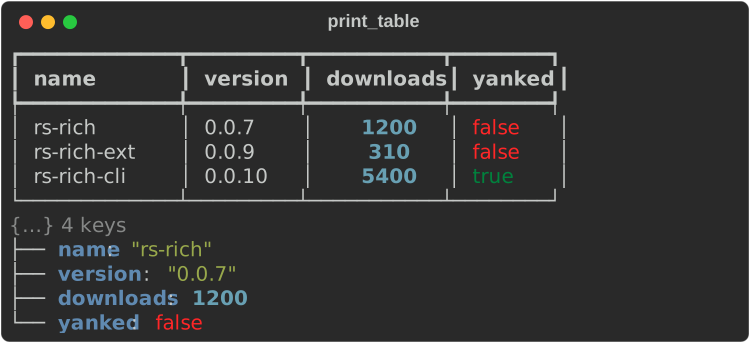
Table columns are the union of the records' keys in first-seen order. A missing field leaves its cell empty, nested values show as compact JSON, all-number columns are right-justified and nulls are dim.
Table options
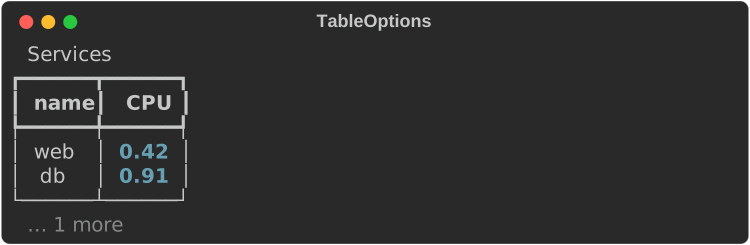
TableOptions (or the same methods on TableView) chooses and orders
columns, renames headers, sets justification, adds a title and limits rows
and string length:
fn show_table_options(console: &Console) -> Result<(), DataError> {
    let rows = rich_ext::data::from_serialize(&serde_json::json!([
        {"name": "web", "cpu": 0.42, "region": "eu-west-1", "notes": "canary"},
        {"name": "db", "cpu": 0.91, "region": "eu-west-1"},
        {"name": "cache", "cpu": 0.08, "region": "us-east-2"},
    ]))?;
    let options = TableOptions::new()
        .title("Services")
        .columns(["name", "cpu"]) // pick and order columns
        .header("cpu", "CPU")
        .justify("name", Justify::Center)
        .max_rows(2); // then "… 1 more"
    console.print(&TableView::new(&rows).options(options));
    Ok(())
}
Flatten and unflatten
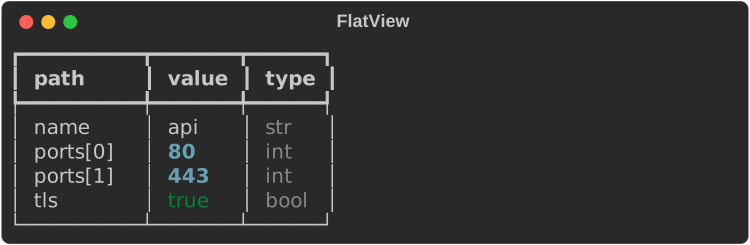
flatten lists every leaf with its path in document order. Scalars and empty
containers count as leaves. unflatten rebuilds the tree. It returns an
UnflattenError for input that cannot be one tree: no leaves, a duplicate
path, a path that is both a leaf and a container, a container with both keys
and indexes, or a sequence with a missing index. FlatView renders the
leaves as a table.
fn show_flatten(console: &Console, api: &Node) {
    console.print(&FlatView::new(api).show_types(true));

    // Leaves go back together into the same shape.
    let leaves = flatten(api);
    let rebuilt = unflatten(leaves).expect("consistent paths");
    assert_eq!(rebuilt.to_json(), api.to_json());
}
Search
A SearchQuery matches by key (substring), path (glob) or value
(substring), or by text, which matches any of them. Combine criteria with
and_key, and_path, and_value and and_text; all of them must match.
Matching is case-sensitive unless you call case_insensitive(true).
Path globs: * is one segment, [*] any index, ** any number of segments,
and * or ? inside a key are wildcards: servers[*].name, **.port,
db_*.host.
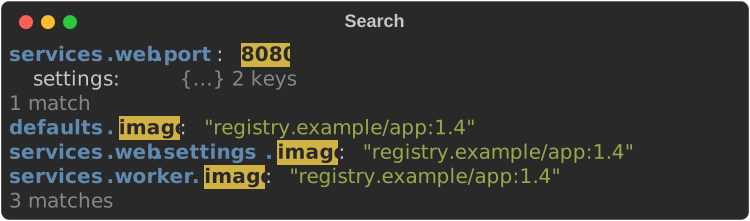
search returns the matches. SearchResults renders them with the match
highlighted, and context(n) adds up to n sibling entries around each
match:
fn show_search(console: &Console, deploy: &Node) {
    // `**` is any number of segments; `*` one segment; `[*]` any index.
    let query = SearchQuery::path("services.**").and_value("8080");
    console.print(&SearchResults::new(deploy, &query).context(1));
    console.print(&SearchResults::new(
        deploy,
        &SearchQuery::key("IMAGE").case_insensitive(true),
    ));
}
Selection (JSONPath)
Selection runs an expression language over a document. SelectorBackend
compiles an expression into a Selector, and Selectors is a registry of
backends by name, so a tool can offer --select jsonpath:… now and other
languages later. With the jsonpath feature, Selectors::default() includes
the built-in JsonPath backend.
The built-in JSONPath supports $, .key, ['key'], [n], [-n], [*],
.*, recursive descent (..key, ..*), slices ([a:b:step]), unions
([0,2]) and filters ([?(@.k > 1)] with ==, !=, <, <=, >, >=,
&&, ||, !). The leading $ is optional. A SelectError names the
column of the problem: expected `]` at column 10.
Two limits keep hostile expressions cheap: ! and parentheses nest at most
128 levels in a filter, and a selection that produces, or visits through
recursive descent, more than a million nodes stops with an error (chained
..* steps multiply).
fn show_select(api: &Node) -> Result<(), SelectError> {
    // Through the registry, as a CLI flag like `--select jsonpath:…` would...
    let selector = Selectors::default().compile("jsonpath", "$.ports[?(@ > 100)]")?;
    for (path, node) in selector.select(api)? {
        println!("{path} = {:?}", node.value);
    }
    // ...or directly.
    let tls = JsonPathSelector::parse("$.tls")?.select(api)?;
    assert_eq!(tls[0].1.value, Value::Bool(true));
    Ok(())
}
A custom backend
Implement SelectorBackend and Selector to add a language:
/// A tiny selection language: a dotted path such as `ports.0`.
struct Dotted;

struct DottedSelector(Path);

impl Selector for DottedSelector {
    fn select<'a>(&self, root: &'a Node) -> Result<Vec<(Path, &'a Node)>, SelectError> {
        Ok(root
            .at(&self.0)
            .map(|n| (self.0.clone(), n))
            .into_iter()
            .collect())
    }
}

impl SelectorBackend for Dotted {
    fn name(&self) -> &str {
        "dotted"
    }
    fn compile(&self, expr: &str) -> Result<Box<dyn Selector>, SelectError> {
        let mut path = Path::root();
        for part in expr.split('.') {
            path = match part.parse::<usize>() {
                Ok(index) => path.child_index(index),
                Err(_) => path.child_key(part),
            };
        }
        Ok(Box::new(DottedSelector(path)))
    }
}

fn custom_backend(api: &Node) -> Result<(), SelectError> {
    let mut selectors = Selectors::default();
    selectors.register(Box::new(Dotted));
    let hits = selectors.compile("dotted", "ports.0")?.select(api)?;
    assert_eq!(hits[0].0.to_string(), "ports[0]");
    Ok(())
}
register replaces any backend with the same name.
Diff
diff(old, new) compares two documents leaf by leaf, ignoring metadata. It
returns Changes (Added, Removed, Changed) with the path and the old
and new leaves, in document order. DiffView renders them with +, - and
~ markers, so they read correctly without colour:
fn show_diff(console: &Console, api: &Node) {
    let next = parse(
        Format::Json,
        r#"{"name": "api", "ports": [80, 8443], "tls": true, "hsts": true}"#,
    )
    .unwrap();
    for change in diff(api, &next) {
        eprintln!("{:?} at {}", change.kind, change.path);
    }
    console.print(&DiffView::new(api, &next));
}

For line diffs of text, source and patches, see Diffs and test reports.
Redaction and config files
Redaction masks string and number leaves whose key matches a pattern
(case-insensitive substring, or a whole-key glob when the pattern contains
* or ?; - and _ are interchangeable, so api-key matches api_key).
Everything under a matching key is masked: {"password": {"value": …}}, a
credentials: section, and XML <password type="plain">…</password>, whose
text sits under #text. Redaction::secrets() starts from SECRET_KEYS:
password, secret, token, key and similar. pattern adds a pattern and mask
changes the replacement (default ********). Structure, booleans and nulls
are left alone.
node.redacted(&redactor) returns a masked copy for any view.
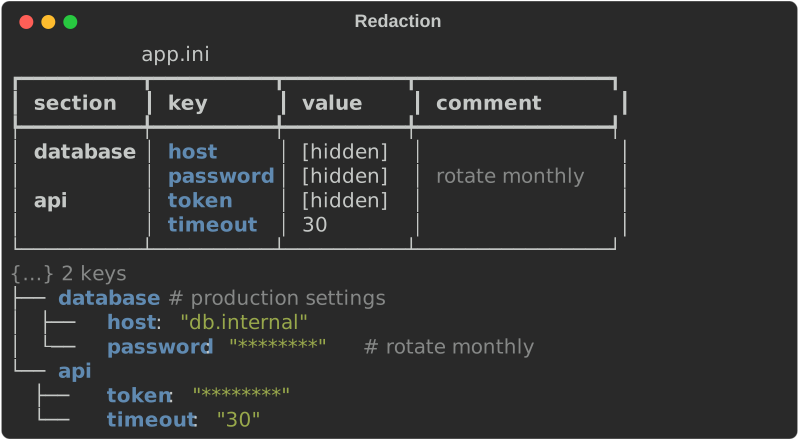
ConfigFileView shows INI and dotenv files as a section | key | value |
comment table and takes a redactor directly:
fn show_redaction(console: &Console) {
    let ini = parse_ini(
        "; production settings\n\
         [database]\n\
         host = db.internal\n\
         ; rotate monthly\n\
         password = hunter2\n\
         [api]\n\
         token = sk-live-123\n\
         timeout = 30\n",
    )
    .unwrap();
    // Masks keys containing password, secret, token, key, … (see SECRET_KEYS).
    let redaction = Redaction::secrets().pattern("host").mask("[hidden]");
    console.print(
        &ConfigFileView::new(&ini)
            .title("app.ini")
            .redactor(redaction),
    );

    // Or redact the tree itself, for any view.
    let safe = ini.redacted(&Redaction::secrets());
    console.print(&Explorer::new(&safe).max_depth(2));
}
Redactor is a trait, and closures of type Fn(&Path, &Node) -> Option<Node>
implement it, so you can redact by path or value shape as well as by key.
Gotchas
- Nothing wraps in the explorer. Lines are cut to the width. Use
max_stringorFlatViewwhen values are long. - INI and dotenv values are strings. Parse numbers and booleans yourself.
- Merge keys are not merged.
<<: *baseshows as a<<key holding a copy ofbase. - XML text is a string.
<port>8080</port>gives"8080", not a number. - JSON numbers are 64-bit. An integer beyond the
i64/u64range becomes aFloatand loses precision (Python keeps it exact).1e400and lone surrogate escapes such as"\ud800"are parse errors here, where Python reads infinity and a lone surrogate. - Terminal safety. Every view escapes control characters in keys,
values, anchor names and comments (C0, DEL and C1, so the one-character
CSI
U+009Btoo) as\u009b-style escapes. - Theme keys. This module's own style names and their defaults are listed
in
DATA_STYLES.
See also
rich_ext::dataon docs.rsExplorer,TableOptions,Redaction,Selectors- Diagnostics: what
DataError::to_diagnosticreturns - Diffs and test reports: line and patch diffs
- Using the CLI:
rich inspectand--format