Macros
rs-rich-ext has two groups of macros:
- Checked macros (feature
macros):richf!,style!,theme_key!,markup!,#[derive(Rich)]and the print macrosrich_println!,rich_eprintln!andrich_trace!. They check markup and styles at compile time, so a typo in a tag is a build error instead of silently unstyled output. - Builder macros (no feature):
rich_table!,rich_panel!,rich_tree!,rich_progress!andrich_dbg!, shorthands for common core types.
The procedural macros live in the rs-rich-macros crate. Do not depend on it
directly: rs-rich-ext re-exports them and provides the runtime they expand
to.
richf!: format! for markup
richf! takes a markup string with format!-style placeholders and returns a
rich::Text:
let name = "[red]mallory[/red]"; // user data: printed, never parsed
let count = 7;
let text = richf!("[bold]{name}[/] has {count:>3} items, {} left", 2);
console.print(&text);

// Named arguments, positions and width references, as in `format!`.
let width = 6;
console.print(&richf!("[green]{0}|{v:>width$}|{0}[/]", "x", v = 1.5));

// Keys your theme defines, declared up front so they are accepted.
console.print(&richf!(
    keys["app.title"],
    "[app.title]{}[/] {{literal braces}}",
    "Title"
));

// A placeholder inside a tag is inserted as markup (checked at run time).
let colour = "magenta";
console.print(&richf!("[{colour}]hue[/]"));

- Values are escaped. A value containing
[red]prints the brackets; it cannot inject markup, and it prints exactly as given — backslashes included. Nothing in a value can reach the template's own tags either: a value ending in\does not escape the tag after it. This is the main reason to preferrichf!overprint_str(&format!(…)). A template[that could still open a tag with a value's]("[b {}") is a compile error; write\[. - Placeholders work as in
format!: implicit captures ({name}), positions ({0}), named arguments ({v}withv = …), format specs ({count:>3},{v:>width$}) and{{/}}for literal braces. Unused arguments are an error. - A placeholder inside a tag (
[{colour}]) is inserted as markup, so the style can be chosen at run time. That tag is checked at run time only. - Tags must be balanced and properly nested, and each tag must be a style
(
bold red on blue,#ff8800), a[link=…]or[@…]tag, or a key in the default theme (repr.number,logging.level.info). - For your own theme keys, including the extended theme's
errororwarning, declare them first:richf!(keys["app.title", "error"], …).
What a mistake looks like
A misspelt style is a compile error that points at the literal. Compiling
gives:
error: unknown style or theme key `[bodl]`: it would render unstyled. Use a style such as `bold red`, a default theme key such as `repr.number`, or declare custom keys with `keys["bodl"]`
 --> src/main.rs:5:23
  |
5 |     let text = richf!("[bodl]hello[/] {name}");
  |                       ^^^^^^^^^^^^^^^^^^^^^^^
Other compile errors: a closing tag that matches no open tag
([bold]x[/italic]), a tag left open at the end, a malformed placeholder and an
unused argument.
Stricter than the runtime
The macros use the core's own markup and style parsers, so anything they accept renders the same at run time. They are deliberately stricter in two ways: an unknown style name and an unclosed tag are errors, where the runtime would render them as no-ops.
Checked literals: style!, theme_key!, markup!
let warn: rich::Style = style!("bold yellow on grey23"); // parsed at compile time
let key: &'static str = theme_key!("repr.number"); // must exist in the default theme
let banner: &'static str = markup!("[green]ok[/] [dim]all checks passed[/]");

console.print(&rich::Text::styled("careful", warn));
console.print(&rich::Text::styled("42", key));
console.print_str(banner);

| Macro | Returns | Checks |
|---|---|---|
style!("bold red on white") |
rich::Style |
parses as a style |
theme_key!("repr.number") |
&'static str |
exists in the default theme |
markup!("[green]ok[/]") |
&'static str |
valid, balanced markup with known tags; accepts keys[…] like richf! |
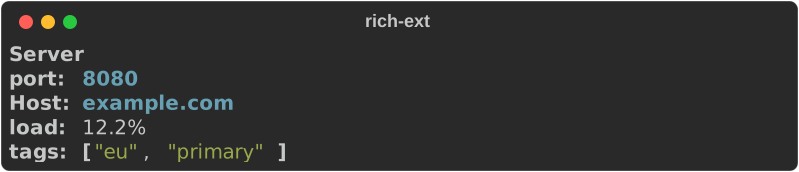
#[derive(Rich)]
Derive Rich on a struct or enum to print it as labelled fields. The derive
implements Renderable, so the value goes straight to console.print:
#[derive(Rich)]
#[rich(title = "Server")]
struct Server {
    #[rich(label = "Host", style = "bold cyan")]
    host: String,
    #[rich(order = -1)] // before the others
    port: u16,
    #[rich(skip)]
    #[allow(dead_code)]
    token: String,
    #[rich(format = "{:.1}%", justify = "right")]
    load: f64,
    tags: Vec<&'static str>, // Debug, highlighted
}
Field options, in #[rich(…)]:
| Option | Effect |
|---|---|
skip |
Leave the field out (secrets, internals) |
label = "Host" |
The label, instead of the field name |
style = "bold cyan" |
Style the value; checked at compile time |
display |
Format with Display instead of Debug. The default for String, str, char and Cow fields |
format = "{:.1}%" |
Format with this format! spec |
justify = "right" |
Alignment in table presentations: left, center or right |
order = N |
Sort key; fields default to their position, so -1 moves one first |
Debug values without a style are coloured by ReprHighlighter: numbers,
strings, booleans and collections are highlighted as in Pretty.
Panels, tables and enums
Type-level options choose the presentation:
| Option | Presentation |
|---|---|
| (none) | a bold title line, then a label/value grid |
#[rich(panel)] |
the grid inside a panel, titled |
#[rich(table)] |
a one-row table with the labels as headers |
title = "…" |
the title. Without it, a panel uses the type name and other structs have none; on an enum it replaces every variant name |
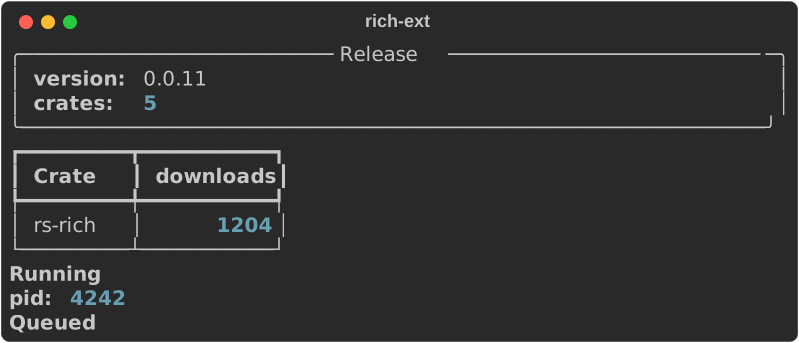
Enums use the variant name as the title and the variant's fields as rows.
#[derive(Rich)]
#[rich(panel, title = "Release")]
struct Release {
    #[rich(display)]
    version: semver_like::Version,
    crates: u32,
}

#[derive(Rich)]
#[rich(table)]
struct Download {
    #[rich(label = "Crate")]
    name: &'static str,
    #[rich(justify = "right")]
    downloads: u64,
}

#[derive(Rich)]
enum Job {
    Queued,
    Running { pid: u32 },
    Failed(#[rich(label = "code")] i32),
}
console.print(&Release {
    version: semver_like::Version(0, 0, 11),
    crates: 5,
});
console.print(&Download {
    name: "rs-rich",
    downloads: 1204,
});
console.print(&Job::Running { pid: 4242 });
console.print(&Job::Queued);
Many records as a table
rich_ext::derive::table lays out a slice of records as one table, with a
column per label:
use rich_ext::derive;

let servers = [
    server("a.example.com", 8080, 1.0),
    server("b.example.com", 8443, 99.5),
];
console.print(&derive::table(&servers));

// Enum variants with different fields leave the missing cells empty.
let jobs = [Job::Running { pid: 7 }, Job::Failed(2), Job::Queued];
console.print(&derive::table(&jobs));
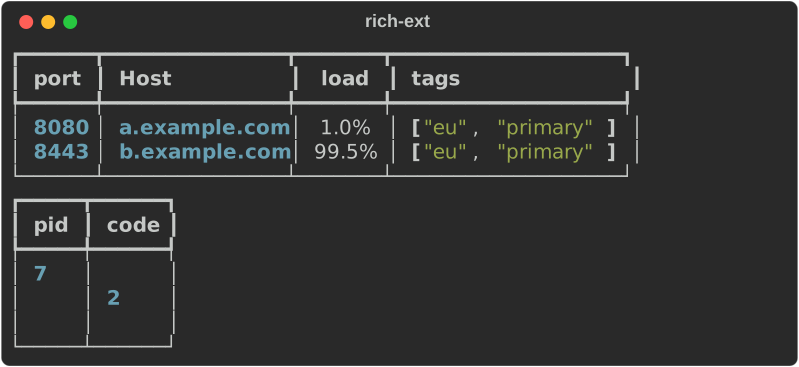
Columns are the union of all labels in first-seen order; each takes the justification of its first field.
Without the derive
The derive implements the derive::RichRecord trait: a title and a list of
derive::Fields, plus a Presentation. Implement it by hand for types you
cannot annotate, then use derive::render in your own Renderable impl or
pass the values to derive::table. derive::table works on hand-written
impls without the macros feature.
Builder macros
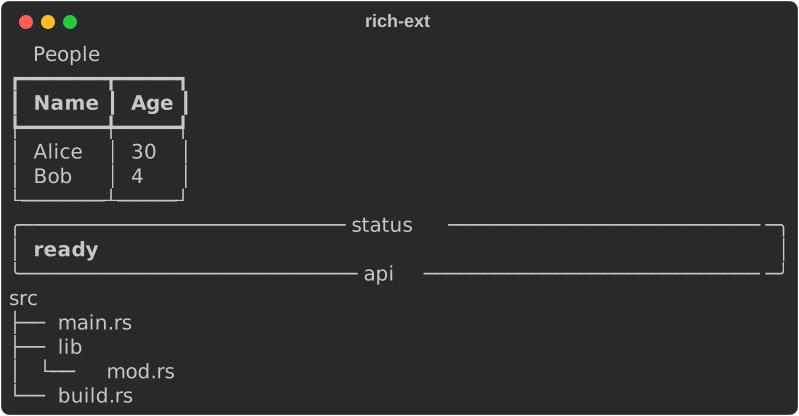
These need no feature. Each returns the ordinary core type, so you can keep configuring it:
let table = rich_table!(["Name", "Age"], ["Alice", 30], ["Bob", 4]);
let panel = rich_panel!("[bold]ready[/]", title = "status", subtitle = "api");
let tree = rich_tree!("src" => ["main.rs", "lib" => ["mod.rs"], "build.rs"]);

// They return the ordinary core types, so keep configuring them.
let table = table.title("People");
console.print(&table);
console.print(&panel);
console.print(&tree);
| Macro | Builds |
|---|---|
rich_table!([headers…], [cells…], …) |
Table; cells are anything Display |
rich_panel!("markup", title = …, subtitle = …) |
Panel around markup; any name = value calls that builder method |
rich_panel!(renderable, …) |
Panel around any renderable expression |
rich_tree!("root" => ["leaf", "branch" => ["leaf"]]) |
Tree |
rich_progress!(iter, "description") |
core track(iter, description): iterate with a progress bar |
rich_panel! with a string literal parses it as markup at run time (it is not
checked); unparseable markup falls back to the literal text.
Printing
use rich_ext::{rich_dbg, rich_eprintln, rich_println, rich_progress, rich_trace};

let retries = rich_dbg!(3 * 2); // like dbg!: prints to stderr, returns the value
rich_println!("[bold green]done[/] after {retries} retries");
rich_eprintln!("[yellow]warning:[/] {} files skipped", 2);
rich_trace!("[dim]cache[/] warmed"); // dim `file:line` prefix, to stderr

let mut total = 0;
for n in rich_progress!(0..50u64, "Summing") {
    total += n;
}
rich_println!("total = {t}", t = total);
| Macro | Writes | Feature |
|---|---|---|
rich_println!(…) |
richf!(…) to stdout |
macros |
rich_eprintln!(…) |
richf!(…) to stderr |
macros |
rich_trace!(…) |
a dim file:line then richf!(…) to stderr |
macros |
rich_dbg!(expr) |
[file:line:col] expr = value to stderr, value through Pretty; returns the value |
none |
rich_dbg! works like std::dbg!: it takes ownership and hands the value
back, accepts several expressions (returning a tuple), and prints just the
location when called with none. Its line looks like this:

The stderr macros colour their output only when stderr is a terminal.
Placeholders capture local variables as they do in format!:
rich_println!("{name}"), {name:>5} and {name:>width$} all work, as do
positional and named arguments.
rich_trace! is for quick, temporary trace lines. For real logging, route
log or tracing through RichHandler.
Run the example
See also
- Markup and style: the markup these macros check.
- Extensions: extra theme keys to declare
with
keys[…]. - Structured data:
print_tableand friends forserdetypes, when you would rather not derive. - API:
rich_extmacros,derive,rs-rich-macros.