Images
ImageArt draws a still image in the terminal. It owns the decoded picture,
picks a backend (ASCII, Braille, half blocks, quadrants or Sixel), and applies
the optional steps in between: fitting and cropping, flattening transparency,
reducing colours, dithering, tone adjustments, rotation and flips.
Use it for thumbnails, previews, a logo in a report, or the picture half of a
tool that already prints tables. It needs the image feature
(cargo add rs-rich-art --features image).
The smallest example
The examples on this page draw their own test card, so they need no image file:
/// A 96×64 test card: a diagonal gradient, a yellow disc, a red square and a
/// white bar, so every renderer has edges, flat areas and smooth ramps.
fn test_card() -> DynamicImage {
    let (w, h) = (96u32, 64u32);
    DynamicImage::ImageRgba8(RgbaImage::from_fn(w, h, |x, y| {
        let (fx, fy) = (x as f32 / (w - 1) as f32, y as f32 / (h - 1) as f32);
        let mut rgb = [
            (30.0 + 200.0 * fx) as u8,
            (40.0 + 150.0 * fy) as u8,
            (210.0 - 150.0 * fx) as u8,
        ];
        let (dx, dy) = (x as f32 - 30.0, y as f32 - 32.0);
        if dx * dx + dy * dy <= 18.0 * 18.0 {
            rgb = [250, 205, 40]; // the disc
        }
        if (60..84).contains(&x) && (14..38).contains(&y) {
            rgb = [225, 55, 85]; // the square
        }
        if (56..90).contains(&x) && (46..52).contains(&y) {
            rgb = [245, 245, 245]; // the bar
        }
        Rgba([rgb[0], rgb[1], rgb[2], 255])
    }))
}
Render it with half blocks, 48 columns wide:
let art = ImageArt::new(test_card()) // or ImageArt::from_path("photo.png")?
    .mode(ImageMode::Blocks)
    .width(48);
console.print(&art);
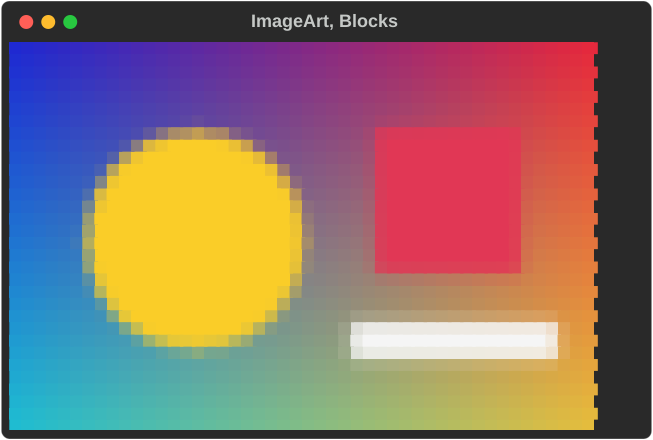
For a file, use ImageArt::from_path("photo.png")? (PNG and JPEG with the
image feature; GIF too with gif). ImageArt::from_bytes decodes from memory
and ImageArt::new takes an image::DynamicImage you already have.
Modes
.mode(ImageMode::…) pins a backend. Each one trades detail, colour and
compatibility differently:
let card = test_card();
let art = |mode| ImageArt::new(card.clone()).mode(mode).width(30);
console.print(&grid(
    vec![
        ("Ascii", art(ImageMode::Ascii)),
        ("Ascii + .color(true)", art(ImageMode::Ascii).color(true)),
        ("Blocks", art(ImageMode::Blocks)),
        ("Quadrants", art(ImageMode::Quadrants)),
        ("Braille", art(ImageMode::Braille)),
    ],
    2,
    30,
));
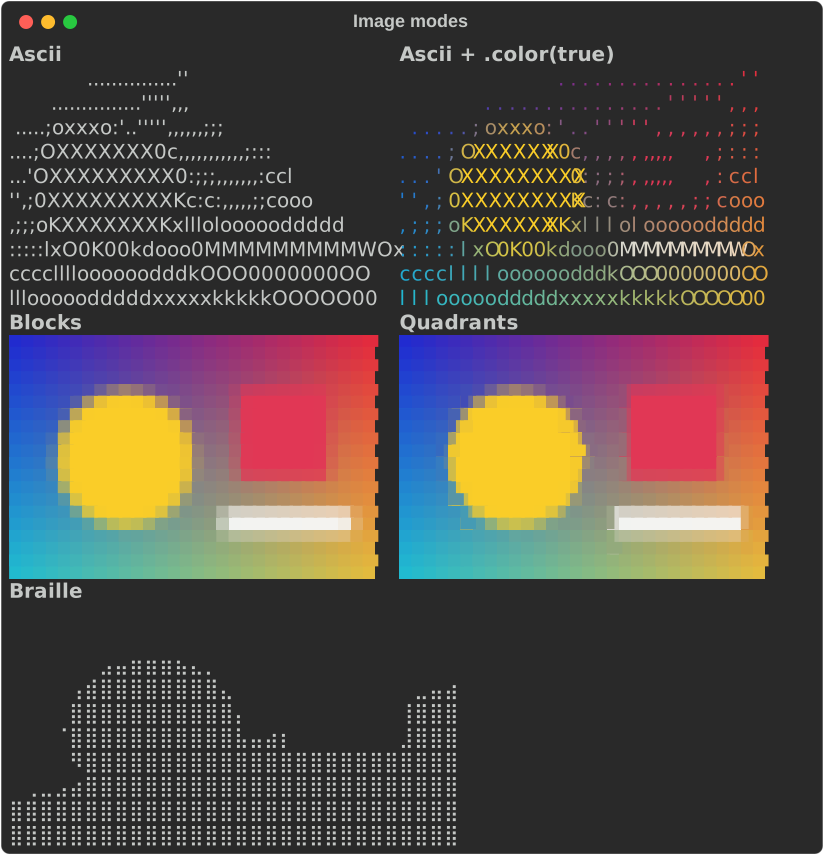
| Mode | What to notice |
|---|---|
Ascii |
One character per pixel, chosen by brightness from a density ramp (rich_art::DEFAULT_RAMP, spaces through M). Works with no colour at all. .color(true) also colours each character with its pixel. |
Blocks |
▀ with the top pixel as foreground and the bottom one as background: twice ASCII's vertical detail and every cell painted. Needs colour. |
Quadrants |
Splits each cell into 2×2 pixels. A cell still has only two colours, so it picks the split with the smallest error. Sharper edges than blocks. |
Braille |
2×4 dots per cell, each on or off by a fixed brightness threshold. Monochrome. |
Sixel |
Real pixels. See Sixel below. |
Auto |
The default. ASCII without colour, Sixel where it is compiled in and looks supported, otherwise blocks. |
Terminal cells are about twice as tall as they are wide. Every backend corrects for that, so a square image stays square.
Size
.width(columns)sets the width. Without it the image fills the console width (or the table cell, panel or column it is placed in)..height(rows)sets the height. Without.fit, the backends treat it differently: ASCII uses it as an exact row count, the others as a cap that keeps the aspect ratio..max_width(columns)and.max_height(rows)are upper bounds that never enlarge anything. They are useful when the width comes from the terminal.
The terminal's height does not cap an image: an image taller than the screen
scrolls, like any long output. Rows are capped only by .height,
.max_height, or a fixed options.height from the container rendering it (a
Layout region, for one). This is deliberate: shrinking every tall image to
the screen would change output for everyone who scrolls it or pipes it. To fit
the screen, pass its height yourself, as .max_height(rows).
Fit and crop
.fit(…) makes the image fill an exact width × height box of cells. It
needs both dimensions.
let card = test_card();
// A 20×10-cell box is taller (in pixels) than the 3:2 card, so each
// policy has to do something different to fill it.
let boxed = |fit| {
    ImageArt::new(card.clone())
        .mode(ImageMode::Blocks)
        .width(20)
        .height(10)
        .fit(fit)
        .background([40, 40, 40])
};
console.print(&grid(
    vec![
        ("Contain", boxed(ImageFit::Contain)),
        ("Cover", boxed(ImageFit::Cover)),
        (
            "Cover, TopLeft",
            boxed(ImageFit::Cover).anchor(ImageAnchor::TopLeft),
        ),
        ("Stretch", boxed(ImageFit::Stretch)),
    ],
    4,
    20,
));
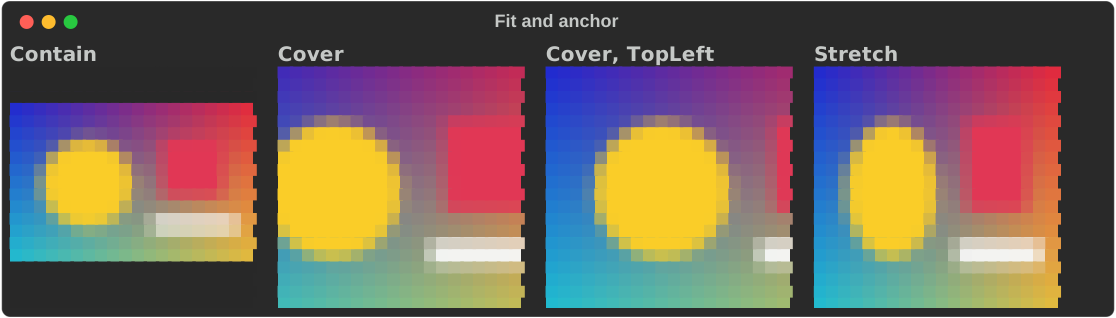
| Fit | Effect |
|---|---|
ImageFit::Contain |
The whole image, centred, with background-coloured padding. |
ImageFit::Cover |
Fills the box and crops what overflows. .anchor(…) picks what to keep. |
ImageFit::Stretch |
Fills the box exactly, ignoring the aspect ratio. |
ImageAnchor is Center (the default), Top, Bottom, Left, Right,
TopLeft, TopRight, BottomLeft or BottomRight. It only matters for
Cover.
Fitting clamps the width to the space available, and refuses boxes above 16
megapixels (including the intermediate image cover resizes to). Invalid sizes
are reported by render; console.print then draws
nothing.
Native size
.fit(ImageFit::Native) renders the image at its own size, in whole cells, and
needs no width or height. Icons, logos and pixel art come out the size they
are, where the default would enlarge them to fill the console.
// A 16×16 icon at its own size: one pixel per cell across in half-blocks,
// two in quadrants and Braille. Without `.fit(ImageFit::Native)` it would
// fill the whole width.
let art = |mode| {
    ImageArt::new(icon())
        .mode(mode)
        .fit(ImageFit::Native)
        .background_mode(rich_art::ImageBackground::TerminalDefault)
};
console.print(&grid(
    vec![
        ("Blocks: 16×8", art(ImageMode::Blocks)),
        ("Quadrants: 8×4", art(ImageMode::Quadrants)),
        ("Braille: 8×4", art(ImageMode::Braille)),
    ],
    3,
    18,
));
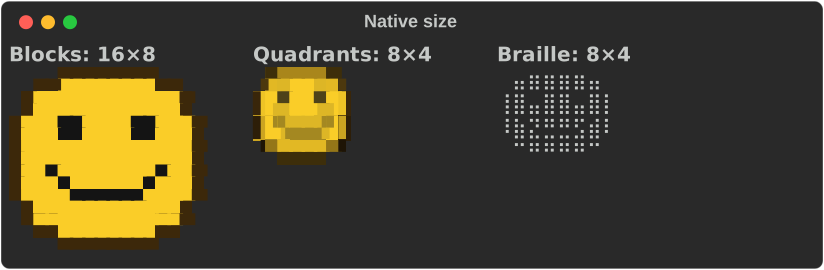
| Mode | Pixels per cell | A 16×16 image |
|---|---|---|
| Ascii, Blocks | 1 × 2 | 16 × 8 cells |
| Quadrants, Braille | 2 × 4 | 8 × 4 cells |
| Sixel | 8 × 16 (the assumed cell size) | 2 × 1 cells |
Every mode keeps the aspect ratio on a cell twice as tall as it is wide. A size
that is not a whole number of cells rounds up: each pixel lands on exactly one
sub-cell pixel, unscaled, and the rest of the last cell takes the background
(transparent with ImageBackground::TerminalDefault). A 1×1 image is one cell.
The console width, .width/.height and .max_width/.max_height only ever
shrink a native image. It then fits the capped grid as Contain does, keeping
the aspect ratio. ImageArt::native_grid(mode, available) returns the grid a
render will use.
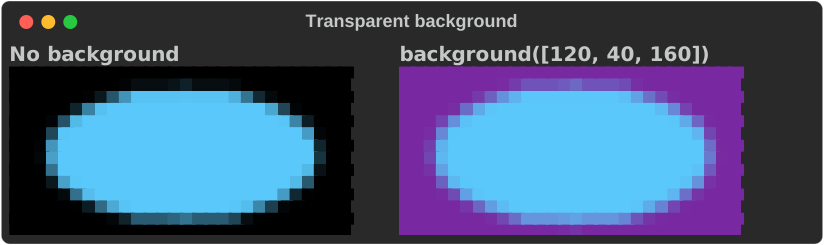
Transparency
Without a background, transparent pixels read as black (in ASCII, as the
darkest character). .background([r, g, b]) flattens transparency onto a colour
of your choice before resizing, and also colours Contain padding:
let art = || ImageArt::new(logo()).mode(ImageMode::Blocks).width(28);
console.print(&grid(
    vec![
        ("No background", art()),
        (
            "background([120, 40, 160])",
            art().background([120, 40, 160]),
        ),
    ],
    2,
    30,
));
Colour depth
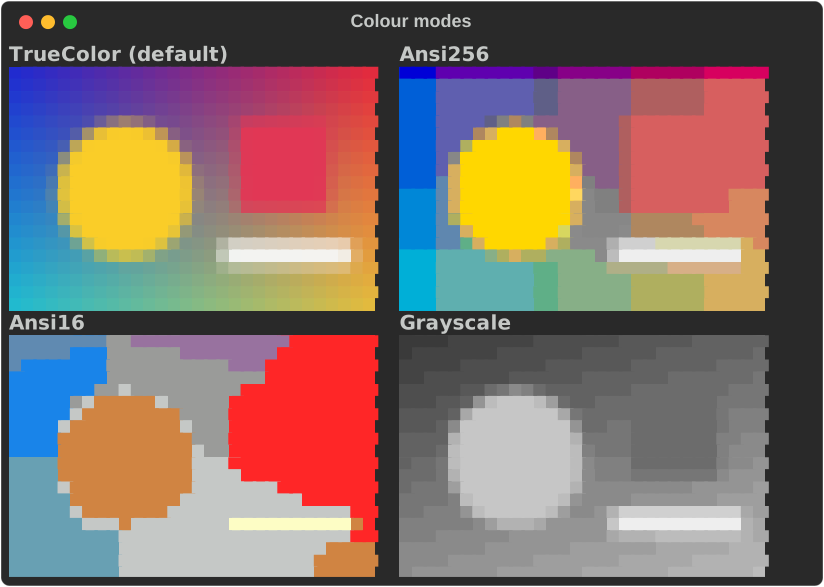
By default colours are sent as 24-bit truecolor. .color_mode(…) reduces them
to a palette, for terminals (or recordings) that cannot show truecolor:
let card = test_card();
let art = |mode| {
    ImageArt::new(card.clone())
        .mode(ImageMode::Blocks)
        .width(30)
        .color_mode(mode)
};
console.print(&grid(
    vec![
        ("TrueColor (default)", art(ImageColorMode::TrueColor)),
        ("Ansi256", art(ImageColorMode::Ansi256)),
        ("Ansi16", art(ImageColorMode::Ansi16)),
        ("Grayscale", art(ImageColorMode::Grayscale)),
    ],
    2,
    30,
));
ImageColorMode |
Palette |
|---|---|
TrueColor |
The sampled RGB, unchanged (default). |
Ansi256 |
The fixed entries 16–255. Entries 0–15 are left out because terminal themes redefine them. |
Ansi16 |
The 16 system colours. The terminal theme decides how they look, so output follows the user's theme at the cost of fidelity. |
Grayscale |
The 26 neutral entries (16, 232–255 and 231), chosen by luma. |
The nearest colour is found by squared distance in encoded RGB, with ties going to the lowest palette index. It is deterministic, not perceptual.
Dithering
Reducing colours creates flat bands. .dither(…) trades them for a pattern
that averages to the right colour from a distance:
let card = test_card();
let art = |dither| {
    ImageArt::new(card.clone())
        .mode(ImageMode::Blocks)
        .width(30)
        .color_mode(ImageColorMode::Ansi16)
        .dither(dither)
};
console.print(&grid(
    vec![
        ("Ansi16, Dither::None", art(Dither::None)),
        ("Ansi16, FloydSteinberg", art(Dither::FloydSteinberg)),
        ("Ansi16, Bayer4x4", art(Dither::Bayer4x4)),
    ],
    3,
    30,
));
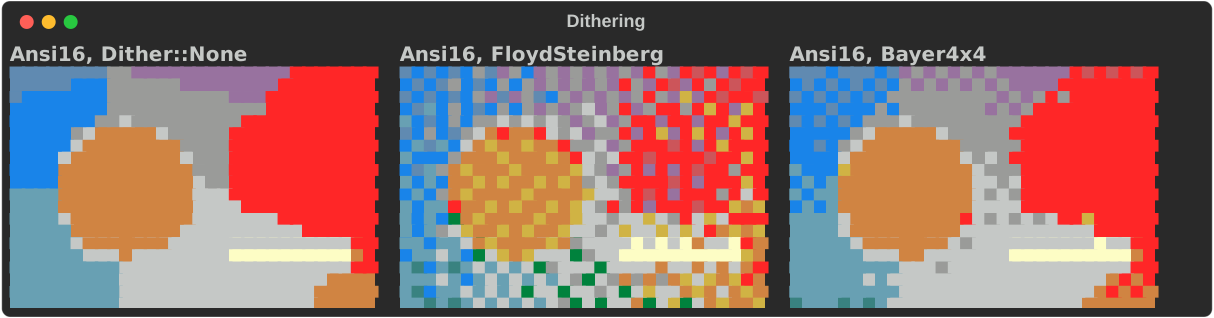
Dither::FloydSteinbergdiffuses each pixel's error to its neighbours, scanning left to right, top to bottom. Error at the edges is dropped.Dither::Bayer4x4adds a fixed 4×4 threshold pattern anchored at the top-left corner. It is stable from frame to frame.
Dithering needs a reduced palette (Ansi256, Ansi16 or Grayscale).
Palette reduction and dithering work with the Ascii, Blocks and Quadrants
backends. Braille has no colour and Sixel does its own palette, so both reject
them.
Tone adjustments
ImageTransforms carries brightness, contrast and gamma. Each defaults to
1.0, which leaves the image untouched:
let card = test_card();
let art = |transforms| {
    ImageArt::new(card.clone())
        .mode(ImageMode::Blocks)
        .width(22)
        .transforms(transforms)
};
let tone = |brightness, contrast, gamma| ImageTransforms {
    brightness,
    contrast,
    gamma,
    ..ImageTransforms::default()
};
console.print(&grid(
    vec![
        ("Unchanged", art(ImageTransforms::default())),
        ("brightness 0.6", art(tone(0.6, 1.0, 1.0))),
        ("contrast 1.8", art(tone(1.0, 1.8, 1.0))),
        ("gamma 2.2", art(tone(1.0, 1.0, 2.2))),
    ],
    4,
    22,
));
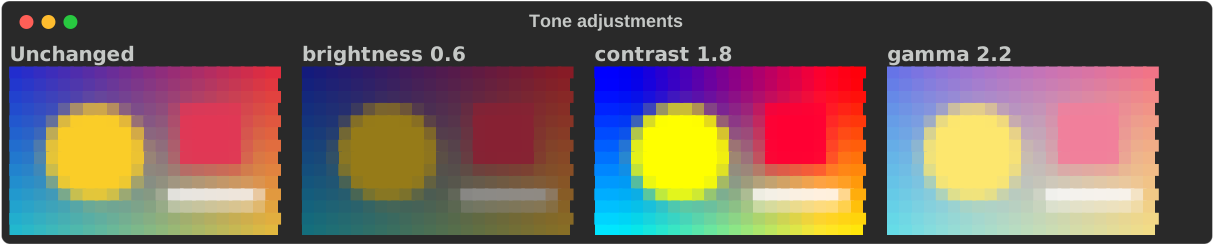
They act on each colour channel v in 0..1, clamping after each step, and
never touch alpha:
- brightness
b:v × b - contrast
c:(v − 0.5) × c + 0.5 - gamma
g:v^(1/g), so values above 1 brighten the mid-tones
Brightness and contrast must be finite and at least 0; gamma must be finite and
above 0. Anything else is ImageArtError::InvalidAdjustment.
Rotation, flips and grayscale
The same struct rotates clockwise in quarter turns, flips, and converts to grayscale:
let card = test_card();
let art = |transforms| {
    ImageArt::new(card.clone())
        .mode(ImageMode::Blocks)
        .width(22)
        .transforms(transforms)
};
console.print(&grid(
    vec![
        (
            "Clockwise90",
            art(ImageTransforms {
                rotation: Rotation::Clockwise90,
                ..ImageTransforms::default()
            }),
        ),
        (
            "flip_horizontal",
            art(ImageTransforms {
                flip_horizontal: true,
                ..ImageTransforms::default()
            }),
        ),
        (
            "flip_vertical",
            art(ImageTransforms {
                flip_vertical: true,
                ..ImageTransforms::default()
            }),
        ),
        (
            "grayscale",
            art(ImageTransforms {
                grayscale: true,
                ..ImageTransforms::default()
            }),
        ),
    ],
    4,
    22,
));
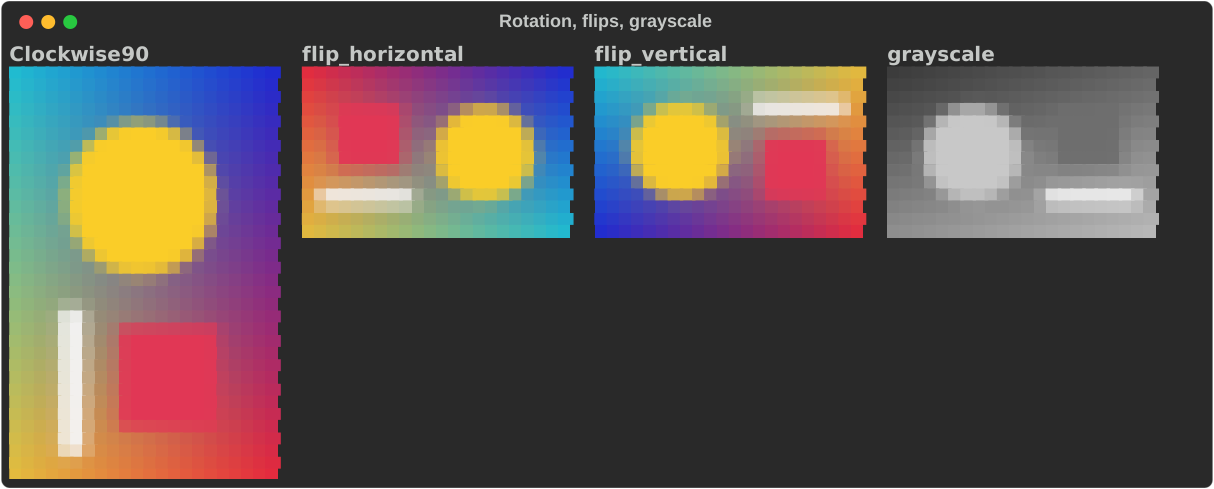
The order is fixed: rotation, horizontal flip, vertical flip, brightness, contrast, gamma, grayscale; then fitting and background, sampling, palette reduction and dithering, and finally the backend picks characters. Rotation and flips keep transparency. Grayscale composites onto the background first (and turns contain padding gray too).
These transforms apply to still images only, not to GIFs or image diffs.
Strict rendering
console.print(&art) cannot fail, so when a request is impossible — an
explicit Sixel without the feature, palette reduction with Braille, a bad
adjustment — it quietly falls back to ASCII. Call render instead when you want
to know why:
// `console.print` cannot fail, so an impossible request quietly degrades
// to ASCII. `render` is the strict entry point that says why.
let art = ImageArt::new(test_card())
    .mode(ImageMode::Braille)
    .color_mode(ImageColorMode::Ansi256); // Braille has no colour
match art.render(console, &console.options()) {
    Ok(segments) => console.print_str(&format!("{} segments", segments.len())),
    Err(ImageArtError::UnsupportedColorOptions) => {
        console.print_str("[red]rejected:[/] Braille cannot be quantized")
    }
    Err(other) => console.print_str(&format!("[red]rejected:[/] {other}")),
}
render returns the segments on success, or an ImageArtError:
| Error | Cause |
|---|---|
FeatureNotEnabled { mode, feature } |
An explicit mode this build cannot draw, e.g. Sixel without sixel. |
NonTerminalDestination |
Sixel requested for output that is not a terminal. |
SixelNotSupported |
Sixel requested on a terminal not known to support it; RICH_SIXEL=1 or RICH_GRAPHICS=sixel forces it. |
SixelEncodeFailed |
The encoder rejected this image or size. |
SixelTooLarge |
The Sixel raster would exceed 16 megapixels (8×16 pixels per cell); narrow it or cap its height. |
InvalidFitDimensions |
Fitting without a positive width and height, or above 16 megapixels. |
UnsupportedColorOptions |
Palette reduction or dithering with a backend that cannot do it, or dithering with truecolor. |
InvalidAdjustment |
Brightness, contrast or gamma out of range. |
To see what Auto would choose, ask resolve_mode with the capabilities you
care about. RenderCapabilities::from_console reads them off a console:
// What would Auto pick? Explicit modes are returned unchanged.
let auto = ImageArt::new(test_card());
for (label, caps) in [
    ("no colour", RenderCapabilities::default()),
    (
        "colour",
        RenderCapabilities {
            color: true,
            sixel_supported: false,
        },
    ),
    (
        "colour + Sixel",
        RenderCapabilities {
            color: true,
            sixel_supported: true,
        },
    ),
    ("this console", RenderCapabilities::from_console(console)),
] {
    let mode = auto.resolve_mode(caps);
    console.print_str(&format!("Auto with {label:<14} → {mode:?}"));
}
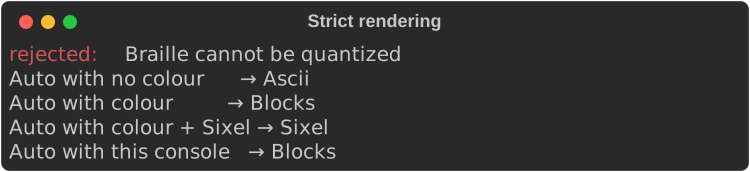
A console with an attached rich::protocol::RenderEnvironment (as the CLI
uses) is honoured by render; render_with_environment takes one explicitly.
Through an environment, Auto picks ASCII when Unicode is unavailable.
Sixel
Sixel draws real pixels, so a photo keeps its detail. It needs the sixel
feature and a terminal that understands it, such as Windows Terminal 1.22+,
WezTerm, mintty, foot or mlterm.
// Sixel is opt-in: it needs the `sixel` feature and a terminal that
// draws it. `render` reports why when either is missing.
let art = ImageArt::new(test_card()).mode(ImageMode::Sixel).width(40);
match art.render(console, &console.options()) {
    Ok(_) => console.print(&art),
    Err(ImageArtError::FeatureNotEnabled { feature, .. }) => {
        console.print_str(&format!("rebuild rs-rich-art with the {feature:?} feature"))
    }
    Err(ImageArtError::NonTerminalDestination) => {
        console.print(&art.mode(ImageMode::Blocks)) // e.g. output is redirected
    }
    Err(other) => console.print_str(&format!("no Sixel: {other}")),
}
There is no reliable way to ask a terminal whether it supports Sixel without a
round trip on a tty, so support is guessed from environment variables (TERM,
TERM_PROGRAM, WT_SESSION).
RICH_GRAPHICS=sixel forces Sixel on and RICH_GRAPHICS=none (or kitty,
iterm) rules it out; otherwise RICH_SIXEL=1 or RICH_SIXEL=0 overrides the
guess. With the feature on you can also use SixelArt directly:
use rich_art::sixel::{is_probably_supported, SixelArt};
// A guess from environment variables (RICH_GRAPHICS or RICH_SIXEL override it).
if console.is_terminal() && is_probably_supported() {
    console.print(&SixelArt::new(test_card()).width(40).max_colors(64));
}
Sixel output is terminal graphics, not text, so it cannot be exported to HTML
or SVG; exports use blocks instead. Run the example with -- --sixel in a Sixel
terminal to see it.
The individual backends
ImageArt is a front end. The backends are public too, for when you want one
and none of the preprocessing: AsciiArt (with .ramp(), .invert(),
.color(), and to_text() for a plain String), BlockArt, QuadrantArt,
BrailleArt and SixelArt. Each has new(image), width and height.
Gotchas
- Colour backends (blocks, quadrants) need colour. With
NO_COLOR, or output that is not a terminal, preferAsciiorBraille;Autodoes this for you. - The image is resampled to the cell grid, so fine text in a screenshot will not survive at 40 columns. Sixel is the only mode that keeps pixels.
.color(true)only affects ASCII; the colour backends are always in colour.