Animated GIFs
AnimatedArt plays an animated GIF in place in the terminal, honouring each
frame's own delay. Stage plays several side by side, each on its own clock.
Both need the gif feature (cargo add rs-rich-art --features gif).
Use them for a splash screen, a mascot in a demo, or to preview a GIF without
opening a viewer. For a still picture, use ImageArt instead.
The smallest example
The examples on this page encode their own six-frame GIF, so they need no file:
/// A six-frame GIF of a ball rolling across a floor, 100 ms per frame.
fn rolling_ball() -> Vec<u8> {
    let mut bytes = Vec::new();
    {
        let mut encoder = GifEncoder::new(&mut bytes);
        for step in 0..6u32 {
            let cx = 10.0 + step as f32 * 14.0;
            let image = RgbaImage::from_fn(96, 40, |x, y| {
                let (dx, dy) = (x as f32 - cx, y as f32 - 18.0);
                if dx * dx + dy * dy <= 81.0 {
                    Rgba([250, 200, 40, 255]) // the ball
                } else if y >= 30 {
                    Rgba([60, 140, 90, 255]) // the floor
                } else {
                    Rgba([20, 24, 60, 255]) // the sky
                }
            });
            let delay = Delay::from_numer_denom_ms(100, 1);
            encoder
                .encode_frame(Frame::from_parts(image, 0, 0, delay))
                .expect("encode a frame");
        }
    }
    bytes
}
Load it, look at it, and print its first frame:
let art = AnimatedArt::from_bytes(&rolling_ball()) // or AnimatedArt::from_path("spin.gif")?
    .expect("a valid GIF")
    .width(32);
console.print_str(&format!(
    "{} frames, {:?} per pass, first frame shown for {:?}",
    art.frame_count(),
    art.duration(),
    art.frame_delay(0).unwrap_or_default(),
));
// An AnimatedArt printed like any other renderable shows its first frame.
console.print(&art);
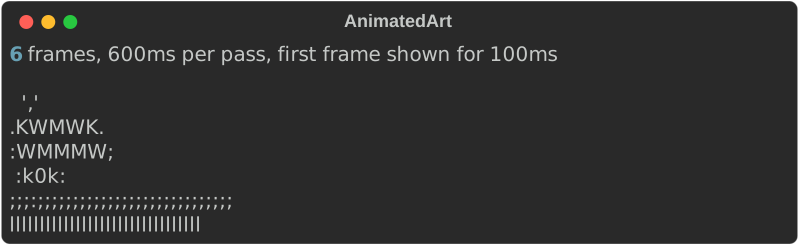
AnimatedArt::from_path("spin.gif")? reads a file instead. Decoding happens
once, up front: every frame is composited to a full canvas, so the GIF's
disposal rules (background, previous) are already applied and frames never
smear.
Playing it
let art = AnimatedArt::from_bytes(&rolling_ball())
    .expect("a valid GIF")
    .width(40)
    .color(true)
    .blocks(true)
    .max_fps(20.0) // colour frames are byte-heavy; cap the rate
    .repeat(Repeat::Times(3));
// Draws in place through rich's Live display; returns when done.
// Redirected output gets the first frame once instead.
art.play_stdout(Console::builder().build())?;
play_stdout (or play with any writer) draws each frame in place through
rich's Live display and returns when the repeats are done. It hides the
cursor while playing and restores it at the end.
- A frame with a zero delay is shown for 100 ms, as browsers do.
.max_fps(fps)holds fast frames longer. Colour frames are many bytes each; an uncapped GIF can outrun a slow terminal and tear.- When the console is not a terminal (output piped or redirected),
playwrites the first frame once and returns, even withRepeat::Forever.
Run the example with -- --play to watch it.
How frames are drawn
Frames use the same backends as still images. The three screenshots below show frames 0, 2 and 4 of the same GIF.
ASCII (default)

.ramp(…) sets the characters (darkest first) and .invert(true) swaps dark
and light, for light-on-dark terminals.
Coloured ASCII
// Colour each ASCII cell with its pixel.
let ansi = AnimatedArt::from_bytes(&rolling_ball())
    .expect("a valid GIF")
    .width(28)
    .color(true);

Half blocks
// Half-block pixels on a colour terminal; ASCII everywhere else.
let blocks = AnimatedArt::from_bytes(&rolling_ball())
    .expect("a valid GIF")
    .width(28)
    .color(true)
    .blocks(true);

.blocks(true) only takes effect together with .color(true) on a colour
terminal. Without colour, or when the output is not a terminal, frames fall
back to ASCII. In block mode .height(rows) caps the rows and keeps the aspect
ratio; the ramp and inversion settings apply to the ASCII fallback.
To render one frame yourself, use render_frame(index), which returns a
renderable honouring these settings. The older frame(index) always returns
an AsciiArt.
Repeats
Repeat |
Plays |
|---|---|
Repeat::Once |
One pass (the default). |
Repeat::Times(n) |
n passes. |
Repeat::Forever |
Until the process is interrupted. |
duration() is the length of one pass after any frame-rate cap;
frame_count() and frame_delay(index) give the rest.
Several at once: Stage
let fast = AnimatedArt::from_bytes(&rolling_ball())
    .expect("a valid GIF")
    .width(30)
    .color(true)
    .repeat(Repeat::Forever);
let slow = fast.clone().max_fps(4.0).invert(true);
Stage::new()
    .with(fast)
    .with(slow) // each animation keeps its own clock
    .gap(4)
    .until(Until::Elapsed(Duration::from_secs(3)))
    .play_stdout(Console::builder().build())?;
A Stage lays animations out left to right, gap columns apart (default 2),
and plays them together. Each keeps its own frame clock, so a 40 ms GIF and a
250 ms GIF both run at their real speed. The stage sleeps until the next frame
is due and only redraws when something changed.
.until(…) decides when it stops:
Until::AllFinished(default) — once every animation has played its repeats. One set toRepeat::Forevernever finishes.Until::Elapsed(duration)— after a fixed wall-clock time.
A finished animation holds its last frame while the others play on.
Gotchas
- Ctrl-C leaves the cursor hidden. An interrupt ends the process without
unwinding, so the cursor is not restored. If you install a signal handler,
print
rich_art::gif::show_cursor_sequence()on the way out. - Playback blocks the calling thread for the whole animation.
- GIFs cannot be exported to HTML or SVG as animations.
console.print(&art)records the first frame. - Still-image options (fit, palette reduction, tone, rotation) do not apply to GIFs.
See also
- rich-art overview
- Images
rich gifon the command line- The
gif,stageandmake_demo_gifexamples incrates/rich-art/examples/