Progress and live displays
These types show work in progress, redrawing in place instead of scrolling:
| Type | Use it for |
|---|---|
track |
a progress bar over an iterator, in one line |
Progress |
several tasks with bars, percentages, speeds and times |
Live |
redrawing any renderable in place |
Status and Spinner |
"working on it" with an animation |
ProgressBar |
a bare bar to embed in your own layout |
The screenshots on this page are single frames rendered with a fixed clock; the code runs the real animation in a terminal.
The examples use these imports:
use rich::progress::TaskUpdate;
use rich::{
    BarColumn, ColumnOptions, Console, Justify, Live, Progress, ProgressBar, ProgressColumn,
    Spinner, SpinnerColumn, Status, Text, TextColumn, TimeRemainingColumn,
};
The one-liner: track
rich::track wraps an iterator and draws a live bar on stdout while you
consume it. The total comes from the iterator's exact size, if it has one.
fn track_iterator() {
    // The one-liner: a live bar on stdout for any iterator.
    let mut total = 0;
    for n in rich::track(0..40, "Summing") {
        std::thread::sleep(Duration::from_millis(10));
        total += n;
    }
    assert_eq!(total, 780);

    // The same through a running Progress, sharing its display with other tasks.
    let live = Progress::new().start(Console::new(), std::io::stdout(), 10.0);
    for _item in live.track(vec!["a", "b", "c"], None, "Items") {
        std::thread::sleep(Duration::from_millis(50));
    }
    live.stop();
}
The display stops when the iterator is exhausted or dropped. The second half
shows LiveProgress::track, which adds a task to a display you already have
running.
Progress
A Progress
holds a list of tasks and a list of columns. It is a renderable: printing it
draws one frame. To animate it, start it as a live display.
Running it live
fn live_progress() {
    let progress = Progress::new().transient(false).expand(false);
    // `start` moves the progress onto a refresh thread: 10 redraws a second.
    let live = progress.start(Console::new(), std::io::stdout(), 10.0);

    let task = live.add_task("Working", 50.0, 0.0);
    for _ in 0..50 {
        std::thread::sleep(Duration::from_millis(20));
        live.advance(task, 1.0);
    }
    // Draw the final frame, join the thread, get the Progress back.
    let (progress, _stdout) = live.stop();
    assert!(progress.finished());
}
start(console, writer, refresh_per_second)moves the progress to a background thread that redraws it on a timer, and returns aLiveProgresshandle.writeris usuallystd::io::stdout(); anyWrite + Sendworks.- Through the handle:
add_task,advance,update,reset,refresh,track,wrap_read(count bytes as they are read),open(a file, sized from its metadata) andwith(|progress| …)for anything else. stop()draws the final frame, joins the thread and gives back theProgressand the writer. Dropping the handle stops it too..transient(true)erases the display when it stops;.disable(true)shows nothing while tasks still update.
Tasks
fn default_columns(console: &Console) {
    let (now, clock) = fixed_clock();
    // Description, bar, percentage and time remaining — upstream's defaults.
    let mut progress = Progress::new().clock(clock);

    let download = progress.add_task("Downloading", 100.0, 0.0);
    let extract = progress.add_task("Extracting", 100.0, 0.0);
    let verify = progress.add_task("Verifying", None, 0.0); // indeterminate

    *now.lock().unwrap() = 5.0;
    progress.advance(download, 30.0);
    *now.lock().unwrap() = 10.0;
    progress.advance(download, 34.0);
    progress.update(extract, TaskUpdate::default().completed(100.0));
    progress.advance(verify, 1.0);

    console.print(&progress);
}

| Method | Does |
|---|---|
add_task(description, total, completed) |
a started task; returns its TaskId. total is f64 or None (indeterminate: the bar pulses) |
add_unstarted_task(…) |
a task whose clock has not started (start_task starts it) |
add_task_with(…, start, fields) |
with custom fields for format strings |
advance(id, amount) |
add to completed and record a speed sample |
update(id, TaskUpdate) |
change total, completed, advance, description, visible, fields |
reset(id, start, total, completed) |
start over |
start_task, stop_task, remove_task |
lifecycle |
task(id), tasks(), finished() |
read back: each Task has percentage(), speed(), elapsed(), time_remaining()… |
TaskUpdate::default().completed(100.0).description("done") builds an
update; .refresh(true) makes a running display redraw immediately.
Columns
Progress::new() uses upstream's default columns. Replace them with
.columns(vec![…]):
fn all_columns(console: &Console) {
    let (now, clock) = fixed_clock();
    let mut progress = Progress::new().clock(clock).columns(vec![
        ProgressColumn::spinner(),
        ProgressColumn::Description,
        ProgressColumn::Bar,
        ProgressColumn::Download,
        ProgressColumn::TransferSpeed,
        ProgressColumn::TimeElapsed,
        ProgressColumn::time_remaining(),
    ]);
    let iso = progress.add_task("ubuntu.iso", 4_700_000_000.0, 0.0);
    let deb = progress.add_task("rich.deb", 18_000_000.0, 0.0);

    *now.lock().unwrap() = 4.0;
    progress.advance(iso, 400_000_000.0);
    progress.advance(deb, 18_000_000.0);
    *now.lock().unwrap() = 8.0;
    progress.advance(iso, 500_000_000.0);

    console.print(&progress);
}

ProgressColumn |
Shows |
|---|---|
Description |
the task description (markup) |
Bar, BarWith(BarColumn) |
the bar; BarColumn sets width and styles |
Percentage |
64% |
MofN |
9/40 |
TaskProgress { show_speed } |
percentage, or speed for indeterminate tasks |
Download, BinaryDownload |
0.9/4.7 GB (decimal or binary units) |
TransferSpeed |
125.0 MB/s |
FileSize, TotalFileSize |
completed or total as a size |
TimeElapsed |
0:00:08 |
TimeRemaining(..), time_remaining() |
estimated time left; TimeRemainingColumn::new(compact, elapsed_when_finished) |
Spinner(..), spinner() |
a spinner, replaced by finished_text when the task completes |
Text(String, Style) |
fixed text |
TextFormat(TextColumn) |
a format string over the task |
Renderable(Arc<…>) |
any renderable, the same on every row |
WithTableColumn(..) / .with_table_column(ColumnOptions) |
set the grid column's width, ratio or justify |
Format strings and custom fields
TextColumn expands a Python-style format string against the task, as
upstream does: {task.description}, {task.completed},
{task.percentage:>3.0f}, {task.fields[name]}. The result is markup unless
you call .markup(false).
fn custom_columns(console: &Console) {
    let (now, clock) = fixed_clock();
    let mut progress = Progress::new().clock(clock).columns(vec![
        // Format strings see the task, like upstream's "{task.description}".
        ProgressColumn::TextFormat(TextColumn::new("[bold blue]{task.fields[stage]}")),
        ProgressColumn::Description,
        ProgressColumn::BarWith(
            BarColumn::new()
                .bar_width(Some(20))
                .complete_style("magenta")
                .finished_style("bold green"),
        ),
        ProgressColumn::MofN,
        ProgressColumn::TextFormat(
            TextColumn::new("{task.percentage:>3.0f}%").justify(Justify::Right),
        ),
        ProgressColumn::TimeRemaining(TimeRemainingColumn::new(true, true)),
        ProgressColumn::Spinner(SpinnerColumn::new("line", "✓")).with_table_column(ColumnOptions {
            width: Some(2),
            ..ColumnOptions::default()
        }),
    ]);

    let fields = |stage: &str| [("stage", stage.to_string())];
    let build = progress.add_task_with("compile", 120.0, 0.0, true, fields("1/2"));
    let test = progress.add_task_with("test", 40.0, 0.0, true, fields("2/2"));

    *now.lock().unwrap() = 30.0;
    progress.advance(build, 120.0);
    progress.update(test, TaskUpdate::default().advance(9.0));

    console.print(&progress);
}

Deterministic time
Time-based columns (speed, elapsed, remaining, spinners) read the progress
clock. Replace it with .clock(f) — a function returning seconds — to get the
same frame every run, which is how the screenshots here are made and how you
should test progress output:
/// A clock you control. Time-based columns read it, so frames are reproducible.
fn fixed_clock() -> (Arc<Mutex<f64>>, impl Fn() -> f64 + Send + Sync + 'static) {
    let now = Arc::new(Mutex::new(0.0_f64));
    let reader = now.clone();
    (now, move || *reader.lock().unwrap())
}
Live
Live redraws a
renderable in place: each update moves the cursor back over the previous frame
and draws the new one. It has two modes.
Manual: you call update (or refresh) and each call redraws.
fn live_display() {
    // Live redraws a renderable in place. Manual mode: you call update/refresh.
    let spinner = Spinner::new("dots").text("counting…");
    let mut live = Live::new(Box::new(Text::new("")), Console::new(), std::io::stdout());
    live.start();
    let started = Instant::now();
    for n in 0..20 {
        let frame = spinner.render(started.elapsed().as_secs_f64());
        live.update(Box::new(frame.append_text(&Text::new(format!(" {n}")))));
        std::thread::sleep(Duration::from_millis(50));
    }
    live.stop(); // leaves the last frame on screen
}
Auto-refresh: Live::spawn runs the display on a background thread that
redraws on a timer; update sends it a new renderable. The renderable, the
console and the writer move to the thread, so they must be Send.
fn auto_live() {
    // Auto-refresh mode: a background thread redraws; you send new renderables.
    let live = Live::spawn(
        Box::new(Text::new("starting")),
        Console::new(),
        std::io::stdout(),
        20.0,
    );
    let status = Status::new("Downloading…");
    let started = Instant::now();
    while started.elapsed() < Duration::from_millis(800) {
        // Spinners animate by rendering at the current time.
        let frame = status.renderable().render(started.elapsed().as_secs_f64());
        live.update(Box::new(frame));
        std::thread::sleep(Duration::from_millis(50));
    }
    live.update(Box::new(Text::styled("✓ downloaded", "green")));
    let _stdout = live.stop();
}
Live::new(renderable, console, writer);.transient(true)erases the display onstop.start()hides the cursor and draws the first frame;stop()draws the last frame and restores the cursor.- For an auto-refreshing display,
Live::spawn_with(…, transient)andAutoLive'supdate,refresh,refresh_waitandstop.
One live display at a time
A live display owns the cursor. Anything else printed to the same terminal while it runs — including from another thread — lands in the middle of its redraws.
When stdout is not a terminal
Live draws nothing while running, and stop writes the final frame once,
without a trailing newline (upstream's behaviour for files). Print a
newline after stop if more output follows. LiveProgress::stop does this
for you.
Status and spinners
A Spinner
is an animation of frames; render(seconds) returns the frame for that
moment as a Text. The first call fixes the start of the animation, so keep
one spinner for the whole animation.
fn spinners(console: &Console) {
    for name in [
        "dots",
        "line",
        "arc",
        "bouncingBar",
        "moon",
        "earth",
        "clock",
    ] {
        let spinner = Spinner::new(name).style("green");
        spinner.render(0.0); // the first render starts the animation clock
                             // Six frames, 0.1 s apart, then the name.
        let mut row = Text::new("");
        for step in 0..6 {
            row = row.append_text(&spinner.render(step as f64 * 0.1));
            row.append("  ", None);
        }
        row.append(name, Some("dim".into()));
        console.print(&row);
    }
}
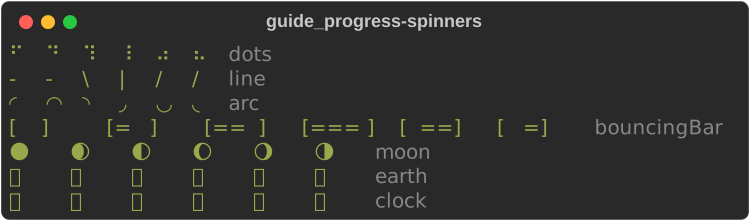
Spinner::new(name) accepts every upstream spinner name (dots, dots2 …
dots12, line, arc, bouncingBar, bouncingBall, moon, earth,
clock, material, aesthetic and more); an unknown name falls back to
dots. .text(markup) adds text after the frame, .style(s) styles the
frame, .speed(x) scales the rate.
A Status is
a spinner plus a message, styled status.spinner:
fn status(console: &Console) {
    let mut status = Status::new("Fetching [bold]index[/]…").spinner("dots");
    console.print(&status.renderable().render(0.0));

    // Change the message, the spinner, its style or speed.
    status.update(
        Some("Unpacking…"),
        Some("line"),
        Some("yellow".into()),
        None,
    );
    console.print(&status.renderable().render(0.0));
}

A status in a Live animates on its own. The auto-refresh example above
renders status.renderable().render(elapsed) instead, to choose each frame.
Spinners read the console clock
As upstream's does, a Spinner or Status renders the frame for
console.get_time(), so one placed directly in a Live animates on
every refresh. For reproducible output, such as tests or screenshots, pin
the clock with ConsoleBuilder::get_time, or render a given moment with
render(elapsed_seconds) as the examples on this page do.
ProgressBar
ProgressBar
is the bar on its own — for a table cell, a panel, or your own renderable.
fn bars(console: &Console) {
    // The bar on its own, as a renderable.
    console.print(&ProgressBar::new(100.0, 25.0).width(40));
    console.print(
        &ProgressBar::new(100.0, 70.0)
            .width(40)
            .complete_style("yellow"),
    );
    console.print(&ProgressBar::new(100.0, 100.0).width(40));
    // No total: a pulsing bar. `animation_time` picks the frame.
    console.print(&ProgressBar::indeterminate().width(40).animation_time(0.4));
}

ProgressBar::new(total, completed), .width(n) (default: the full width),
.style, .complete_style, .finished_style, .pulse_style, .pulse(true)
and ProgressBar::indeterminate(); .animation_time(t) picks the pulse frame.
Not yet ported
Console.status()/with console.status(...): create aStatusand drive it withLiveas shown above.Live:screen=True(alternate screen),redirect_stdout/redirect_stderr,vertical_overflow, andget_renderablecallbacks.Progress:console.printthrough the display (progress.console), andredirect_stdout.
See also
- Layout — build a dashboard to redraw with
Live - Tutorial: progress and live output
- API:
progress·track·Live·Status·Spinner·ProgressBar